Windows goes mute after 5 minutes and comes back after reboot

7932

New member
Local time
9:22 PM
Messages
17
Its been happening for about last two weeks on my wife's Acer Aspire 5551 Windows 7 Home Edition x 64. Windows goes mute after about 5 minutes, when I did sound test I can see bars were moving but no sound coming from speakers. Sound comes back after reboot but goes off after about 5 minutes. So far I have tried : new Realtek drivers, system restore, usb sound card, external speakers, using headphones in hope that maybe that solves that but nothing seem to be working

Any ideas ? I would very grateful as I got no clue what else can be a cause of that
 

My Computer My Computer

At a glance

Windows 7 Ultimate x64bit.650W11GBGTX1050
Computer type
PC/Desktop
OS
Windows 7 Ultimate x64bit.
CPU
650W
Motherboard
Asus PT6 Deluxe
Memory
11GB
Graphics Card(s)
GTX1050
When it happens, check the Sound Playback panel. The Speakers should be set as default playback device. If something else is getting set as the playback device that could be the problem.
 

My Computer My Computer

At a glance

Windows 10 64 bitIntel i7 6700K16GB Corsair DominatorIntel CPU Graphics
Computer type
PC/Desktop
Computer Manufacturer/Model Number
My Own Build
OS
Windows 10 64 bit
CPU
Intel i7 6700K
Motherboard
ASUS ROG Maximus VIII Hero
Memory
16GB Corsair Dominator
Graphics Card(s)
Intel CPU Graphics
Sound Card
RealTek
Monitor(s) Displays
27" Dell S2719dgf
Screen Resolution
2560X1440
Hard Drives
1 TB Samsung 850 EVO SSD for Win 10 Pro
500GB Samsung 850 EVO SSD for Win 10 Insider
2 TB drive for backup
PSU
EVGA Supernova 750G2
Case
BeQuiet Silent Base 600
Cooling
Deepcool Captain 120EX
Keyboard
Microsoft Wireless 2000
Mouse
Microsoft wireless
Internet Speed
100 MB/sec (Cable)
Antivirus
Microsoft Defender and Malwarebytes
Browser
Edge/Firefox
Other Info
Cakewalk (Sonar) by BandLab and Studio One 4.1 Pro recording studio software. MOTU 896Mk3 Hybrid recording interface, Frontier Tranzport wireless control unit, Behringer X-Touch Control Surface.
Five USB connected optical drives for CD Audio production using Nero BurningROM
Thank you, I have checked that last night and everything seem to be normal yet there is no sound. And the same again after reboot, sound came back for about 5 minutes and was gone again.
 

My Computer My Computer

At a glance

Windows 7 Ultimate x64bit.650W11GBGTX1050
Computer type
PC/Desktop
OS
Windows 7 Ultimate x64bit.
CPU
650W
Motherboard
Asus PT6 Deluxe
Memory
11GB
Graphics Card(s)
GTX1050
Its been happening for about last two weeks on my wife's Acer Aspire 5551 Windows 7 Home Edition x 64. Windows goes mute after about 5 minutes, when I did sound test I can see bars were moving but no sound coming from speakers. Sound comes back after reboot but goes off after about 5 minutes. So far I have tried : new Realtek drivers, system restore, usb sound card, external speakers, using headphones in hope that maybe that solves that but nothing seem to be working

Any ideas ? I would very grateful as I got no clue what else can be a cause of that

Since you tried a USB sound card, that pretty much narrows the problem down to software.

Maybe some communication app is messing up and telling the OS that there is an incoming call when there is not one. Check this setting:
s.PNG

If the sound still mutes when that setting is set to "Do nothing", then:
...reboot the laptop
...start playing some music
...start Process Monitor* and let it collect data
...stop the data collection as soon as the sound mutes.

Work your way up from the bottom of Process Monitor's data - looking for a reason for the sound to mute. I have no idea what to look for. Hopefully, something will jump out at you. You might try searching for words like level, mute, sound, volume...

* See this post http://www.sevenforums.com/general-discussion/252949-missing-start-menu-icons-2.html#post2105453 on info about using Process Monitor. In your case, you will not want to filter out anything - just yet.
 

My Computer My Computer

At a glance

W7 Pro SP1 64biti78GBIntel HD Graphics
Computer type
Laptop
Computer Manufacturer/Model Number
Employer provided Dell Latitude
OS
W7 Pro SP1 64bit
CPU
i7
Memory
8GB
Graphics Card(s)
Intel HD Graphics
Hard Drives
crappy SSD
Antivirus
Employer mandated Symantec Endpoint Protection
Browser
Pale Moon 64bit, IE11 64bit & Chrome 64bit
Thank you - have tried and there is nothing in Process Monitor that would give me a clue why Windows go mute.
 

My Computer My Computer

At a glance

Windows 7 Ultimate x64bit.650W11GBGTX1050
Computer type
PC/Desktop
OS
Windows 7 Ultimate x64bit.
CPU
650W
Motherboard
Asus PT6 Deluxe
Memory
11GB
Graphics Card(s)
GTX1050
...when I did sound test I can see bars were moving but no sound coming from speakers.
~~~
Are you looking at the Volume Mixer applet when you see these bars? If so, does the speaker under master (left most?) slider get the normal red symbol on it - as if you manually muted everything?

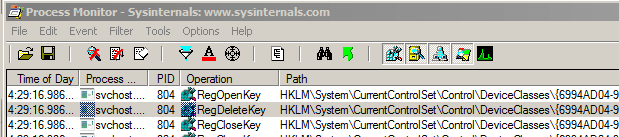
When I manually mute sounds by clicking on the speaker under the master slider, lots of things change in the registry. There should be one or more RegDeleteKey operations:
mute.PNG

Maybe (if we are lucky) the issue you are having will mimic the user manually muting all sounds.

You can...
...start gathering data via Process Monitor
...manually mute all sounds via the Volume mixer
...find the RegDeleteKey operation(s).
Then you will know what they look like for your hardware.

Next...
...reboot the laptop
...start gathering data via Process Monitor

Once the sound mutes on its own, search for any RegDeleteKey operation(s) that look similar to the one that you saw when you manually muted all sounds. Then look at the Process Monitor entries just above the first/similar RegDeleteKey operation for some operation that might have caused the muting.

Also, take note of the precise time stamp in the left most column of Process Monitor for that first/similar RegDeleteKey operation. Then look thru each Windows Event Logs to see if anything happened around that time. If you need help finding/opening the Windows Event logs, see this old post of mine.
 

My Computer My Computer

At a glance

W7 Pro SP1 64biti78GBIntel HD Graphics
Computer type
Laptop
Computer Manufacturer/Model Number
Employer provided Dell Latitude
OS
W7 Pro SP1 64bit
CPU
i7
Memory
8GB
Graphics Card(s)
Intel HD Graphics
Hard Drives
crappy SSD
Antivirus
Employer mandated Symantec Endpoint Protection
Browser
Pale Moon 64bit, IE11 64bit & Chrome 64bit
Back
Top