STILL confused about "Upgrade" installation process.

MS contact info

I started my call with product sales and licensing, and selected the business option.

Telephone

Microsoft Product Pre-sales & Information
Hours: 6:00 A.M. - 6:00 P.M. Pacific Time, Monday through Friday
1-800-Microsoft (642-7676)

Help and Support

If you hit a brick wall with whichever rep you speak to, PM me for the name of the specific rep I dealt with. I'd rather not post his direct contact info for his privacy.

I'm assuming all the Reps will be helpful, so I don't want to flood only my Rep with requests.

You can also try: 1-877-MY-MS-STORE (877-696-7786)

That is the contact number I was given last for finalizing my issue once the products arrive.

Additional Contacts:
[FONT=&quot]MSI Presales and Licensing team at 1-800-426-9400

(My Rep suggested calling this number first.)
[/FONT]
 
Last edited:

My Computer My Computer

At a glance

Windows 98SE, Windows XP Home & Pro; OpenSuse...
OS
Windows 98SE, Windows XP Home & Pro; OpenSuse 10.3/11, Windows 7 RC and verious linuxes in VBox
Thanks timsart, very useful. Saved me to wade thru the whole chain of command again.
 

My Computer My Computer

At a glance

Vista, Windows7, Mint Mate, Zorin, Windows 8from 1.6GHz Duo to i7
Computer Manufacturer/Model Number
HP, Dell, Gateway, Toshiba - 4 laptops and 2 desktops
OS
Vista, Windows7, Mint Mate, Zorin, Windows 8
CPU
from 1.6GHz Duo to i7
Monitor(s) Displays
2x HP w2207
Hard Drives
5x HDD, 7x SSD, 12x Externals
Keyboard
with trackball - no mices
Mouse
Trackball mice
Internet Speed
DSL 6000
Hello everyone. I purchased one of the $49 W7 Home Premium upgrades when they were available. However, It's still unclear to me whether or not I will be able to install this thing without a pre-existing OS installation on my hard drive. Can anyone give me a definitive yes or no? Thanks.

Definitive answer is no, you do not have to have Windows installed to install the upgrade version.

Cite your source Mac... :p
 

My Computer My Computer

At a glance

64-bit Windows 8.1 ProCore(TM) i5 CPU 4330 Haswell @ 3.20GHz12.00 GBIntel(R) HD Graphics
Computer type
PC/Desktop
Computer Manufacturer/Model Number
LENOVO K450 @3.0GHZ
OS
64-bit Windows 8.1 Pro
CPU
Core(TM) i5 CPU 4330 Haswell @ 3.20GHz
Motherboard
LENOVO
Memory
12.00 GB
Graphics Card(s)
Intel(R) HD Graphics
Sound Card
Intel HD integtrated
Monitor(s) Displays
HP 25' ISP Monitor
Screen Resolution
1900/1020
Hard Drives
(1) ST1000DM003-1CH162 (2) Generic STORAGE DEVICE USB Device (3) Generic STORAGE DEVICE USB Device
Internet Speed
100mb down/10mb up
timsart, thank you for the info about the Win 2000 upgrade. I called the Microsoft store and pleaded my case and was told that I will have an answer within 72 hours.

Update: The Microsoft store has ruled in my favor and will send me the full version of windows 7 home premium instead of the upgrade version. This would not have happened if it weren`t for seven forums and the helpful members. Thanks again timsart.
 
Last edited:

My Computer My Computer

At a glance

Windows 7 Ultimate x64Intel I7 980x @ 3.47 GHz6 GB (3 x 2GB) 1333 MHz2 EVGA GTX 480's in SLI
Computer Manufacturer/Model Number
DELL/Alienware Area-51
OS
Windows 7 Ultimate x64
CPU
Intel I7 980x @ 3.47 GHz
Motherboard
X58
Memory
6 GB (3 x 2GB) 1333 MHz
Graphics Card(s)
2 EVGA GTX 480's in SLI
Sound Card
Creative X-Fi Titanium
Monitor(s) Displays
DELL Ultra Sharp 2709W
Screen Resolution
1920 x 1200
Hard Drives
OS = 750 GB Seagate
Data = 750 GB Seagate
Music = 1 TB WD Black
PSU
1.2 KW
Case
DELL Alienware Area-51
Cooling
Liquid for CPU
Keyboard
Alienware TactX
Mouse
Alienware TactX
Internet Speed
Cable 5-9 MB
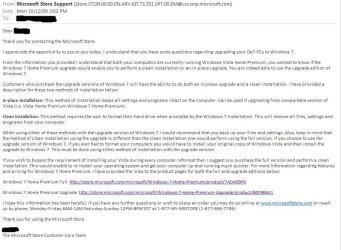
Although not an issue for me directly as a TechNet subscriber, the "Upgrade" install process was still bugging the hell out of me and some of my House Party guests are beginning to inquire about the exact upgrade details. So I wrote to Microsoft. I've attached the reply I received yesterday.

Most of the folks I will be doing upgrades for are Dell users so I phrased my questions in that context to alleviate their particular fears.... not that it should matter for others. Dells are a bit unique in that they ship a pre-activated full OS disk and not a "System Restore" disk.

The rumors of clean installs with an upgrade disk apprear to be true.
But, it also appears that one doesn't just slip in the Vista disk when prompted. The upgrade process must see a fully installed and activated qualifying version before it will allow a complete disk format to pass a flag that allows the upgrade key to activate Windows 7. I guess the "flag" would be held in the RAMdrive during installation or placed in the System Reserved partition.

I think this is the pertinent part:
" If you choose to use the upgrade version of Windows 7, if you ever had to format your computers you would have to install your original copy of Windows Vista and then install the upgrade to Windows 7. This must be done using either method of installation with the upgrade version.
If you wish to bypass the requirement of installing your Vista during every computer reformat then I suggest you purchase the full version and perform a clean installation. This would enable to re-install your operating system and get your computer up and running much quicker."

So, the clean install process is clearly more complicated but doable. And in the case of Dell users, the process will be a little quicker for future reinstallations because we can get Vista installed and activated from a USB key in about 10 minutes. Won't have to sit through all of the driver and crapware installations of some "System Restore" processes. It shouldn't matter that many of the drivers aren't present, just that Vista is installed and activated.

W7 Upgrade email from MS-nonames.jpg


Tom
 

My Computer My Computer

At a glance

W8 Pro, W7 Ultimate, XP Pro x64, Vista x64, U...Q6600, Q6700, T7500, T7500, N270, N2708GB, 8GB, 4GB, 4GB, 2GB, 2GBATI, nVidia, nVidia, nVidia, Intel, Intel
Computer type
PC/Desktop
Computer Manufacturer/Model Number
Dell: XPS 420 (2), XPS M1330 (several), XPS 14z, Mini 9, Mini 10v
OS
W8 Pro, W7 Ultimate, XP Pro x64, Vista x64, Ubuntu
CPU
Q6600, Q6700, T7500, T7500, N270, N270
Motherboard
Dell
Memory
8GB, 8GB, 4GB, 4GB, 2GB, 2GB
Graphics Card(s)
ATI, nVidia, nVidia, nVidia, Intel, Intel
Monitor(s) Displays
Dell 2408WFP
Hard Drives
A drawer full. OCZ Vertex's in RAID 0. Vertex 3's, Vertex 4, Samsung 830's, Samsung 840's, Intel 330. Don't use dino drives any more except for servers.
Keyboard
Logitech Wave
Internet Speed
29 Mbps DL / .95 Mbps UL
Other Info
New project(2013)...Another low power server. Zotac H67ITX, i3-2100T, Windows Server 2012 Essentials on Samsung SSD.
Previous project...Low power (38-40 watts using Kill-a-Watt) Windows Home Server. Zotac ION (Atom 330, GeForce9400), 4GB RAM, 2x2TB WD Green, IN WIM miniITX Case. Fits on a shelf in laundry closet, practically silent.
Although not an issue for me directly as a TechNet subscriber, the "Upgrade" install process was still bugging the hell out of me and some of my House Party guests are beginning to inquire about the exact upgrade details. So I wrote to Microsoft. I've attached the reply I received yesterday.

Most of the folks I will be doing upgrades for are Dell users so I phrased my questions in that context to alleviate their particular fears.... not that it should matter for others. Dells are a bit unique in that they ship a pre-activated full OS disk and not a "System Restore" disk.

The rumors of clean installs with an upgrade disk apprear to be true.
But, it also appears that one doesn't just slip in the Vista disk when prompted. The upgrade process must see a fully installed and activated qualifying version before it will allow a complete disk format to pass a flag that allows the upgrade key to activate Windows 7. I guess the "flag" would be held in the RAMdrive during installation or placed in the System Reserved partition.

I think this is the pertinent part:
" If you choose to use the upgrade version of Windows 7, if you ever had to format your computers you would have to install your original copy of Windows Vista and then install the upgrade to Windows 7. This must be done using either method of installation with the upgrade version.
If you wish to bypass the requirement of installing your Vista during every computer reformat then I suggest you purchase the full version and perform a clean installation. This would enable to re-install your operating system and get your computer up and running much quicker."

So, the clean install process is clearly more complicated but doable. And in the case of Dell users, the process will be a little quicker for future reinstallations because we can get Vista installed and activated from a USB key in about 10 minutes. Won't have to sit through all of the driver and crapware installations of some "System Restore" processes. It shouldn't matter that many of the drivers aren't present, just that Vista is installed and activated.

View attachment 31321


Tom

Thanks Tom,

Good news for the Dell users.

This has been the question of interest for some time now, this revelation is appreciated by all waiting to hear the news, now we know.

Great find, even greater info,
 

My Computer My Computer

At a glance

Windows 7 Ult x64 - SP1/ Windows 8 Pro x64Intel Core i5-3570K 4.6GHz8GB (2X4GB) DDR3 1600 Corsair Vengeance CL8 1.5vSapphire HD 7770 Vapor-X OC 1GB DDR5
Computer type
PC/Desktop
Computer Manufacturer/Model Number
76~2.0
OS
Windows 7 Ult x64 - SP1/ Windows 8 Pro x64
CPU
Intel Core i5-3570K 4.6GHz
Motherboard
Gigabyte GA-Z77X UD3H, f18
Memory
8GB (2X4GB) DDR3 1600 Corsair Vengeance CL8 1.5v
Graphics Card(s)
Sapphire HD 7770 Vapor-X OC 1GB DDR5
Sound Card
Onboard VIA VT2021
Monitor(s) Displays
22" LCD Dell
Screen Resolution
1680x1050
Hard Drives
Samsung 840Pro 128GB SSD,
Seagate Barracuda 500GB SATA2 7200rpm 32MB cache, Seagate Barracuda 1TB SATA2 7200rpm 32MB cache,
PSU
Corsair HX650W
Case
Cooler Master Storm Scout
Cooling
Corsair H80 2x12cm Noctua NF P12 , 2x14cm case fans
Keyboard
Logitech Wave
Mouse
CM Sentinel
Internet Speed
Dismal
Antivirus
Avast
Browser
Opera Next
Other Info
Haswell laptop: HP Envy 17t-j, i7-4700MQ, GeForce 740M 2GB DDR3, 17.3" Full HD 1920x1080, 16GB RAM, Samsung 840 Pro 128GB, 1TB Hitachi 7200 HDD,
Desktop: eSATA ports,
External eSATA Seagate 500GB SATA2 7200rpm,
External WD USB 500GB
I agree with all the complaints. Microsoft messed up the Vista release and now is causing problems with the new OS. All these questions and problems show many people do not understand and cannot get definite answers as to what they need to do.

Shame on Microsoft for causing all this confusion. They could put out a web site with all these answers, but have not bothered to do so. They really need to delete the requirement for an activated version of a prior OS being installed and just go with a valid copy of an prior OS DVD to prove the update would be allowed.
 

My Computer My Computer

At a glance

Windows 7 x64i7-2600K8 GGTX 480
Computer Manufacturer/Model Number
Homebuilt
OS
Windows 7 x64
CPU
i7-2600K
Motherboard
Asus P8Z77-v Pro
Memory
8 G
Graphics Card(s)
GTX 480
Sound Card
Onboard
Monitor(s) Displays
LG W2753V
Screen Resolution
1920x1080
Hard Drives
Crucial M4 128 G SSD
I agree with all the complaints. Microsoft messed up the Vista release and now is causing problems with the new OS. All these questions and problems show many people do not understand and cannot get definite answers as to what they need to do.

Shame on Microsoft for causing all this confusion. They could put out a web site with all these answers, but have not bothered to do so. They really need to delete the requirement for an activated version of a prior OS being installed and just go with a valid copy of an prior OS DVD to prove the update would be allowed.
LINK This MS link has the install info on the bottom right corner of the page. It's been there for a while now.
 

My Computer My Computer

At a glance

Windows 7 Professional x64AMD Athlon 64 X2 6000 3.1GHzG.SKILL 4GB (2 x 2GB) 240-Pin DDR2 SDRAM DDR2...ATI Radeon HD4350 512mb
Computer Manufacturer/Model Number
home built
OS
Windows 7 Professional x64
CPU
AMD Athlon 64 X2 6000 3.1GHz
Motherboard
Asus M3A78-EM
Memory
G.SKILL 4GB (2 x 2GB) 240-Pin DDR2 SDRAM DDR2 800 (PC2 6400)
Graphics Card(s)
ATI Radeon HD4350 512mb
Sound Card
on board
Monitor(s) Displays
Samsung SyncMaster 206bw
Screen Resolution
1680x1050
Hard Drives
Seagate 250gb
WD 160gb
WD 250gb USB
Maxtor 40gb (backup)
PSU
Thermaltake PurePower 500watt
Case
Apevia
Cooling
2x120 case fans
Keyboard
wireless Logitech
Mouse
wireless Logitech
Internet Speed
DSL (best I can do in the boonies)
Other Info
Lord make my word sweet, in case I have to eat them later...
just go with a valid copy of an prior OS DVD to prove the update would be allowed.

Anyone can download a "valid copy" of Windows, illegally. Therefore your method does nothing to prevent piracy.

Only if you had to verify the product key would it work. But you can't verify that a product key is genuine without an internet connection (which you likely wouldn't have during installation).
 

My Computer My Computer

At a glance

XP, Seven, 2008R2AMD, Intel, VIACorsair, Kingston, etc.ATI, NVIDIA
Computer Manufacturer/Model Number
Too many to list.
OS
XP, Seven, 2008R2
CPU
AMD, Intel, VIA
Motherboard
Various
Memory
Corsair, Kingston, etc.
Graphics Card(s)
ATI, NVIDIA
Monitor(s) Displays
Samsung
Hard Drives
Maxtor, Western Digital
Keyboard
qwerty
Internet Speed
22 Mb/s @ home, 1 Gb/s @ server
Other Info
All of my systems still run fastest on XP 32-bit for the most part. Win7 is fun to play with, but I still prefer XP for raw speed, security, and functionality.
Anyone can download a "valid copy" of Windows, illegally. Therefore your method does nothing to prevent piracy.
I'm going to break our tradition and agree with you 100% on this.
 

My Computer My Computer

At a glance

Windows 7 Ultimate x64 SP1Intel Core i7-260012 GB Patriot Extreme DDR3-1333Nvidia GTX 470
OS
Windows 7 Ultimate x64 SP1
CPU
Intel Core i7-2600
Motherboard
Gigabyte GA-P67A-UD3P-B3
Memory
12 GB Patriot Extreme DDR3-1333
Graphics Card(s)
Nvidia GTX 470
Monitor(s) Displays
Dell UltraSharp 2209WA
Hard Drives
OCZ Agility3 240 GB, WD5001AALS, WD7501AALS
PSU
OCZ ModStream 700W
Case
CoolerMaster HAF 912 Advanced
Cooling
CoolerMaster Hyper 212 Plus
How about requireing that to activate the windows 7 update, a valid key for a prior version be entered first, which can then be validated, and then a update key be entered. Microsoft can track the pairing to ensure old keys aren't reused for mutiple upgrade keys.
 

My Computer My Computer

At a glance

Windows 7
OS
Windows 7
How about requireing that to activate the windows 7 update, a valid key for a prior version be entered first, which can then be validated, and then a update key be entered. Microsoft can track the pairing to ensure old keys aren't reused for mutiple upgrade keys.

How about it doesn't matter because the product is complete will be on the shelves in 6 days? :)
 

My Computer My Computer

At a glance

Windows 7 Ultimate RTM (Technet)3.00 gigahertz Intel Core2 Duo E84004GBATI Radeon X1950 Pro
Computer Manufacturer/Model Number
Custom
OS
Windows 7 Ultimate RTM (Technet)
CPU
3.00 gigahertz Intel Core2 Duo E8400
Motherboard
ASUSTeK Computer INC. P5K/EPU Rev 1.xx
Memory
4GB
Graphics Card(s)
ATI Radeon X1950 Pro
Sound Card
Built in HD Audio
Monitor(s) Displays
22" Gateway LCD
Screen Resolution
1920 x 1200
Hard Drives
ST3160023A [Hard drive] (160.04 GB) -- drive 0, rev 8.01, ST3500630AS [Hard drive] (500.11 GB) -- drive 2, rev 3.AAK
ST3500630AS [Hard drive] (500.11 GB) -- drive 1, rev 3.AAK
Keyboard
Logitech G11
Mouse
Microsoft Wireless Laser Mouse 5000
Internet Speed
13.44 Mbps
I was pretty much just told "too bad" and I would either get a refund from my preorder or pay another $150 for full version if I wanted to upgrade my windows 2000 to 7
 

My Computer My Computer

At a glance

win95-7
OS
win95-7
You need to raise the point in writing - email will do - it is legally binding.

Attach a copy of the screenshot posted earlier - that proves they were saying the upgrade license can be used from 2000. That is part the contract - a contract requires offer and acceptance - that was part of the offer - you accepted by buying the upgrade.

They have no choice but to honor it.
 

My Computers My Computers

  • At a glance

    7 X64i5 84002x8gb 3200mhz
    Computer type
    PC/Desktop
    OS
    7 X64
    CPU
    i5 8400
    Motherboard
    gigabyte b365m ds3h
    Memory
    2x8gb 3200mhz
    Hard Drives
    various
    PSU
    pure power 11 400w cm
    Case
    Coolermaster
    Cooling
    cryorig m9i
  • At a glance

    7x64g54008gb ddr4 2400
    Computer type
    PC/Desktop
    OS
    7x64
    CPU
    g5400
    Motherboard
    ga b365m ds3h
    Memory
    8gb ddr4 2400
    PSU
    xfx pro 450w
Right. I have the full versions of both XP and Vista, with legitimate serial numbers. It's just insane that they expect me to go back and install Vista before installing W7 every time I get a new hard drive or run DBAN.
So get a drive-imaging program and create a clean image for yourself, or clone the old install to the new hard drive. Or, go buy the full version if it will cause you this much trouble. You shouldn't be reinstalling that often with Windows 7 anyway, and if you swap HDDs often, clone it. Simple.
 

My Computer My Computer

At a glance

Windows 7 Ultimate x64 SP1Intel Core i7-260012 GB Patriot Extreme DDR3-1333Nvidia GTX 470
OS
Windows 7 Ultimate x64 SP1
CPU
Intel Core i7-2600
Motherboard
Gigabyte GA-P67A-UD3P-B3
Memory
12 GB Patriot Extreme DDR3-1333
Graphics Card(s)
Nvidia GTX 470
Monitor(s) Displays
Dell UltraSharp 2209WA
Hard Drives
OCZ Agility3 240 GB, WD5001AALS, WD7501AALS
PSU
OCZ ModStream 700W
Case
CoolerMaster HAF 912 Advanced
Cooling
CoolerMaster Hyper 212 Plus
Reinstalls are a thing of the past with WIndows 7 outstanding new Backup Imaging (hey I sound like a MS commercial - fine by me): 20 minutes to image your HDD and 20 minutes to reimage to your HDD or a new one.

Just put any licensed OS on a drive and activate it - nothing else needed - then start the upgrade from there to clean install (needed anyway for any OS besides Vista) over itself, or to another formatted partition or HDD (my preferred). Install your programs, configure to satisfaction, then image the drive. You can then delete the XP/Vista.
 
Hi Greg,

LOL - you do sound like a commercial.

Exactly how much USED space do you back up in 20 mins.?

That is critical to the speed, as is the cpu you use , and the free space on the target destination.

BTW - Imaging software has been around a long time - much of it free.

Many of us have always made regular backup images.

It's good that MS now include their own version in the Home Premium edition with 7 - previously, it only came with the higher Editions.

P.S. I backed up an o/s partition , installed, with updates and programs - 12.3gb used space - took less than 6 minutes with Macrium Reflect. Around 10 mins with Paragon - that is not as fast as Macrium, but works at a very low level of cpu usage. That was to another partition on the same HD , which obviously slows it down.
 

My Computers My Computers

  • At a glance

    7 X64i5 84002x8gb 3200mhz
    Computer type
    PC/Desktop
    OS
    7 X64
    CPU
    i5 8400
    Motherboard
    gigabyte b365m ds3h
    Memory
    2x8gb 3200mhz
    Hard Drives
    various
    PSU
    pure power 11 400w cm
    Case
    Coolermaster
    Cooling
    cryorig m9i
  • At a glance

    7x64g54008gb ddr4 2400
    Computer type
    PC/Desktop
    OS
    7x64
    CPU
    g5400
    Motherboard
    ga b365m ds3h
    Memory
    8gb ddr4 2400
    PSU
    xfx pro 450w
Hi Greg,

LOL - you do sound like a commercial.

Exactly how much USED space do you back up in 20 mins.?

That is critical to the speed, as is the cpu you use , and the free space on the target destination.

BTW - Imaging software has been around a long time - much of it free.

Many of us have always made regular backup images.

It's good that MS now include their own version in the Home Premium edition with 7 - previously, it only came with the higher Editions.

P.S. I backed up an o/s partition , installed, with updates and programs - 12.3gb used space - took less than 6 minutes with Macrium Reflect. Around 10 mins with Paragon - that is not as fast as Macrium, but works at a very low level of cpu usage. That was to another partition on the same HD , which obviously slows it down.

74.4/320g in 20 minutes. I just used Acronis to do my roommates 25g Vista and it was the same.

Yes backup imaging is just catching up with us plebes now that MS "put a button." :eek:
I stare at these buttons like Homer at the nuke plant until I dare venture forth and now find this to be my favorite new feature of Windows.

Actually the emphasis is because it is dawning on anxious Upgraders that creating the backup image is our free pass to never having to clean install again. And since my favorite hobby is clean reinstalls with optimizing (my friends and family love me and fly me all over the country), I need a new hobby!

That said, if you read these many threads where the tech savvy are advising over and over to image the drive, I notice even many enthusiasts ignoring the suggestion like it is too advanced. So I persist. It easy. Do it.
 
If you already have the RC installed, MS has said that you will be able to do the double install only once... after that you will need to insert a disc with a qualifying version in order for it to work. So, be sure to image your drive immediately after activating..

I hope this answers your questions...

Actually the RC will serve as the underlying activated OS for upgrade until it expires June 1. The Upgrade only looks for an activated OS. I'm not sure it would work with the Enterprise 90 day trial that MS provides now for download with activation, but from what I have read on Win7 Technet blog, there is no way for the installer to determine anything other than it is MS OS and activated.
 
Back
Top