
LAN connection not showing

goofy gorilla

New member
Local time
6:01 PM
Messages
20
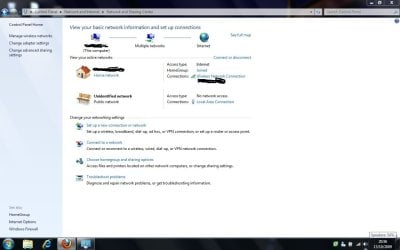
hi guys...im trying to enable The LAN connection on my laptop, i cannot get it to show up on the taskbar, ive got the wireless lan but not the WIRED LAN which i need to see and configure. The LAN connection is available, however there is no option to change it or enable it...the LAN connection is showing up as "Unidentified network - public network"....normally you could click on the "public network" and change it to "home network" like my wireless network, but that option is greyed out and is read only...? see screenshot
 

Attachments
  • LAN.jpg
    LAN.jpg
    66.5 KB · Views: 433

My Computer My Computer

OS
windows 7
hi guys...im trying to enable The LAN connection on my laptop, i cannot get it to show up on the taskbar, ive got the wireless lan but not the WIRED LAN which i need to see and configure. The LAN connection is available, however there is no option to change it or enable it...the LAN connection is showing up as "Unidentified network - public network"....normally you could click on the "public network" and change it to "home network" like my wireless network, but that option is greyed out and is read only...? see screenshot

GG

You might just need a NIC (lan) driver. go into device manager (type device manager) in search. go to the network tab look for you LAN devices. Isw there a yellow triangle on it? is it missing?

en
 

My Computer My Computer

Computer Manufacturer/Model Number
HP Pavillion dv-7 1005 Tx
OS
Win 8 Release candidate 8400
CPU
[email protected]
Memory
4 gigs
Graphics Card(s)
Nvidia 9600M
Sound Card
HD built-in
Monitor(s) Displays
17" Wxga
Screen Resolution
1440x900
Cooling
none
Internet Speed
45Mb down 5Mb up
hi guys...im trying to enable The LAN connection on my laptop, i cannot get it to show up on the taskbar, ive got the wireless lan but not the WIRED LAN which i need to see and configure. The LAN connection is available, however there is no option to change it or enable it...the LAN connection is showing up as "Unidentified network - public network"....normally you could click on the "public network" and change it to "home network" like my wireless network, but that option is greyed out and is read only...? see screenshot

GG

You might just need a NIC (lan) driver. go into device manager (type device manager) in search. go to the network tab look for you LAN devices. Isw there a yellow triangle on it? is it missing?

en
drivers are fine..device is working fine...i think this is a windows 7 fault...ive read people having similar isuues...but no solutions posted..?
 

My Computer My Computer

OS
windows 7
Back
Top