
Solved MY internet connection randomly ceases

First off, I am stunned that you havent secured your router management.. Well, that's an assumption on my part. Your username is admin, and your password will be __________ Just google your router model number.If you haven't secured your router, an example could be use admin and password admin, Or it could be user admin and password is <nothing> Note carefully, this is not for all routers. Some might be username <blank> and password admin, some might be admin admin. Google is your friend and will tell all

In this Linksys help page, the username is blank and the password is admin

Linksys Official Support - How to access the router’s web-based setup page

Also, since you cannot access the router from your bad computer, use one of your other devices. On the bad computer get your IP address and MAC address and write it down. When you go to your other machine ( I have six machine in my house ) just do the 192.168.1.1 and when you are able to access the router management web page..

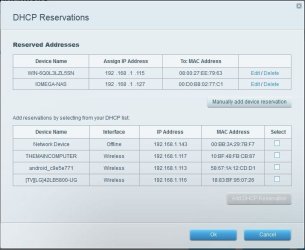
Hold on a sec, I'm new to the forum, I normally hang out at windowsbbs.com.. Let's see if I can insert a picture of my router --- EA4500

Cool, in my router mgmt. you can see all the devices connected to my router. Notice, that the IP addresses that the router has handed out to each device is specified. On the top is the reserved list, and what that means is I dont' want those devices asking the router for a leased IP address. One is my Win 2008 server and the other is a network attached storage. the bottom part are devices that get IP addresses from the router and the lease time, is, I think, one week. The bottom line is my username was admin, and the password was what I configured.. then go to dhcp reservations, or Local , or words to that effect and see if your bad device is in there
 

Attachments
  • ea4500.jpg
    ea4500.jpg
    42.2 KB · Views: 1
Last edited:

My Computer My Computer

At a glance

Win 7 Professional 32 bitAMD2 gigNvidia--what else?
Computer type
PC/Desktop
Computer Manufacturer/Model Number
Clone
OS
Win 7 Professional 32 bit
CPU
AMD
Motherboard
ASUS P5QL/EPU
Memory
2 gig
Graphics Card(s)
Nvidia--what else?
Screen Resolution
1920 X 1080
Internet Speed
Wired--50 down wireless 10 down
Antivirus
NOD32
Browser
95% Firefox
I updated the OP and now have access to my 'router management;however, I'm still not sure on what to do. I have also tried reinstalling the driver again.
 

My Computer My Computer

At a glance

Windows 7 home Premium 64 bit
Computer type
PC/Desktop
OS
Windows 7 home Premium 64 bit
I reinstalled my driver and the problem actually got worse! I now only have about 15 minutes before my PC loses access again. Here are the results from pinging my MAC address: C:\Users\Jared>ping 255.255.255.0
Pinging 255.255.255.0 with 32 bytes of data:
PING: transmit failed. General failure.
Ping statistics for 255.255.255.0:
Packets: Sent = 4, Received = 0, Lost = 4 (100% loss),
I'm still not sure on what to do with my router; if the problem persists, I am probably just going to reinstall windows 7.
 

My Computer My Computer

At a glance

Windows 7 home Premium 64 bit
Computer type
PC/Desktop
OS
Windows 7 home Premium 64 bit
well, you can't ping 255.255.255.0 -- that's just a broadcast address or a subnet mask for an IP address.

First off, try an acquire an IP address for your bad machine.. In the bottom right hand corner of your desktop is you network notification icon. For a wireless you would have something like this:

OhgZIg.jpg


See the bars? Do you have some kind of network icon right now

As for your router mgmnt. I can assume you can go into the web based router mgmt page and look around right?

I'll be hangiing around all day and will try to work with you on this
 

My Computer My Computer

At a glance

Win 7 Professional 32 bitAMD2 gigNvidia--what else?
Computer type
PC/Desktop
Computer Manufacturer/Model Number
Clone
OS
Win 7 Professional 32 bit
CPU
AMD
Motherboard
ASUS P5QL/EPU
Memory
2 gig
Graphics Card(s)
Nvidia--what else?
Screen Resolution
1920 X 1080
Internet Speed
Wired--50 down wireless 10 down
Antivirus
NOD32
Browser
95% Firefox
well, you can't ping 255.255.255.0 -- that's just a broadcast address or a subnet mask for an IP address.

First off, try an acquire an IP address for your bad machine.. In the bottom right hand corner of your desktop is you network notification icon. For a wireless you would have something like this:

OhgZIg.jpg


See the bars? Do you have some kind of network icon right now

As for your router mgmnt. I can assume you can go into the web based router mgmt page and look around right?

I'll be hangiing around all day and will try to work with you on this

Thanks, I truly do appreciate it. I have access to my router now and my Ip address for the computer is 192.168.1.105
 

My Computer My Computer

At a glance

Windows 7 home Premium 64 bit
Computer type
PC/Desktop
OS
Windows 7 home Premium 64 bit
here's your command ping -n 100 192.168.1.105 It will ping your nic 100 times. After that ping your default gate way 100 times

ping -n 100 192.168.1.1

copy and paste the results no word wrap I'm looking for the time. I wanna see if they are degrading
 

My Computer My Computer

At a glance

Win 7 Professional 32 bitAMD2 gigNvidia--what else?
Computer type
PC/Desktop
Computer Manufacturer/Model Number
Clone
OS
Win 7 Professional 32 bit
CPU
AMD
Motherboard
ASUS P5QL/EPU
Memory
2 gig
Graphics Card(s)
Nvidia--what else?
Screen Resolution
1920 X 1080
Internet Speed
Wired--50 down wireless 10 down
Antivirus
NOD32
Browser
95% Firefox
here's your command ping -n 100 192.168.1.105 It will ping your nic 100 times. After that ping your default gate way 100 times

ping -n 100 192.168.1.1

copy and paste the results no word wrap I'm looking for the time. I wanna see if they are degrading

I will soon, is my default gateway my Ip address or is it just 192.168.1.1
 

My Computer My Computer

At a glance

Windows 7 home Premium 64 bit
Computer type
PC/Desktop
OS
Windows 7 home Premium 64 bit
well, IP addresses represent your computer. Your default gateway (router) is where your computer sends data to whereever. websites etc. Your router is also a dhcp server. It leases IP addresses to machines that request them. Your default gateway, aka the router is the 192.168.1.1.. Your bad machine got it's 1.105 address from your router.. so ping your computer first to check your network interface card, then ping the router. I still suspect you have a flakey nic or the router is blocking your bad computer from sending traffic to the outside world
 

My Computer My Computer

At a glance

Win 7 Professional 32 bitAMD2 gigNvidia--what else?
Computer type
PC/Desktop
Computer Manufacturer/Model Number
Clone
OS
Win 7 Professional 32 bit
CPU
AMD
Motherboard
ASUS P5QL/EPU
Memory
2 gig
Graphics Card(s)
Nvidia--what else?
Screen Resolution
1920 X 1080
Internet Speed
Wired--50 down wireless 10 down
Antivirus
NOD32
Browser
95% Firefox
This is the data before the connection is lost

:C:\Users\Jared>ping -n 100 192.168.1.1

Pinging 192.168.1.1 with 32 bytes of data:

  • Reply from 192.168.1.1: bytes=32 time=19ms TTL=64
  • Reply from 192.168.1.1: bytes=32 time=79ms TTL=64
  • Reply from 192.168.1.1: bytes=32 time=143ms TTL=64
  • Reply from 192.168.1.1: bytes=32 time=45ms TTL=64
  • Reply from 192.168.1.1: bytes=32 time=1ms TTL=64
  • Reply from 192.168.1.1: bytes=32 time=2ms TTL=64
  • Reply from 192.168.1.1: bytes=32 time=64ms TTL=64
  • Reply from 192.168.1.1: bytes=32 time=45ms TTL=64
  • Reply from 192.168.1.1: bytes=32 time=78ms TTL=64
  • Reply from 192.168.1.1: bytes=32 time=60ms TTL=64
  • Reply from 192.168.1.1: bytes=32 time=1ms TTL=64
  • Reply from 192.168.1.1: bytes=32 time=37ms TTL=64
  • Reply from 192.168.1.1: bytes=32 time=1ms TTL=64
  • Reply from 192.168.1.1: bytes=32 time=1ms TTL=64
  • Reply from 192.168.1.1: bytes=32 time=9ms TTL=64
  • Reply from 192.168.1.1: bytes=32 time=10ms TTL=64
  • Reply from 192.168.1.1: bytes=32 time=2ms TTL=64
  • Reply from 192.168.1.1: bytes=32 time=12ms TTL=64
  • Reply from 192.168.1.1: bytes=32 time=9ms TTL=64
  • Reply from 192.168.1.1: bytes=32 time=1ms TTL=64
  • Reply from 192.168.1.1: bytes=32 time=5ms TTL=64
  • Reply from 192.168.1.1: bytes=32 time=6ms TTL=64
  • Reply from 192.168.1.1: bytes=32 time=3ms TTL=64
  • Reply from 192.168.1.1: bytes=32 time=4ms TTL=64
  • Reply from 192.168.1.1: bytes=32 time=12ms TTL=64
  • Reply from 192.168.1.1: bytes=32 time=34ms TTL=64
  • Reply from 192.168.1.1: bytes=32 time=7ms TTL=64
  • Reply from 192.168.1.1: bytes=32 time=26ms TTL=64
  • Reply from 192.168.1.1: bytes=32 time=8ms TTL=64
  • Reply from 192.168.1.1: bytes=32 time=1ms TTL=64
  • Reply from 192.168.1.1: bytes=32 time=172ms TTL=64
  • Reply from 192.168.1.1: bytes=32 time=4ms TTL=64
  • Reply from 192.168.1.1: bytes=32 time=2ms TTL=64
  • Reply from 192.168.1.1: bytes=32 time=6ms TTL=64
  • Reply from 192.168.1.1: bytes=32 time=1ms TTL=64
  • Reply from 192.168.1.1: bytes=32 time=38ms TTL=64
  • Reply from 192.168.1.1: bytes=32 time=23ms TTL=64
  • Request timed out.
  • Reply from 192.168.1.1: bytes=32 time=3ms TTL=64
  • Reply from 192.168.1.1: bytes=32 time=2ms TTL=64
  • Reply from 192.168.1.1: bytes=32 time=1ms TTL=64
  • Reply from 192.168.1.1: bytes=32 time=2ms TTL=64
  • Reply from 192.168.1.1: bytes=32 time=32ms TTL=64
  • Reply from 192.168.1.1: bytes=32 time=11ms TTL=64
  • Reply from 192.168.1.1: bytes=32 time=83ms TTL=64
  • Reply from 192.168.1.1: bytes=32 time=33ms TTL=64
  • Reply from 192.168.1.1: bytes=32 time=64ms TTL=64
  • Reply from 192.168.1.1: bytes=32 time=77ms TTL=64
  • Request timed out.
  • Reply from 192.168.1.1: bytes=32 time=94ms TTL=64
  • Reply from 192.168.1.1: bytes=32 time=79ms TTL=64
  • Reply from 192.168.1.1: bytes=32 time=27ms TTL=64
  • Reply from 192.168.1.1: bytes=32 time=130ms TTL=64
  • Reply from 192.168.1.1: bytes=32 time=12ms TTL=64
  • Reply from 192.168.1.1: bytes=32 time=66ms TTL=64
  • Reply from 192.168.1.1: bytes=32 time=35ms TTL=64
  • Reply from 192.168.1.1: bytes=32 time=7ms TTL=64
  • Reply from 192.168.1.1: bytes=32 time=59ms TTL=64
  • Reply from 192.168.1.1: bytes=32 time=68ms TTL=64
  • Reply from 192.168.1.1: bytes=32 time=3ms TTL=64
  • Reply from 192.168.1.1: bytes=32 time=132ms TTL=64
  • Reply from 192.168.1.1: bytes=32 time=62ms TTL=64
  • Reply from 192.168.1.1: bytes=32 time=30ms TTL=64
  • Reply from 192.168.1.1: bytes=32 time=53ms TTL=64
  • Reply from 192.168.1.1: bytes=32 time=1ms TTL=64
  • Reply from 192.168.1.1: bytes=32 time=4ms TTL=64
  • Reply from 192.168.1.1: bytes=32 time=12ms TTL=64
  • Reply from 192.168.1.1: bytes=32 time=6ms TTL=64
  • Reply from 192.168.1.1: bytes=32 time=31ms TTL=64
  • Reply from 192.168.1.1: bytes=32 time=5ms TTL=64
  • Reply from 192.168.1.1: bytes=32 time=6ms TTL=64
  • Reply from 192.168.1.1: bytes=32 time=12ms TTL=64
  • Reply from 192.168.1.1: bytes=32 time=59ms TTL=64
  • Reply from 192.168.1.1: bytes=32 time=17ms TTL=64
  • Reply from 192.168.1.1: bytes=32 time=21ms TTL=64
  • Reply from 192.168.1.1: bytes=32 time=3ms TTL=64
  • Reply from 192.168.1.1: bytes=32 time=112ms TTL=64
  • Reply from 192.168.1.1: bytes=32 time=18ms TTL=64
  • Reply from 192.168.1.1: bytes=32 time=56ms TTL=64
  • Reply from 192.168.1.1: bytes=32 time=66ms TTL=64
  • Reply from 192.168.1.1: bytes=32 time=2ms TTL=64
  • Reply from 192.168.1.1: bytes=32 time=6ms TTL=64
  • Reply from 192.168.1.1: bytes=32 time=99ms TTL=64
  • Reply from 192.168.1.1: bytes=32 time=8ms TTL=64
  • Reply from 192.168.1.1: bytes=32 time=20ms TTL=64
  • Reply from 192.168.1.1: bytes=32 time=50ms TTL=64
  • Reply from 192.168.1.1: bytes=32 time=19ms TTL=64
  • Reply from 192.168.1.1: bytes=32 time=114ms TTL=64
  • Reply from 192.168.1.1: bytes=32 time=8ms TTL=64
  • Reply from 192.168.1.1: bytes=32 time=3ms TTL=64
  • Reply from 192.168.1.1: bytes=32 time=6ms TTL=64
  • Reply from 192.168.1.1: bytes=32 time=10ms TTL=64
  • Reply from 192.168.1.1: bytes=32 time=9ms TTL=64
  • Reply from 192.168.1.1: bytes=32 time=12ms TTL=64
  • Reply from 192.168.1.1: bytes=32 time=1ms TTL=64
  • Reply from 192.168.1.1: bytes=32 time=17ms TTL=64
  • Reply from 192.168.1.1: bytes=32 time=8ms TTL=64
  • Reply from 192.168.1.1: bytes=32 time=22ms TTL=64
  • Reply from 192.168.1.1: bytes=32 time=11ms TTL=64
  • Reply from 192.168.1.1: bytes=32 time=18ms TTL=64


  • Ping statistics for 192.168.1.1:
  • Packets: Sent = 100, Received = 98, Lost = 2 (2% loss),
  • Approximate round trip times in milli-seconds:
  • Minimum = 1ms, Maximum = 172ms, Average = 30ms
  • C:\Users\Jared>ping 192.168.1.1
  • Pinging 192.168.1.1 with 32 bytes of data:
  • Reply from 192.168.1.1: bytes=32 time=10ms TTL=64
  • Reply from 192.168.1.1: bytes=32 time=8ms TTL=64
  • Reply from 192.168.1.1: bytes=32 time=5ms TTL=64
  • Reply from 192.168.1.1: bytes=32 time=1ms TTL=64
  • Ping statistics for 192.168.1.1:
  • Packets: Sent = 4, Received = 4, Lost = 0 (0% loss),
  • Approximate round trip times in milli-seconds:
  • Minimum = 1ms, Maximum = 10ms, Average = 6ms
  • C:\Users\Jared>


My Computer My Computer

At a glance

Windows 7 home Premium 64 bit
Computer type
PC/Desktop
OS
Windows 7 home Premium 64 bit
Your return times are not good.. (time = 143ms) you should be at 10 or less than. How far away are you from the router?

Also when you say the connection gets dropped please go into device properties and get a report on the wireless nic.. On your desktop right click on My Computer, left click on Properties, left click on device manager, left click on Network Adapter

MFW6sq.jpg


what is the report on your wireless nic
 

My Computer My Computer

At a glance

Win 7 Professional 32 bitAMD2 gigNvidia--what else?
Computer type
PC/Desktop
Computer Manufacturer/Model Number
Clone
OS
Win 7 Professional 32 bit
CPU
AMD
Motherboard
ASUS P5QL/EPU
Memory
2 gig
Graphics Card(s)
Nvidia--what else?
Screen Resolution
1920 X 1080
Internet Speed
Wired--50 down wireless 10 down
Antivirus
NOD32
Browser
95% Firefox
Your return times are not good.. (time = 143ms) you should be at 10 or less than. How far away are you from the router?

Also when you say the connection gets dropped please go into device properties and get a report on the wireless nic.. On your desktop right click on My Computer, left click on Properties, left click on device manager, left click on Network Adapter

MFW6sq.jpg


what is the report on your wireless nic

It turns out I have two network adapters. The second is realtek PCIE GBE family Controller. It says that the device is working probably;however, explorer almost crashed when I tried to open it. I also haven't tried uninstalling the driver on this one.
 

My Computer My Computer

At a glance

Windows 7 home Premium 64 bit
Computer type
PC/Desktop
OS
Windows 7 home Premium 64 bit
Tell you what. Looks like you ain't interested in dealing with this. It's been over an hour since your last response. You could look over the diags I suggested and go to a good machine and report back. I gotta go though

regards
 

My Computer My Computer

At a glance

Win 7 Professional 32 bitAMD2 gigNvidia--what else?
Computer type
PC/Desktop
Computer Manufacturer/Model Number
Clone
OS
Win 7 Professional 32 bit
CPU
AMD
Motherboard
ASUS P5QL/EPU
Memory
2 gig
Graphics Card(s)
Nvidia--what else?
Screen Resolution
1920 X 1080
Internet Speed
Wired--50 down wireless 10 down
Antivirus
NOD32
Browser
95% Firefox
These are the logs from when I pinged my nic after the connection was lost.

  • C:\Users\Jared>ping -n 100 192.168.1.1


    Pinging 192.168.1.1 with 32 bytes of data:
    Reply from 192.168.1.105: Destination host unreachable.
    Reply from 192.168.1.105: Destination host unreachable.
    Reply from 192.168.1.105: Destination host unreachable.
    Reply from 192.168.1.105: Destination host unreachable.
    Reply from 192.168.1.105: Destination host unreachable.
    Reply from 192.168.1.105: Destination host unreachable.
    Reply from 192.168.1.105: Destination host unreachable.
    Reply from 192.168.1.105: Destination host unreachable.
    Reply from 192.168.1.105: Destination host unreachable.
    Request timed out.
    Request timed out.
    Request timed out.
    Reply from 192.168.1.105: Destination host unreachable.
    Reply from 192.168.1.105: Destination host unreachable.
    Request timed out.
    Request timed out.
    Reply from 192.168.1.105: Destination host unreachable.
    Reply from 192.168.1.105: Destination host unreachable.
    Reply from 192.168.1.105: Destination host unreachable.
    Reply from 192.168.1.105: Destination host unreachable.
    Request timed out.
    Reply from 192.168.1.105: Destination host unreachable.
    Request timed out.
    Reply from 192.168.1.105: Destination host unreachable.
    Reply from 192.168.1.105: Destination host unreachable.
    Reply from 192.168.1.105: Destination host unreachable.
    Reply from 192.168.1.105: Destination host unreachable.
    Reply from 192.168.1.105: Destination host unreachable.
    Reply from 192.168.1.105: Destination host unreachable.
    Reply from 192.168.1.105: Destination host unreachable.
    Request timed out.
    Request timed out.
    Request timed out.
    Reply from 192.168.1.105: Destination host unreachable.
    Reply from 192.168.1.105: Destination host unreachable.
    Reply from 192.168.1.105: Destination host unreachable.
    Request timed out.
    Request timed out.
    Reply from 192.168.1.105: Destination host unreachable.
    Request timed out.
    Request timed out.
    Reply from 192.168.1.105: Destination host unreachable.
    Request timed out.
    Reply from 192.168.1.105: Destination host unreachable.
    Reply from 192.168.1.105: Destination host unreachable.
    Reply from 192.168.1.105: Destination host unreachable.
    Reply from 192.168.1.105: Destination host unreachable.
    Reply from 192.168.1.105: Destination host unreachable.
    Reply from 192.168.1.105: Destination host unreachable.
    Request timed out.
    Reply from 192.168.1.105: Destination host unreachable.
    Request timed out.
    Reply from 192.168.1.105: Destination host unreachable.
    Reply from 192.168.1.105: Destination host unreachable.
    Reply from 192.168.1.105: Destination host unreachable.
    Reply from 192.168.1.105: Destination host unreachable.
    Reply from 192.168.1.105: Destination host unreachable.
    Reply from 192.168.1.105: Destination host unreachable.
    Reply from 192.168.1.105: Destination host unreachable.
    Reply from 192.168.1.105: Destination host unreachable.
    Reply from 192.168.1.105: Destination host unreachable.
    Reply from 192.168.1.105: Destination host unreachable.
    Reply from 192.168.1.105: Destination host unreachable.
    Request timed out.
    Request timed out.
    Request timed out.
    Request timed out.
    Reply from 192.168.1.105: Destination host unreachable.
    Request timed out.
    Reply from 192.168.1.105: Destination host unreachable.
    Request timed out.
    Request timed out.
    Reply from 192.168.1.105: Destination host unreachable.
    Reply from 192.168.1.105: Destination host unreachable.
    Reply from 192.168.1.105: Destination host unreachable.
    Reply from 192.168.1.105: Destination host unreachable.
    Request timed out.
    Request timed out.
    Reply from 192.168.1.105: Destination host unreachable.
    Request timed out.
    Reply from 192.168.1.105: Destination host unreachable.
    Reply from 192.168.1.105: Destination host unreachable.
    Reply from 192.168.1.105: Destination host unreachable.
    Reply from 192.168.1.105: Destination host unreachable.
    Reply from 192.168.1.105: Destination host unreachable.
    Reply from 192.168.1.105: Destination host unreachable.
    Request timed out.
    Reply from 192.168.1.105: Destination host unreachable.
    Request timed out.
    Reply from 192.168.1.105: Destination host unreachable.
    Request timed out.
    Request timed out.
    Reply from 192.168.1.105: Destination host unreachable.
    Request timed out.
    Request timed out.
    Reply from 192.168.1.105: Destination host unreachable.
    Request timed out.
    Reply from 192.168.1.105: Destination host unreachable.
    Reply from 192.168.1.105: Destination host unreachable.
    Reply from 192.168.1.105: Destination host unreachable.


    Ping statistics for 192.168.1.1:
    Packets: Sent = 100, Received = 66, Lost = 34 (34% loss),


    C:\Users\Jared>ping 192.168.1.105


    Pinging 192.168.1.105 with 32 bytes of data:
    Reply from 192.168.1.105: bytes=32 time 1ms TTL=128
    Reply from 192.168.1.105: bytes=32 time 1ms TTL=128
    Reply from 192.168.1.105: bytes=32 time 1ms TTL=128
    Reply from 192.168.1.105: bytes=32 time 1ms TTL=128


    Ping statistics for 192.168.1.105:
    Packets: Sent = 4, Received = 4, Lost = 0 (0% loss),
    Approximate round trip times in milli-seconds:
    Minimum = 0ms, Maximum = 0ms, Average = 0ms


    C:\Users\Jared>


  • Later today, I'll see if the problem occurs when I use a different but unsecure network
 

My Computer My Computer

At a glance

Windows 7 home Premium 64 bit
Computer type
PC/Desktop
OS
Windows 7 home Premium 64 bit
If .105 is your nic, then you are not able to ping your own ip address..You can have multiple IP addresses on your computer.. they just have to be on different subnets. i.e. you wireless is 192.168.1.05 and your ethernet is 192.168.2.105

right click on your network icon then left click on network properties and sharing and tell me what you see..I'll be back in an hour and we'll walk through this. this should be easy
 

My Computer My Computer

At a glance

Win 7 Professional 32 bitAMD2 gigNvidia--what else?
Computer type
PC/Desktop
Computer Manufacturer/Model Number
Clone
OS
Win 7 Professional 32 bit
CPU
AMD
Motherboard
ASUS P5QL/EPU
Memory
2 gig
Graphics Card(s)
Nvidia--what else?
Screen Resolution
1920 X 1080
Internet Speed
Wired--50 down wireless 10 down
Antivirus
NOD32
Browser
95% Firefox
The full map is jared's PC to chastoy to the internet. When the connection stops, I can't confirm what happens because network and sharing center no longer operates after my computer enters limited access mode. However, I'm assuming the break is between my PC and chastoy, even though the computer still says it's connected to chastoy;because of the fact my other devices still work on that router.
 

My Computer My Computer

At a glance

Windows 7 home Premium 64 bit
Computer type
PC/Desktop
OS
Windows 7 home Premium 64 bit
So is chastoy the name of the router?

And yesterday, I didnt get an answer about how far away is the router from your PC?

Your last ping doesnt make sense. How can you ping your router but it says its coming from 1.105

Your PC is obtaining an IP address from the router, correct?
 

My Computer My Computer

At a glance

Win 7 Professional 32 bitAMD2 gigNvidia--what else?
Computer type
PC/Desktop
Computer Manufacturer/Model Number
Clone
OS
Win 7 Professional 32 bit
CPU
AMD
Motherboard
ASUS P5QL/EPU
Memory
2 gig
Graphics Card(s)
Nvidia--what else?
Screen Resolution
1920 X 1080
Internet Speed
Wired--50 down wireless 10 down
Antivirus
NOD32
Browser
95% Firefox
So is chastoy the name of the router?

And yesterday, I didnt get an answer about how far away is the router from your PC?

The router is approximately 12 feet away from the router and within another room. Yes chastoy is the name of the router. Edit:apparently, my connection seemed to be stronger to the insecure network than my regular router.
 

My Computer My Computer

At a glance

Windows 7 home Premium 64 bit
Computer type
PC/Desktop
OS
Windows 7 home Premium 64 bit
12 feet should be OK, How's the signal strength on your task bar?

Right click on your network icon, left click on "open network and sharing center". In the top left left click on change adapter settings properties. right click on your wireless network connection. left click on properties. left click on internet protocol ver 4 TCP/IP protocol. Check and make sure obtain address automatically is filled. ON the dns you can either put in a manual one like google's 8.8.8.8 or either obtain automatically

Also, go into manage wireless and chose your chastoy router. Go into properties and make sure it sez connect to this machine when in range or automatically or words to that effect
 

My Computer My Computer

At a glance

Win 7 Professional 32 bitAMD2 gigNvidia--what else?
Computer type
PC/Desktop
Computer Manufacturer/Model Number
Clone
OS
Win 7 Professional 32 bit
CPU
AMD
Motherboard
ASUS P5QL/EPU
Memory
2 gig
Graphics Card(s)
Nvidia--what else?
Screen Resolution
1920 X 1080
Internet Speed
Wired--50 down wireless 10 down
Antivirus
NOD32
Browser
95% Firefox
It is my bed time, but before I go;

windows - Pinging a machine on my local network gets an 'unreachable' response from my own IP address? - Super User

This question is now the top google result when searching for 'destination host unreachable from my own ip address'. If that's how you got here, then you should know that my problem was a silly one probably caused by temperamental hardware, so don't bother reading through the walls of text below. The sole piece of information that's probably useful to you comes from Harry Johnston's comment below:
Getting a "destination unreachable" message from your own machine is normal behaviour in recent Windows versions. It just means that the arp failed, i.e., the IP address couldn't be located on the LAN
To confirm this, try running arp -a on your machine, and you'll see a list of all the IP addresses that could be found on your LAN. If you don't see the IP address that you're trying to ping, then that explains why your pings are returning 'unreachable' from your own machine. As for how to fix that problem, it could be caused by anything. Try resetting your router, resetting your network adapters, fiddling with static/dynamic IP addresses etc etc.
 

My Computer My Computer

At a glance

Windows 7 Ultimate x64 SP1AMD Phenom 2 1090T2x8GB Kingston HyperX Fury Black 1600Mhz Unga...MSI GTX 970 Gaming 4G
Computer type
PC/Desktop
Computer Manufacturer/Model Number
Custom Build
OS
Windows 7 Ultimate x64 SP1
CPU
AMD Phenom 2 1090T
Motherboard
Gigabyte GA-890FXA-UD5
Memory
2x8GB Kingston HyperX Fury Black 1600Mhz Unganged
Graphics Card(s)
MSI GTX 970 Gaming 4G
Sound Card
Realtek On-Board HD 7.1 Audio / Logitech G35
Monitor(s) Displays
3xAcer GD245HQ
Screen Resolution
1920x1080
Hard Drives
Samsung 850 Pro 512GB SSD - OS /
WD Caviar Black SATA 3 - 1 TBx2 - Dynamic RAID 0 /
WD Caviar Green SATA 2 - 640GBx2 - Dynamic RAID 0 /
WD Caviar Green SATA 2 - 640GB - Internal Backup /
Seagate Barracude SATA 3 - 3TB - External Backup/ Sync
PSU
HighPower 1000W
Case
Cooler Master HAF 932
Cooling
Noctua NH-D14
Keyboard
Logitech G19
Mouse
Logitech G500
Internet Speed
100/4 Mbit Cable (100GB quota)
Antivirus
ZoneAlarm Extreme Security / MBAM Pro / MBAE Free / SAS Free
Browser
IE 11 - Firefox - Chrome
Other Info
Logitech F710/ G27/ G940/ Z5500 // TrackIR 5 // Nvidia 3D Surround Vision
It is my bed time, but before I go;

windows - Pinging a machine on my local network gets an 'unreachable' response from my own IP address? - Super User

This question is now the top google result when searching for 'destination host unreachable from my own ip address'. If that's how you got here, then you should know that my problem was a silly one probably caused by temperamental hardware, so don't bother reading through the walls of text below. The sole piece of information that's probably useful to you comes from Harry Johnston's comment below:
Getting a "destination unreachable" message from your own machine is normal behaviour in recent Windows versions. It just means that the arp failed, i.e., the IP address couldn't be located on the LAN
To confirm this, try running arp -a on your machine, and you'll see a list of all the IP addresses that could be found on your LAN. If you don't see the IP address that you're trying to ping, then that explains why your pings are returning 'unreachable' from your own machine. As for how to fix that problem, it could be caused by anything. Try resetting your router, resetting your network adapters, fiddling with static/dynamic IP addresses etc etc.


ARP is hardware addresses NOT IP addresses
 

My Computer My Computer

At a glance

Win 7 Professional 32 bitAMD2 gigNvidia--what else?
Computer type
PC/Desktop
Computer Manufacturer/Model Number
Clone
OS
Win 7 Professional 32 bit
CPU
AMD
Motherboard
ASUS P5QL/EPU
Memory
2 gig
Graphics Card(s)
Nvidia--what else?
Screen Resolution
1920 X 1080
Internet Speed
Wired--50 down wireless 10 down
Antivirus
NOD32
Browser
95% Firefox
Back
Top