VGA card holding 3GB system memory - no option in bios to disable

Eiac

New member
Local time
11:15 AM
Messages
9
I have googled this to no end, so now I post...

I have 6gb system memory. 3gb is available to windows.
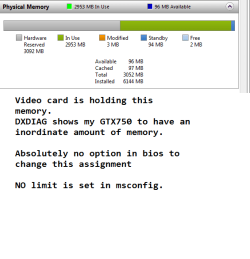
My GTX750 is holding this extra memory- this was confirmed by checking graphics memory in DXDIAG - my card shows to have 4GB which accounts for the lost memory.

Google is full of a million hits of the same two fixes:

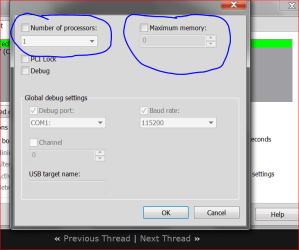
1- msconfig > boot > advanced > remove memory limit --- No memory limit has been set, this is fruitless.

2- Check bios and reassign the memory back to the system. --- Just spent half an hour going through my BIOS - there is absolutely no option, at all, anywhere to do this. I have used hundreds of different BIOS in my time - so this totally baffles me.


Phenom x4 840
Gigabyte GA-970A-D3P
nvidia GTX 750 1GB

Anyone have experience with this board?

Cheers
 

My Computer My Computer

At a glance

Windows 7 Ultimate x64Phenom II 840 x4 AM36GB DDR3-1600Sapphire HD4850 512MB
Computer type
PC/Desktop
Computer Manufacturer/Model Number
Custom Build
OS
Windows 7 Ultimate x64
CPU
Phenom II 840 x4 AM3
Motherboard
Asus M4A78T-E
Memory
6GB DDR3-1600
Graphics Card(s)
Sapphire HD4850 512MB
Hard Drives
Samsung 840 Pro SSD 128GB
WD Green 2TB
Browser
Firefox
Test the RAMs one by one, check what they each report in resource monitor.
 

My Computer My Computer

At a glance

Windows 7 Ultimate x64 SP1AMD Phenom 2 1090T2x8GB Kingston HyperX Fury Black 1600Mhz Unga...MSI GTX 970 Gaming 4G
Computer type
PC/Desktop
Computer Manufacturer/Model Number
Custom Build
OS
Windows 7 Ultimate x64 SP1
CPU
AMD Phenom 2 1090T
Motherboard
Gigabyte GA-890FXA-UD5
Memory
2x8GB Kingston HyperX Fury Black 1600Mhz Unganged
Graphics Card(s)
MSI GTX 970 Gaming 4G
Sound Card
Realtek On-Board HD 7.1 Audio / Logitech G35
Monitor(s) Displays
3xAcer GD245HQ
Screen Resolution
1920x1080
Hard Drives
Samsung 850 Pro 512GB SSD - OS /
WD Caviar Black SATA 3 - 1 TBx2 - Dynamic RAID 0 /
WD Caviar Green SATA 2 - 640GBx2 - Dynamic RAID 0 /
WD Caviar Green SATA 2 - 640GB - Internal Backup /
Seagate Barracude SATA 3 - 3TB - External Backup/ Sync
PSU
HighPower 1000W
Case
Cooler Master HAF 932
Cooling
Noctua NH-D14
Keyboard
Logitech G19
Mouse
Logitech G500
Internet Speed
100/4 Mbit Cable (100GB quota)
Antivirus
ZoneAlarm Extreme Security / MBAM Pro / MBAE Free / SAS Free
Browser
IE 11 - Firefox - Chrome
Other Info
Logitech F710/ G27/ G940/ Z5500 // TrackIR 5 // Nvidia 3D Surround Vision
Test the RAMs one by one, check what they each report in resource monitor.

This isnt the problem dude. People who post "quick fixes" without even reading threads properly really irritate me.


Every stick of RAM works totally fine.


The problem is that 3gb of my system ram has been unnecessarily given to my video card.

If you read my post properly you would know that this is clearly not a case of bad ram. Bad ram would stop the PC booting or not show up at all.

This is a memory assignment issue.
 

My Computer My Computer

At a glance

Windows 7 Ultimate x64Phenom II 840 x4 AM36GB DDR3-1600Sapphire HD4850 512MB
Computer type
PC/Desktop
Computer Manufacturer/Model Number
Custom Build
OS
Windows 7 Ultimate x64
CPU
Phenom II 840 x4 AM3
Motherboard
Asus M4A78T-E
Memory
6GB DDR3-1600
Graphics Card(s)
Sapphire HD4850 512MB
Hard Drives
Samsung 840 Pro SSD 128GB
WD Green 2TB
Browser
Firefox
When you open memory tab of Resource monitor, do they show as hardware reserved? Post a screenshot.
 

My Computer My Computer

At a glance

Windows 7 Ultimate x64 SP1AMD Phenom 2 1090T2x8GB Kingston HyperX Fury Black 1600Mhz Unga...MSI GTX 970 Gaming 4G
Computer type
PC/Desktop
Computer Manufacturer/Model Number
Custom Build
OS
Windows 7 Ultimate x64 SP1
CPU
AMD Phenom 2 1090T
Motherboard
Gigabyte GA-890FXA-UD5
Memory
2x8GB Kingston HyperX Fury Black 1600Mhz Unganged
Graphics Card(s)
MSI GTX 970 Gaming 4G
Sound Card
Realtek On-Board HD 7.1 Audio / Logitech G35
Monitor(s) Displays
3xAcer GD245HQ
Screen Resolution
1920x1080
Hard Drives
Samsung 850 Pro 512GB SSD - OS /
WD Caviar Black SATA 3 - 1 TBx2 - Dynamic RAID 0 /
WD Caviar Green SATA 2 - 640GBx2 - Dynamic RAID 0 /
WD Caviar Green SATA 2 - 640GB - Internal Backup /
Seagate Barracude SATA 3 - 3TB - External Backup/ Sync
PSU
HighPower 1000W
Case
Cooler Master HAF 932
Cooling
Noctua NH-D14
Keyboard
Logitech G19
Mouse
Logitech G500
Internet Speed
100/4 Mbit Cable (100GB quota)
Antivirus
ZoneAlarm Extreme Security / MBAM Pro / MBAE Free / SAS Free
Browser
IE 11 - Firefox - Chrome
Other Info
Logitech F710/ G27/ G940/ Z5500 // TrackIR 5 // Nvidia 3D Surround Vision
Yes they are. I have already said they are assigned to my VGA card....
 

Attachments

  • mem.png
    mem.png
    9.4 KB · Views: 38
Last edited:

My Computer My Computer

At a glance

Windows 7 Ultimate x64Phenom II 840 x4 AM36GB DDR3-1600Sapphire HD4850 512MB
Computer type
PC/Desktop
Computer Manufacturer/Model Number
Custom Build
OS
Windows 7 Ultimate x64
CPU
Phenom II 840 x4 AM3
Motherboard
Asus M4A78T-E
Memory
6GB DDR3-1600
Graphics Card(s)
Sapphire HD4850 512MB
Hard Drives
Samsung 840 Pro SSD 128GB
WD Green 2TB
Browser
Firefox
What slots do you have your RAM installed on the motherboard? Can you please update your system specs completely, your graphics card reads differently to what you've listed in the thread so we don't know if your other specs are up to date.

Bad ram would stop the PC booting or not show up at all.

This is also completely wrong. While I don't believe bad RAM is your issue (it's how you have it installed) the above statement is utterly false. Just in case people who stumble on this thread take it as gospel.
 

My Computer My Computer

At a glance

W7 Pro x64 SP1 | W10 Pro IP x64 | W8.1 Pro x6...i7-4790k @ 4GHz (4.4GHz Boost)16GB DDR3 Kingston HyperX Fury @ 1600MHz CL 9...EVGA GTX 980 Classified
Computer type
PC/Desktop
Computer Manufacturer/Model Number
Custom Build
OS
W7 Pro x64 SP1 | W10 Pro IP x64 | W8.1 Pro x64 VM | Linux Mint VM
CPU
i7-4790k @ 4GHz (4.4GHz Boost)
Motherboard
ASUS Sabertooth Z87 (BIOS Rev 2004)
Memory
16GB DDR3 Kingston HyperX Fury @ 1600MHz CL 9-9-9-27
Graphics Card(s)
EVGA GTX 980 Classified
Sound Card
Realtek Onboard
Monitor(s) Displays
Samsung S27D390
Screen Resolution
1920 x 1080
Hard Drives
240GB Intel 520 Series SSD |
Samsung 850 EVO 120GB SSD |
2TB WD Caviar Black |
2TB WD Caviar Green
PSU
Corsair HX850-80 Gold Modular
Case
Cooler Master Silencio 650
Cooling
Corsair H80i w/2 x Corsair SP120 | 2 x 120mm Noctua NF-S12B
Keyboard
Microsoft Sidewinder X4
Mouse
Gigabyte M6900 optical
Internet Speed
152mb
Antivirus
F-Secure
Browser
Firefox 38.0
Other Info
Backup Rig: Win 7 Pro 64-bit | AMD A10-5800k | ASUS F2A85-V Pro | 8GB Samsung DDR3 @1600MHz | 120GB Toshiba SDD | 2TB Seagate HDD | Cooler Master Silencio 550
How is 6GB formed? 3x2GB - 4+2GB? Dual-channel enabled in BIOS ganged/unganged?

Just as examples
Hardware Reserved Ram 8GB! [Solved] - RAM - Memory - ram incompatibility
6GB of "Hardware Reserved" memory? [Solved] - Memory - Memory - 4+2 incompatibility
Hardware reserved ram [Solved] - Corsair - Memory driver issue
BIOS/Windows recognizes half memory [Solved] - Memory - Memory - check the last posts

Try uninstalling the GPU driver/may also be chipset
Try a clean restart (http://www.sevenforums.com/tutorial...ation-conflicts-performing-clean-startup.html)
Try in Safe Mode

Some people with dual boot say Win7 is reserved while 8 is ok, etc.

I won't say to run memtest now, but do start one when you go to sleep to eliminate the doubt, nothing more.
 

My Computer My Computer

At a glance

Windows 7 Ultimate x64 SP1AMD Phenom 2 1090T2x8GB Kingston HyperX Fury Black 1600Mhz Unga...MSI GTX 970 Gaming 4G
Computer type
PC/Desktop
Computer Manufacturer/Model Number
Custom Build
OS
Windows 7 Ultimate x64 SP1
CPU
AMD Phenom 2 1090T
Motherboard
Gigabyte GA-890FXA-UD5
Memory
2x8GB Kingston HyperX Fury Black 1600Mhz Unganged
Graphics Card(s)
MSI GTX 970 Gaming 4G
Sound Card
Realtek On-Board HD 7.1 Audio / Logitech G35
Monitor(s) Displays
3xAcer GD245HQ
Screen Resolution
1920x1080
Hard Drives
Samsung 850 Pro 512GB SSD - OS /
WD Caviar Black SATA 3 - 1 TBx2 - Dynamic RAID 0 /
WD Caviar Green SATA 2 - 640GBx2 - Dynamic RAID 0 /
WD Caviar Green SATA 2 - 640GB - Internal Backup /
Seagate Barracude SATA 3 - 3TB - External Backup/ Sync
PSU
HighPower 1000W
Case
Cooler Master HAF 932
Cooling
Noctua NH-D14
Keyboard
Logitech G19
Mouse
Logitech G500
Internet Speed
100/4 Mbit Cable (100GB quota)
Antivirus
ZoneAlarm Extreme Security / MBAM Pro / MBAE Free / SAS Free
Browser
IE 11 - Firefox - Chrome
Other Info
Logitech F710/ G27/ G940/ Z5500 // TrackIR 5 // Nvidia 3D Surround Vision

My Computer My Computer

At a glance

Windows 10 Pro. 64/ version 1709 Windows 7 Pr...Intel i7-6800K @ 4.3Corsair Platinum 16 gig @2400EVGA GTX 1070 OC
Computer type
PC/Desktop
Computer Manufacturer/Model Number
Home made Desktop
OS
Windows 10 Pro. 64/ version 1709 Windows 7 Pro/64
CPU
Intel i7-6800K @ 4.3
Motherboard
ASUS X-99 Deluxe II
Memory
Corsair Platinum 16 gig @2400
Graphics Card(s)
EVGA GTX 1070 OC
Monitor(s) Displays
Asus 27" LED LCD/VE278Q
Screen Resolution
1920-1080 or 1280-720 HDMI
Hard Drives
INTEL SSD 730-240 Gb Sata 3.0/
PSU
EVGA Platium 1200W
Case
Phanteks Luxe Tempered Glass 8 fans/ one radiator
Cooling
XSPC/ Water Cooled CPU
Keyboard
Das 4 Professional
Mouse
Logitech M705/MX Anywhere 2-S
Internet Speed
100 mbits
Antivirus
Microsoft Security Essentials/ Malwarebytes Premium 3.0/ SAS
Browser
I.E. 11 default/Firefox/ ISP Time Warner Cable/Spectrum
Other Info
LG BluRay Burner/
Sound system-KLipsch-THX/
Icy Dock ssd Hot Swap bays.
Layback Bear I have already stated that there is NO maximum limit set in msconfig. This is one of the results google pumps out a thousand times. I've seen this fix before, if it was the problem I wouldn't be posting here. No need for that screenshot as it wont tell you anything useful.

Phenom II x4 840 AM3
Gigabyte GA-970A-D3P
6GB DDR3 1600 (dual ch. 2x2gb, dual ch. 2x1gb)
GTX750 1gb
Samsung 840 pro ssd.
 

My Computer My Computer

At a glance

Windows 7 Ultimate x64Phenom II 840 x4 AM36GB DDR3-1600Sapphire HD4850 512MB
Computer type
PC/Desktop
Computer Manufacturer/Model Number
Custom Build
OS
Windows 7 Ultimate x64
CPU
Phenom II 840 x4 AM3
Motherboard
Asus M4A78T-E
Memory
6GB DDR3-1600
Graphics Card(s)
Sapphire HD4850 512MB
Hard Drives
Samsung 840 Pro SSD 128GB
WD Green 2TB
Browser
Firefox
What slots do you have your RAM installed on the motherboard?

Answer this please.

Can you please update your system specs completely, your graphics card reads differently to what you've listed in the thread as does your motherboard so we don't know if your other specs are up to date.

Do this please.
 

My Computer My Computer

At a glance

W7 Pro x64 SP1 | W10 Pro IP x64 | W8.1 Pro x6...i7-4790k @ 4GHz (4.4GHz Boost)16GB DDR3 Kingston HyperX Fury @ 1600MHz CL 9...EVGA GTX 980 Classified
Computer type
PC/Desktop
Computer Manufacturer/Model Number
Custom Build
OS
W7 Pro x64 SP1 | W10 Pro IP x64 | W8.1 Pro x64 VM | Linux Mint VM
CPU
i7-4790k @ 4GHz (4.4GHz Boost)
Motherboard
ASUS Sabertooth Z87 (BIOS Rev 2004)
Memory
16GB DDR3 Kingston HyperX Fury @ 1600MHz CL 9-9-9-27
Graphics Card(s)
EVGA GTX 980 Classified
Sound Card
Realtek Onboard
Monitor(s) Displays
Samsung S27D390
Screen Resolution
1920 x 1080
Hard Drives
240GB Intel 520 Series SSD |
Samsung 850 EVO 120GB SSD |
2TB WD Caviar Black |
2TB WD Caviar Green
PSU
Corsair HX850-80 Gold Modular
Case
Cooler Master Silencio 650
Cooling
Corsair H80i w/2 x Corsair SP120 | 2 x 120mm Noctua NF-S12B
Keyboard
Microsoft Sidewinder X4
Mouse
Gigabyte M6900 optical
Internet Speed
152mb
Antivirus
F-Secure
Browser
Firefox 38.0
Other Info
Backup Rig: Win 7 Pro 64-bit | AMD A10-5800k | ASUS F2A85-V Pro | 8GB Samsung DDR3 @1600MHz | 120GB Toshiba SDD | 2TB Seagate HDD | Cooler Master Silencio 550
There is nothing wrong with your PC. I have 32 GB of RAM and the same thing happens to me. My Graphics card has 4gb on board and when my system starts up 4gb is shadowed by the system ram so 8gb is available to the video card. After I have started a virtual machine that runs Windows 10 (either 32 bit with 3gb Ram or 64 bit with 8gb) the memory is allocated to the VM PC's. After a certain time with say 2 or 3 machines running the video card ram is released back to the system. You are not loosing any memory the operating system is using it, otherwise what would be the point of having the memory installed if the OS did not use it. You need to do something to use more memory and then the memory will be used. I have just run the X3 demo and my card HD 7770 2gb grabbed 4gb of system ram to play with.
Edit I am talking about 2 different systems ........
 

My Computer My Computer

At a glance

Windows 7 x64 Ultimate and numerous virtual m...AMD FX-8350 Vishera 32nm Technology @ 4.2 GHz...G Skill 32.0GB Dual-Channel DDR3 @ 1204MHz (1...EVGA GeForce GTX 960 4GB Super SC ACX 2.0+ wi...
Computer type
PC/Desktop
Computer Manufacturer/Model Number
Bluethunder II
OS
Windows 7 x64 Ultimate and numerous virtual machines
CPU
AMD FX-8350 Vishera 32nm Technology @ 4.2 GHz default
Motherboard
ASUSTeK COMPUTER INC. SABERTOOTH 990FX R2.0 (Socket 942)
Memory
G Skill 32.0GB Dual-Channel DDR3 @ 1204MHz (11-13-13-31)
Graphics Card(s)
EVGA GeForce GTX 960 4GB Super SC ACX 2.0+ with Back Plate
Sound Card
Creative X-Fi Titanium HD Audiophile PCIe
Monitor(s) Displays
LG L227WTG x 3
Screen Resolution
1680 x 1050 16:10
Hard Drives
238GB Samsung850 PRO SATA Disk Device (SSD)
1863GB Seagate ST2000DM 001-1CH164 (SATA)
1397GB Seagate ST1500DL 003-9VT16L(SATA)
466GB Western Digital WDC WD50 03AZEX-00K1GA0 (SATA) x 2
932GB Seagate ST310005 28AS SATA Disk Device (SATA)
PSU
Enermax Revolution87+ 1000 Watts Gold Certified Power Supply
Case
Rocketfish Full Tower
Cooling
Cooler Master Hyper 212 EVO Push Pull 120mm Fans
Keyboard
Logitech K740
Mouse
Logitech G100S Laser LED + Logitech Gamepad F310
Internet Speed
500 mbs down and 30mbs up
Antivirus
Malwarebytes Pro & Avast and MSE on certain Virtual Machines
Browser
Firefox (Main) Chrome, Internet Explorer (Back Up)
Other Info
Logitech X 230 2.1 Stereo System and 5.1 Yamaha RX V2090
B&W DM6 Monitor Speakers + Center and Surround Speakers
Using Mouse Without Borders (Google it)
Layback Bear I have already stated that there is NO maximum limit set in msconfig. This is one of the results google pumps out a thousand times. I've seen this fix before, if it was the problem I wouldn't be posting here. No need for that screenshot as it wont tell you anything useful.

Phenom II x4 840 AM3
Gigabyte GA-970A-D3P
6GB DDR3 1600 (dual ch. 2x2gb, dual ch. 2x1gb)
GTX750 1gb
Samsung 840 pro ssd.

Already answered that.
 

My Computer My Computer

At a glance

Windows 7 Ultimate x64Phenom II 840 x4 AM36GB DDR3-1600Sapphire HD4850 512MB
Computer type
PC/Desktop
Computer Manufacturer/Model Number
Custom Build
OS
Windows 7 Ultimate x64
CPU
Phenom II 840 x4 AM3
Motherboard
Asus M4A78T-E
Memory
6GB DDR3-1600
Graphics Card(s)
Sapphire HD4850 512MB
Hard Drives
Samsung 840 Pro SSD 128GB
WD Green 2TB
Browser
Firefox
There is nothing wrong with your PC. I have 32 GB of RAM and the same thing happens to me. My Graphics card has 4gb on board and when my system starts up 4gb is shadowed by the system ram so 8gb is available to the video card. After I have started a virtual machine that runs Windows 10 (either 32 bit with 3gb Ram or 64 bit with 8gb) the memory is allocated to the VM PC's. After a certain time with say 2 or 3 machines running the video card ram is released back to the system. You are not loosing any memory the operating system is using it, otherwise what would be the point of having the memory installed if the OS did not use it. You need to do something to use more memory and then the memory will be used. I have just run the X3 demo and my card HD 7770 2gb grabbed 4gb of system ram to play with.
Edit I am talking about 2 different systems ........


Wrong. I am losing a tonne of performance.

I do alot of mukltitasking, often have a tonne of windows open. Since this issue appeared, I am frequently getting the error "Not enough memory to complete the operation" when doing something as benign as opening a new window in chrome.

When this happens, taskmgr shows 95%+ usage of a total of 3052MB memory. Nothing is removed from the video card.

Games are messy, total memory usage sits at well over 90% and never increases from 3GB.


There totally is a problem and this absolutely is not how the system should be performing. If I wasn't noticing a staggering decrease in performance I would not have made this thread
 

My Computer My Computer

At a glance

Windows 7 Ultimate x64Phenom II 840 x4 AM36GB DDR3-1600Sapphire HD4850 512MB
Computer type
PC/Desktop
Computer Manufacturer/Model Number
Custom Build
OS
Windows 7 Ultimate x64
CPU
Phenom II 840 x4 AM3
Motherboard
Asus M4A78T-E
Memory
6GB DDR3-1600
Graphics Card(s)
Sapphire HD4850 512MB
Hard Drives
Samsung 840 Pro SSD 128GB
WD Green 2TB
Browser
Firefox
Layback Bear I have already stated that there is NO maximum limit set in msconfig. This is one of the results google pumps out a thousand times. I've seen this fix before, if it was the problem I wouldn't be posting here. No need for that screenshot as it wont tell you anything useful.

Phenom II x4 840 AM3
Gigabyte GA-970A-D3P
6GB DDR3 1600 (dual ch. 2x2gb, dual ch. 2x1gb)
GTX750 1gb
Samsung 840 pro ssd.

Already answered that.

Already answered what?
 

My Computer My Computer

At a glance

W7 Pro x64 SP1 | W10 Pro IP x64 | W8.1 Pro x6...i7-4790k @ 4GHz (4.4GHz Boost)16GB DDR3 Kingston HyperX Fury @ 1600MHz CL 9...EVGA GTX 980 Classified
Computer type
PC/Desktop
Computer Manufacturer/Model Number
Custom Build
OS
W7 Pro x64 SP1 | W10 Pro IP x64 | W8.1 Pro x64 VM | Linux Mint VM
CPU
i7-4790k @ 4GHz (4.4GHz Boost)
Motherboard
ASUS Sabertooth Z87 (BIOS Rev 2004)
Memory
16GB DDR3 Kingston HyperX Fury @ 1600MHz CL 9-9-9-27
Graphics Card(s)
EVGA GTX 980 Classified
Sound Card
Realtek Onboard
Monitor(s) Displays
Samsung S27D390
Screen Resolution
1920 x 1080
Hard Drives
240GB Intel 520 Series SSD |
Samsung 850 EVO 120GB SSD |
2TB WD Caviar Black |
2TB WD Caviar Green
PSU
Corsair HX850-80 Gold Modular
Case
Cooler Master Silencio 650
Cooling
Corsair H80i w/2 x Corsair SP120 | 2 x 120mm Noctua NF-S12B
Keyboard
Microsoft Sidewinder X4
Mouse
Gigabyte M6900 optical
Internet Speed
152mb
Antivirus
F-Secure
Browser
Firefox 38.0
Other Info
Backup Rig: Win 7 Pro 64-bit | AMD A10-5800k | ASUS F2A85-V Pro | 8GB Samsung DDR3 @1600MHz | 120GB Toshiba SDD | 2TB Seagate HDD | Cooler Master Silencio 550
I asked the mem combo (which you answered), Boozad asked which slots they are installed at.
 

My Computer My Computer

At a glance

Windows 7 Ultimate x64 SP1AMD Phenom 2 1090T2x8GB Kingston HyperX Fury Black 1600Mhz Unga...MSI GTX 970 Gaming 4G
Computer type
PC/Desktop
Computer Manufacturer/Model Number
Custom Build
OS
Windows 7 Ultimate x64 SP1
CPU
AMD Phenom 2 1090T
Motherboard
Gigabyte GA-890FXA-UD5
Memory
2x8GB Kingston HyperX Fury Black 1600Mhz Unganged
Graphics Card(s)
MSI GTX 970 Gaming 4G
Sound Card
Realtek On-Board HD 7.1 Audio / Logitech G35
Monitor(s) Displays
3xAcer GD245HQ
Screen Resolution
1920x1080
Hard Drives
Samsung 850 Pro 512GB SSD - OS /
WD Caviar Black SATA 3 - 1 TBx2 - Dynamic RAID 0 /
WD Caviar Green SATA 2 - 640GBx2 - Dynamic RAID 0 /
WD Caviar Green SATA 2 - 640GB - Internal Backup /
Seagate Barracude SATA 3 - 3TB - External Backup/ Sync
PSU
HighPower 1000W
Case
Cooler Master HAF 932
Cooling
Noctua NH-D14
Keyboard
Logitech G19
Mouse
Logitech G500
Internet Speed
100/4 Mbit Cable (100GB quota)
Antivirus
ZoneAlarm Extreme Security / MBAM Pro / MBAE Free / SAS Free
Browser
IE 11 - Firefox - Chrome
Other Info
Logitech F710/ G27/ G940/ Z5500 // TrackIR 5 // Nvidia 3D Surround Vision
I've also asked for system specs to be updated twice which hasn't been done so I'll unsubscribe. I'm not jumping back and forth to check on specs when someone can't be bothered to answer a couple of questions, especially when they say that people who don't read threads properly really irritate them.
 

My Computer My Computer

At a glance

W7 Pro x64 SP1 | W10 Pro IP x64 | W8.1 Pro x6...i7-4790k @ 4GHz (4.4GHz Boost)16GB DDR3 Kingston HyperX Fury @ 1600MHz CL 9...EVGA GTX 980 Classified
Computer type
PC/Desktop
Computer Manufacturer/Model Number
Custom Build
OS
W7 Pro x64 SP1 | W10 Pro IP x64 | W8.1 Pro x64 VM | Linux Mint VM
CPU
i7-4790k @ 4GHz (4.4GHz Boost)
Motherboard
ASUS Sabertooth Z87 (BIOS Rev 2004)
Memory
16GB DDR3 Kingston HyperX Fury @ 1600MHz CL 9-9-9-27
Graphics Card(s)
EVGA GTX 980 Classified
Sound Card
Realtek Onboard
Monitor(s) Displays
Samsung S27D390
Screen Resolution
1920 x 1080
Hard Drives
240GB Intel 520 Series SSD |
Samsung 850 EVO 120GB SSD |
2TB WD Caviar Black |
2TB WD Caviar Green
PSU
Corsair HX850-80 Gold Modular
Case
Cooler Master Silencio 650
Cooling
Corsair H80i w/2 x Corsair SP120 | 2 x 120mm Noctua NF-S12B
Keyboard
Microsoft Sidewinder X4
Mouse
Gigabyte M6900 optical
Internet Speed
152mb
Antivirus
F-Secure
Browser
Firefox 38.0
Other Info
Backup Rig: Win 7 Pro 64-bit | AMD A10-5800k | ASUS F2A85-V Pro | 8GB Samsung DDR3 @1600MHz | 120GB Toshiba SDD | 2TB Seagate HDD | Cooler Master Silencio 550
Eiac Please don't keep telling us you have already posted something. We know what you post we can read.

You have to help us help you.
When I ask for a picture their is a reason.

Your video card only uses system ram when it runs out of the ram that the video card has built in.
Unless you have been doing some strange things with settings. That is the way it should work.

90% of the time I see a picture of Hardware Reserve as high as yours it is caused by:

1. Wrong ram
2. Wrong ram setting
3. Ram installed incorrectly.
4. Mismatched ram

Their was no reason to take so long for your system specs. Remember their are reason we ask for information. We can't look under the hood of your system if we don't know what system you have; and no we don't search through post looking for system specs. That is why we have My System Specs.

I'm also gone.
Have a nice day.
 

My Computer My Computer

At a glance

Windows 10 Pro. 64/ version 1709 Windows 7 Pr...Intel i7-6800K @ 4.3Corsair Platinum 16 gig @2400EVGA GTX 1070 OC
Computer type
PC/Desktop
Computer Manufacturer/Model Number
Home made Desktop
OS
Windows 10 Pro. 64/ version 1709 Windows 7 Pro/64
CPU
Intel i7-6800K @ 4.3
Motherboard
ASUS X-99 Deluxe II
Memory
Corsair Platinum 16 gig @2400
Graphics Card(s)
EVGA GTX 1070 OC
Monitor(s) Displays
Asus 27" LED LCD/VE278Q
Screen Resolution
1920-1080 or 1280-720 HDMI
Hard Drives
INTEL SSD 730-240 Gb Sata 3.0/
PSU
EVGA Platium 1200W
Case
Phanteks Luxe Tempered Glass 8 fans/ one radiator
Cooling
XSPC/ Water Cooled CPU
Keyboard
Das 4 Professional
Mouse
Logitech M705/MX Anywhere 2-S
Internet Speed
100 mbits
Antivirus
Microsoft Security Essentials/ Malwarebytes Premium 3.0/ SAS
Browser
I.E. 11 default/Firefox/ ISP Time Warner Cable/Spectrum
Other Info
LG BluRay Burner/
Sound system-KLipsch-THX/
Icy Dock ssd Hot Swap bays.

My Computer My Computer

At a glance

Win 7 Ultimate x64FX-8350 @ 4.6 GHz so farADATA XPG V1 Series Black 8GB DDR3 1600Sapphire R9 270x Dual-X
Computer type
PC/Desktop
Computer Manufacturer/Model Number
Me
OS
Win 7 Ultimate x64
CPU
FX-8350 @ 4.6 GHz so far
Motherboard
Asus M5A97 EVO
Memory
ADATA XPG V1 Series Black 8GB DDR3 1600
Graphics Card(s)
Sapphire R9 270x Dual-X
Sound Card
Xonar DGX w/ Corsair Vengence 1300
Monitor(s) Displays
Acer S232HL Abid
Screen Resolution
1920x1080
Hard Drives
120 GB OCZ Vertex 3
500 GB Seagate 7200.12
PSU
Antec Earthwatts 650W Green
Case
Antec Three Hundred
Cooling
Cooler Master 212 EVO
Keyboard
Logitech G510
Mouse
Logitech G500s
Internet Speed
35000/3000
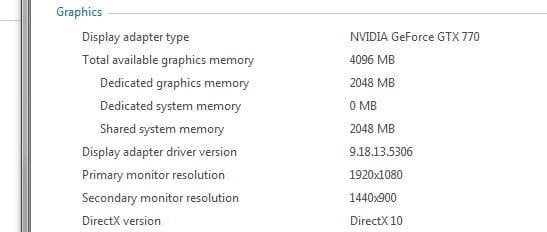
Could you post a shot of your WEI showing the Graphics section, you have to click on View and print detailed performance and system information on the right hand side to bring it up then make a snip and post it.

Example
 

Attachments

  • Capture.JPG
    Capture.JPG
    20.5 KB · Views: 14

My Computer My Computer

At a glance

Windows 10 Pro x64Intel Core i7 6700KGSkill TridentZ RGB 16GB 3600 16-16-16-36EVGA GTX 980 Ti SC x2
Computer type
PC/Desktop
Computer Manufacturer/Model Number
Skylake Special #666
OS
Windows 10 Pro x64
CPU
Intel Core i7 6700K
Motherboard
Asus Sabertooth Z170 Mark 1
Memory
GSkill TridentZ RGB 16GB 3600 16-16-16-36
Graphics Card(s)
EVGA GTX 980 Ti SC x2
Sound Card
Realtek High Definition
Monitor(s) Displays
AOC G2460PG
Screen Resolution
1920 x 1080 144Hz
Hard Drives
Samsung 860 Pro 256GB, Seagate Barracuda 4TB x2
PSU
EVGA 1000 P2, EVGA White Custom Braided Cables
Case
Corsair Vengeance C70 Gunmetal Black
Cooling
Corsair H100i v2, Corsair ML120 x2, Thermal Grizzly Kryonaut
Keyboard
Logitech G910 Orion Spectrum
Mouse
Logitech G700s
Internet Speed
Verizon Fios Quantum Gateway 75/75
Antivirus
Windows Defender, Malwarebytes Free 3.8.3
Browser
Chrome
Other Info
Corsair SP120 x4, LG Blu-ray Drive, Durabrand HT-395 100 Watt Dolby Digital Amp, Corsair H2100 Wireless 7.1 Headset
Back
Top