I have googled this to no end, so now I post...
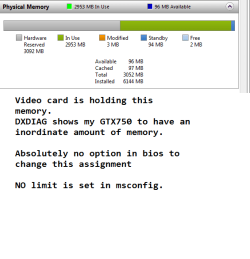
I have 6gb system memory. 3gb is available to windows.
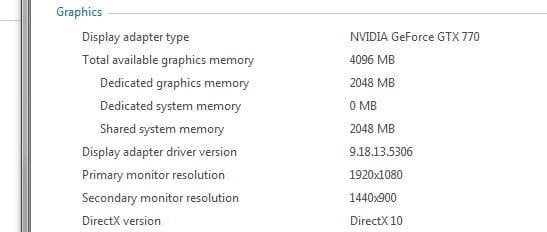
My GTX750 is holding this extra memory- this was confirmed by checking graphics memory in DXDIAG - my card shows to have 4GB which accounts for the lost memory.
Google is full of a million hits of the same two fixes:
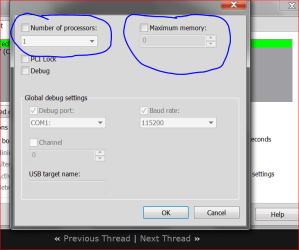
1- msconfig > boot > advanced > remove memory limit --- No memory limit has been set, this is fruitless.
2- Check bios and reassign the memory back to the system. --- Just spent half an hour going through my BIOS - there is absolutely no option, at all, anywhere to do this. I have used hundreds of different BIOS in my time - so this totally baffles me.
Phenom x4 840
Gigabyte GA-970A-D3P
nvidia GTX 750 1GB
Anyone have experience with this board?
Cheers
I have 6gb system memory. 3gb is available to windows.
My GTX750 is holding this extra memory- this was confirmed by checking graphics memory in DXDIAG - my card shows to have 4GB which accounts for the lost memory.
Google is full of a million hits of the same two fixes:
1- msconfig > boot > advanced > remove memory limit --- No memory limit has been set, this is fruitless.
2- Check bios and reassign the memory back to the system. --- Just spent half an hour going through my BIOS - there is absolutely no option, at all, anywhere to do this. I have used hundreds of different BIOS in my time - so this totally baffles me.
Phenom x4 840
Gigabyte GA-970A-D3P
nvidia GTX 750 1GB
Anyone have experience with this board?
Cheers
My Computer
At a glance
Windows 7 Ultimate x64Phenom II 840 x4 AM36GB DDR3-1600Sapphire HD4850 512MB
- Computer type
- PC/Desktop
- Computer Manufacturer/Model Number
- Custom Build
- OS
- Windows 7 Ultimate x64
- CPU
- Phenom II 840 x4 AM3
- Motherboard
- Asus M4A78T-E
- Memory
- 6GB DDR3-1600
- Graphics Card(s)
- Sapphire HD4850 512MB
- Hard Drives
- Samsung 840 Pro SSD 128GB
WD Green 2TB
- Browser
- Firefox