Solved stutter when scrolling in browser

iknowjohnny

New member
Power User
VIP
Local time
11:10 AM
Messages
237
This seems to happen no matter the browser. As i am scrolling up or down the page it will stop or freeze for a split second then continue. I have gone into the scroll settings an unchecked things and tried deactivating addons to no avail in pale moon or firefox to no avail. What global thing could cause this? 3 gigs of ram on windows 7 with a good processor. Nothing in startup other than a few things, i keep tghe machine lean. But it IS my PC at work so maybe a network thing. I can't ask IT to help, as they won't bother with this kind of thing.

I also have another symtom that i think is due to the same problem. When typing the cursor will freeze and the last few letters i typed will not show up for several seconds, then they all are rendered quickly.
 

My Computer

OS
windows 7 professional
Hi iknowjohnny,

Please could you list the web-browsers you have used, in which this issue occurs.

Thanks,

MistUnleashed
 

My Computer

Computer type
PC/Desktop
Computer Manufacturer/Model Number
Custom Build
OS
Windows 7 Ultimate x64
CPU
Intel Core i7 Socket 1156 LGA
Motherboard
Asus P7P55D-E LX
Memory
Corsair Dominator 4GB DDR3
Graphics Card(s)
Gainward GTX 460
Monitor(s) Displays
Acer V243HL
Screen Resolution
1920x1080
Hard Drives
Western Digital 1TB HDD
PSU
Antec TruePower 650W
Case
Antec 300
Cooling
Thermalrite CPU Cooler
Antivirus
Avast Anti-Virus
ff, pale moon and IE
 

My Computer

OS
windows 7 professional
Please could you try recreate this problem in Google Chrome and let me know if the issue still persists?

Chrome DL Link: Chrome

Thanks.
 

My Computer

Computer type
PC/Desktop
Computer Manufacturer/Model Number
Custom Build
OS
Windows 7 Ultimate x64
CPU
Intel Core i7 Socket 1156 LGA
Motherboard
Asus P7P55D-E LX
Memory
Corsair Dominator 4GB DDR3
Graphics Card(s)
Gainward GTX 460
Monitor(s) Displays
Acer V243HL
Screen Resolution
1920x1080
Hard Drives
Western Digital 1TB HDD
PSU
Antec TruePower 650W
Case
Antec 300
Cooling
Thermalrite CPU Cooler
Antivirus
Avast Anti-Virus
Some times when a web page isn't completely loaded you will get a pause with mouse scrolling.

When this happens how many web pages do you have open?

Is this computer yours or is it a company computer under the control of a I.T. department?
 

My Computer

Computer type
PC/Desktop
Computer Manufacturer/Model Number
Home made Desktop
OS
Windows 10 Pro. 64/ version 1709 Windows 7 Pro/64
CPU
Intel i7-6800K @ 4.3
Motherboard
ASUS X-99 Deluxe II
Memory
Corsair Platinum 16 gig @2400
Graphics Card(s)
EVGA GTX 1070 OC
Monitor(s) Displays
Asus 27" LED LCD/VE278Q
Screen Resolution
1920-1080 or 1280-720 HDMI
Hard Drives
INTEL SSD 730-240 Gb Sata 3.0/
PSU
EVGA Platium 1200W
Case
Phanteks Luxe Tempered Glass 8 fans/ one radiator
Cooling
XSPC/ Water Cooled CPU
Keyboard
Das 4 Professional
Mouse
Logitech M705/MX Anywhere 2-S
Internet Speed
100 mbits
Antivirus
Microsoft Security Essentials/ Malwarebytes Premium 3.0/ SAS
Browser
I.E. 11 default/Firefox/ ISP Time Warner Cable/Spectrum
Other Info
LG BluRay Burner/
Sound system-KLipsch-THX/
Icy Dock ssd Hot Swap bays.
This seems to happen no matter the browser. As i am scrolling up or down the page it will stop or freeze for a split second then continue. I have gone into the scroll settings an unchecked things and tried deactivating addons to no avail in pale moon or firefox to no avail. What global thing could cause this? 3 gigs of ram on windows 7 with a good processor. Nothing in startup other than a few things, i keep tghe machine lean. But it IS my PC at work so maybe a network thing. I can't ask IT to help, as they won't bother with this kind of thing.

I also have another symtom that i think is due to the same problem. When typing the cursor will freeze and the last few letters i typed will not show up for several seconds, then they all are rendered quickly.

I have the same exact scrolling issue with Firefox. Very annoying and I have no idea why it happens. 3GB RAM on my system too. I get the text issue too but only when other tabs are freezing things up for me.
 

My Computer

Computer type
PC/Desktop
Computer Manufacturer/Model Number
custom build
OS
Windows 7 32bit Home Premium
CPU
Intel Core I7 920 Bloomfield
Motherboard
Asus P6T Deluxe v1
Memory
3 GB Corsair DDR3 (3x1GB)
Graphics Card(s)
NVidia GTX 570 (1 GB RAM)
Sound Card
on board
Monitor(s) Displays
Dell P2314H
Screen Resolution
1920x1080
Hard Drives
Western Digital Black 1TB (main OS)
PSU
XION Supernova XON-800R14N 800W
Case
Antec 1200
Cooling
Arctic Freezer 7 Pro Rev. 2
Keyboard
AZIO Prism
Mouse
Logitech G700S
Internet Speed
Verizon FiOS 85/85
Antivirus
Avast
Browser
Firefox/Chrome
Other Info
SansDigital rr622 RocketRaid (with non-raid Driver)
Renesas USB 3.0 card
Have you tried using CCleaner to clean out all of your junk / temp files as well as clean the registry? It's a great tool and only takes about a minute to run.

Download from here: CCleaner - Download

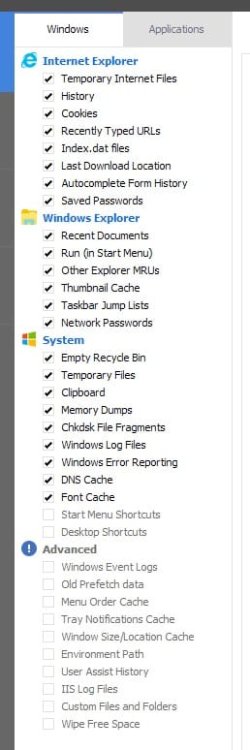
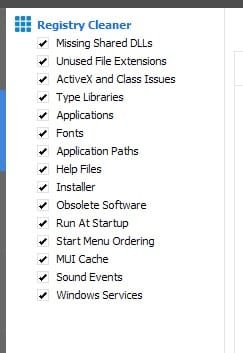
Please run both the 'Cleaner' and the 'Registry' on the settings I've attached.

The Cleaner tab 'Applications' should have everything ticked/selected.

Let me know how it goes.

MistUnleashed
 

Attachments

  • CCleanerSettings.jpg
    CCleanerSettings.jpg
    69.4 KB · Views: 0
  • CCleanerSettings2.jpg
    CCleanerSettings2.jpg
    27.7 KB · Views: 17
Last edited:

My Computer

Computer type
PC/Desktop
Computer Manufacturer/Model Number
Custom Build
OS
Windows 7 Ultimate x64
CPU
Intel Core i7 Socket 1156 LGA
Motherboard
Asus P7P55D-E LX
Memory
Corsair Dominator 4GB DDR3
Graphics Card(s)
Gainward GTX 460
Monitor(s) Displays
Acer V243HL
Screen Resolution
1920x1080
Hard Drives
Western Digital 1TB HDD
PSU
Antec TruePower 650W
Case
Antec 300
Cooling
Thermalrite CPU Cooler
Antivirus
Avast Anti-Virus
Just giving my own experience here. I use ccleaner regularly as part of maintenance, and it makes no difference on the behavior of Firefox. I still get that stutter.
 

My Computer

Computer type
PC/Desktop
Computer Manufacturer/Model Number
custom build
OS
Windows 7 32bit Home Premium
CPU
Intel Core I7 920 Bloomfield
Motherboard
Asus P6T Deluxe v1
Memory
3 GB Corsair DDR3 (3x1GB)
Graphics Card(s)
NVidia GTX 570 (1 GB RAM)
Sound Card
on board
Monitor(s) Displays
Dell P2314H
Screen Resolution
1920x1080
Hard Drives
Western Digital Black 1TB (main OS)
PSU
XION Supernova XON-800R14N 800W
Case
Antec 1200
Cooling
Arctic Freezer 7 Pro Rev. 2
Keyboard
AZIO Prism
Mouse
Logitech G700S
Internet Speed
Verizon FiOS 85/85
Antivirus
Avast
Browser
Firefox/Chrome
Other Info
SansDigital rr622 RocketRaid (with non-raid Driver)
Renesas USB 3.0 card
Just giving my own experience here. I use ccleaner regularly as part of maintenance, and it makes no difference on the behavior of Firefox. I still get that stutter.

I was hoping it to be a bad temporary file in the system. We'll let iknowjohnny have a go and see what the outcome is. You may be facing different issues that just have the same symptoms!
 

My Computer

Computer type
PC/Desktop
Computer Manufacturer/Model Number
Custom Build
OS
Windows 7 Ultimate x64
CPU
Intel Core i7 Socket 1156 LGA
Motherboard
Asus P7P55D-E LX
Memory
Corsair Dominator 4GB DDR3
Graphics Card(s)
Gainward GTX 460
Monitor(s) Displays
Acer V243HL
Screen Resolution
1920x1080
Hard Drives
Western Digital 1TB HDD
PSU
Antec TruePower 650W
Case
Antec 300
Cooling
Thermalrite CPU Cooler
Antivirus
Avast Anti-Virus
Just giving my own experience here. I use ccleaner regularly as part of maintenance, and it makes no difference on the behavior of Firefox. I still get that stutter.

I was hoping it to be a bad temporary file in the system. We'll let iknowjohnny have a go and see what the outcome is. You may be facing different issues that just have the same symptoms!

I'm having some serious memory management issues with Firefox that I'm discussing in another thread, so I wouldn't be surprised if it's a memory issue that's causing the stuttering for me. I wonder if the OP is also having large memory consumption by Firefox?
 

My Computer

Computer type
PC/Desktop
Computer Manufacturer/Model Number
custom build
OS
Windows 7 32bit Home Premium
CPU
Intel Core I7 920 Bloomfield
Motherboard
Asus P6T Deluxe v1
Memory
3 GB Corsair DDR3 (3x1GB)
Graphics Card(s)
NVidia GTX 570 (1 GB RAM)
Sound Card
on board
Monitor(s) Displays
Dell P2314H
Screen Resolution
1920x1080
Hard Drives
Western Digital Black 1TB (main OS)
PSU
XION Supernova XON-800R14N 800W
Case
Antec 1200
Cooling
Arctic Freezer 7 Pro Rev. 2
Keyboard
AZIO Prism
Mouse
Logitech G700S
Internet Speed
Verizon FiOS 85/85
Antivirus
Avast
Browser
Firefox/Chrome
Other Info
SansDigital rr622 RocketRaid (with non-raid Driver)
Renesas USB 3.0 card
I'm having some serious memory management issues with Firefox that I'm discussing in another thread, so I wouldn't be surprised if it's a memory issue that's causing the stuttering for me. I wonder if the OP is also having large memory consumption by Firefox?


Two things:

  1. Have you tried resetting Firefox to factory settings?
  2. Have you ran ADWCleaner to scan for any bad addons/things hiding in your browser?
ADWCleaner Link: https://toolslib.net/downloads/viewdownload/1-adwcleaner/
 

My Computer

Computer type
PC/Desktop
Computer Manufacturer/Model Number
Custom Build
OS
Windows 7 Ultimate x64
CPU
Intel Core i7 Socket 1156 LGA
Motherboard
Asus P7P55D-E LX
Memory
Corsair Dominator 4GB DDR3
Graphics Card(s)
Gainward GTX 460
Monitor(s) Displays
Acer V243HL
Screen Resolution
1920x1080
Hard Drives
Western Digital 1TB HDD
PSU
Antec TruePower 650W
Case
Antec 300
Cooling
Thermalrite CPU Cooler
Antivirus
Avast Anti-Virus
1-yes, and i will never do that again.
2-no

I'll look at that cleaner, but if like that CC cleaner someone posted, i don;'t want to lose all my settings and temp files and such. Been there done that rarely helps, always causes me headaches.
 

My Computer

OS
windows 7 professional
1-yes, and i will never do that again.
2-no

I'll look at that cleaner, but if like that CC cleaner someone posted, i don;'t want to lose all my settings and temp files and such. Been there done that rarely helps, always causes me headaches.

I posted about CCleaner :)

Cleaning temporary files is a good thing for your system, there's a reason they're temporary!

Running it will not reset/change your settings, CCleaner is for clearing temporary files and left over files from previous installations etc. Stuff that your computer will do better without... it will/may even boost your overall computer speed.

Try both CCleaner and ADWCleaner and post back the results. Also with ADWCleaner post the scan log please!

Thanks!
 

My Computer

Computer type
PC/Desktop
Computer Manufacturer/Model Number
Custom Build
OS
Windows 7 Ultimate x64
CPU
Intel Core i7 Socket 1156 LGA
Motherboard
Asus P7P55D-E LX
Memory
Corsair Dominator 4GB DDR3
Graphics Card(s)
Gainward GTX 460
Monitor(s) Displays
Acer V243HL
Screen Resolution
1920x1080
Hard Drives
Western Digital 1TB HDD
PSU
Antec TruePower 650W
Case
Antec 300
Cooling
Thermalrite CPU Cooler
Antivirus
Avast Anti-Virus
I tried that ADWcleaner but again, it screws things up. Luckily i knew it probably would and instead of deleting files it suggested i renamed them then restarted the browser to find all my settings gone. I just deleted the newly generated file and renamed the old one back to normal to get it all back. But thats why i don't like doing these things. Plus i was quite sure it wasn't going to be something like that. And sure enough in a google search i found a mention of this issue related to outdated drivers and did a total intel system driver update which fixed it. Thanks for the replies in any case.
 

My Computer

OS
windows 7 professional
Back
Top