Solved System reserved on D-drive, Windows on C-drive booboo...

johnlewismcleod

New member
Local time
5:05 AM
Messages
10
I know it's a fairly common rookie mistake, but I'm a plumber by trade and I don't get much experience building PCs...so I apologize for my carelessness, but still hope someone is willing to bail me out with this.

I muffed my image restore attempt after a nearly complete hardware upgrade, and decided to go ahead and reinstall windows and restore files to a clean install, but I left both new SSD disks in when I installed Windows 7 Pro 64 bit.

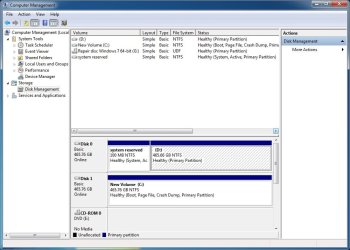
Now I've got my System reserve on one disk, and my Windows C-drive on another....and I spent many, many hours reloading programs and data to complete the restore before I realized what I had done :confused:

My desktop boots fine after stopping and forcing me to choose which "Windows 7" install I want to use during boot up :(, but I'm hoping one of you all can tell me how to recombine windows on C-drive so it will boot without stalling on "two" Windows installs and make backing up understandable for a simple man like me.

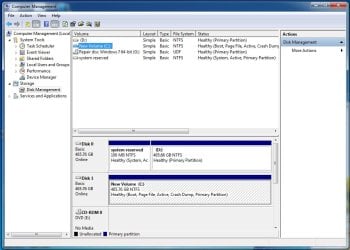
This is a screen shot of what I've got now:
 

Attachments
  • capture-Ooops.jpg
    capture-Ooops.jpg
    79.6 KB · Views: 3
Last edited:

My Computer My Computer

At a glance

Windows 7 Professional 64-bitIntel(R) Core (TM) i7-4790K CPU @ 4.00Hz 4.00GHz16 Gig Corsair CMZ16GX3M2A1600C10 (XMP READY)NVIDIA GeForce GTX 960
Computer type
PC/Desktop
Computer Manufacturer/Model Number
Custom build
OS
Windows 7 Professional 64-bit
CPU
Intel(R) Core (TM) i7-4790K CPU @ 4.00Hz 4.00GHz
Motherboard
ASUS Z97-A LGA 1150 Intel Z97 HDMI SATA 6Gb/s USB 3.0 ATX In
Memory
16 Gig Corsair CMZ16GX3M2A1600C10 (XMP READY)
Graphics Card(s)
NVIDIA GeForce GTX 960
Monitor(s) Displays
HannsG 28" 1080P
Screen Resolution
1920 x 1200
Hard Drives
2 - SAMSUNG 850 EVO MZ-75E500B/AM 2.5" 500GB SATA III 3-D Vertical Internal Solid State Drive (SSD)
PSU
EVGA 220-GS-0550-V1 550W ATX12V / EPS12V SLI Ready CrossFire
Case
Thermaltake Midsize ATX
Cooling
Noctua NH-D14 120mm & 140mm SSO CPU Cooler
Keyboard
USB basic
Mouse
USB basic
Internet Speed
Broadband on the low end of expectations
Antivirus
Norton 360 and Malwarebytes
Browser
Chrome, Firefox, Explorer
You don't need system reserved per se, but you do need the files within it.

Notice that system reserved in your pic is marked "system". That indicates that your boot files are in that partition.

You can copy those files to C using this tutorial and application:

http://www.sevenforums.com/tutorials/209885-bootmgr-move-c-easybcd.html

After you do that, system reserved would be unneeded (unless you use "BitLocker", unlikely). So you could delete it.

You would need to mark the C partition as "active" after you move the files.

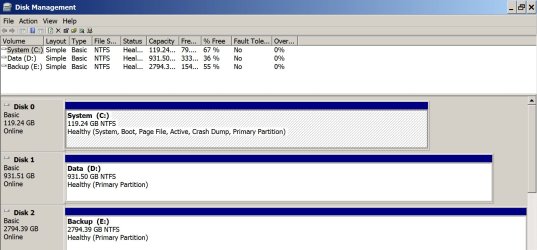
Here's a pic of my Disk Management. Notice I have no system reserved. Notice that C is marked as "system".
 

Attachments

  • Untitled-1.jpg
    Untitled-1.jpg
    156.4 KB · Views: 2

My Computer My Computer

At a glance

Windows 7 Home Premium SP1, 64-bitIntel Skylake i5-6600K, not overclocked8 GB HyperX DDR4-2666 (2 x 4 GB)none; graphics are integrated on CPU
Computer type
PC/Desktop
Computer Manufacturer/Model Number
Ignatz Special; 4 speed manual gearbox; factory air conditioning; one of one
OS
Windows 7 Home Premium SP1, 64-bit
CPU
Intel Skylake i5-6600K, not overclocked
Motherboard
AsRock Z170M Extreme 4, micro ATX
Memory
8 GB HyperX DDR4-2666 (2 x 4 GB)
Graphics Card(s)
none; graphics are integrated on CPU
Sound Card
onboard: Realtek ALC1150; external: USB Behringer UF0-202
Monitor(s) Displays
Dell S2340M 23 inch IPS
Screen Resolution
1600 x 900
Hard Drives
System: Crucial MX100 series SSD, 128 GB;
Data: Samsung Spinpoint 103SJ, 1 TB;
Backup: WD Caviar Green WD30EZRX-00D8PB0, 3 TB
PSU
Rosewill SilentNight 500 watt fanless, semi-modular
Case
Antec Solo II
Cooling
Noctua NH-U12S; Noctua F12 intake, Noctua S12A exhaust
Keyboard
Microsoft 200 6JH-00001 USB
Mouse
Dell or Microsoft optical wired; USB
Antivirus
Microsoft Security Essentials and Malwarebytes Premium
Browser
Pale Moon
Other Info
All fans PWM; speeds at idle: CPU circa 500 rpm; intake circa 600 rpm; exhaust circa 600 rpm; CPU temps 27 idle and 47 C load in a warm room (27 C/81 F) when running Intel Extreme Tuning Utility stress test.
Thanks very much, ignatzatsonic :)

I used EasyBCD and copied the system section of D-drive to C-drive. I got the message that it was a successful task, but now I can't seem to figure out how to make C-drive "active"...it's still listed as New Volume and not System.

Can anyone tell me how to make it the System drive?
 

My Computer My Computer

At a glance

Windows 7 Professional 64-bitIntel(R) Core (TM) i7-4790K CPU @ 4.00Hz 4.00GHz16 Gig Corsair CMZ16GX3M2A1600C10 (XMP READY)NVIDIA GeForce GTX 960
Computer type
PC/Desktop
Computer Manufacturer/Model Number
Custom build
OS
Windows 7 Professional 64-bit
CPU
Intel(R) Core (TM) i7-4790K CPU @ 4.00Hz 4.00GHz
Motherboard
ASUS Z97-A LGA 1150 Intel Z97 HDMI SATA 6Gb/s USB 3.0 ATX In
Memory
16 Gig Corsair CMZ16GX3M2A1600C10 (XMP READY)
Graphics Card(s)
NVIDIA GeForce GTX 960
Monitor(s) Displays
HannsG 28" 1080P
Screen Resolution
1920 x 1200
Hard Drives
2 - SAMSUNG 850 EVO MZ-75E500B/AM 2.5" 500GB SATA III 3-D Vertical Internal Solid State Drive (SSD)
PSU
EVGA 220-GS-0550-V1 550W ATX12V / EPS12V SLI Ready CrossFire
Case
Thermaltake Midsize ATX
Cooling
Noctua NH-D14 120mm & 140mm SSO CPU Cooler
Keyboard
USB basic
Mouse
USB basic
Internet Speed
Broadband on the low end of expectations
Antivirus
Norton 360 and Malwarebytes
Browser
Chrome, Firefox, Explorer
Post a pic of Disk Management.

What choices do you see from the "action" menu and then "all tasks" in Disk Management, AFTER you highlight C?
 

My Computer My Computer

At a glance

Windows 7 Home Premium SP1, 64-bitIntel Skylake i5-6600K, not overclocked8 GB HyperX DDR4-2666 (2 x 4 GB)none; graphics are integrated on CPU
Computer type
PC/Desktop
Computer Manufacturer/Model Number
Ignatz Special; 4 speed manual gearbox; factory air conditioning; one of one
OS
Windows 7 Home Premium SP1, 64-bit
CPU
Intel Skylake i5-6600K, not overclocked
Motherboard
AsRock Z170M Extreme 4, micro ATX
Memory
8 GB HyperX DDR4-2666 (2 x 4 GB)
Graphics Card(s)
none; graphics are integrated on CPU
Sound Card
onboard: Realtek ALC1150; external: USB Behringer UF0-202
Monitor(s) Displays
Dell S2340M 23 inch IPS
Screen Resolution
1600 x 900
Hard Drives
System: Crucial MX100 series SSD, 128 GB;
Data: Samsung Spinpoint 103SJ, 1 TB;
Backup: WD Caviar Green WD30EZRX-00D8PB0, 3 TB
PSU
Rosewill SilentNight 500 watt fanless, semi-modular
Case
Antec Solo II
Cooling
Noctua NH-U12S; Noctua F12 intake, Noctua S12A exhaust
Keyboard
Microsoft 200 6JH-00001 USB
Mouse
Dell or Microsoft optical wired; USB
Antivirus
Microsoft Security Essentials and Malwarebytes Premium
Browser
Pale Moon
Other Info
All fans PWM; speeds at idle: CPU circa 500 rpm; intake circa 600 rpm; exhaust circa 600 rpm; CPU temps 27 idle and 47 C load in a warm room (27 C/81 F) when running Intel Extreme Tuning Utility stress test.
Unfortunately it auto-closes the action menus when I pick screen capture, so I can only list the select-able options:

The action tab offers:

Refresh

Rescan disks

Create VHD

Attach VHD

All tasks> Open, Explore, Change letter drive and paths, Shrink volume, and Properties.

Under All tasks there is a listing of Mark partition as active, but it's not select-able.
 

My Computer My Computer

At a glance

Windows 7 Professional 64-bitIntel(R) Core (TM) i7-4790K CPU @ 4.00Hz 4.00GHz16 Gig Corsair CMZ16GX3M2A1600C10 (XMP READY)NVIDIA GeForce GTX 960
Computer type
PC/Desktop
Computer Manufacturer/Model Number
Custom build
OS
Windows 7 Professional 64-bit
CPU
Intel(R) Core (TM) i7-4790K CPU @ 4.00Hz 4.00GHz
Motherboard
ASUS Z97-A LGA 1150 Intel Z97 HDMI SATA 6Gb/s USB 3.0 ATX In
Memory
16 Gig Corsair CMZ16GX3M2A1600C10 (XMP READY)
Graphics Card(s)
NVIDIA GeForce GTX 960
Monitor(s) Displays
HannsG 28" 1080P
Screen Resolution
1920 x 1200
Hard Drives
2 - SAMSUNG 850 EVO MZ-75E500B/AM 2.5" 500GB SATA III 3-D Vertical Internal Solid State Drive (SSD)
PSU
EVGA 220-GS-0550-V1 550W ATX12V / EPS12V SLI Ready CrossFire
Case
Thermaltake Midsize ATX
Cooling
Noctua NH-D14 120mm & 140mm SSO CPU Cooler
Keyboard
USB basic
Mouse
USB basic
Internet Speed
Broadband on the low end of expectations
Antivirus
Norton 360 and Malwarebytes
Browser
Chrome, Firefox, Explorer
Unfortunately it auto-closes the action menus when I pick screen capture, so I can only list the select-able options:

The action tab offers:

Refresh

Rescan disks

Create VHD

Attach VHD

All tasks> Open, Explore, Change letter drive and paths, Shrink volume, and Properties.

Under All tasks there is a listing of Mark partition as active, but it's not select-able.

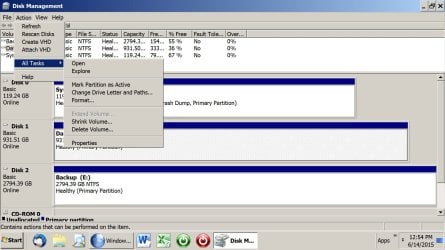
Are you sure this "non-selectable" is AFTER C is highlighted with the mouse.

Pic below shows my menu when I have highlighted my inactive D partition, showing the choice to make it active.
 

Attachments

  • Untitled-1.jpg
    Untitled-1.jpg
    194.1 KB · Views: 0

My Computer My Computer

At a glance

Windows 7 Home Premium SP1, 64-bitIntel Skylake i5-6600K, not overclocked8 GB HyperX DDR4-2666 (2 x 4 GB)none; graphics are integrated on CPU
Computer type
PC/Desktop
Computer Manufacturer/Model Number
Ignatz Special; 4 speed manual gearbox; factory air conditioning; one of one
OS
Windows 7 Home Premium SP1, 64-bit
CPU
Intel Skylake i5-6600K, not overclocked
Motherboard
AsRock Z170M Extreme 4, micro ATX
Memory
8 GB HyperX DDR4-2666 (2 x 4 GB)
Graphics Card(s)
none; graphics are integrated on CPU
Sound Card
onboard: Realtek ALC1150; external: USB Behringer UF0-202
Monitor(s) Displays
Dell S2340M 23 inch IPS
Screen Resolution
1600 x 900
Hard Drives
System: Crucial MX100 series SSD, 128 GB;
Data: Samsung Spinpoint 103SJ, 1 TB;
Backup: WD Caviar Green WD30EZRX-00D8PB0, 3 TB
PSU
Rosewill SilentNight 500 watt fanless, semi-modular
Case
Antec Solo II
Cooling
Noctua NH-U12S; Noctua F12 intake, Noctua S12A exhaust
Keyboard
Microsoft 200 6JH-00001 USB
Mouse
Dell or Microsoft optical wired; USB
Antivirus
Microsoft Security Essentials and Malwarebytes Premium
Browser
Pale Moon
Other Info
All fans PWM; speeds at idle: CPU circa 500 rpm; intake circa 600 rpm; exhaust circa 600 rpm; CPU temps 27 idle and 47 C load in a warm room (27 C/81 F) when running Intel Extreme Tuning Utility stress test.
Yes...very sure.

This is what Disk Management looks like currently:
 

Attachments

  • After EasyBCD.jpg
    After EasyBCD.jpg
    83.9 KB · Views: 2

My Computer My Computer

At a glance

Windows 7 Professional 64-bitIntel(R) Core (TM) i7-4790K CPU @ 4.00Hz 4.00GHz16 Gig Corsair CMZ16GX3M2A1600C10 (XMP READY)NVIDIA GeForce GTX 960
Computer type
PC/Desktop
Computer Manufacturer/Model Number
Custom build
OS
Windows 7 Professional 64-bit
CPU
Intel(R) Core (TM) i7-4790K CPU @ 4.00Hz 4.00GHz
Motherboard
ASUS Z97-A LGA 1150 Intel Z97 HDMI SATA 6Gb/s USB 3.0 ATX In
Memory
16 Gig Corsair CMZ16GX3M2A1600C10 (XMP READY)
Graphics Card(s)
NVIDIA GeForce GTX 960
Monitor(s) Displays
HannsG 28" 1080P
Screen Resolution
1920 x 1200
Hard Drives
2 - SAMSUNG 850 EVO MZ-75E500B/AM 2.5" 500GB SATA III 3-D Vertical Internal Solid State Drive (SSD)
PSU
EVGA 220-GS-0550-V1 550W ATX12V / EPS12V SLI Ready CrossFire
Case
Thermaltake Midsize ATX
Cooling
Noctua NH-D14 120mm & 140mm SSO CPU Cooler
Keyboard
USB basic
Mouse
USB basic
Internet Speed
Broadband on the low end of expectations
Antivirus
Norton 360 and Malwarebytes
Browser
Chrome, Firefox, Explorer
Ah-hah!

I just noticed that it is listed as active in the drive info...it's just not tagged as Active like yours is.

Maybe it's already done and I don't need to do anything else but alter the tag discription :p

Can I do a valid boot test without erasing the original system section on D-drive, or do I need to commit and erase everything from D to know if I've accomplished my goal?
 

My Computer My Computer

At a glance

Windows 7 Professional 64-bitIntel(R) Core (TM) i7-4790K CPU @ 4.00Hz 4.00GHz16 Gig Corsair CMZ16GX3M2A1600C10 (XMP READY)NVIDIA GeForce GTX 960
Computer type
PC/Desktop
Computer Manufacturer/Model Number
Custom build
OS
Windows 7 Professional 64-bit
CPU
Intel(R) Core (TM) i7-4790K CPU @ 4.00Hz 4.00GHz
Motherboard
ASUS Z97-A LGA 1150 Intel Z97 HDMI SATA 6Gb/s USB 3.0 ATX In
Memory
16 Gig Corsair CMZ16GX3M2A1600C10 (XMP READY)
Graphics Card(s)
NVIDIA GeForce GTX 960
Monitor(s) Displays
HannsG 28" 1080P
Screen Resolution
1920 x 1200
Hard Drives
2 - SAMSUNG 850 EVO MZ-75E500B/AM 2.5" 500GB SATA III 3-D Vertical Internal Solid State Drive (SSD)
PSU
EVGA 220-GS-0550-V1 550W ATX12V / EPS12V SLI Ready CrossFire
Case
Thermaltake Midsize ATX
Cooling
Noctua NH-D14 120mm & 140mm SSO CPU Cooler
Keyboard
USB basic
Mouse
USB basic
Internet Speed
Broadband on the low end of expectations
Antivirus
Norton 360 and Malwarebytes
Browser
Chrome, Firefox, Explorer
I do notice that it doesn't list "system" as a current property, though :shock:
 

My Computer My Computer

At a glance

Windows 7 Professional 64-bitIntel(R) Core (TM) i7-4790K CPU @ 4.00Hz 4.00GHz16 Gig Corsair CMZ16GX3M2A1600C10 (XMP READY)NVIDIA GeForce GTX 960
Computer type
PC/Desktop
Computer Manufacturer/Model Number
Custom build
OS
Windows 7 Professional 64-bit
CPU
Intel(R) Core (TM) i7-4790K CPU @ 4.00Hz 4.00GHz
Motherboard
ASUS Z97-A LGA 1150 Intel Z97 HDMI SATA 6Gb/s USB 3.0 ATX In
Memory
16 Gig Corsair CMZ16GX3M2A1600C10 (XMP READY)
Graphics Card(s)
NVIDIA GeForce GTX 960
Monitor(s) Displays
HannsG 28" 1080P
Screen Resolution
1920 x 1200
Hard Drives
2 - SAMSUNG 850 EVO MZ-75E500B/AM 2.5" 500GB SATA III 3-D Vertical Internal Solid State Drive (SSD)
PSU
EVGA 220-GS-0550-V1 550W ATX12V / EPS12V SLI Ready CrossFire
Case
Thermaltake Midsize ATX
Cooling
Noctua NH-D14 120mm & 140mm SSO CPU Cooler
Keyboard
USB basic
Mouse
USB basic
Internet Speed
Broadband on the low end of expectations
Antivirus
Norton 360 and Malwarebytes
Browser
Chrome, Firefox, Explorer
Ah-hah!

I just noticed that it is listed as active in the drive info...it's just not tagged as Active like yours is.

Maybe it's already done and I don't need to do anything else but alter the tag discription :p

Can I do a valid boot test without erasing the original system section on D-drive, or do I need to commit and erase everything from D to know if I've accomplished my goal?

Are my eyes bad?

Don't I see "active" attached to the C drive in your picture?

Mark System Reserved as inactive and reboot.

Then, disconnect your D drive (pull the cables) and see if you can reboot.
 

My Computer My Computer

At a glance

Windows 7 Home Premium SP1, 64-bitIntel Skylake i5-6600K, not overclocked8 GB HyperX DDR4-2666 (2 x 4 GB)none; graphics are integrated on CPU
Computer type
PC/Desktop
Computer Manufacturer/Model Number
Ignatz Special; 4 speed manual gearbox; factory air conditioning; one of one
OS
Windows 7 Home Premium SP1, 64-bit
CPU
Intel Skylake i5-6600K, not overclocked
Motherboard
AsRock Z170M Extreme 4, micro ATX
Memory
8 GB HyperX DDR4-2666 (2 x 4 GB)
Graphics Card(s)
none; graphics are integrated on CPU
Sound Card
onboard: Realtek ALC1150; external: USB Behringer UF0-202
Monitor(s) Displays
Dell S2340M 23 inch IPS
Screen Resolution
1600 x 900
Hard Drives
System: Crucial MX100 series SSD, 128 GB;
Data: Samsung Spinpoint 103SJ, 1 TB;
Backup: WD Caviar Green WD30EZRX-00D8PB0, 3 TB
PSU
Rosewill SilentNight 500 watt fanless, semi-modular
Case
Antec Solo II
Cooling
Noctua NH-U12S; Noctua F12 intake, Noctua S12A exhaust
Keyboard
Microsoft 200 6JH-00001 USB
Mouse
Dell or Microsoft optical wired; USB
Antivirus
Microsoft Security Essentials and Malwarebytes Premium
Browser
Pale Moon
Other Info
All fans PWM; speeds at idle: CPU circa 500 rpm; intake circa 600 rpm; exhaust circa 600 rpm; CPU temps 27 idle and 47 C load in a warm room (27 C/81 F) when running Intel Extreme Tuning Utility stress test.
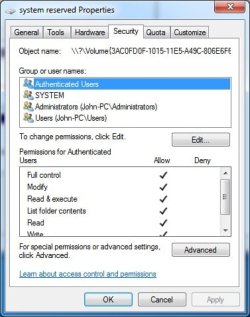
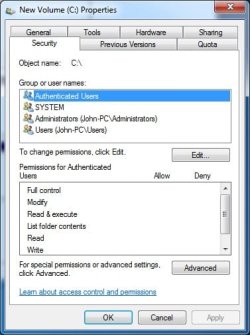
K...I found a difference in the Securities field of Disk Properties. This is what's listed for D-drive System reserved section I want to delete:
 

Attachments

  • Security properties of System Reserved section on D-drive.jpg
    Security properties of System Reserved section on D-drive.jpg
    31.9 KB · Views: 8

My Computer My Computer

At a glance

Windows 7 Professional 64-bitIntel(R) Core (TM) i7-4790K CPU @ 4.00Hz 4.00GHz16 Gig Corsair CMZ16GX3M2A1600C10 (XMP READY)NVIDIA GeForce GTX 960
Computer type
PC/Desktop
Computer Manufacturer/Model Number
Custom build
OS
Windows 7 Professional 64-bit
CPU
Intel(R) Core (TM) i7-4790K CPU @ 4.00Hz 4.00GHz
Motherboard
ASUS Z97-A LGA 1150 Intel Z97 HDMI SATA 6Gb/s USB 3.0 ATX In
Memory
16 Gig Corsair CMZ16GX3M2A1600C10 (XMP READY)
Graphics Card(s)
NVIDIA GeForce GTX 960
Monitor(s) Displays
HannsG 28" 1080P
Screen Resolution
1920 x 1200
Hard Drives
2 - SAMSUNG 850 EVO MZ-75E500B/AM 2.5" 500GB SATA III 3-D Vertical Internal Solid State Drive (SSD)
PSU
EVGA 220-GS-0550-V1 550W ATX12V / EPS12V SLI Ready CrossFire
Case
Thermaltake Midsize ATX
Cooling
Noctua NH-D14 120mm & 140mm SSO CPU Cooler
Keyboard
USB basic
Mouse
USB basic
Internet Speed
Broadband on the low end of expectations
Antivirus
Norton 360 and Malwarebytes
Browser
Chrome, Firefox, Explorer
And this is what's listed in Security permissions for C-drive:
 

Attachments

  • Security properties of C-drive.jpg
    Security properties of C-drive.jpg
    30.8 KB · Views: 8

My Computer My Computer

At a glance

Windows 7 Professional 64-bitIntel(R) Core (TM) i7-4790K CPU @ 4.00Hz 4.00GHz16 Gig Corsair CMZ16GX3M2A1600C10 (XMP READY)NVIDIA GeForce GTX 960
Computer type
PC/Desktop
Computer Manufacturer/Model Number
Custom build
OS
Windows 7 Professional 64-bit
CPU
Intel(R) Core (TM) i7-4790K CPU @ 4.00Hz 4.00GHz
Motherboard
ASUS Z97-A LGA 1150 Intel Z97 HDMI SATA 6Gb/s USB 3.0 ATX In
Memory
16 Gig Corsair CMZ16GX3M2A1600C10 (XMP READY)
Graphics Card(s)
NVIDIA GeForce GTX 960
Monitor(s) Displays
HannsG 28" 1080P
Screen Resolution
1920 x 1200
Hard Drives
2 - SAMSUNG 850 EVO MZ-75E500B/AM 2.5" 500GB SATA III 3-D Vertical Internal Solid State Drive (SSD)
PSU
EVGA 220-GS-0550-V1 550W ATX12V / EPS12V SLI Ready CrossFire
Case
Thermaltake Midsize ATX
Cooling
Noctua NH-D14 120mm & 140mm SSO CPU Cooler
Keyboard
USB basic
Mouse
USB basic
Internet Speed
Broadband on the low end of expectations
Antivirus
Norton 360 and Malwarebytes
Browser
Chrome, Firefox, Explorer
If you want to find out if your fiddling has worked, try what I said in post 10.
 

My Computer My Computer

At a glance

Windows 7 Home Premium SP1, 64-bitIntel Skylake i5-6600K, not overclocked8 GB HyperX DDR4-2666 (2 x 4 GB)none; graphics are integrated on CPU
Computer type
PC/Desktop
Computer Manufacturer/Model Number
Ignatz Special; 4 speed manual gearbox; factory air conditioning; one of one
OS
Windows 7 Home Premium SP1, 64-bit
CPU
Intel Skylake i5-6600K, not overclocked
Motherboard
AsRock Z170M Extreme 4, micro ATX
Memory
8 GB HyperX DDR4-2666 (2 x 4 GB)
Graphics Card(s)
none; graphics are integrated on CPU
Sound Card
onboard: Realtek ALC1150; external: USB Behringer UF0-202
Monitor(s) Displays
Dell S2340M 23 inch IPS
Screen Resolution
1600 x 900
Hard Drives
System: Crucial MX100 series SSD, 128 GB;
Data: Samsung Spinpoint 103SJ, 1 TB;
Backup: WD Caviar Green WD30EZRX-00D8PB0, 3 TB
PSU
Rosewill SilentNight 500 watt fanless, semi-modular
Case
Antec Solo II
Cooling
Noctua NH-U12S; Noctua F12 intake, Noctua S12A exhaust
Keyboard
Microsoft 200 6JH-00001 USB
Mouse
Dell or Microsoft optical wired; USB
Antivirus
Microsoft Security Essentials and Malwarebytes Premium
Browser
Pale Moon
Other Info
All fans PWM; speeds at idle: CPU circa 500 rpm; intake circa 600 rpm; exhaust circa 600 rpm; CPU temps 27 idle and 47 C load in a warm room (27 C/81 F) when running Intel Extreme Tuning Utility stress test.
Ah-hah!

I just noticed that it is listed as active in the drive info...it's just not tagged as Active like yours is.

Maybe it's already done and I don't need to do anything else but alter the tag discription :p

Can I do a valid boot test without erasing the original system section on D-drive, or do I need to commit and erase everything from D to know if I've accomplished my goal?

Are my eyes bad?

Don't I see "active" attached to the C drive in your picture?

Mark System Reserved as inactive and reboot.

Then, disconnect your D drive (pull the cables) and see if you can reboot.

Nope...your eyes are good, brother. It's my ignorence that's holding us back :p
 

My Computer My Computer

At a glance

Windows 7 Professional 64-bitIntel(R) Core (TM) i7-4790K CPU @ 4.00Hz 4.00GHz16 Gig Corsair CMZ16GX3M2A1600C10 (XMP READY)NVIDIA GeForce GTX 960
Computer type
PC/Desktop
Computer Manufacturer/Model Number
Custom build
OS
Windows 7 Professional 64-bit
CPU
Intel(R) Core (TM) i7-4790K CPU @ 4.00Hz 4.00GHz
Motherboard
ASUS Z97-A LGA 1150 Intel Z97 HDMI SATA 6Gb/s USB 3.0 ATX In
Memory
16 Gig Corsair CMZ16GX3M2A1600C10 (XMP READY)
Graphics Card(s)
NVIDIA GeForce GTX 960
Monitor(s) Displays
HannsG 28" 1080P
Screen Resolution
1920 x 1200
Hard Drives
2 - SAMSUNG 850 EVO MZ-75E500B/AM 2.5" 500GB SATA III 3-D Vertical Internal Solid State Drive (SSD)
PSU
EVGA 220-GS-0550-V1 550W ATX12V / EPS12V SLI Ready CrossFire
Case
Thermaltake Midsize ATX
Cooling
Noctua NH-D14 120mm & 140mm SSO CPU Cooler
Keyboard
USB basic
Mouse
USB basic
Internet Speed
Broadband on the low end of expectations
Antivirus
Norton 360 and Malwarebytes
Browser
Chrome, Firefox, Explorer
You're a freaking genius! :)

It worked, and once I rebooted it added "system" as a property to C-drive automatically.

EasyBCD automatically makes the drive it copies system reserved files to active and I missed that when I did the transfer...my sincere apologies :o

Thanks very much for hanging in there with me, ignatzatsonic...I know it must be annoying as heck to be helping someone who's not carrying their part of the load in the process :p

I'm fixed!!!
 

My Computer My Computer

At a glance

Windows 7 Professional 64-bitIntel(R) Core (TM) i7-4790K CPU @ 4.00Hz 4.00GHz16 Gig Corsair CMZ16GX3M2A1600C10 (XMP READY)NVIDIA GeForce GTX 960
Computer type
PC/Desktop
Computer Manufacturer/Model Number
Custom build
OS
Windows 7 Professional 64-bit
CPU
Intel(R) Core (TM) i7-4790K CPU @ 4.00Hz 4.00GHz
Motherboard
ASUS Z97-A LGA 1150 Intel Z97 HDMI SATA 6Gb/s USB 3.0 ATX In
Memory
16 Gig Corsair CMZ16GX3M2A1600C10 (XMP READY)
Graphics Card(s)
NVIDIA GeForce GTX 960
Monitor(s) Displays
HannsG 28" 1080P
Screen Resolution
1920 x 1200
Hard Drives
2 - SAMSUNG 850 EVO MZ-75E500B/AM 2.5" 500GB SATA III 3-D Vertical Internal Solid State Drive (SSD)
PSU
EVGA 220-GS-0550-V1 550W ATX12V / EPS12V SLI Ready CrossFire
Case
Thermaltake Midsize ATX
Cooling
Noctua NH-D14 120mm & 140mm SSO CPU Cooler
Keyboard
USB basic
Mouse
USB basic
Internet Speed
Broadband on the low end of expectations
Antivirus
Norton 360 and Malwarebytes
Browser
Chrome, Firefox, Explorer
Good job, carry on.
 

My Computer My Computer

At a glance

Windows 7 Home Premium SP1, 64-bitIntel Skylake i5-6600K, not overclocked8 GB HyperX DDR4-2666 (2 x 4 GB)none; graphics are integrated on CPU
Computer type
PC/Desktop
Computer Manufacturer/Model Number
Ignatz Special; 4 speed manual gearbox; factory air conditioning; one of one
OS
Windows 7 Home Premium SP1, 64-bit
CPU
Intel Skylake i5-6600K, not overclocked
Motherboard
AsRock Z170M Extreme 4, micro ATX
Memory
8 GB HyperX DDR4-2666 (2 x 4 GB)
Graphics Card(s)
none; graphics are integrated on CPU
Sound Card
onboard: Realtek ALC1150; external: USB Behringer UF0-202
Monitor(s) Displays
Dell S2340M 23 inch IPS
Screen Resolution
1600 x 900
Hard Drives
System: Crucial MX100 series SSD, 128 GB;
Data: Samsung Spinpoint 103SJ, 1 TB;
Backup: WD Caviar Green WD30EZRX-00D8PB0, 3 TB
PSU
Rosewill SilentNight 500 watt fanless, semi-modular
Case
Antec Solo II
Cooling
Noctua NH-U12S; Noctua F12 intake, Noctua S12A exhaust
Keyboard
Microsoft 200 6JH-00001 USB
Mouse
Dell or Microsoft optical wired; USB
Antivirus
Microsoft Security Essentials and Malwarebytes Premium
Browser
Pale Moon
Other Info
All fans PWM; speeds at idle: CPU circa 500 rpm; intake circa 600 rpm; exhaust circa 600 rpm; CPU temps 27 idle and 47 C load in a warm room (27 C/81 F) when running Intel Extreme Tuning Utility stress test.
Back
Top