johnlewismcleod
New member
- Local time
- 6:40 AM
- Messages
- 10
I know it's a fairly common rookie mistake, but I'm a plumber by trade and I don't get much experience building PCs...so I apologize for my carelessness, but still hope someone is willing to bail me out with this.
I muffed my image restore attempt after a nearly complete hardware upgrade, and decided to go ahead and reinstall windows and restore files to a clean install, but I left both new SSD disks in when I installed Windows 7 Pro 64 bit.
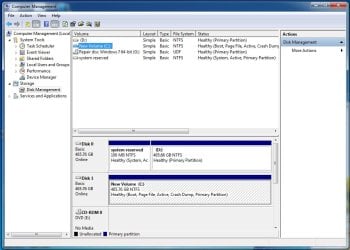
Now I've got my System reserve on one disk, and my Windows C-drive on another....and I spent many, many hours reloading programs and data to complete the restore before I realized what I had done
My desktop boots fine after stopping and forcing me to choose which "Windows 7" install I want to use during boot up , but I'm hoping one of you all can tell me how to recombine windows on C-drive so it will boot without stalling on "two" Windows installs and make backing up understandable for a simple man like me.
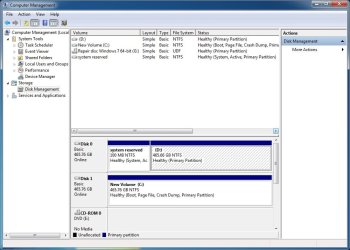
This is a screen shot of what I've got now:
I muffed my image restore attempt after a nearly complete hardware upgrade, and decided to go ahead and reinstall windows and restore files to a clean install, but I left both new SSD disks in when I installed Windows 7 Pro 64 bit.
Now I've got my System reserve on one disk, and my Windows C-drive on another....and I spent many, many hours reloading programs and data to complete the restore before I realized what I had done
My desktop boots fine after stopping and forcing me to choose which "Windows 7" install I want to use during boot up
, but I'm hoping one of you all can tell me how to recombine windows on C-drive so it will boot without stalling on "two" Windows installs and make backing up understandable for a simple man like me.This is a screen shot of what I've got now:
Attachments
Last edited:
My Computer
At a glance
Windows 7 Professional 64-bitIntel(R) Core (TM) i7-4790K CPU @ 4.00Hz 4.00GHz16 Gig Corsair CMZ16GX3M2A1600C10 (XMP READY)NVIDIA GeForce GTX 960
- Computer type
- PC/Desktop
- Computer Manufacturer/Model Number
- Custom build
- OS
- Windows 7 Professional 64-bit
- CPU
- Intel(R) Core (TM) i7-4790K CPU @ 4.00Hz 4.00GHz
- Motherboard
- ASUS Z97-A LGA 1150 Intel Z97 HDMI SATA 6Gb/s USB 3.0 ATX In
- Memory
- 16 Gig Corsair CMZ16GX3M2A1600C10 (XMP READY)
- Graphics Card(s)
- NVIDIA GeForce GTX 960
- Monitor(s) Displays
- HannsG 28" 1080P
- Screen Resolution
- 1920 x 1200
- Hard Drives
- 2 - SAMSUNG 850 EVO MZ-75E500B/AM 2.5" 500GB SATA III 3-D Vertical Internal Solid State Drive (SSD)
- PSU
- EVGA 220-GS-0550-V1 550W ATX12V / EPS12V SLI Ready CrossFire
- Case
- Thermaltake Midsize ATX
- Cooling
- Noctua NH-D14 120mm & 140mm SSO CPU Cooler
- Keyboard
- USB basic
- Mouse
- USB basic
- Internet Speed
- Broadband on the low end of expectations
- Antivirus
- Norton 360 and Malwarebytes
- Browser
- Chrome, Firefox, Explorer