Quicken 2014 & 2015 display slowness

RocketJSquirrel

New member
Local time
11:12 AM
Messages
14
Quicken 2014 & 2015 display slowly on my Dell XPS laptop. At program startup, the Quicken window flickers, flashes, and jumps around before finally settling down. Resizing Quicken windows lags badly, with the window frame taking seconds to catch up with the mouse.

My understanding is that for QW2014, Intuit moved from a really old version of Microsoft .NET (like version 2) to a newer version (I think 4). This screwed up Quicken really badly, with all sorts of issues surfacing in addition to display slowness. (E.g., CTRL keys stop working, focus gets lost, etc.)

Not every user sees all the symptoms. Apparently, most users don't see the flickering & flashing that I see. More users see repaint slowness and focus issues.

The Quicken Community has no answer for why this has been happening for the past 2 years of Quicken versions. I wonder if anyone here on the Win7 forum might have a clue.

Hopefully, my hardware configuration will show when you click on it. My Dell has 2 graphics processors, and they both exhibit the same problem with Quicken.
 

My Computer My Computer

At a glance

Windows 7 Pro 64 bitIntel i5 @ 2.3 GHz8 GBIntel integrated graphics AND Nvidia GeForce ...
Computer type
Laptop
Computer Manufacturer/Model Number
Dell XPS L702X
OS
Windows 7 Pro 64 bit
CPU
Intel i5 @ 2.3 GHz
Memory
8 GB
Graphics Card(s)
Intel integrated graphics AND Nvidia GeForce GT550M
Sound Card
Realtek High Definition Audio
Monitor(s) Displays
LG external LCD monitor
Screen Resolution
1920 x 1080
Hard Drives
Samsung 256 GB SSD
Keyboard
Evoluent Mouse-Friendly Keyboard (wired)
Mouse
Evoluent Vertical Mouse (wireless)
Internet Speed
100 Mb down/5 Mb up
Antivirus
Microsoft Security Essentials
Browser
Firefox
Click on the Start Orb and type dxdiag. In the search result list, click on dxdiag.exe.

After it runs (green bar disappears), click on Save Information at the bottom of the window. Save the text file to a convenient location then upload the file here.
 

My Computer My Computer

At a glance

Windows 7 Pro-x64i7-2600 3.4GHz - 3.8GHz Turbo8Gb - 2x4GB, Muskin 991770 PC3-1333Integrated Intel HD 2000
Computer type
PC/Desktop
Computer Manufacturer/Model Number
Built 2/11/2011
OS
Windows 7 Pro-x64
CPU
i7-2600 3.4GHz - 3.8GHz Turbo
Motherboard
Intel DH67BL-B3
Memory
8Gb - 2x4GB, Muskin 991770 PC3-1333
Graphics Card(s)
Integrated Intel HD 2000
Sound Card
Integrated Intel 10.1 HD, RealTek ALC892
Monitor(s) Displays
Asus LCD VH222H, Haier HL24XSL2a
Screen Resolution
1920x1080, 1920x1080
Hard Drives
Crucial SSD C300-128Gb,
Western Digital WD5002AALX - 500Gb,
Western Digital WD7501AALS - 750Gb
PSU
Seasonic 650W 80+ Gold Modular
Case
Rosewill Defender
Cooling
Stock CPU, Four 120mm case fans, PCH fan added
Keyboard
Logitech EX100 Y-RBH94 Wireless
Mouse
Logitech EX100 M-RCE95 Wireless
Internet Speed
3.0/1.5 Mbs
Antivirus
Microsoft Security Essentials
Browser
Microsoft Internet Explorer 11
Other Info
Antec Veris Premier-Multimedia IR Station,
Cyber Accoustics-3602 Speakers,
AFT XM-5U Card Reader,
Hauppauge TV-HVR-2250,
Sony LX300 USB Turntable
Thanks for taking the time to look at this. I hope some sip from this fire hose provides a clue.
 

Attachments

My Computer My Computer

At a glance

Windows 7 Pro 64 bitIntel i5 @ 2.3 GHz8 GBIntel integrated graphics AND Nvidia GeForce ...
Computer type
Laptop
Computer Manufacturer/Model Number
Dell XPS L702X
OS
Windows 7 Pro 64 bit
CPU
Intel i5 @ 2.3 GHz
Memory
8 GB
Graphics Card(s)
Intel integrated graphics AND Nvidia GeForce GT550M
Sound Card
Realtek High Definition Audio
Monitor(s) Displays
LG external LCD monitor
Screen Resolution
1920 x 1080
Hard Drives
Samsung 256 GB SSD
Keyboard
Evoluent Mouse-Friendly Keyboard (wired)
Mouse
Evoluent Vertical Mouse (wireless)
Internet Speed
100 Mb down/5 Mb up
Antivirus
Microsoft Security Essentials
Browser
Firefox
You might start by updating your drivers.

Driver Version: 8.15.10.2455
DDI Version: 10.1
Driver Model: WDDM 1.1
Driver Attributes: Final Retail
Driver Date/Size: 7/19/2011 15:39:54, 8310272 bytes
 

My Computer My Computer

At a glance

Windows 7 Pro-x64i7-2600 3.4GHz - 3.8GHz Turbo8Gb - 2x4GB, Muskin 991770 PC3-1333Integrated Intel HD 2000
Computer type
PC/Desktop
Computer Manufacturer/Model Number
Built 2/11/2011
OS
Windows 7 Pro-x64
CPU
i7-2600 3.4GHz - 3.8GHz Turbo
Motherboard
Intel DH67BL-B3
Memory
8Gb - 2x4GB, Muskin 991770 PC3-1333
Graphics Card(s)
Integrated Intel HD 2000
Sound Card
Integrated Intel 10.1 HD, RealTek ALC892
Monitor(s) Displays
Asus LCD VH222H, Haier HL24XSL2a
Screen Resolution
1920x1080, 1920x1080
Hard Drives
Crucial SSD C300-128Gb,
Western Digital WD5002AALX - 500Gb,
Western Digital WD7501AALS - 750Gb
PSU
Seasonic 650W 80+ Gold Modular
Case
Rosewill Defender
Cooling
Stock CPU, Four 120mm case fans, PCH fan added
Keyboard
Logitech EX100 Y-RBH94 Wireless
Mouse
Logitech EX100 M-RCE95 Wireless
Internet Speed
3.0/1.5 Mbs
Antivirus
Microsoft Security Essentials
Browser
Microsoft Internet Explorer 11
Other Info
Antec Veris Premier-Multimedia IR Station,
Cyber Accoustics-3602 Speakers,
AFT XM-5U Card Reader,
Hauppauge TV-HVR-2250,
Sony LX300 USB Turntable
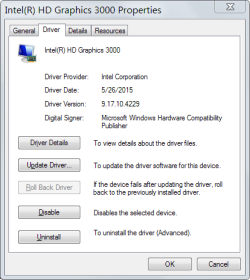
That got my hopes up. Both Win7 Device Manager and the Dell site told me I had the latest (2011) Intel graphics driver. So I went to Intel and found a 2015 driver. Full of optimism, I installed it, and got no improvement in Quicken's display behavior. Old and new driver versions shown in attachments.

Remember the other contributors to this mystery: (1) Quicken post-2013 is the only program which has this problem, and (2) the same problem appears when forcing Quicken to use the Nvidia GPU, which has much more recent drivers.

Also remember that a good deal of Quicken's code is 15 years old or more. I'm certain Quicken bypasses layers of newer Windows APIs which Quicken predates.

I'm open to the idea that this could still be a driver issue, but which drivers other than graphics/video could be at play here?
 

Attachments

  • OldIntelDriver.png
    OldIntelDriver.png
    12.5 KB · Views: 26
  • NewIntelDriver.png
    NewIntelDriver.png
    12.9 KB · Views: 26

My Computer My Computer

At a glance

Windows 7 Pro 64 bitIntel i5 @ 2.3 GHz8 GBIntel integrated graphics AND Nvidia GeForce ...
Computer type
Laptop
Computer Manufacturer/Model Number
Dell XPS L702X
OS
Windows 7 Pro 64 bit
CPU
Intel i5 @ 2.3 GHz
Memory
8 GB
Graphics Card(s)
Intel integrated graphics AND Nvidia GeForce GT550M
Sound Card
Realtek High Definition Audio
Monitor(s) Displays
LG external LCD monitor
Screen Resolution
1920 x 1080
Hard Drives
Samsung 256 GB SSD
Keyboard
Evoluent Mouse-Friendly Keyboard (wired)
Mouse
Evoluent Vertical Mouse (wireless)
Internet Speed
100 Mb down/5 Mb up
Antivirus
Microsoft Security Essentials
Browser
Firefox
There was no shortage of drivers in the DX list. :) Perhaps there's others that are interfering.

Use this tutorial on Clean Start/Boot on both the Services and Startup tab. If there are QB startups/services, leave those but uncheck all the rest except your antivirus (AV). You should have nothing but QB and your AV for this test.

By the way, I'm still using QuickBooks Pro from 1998. I tried a newer version about 2010 and returned it. Too much overhead. There were things running even when QB wasn't. The PC just crawled with QB installed.
 

My Computer My Computer

At a glance

Windows 7 Pro-x64i7-2600 3.4GHz - 3.8GHz Turbo8Gb - 2x4GB, Muskin 991770 PC3-1333Integrated Intel HD 2000
Computer type
PC/Desktop
Computer Manufacturer/Model Number
Built 2/11/2011
OS
Windows 7 Pro-x64
CPU
i7-2600 3.4GHz - 3.8GHz Turbo
Motherboard
Intel DH67BL-B3
Memory
8Gb - 2x4GB, Muskin 991770 PC3-1333
Graphics Card(s)
Integrated Intel HD 2000
Sound Card
Integrated Intel 10.1 HD, RealTek ALC892
Monitor(s) Displays
Asus LCD VH222H, Haier HL24XSL2a
Screen Resolution
1920x1080, 1920x1080
Hard Drives
Crucial SSD C300-128Gb,
Western Digital WD5002AALX - 500Gb,
Western Digital WD7501AALS - 750Gb
PSU
Seasonic 650W 80+ Gold Modular
Case
Rosewill Defender
Cooling
Stock CPU, Four 120mm case fans, PCH fan added
Keyboard
Logitech EX100 Y-RBH94 Wireless
Mouse
Logitech EX100 M-RCE95 Wireless
Internet Speed
3.0/1.5 Mbs
Antivirus
Microsoft Security Essentials
Browser
Microsoft Internet Explorer 11
Other Info
Antec Veris Premier-Multimedia IR Station,
Cyber Accoustics-3602 Speakers,
AFT XM-5U Card Reader,
Hauppauge TV-HVR-2250,
Sony LX300 USB Turntable
I'm using Quicken, not QuickBooks. I'm a Quicken whiz, "super user" on their site, alpha/beta tester, phone meeting participant (across 12.5 time zones), ad nauseam. I beta test every version, and I get all the versions for free, but my production machine is still running QW2013, thanks to these .NET4-related problems introduced with QW2014.
 

My Computer My Computer

At a glance

Windows 7 Pro 64 bitIntel i5 @ 2.3 GHz8 GBIntel integrated graphics AND Nvidia GeForce ...
Computer type
Laptop
Computer Manufacturer/Model Number
Dell XPS L702X
OS
Windows 7 Pro 64 bit
CPU
Intel i5 @ 2.3 GHz
Memory
8 GB
Graphics Card(s)
Intel integrated graphics AND Nvidia GeForce GT550M
Sound Card
Realtek High Definition Audio
Monitor(s) Displays
LG external LCD monitor
Screen Resolution
1920 x 1080
Hard Drives
Samsung 256 GB SSD
Keyboard
Evoluent Mouse-Friendly Keyboard (wired)
Mouse
Evoluent Vertical Mouse (wireless)
Internet Speed
100 Mb down/5 Mb up
Antivirus
Microsoft Security Essentials
Browser
Firefox
Quicken 2014 & 2015 display slowly on my Dell XPS laptop. At program startup, the Quicken window flickers, flashes, and jumps around before finally settling down. Resizing Quicken windows lags badly, with the window frame taking seconds to catch up with the mouse.

My understanding is that for QW2014, Intuit moved from a really old version of Microsoft .NET (like version 2) to a newer version (I think 4). This screwed up Quicken really badly, with all sorts of issues surfacing in addition to display slowness. (E.g., CTRL keys stop working, focus gets lost, etc.)

Not every user sees all the symptoms. Apparently, most users don't see the flickering & flashing that I see. More users see repaint slowness and focus issues.

The Quicken Community has no answer for why this has been happening for the past 2 years of Quicken versions. I wonder if anyone here on the Win7 forum might have a clue.

Hopefully, my hardware configuration will show when you click on it. My Dell has 2 graphics processors, and they both exhibit the same problem with Quicken.

I'm running Quicken Deluxe 2015 on a new machine, noted in my system specs #2, with the same issues you describe. I also experienced these conditions on system #1 in my specs.

I've come to the conclusion that it's Quicken rather then my system.

In as much Quicken is the only game in town for this type of software and the only one my bank supports I have resolved to live with it.

If I could find something to replace it I'd start using it right now. It's unfortunate that MS Money went down as I preferred it over Quicken.
 
Last edited:

My Computer My Computer

At a glance

1. Windows 7 Home Premium sp1 - 64bit 2. Wind...1. AMD Phenom II x2 511 3.4GHz 2. Intel i7-47...1. 5 GB - DDR3 2. 8GB DDR3-1600MHzIntegrated 1. ATI Radeon 4200 2. Intel HD Gra...
Computer type
PC/Desktop
Computer Manufacturer/Model Number
1. HP p6733w Desktop 2. HP Envy 700-515xt Desktop
OS
1. Windows 7 Home Premium sp1 - 64bit 2. Windows 7 Pro sp1 - 64bit
CPU
1. AMD Phenom II x2 511 3.4GHz 2. Intel i7-4790 Quad 4.0GHz
Motherboard
1. N-Alvorix-RS880-uATX 2. Kaili2
Memory
1. 5 GB - DDR3 2. 8GB DDR3-1600MHz
Graphics Card(s)
Integrated 1. ATI Radeon 4200 2. Intel HD Graphics 4600
Sound Card
1. Realtek High Definition Audio 2. Realtek (Neutered Beats)
Monitor(s) Displays
1. Acer V193L 2. HP 2311 Series Wide LCD
Screen Resolution
1. 1280 x 1024 2. 1920 x 1080
Hard Drives
1. 750 GB - 7200 RPM SATA 2. 1TB 7200 RPM SATA
PSU
1. 250w 2. 300w
Cooling
Stock
Keyboard
Logitech USB keyboard
Mouse
Logitech USB optical mouse
Internet Speed
1.0 - 2.0 mbps
Antivirus
Eset Smart Security v9.0.349.0
Browser
Pale Moon
Any feedback from the Clean Boot?
 

My Computer My Computer

At a glance

Windows 7 Pro-x64i7-2600 3.4GHz - 3.8GHz Turbo8Gb - 2x4GB, Muskin 991770 PC3-1333Integrated Intel HD 2000
Computer type
PC/Desktop
Computer Manufacturer/Model Number
Built 2/11/2011
OS
Windows 7 Pro-x64
CPU
i7-2600 3.4GHz - 3.8GHz Turbo
Motherboard
Intel DH67BL-B3
Memory
8Gb - 2x4GB, Muskin 991770 PC3-1333
Graphics Card(s)
Integrated Intel HD 2000
Sound Card
Integrated Intel 10.1 HD, RealTek ALC892
Monitor(s) Displays
Asus LCD VH222H, Haier HL24XSL2a
Screen Resolution
1920x1080, 1920x1080
Hard Drives
Crucial SSD C300-128Gb,
Western Digital WD5002AALX - 500Gb,
Western Digital WD7501AALS - 750Gb
PSU
Seasonic 650W 80+ Gold Modular
Case
Rosewill Defender
Cooling
Stock CPU, Four 120mm case fans, PCH fan added
Keyboard
Logitech EX100 Y-RBH94 Wireless
Mouse
Logitech EX100 M-RCE95 Wireless
Internet Speed
3.0/1.5 Mbs
Antivirus
Microsoft Security Essentials
Browser
Microsoft Internet Explorer 11
Other Info
Antec Veris Premier-Multimedia IR Station,
Cyber Accoustics-3602 Speakers,
AFT XM-5U Card Reader,
Hauppauge TV-HVR-2250,
Sony LX300 USB Turntable
Not yet. I have to block out some time for that.
 

My Computer My Computer

At a glance

Windows 7 Pro 64 bitIntel i5 @ 2.3 GHz8 GBIntel integrated graphics AND Nvidia GeForce ...
Computer type
Laptop
Computer Manufacturer/Model Number
Dell XPS L702X
OS
Windows 7 Pro 64 bit
CPU
Intel i5 @ 2.3 GHz
Memory
8 GB
Graphics Card(s)
Intel integrated graphics AND Nvidia GeForce GT550M
Sound Card
Realtek High Definition Audio
Monitor(s) Displays
LG external LCD monitor
Screen Resolution
1920 x 1080
Hard Drives
Samsung 256 GB SSD
Keyboard
Evoluent Mouse-Friendly Keyboard (wired)
Mouse
Evoluent Vertical Mouse (wireless)
Internet Speed
100 Mb down/5 Mb up
Antivirus
Microsoft Security Essentials
Browser
Firefox
Any feedback from the Clean Boot?
OK, I got around to trying the Clean Boot. It had no effect on Quicken's flickery flashy startup. I even tried a "too-clean" boot and disabled Microsoft services as well as the 3rd party services. No joy there, either. But thanks for the eminently logical suggestion.

Any other thoughts? Someone elsewhere suggested that Quicken was improperly using hardware display acceleration, and that it would be better to disable that. But I don't know how to do that.
 

My Computer My Computer

At a glance

Windows 7 Pro 64 bitIntel i5 @ 2.3 GHz8 GBIntel integrated graphics AND Nvidia GeForce ...
Computer type
Laptop
Computer Manufacturer/Model Number
Dell XPS L702X
OS
Windows 7 Pro 64 bit
CPU
Intel i5 @ 2.3 GHz
Memory
8 GB
Graphics Card(s)
Intel integrated graphics AND Nvidia GeForce GT550M
Sound Card
Realtek High Definition Audio
Monitor(s) Displays
LG external LCD monitor
Screen Resolution
1920 x 1080
Hard Drives
Samsung 256 GB SSD
Keyboard
Evoluent Mouse-Friendly Keyboard (wired)
Mouse
Evoluent Vertical Mouse (wireless)
Internet Speed
100 Mb down/5 Mb up
Antivirus
Microsoft Security Essentials
Browser
Firefox
Back
Top