Hi, I was working on this some time back when I was taken very ill and everything was put on hold.
However I am back at it and would love some help form someone who understands the issues.
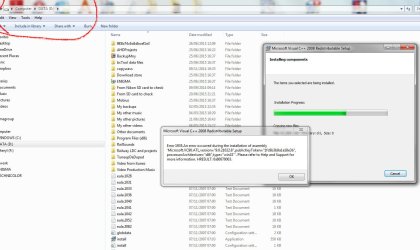
This is a problem I have been struggling with for many months, on-line research shows it’s quite common and the usual only fix offered is to reinstall the whole system.
This is just not practical for me and I don’t think its the real answer.
My own feeling is that the problem resides in the registry but I don’t have the skills needed to find what it might be.
Let me explain a little more.
Initially the issue showed up when trying to install Corel video editing suit some months back, the installation failed and the 1935 error code was tracked down.
I gave up but just this week tried to install Cyber Media video editing suit and got the same issue once again.
https://www.dropbox.com/s/wzoc0eqsixkn110/cantinstallcyber.jpg?dl=0
So I started digging again.
Since this point I have been trying to direct install MS Visual x64 2008 (vcredist_x64)
Here are the MS Visuals I do have installed, I say that but it would be good to know if they are fully installed!
https://www.dropbox.com/s/qbl8o11ivb26z01/msvis.jpg?dl=0
Another computer forum suggested I use process monitor while trying to install and see what they makes of it.
I did this, but I do not know how read it’s output. Here I have filtered it to look at installer and only show the issues (I hope)
https://www.dropbox.com/s/hnfkmjsjtbcite9/Logfile2.zip?dl=0
Things I have tried that did not work.
Remove MS Visuals and reinstall fresh.
Nope, was unable to install any of them due to the same error and had to use restore point to get back to where I am, which is for the record an otherwise stable busy home system.
Various MS Mr Fixits, none of these helped.
Safe mode install = same issue.
Here then is the full event viewer output.
Log Name: Application
Source: MsiInstaller
Date: 26/06/2015 08:29:17
Event ID: 11935
Task Category: None
Level: Error
Keywords: Classic
User: Enigma\Mike & Cheryl
Computer: Enigma
Description:
Product: Microsoft Visual C++ 2008 Redistributable – x64 9.0.30729.6161 — Error 1935.An error occurred during the installation of assembly ‘Microsoft.VC90.ATL,version=”9.0.30729.6161″,publicKeyToken=”1fc8b3b9a1e18e3b”,processorArchitecture=”amd64″,type=”win32″‘. Please refer to Help and Support for more information. HRESULT: 0×80070003. assembly interface: IAssemblyCache, function: CreateAssemblyCacheItem, component: {74C57B6B-FF6E-3825-BED2-78E14E3E0E3C}
Event Xml:
<Event xmlns=”http://schemas.microsoft.com/win/2004/08/events/event”>
<System>
<Provider Name=”MsiInstaller” />
<EventID Qualifiers=”0″>11935</EventID>
<Level>2</Level>
<Task>0</Task>
<Keywords>0×80000000000000</Keywords>
<TimeCreated SystemTime=”2015-06-26T07:29:17.000000000Z” />
<EventRecordID>105835</EventRecordID>
<Channel>Application</Channel>
<Computer>Enigma</Computer>
<Security UserID=”S-1-5-21-989875291-3784188841-2934234737-1000″ />
</System>
<EventData>
<Data>Product: Microsoft Visual C++ 2008 Redistributable – x64 9.0.30729.6161 — Error 1935.An error occurred during the installation of assembly ‘Microsoft.VC90.ATL,version=”9.0.30729.6161″,publicKeyToken=”1fc8b3b9a1e18e3b”,processorArchitecture=”amd64″,type=”win32″‘. Please refer to Help and Support for more information. HRESULT: 0×80070003. assembly interface: IAssemblyCache, function: CreateAssemblyCacheItem, component: {74C57B6B-FF6E-3825-BED2-78E14E3E0E3C}</Data>
<Data>(NULL)</Data>
<Data>(NULL)</Data>
<Data>(NULL)</Data>
<Data>(NULL)</Data>
<Data>(NULL)</Data>
<Data>
</Data>
<Binary>7B35464345364437362D463544432D333741422D423242382D3232414238434544423144347D</Binary>
</EventData>
</Event>
Lastly CBS log for this problem file
https://www.dropbox.com/s/ggwpaoo96gfcuz9/CBS 26.6.15.log?dl=0
I really hope someone can help me sort this as I badly need to update some software and can’t because of it.
Kind regards
Mike
Sussex UK
However I am back at it and would love some help form someone who understands the issues.
This is a problem I have been struggling with for many months, on-line research shows it’s quite common and the usual only fix offered is to reinstall the whole system.
This is just not practical for me and I don’t think its the real answer.
My own feeling is that the problem resides in the registry but I don’t have the skills needed to find what it might be.
Let me explain a little more.
Initially the issue showed up when trying to install Corel video editing suit some months back, the installation failed and the 1935 error code was tracked down.
I gave up but just this week tried to install Cyber Media video editing suit and got the same issue once again.
https://www.dropbox.com/s/wzoc0eqsixkn110/cantinstallcyber.jpg?dl=0
So I started digging again.
Since this point I have been trying to direct install MS Visual x64 2008 (vcredist_x64)
Here are the MS Visuals I do have installed, I say that but it would be good to know if they are fully installed!
https://www.dropbox.com/s/qbl8o11ivb26z01/msvis.jpg?dl=0
Another computer forum suggested I use process monitor while trying to install and see what they makes of it.
I did this, but I do not know how read it’s output. Here I have filtered it to look at installer and only show the issues (I hope)
https://www.dropbox.com/s/hnfkmjsjtbcite9/Logfile2.zip?dl=0
Things I have tried that did not work.
Remove MS Visuals and reinstall fresh.
Nope, was unable to install any of them due to the same error and had to use restore point to get back to where I am, which is for the record an otherwise stable busy home system.
Various MS Mr Fixits, none of these helped.
Safe mode install = same issue.
Here then is the full event viewer output.
Log Name: Application
Source: MsiInstaller
Date: 26/06/2015 08:29:17
Event ID: 11935
Task Category: None
Level: Error
Keywords: Classic
User: Enigma\Mike & Cheryl
Computer: Enigma
Description:
Product: Microsoft Visual C++ 2008 Redistributable – x64 9.0.30729.6161 — Error 1935.An error occurred during the installation of assembly ‘Microsoft.VC90.ATL,version=”9.0.30729.6161″,publicKeyToken=”1fc8b3b9a1e18e3b”,processorArchitecture=”amd64″,type=”win32″‘. Please refer to Help and Support for more information. HRESULT: 0×80070003. assembly interface: IAssemblyCache, function: CreateAssemblyCacheItem, component: {74C57B6B-FF6E-3825-BED2-78E14E3E0E3C}
Event Xml:
<Event xmlns=”http://schemas.microsoft.com/win/2004/08/events/event”>
<System>
<Provider Name=”MsiInstaller” />
<EventID Qualifiers=”0″>11935</EventID>
<Level>2</Level>
<Task>0</Task>
<Keywords>0×80000000000000</Keywords>
<TimeCreated SystemTime=”2015-06-26T07:29:17.000000000Z” />
<EventRecordID>105835</EventRecordID>
<Channel>Application</Channel>
<Computer>Enigma</Computer>
<Security UserID=”S-1-5-21-989875291-3784188841-2934234737-1000″ />
</System>
<EventData>
<Data>Product: Microsoft Visual C++ 2008 Redistributable – x64 9.0.30729.6161 — Error 1935.An error occurred during the installation of assembly ‘Microsoft.VC90.ATL,version=”9.0.30729.6161″,publicKeyToken=”1fc8b3b9a1e18e3b”,processorArchitecture=”amd64″,type=”win32″‘. Please refer to Help and Support for more information. HRESULT: 0×80070003. assembly interface: IAssemblyCache, function: CreateAssemblyCacheItem, component: {74C57B6B-FF6E-3825-BED2-78E14E3E0E3C}</Data>
<Data>(NULL)</Data>
<Data>(NULL)</Data>
<Data>(NULL)</Data>
<Data>(NULL)</Data>
<Data>(NULL)</Data>
<Data>
</Data>
<Binary>7B35464345364437362D463544432D333741422D423242382D3232414238434544423144347D</Binary>
</EventData>
</Event>
Lastly CBS log for this problem file
https://www.dropbox.com/s/ggwpaoo96gfcuz9/CBS 26.6.15.log?dl=0
I really hope someone can help me sort this as I badly need to update some software and can’t because of it.
Kind regards
Mike
Sussex UK
My Computer
At a glance
Windows 7 pro 64bit SRP1intel i5-4460 @3.20GhzType DDR3 Size 16GBNVIDIA GeForce GTX 1050
- Computer type
- PC/Desktop
- Computer Manufacturer/Model Number
- Novatech ltd
- OS
- Windows 7 pro 64bit SRP1
- CPU
- intel i5-4460 @3.20Ghz
- Motherboard
- Manufacturer Gigabyte Technology Co., Ltd. Model H81M-DS2V (
- Memory
- Type DDR3 Size 16GB
- Graphics Card(s)
- NVIDIA GeForce GTX 1050
- Hard Drives
- Samsung SSD 840 EVO 500G SCSI Disk Device
TOSHIBA DT01ACA100 SCSI Disk 1TB
WDC WD10EFRX-68PJCN0 SCSI Disk Device 1TB (red)
TOSHIBA DT01ABA300 SCSI Disk Device
- PSU
- 600w
- Antivirus
- Kaspersky internet securities
- Browser
- Chrome and IE
- Other Info
- Back up, Acronis True image 2014 to external 2TB drive via front e-sata port supplied by PCI express card.