
Solved Error 1935 installing ms visual c++ x64 2008 and others

mikesndbs

New member
Member
Local time
6:03 PM
Messages
76
Location
Sussex UK
Hi, I was working on this some time back when I was taken very ill and everything was put on hold.
However I am back at it and would love some help form someone who understands the issues.

This is a problem I have been struggling with for many months, on-line research shows it’s quite common and the usual only fix offered is to reinstall the whole system.

This is just not practical for me and I don’t think its the real answer.

My own feeling is that the problem resides in the registry but I don’t have the skills needed to find what it might be.


Let me explain a little more.

Initially the issue showed up when trying to install Corel video editing suit some months back, the installation failed and the 1935 error code was tracked down.

I gave up but just this week tried to install Cyber Media video editing suit and got the same issue once again.

https://www.dropbox.com/s/wzoc0eqsixkn110/cantinstallcyber.jpg?dl=0

So I started digging again.

Since this point I have been trying to direct install MS Visual x64 2008 (vcredist_x64)

Here are the MS Visuals I do have installed, I say that but it would be good to know if they are fully installed!

https://www.dropbox.com/s/qbl8o11ivb26z01/msvis.jpg?dl=0


Another computer forum suggested I use process monitor while trying to install and see what they makes of it.

I did this, but I do not know how read it’s output. Here I have filtered it to look at installer and only show the issues (I hope)

https://www.dropbox.com/s/hnfkmjsjtbcite9/Logfile2.zip?dl=0


Things I have tried that did not work.

Remove MS Visuals and reinstall fresh.

Nope, was unable to install any of them due to the same error and had to use restore point to get back to where I am, which is for the record an otherwise stable busy home system.

Various MS Mr Fixits, none of these helped.

Safe mode install = same issue.

Here then is the full event viewer output.

Log Name: Application
Source: MsiInstaller
Date: 26/06/2015 08:29:17
Event ID: 11935
Task Category: None
Level: Error
Keywords: Classic
User: Enigma\Mike & Cheryl
Computer: Enigma
Description:
Product: Microsoft Visual C++ 2008 Redistributable – x64 9.0.30729.6161 — Error 1935.An error occurred during the installation of assembly ‘Microsoft.VC90.ATL,version=”9.0.30729.6161″,publicKeyToken=”1fc8b3b9a1e18e3b”,processorArchitecture=”amd64″,type=”win32″‘. Please refer to Help and Support for more information. HRESULT: 0×80070003. assembly interface: IAssemblyCache, function: CreateAssemblyCacheItem, component: {74C57B6B-FF6E-3825-BED2-78E14E3E0E3C}
Event Xml:
<Event xmlns=”http://schemas.microsoft.com/win/2004/08/events/event”>
<System>
<Provider Name=”MsiInstaller” />
<EventID Qualifiers=”0″>11935</EventID>
<Level>2</Level>
<Task>0</Task>
<Keywords>0×80000000000000</Keywords>
<TimeCreated SystemTime=”2015-06-26T07:29:17.000000000Z” />
<EventRecordID>105835</EventRecordID>
<Channel>Application</Channel>
<Computer>Enigma</Computer>
<Security UserID=”S-1-5-21-989875291-3784188841-2934234737-1000″ />
</System>
<EventData>
<Data>Product: Microsoft Visual C++ 2008 Redistributable – x64 9.0.30729.6161 — Error 1935.An error occurred during the installation of assembly ‘Microsoft.VC90.ATL,version=”9.0.30729.6161″,publicKeyToken=”1fc8b3b9a1e18e3b”,processorArchitecture=”amd64″,type=”win32″‘. Please refer to Help and Support for more information. HRESULT: 0×80070003. assembly interface: IAssemblyCache, function: CreateAssemblyCacheItem, component: {74C57B6B-FF6E-3825-BED2-78E14E3E0E3C}</Data>
<Data>(NULL)</Data>
<Data>(NULL)</Data>
<Data>(NULL)</Data>
<Data>(NULL)</Data>
<Data>(NULL)</Data>
<Data>
</Data>
<Binary>7B35464345364437362D463544432D333741422D423242382D3232414238434544423144347D</Binary>
</EventData>
</Event>


Lastly CBS log for this problem file

https://www.dropbox.com/s/ggwpaoo96gfcuz9/CBS 26.6.15.log?dl=0


I really hope someone can help me sort this as I badly need to update some software and can’t because of it.


Kind regards


Mike


Sussex UK
 

My Computer My Computer

At a glance

Windows 7 pro 64bit SRP1intel i5-4460 @3.20GhzType DDR3 Size 16GBNVIDIA GeForce GTX 1050
Computer type
PC/Desktop
Computer Manufacturer/Model Number
Novatech ltd
OS
Windows 7 pro 64bit SRP1
CPU
intel i5-4460 @3.20Ghz
Motherboard
Manufacturer Gigabyte Technology Co., Ltd. Model H81M-DS2V (
Memory
Type DDR3 Size 16GB
Graphics Card(s)
NVIDIA GeForce GTX 1050
Hard Drives
Samsung SSD 840 EVO 500G SCSI Disk Device
TOSHIBA DT01ACA100 SCSI Disk 1TB
WDC WD10EFRX-68PJCN0 SCSI Disk Device 1TB (red)
TOSHIBA DT01ABA300 SCSI Disk Device
PSU
600w
Antivirus
Kaspersky internet securities
Browser
Chrome and IE
Other Info
Back up, Acronis True image 2014 to external 2TB drive via front e-sata port supplied by PCI express card.
My Computer My Computer

At a glance

Windows 7 pro 64bit SRP1intel i5-4460 @3.20GhzType DDR3 Size 16GBNVIDIA GeForce GTX 1050
Computer type
PC/Desktop
Computer Manufacturer/Model Number
Novatech ltd
OS
Windows 7 pro 64bit SRP1
CPU
intel i5-4460 @3.20Ghz
Motherboard
Manufacturer Gigabyte Technology Co., Ltd. Model H81M-DS2V (
Memory
Type DDR3 Size 16GB
Graphics Card(s)
NVIDIA GeForce GTX 1050
Hard Drives
Samsung SSD 840 EVO 500G SCSI Disk Device
TOSHIBA DT01ACA100 SCSI Disk 1TB
WDC WD10EFRX-68PJCN0 SCSI Disk Device 1TB (red)
TOSHIBA DT01ABA300 SCSI Disk Device
PSU
600w
Antivirus
Kaspersky internet securities
Browser
Chrome and IE
Other Info
Back up, Acronis True image 2014 to external 2TB drive via front e-sata port supplied by PCI express card.
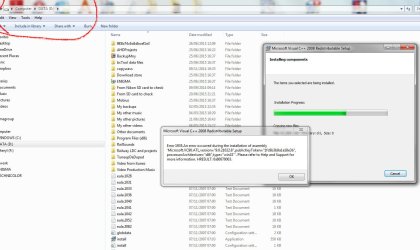
One odd thing I notice when any of the MS Visuals tries to install it unpacks to my D: drive, this is not my system drive??
 

Attachments

  • installtoD.jpg
    installtoD.jpg
    111.3 KB · Views: 2

My Computer My Computer

At a glance

Windows 7 pro 64bit SRP1intel i5-4460 @3.20GhzType DDR3 Size 16GBNVIDIA GeForce GTX 1050
Computer type
PC/Desktop
Computer Manufacturer/Model Number
Novatech ltd
OS
Windows 7 pro 64bit SRP1
CPU
intel i5-4460 @3.20Ghz
Motherboard
Manufacturer Gigabyte Technology Co., Ltd. Model H81M-DS2V (
Memory
Type DDR3 Size 16GB
Graphics Card(s)
NVIDIA GeForce GTX 1050
Hard Drives
Samsung SSD 840 EVO 500G SCSI Disk Device
TOSHIBA DT01ACA100 SCSI Disk 1TB
WDC WD10EFRX-68PJCN0 SCSI Disk Device 1TB (red)
TOSHIBA DT01ABA300 SCSI Disk Device
PSU
600w
Antivirus
Kaspersky internet securities
Browser
Chrome and IE
Other Info
Back up, Acronis True image 2014 to external 2TB drive via front e-sata port supplied by PCI express card.
It may be possible it is unpacking to the drive that has the most empty space, you can remove them after install no worries. Are you installing the service packed versions by the way?

Did you try installing with "run as admin"?
Try installing from another account?

See if this helps http://answers.microsoft.com/en-us/...stalling/046b7c56-af58-4076-bf05-3417a0960fa6
You will need to reinstall .net framework on t he computer and later try to install the programs.

a) Click the Start button, click Control Panel, click Programs, and then click Turn Windows features on or off. If you are prompted for an administrator password or confirmation, type the password or provide confirmation.
b) Uncheck the box if it is checked beside “Microsoft .NET framework 3.51” in the list
c) Click OK and restart the computer
d) After the restart open the “Turn windows feature on or off” window and now check the box beside “Microsoft .NET framework 3.51” in the list
e) Click OK and restart the computer.
 

My Computer My Computer

At a glance

Windows 7 Ultimate x64 SP1AMD Phenom 2 1090T2x8GB Kingston HyperX Fury Black 1600Mhz Unga...MSI GTX 970 Gaming 4G
Computer type
PC/Desktop
Computer Manufacturer/Model Number
Custom Build
OS
Windows 7 Ultimate x64 SP1
CPU
AMD Phenom 2 1090T
Motherboard
Gigabyte GA-890FXA-UD5
Memory
2x8GB Kingston HyperX Fury Black 1600Mhz Unganged
Graphics Card(s)
MSI GTX 970 Gaming 4G
Sound Card
Realtek On-Board HD 7.1 Audio / Logitech G35
Monitor(s) Displays
3xAcer GD245HQ
Screen Resolution
1920x1080
Hard Drives
Samsung 850 Pro 512GB SSD - OS /
WD Caviar Black SATA 3 - 1 TBx2 - Dynamic RAID 0 /
WD Caviar Green SATA 2 - 640GBx2 - Dynamic RAID 0 /
WD Caviar Green SATA 2 - 640GB - Internal Backup /
Seagate Barracude SATA 3 - 3TB - External Backup/ Sync
PSU
HighPower 1000W
Case
Cooler Master HAF 932
Cooling
Noctua NH-D14
Keyboard
Logitech G19
Mouse
Logitech G500
Internet Speed
100/4 Mbit Cable (100GB quota)
Antivirus
ZoneAlarm Extreme Security / MBAM Pro / MBAE Free / SAS Free
Browser
IE 11 - Firefox - Chrome
Other Info
Logitech F710/ G27/ G940/ Z5500 // TrackIR 5 // Nvidia 3D Surround Vision
It may be possible it is unpacking to the drive that has the most empty space, you can remove them after install no worries. Are you installing the service packed versions by the way?

Did you try installing with "run as admin"?
Try installing from another account?

See if this helps Error 1935 HRESULT 0x80070003 when installing numerous programs - Microsoft Community
You will need to reinstall .net framework on t he computer and later try to install the programs.

a) Click the Start button, click Control Panel, click Programs, and then click Turn Windows features on or off. If you are prompted for an administrator password or confirmation, type the password or provide confirmation.
b) Uncheck the box if it is checked beside “Microsoft .NET framework 3.51” in the list
c) Click OK and restart the computer
d) After the restart open the “Turn windows feature on or off” window and now check the box beside “Microsoft .NET framework 3.51” in the list
e) Click OK and restart the computer.


Hi many thanks.

I have done all those things, but good suggestions all the same.

I don't quite understand what you mean by "service packed versions" ?

I have been downloading them direct from MS web site.

Many thanks
 

My Computer My Computer

At a glance

Windows 7 pro 64bit SRP1intel i5-4460 @3.20GhzType DDR3 Size 16GBNVIDIA GeForce GTX 1050
Computer type
PC/Desktop
Computer Manufacturer/Model Number
Novatech ltd
OS
Windows 7 pro 64bit SRP1
CPU
intel i5-4460 @3.20Ghz
Motherboard
Manufacturer Gigabyte Technology Co., Ltd. Model H81M-DS2V (
Memory
Type DDR3 Size 16GB
Graphics Card(s)
NVIDIA GeForce GTX 1050
Hard Drives
Samsung SSD 840 EVO 500G SCSI Disk Device
TOSHIBA DT01ACA100 SCSI Disk 1TB
WDC WD10EFRX-68PJCN0 SCSI Disk Device 1TB (red)
TOSHIBA DT01ABA300 SCSI Disk Device
PSU
600w
Antivirus
Kaspersky internet securities
Browser
Chrome and IE
Other Info
Back up, Acronis True image 2014 to external 2TB drive via front e-sata port supplied by PCI express card.

My Computer My Computer

At a glance

Windows 7 Ultimate x64 SP1AMD Phenom 2 1090T2x8GB Kingston HyperX Fury Black 1600Mhz Unga...MSI GTX 970 Gaming 4G
Computer type
PC/Desktop
Computer Manufacturer/Model Number
Custom Build
OS
Windows 7 Ultimate x64 SP1
CPU
AMD Phenom 2 1090T
Motherboard
Gigabyte GA-890FXA-UD5
Memory
2x8GB Kingston HyperX Fury Black 1600Mhz Unganged
Graphics Card(s)
MSI GTX 970 Gaming 4G
Sound Card
Realtek On-Board HD 7.1 Audio / Logitech G35
Monitor(s) Displays
3xAcer GD245HQ
Screen Resolution
1920x1080
Hard Drives
Samsung 850 Pro 512GB SSD - OS /
WD Caviar Black SATA 3 - 1 TBx2 - Dynamic RAID 0 /
WD Caviar Green SATA 2 - 640GBx2 - Dynamic RAID 0 /
WD Caviar Green SATA 2 - 640GB - Internal Backup /
Seagate Barracude SATA 3 - 3TB - External Backup/ Sync
PSU
HighPower 1000W
Case
Cooler Master HAF 932
Cooling
Noctua NH-D14
Keyboard
Logitech G19
Mouse
Logitech G500
Internet Speed
100/4 Mbit Cable (100GB quota)
Antivirus
ZoneAlarm Extreme Security / MBAM Pro / MBAE Free / SAS Free
Browser
IE 11 - Firefox - Chrome
Other Info
Logitech F710/ G27/ G940/ Z5500 // TrackIR 5 // Nvidia 3D Surround Vision
MS site has both the plain versions and service packed versions. Still, it shouldn't be causing your issues.

Try installing in Safe Mode - https://4sysops.com/archives/tip-how-to-install-and-uninstall-a-program-in-safe-mode/

Others that come to mind is running:
Tweaking.com - Windows Repair
and
https://support.microsoft.com/en-us/kb/968003 (this one is for ...0005 but doesn't hurt I believe)


Many thanks, I have done the first two things.

Now I ran subinacl but I am not sure what I am supposed to do with it? it opened and then vanished.
 

My Computer My Computer

At a glance

Windows 7 pro 64bit SRP1intel i5-4460 @3.20GhzType DDR3 Size 16GBNVIDIA GeForce GTX 1050
Computer type
PC/Desktop
Computer Manufacturer/Model Number
Novatech ltd
OS
Windows 7 pro 64bit SRP1
CPU
intel i5-4460 @3.20Ghz
Motherboard
Manufacturer Gigabyte Technology Co., Ltd. Model H81M-DS2V (
Memory
Type DDR3 Size 16GB
Graphics Card(s)
NVIDIA GeForce GTX 1050
Hard Drives
Samsung SSD 840 EVO 500G SCSI Disk Device
TOSHIBA DT01ACA100 SCSI Disk 1TB
WDC WD10EFRX-68PJCN0 SCSI Disk Device 1TB (red)
TOSHIBA DT01ABA300 SCSI Disk Device
PSU
600w
Antivirus
Kaspersky internet securities
Browser
Chrome and IE
Other Info
Back up, Acronis True image 2014 to external 2TB drive via front e-sata port supplied by PCI express card.
Follow the directions in the KB, you are supposed to create the batch file reset.cmd (details in the link) and run that as admin. Not run subinacl directly :)
 

My Computer My Computer

At a glance

Windows 7 Ultimate x64 SP1AMD Phenom 2 1090T2x8GB Kingston HyperX Fury Black 1600Mhz Unga...MSI GTX 970 Gaming 4G
Computer type
PC/Desktop
Computer Manufacturer/Model Number
Custom Build
OS
Windows 7 Ultimate x64 SP1
CPU
AMD Phenom 2 1090T
Motherboard
Gigabyte GA-890FXA-UD5
Memory
2x8GB Kingston HyperX Fury Black 1600Mhz Unganged
Graphics Card(s)
MSI GTX 970 Gaming 4G
Sound Card
Realtek On-Board HD 7.1 Audio / Logitech G35
Monitor(s) Displays
3xAcer GD245HQ
Screen Resolution
1920x1080
Hard Drives
Samsung 850 Pro 512GB SSD - OS /
WD Caviar Black SATA 3 - 1 TBx2 - Dynamic RAID 0 /
WD Caviar Green SATA 2 - 640GBx2 - Dynamic RAID 0 /
WD Caviar Green SATA 2 - 640GB - Internal Backup /
Seagate Barracude SATA 3 - 3TB - External Backup/ Sync
PSU
HighPower 1000W
Case
Cooler Master HAF 932
Cooling
Noctua NH-D14
Keyboard
Logitech G19
Mouse
Logitech G500
Internet Speed
100/4 Mbit Cable (100GB quota)
Antivirus
ZoneAlarm Extreme Security / MBAM Pro / MBAE Free / SAS Free
Browser
IE 11 - Firefox - Chrome
Other Info
Logitech F710/ G27/ G940/ Z5500 // TrackIR 5 // Nvidia 3D Surround Vision
I went through the log file (I am not a programmer or anything) and as far as I can see, the problem is here:

Code:
MSI (s) (34:78) [11:31:55:561]: Executing op: SetTargetFolder(Folder=C:\Windows\winsxs\amd64_microsoft.vc90.atl_1fc8b3b9a1e18e3b_9.0.30729.6161_none_0a1fd3a3a768b895\)
MSI (s) (34:78) [11:31:55:561]: Executing op: SetSourceFolder(Folder=1\Windows\winsxs\ulATLx64\)
MSI (s) (34:78) [11:31:55:561]: Executing op: AssemblyCopy(SourceName=ax64.dll|atl90.dll,SourceCabKey=ul_atl90.dll.30729.6161.Microsoft_VC90_ATL_x64.QFE,DestName=atl90.dll,Attributes=0,FileSize=176456,PerTick=65536,,VerifyMedia=1,ElevateFlags=4,,,,ComponentId={74C57B6B-FF6E-3825-BED2-78E14E3E0E3C},,,,AssemblyMode=0,)
MSI (s) (34:78) [11:31:55:561]: [COLOR=red]Assembly Error:The system cannot find the path specified.[/COLOR]
 
MSI (s) (34:78) [11:31:55:561]: Note: 1: 1935 2: {74C57B6B-FF6E-3825-BED2-78E14E3E0E3C} 3: 0x80070003 4: IAssemblyCache 5: CreateAssemblyCacheItem 6: Microsoft.VC90.ATL,version="9.0.30729.6161",publicKeyToken="1fc8b3b9a1e18e3b",processorArchitecture="amd64",type="win32" 
MSI (s) (34:78) [11:31:55:561]: [B]Assembly Error (sxs): Please look into Component Based Servicing Log located at -312265544ndir\logs\cbs\cbs.log to get more diagnostic information.[/B]
MSI (s) (34:78) [11:31:57:903]: Product: Microsoft Visual C++ 2008 Redistributable - x64 9.0.30729.6161 -- Error 1935.An error occurred during the installation of assembly 'Microsoft.VC90.ATL,version="9.0.30729.6161",publicKeyToken="1fc8b3b9a1e18e3b",processorArchitecture="amd64",type="win32"'. Please refer to Help and Support for more information. HRESULT: 0x80070003. assembly interface: IAssemblyCache, function: CreateAssemblyCacheItem, component: {74C57B6B-FF6E-3825-BED2-78E14E3E0E3C}
 
Error 1935.An error occurred during the installation of assembly 'Microsoft.VC90.ATL,version="9.0.30729.6161",publicKeyToken="1fc8b3b9a1e18e3b",processorArchitecture="amd64",type="win32"'. Please refer to Help and Support for more information. HRESULT: 0x80070003. assembly interface: IAssemblyCache, function: CreateAssemblyCacheItem, component: {74C57B6B-FF6E-3825-BED2-78E14E3E0E3C}

Assembly Error (sxs): Please look into Component Based Servicing Log located at -312265544ndir\logs\cbs\cbs.log to get more diagnostic information.

See if you can spot anything in cbs.log, and attach if size is manageable.

Maybe one of our programmers would know what this means?
 

My Computer My Computer

At a glance

Windows 7 Ultimate x64 SP1AMD Phenom 2 1090T2x8GB Kingston HyperX Fury Black 1600Mhz Unga...MSI GTX 970 Gaming 4G
Computer type
PC/Desktop
Computer Manufacturer/Model Number
Custom Build
OS
Windows 7 Ultimate x64 SP1
CPU
AMD Phenom 2 1090T
Motherboard
Gigabyte GA-890FXA-UD5
Memory
2x8GB Kingston HyperX Fury Black 1600Mhz Unganged
Graphics Card(s)
MSI GTX 970 Gaming 4G
Sound Card
Realtek On-Board HD 7.1 Audio / Logitech G35
Monitor(s) Displays
3xAcer GD245HQ
Screen Resolution
1920x1080
Hard Drives
Samsung 850 Pro 512GB SSD - OS /
WD Caviar Black SATA 3 - 1 TBx2 - Dynamic RAID 0 /
WD Caviar Green SATA 2 - 640GBx2 - Dynamic RAID 0 /
WD Caviar Green SATA 2 - 640GB - Internal Backup /
Seagate Barracude SATA 3 - 3TB - External Backup/ Sync
PSU
HighPower 1000W
Case
Cooler Master HAF 932
Cooling
Noctua NH-D14
Keyboard
Logitech G19
Mouse
Logitech G500
Internet Speed
100/4 Mbit Cable (100GB quota)
Antivirus
ZoneAlarm Extreme Security / MBAM Pro / MBAE Free / SAS Free
Browser
IE 11 - Firefox - Chrome
Other Info
Logitech F710/ G27/ G940/ Z5500 // TrackIR 5 // Nvidia 3D Surround Vision
It is all guessing at the moment:

Someone mentions:
I had the exact same problem as you after migrating from an old computer to a new computer.I reinstalled Microsoft's vc80.crt and the .net framework and that fixed the issue! I'm now able to install and reinstall programs without receiving the errors that you listed.

Files installed:
vcredist_x86.exe
dotnetfx.exe

Did you try installing the VC Redist 2005 first? No idea, why this would matter.

Anyway, what happens if you add yourself to root C with full control.
Does TrustedInstaller has full control in Advanced section of security tab, for ProgramFiles/ProgramFiles(x86) and Windows folders?
 

My Computer My Computer

At a glance

Windows 7 Ultimate x64 SP1AMD Phenom 2 1090T2x8GB Kingston HyperX Fury Black 1600Mhz Unga...MSI GTX 970 Gaming 4G
Computer type
PC/Desktop
Computer Manufacturer/Model Number
Custom Build
OS
Windows 7 Ultimate x64 SP1
CPU
AMD Phenom 2 1090T
Motherboard
Gigabyte GA-890FXA-UD5
Memory
2x8GB Kingston HyperX Fury Black 1600Mhz Unganged
Graphics Card(s)
MSI GTX 970 Gaming 4G
Sound Card
Realtek On-Board HD 7.1 Audio / Logitech G35
Monitor(s) Displays
3xAcer GD245HQ
Screen Resolution
1920x1080
Hard Drives
Samsung 850 Pro 512GB SSD - OS /
WD Caviar Black SATA 3 - 1 TBx2 - Dynamic RAID 0 /
WD Caviar Green SATA 2 - 640GBx2 - Dynamic RAID 0 /
WD Caviar Green SATA 2 - 640GB - Internal Backup /
Seagate Barracude SATA 3 - 3TB - External Backup/ Sync
PSU
HighPower 1000W
Case
Cooler Master HAF 932
Cooling
Noctua NH-D14
Keyboard
Logitech G19
Mouse
Logitech G500
Internet Speed
100/4 Mbit Cable (100GB quota)
Antivirus
ZoneAlarm Extreme Security / MBAM Pro / MBAE Free / SAS Free
Browser
IE 11 - Firefox - Chrome
Other Info
Logitech F710/ G27/ G940/ Z5500 // TrackIR 5 // Nvidia 3D Surround Vision
Ran 968003 as cmd file.
Sadly no effect, good idea all the same.
 

My Computer My Computer

At a glance

Windows 7 pro 64bit SRP1intel i5-4460 @3.20GhzType DDR3 Size 16GBNVIDIA GeForce GTX 1050
Computer type
PC/Desktop
Computer Manufacturer/Model Number
Novatech ltd
OS
Windows 7 pro 64bit SRP1
CPU
intel i5-4460 @3.20Ghz
Motherboard
Manufacturer Gigabyte Technology Co., Ltd. Model H81M-DS2V (
Memory
Type DDR3 Size 16GB
Graphics Card(s)
NVIDIA GeForce GTX 1050
Hard Drives
Samsung SSD 840 EVO 500G SCSI Disk Device
TOSHIBA DT01ACA100 SCSI Disk 1TB
WDC WD10EFRX-68PJCN0 SCSI Disk Device 1TB (red)
TOSHIBA DT01ABA300 SCSI Disk Device
PSU
600w
Antivirus
Kaspersky internet securities
Browser
Chrome and IE
Other Info
Back up, Acronis True image 2014 to external 2TB drive via front e-sata port supplied by PCI express card.
I went through the log file (I am not a programmer or anything) and as far as I can see, the problem is here:

Code:
MSI (s) (34:78) [11:31:55:561]: Executing op: SetTargetFolder(Folder=C:\Windows\winsxs\amd64_microsoft.vc90.atl_1fc8b3b9a1e18e3b_9.0.30729.6161_none_0a1fd3a3a768b895\)
MSI (s) (34:78) [11:31:55:561]: Executing op: SetSourceFolder(Folder=1\Windows\winsxs\ulATLx64\)
MSI (s) (34:78) [11:31:55:561]: Executing op: AssemblyCopy(SourceName=ax64.dll|atl90.dll,SourceCabKey=ul_atl90.dll.30729.6161.Microsoft_VC90_ATL_x64.QFE,DestName=atl90.dll,Attributes=0,FileSize=176456,PerTick=65536,,VerifyMedia=1,ElevateFlags=4,,,,ComponentId={74C57B6B-FF6E-3825-BED2-78E14E3E0E3C},,,,AssemblyMode=0,)
MSI (s) (34:78) [11:31:55:561]: [COLOR=red]Assembly Error:The system cannot find the path specified.[/COLOR]
 
MSI (s) (34:78) [11:31:55:561]: Note: 1: 1935 2: {74C57B6B-FF6E-3825-BED2-78E14E3E0E3C} 3: 0x80070003 4: IAssemblyCache 5: CreateAssemblyCacheItem 6: Microsoft.VC90.ATL,version="9.0.30729.6161",publicKeyToken="1fc8b3b9a1e18e3b",processorArchitecture="amd64",type="win32" 
MSI (s) (34:78) [11:31:55:561]: [B]Assembly Error (sxs): Please look into Component Based Servicing Log located at -312265544ndir\logs\cbs\cbs.log to get more diagnostic information.[/B]
MSI (s) (34:78) [11:31:57:903]: Product: Microsoft Visual C++ 2008 Redistributable - x64 9.0.30729.6161 -- Error 1935.An error occurred during the installation of assembly 'Microsoft.VC90.ATL,version="9.0.30729.6161",publicKeyToken="1fc8b3b9a1e18e3b",processorArchitecture="amd64",type="win32"'. Please refer to Help and Support for more information. HRESULT: 0x80070003. assembly interface: IAssemblyCache, function: CreateAssemblyCacheItem, component: {74C57B6B-FF6E-3825-BED2-78E14E3E0E3C}
 
Error 1935.An error occurred during the installation of assembly 'Microsoft.VC90.ATL,version="9.0.30729.6161",publicKeyToken="1fc8b3b9a1e18e3b",processorArchitecture="amd64",type="win32"'. Please refer to Help and Support for more information. HRESULT: 0x80070003. assembly interface: IAssemblyCache, function: CreateAssemblyCacheItem, component: {74C57B6B-FF6E-3825-BED2-78E14E3E0E3C}

Assembly Error (sxs): Please look into Component Based Servicing Log located at -312265544ndir\logs\cbs\cbs.log to get more diagnostic information.

See if you can spot anything in cbs.log, and attach if size is manageable.

Maybe one of our programmers would know what this means?


That does look interesting.

CBS log is here I could not find the ref but will keep looking.
https://www.dropbox.com/s/ggwpaoo96gfcuz9/CBS 26.6.15.log?dl=0
 

My Computer My Computer

At a glance

Windows 7 pro 64bit SRP1intel i5-4460 @3.20GhzType DDR3 Size 16GBNVIDIA GeForce GTX 1050
Computer type
PC/Desktop
Computer Manufacturer/Model Number
Novatech ltd
OS
Windows 7 pro 64bit SRP1
CPU
intel i5-4460 @3.20Ghz
Motherboard
Manufacturer Gigabyte Technology Co., Ltd. Model H81M-DS2V (
Memory
Type DDR3 Size 16GB
Graphics Card(s)
NVIDIA GeForce GTX 1050
Hard Drives
Samsung SSD 840 EVO 500G SCSI Disk Device
TOSHIBA DT01ACA100 SCSI Disk 1TB
WDC WD10EFRX-68PJCN0 SCSI Disk Device 1TB (red)
TOSHIBA DT01ABA300 SCSI Disk Device
PSU
600w
Antivirus
Kaspersky internet securities
Browser
Chrome and IE
Other Info
Back up, Acronis True image 2014 to external 2TB drive via front e-sata port supplied by PCI express card.
Hi again, yes tried 2005 and same error. TrustedInstaller seems to have all contol.
 

My Computer My Computer

At a glance

Windows 7 pro 64bit SRP1intel i5-4460 @3.20GhzType DDR3 Size 16GBNVIDIA GeForce GTX 1050
Computer type
PC/Desktop
Computer Manufacturer/Model Number
Novatech ltd
OS
Windows 7 pro 64bit SRP1
CPU
intel i5-4460 @3.20Ghz
Motherboard
Manufacturer Gigabyte Technology Co., Ltd. Model H81M-DS2V (
Memory
Type DDR3 Size 16GB
Graphics Card(s)
NVIDIA GeForce GTX 1050
Hard Drives
Samsung SSD 840 EVO 500G SCSI Disk Device
TOSHIBA DT01ACA100 SCSI Disk 1TB
WDC WD10EFRX-68PJCN0 SCSI Disk Device 1TB (red)
TOSHIBA DT01ABA300 SCSI Disk Device
PSU
600w
Antivirus
Kaspersky internet securities
Browser
Chrome and IE
Other Info
Back up, Acronis True image 2014 to external 2TB drive via front e-sata port supplied by PCI express card.
Please run in elevated cmd: sfc /scannow

Also scan with Malwarebytes Anti-Malware free (if you haven't already)

Edit: Do you have any Windows Updates pending? Do they install correctly?
 

My Computer My Computer

At a glance

Windows 7 Ultimate x64 SP1AMD Phenom 2 1090T2x8GB Kingston HyperX Fury Black 1600Mhz Unga...MSI GTX 970 Gaming 4G
Computer type
PC/Desktop
Computer Manufacturer/Model Number
Custom Build
OS
Windows 7 Ultimate x64 SP1
CPU
AMD Phenom 2 1090T
Motherboard
Gigabyte GA-890FXA-UD5
Memory
2x8GB Kingston HyperX Fury Black 1600Mhz Unganged
Graphics Card(s)
MSI GTX 970 Gaming 4G
Sound Card
Realtek On-Board HD 7.1 Audio / Logitech G35
Monitor(s) Displays
3xAcer GD245HQ
Screen Resolution
1920x1080
Hard Drives
Samsung 850 Pro 512GB SSD - OS /
WD Caviar Black SATA 3 - 1 TBx2 - Dynamic RAID 0 /
WD Caviar Green SATA 2 - 640GBx2 - Dynamic RAID 0 /
WD Caviar Green SATA 2 - 640GB - Internal Backup /
Seagate Barracude SATA 3 - 3TB - External Backup/ Sync
PSU
HighPower 1000W
Case
Cooler Master HAF 932
Cooling
Noctua NH-D14
Keyboard
Logitech G19
Mouse
Logitech G500
Internet Speed
100/4 Mbit Cable (100GB quota)
Antivirus
ZoneAlarm Extreme Security / MBAM Pro / MBAE Free / SAS Free
Browser
IE 11 - Firefox - Chrome
Other Info
Logitech F710/ G27/ G940/ Z5500 // TrackIR 5 // Nvidia 3D Surround Vision
Hi, sadly have done those ideas and no updates pending other than some optionals that don't apply to me.
Very grateful for your help all the same.
 

My Computer My Computer

At a glance

Windows 7 pro 64bit SRP1intel i5-4460 @3.20GhzType DDR3 Size 16GBNVIDIA GeForce GTX 1050
Computer type
PC/Desktop
Computer Manufacturer/Model Number
Novatech ltd
OS
Windows 7 pro 64bit SRP1
CPU
intel i5-4460 @3.20Ghz
Motherboard
Manufacturer Gigabyte Technology Co., Ltd. Model H81M-DS2V (
Memory
Type DDR3 Size 16GB
Graphics Card(s)
NVIDIA GeForce GTX 1050
Hard Drives
Samsung SSD 840 EVO 500G SCSI Disk Device
TOSHIBA DT01ACA100 SCSI Disk 1TB
WDC WD10EFRX-68PJCN0 SCSI Disk Device 1TB (red)
TOSHIBA DT01ABA300 SCSI Disk Device
PSU
600w
Antivirus
Kaspersky internet securities
Browser
Chrome and IE
Other Info
Back up, Acronis True image 2014 to external 2TB drive via front e-sata port supplied by PCI express card.
Hi

After finding the error access denied winsxs/installtemp I have now set the permissions to that folder so that for the moment everyone has full control.

I re ran the installer for Visual 2008 but again it failed.
You can see here the error message and the point it seemed to fail on.
On checking the log files I don’t see access denied anymore.
What I do see in dd_vcredistMSI75E8 is this:

MSI (s) (00:3C) [09:40:39:636]: File: C:\Program Files\Common Files\Microsoft Shared\VC\msdia90.dll; To be installed; Won't patch; No existing file
MSI (s) (00:3C) [09:40:39:636]: Source for file 'FL_msdia71_dll_2_60035_amd64_ln.3643236F_FC70_11D3_A536_0090278A1BB8' is compressed
MSI (s) (00:3C) [09:40:39:683]: Executing op: SetTargetFolder(Folder=C:\Windows\winsxs\amd64_microsoft.vc90.atl_1fc8b3b9a1e18e3b_9.0.21022.8_none_7644f34b9721eccf\)
MSI (s) (00:3C) [09:40:39:683]: Executing op: SetSourceFolder(Folder=1\Windows\winsxs\ulATLx64\)
MSI (s) (00:3C) [09:40:39:683]: Executing op: AssemblyCopy(SourceName=ax64.dll|atl90.dll,SourceCabKey=ul_atl90.dll.21022.08.Microsoft_VC90_ATL_x64.RTM,DestName=atl90.dll,Attributes=0,FileSize=179704,PerTick=65536,,VerifyMedia=1,ElevateFlags=4,,,,ComponentId={2A030FEB-29B5-314B-97B5-ED38673CC885},,,,AssemblyMode=0,)
MSI (s) (00:3C) [09:40:39:683]: Assembly Error:The system cannot find the path specified.

And:

Property(S): SecureCustomProperties = IE501FOUND.3643236F_FC70_11D3_A536_0090278A1BB8;INSTALLBLOCKFOUND.3643236F_FC70_11D3_A536_0090278A1BB8;JSHFOUNDVER;MMCFOUND.3643236F_FC70_11D3_A536_0090278A1BB8;NEWERPRODUCTVERSIONDETECTED;OCMFOUNDVER;OCMFOUNDVERLANG;REDISTFOUNDVER;REDISTFOUNDVERLANG;UNINSTALLBLOCKFOUND.3643236F_FC70_11D3_A536_0090278A1BB8
Property(S): NEWERPRODUCTVERSIONDETECTED = {9A25302D-30C0-39D9-BD6F-21E6EC160475}
Property(S): MsiLogFileLocation = C:\Users\MIKE&C~1\AppData\Local\Temp\dd_vcredistMSI75E8.txt
Property(S): PackageCode = {4058F55C-D581-49DD-8065-96BBBE4AD8D3}
Property(S): ProductState = -1
Property(S): PackagecodeChanging = 1
Property(S): USING_EXUIH = 1
Property(S): LOCPRODUCTNAME = Microsoft Visual C++ 2008 Redistributable
Property(S): CURRENTDIRECTORY = d:\197fa2011e649fd12904


So this INSTALLBLOCKFOUND I wonder what is going on?

Here is a link to the new logs and screen shot
https://www.dropbox.com/s/pb4nh23z2ej73zt/Logs.zip?dl=0
 

My Computer My Computer

At a glance

Windows 7 pro 64bit SRP1intel i5-4460 @3.20GhzType DDR3 Size 16GBNVIDIA GeForce GTX 1050
Computer type
PC/Desktop
Computer Manufacturer/Model Number
Novatech ltd
OS
Windows 7 pro 64bit SRP1
CPU
intel i5-4460 @3.20Ghz
Motherboard
Manufacturer Gigabyte Technology Co., Ltd. Model H81M-DS2V (
Memory
Type DDR3 Size 16GB
Graphics Card(s)
NVIDIA GeForce GTX 1050
Hard Drives
Samsung SSD 840 EVO 500G SCSI Disk Device
TOSHIBA DT01ACA100 SCSI Disk 1TB
WDC WD10EFRX-68PJCN0 SCSI Disk Device 1TB (red)
TOSHIBA DT01ABA300 SCSI Disk Device
PSU
600w
Antivirus
Kaspersky internet securities
Browser
Chrome and IE
Other Info
Back up, Acronis True image 2014 to external 2TB drive via front e-sata port supplied by PCI express card.
Kind of out of ideas here :P

Try cleaning with CCleaner, scan registry too (make sure to export/backup registry before cleaning).
Uninstall AV and try again.
 

My Computer My Computer

At a glance

Windows 7 Ultimate x64 SP1AMD Phenom 2 1090T2x8GB Kingston HyperX Fury Black 1600Mhz Unga...MSI GTX 970 Gaming 4G
Computer type
PC/Desktop
Computer Manufacturer/Model Number
Custom Build
OS
Windows 7 Ultimate x64 SP1
CPU
AMD Phenom 2 1090T
Motherboard
Gigabyte GA-890FXA-UD5
Memory
2x8GB Kingston HyperX Fury Black 1600Mhz Unganged
Graphics Card(s)
MSI GTX 970 Gaming 4G
Sound Card
Realtek On-Board HD 7.1 Audio / Logitech G35
Monitor(s) Displays
3xAcer GD245HQ
Screen Resolution
1920x1080
Hard Drives
Samsung 850 Pro 512GB SSD - OS /
WD Caviar Black SATA 3 - 1 TBx2 - Dynamic RAID 0 /
WD Caviar Green SATA 2 - 640GBx2 - Dynamic RAID 0 /
WD Caviar Green SATA 2 - 640GB - Internal Backup /
Seagate Barracude SATA 3 - 3TB - External Backup/ Sync
PSU
HighPower 1000W
Case
Cooler Master HAF 932
Cooling
Noctua NH-D14
Keyboard
Logitech G19
Mouse
Logitech G500
Internet Speed
100/4 Mbit Cable (100GB quota)
Antivirus
ZoneAlarm Extreme Security / MBAM Pro / MBAE Free / SAS Free
Browser
IE 11 - Firefox - Chrome
Other Info
Logitech F710/ G27/ G940/ Z5500 // TrackIR 5 // Nvidia 3D Surround Vision
Well my good friend I have fixed it, and very many thanks for helping me with this.

It’s fixed!!!!

Here is how.
I ran Tweaking.com\Windows Repair (All in One)
Did the reparse repairs and then went to the main repair after backing up registry and making a restore point.
I then selected only the following repairs:
Reset Registry Permissions.
Reset file permissions (C: only)
Remove policies set by infections.
I ran this in safe mode, using msconfig as admin, boot/ minimal with network.
After this I verified I had permissions on winsxs and created the folder InstallTemp.C:\Windows\WinSxS\InstallTemp
I then installed Visual c++ 2005 first, then 2008 x86 and x64 versions.

It all worked

What I need to check now is that do I need to re set folder permissions in order to be safe from attack by viruses etc?
 

My Computer My Computer

At a glance

Windows 7 pro 64bit SRP1intel i5-4460 @3.20GhzType DDR3 Size 16GBNVIDIA GeForce GTX 1050
Computer type
PC/Desktop
Computer Manufacturer/Model Number
Novatech ltd
OS
Windows 7 pro 64bit SRP1
CPU
intel i5-4460 @3.20Ghz
Motherboard
Manufacturer Gigabyte Technology Co., Ltd. Model H81M-DS2V (
Memory
Type DDR3 Size 16GB
Graphics Card(s)
NVIDIA GeForce GTX 1050
Hard Drives
Samsung SSD 840 EVO 500G SCSI Disk Device
TOSHIBA DT01ACA100 SCSI Disk 1TB
WDC WD10EFRX-68PJCN0 SCSI Disk Device 1TB (red)
TOSHIBA DT01ABA300 SCSI Disk Device
PSU
600w
Antivirus
Kaspersky internet securities
Browser
Chrome and IE
Other Info
Back up, Acronis True image 2014 to external 2TB drive via front e-sata port supplied by PCI express card.
You should start considering a repair install or better yet a clean
install.
http://www.sevenforums.com/tutorials/3413-repair-install.html

http://www.sevenforums.com/tutorials/1649-clean-install-windows-7-a.html
or (if OEM) http://www.sevenforums.com/tutorials/219487-clean-reinstall-factory-oem-windows-7-a.html#post1839164

You can get an installation ISO from Microsoft Software Recovery if your copy of Windows is
retail


Bah, haha. Good job! First account of fixing this issue as far as I know! ;)
 

My Computer My Computer

At a glance

Windows 7 Ultimate x64 SP1AMD Phenom 2 1090T2x8GB Kingston HyperX Fury Black 1600Mhz Unga...MSI GTX 970 Gaming 4G
Computer type
PC/Desktop
Computer Manufacturer/Model Number
Custom Build
OS
Windows 7 Ultimate x64 SP1
CPU
AMD Phenom 2 1090T
Motherboard
Gigabyte GA-890FXA-UD5
Memory
2x8GB Kingston HyperX Fury Black 1600Mhz Unganged
Graphics Card(s)
MSI GTX 970 Gaming 4G
Sound Card
Realtek On-Board HD 7.1 Audio / Logitech G35
Monitor(s) Displays
3xAcer GD245HQ
Screen Resolution
1920x1080
Hard Drives
Samsung 850 Pro 512GB SSD - OS /
WD Caviar Black SATA 3 - 1 TBx2 - Dynamic RAID 0 /
WD Caviar Green SATA 2 - 640GBx2 - Dynamic RAID 0 /
WD Caviar Green SATA 2 - 640GB - Internal Backup /
Seagate Barracude SATA 3 - 3TB - External Backup/ Sync
PSU
HighPower 1000W
Case
Cooler Master HAF 932
Cooling
Noctua NH-D14
Keyboard
Logitech G19
Mouse
Logitech G500
Internet Speed
100/4 Mbit Cable (100GB quota)
Antivirus
ZoneAlarm Extreme Security / MBAM Pro / MBAE Free / SAS Free
Browser
IE 11 - Firefox - Chrome
Other Info
Logitech F710/ G27/ G940/ Z5500 // TrackIR 5 // Nvidia 3D Surround Vision
What I don't understand is you did run tweaking.com aio repair before, no? Maybe the default options were needed to be changed as you did this time?

Creating this one - C:\Windows\WinSxS\InstallTemp was a good idea
 

My Computer My Computer

At a glance

Windows 7 Ultimate x64 SP1AMD Phenom 2 1090T2x8GB Kingston HyperX Fury Black 1600Mhz Unga...MSI GTX 970 Gaming 4G
Computer type
PC/Desktop
Computer Manufacturer/Model Number
Custom Build
OS
Windows 7 Ultimate x64 SP1
CPU
AMD Phenom 2 1090T
Motherboard
Gigabyte GA-890FXA-UD5
Memory
2x8GB Kingston HyperX Fury Black 1600Mhz Unganged
Graphics Card(s)
MSI GTX 970 Gaming 4G
Sound Card
Realtek On-Board HD 7.1 Audio / Logitech G35
Monitor(s) Displays
3xAcer GD245HQ
Screen Resolution
1920x1080
Hard Drives
Samsung 850 Pro 512GB SSD - OS /
WD Caviar Black SATA 3 - 1 TBx2 - Dynamic RAID 0 /
WD Caviar Green SATA 2 - 640GBx2 - Dynamic RAID 0 /
WD Caviar Green SATA 2 - 640GB - Internal Backup /
Seagate Barracude SATA 3 - 3TB - External Backup/ Sync
PSU
HighPower 1000W
Case
Cooler Master HAF 932
Cooling
Noctua NH-D14
Keyboard
Logitech G19
Mouse
Logitech G500
Internet Speed
100/4 Mbit Cable (100GB quota)
Antivirus
ZoneAlarm Extreme Security / MBAM Pro / MBAE Free / SAS Free
Browser
IE 11 - Firefox - Chrome
Other Info
Logitech F710/ G27/ G940/ Z5500 // TrackIR 5 // Nvidia 3D Surround Vision
Back
Top