Svchost.exe High memory usage at startup

I had a similar problem, although my laptop became unresponsive about 10 to 15 mins after start up.

Having arrived at this thread and installed Process explorer, thanks goes to WHS, I could see that my memory usage went up massively due to svchost(netsvcs) kicking in.

The solution was to use Process explorer, right click on svchost(netsvcs) and lower the priority to:

Background: 4 (Low I/O and Memory Priority)

My laptop is now running smoothly again.

hello,im having last days exactly same problem laptop is unresponsive for about 10-15min i track issue that its svchost eating too much RAM sometimes my RAM usage is like 95% i find out that its svchost (sometime 800MB) (my PC RAM is 2GB) thanks for posting solution but it dont work for me.
I was trying
- malwarebytes
- spyware search and destroy
- ccleaner
- emisoft emergency kit
- RAMMAP (emptyng will free RAM so this is temporary solution)
- process explorer (lower svchost priority)
Installing windows7 update 3050265
whish

This update addresses an issue in which system performance can be decreased during scans. This issue has the greatest effect on computers that have a small amount of physical memory.

Did you find any more solutions about this problem please?
thanks!
 

My Computer My Computer

Computer type
PC/Desktop
OS
windows8.1 Pro
You could try lowering the priority of other background services, they don't look like they are using much memory, but it it all adds up I suppose.
 

My Computer My Computer

Computer type
Laptop
OS
Windows 7 home premium 64bit

My Computer My Computer

Computer type
PC/Desktop
Computer Manufacturer/Model Number
Custom Build
OS
Windows 7 Ultimate x64 SP1
CPU
AMD Phenom 2 1090T
Motherboard
Gigabyte GA-890FXA-UD5
Memory
2x8GB Kingston HyperX Fury Black 1600Mhz Unganged
Graphics Card(s)
MSI GTX 970 Gaming 4G
Sound Card
Realtek On-Board HD 7.1 Audio / Logitech G35
Monitor(s) Displays
3xAcer GD245HQ
Screen Resolution
1920x1080
Hard Drives
Samsung 850 Pro 512GB SSD - OS /
WD Caviar Black SATA 3 - 1 TBx2 - Dynamic RAID 0 /
WD Caviar Green SATA 2 - 640GBx2 - Dynamic RAID 0 /
WD Caviar Green SATA 2 - 640GB - Internal Backup /
Seagate Barracude SATA 3 - 3TB - External Backup/ Sync
PSU
HighPower 1000W
Case
Cooler Master HAF 932
Cooling
Noctua NH-D14
Keyboard
Logitech G19
Mouse
Logitech G500
Internet Speed
100/4 Mbit Cable (100GB quota)
Antivirus
ZoneAlarm Extreme Security / MBAM Pro / MBAE Free / SAS Free
Browser
IE 11 - Firefox - Chrome
Other Info
Logitech F710/ G27/ G940/ Z5500 // TrackIR 5 // Nvidia 3D Surround Vision
You could try lowering the priority of other background services, they don't look like they are using much memory, but it it all adds up I suppose.

See if this would help http://www.sevenforums.com/general-...-netsvcs-using-datastore-edb.html#post3098225

You are better off in EightForums though. Windows 8 Forums (Nevermind if those are 2 different computers :))

thanks a lot very useful links!
i think problem is more or less solved with that windows update i still can pass 80% physical memory but computer is at least usable now. Boot is very slow (black screen). Will investigate problem more. This may end with complete reinstall :confused:
 

My Computer My Computer

Computer type
PC/Desktop
OS
windows8.1 Pro

My Computer My Computer

Computer type
PC/Desktop
Computer Manufacturer/Model Number
Custom Build
OS
Windows 7 Ultimate x64 SP1
CPU
AMD Phenom 2 1090T
Motherboard
Gigabyte GA-890FXA-UD5
Memory
2x8GB Kingston HyperX Fury Black 1600Mhz Unganged
Graphics Card(s)
MSI GTX 970 Gaming 4G
Sound Card
Realtek On-Board HD 7.1 Audio / Logitech G35
Monitor(s) Displays
3xAcer GD245HQ
Screen Resolution
1920x1080
Hard Drives
Samsung 850 Pro 512GB SSD - OS /
WD Caviar Black SATA 3 - 1 TBx2 - Dynamic RAID 0 /
WD Caviar Green SATA 2 - 640GBx2 - Dynamic RAID 0 /
WD Caviar Green SATA 2 - 640GB - Internal Backup /
Seagate Barracude SATA 3 - 3TB - External Backup/ Sync
PSU
HighPower 1000W
Case
Cooler Master HAF 932
Cooling
Noctua NH-D14
Keyboard
Logitech G19
Mouse
Logitech G500
Internet Speed
100/4 Mbit Cable (100GB quota)
Antivirus
ZoneAlarm Extreme Security / MBAM Pro / MBAE Free / SAS Free
Browser
IE 11 - Firefox - Chrome
Other Info
Logitech F710/ G27/ G940/ Z5500 // TrackIR 5 // Nvidia 3D Surround Vision

My Computer My Computer

Computer type
PC/Desktop
OS
windows8.1 Pro
Hello!

I had the same issue and I put a little time to solve it. :)
The svchost service in question is a Windows service host that contains lots of services, it must be done so that you get into it ... Like you, for almost 10 minutes after the computer has started, I couldn't do almost anything...
Then I get the idea "services.msc" (you type that in the Run bar) : there are there full of services that consume a max of memory and are not necessarily always helpful, it depends on your use your desktop.
The main culprit turns out to be the Windows Update service and its two acolytes : the Security Center service and the Windows Modules Installer.

If you have a correct antivirus, you do not need to search for the Windows updates at each startup.
Personally, since I disabled all three services, I haven't the problem at all any more ; I just reactivate the Update service once a month, at night.

Here's the trick :
- In the Window's path (type set path in a prompt window), create a command file "wud.cmd" (wud like Windows UpDate but you can choose any other name) containing the following code:

@echo off
rem script to activate/desactivate WUpdate services
if "%1"=="" (
echo Security Center service activation :
sc config wscsvc start= demand
sc start wscsvc
echo Windows' modules Installation Program service activation :
sc config TrustedInstaller start= demand
sc start TrustedInstaller
echo Windows Update service activation
sc config wuauserv start= demand
sc start wuauserv
call :verif
call :verif
) else (
echo Windows Update service desactivation
sc stop wuauserv
echo Windows' module's installation Program desactivation
sc stop TrustedInstaller
echo Security center service desactivation
sc stop wscsvc
call :verif
call :verif
sc config wuauserv start= disabled
sc config TrustedInstaller start= disabled
sc config wscsvc start= disabled
)
pause
goto :eof
:verif
timeout /T 10
sc query wuauserv
sc query TrustedInstaller
sc query wscsvc
goto :eof

Here it is !

- Now you just need to open a command prompt window as administrator and to type:

wud d

(d like disable) :devil:

And it's good! The concerned services are disabled and let you easy.

- Then, every month, in a command prompt as administrator, type "wud" without any argument. This reactivates Windows Update service, and allows you to make updates. If necessary, schedule a task to remind you.

What a relief, I was also wondering how to get out but this little trick is enough and tested OK ! :party:

Regards,

Guilyou

* to open a prompt window as administrator, just go into the file "All programs" of the main menu, select "Accessories", then right click on Command prompt -> Run as administrator
You may also, for future usage, right-click on the command prompt icon in the taskbar and attach it to this taskbar (then you just have to rightclick directly on it to open as an administrator).

I used this 'fix' for some time, however I have now installed more RAM in the affected computer(s) and should no longer have this issue, so I tried removing the code.
First, I ran 'wud' from an administrator cmd prompt, to re-activate everything it disabled;
Then I removed wud.cmd from sys32 folder, and 'renamed' it back to wud.txt and left it on my desktop;
But every time I reboot, while windows update is now running, the security Center in windows action center is not running and I have to start it manually each time I re-boot. How do I resolve this? SI there some residual effect and how do I fix it?
 

My Computer My Computer

Computer type
PC/Desktop
Computer Manufacturer/Model Number
Custom Build
OS
Windows 7 Ultimate x64
CPU
i3-3220
Motherboard
ASUS Z-75 Pro
Memory
8GB DDR3 PC3-1600
Graphics Card(s)
RADEON HD 7750 1GB
Monitor(s) Displays
LG - LED Backlit IPS LCD
Screen Resolution
1920 x 1080
Hard Drives
Internal 2 TB
External 3 TB
Case
RAIDMAX Super Hurricane ATX-248NWU Black/Blue
Cooling
Coolermaster Hyper 212 EVO Cooling Fan
Internet Speed
FiOS
Antivirus
MSE
Browser
Chrome

My Computer My Computer

Computer type
Laptop
Computer Manufacturer/Model Number
ASUS
OS
Microsoft Windows 7 Home Premium 64-bit 7601 Multiprocessor Free Service Pack 1
CPU
AMD C-60 APU with Radeon(tm) HD Graphics
Motherboard
ASUSTeK COMPUTER INC. X501U
Memory
4.00 GB
Graphics Card(s)
AMD Radeon HD 6290 Graphics
Sound Card
(1) AMD High Definition Audio Device (2) Realtek High Defi
Screen Resolution
1366 x 768 x 32 bits (4294967296 colors) @ 60 Hz
Hard Drives
Hitachi HTS545050A7E380 SATA Disk Device
Antivirus
Comodo CIS & FW, SecureAplus App Whitelisting, Threatfire
Browser
Cyberfox 64bit, Opera 64bit, Airfox
Other Info
Spy-The-Spy, HitmanPro.Alert, Norton Connect Safe, MJRegWatcher, BitDefender TrafficLight, Voodoo Shield, Zemana AntiMalware
I believe I have solved it myself.
It looks as though in executing this code, it changes the Security Center service (WSCSVC) startup option to 'manual' in services (start/search 'services.msc'). Per this thread: Security Center » Black Viper | www.blackviper.com it seems as though this is not the default setting (and per logic, which I already figured - although I did not know if it should be delayed start or not - I tried simply automatic first, and that worked fine, but I will now change it now to the proper setting of automatic/delayed start).
Maybe this can help others who used this and wish to discontinue its use.
Thanks.

LOL, looks like you edit'ed with the same google search I did, or I did not read completely through your post the first time. Thanks again!
 
Last edited:

My Computer My Computer

Computer type
PC/Desktop
Computer Manufacturer/Model Number
Custom Build
OS
Windows 7 Ultimate x64
CPU
i3-3220
Motherboard
ASUS Z-75 Pro
Memory
8GB DDR3 PC3-1600
Graphics Card(s)
RADEON HD 7750 1GB
Monitor(s) Displays
LG - LED Backlit IPS LCD
Screen Resolution
1920 x 1080
Hard Drives
Internal 2 TB
External 3 TB
Case
RAIDMAX Super Hurricane ATX-248NWU Black/Blue
Cooling
Coolermaster Hyper 212 EVO Cooling Fan
Internet Speed
FiOS
Antivirus
MSE
Browser
Chrome
Well I think of you go by the settings in that table (for services that you changed) it should sort them out.

For svchost high memory usage by windows update service the fix is pretty long winded and it's not easy.

Have a look at this:

http://www.sevenforums.com/general-...ng-all-my-memory-post3072022.html#post3072022

Bear in mind that you may need to run the hofix in aggressive mode two or three times with a reboot each time. You will also nned to confirm that files deleted by the script have actually been deleted and if not - force delete them.
 

My Computer My Computer

Computer type
Laptop
Computer Manufacturer/Model Number
ASUS
OS
Microsoft Windows 7 Home Premium 64-bit 7601 Multiprocessor Free Service Pack 1
CPU
AMD C-60 APU with Radeon(tm) HD Graphics
Motherboard
ASUSTeK COMPUTER INC. X501U
Memory
4.00 GB
Graphics Card(s)
AMD Radeon HD 6290 Graphics
Sound Card
(1) AMD High Definition Audio Device (2) Realtek High Defi
Screen Resolution
1366 x 768 x 32 bits (4294967296 colors) @ 60 Hz
Hard Drives
Hitachi HTS545050A7E380 SATA Disk Device
Antivirus
Comodo CIS & FW, SecureAplus App Whitelisting, Threatfire
Browser
Cyberfox 64bit, Opera 64bit, Airfox
Other Info
Spy-The-Spy, HitmanPro.Alert, Norton Connect Safe, MJRegWatcher, BitDefender TrafficLight, Voodoo Shield, Zemana AntiMalware
Well, I am not an expert by any means, but I believe MS finally fixed the issue caused by 2 GiB memory machines in a recent update (Can't remember where I read about it at this point in time). However, from what I understood, the issue (Which seemed to come out with a windows update 'update', in spring-ish of this year) mostly only affected machines with less than 4 GiB of RAM, which is why I simply decided to upgrade my RAM to 4 GiB to avoid the issue (For only $8.99 on ebay, it was an easy and painless fix).
I originally used that code above as a temporary fix. Once I did some research in my free time, and felt confident more RAM would fix the issue, as it seemed MS was not doing anything quickly to address it, I ordered the memory to alleviate the problem. It seems however that very recently MS did finally release a KB fix for the issue, but the increase in RAM never hurts.
My only issue was is it seemed that code left a residual effect of changing the WSCSVC from it's default setting to manual even after I removed it (or rather, it probably changed it when run originally, and removing it did not change it back). I did not change the service(s) (well... the code I copied and ran did, but I did not knowingly stop the service(s)).
Since the computer now has all action center and windows update services running normally upon reboot again and my memory usage is holding @ ~25% (of 4 GiB), I think my problem is resolved and I will skip the long winded difficult fix I do not seem to need!
Thanks!
 

My Computer My Computer

Computer type
PC/Desktop
Computer Manufacturer/Model Number
Custom Build
OS
Windows 7 Ultimate x64
CPU
i3-3220
Motherboard
ASUS Z-75 Pro
Memory
8GB DDR3 PC3-1600
Graphics Card(s)
RADEON HD 7750 1GB
Monitor(s) Displays
LG - LED Backlit IPS LCD
Screen Resolution
1920 x 1080
Hard Drives
Internal 2 TB
External 3 TB
Case
RAIDMAX Super Hurricane ATX-248NWU Black/Blue
Cooling
Coolermaster Hyper 212 EVO Cooling Fan
Internet Speed
FiOS
Antivirus
MSE
Browser
Chrome
Sorry. I missed them 2Gb RAM issue. Obviously that's not really enough RAM for Windows 7. Glas you fixed it!
 

My Computer My Computer

Computer type
Laptop
Computer Manufacturer/Model Number
ASUS
OS
Microsoft Windows 7 Home Premium 64-bit 7601 Multiprocessor Free Service Pack 1
CPU
AMD C-60 APU with Radeon(tm) HD Graphics
Motherboard
ASUSTeK COMPUTER INC. X501U
Memory
4.00 GB
Graphics Card(s)
AMD Radeon HD 6290 Graphics
Sound Card
(1) AMD High Definition Audio Device (2) Realtek High Defi
Screen Resolution
1366 x 768 x 32 bits (4294967296 colors) @ 60 Hz
Hard Drives
Hitachi HTS545050A7E380 SATA Disk Device
Antivirus
Comodo CIS & FW, SecureAplus App Whitelisting, Threatfire
Browser
Cyberfox 64bit, Opera 64bit, Airfox
Other Info
Spy-The-Spy, HitmanPro.Alert, Norton Connect Safe, MJRegWatcher, BitDefender TrafficLight, Voodoo Shield, Zemana AntiMalware
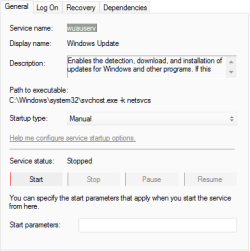
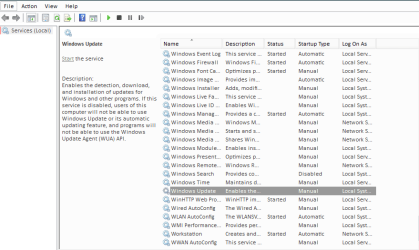
svchost.exe high memory usage mostly caused by the Windows update service wuauserv and Windows-driver foundation wudfsvc. By terminating or killing the wuauserv or wudfsvc, will helps your system resources back.

If you still experience the svchost.exe high memory and CPU usage in your Windows 7 system, this article helps you.
 

Attachments

  • disable windows driver foundation permanently.png
    disable windows driver foundation permanently.png
    7.3 KB · Views: 25
  • disable windows update permanently.png
    disable windows update permanently.png
    6.8 KB · Views: 24
  • disable-windows-update-in-services-msc.png
    disable-windows-update-in-services-msc.png
    18.5 KB · Views: 0
Last edited:

My Computer My Computer

Computer type
PC/Desktop
Computer Manufacturer/Model Number
Asus
OS
Windows 7
CPU
Asus
Motherboard
Intel Dual Core
Memory
2 GB RAM
Graphics Card(s)
512 MB
Monitor(s) Displays
15 inch CFT
Hard Drives
Seagate 160 GB
Keyboard
Logitech
Mouse
Zebronic
Internet Speed
8 MB/S
Antivirus
Bit defender
Browser
Chrome
svchost.exe high memory usage mostly caused by the Windows update service wuauserv and Windows-driver foundation wudfsvc. By terminating or killing the wuauserv or wudfsvc, will helps your system resources back.

If you still experience the svchost.exe high memory and CPU usage in your Windows 7 system, this article helps you.

I will add that this fixed my issue with svchost.exe constantly taking 50% of the cpu, sop basically when i ran Chrome and/or Firefox and a couple of other apps, I'd be up around the 95 - 100% CPU usage and basically this was making the system non-responsive and very sluggish.

Changing the "Windows Update" service settings to 'dsiabled' it brought my system back to life and the CPU was functioning normally, bouncing around but usually sitting at under 10%.

As for the updates, I will do them manually once a week.
 

My Computer My Computer

Computer type
PC/Desktop
Computer Manufacturer/Model Number
Custom Build
OS
Windows 7 Home Premium 64bit
CPU
i7-3770
Motherboard
ASUS P8Z77-V Deluxe
Memory
G.Skill 2133MHz - 16 GB
Graphics Card(s)
ASUS GTX 670
Sound Card
motherboard
Monitor(s) Displays
AOC e2795Vh
Screen Resolution
1920 x 1808
Hard Drives
OCZ Agility 4 - 128GB
WD 1TB - Black
PSU
Corsair HX850w
Case
Fractal Design F4
Cooling
Corsair H100
Keyboard
Microsoft Desktop 600
Mouse
Microsof Desktop 600
Internet Speed
ADSL - 8MB
Antivirus
Microsoft Security essentials
Browser
Firefox
Back
Top