The following pertains to Windows 7 Ultimate x64:
I've been searching on-line for an answer to the questions above, but have been unable to find a satisfactory answer that works. However, I have found a solution that works, for me, and wanted to pass it along:
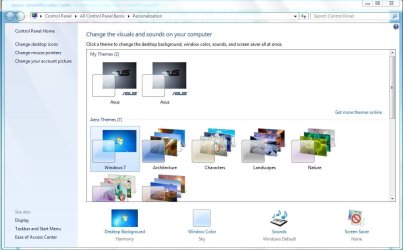
The symptoms I've been experiencing echo many of the posts I've read: I assign a screen saver (which actually functions properly), but on the Control Panel's 'Personalization' screen, in the lower right corner, it says that none has been assigned. I select a new wallpaper (which actually changes), but the Desktop Background in the lower left corner shows the icon for the old wallpaper. I change anything that would normally change the Theme I'm using, and instead of 'Unsaved Theme' showing up under 'My Themes', I see only the default theme with the old wallpaper.
In my case, I navigated to "C:\Users\<my_user_name>\AppData\Local\Microsoft\Windows\Themes\" (where
"<my_user_name>" represents my actual user name), and found a default theme in that folder. It had the read-only attribute, which I removed (right-click file name, Properties, uncheck "Read-only").
After I removed the read-only attribute, my subsequent changes produced a new 'Unsaved Theme', which I was able to right-click on the Personalization screen and save under a meaningful name. Once the new Theme had been saved, I could right-click the old one and delete it. From that point onward, any changes I made to any element of my Theme were reflected immediately on the bottom of the Personalization screen, and a new Unsaved Theme appeared under 'My Themes', as expected.
I hope this simple expedient helps one of the many users afflicted by 'Theme problems'!!
aboutblank6
October 31, 2015