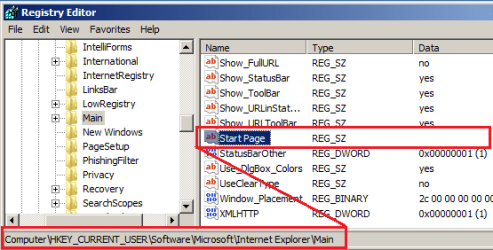
Suddenly today, IE11 stops working at load for just the Administrator user ID. The message says there is problem with the web page its trying to load. The web page is "cnn.com/#"http://www.cnn.com/# and is the home page for this user in IE11. IE11 loads fine for the regular user which does not have admin privileges and will load the same URL with no problems. No addons for the admin user in IE11 and I can't get to the home page edit since the program won't load. Does anyone know where the start page for IE11 in W7 is stored? I've searched here and found no location. Thanks.
Last edited:
My Computer
At a glance
Windows 7 Home Premium 64 bit SP1i5-2320 @3.00 GHz6GBNVIDIA GeForce 7300 LE
- Computer type
- PC/Desktop
- Computer Manufacturer/Model Number
- ASUS
- OS
- Windows 7 Home Premium 64 bit SP1
- CPU
- i5-2320 @3.00 GHz
- Memory
- 6GB
- Graphics Card(s)
- NVIDIA GeForce 7300 LE
- Monitor(s) Displays
- Acer S200HQL 19.5 LED
- Screen Resolution
- 1280 x 800 (1900 x 900 max)
- Hard Drives
- Drive 1: 1 TB SATA internal: C drive
Drive 2: 250 GB SATA internal: User Data Backup
Drive 3: 500 GB SATA USB: Full System Backup 1, Father
Drive 4: 500 GB SATA USB: Full System Backup 2, Son
Drive 5: 40 GB IDE USB: Kindle, ASUS Tabl
- Keyboard
- ASUS KB34211
- Mouse
- Logitech m325 cordless
- Internet Speed
- 27Mb down, 3 Mb up cable modem w/Netgear R6400 WiFi
- Antivirus
- NIS, Spybot S&D, CCleaner, Malwarebytes, MSERT, MRT
- Browser
- FF v44.0.2;IE11 v11.0.9600.18015,uv11.0.23;Chrome v44.0.2403
- Other Info
- FF has AdBlockPlus and Ghostery plugins,