
Solved W7 IE11 stops working on load for one user

jamis

New member
Power User
VIP
Local time
12:45 PM
Messages
246
Location
NW OH
Suddenly today, IE11 stops working at load for just the Administrator user ID. The message says there is problem with the web page its trying to load. The web page is "cnn.com/#"http://www.cnn.com/# and is the home page for this user in IE11. IE11 loads fine for the regular user which does not have admin privileges and will load the same URL with no problems. No addons for the admin user in IE11 and I can't get to the home page edit since the program won't load. Does anyone know where the start page for IE11 in W7 is stored? I've searched here and found no location. Thanks.
 
Last edited:

My Computer My Computer

At a glance

Windows 7 Home Premium 64 bit SP1i5-2320 @3.00 GHz6GBNVIDIA GeForce 7300 LE
Computer type
PC/Desktop
Computer Manufacturer/Model Number
ASUS
OS
Windows 7 Home Premium 64 bit SP1
CPU
i5-2320 @3.00 GHz
Memory
6GB
Graphics Card(s)
NVIDIA GeForce 7300 LE
Monitor(s) Displays
Acer S200HQL 19.5 LED
Screen Resolution
1280 x 800 (1900 x 900 max)
Hard Drives
Drive 1: 1 TB SATA internal: C drive
Drive 2: 250 GB SATA internal: User Data Backup
Drive 3: 500 GB SATA USB: Full System Backup 1, Father
Drive 4: 500 GB SATA USB: Full System Backup 2, Son
Drive 5: 40 GB IDE USB: Kindle, ASUS Tabl
Keyboard
ASUS KB34211
Mouse
Logitech m325 cordless
Internet Speed
27Mb down, 3 Mb up cable modem w/Netgear R6400 WiFi
Antivirus
NIS, Spybot S&D, CCleaner, Malwarebytes, MSERT, MRT
Browser
FF v44.0.2;IE11 v11.0.9600.18015,uv11.0.23;Chrome v44.0.2403
Other Info
FF has AdBlockPlus and Ghostery plugins,
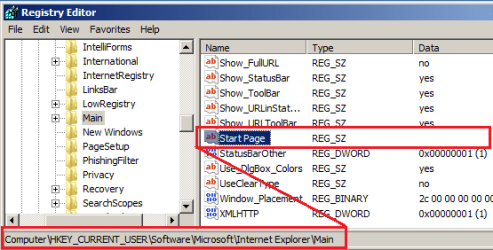
...and I can't get to the home page edit since the program won't load. Does anyone know where the start page for IE11 in W7 is stored? I've searched here and found no location. Thanks.

You can open IE's settings/options using the control panel (without starting IE).

But to answer your question:

IE.PNG
 
Last edited:

My Computer My Computer

At a glance

W7 Pro SP1 64biti78GBIntel HD Graphics
Computer type
Laptop
Computer Manufacturer/Model Number
Employer provided Dell Latitude
OS
W7 Pro SP1 64bit
CPU
i7
Memory
8GB
Graphics Card(s)
Intel HD Graphics
Hard Drives
crappy SSD
Antivirus
Employer mandated Symantec Endpoint Protection
Browser
Pale Moon 64bit, IE11 64bit & Chrome 64bit
use google chrome
 

My Computer My Computer

At a glance

Windows 7 Ultimate 32 bit,Chromium OS, window...not sure2.00GBintel inside pentium 4,Vision AMD
Computer type
PC/Desktop
Computer Manufacturer/Model Number
Dell,Samsung,Compaq,oracle virtualbox
OS
Windows 7 Ultimate 32 bit,Chromium OS, windows server 2008 32bit
CPU
not sure
Motherboard
not sure
Memory
2.00GB
Graphics Card(s)
intel inside pentium 4,Vision AMD
Monitor(s) Displays
MAG Innovision
Keyboard
onn RF wireless
Mouse
onn RF wireless
Antivirus
Avast!
Browser
Google Chrome

My Computer My Computer

At a glance

W7 Pro SP1 64biti78GBIntel HD Graphics
Computer type
Laptop
Computer Manufacturer/Model Number
Employer provided Dell Latitude
OS
W7 Pro SP1 64bit
CPU
i7
Memory
8GB
Graphics Card(s)
Intel HD Graphics
Hard Drives
crappy SSD
Antivirus
Employer mandated Symantec Endpoint Protection
Browser
Pale Moon 64bit, IE11 64bit & Chrome 64bit
...and I can't get to the home page edit since the program won't load. Does anyone know where the start page for IE11 in W7 is stored? I've searched here and found no location. Thanks.

You can open IE's settings/options using the control panel (without starting IE).

But to answer your question:

Thanks. Totally forgot about control panel access. Tried both suggestions and still get the "Internet Explorer has stopped working" messages even with no home page. Just don't get the message that the web page is causing the problem. Windows tries to recover IE even if auto recovery is unchecked in internet options. Continues to attempt recovery until the programs are ended with Task Manager. Works fine with the non-admin userid (thank goodness since that's what SWMBO uses). Spotted this problem when I went to look at a recent windows update writeup from the update page. Additional help would be appreciated. Thanks again.
 

My Computer My Computer

At a glance

Windows 7 Home Premium 64 bit SP1i5-2320 @3.00 GHz6GBNVIDIA GeForce 7300 LE
Computer type
PC/Desktop
Computer Manufacturer/Model Number
ASUS
OS
Windows 7 Home Premium 64 bit SP1
CPU
i5-2320 @3.00 GHz
Memory
6GB
Graphics Card(s)
NVIDIA GeForce 7300 LE
Monitor(s) Displays
Acer S200HQL 19.5 LED
Screen Resolution
1280 x 800 (1900 x 900 max)
Hard Drives
Drive 1: 1 TB SATA internal: C drive
Drive 2: 250 GB SATA internal: User Data Backup
Drive 3: 500 GB SATA USB: Full System Backup 1, Father
Drive 4: 500 GB SATA USB: Full System Backup 2, Son
Drive 5: 40 GB IDE USB: Kindle, ASUS Tabl
Keyboard
ASUS KB34211
Mouse
Logitech m325 cordless
Internet Speed
27Mb down, 3 Mb up cable modem w/Netgear R6400 WiFi
Antivirus
NIS, Spybot S&D, CCleaner, Malwarebytes, MSERT, MRT
Browser
FF v44.0.2;IE11 v11.0.9600.18015,uv11.0.23;Chrome v44.0.2403
Other Info
FF has AdBlockPlus and Ghostery plugins,

My Computer My Computer

At a glance

W7 Pro SP1 64biti78GBIntel HD Graphics
Computer type
Laptop
Computer Manufacturer/Model Number
Employer provided Dell Latitude
OS
W7 Pro SP1 64bit
CPU
i7
Memory
8GB
Graphics Card(s)
Intel HD Graphics
Hard Drives
crappy SSD
Antivirus
Employer mandated Symantec Endpoint Protection
Browser
Pale Moon 64bit, IE11 64bit & Chrome 64bit
You might try a complete reset of IE while in that admin account:
http://www.sevenforums.com/tutorials/1222-internet-explorer-reset.html
Including step 5.

OK, I'll give it a go. Just one question before I do. It will not affect IE in the other user id account? I have a fairly recent full system save on an external hard drive, but don't want to have to recover everything. Not sure I fully understand how Windows works with multiple IDs, so I want to be careful. Thanks.
 

My Computer My Computer

At a glance

Windows 7 Home Premium 64 bit SP1i5-2320 @3.00 GHz6GBNVIDIA GeForce 7300 LE
Computer type
PC/Desktop
Computer Manufacturer/Model Number
ASUS
OS
Windows 7 Home Premium 64 bit SP1
CPU
i5-2320 @3.00 GHz
Memory
6GB
Graphics Card(s)
NVIDIA GeForce 7300 LE
Monitor(s) Displays
Acer S200HQL 19.5 LED
Screen Resolution
1280 x 800 (1900 x 900 max)
Hard Drives
Drive 1: 1 TB SATA internal: C drive
Drive 2: 250 GB SATA internal: User Data Backup
Drive 3: 500 GB SATA USB: Full System Backup 1, Father
Drive 4: 500 GB SATA USB: Full System Backup 2, Son
Drive 5: 40 GB IDE USB: Kindle, ASUS Tabl
Keyboard
ASUS KB34211
Mouse
Logitech m325 cordless
Internet Speed
27Mb down, 3 Mb up cable modem w/Netgear R6400 WiFi
Antivirus
NIS, Spybot S&D, CCleaner, Malwarebytes, MSERT, MRT
Browser
FF v44.0.2;IE11 v11.0.9600.18015,uv11.0.23;Chrome v44.0.2403
Other Info
FF has AdBlockPlus and Ghostery plugins,
> It will not affect IE in the other user id account?
That is a good question. As far as I know, I have never been asked that.

I used to have a Virtual Machine (VM) with IE8...
...and another VM with IE9
...and another VM with IE10
...and another VM with IE11
...but my poor little SSD was running out of room. To make room for a VM with Windows 10, I deleted several Windows 7 VMs. I bore you with all of that to say: I could only test completely resetting IE8. It did not affect anything that I could see in a different profile. For instance, I set that other profile to "Always switch to new tabs when they are created". That setting was still checked after I reset IE8 in the admin profile/user.

In case it matters to you, completely resetting IE will turn off the displaying of the status bar within Windows (file) Explorer - but only for the account that performs the reset. The status bar within Windows (file) Explorer is turned off by default, but I find it annoying that IE's settings impact Windows (file) Explorer settings.
 
Last edited:

My Computer My Computer

At a glance

W7 Pro SP1 64biti78GBIntel HD Graphics
Computer type
Laptop
Computer Manufacturer/Model Number
Employer provided Dell Latitude
OS
W7 Pro SP1 64bit
CPU
i7
Memory
8GB
Graphics Card(s)
Intel HD Graphics
Hard Drives
crappy SSD
Antivirus
Employer mandated Symantec Endpoint Protection
Browser
Pale Moon 64bit, IE11 64bit & Chrome 64bit
The reset via internet options worked fine with deleting personal options setting. Also did not affect the other user id's IE operation. Many Thank Yous for the help.
 

My Computer My Computer

At a glance

Windows 7 Home Premium 64 bit SP1i5-2320 @3.00 GHz6GBNVIDIA GeForce 7300 LE
Computer type
PC/Desktop
Computer Manufacturer/Model Number
ASUS
OS
Windows 7 Home Premium 64 bit SP1
CPU
i5-2320 @3.00 GHz
Memory
6GB
Graphics Card(s)
NVIDIA GeForce 7300 LE
Monitor(s) Displays
Acer S200HQL 19.5 LED
Screen Resolution
1280 x 800 (1900 x 900 max)
Hard Drives
Drive 1: 1 TB SATA internal: C drive
Drive 2: 250 GB SATA internal: User Data Backup
Drive 3: 500 GB SATA USB: Full System Backup 1, Father
Drive 4: 500 GB SATA USB: Full System Backup 2, Son
Drive 5: 40 GB IDE USB: Kindle, ASUS Tabl
Keyboard
ASUS KB34211
Mouse
Logitech m325 cordless
Internet Speed
27Mb down, 3 Mb up cable modem w/Netgear R6400 WiFi
Antivirus
NIS, Spybot S&D, CCleaner, Malwarebytes, MSERT, MRT
Browser
FF v44.0.2;IE11 v11.0.9600.18015,uv11.0.23;Chrome v44.0.2403
Other Info
FF has AdBlockPlus and Ghostery plugins,
Glad that it worked :-)
 

My Computer My Computer

At a glance

W7 Pro SP1 64biti78GBIntel HD Graphics
Computer type
Laptop
Computer Manufacturer/Model Number
Employer provided Dell Latitude
OS
W7 Pro SP1 64bit
CPU
i7
Memory
8GB
Graphics Card(s)
Intel HD Graphics
Hard Drives
crappy SSD
Antivirus
Employer mandated Symantec Endpoint Protection
Browser
Pale Moon 64bit, IE11 64bit & Chrome 64bit
Back
Top