
Hi
My motherboard doesn't have any PCI slots - only a PCI-E port, the one we normally plug graphics cards into.
That slot is free now - I use the built-in graphics. As you see, there are only two SATA connectors on this board, which is painfully few. So, I thought, maybe I could put a SATA card into that PCI-E plug so I would have 4 SATA ports then? (two onboard and two on the card)
That card is old, but still working fine, Silicone SATA RAID. Would I be able to use it for booting, or for a DVD drive? :O Maybe both? Is it like a traditional SATA Controller or are there any limitations compared to the onboard plugs? I never tried using it for either a DVD drive nor for a boot drive, only for secondary data disks. That did the job fine, though in a vanilla/standard PCI slot. Never tried putting it into a graphics card slot, but seems like that's my only option here.
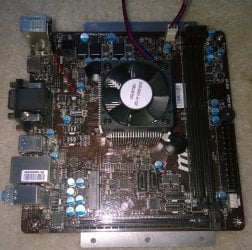
Oh and the type is MSI AM1i if you want to look it up. I'll include a photo here. The PCI-e Graphicsport in question is on the bottom in the picture.
EDIT: Oh, looking at the picture.... There is a beeper on the top left, sticked to the bottom of one of the rear connector boxes. It is connected to the board, but it never sounds. I want it to make that beep on boot. (POST chime) How do I enable that? There doesn't seem to be a BIOS setting for that.
[CLICK HERE] for official specs
My motherboard doesn't have any PCI slots - only a PCI-E port, the one we normally plug graphics cards into.
That slot is free now - I use the built-in graphics. As you see, there are only two SATA connectors on this board, which is painfully few. So, I thought, maybe I could put a SATA card into that PCI-E plug so I would have 4 SATA ports then? (two onboard and two on the card)
That card is old, but still working fine, Silicone SATA RAID. Would I be able to use it for booting, or for a DVD drive? :O Maybe both?
Is it like a traditional SATA Controller or are there any limitations compared to the onboard plugs? I never tried using it for either a DVD drive nor for a boot drive, only for secondary data disks. That did the job fine, though in a vanilla/standard PCI slot. Never tried putting it into a graphics card slot, but seems like that's my only option here. Oh and the type is MSI AM1i if you want to look it up. I'll include a photo here. The PCI-e Graphicsport in question is on the bottom in the picture.
EDIT: Oh, looking at the picture.... There is a beeper on the top left, sticked to the bottom of one of the rear connector boxes. It is connected to the board, but it never sounds. I want it to make that beep on boot. (POST chime) How do I enable that? There doesn't seem to be a BIOS setting for that.
[CLICK HERE] for official specs
My Computer
At a glance
Microsoft® Windows 7 Professional 64-bitIntel(R) Pentium(R) Dual CPU T2310 @ 1.46GHz4,00 GB(1) Mobile Intel(R) 965 Express Chipset Famil...
- Computer type
- Laptop
- Computer Manufacturer/Model Number
- HP Compaq 6720s
- OS
- Microsoft® Windows 7 Professional 64-bit
- CPU
- Intel(R) Pentium(R) Dual CPU T2310 @ 1.46GHz
- Motherboard
- Hewlett-Packard 30D8
- Memory
- 4,00 GB
- Graphics Card(s)
- (1) Mobile Intel(R) 965 Express Chipset Family (2) Mobile
- Sound Card
- (1) Bluetooth Hands-free Audio (2) Bluetooth Stereo Audio
- Screen Resolution
- 1280 x 800 x 32 bits (4294967296 colors) @ 59 Hz
- Hard Drives
- (1) Hitachi HTS542516K9SA00 ATA Device (2) Multi Flash Reader USB Device


