External HDD showing full but it is impossible

7leagueboot

New member
Member
Local time
4:36 PM
Messages
77
Location
France
I have a WD 'My Passport' 2TB 2.5" drive which I purchased in September 2014. It has remained connected to my PC via a USB 3.0 port ever since and has behaved faultlessly ...until yesterday morning. Since then, the WD Lock device works as normal but as soon as it claims the drive has been unlocked, it appears in Explorer as F: Local Drive whereas it always showed as F: My Passport previously.

If I try to read the files on it Windows Explorer crashes, as does every other program I have open. If I try to open task manager, it won't and the only way to recover is to reboot using Ctrl/Alt/Del.

I tried the drive on a second laptop and it did the same thing however, this other laptop has MiniTool Partition Wizard installed so I used that to check the disk and perform a defrag. The chkdsk option claimed the disk was 100% full whereas prior to this happening it wasn't even half full. It also stated that a repair was impossible because 0 bytes were available for the log (or something like that). The attempt to defrag merely crashed the PC.

This drive has some extremely important data which I desperately need to recover so all assistance would be gratefully received.
 

My Computer My Computer

At a glance

Windows 7 Ultimate x64i7 Q8408 GB2 x ATI Radeon H5780
Computer Manufacturer/Model Number
Alienware M17x R2
OS
Windows 7 Ultimate x64
CPU
i7 Q840
Motherboard
M17x
Memory
8 GB
Graphics Card(s)
2 x ATI Radeon H5780
Sound Card
ATI HD Audio
Hard Drives
2 x 500 GB in RAID 0

My Computer My Computer

At a glance

Windows 7 Ultimate x64 SP1AMD Phenom 2 1090T2x8GB Kingston HyperX Fury Black 1600Mhz Unga...MSI GTX 970 Gaming 4G
Computer type
PC/Desktop
Computer Manufacturer/Model Number
Custom Build
OS
Windows 7 Ultimate x64 SP1
CPU
AMD Phenom 2 1090T
Motherboard
Gigabyte GA-890FXA-UD5
Memory
2x8GB Kingston HyperX Fury Black 1600Mhz Unganged
Graphics Card(s)
MSI GTX 970 Gaming 4G
Sound Card
Realtek On-Board HD 7.1 Audio / Logitech G35
Monitor(s) Displays
3xAcer GD245HQ
Screen Resolution
1920x1080
Hard Drives
Samsung 850 Pro 512GB SSD - OS /
WD Caviar Black SATA 3 - 1 TBx2 - Dynamic RAID 0 /
WD Caviar Green SATA 2 - 640GBx2 - Dynamic RAID 0 /
WD Caviar Green SATA 2 - 640GB - Internal Backup /
Seagate Barracude SATA 3 - 3TB - External Backup/ Sync
PSU
HighPower 1000W
Case
Cooler Master HAF 932
Cooling
Noctua NH-D14
Keyboard
Logitech G19
Mouse
Logitech G500
Internet Speed
100/4 Mbit Cable (100GB quota)
Antivirus
ZoneAlarm Extreme Security / MBAM Pro / MBAE Free / SAS Free
Browser
IE 11 - Firefox - Chrome
Other Info
Logitech F710/ G27/ G940/ Z5500 // TrackIR 5 // Nvidia 3D Surround Vision
If I run the partition recovery wizard, will it retain all my data or is there a risk of losing it all?
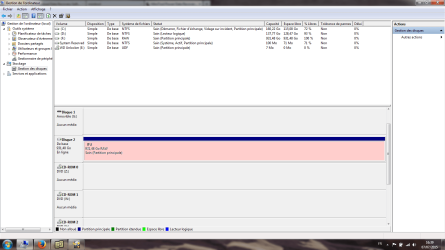
As far as the screen capture is concerned, Disk Manager just crashes when the drive is connected.
 

My Computer My Computer

At a glance

Windows 7 Ultimate x64i7 Q8408 GB2 x ATI Radeon H5780
Computer Manufacturer/Model Number
Alienware M17x R2
OS
Windows 7 Ultimate x64
CPU
i7 Q840
Motherboard
M17x
Memory
8 GB
Graphics Card(s)
2 x ATI Radeon H5780
Sound Card
ATI HD Audio
Hard Drives
2 x 500 GB in RAID 0
It won't do anything to data, scan, screenshot, quit out. :)
 

My Computer My Computer

At a glance

Windows 7 Ultimate x64 SP1AMD Phenom 2 1090T2x8GB Kingston HyperX Fury Black 1600Mhz Unga...MSI GTX 970 Gaming 4G
Computer type
PC/Desktop
Computer Manufacturer/Model Number
Custom Build
OS
Windows 7 Ultimate x64 SP1
CPU
AMD Phenom 2 1090T
Motherboard
Gigabyte GA-890FXA-UD5
Memory
2x8GB Kingston HyperX Fury Black 1600Mhz Unganged
Graphics Card(s)
MSI GTX 970 Gaming 4G
Sound Card
Realtek On-Board HD 7.1 Audio / Logitech G35
Monitor(s) Displays
3xAcer GD245HQ
Screen Resolution
1920x1080
Hard Drives
Samsung 850 Pro 512GB SSD - OS /
WD Caviar Black SATA 3 - 1 TBx2 - Dynamic RAID 0 /
WD Caviar Green SATA 2 - 640GBx2 - Dynamic RAID 0 /
WD Caviar Green SATA 2 - 640GB - Internal Backup /
Seagate Barracude SATA 3 - 3TB - External Backup/ Sync
PSU
HighPower 1000W
Case
Cooler Master HAF 932
Cooling
Noctua NH-D14
Keyboard
Logitech G19
Mouse
Logitech G500
Internet Speed
100/4 Mbit Cable (100GB quota)
Antivirus
ZoneAlarm Extreme Security / MBAM Pro / MBAE Free / SAS Free
Browser
IE 11 - Firefox - Chrome
Other Info
Logitech F710/ G27/ G940/ Z5500 // TrackIR 5 // Nvidia 3D Surround Vision
Right, well Partition Wizard doesn't want to launch. Mind you, it did the same yesterday but after about 20 minutes it finally opened. It's definitely this drive that's causing that.

Incidentally, I made a mistake, it's a 1 TB drive. Here's the info you requested:

WD My Passport 2.5" - 1 TB (931.48 GB).
Part #: WD88EP00 1088K-03
 

My Computer My Computer

At a glance

Windows 7 Ultimate x64i7 Q8408 GB2 x ATI Radeon H5780
Computer Manufacturer/Model Number
Alienware M17x R2
OS
Windows 7 Ultimate x64
CPU
i7 Q840
Motherboard
M17x
Memory
8 GB
Graphics Card(s)
2 x ATI Radeon H5780
Sound Card
ATI HD Audio
Hard Drives
2 x 500 GB in RAID 0
I'm unable to provide a screenshot from the other laptop as it doesn't have software for that purpose. However, Partition Wizard eventually completed its scan and, although I cannot access them, all my folders were displayed in its report. Disk Manager now shows the file system as RAW.

So I'm wondering whether I should get Partition Wizard to repair the MBR or follow its advice and download their Data Recovery Wizard?
 

My Computer My Computer

At a glance

Windows 7 Ultimate x64i7 Q8408 GB2 x ATI Radeon H5780
Computer Manufacturer/Model Number
Alienware M17x R2
OS
Windows 7 Ultimate x64
CPU
i7 Q840
Motherboard
M17x
Memory
8 GB
Graphics Card(s)
2 x ATI Radeon H5780
Sound Card
ATI HD Audio
Hard Drives
2 x 500 GB in RAID 0
No special software needed, press "Print Scr" (may be a Fn key combination), open mspaint and paste, then save as jpg.
Or try with How to Use the Snipping Tool in Vista

Post the wizard results, then double click the partition/s and take another screenshot. Post them all. So an expert can look and guide you.
 

My Computer My Computer

At a glance

Windows 7 Ultimate x64 SP1AMD Phenom 2 1090T2x8GB Kingston HyperX Fury Black 1600Mhz Unga...MSI GTX 970 Gaming 4G
Computer type
PC/Desktop
Computer Manufacturer/Model Number
Custom Build
OS
Windows 7 Ultimate x64 SP1
CPU
AMD Phenom 2 1090T
Motherboard
Gigabyte GA-890FXA-UD5
Memory
2x8GB Kingston HyperX Fury Black 1600Mhz Unganged
Graphics Card(s)
MSI GTX 970 Gaming 4G
Sound Card
Realtek On-Board HD 7.1 Audio / Logitech G35
Monitor(s) Displays
3xAcer GD245HQ
Screen Resolution
1920x1080
Hard Drives
Samsung 850 Pro 512GB SSD - OS /
WD Caviar Black SATA 3 - 1 TBx2 - Dynamic RAID 0 /
WD Caviar Green SATA 2 - 640GBx2 - Dynamic RAID 0 /
WD Caviar Green SATA 2 - 640GB - Internal Backup /
Seagate Barracude SATA 3 - 3TB - External Backup/ Sync
PSU
HighPower 1000W
Case
Cooler Master HAF 932
Cooling
Noctua NH-D14
Keyboard
Logitech G19
Mouse
Logitech G500
Internet Speed
100/4 Mbit Cable (100GB quota)
Antivirus
ZoneAlarm Extreme Security / MBAM Pro / MBAE Free / SAS Free
Browser
IE 11 - Firefox - Chrome
Other Info
Logitech F710/ G27/ G940/ Z5500 // TrackIR 5 // Nvidia 3D Surround Vision
Ok, thanks for the tip however, the screenshot only shows what I already said. As you can see, this is a French PC. Sain means healthy. I believe the reason why the drive cannot be accessed and shows as having 0 bytes free/used space available is due to it being converted to RAW. That likely happened following one of our frequent power cuts.
 

Attachments

  • DiskManager.png
    DiskManager.png
    52.6 KB · Views: 16

My Computer My Computer

At a glance

Windows 7 Ultimate x64i7 Q8408 GB2 x ATI Radeon H5780
Computer Manufacturer/Model Number
Alienware M17x R2
OS
Windows 7 Ultimate x64
CPU
i7 Q840
Motherboard
M17x
Memory
8 GB
Graphics Card(s)
2 x ATI Radeon H5780
Sound Card
ATI HD Audio
Hard Drives
2 x 500 GB in RAID 0
I will PM our data recovery expert, be patient and don't attempt anything if your data is important. :)
 

My Computer My Computer

At a glance

Windows 7 Ultimate x64 SP1AMD Phenom 2 1090T2x8GB Kingston HyperX Fury Black 1600Mhz Unga...MSI GTX 970 Gaming 4G
Computer type
PC/Desktop
Computer Manufacturer/Model Number
Custom Build
OS
Windows 7 Ultimate x64 SP1
CPU
AMD Phenom 2 1090T
Motherboard
Gigabyte GA-890FXA-UD5
Memory
2x8GB Kingston HyperX Fury Black 1600Mhz Unganged
Graphics Card(s)
MSI GTX 970 Gaming 4G
Sound Card
Realtek On-Board HD 7.1 Audio / Logitech G35
Monitor(s) Displays
3xAcer GD245HQ
Screen Resolution
1920x1080
Hard Drives
Samsung 850 Pro 512GB SSD - OS /
WD Caviar Black SATA 3 - 1 TBx2 - Dynamic RAID 0 /
WD Caviar Green SATA 2 - 640GBx2 - Dynamic RAID 0 /
WD Caviar Green SATA 2 - 640GB - Internal Backup /
Seagate Barracude SATA 3 - 3TB - External Backup/ Sync
PSU
HighPower 1000W
Case
Cooler Master HAF 932
Cooling
Noctua NH-D14
Keyboard
Logitech G19
Mouse
Logitech G500
Internet Speed
100/4 Mbit Cable (100GB quota)
Antivirus
ZoneAlarm Extreme Security / MBAM Pro / MBAE Free / SAS Free
Browser
IE 11 - Firefox - Chrome
Other Info
Logitech F710/ G27/ G940/ Z5500 // TrackIR 5 // Nvidia 3D Surround Vision
Launch PW.

Then on the left pane click on Partition Recovery Wizard > Next > Choose your WD external drive > Next > Full Disk > Next > Quick scan >Next.

After QuicK Scan completes you will get a Window showing the found partitions. Post the screenshot of it.

Double click on that partition/s also and show me the files.

You may then close the explorer,click on the Cancel tab to close the Window and then close PW. ( You may run Quick Scan again if needed.)

Wait for further instructions after I see the screenshot.
 

My Computer My Computer

At a glance

Windows 7 Home Premium 32 bit
OS
Windows 7 Home Premium 32 bit
It has been running for a few hours now and is very far from completing its scan. I fear it will require around 24 hours to complete. Once it has I will take the screenshots you requested and post them jumanji. Thanks for your assistance. :)
 

My Computer My Computer

At a glance

Windows 7 Ultimate x64i7 Q8408 GB2 x ATI Radeon H5780
Computer Manufacturer/Model Number
Alienware M17x R2
OS
Windows 7 Ultimate x64
CPU
i7 Q840
Motherboard
M17x
Memory
8 GB
Graphics Card(s)
2 x ATI Radeon H5780
Sound Card
ATI HD Audio
Hard Drives
2 x 500 GB in RAID 0
Well it appears 24 hours was rather optimistic. It is still performing its 'Quick Scan' and after 72 hours has reached 7272192 of 1953458176 sectors. At this pace it seems probable it will take at least a week to complete. :(
 

My Computer My Computer

At a glance

Windows 7 Ultimate x64i7 Q8408 GB2 x ATI Radeon H5780
Computer Manufacturer/Model Number
Alienware M17x R2
OS
Windows 7 Ultimate x64
CPU
i7 Q840
Motherboard
M17x
Memory
8 GB
Graphics Card(s)
2 x ATI Radeon H5780
Sound Card
ATI HD Audio
Hard Drives
2 x 500 GB in RAID 0
In post#6, you said "However, Partition Wizard eventually completed its scan and, although I cannot access them, all my folders were displayed in its report. Disk Manager now shows the file system as RAW."

What happened now?

Looks like your HDD has gone from bad to worse. Cancel PW scan.It is not taking us anywhere.

Now do not change computers. You seem to have installed WD Smartware in the original PC. Have you also installed WD's Disk Utilities?

Connect your WD external to the same PC. Try to access it in the same way as you used to. Post the screenshots of how your WD external looks like in My Computer, Device Manager and Windows Disk Management.

Post the screenshots and explain your problem afresh as you see it in the PC with Smartware.. May be I have to refer this case to CKWD since he is the WD man, if he does not come in.

(I do not have any WD drives and do not know much about Smartware.What all I can say now is that if the interface SATA to USB bridge in your Passport drive has become faulty and you are unable to access the drive because of it, none of us including the WD Man CKWD can help you to retrieve the data since your passport is hardware encrypted.)

I shall leave it to CKWD to examine and tell whether it is a problem with the installed Smartware or the HDD.
 
Last edited:

My Computer My Computer

At a glance

Windows 7 Home Premium 32 bit
OS
Windows 7 Home Premium 32 bit
I do not have WD's Disk Utilities on my original PC however, I can install WD's "Data Lifeguard Diagnostic" if that would be of any help?

Just one problem though. Even before the drive worsened, it would crash every application on my original PC. I'm assuming that was because once the WD Lock software was unlocked, Windows Explorer automatically scans the drive. Whatever the reason, Explorer would instantly crash as well as everything else, including Task Manager. The only way I could recover was to use Ctrl/Alt/Del to logoff and restart.
 

My Computer My Computer

At a glance

Windows 7 Ultimate x64i7 Q8408 GB2 x ATI Radeon H5780
Computer Manufacturer/Model Number
Alienware M17x R2
OS
Windows 7 Ultimate x64
CPU
i7 Q840
Motherboard
M17x
Memory
8 GB
Graphics Card(s)
2 x ATI Radeon H5780
Sound Card
ATI HD Audio
Hard Drives
2 x 500 GB in RAID 0
I had this once with a external USB drive housing that was partly defective.
Only a small portion of the available drive was exessible.
Planted the drive over in another case and all was OK.
 

My Computer My Computer

At a glance

Microsoft Windows 7 Ultimate 64-bits 7601 Mul...Intel(R) Core(TM)2 Duo CPU E8400 @ 3.00GHz8,00 GB(1) Intel(R) G41 Express Chipset (2) Intel(R)...
Computer type
PC/Desktop
OS
Microsoft Windows 7 Ultimate 64-bits 7601 Multiprocessor Free Service Pack 1
CPU
Intel(R) Core(TM)2 Duo CPU E8400 @ 3.00GHz
Motherboard
ASRock G41MH/USB3.
Memory
8,00 GB
Graphics Card(s)
(1) Intel(R) G41 Express Chipset (2) Intel(R) G41 Express
Sound Card
(1) VIA High Definition Audio (2) Intel(R) High Definition
Monitor(s) Displays
S24B350 Samsung
Screen Resolution
1920 x 1080 x 32 bits (4294967296 colors) @ 60 Hz
Hard Drives
(1) ST31000528AS ATA Device (2) Generic- Compact Flash USB Device (3) Generic- MS/MS-Pro USB Device (4) Generic- SD/MMC USB Device (5) Generic- SM/xD-Picture USB Device
Antivirus
ZoneAlarm Free Antivirus + Firewall version: 12.0.104.000 Vs
This drive has some extremely important data which I desperately need to recover so all assistance would be gratefully received.

All files of any importance should have at least one backup copy while those of particular importance require 2 or more backup copies. No drive, new or old, can be trusted without backups. Data recovery after an incident cannot be relied on.
 

My Computer My Computer

At a glance

Windows 7 Pro 64 bitXeon W35208 GBNvidia Geforce 210
Computer type
PC/Desktop
Computer Manufacturer/Model Number
HP
OS
Windows 7 Pro 64 bit
CPU
Xeon W3520
Memory
8 GB
Graphics Card(s)
Nvidia Geforce 210

My Computer My Computer

At a glance

Microsoft Windows 7 Ultimate 64-bits 7601 Mul...Intel(R) Core(TM)2 Duo CPU E8400 @ 3.00GHz8,00 GB(1) Intel(R) G41 Express Chipset (2) Intel(R)...
Computer type
PC/Desktop
OS
Microsoft Windows 7 Ultimate 64-bits 7601 Multiprocessor Free Service Pack 1
CPU
Intel(R) Core(TM)2 Duo CPU E8400 @ 3.00GHz
Motherboard
ASRock G41MH/USB3.
Memory
8,00 GB
Graphics Card(s)
(1) Intel(R) G41 Express Chipset (2) Intel(R) G41 Express
Sound Card
(1) VIA High Definition Audio (2) Intel(R) High Definition
Monitor(s) Displays
S24B350 Samsung
Screen Resolution
1920 x 1080 x 32 bits (4294967296 colors) @ 60 Hz
Hard Drives
(1) ST31000528AS ATA Device (2) Generic- Compact Flash USB Device (3) Generic- MS/MS-Pro USB Device (4) Generic- SD/MMC USB Device (5) Generic- SM/xD-Picture USB Device
Antivirus
ZoneAlarm Free Antivirus + Firewall version: 12.0.104.000 Vs
Hello 7leagueboot! Also, thank you Jumanji, I appreciate it!

I should have come in earlier, I apologize! I see this is an unpleasant situation! :/

I am going to start a little backwards. 7Leagueboot, you hardly need the WD DLG software in this case, as it is designed to scan your drive's health. A check of this sort could make your drive's state even worse. Besides, it has gone to RAW, indicating a problem with the partition table or file system, more likely the latter in this case. Sometimes the damage is small, but here it seems bigger than that.

There are sofwtares and ways known to supposedly convert the drive back to it original file system while keeping the data intact. In my personal opinion, these rarely work and there is always risk for the data. Using these programs, alongside the health checking programs, and even data recovery programs, on drives which are in a very bad state, could, like Jumanji said, make things from bad to worse. The fact that your scans have continued more than a few hours, indicates exactly that. :/

Also, putting the drive in another case is not possible, and additionally, it would void the warranty.

Usually, in these cases of RAW format, the situation is fixed with a reformat, if the drive is physically fine. But since you need your data back, from what I have read, I believe you should turn to a professional, or you risk further unintentional HDD damage. WD has partners in this field who are fully aware of the WD features and firmware, and are best qualified to try and recover the data.

WD Data recovery partners:
Support Answers

Also, I would agree with LMiller7 about keeping back ups.

Still, what I find unusual is the fact that the RAW drive has its drive letter. Something that comes to mind is to boot into a Linux/Ubuntu Live CD and see if you can open your drive and view your files through there.

Did you use the WD Drive Unlock Utility to try and unlock the drive at first?

I am sorry if I am unable to propose anything else, 7leagueboot, if you have any updates or additional information, please post!

CK_WD
 

My Computer My Computer

At a glance

Windows 7 Home Premium x64
Computer type
PC/Desktop
OS
Windows 7 Home Premium x64
Also, I would agree with LMiller7 about keeping back ups.

Oddly enough, this was originally a backup drive but after running out of space on one of my other drives, I stupidly made the mistake of transferring data from the primary drive to the backup drive in order to recover space. Now I am royally f***ed!

Still, what I find unusual is the fact that the RAW drive has its drive letter. Something that comes to mind is to boot into a Linux/Ubuntu Live CD and see if you can open your drive and view your files through there.

Sorry, I'm not that good with this stuff. I don't have a clue how to do what you suggested there. :o

Did you use the WD Drive Unlock Utility to try and unlock the drive at first?

Yes. That is the first thing that launches when you connect the drive. Of course, now that it is in RAW state, I doubt if that will work anymore.

I am sorry if I am unable to propose anything else, 7leagueboot, if you have any updates or additional information, please post!

CK_WD

It is only now that I can no longer access the data on that drive that I suddenly find myself in desperate need of things that were only on that drive. Just typical!!!

I'm guessing that I can indeed recover the drive by reconverting it to NTFS. I scanned it with the WD DLG software and that said the drive was healthy although it showed it as having 0 bytes available. But I don't want to do anything to it without first trying everything possible to recover the critical data.
 

My Computer My Computer

At a glance

Windows 7 Ultimate x64i7 Q8408 GB2 x ATI Radeon H5780
Computer Manufacturer/Model Number
Alienware M17x R2
OS
Windows 7 Ultimate x64
CPU
i7 Q840
Motherboard
M17x
Memory
8 GB
Graphics Card(s)
2 x ATI Radeon H5780
Sound Card
ATI HD Audio
Hard Drives
2 x 500 GB in RAID 0
Responding to a few posts here - if the disk is RAW Linux will not read it either, drive letter or not, unless you are using Scalpal or some other recovery application that can scan the different sectors. I have had luck recovering files from even RAW disks in the past using applications like Recover My Files Pro, but it can take literally a week for a full recovery (scan is a few days, copy is another few).

Secondly, the first thing anyone should do when trying to recover files or repair a drive is make a disk image. We could recover the files from that disk image, and even mount it on newly purchased drives to try and repair the issue while leaving the original drive untouched.

WD software might help, but there really is far better tools out there. Outside of the inside, the best recovery is probably to acquire your files from the corrupt drive and then redo the drive from fresh. Once things get too messy it becomes difficult to recover partitions and file systems.

Recovery software I use: Purchase Recover My Files data recovery software
It has never failed me!
 

My Computer My Computer

At a glance

Debian CustomI5 / I7Never enough
Computer type
Laptop
Computer Manufacturer/Model Number
Thinkpad'
OS
Debian Custom
CPU
I5 / I7
Memory
Never enough
Monitor(s) Displays
4+
Hard Drives
SSD
Internet Speed
NOS
Antivirus
What?
Browser
Mozilla
Back
Top