svchost.exe (netsvcs) draining all my memory

Nedly I just remembered there was an update about 2 - 3 months ago for the internal Radeon graphic chip for the AMD Radeon graphics driver. I think I am going to back it out and see what happens. Let you know as soon as I find out anything.
 

My Computer My Computer

At a glance

windows 7 professional 64 bit
Computer type
PC/Desktop
OS
windows 7 professional 64 bit
Nedly, I rolled back the AMD internal Radeon driver and the memory consumption for the svchost has come to a crawl. Still take memory, but at a very slow rate about what my other machines are doing. Ran system all night, ran a couple of movies through the Plex server and svchost memory was only at 55kk. Any other day I would have woke up to find my memory usage was at 70 -80 %. I'll be keeping my finger crossed for a couple of days. If after, say 2 -3 days memory usage seems normal I'm going to roll in the new driver to see what happens. Oh the other thing I did was disable windows defender, so it could be either one I guess.
I'll keep everyone posted.
 

My Computer My Computer

At a glance

windows 7 professional 64 bit
Computer type
PC/Desktop
OS
windows 7 professional 64 bit
That sounds fantastic - for the most part. Sadly the bug still exists, and hundreds face it. It is too bad you have to roll back to outdated components to keep a system functional given that updates are to make things better.

You could try something like this as well: TweakRAM ( memory optimizer \ memory booster \ cleaning MEMORY \ increases system )
I have never tried it, but something like this might help your system unload unneeded data from the memory.

From my research so far it is highly AMD related, but I have had a hard time finding solid solutions without having a well problem-ed computer in front of me; All of my main systems are gen Intel. I reached out to the people I have repaired for and am waiting for log files. I am hoping they will yield some better results.

So far this worked for some people: https://support.microsoft.com/en-us/kb/3050265
Others have had success disabling Superfetch.
And many have had success just restoring the system or rolling back the updates.
 

My Computer My Computer

At a glance

Debian CustomI5 / I7Never enough
Computer type
Laptop
Computer Manufacturer/Model Number
Thinkpad'
OS
Debian Custom
CPU
I5 / I7
Memory
Never enough
Monitor(s) Displays
4+
Hard Drives
SSD
Internet Speed
NOS
Antivirus
What?
Browser
Mozilla
What is your AMD Radeon Graphics driver version currently?

Mine is 13.251.0.0 which is not the latest version. Also it's just the driver installed with no Catalyst Control Center so there's no CCC.exe or MOM.exe processes running.
 

My Computer My Computer

At a glance

Microsoft Windows 7 Home Premium 64-bit 7601 ...AMD C-60 APU with Radeon(tm) HD Graphics4.00 GBAMD Radeon HD 6290 Graphics
Computer type
Laptop
Computer Manufacturer/Model Number
ASUS
OS
Microsoft Windows 7 Home Premium 64-bit 7601 Multiprocessor Free Service Pack 1
CPU
AMD C-60 APU with Radeon(tm) HD Graphics
Motherboard
ASUSTeK COMPUTER INC. X501U
Memory
4.00 GB
Graphics Card(s)
AMD Radeon HD 6290 Graphics
Sound Card
(1) AMD High Definition Audio Device (2) Realtek High Defi
Screen Resolution
1366 x 768 x 32 bits (4294967296 colors) @ 60 Hz
Hard Drives
Hitachi HTS545050A7E380 SATA Disk Device
Antivirus
Comodo CIS & FW, SecureAplus App Whitelisting, Threatfire
Browser
Cyberfox 64bit, Opera 64bit, Airfox
Other Info
Spy-The-Spy, HitmanPro.Alert, Norton Connect Safe, MJRegWatcher, BitDefender TrafficLight, Voodoo Shield, Zemana AntiMalware
Hello, first post here in the forums :)
I'm a newbie who's trying to fix the same problem that was shown here in the original post.
I have some knowledge in computers but not too fancy (so please don't use too big of a words :P)

My laptop has been slowing down for the past while and when opening the task manager I could see it's one of the SVCHOST.exe there. When opening the Memory tab in Resource Monitor I saw that it's SVCHOST (netsvcs).
It seems to take up between 500,000 K and 2,050,000 K of memory (as I can see in the Task Manager).
After seeing that the process keeps on rising with the memory use, I've tried ending the process.
Everytime I end the process, the screen "blinks" and the graphics of Windows changes a bit (like a bug). After the 3rd time of ending the process, Windows goes into "Classic Windows" mode, makes it look like the older Windows (95/98/2000...) and the possibility of the original Windows 7 style is now blocked (grey and not pressable).
I've figures it might have something to do with my graphics but I don't know.

I've searched all over and couldn't find any answer.

Any idea? I've seen it happens to many others, but I either can't fix it, or can't understand how to.

Thanks in advance!

 

My Computer My Computer

At a glance

Windows 7 Ultimate 64 bitintel core i7 q720 1.60GHz4GBAMD Mobility Radeon HD 5000 Series
Computer type
PC/Desktop
Computer Manufacturer/Model Number
HP
OS
Windows 7 Ultimate 64 bit
CPU
intel core i7 q720 1.60GHz
Memory
4GB
Graphics Card(s)
AMD Mobility Radeon HD 5000 Series
If anyone is still having the svchost.exe process eating away at system resources. I work for an MSP and I have been using (KB3050265 https://support.microsoft.com/en-us/kb/3050265) as a fix. It seems to be working great for most Windows 7 machines.
 

My Computer My Computer

At a glance

Windows 8 Pro x64
Computer type
PC/Desktop
Computer Manufacturer/Model Number
Dell
OS
Windows 8 Pro x64
If anyone is still having the svchost.exe process eating away at system resources. I work for an MSP and I have been using (KB3050265 https://support.microsoft.com/en-us/kb/3050265) as a fix. It seems to be working great for most Windows 7 machines.

I posted this link on a previous page of this thread. It is not fully functional on all systems and is not applicable to others. I fixed several machines that had this issue simply by disabling the Superfetch service and they all had this update. On the machines where opting out of this service was a fix, they were 100% RAM filled at fire up around 4gb's. At the point of ending the services function the drop was instant down to 1gb or less.
 

My Computer My Computer

At a glance

Debian CustomI5 / I7Never enough
Computer type
Laptop
Computer Manufacturer/Model Number
Thinkpad'
OS
Debian Custom
CPU
I5 / I7
Memory
Never enough
Monitor(s) Displays
4+
Hard Drives
SSD
Internet Speed
NOS
Antivirus
What?
Browser
Mozilla

My Computer My Computer

At a glance

Debian CustomI5 / I7Never enough
Computer type
Laptop
Computer Manufacturer/Model Number
Thinkpad'
OS
Debian Custom
CPU
I5 / I7
Memory
Never enough
Monitor(s) Displays
4+
Hard Drives
SSD
Internet Speed
NOS
Antivirus
What?
Browser
Mozilla
If anyone is still having the svchost.exe process eating away at system resources. I work for an MSP and I have been using (KB3050265 https://support.microsoft.com/en-us/kb/3050265) as a fix. It seems to be working great for most Windows 7 machines.

I posted this link on a previous page of this thread. It is not fully functional on all systems and is not applicable to others. I fixed several machines that had this issue simply by disabling the Superfetch service and they all had this update. On the machines where opting out of this service was a fix, they were 100% RAM filled at fire up around 4gb's. At the point of ending the services function the drop was instant down to 1gb or less.

I have noticed there was a few machines under our support that were still having the issue. This morning I have been testing the new Windows Client update for July 2015 which is https://support.microsoft.com/en-us/kb/3065987
 

My Computer My Computer

At a glance

Windows 8 Pro x64
Computer type
PC/Desktop
Computer Manufacturer/Model Number
Dell
OS
Windows 8 Pro x64
I have noticed there was a few machines under our support that were still having the issue. This morning I have been testing the new Windows Client update for July 2015 which is https://support.microsoft.com/en-us/kb/3065987

Be sure to post results! I personally have had a hard time replicating the issue in my systems, and I am still awaiting log files from other users. The issue seemed to act much like an I/O error which is why I wanted to target CPU and Chipsets. If only I could spend some time in front of an infected machine, I could potentially pull up more statistics on what exactly is happening. If anyone can get the infected machine into a VM, we may be able to debug it in that environment. The infected computers I worked on were Toshiba and HP - AMD - if I am correct. I will have those stats confirmed when the log files come through, hopefully very soon.
 

My Computer My Computer

At a glance

Debian CustomI5 / I7Never enough
Computer type
Laptop
Computer Manufacturer/Model Number
Thinkpad'
OS
Debian Custom
CPU
I5 / I7
Memory
Never enough
Monitor(s) Displays
4+
Hard Drives
SSD
Internet Speed
NOS
Antivirus
What?
Browser
Mozilla
For me KB:3065987 caused a huge lag when browsing files using Explorer. Removing the update fixed the issue.

Note: Tried that update when it was first released and have not tested it since then.
 

My Computer My Computer

At a glance

Microsoft Windows 7 Home Premium 64-bit 7601 ...AMD C-60 APU with Radeon(tm) HD Graphics4.00 GBAMD Radeon HD 6290 Graphics
Computer type
Laptop
Computer Manufacturer/Model Number
ASUS
OS
Microsoft Windows 7 Home Premium 64-bit 7601 Multiprocessor Free Service Pack 1
CPU
AMD C-60 APU with Radeon(tm) HD Graphics
Motherboard
ASUSTeK COMPUTER INC. X501U
Memory
4.00 GB
Graphics Card(s)
AMD Radeon HD 6290 Graphics
Sound Card
(1) AMD High Definition Audio Device (2) Realtek High Defi
Screen Resolution
1366 x 768 x 32 bits (4294967296 colors) @ 60 Hz
Hard Drives
Hitachi HTS545050A7E380 SATA Disk Device
Antivirus
Comodo CIS & FW, SecureAplus App Whitelisting, Threatfire
Browser
Cyberfox 64bit, Opera 64bit, Airfox
Other Info
Spy-The-Spy, HitmanPro.Alert, Norton Connect Safe, MJRegWatcher, BitDefender TrafficLight, Voodoo Shield, Zemana AntiMalware
@flaymon I had the same experience as you except I didn't notice the dropping back into Win Classic.

I was migrating several offices full of HP AMD 4gb Win7 Pro PCs to new LenovoWin7 Pro PCs. Since it was a government related office, all were running a standard desktop configuration and all have carefully vetted and installed updates by WSUS. I only saw this memory leak (SuperProcess) occur on one out of 6 basicly identical machines. Since I was decommissioning the affected PCs, I used the End Process Tree function of Task Mgr to free memory resources so I could complete my tasks. I did notice the blinking screen and I came to expect that three times is what it took to buy me at least 30 - 45 mins of usable time. I would sit and watch the resource usage of the individual services and see a Svchost process pop-up and start gobbling memory. I would also right click and choose go to services where windows would highlight the running services at it seemed to be the same group of 8 or 9 network related services but stopping the super process never yielded any negative consequences beyond the blinking screen. Weird. I will be following this thread because since that job, I have run into one other WIN7 pc exhibiting the same behavior.
 

My Computer My Computer

At a glance

Win8.1 Pro 64bitI tel Pentium G325812GbIntegrated Intel 4000
Computer type
PC/Desktop
Computer Manufacturer/Model Number
Custom Intel build
OS
Win8.1 Pro 64bit
CPU
I tel Pentium G3258
Motherboard
ASRock
Memory
12Gb
Graphics Card(s)
Integrated Intel 4000
Hard Drives
120Gb SSD
160Gb WD
Antivirus
Panda Pro ( at present)
Browser
Chrome
I'll join the party since this is now happening to my desktop. My ATI video card bit the dust so I've just been using the onboard NVidia chip. I did a fresh 64bit Win7SP1 Ultimate install after trying out Win10. Now I'm having this same problem with Svchost.exe (netsvcs) hogging up memory. No rhyme or reason, but on all my other machines running the same Windows build and updates they're not having problems. The major difference is they all have ATI video chipsets. I remember seeing something about an NVidia video driver problem with Win7 causing this problem but can't find anymore info on it. I'm waiting for my buddy to drop off an ATI video card to me to see if that helps. I'll let you guys know. I've tried all the other fixes I could find for this problem but none have permanently fixed it.
 

My Computer My Computer

At a glance

Windows 7 Ultimate x64
Computer type
PC/Desktop
OS
Windows 7 Ultimate x64

My Computer My Computer

At a glance

Windows 7 Ultimate x64 SP1AMD Phenom 2 1090T2x8GB Kingston HyperX Fury Black 1600Mhz Unga...MSI GTX 970 Gaming 4G
Computer type
PC/Desktop
Computer Manufacturer/Model Number
Custom Build
OS
Windows 7 Ultimate x64 SP1
CPU
AMD Phenom 2 1090T
Motherboard
Gigabyte GA-890FXA-UD5
Memory
2x8GB Kingston HyperX Fury Black 1600Mhz Unganged
Graphics Card(s)
MSI GTX 970 Gaming 4G
Sound Card
Realtek On-Board HD 7.1 Audio / Logitech G35
Monitor(s) Displays
3xAcer GD245HQ
Screen Resolution
1920x1080
Hard Drives
Samsung 850 Pro 512GB SSD - OS /
WD Caviar Black SATA 3 - 1 TBx2 - Dynamic RAID 0 /
WD Caviar Green SATA 2 - 640GBx2 - Dynamic RAID 0 /
WD Caviar Green SATA 2 - 640GB - Internal Backup /
Seagate Barracude SATA 3 - 3TB - External Backup/ Sync
PSU
HighPower 1000W
Case
Cooler Master HAF 932
Cooling
Noctua NH-D14
Keyboard
Logitech G19
Mouse
Logitech G500
Internet Speed
100/4 Mbit Cable (100GB quota)
Antivirus
ZoneAlarm Extreme Security / MBAM Pro / MBAE Free / SAS Free
Browser
IE 11 - Firefox - Chrome
Other Info
Logitech F710/ G27/ G940/ Z5500 // TrackIR 5 // Nvidia 3D Surround Vision
It shouldn't start the moment Win7 boot up because both these services should be Auto Delayed. Meaning they will start 1-2 minutes later.

Check services.msc if they are Auto Delayed.

Edit: of course, now I wonder what other services are included in this group. Will have to search later. Can you spot any errors/warnings in Event Viewer?
 

My Computer My Computer

At a glance

Windows 7 Ultimate x64 SP1AMD Phenom 2 1090T2x8GB Kingston HyperX Fury Black 1600Mhz Unga...MSI GTX 970 Gaming 4G
Computer type
PC/Desktop
Computer Manufacturer/Model Number
Custom Build
OS
Windows 7 Ultimate x64 SP1
CPU
AMD Phenom 2 1090T
Motherboard
Gigabyte GA-890FXA-UD5
Memory
2x8GB Kingston HyperX Fury Black 1600Mhz Unganged
Graphics Card(s)
MSI GTX 970 Gaming 4G
Sound Card
Realtek On-Board HD 7.1 Audio / Logitech G35
Monitor(s) Displays
3xAcer GD245HQ
Screen Resolution
1920x1080
Hard Drives
Samsung 850 Pro 512GB SSD - OS /
WD Caviar Black SATA 3 - 1 TBx2 - Dynamic RAID 0 /
WD Caviar Green SATA 2 - 640GBx2 - Dynamic RAID 0 /
WD Caviar Green SATA 2 - 640GB - Internal Backup /
Seagate Barracude SATA 3 - 3TB - External Backup/ Sync
PSU
HighPower 1000W
Case
Cooler Master HAF 932
Cooling
Noctua NH-D14
Keyboard
Logitech G19
Mouse
Logitech G500
Internet Speed
100/4 Mbit Cable (100GB quota)
Antivirus
ZoneAlarm Extreme Security / MBAM Pro / MBAE Free / SAS Free
Browser
IE 11 - Firefox - Chrome
Other Info
Logitech F710/ G27/ G940/ Z5500 // TrackIR 5 // Nvidia 3D Surround Vision
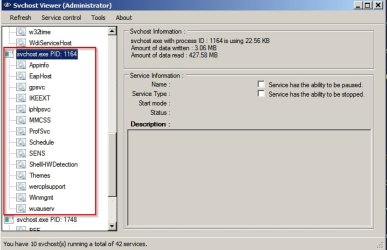
svchost.exe (netsvcs) is not the problem. The problem is one of the services running under it.

svchost netsvcs.jpg

In Task Manager right click the problematic svchost.exe and choose "Go to service" and see what is listed.
 
Last edited:

My Computer My Computer

At a glance

Microsoft Windows 7 Home Premium 64-bit 7601 ...AMD C-60 APU with Radeon(tm) HD Graphics4.00 GBAMD Radeon HD 6290 Graphics
Computer type
Laptop
Computer Manufacturer/Model Number
ASUS
OS
Microsoft Windows 7 Home Premium 64-bit 7601 Multiprocessor Free Service Pack 1
CPU
AMD C-60 APU with Radeon(tm) HD Graphics
Motherboard
ASUSTeK COMPUTER INC. X501U
Memory
4.00 GB
Graphics Card(s)
AMD Radeon HD 6290 Graphics
Sound Card
(1) AMD High Definition Audio Device (2) Realtek High Defi
Screen Resolution
1366 x 768 x 32 bits (4294967296 colors) @ 60 Hz
Hard Drives
Hitachi HTS545050A7E380 SATA Disk Device
Antivirus
Comodo CIS & FW, SecureAplus App Whitelisting, Threatfire
Browser
Cyberfox 64bit, Opera 64bit, Airfox
Other Info
Spy-The-Spy, HitmanPro.Alert, Norton Connect Safe, MJRegWatcher, BitDefender TrafficLight, Voodoo Shield, Zemana AntiMalware
Thanks - keep at it

I've been searching for this problem for months - finally found this thread. I figured SOMEONE else must have it. My disk io / paging subsides after 30 minutes or so. I have learned to start it up long before I want to use it.

Thanks for all the effort. I only have my one little beast here to worry about - and I was counting on Windows 10 fixing it. We'll see.
 

My Computer My Computer

At a glance

Windows 7 Home Premium SP1 64 bitAMD II X2 2153 G
Computer type
PC/Desktop
Computer Manufacturer/Model Number
Compaq CQ510F
OS
Windows 7 Home Premium SP1 64 bit
CPU
AMD II X2 215
Memory
3 G
Rather than start a new thread I thought I may as well ask in this one:

Can anybody help with my housemate's laptop? He told me it was slow, and I thought, yeah I've seen slow before but I am sure I'll be able to speed it up by optimising it and basically giving it a good clean-up. But when I went to use it, I don't think I've ever used a machine as slow in my life! It took forever for the desktop icons to appear and eventually managed to discover that it runs Windows 7 (x86) but only has 1GB RAM. I had an old laptop 1GB RAM module laying about which I said he could have so we fitted it, but it is hardly any different in performance at all! It takes forever to do anything - I loaded up task manager and it took 5 minutes or so to appear on screen.

I ran a CCleaner which recovered 4GB space but disk space isn't an issue, and the disk isn't even that badly fragmented (although it is a little, but not enough I'd have thought to cause these issues)

Then I noticed in task manager that the SVCHOST.EXE process (netsvc module) is using 70-90% CPU time constantly and also has a huge RAM footprint, basically eating all of the system memory. This would seem to be the culprit, or partly the reason why the laptop is so slow - but I can't figure out why it is doing it. Any ideas? If it isn't this causing the issue then I am inclined to believe the hard disk must be bad, because I have never used a machine so slow! If Windows 7 could be installed on a 386, this is how it would run.

Thanks for any info.
 

My Computer My Computer

At a glance

Windows 7 x644200 x23GB8800GT
OS
Windows 7 x64
CPU
4200 x2
Motherboard
Asus A8N SLI
Memory
3GB
Graphics Card(s)
8800GT
Screen Resolution
1360x768
PSU
550W
Back
Top