Themes Not Working

studiorat

New member
Member
VIP
Local time
11:11 AM
Messages
57
Hello,
I downloaded a theme from this site, and followed all the instructions in the
tutorial and when I apply it the Taskbar changes to a classic Taskbar My start orb is still an orb not the rectangular start button of the classic
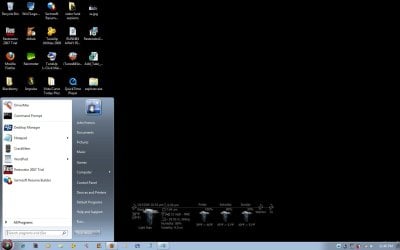
The transparency is gone and the start menu as well has not changed the theme is called Red Fusion By Sergio, but no 3rd party themes are working I tried installing several recommended themes from the Tutorial, and none of the downloaded themes are working... here is what happens!
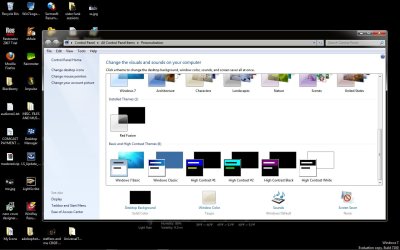
I select the theme from personalize menu, click to apply it and the screen goes Black and White for a few seconds then returns to a black screen and a whitish blue taskbar with a start Orb no theme related changes have taken place as far as I can tell the taskbar is not transparent, the start menu background is still the same when the theme calls for it to be black with red text and so forth i have attached a few ss to help show my issue any help would be appreciated
 

Attachments
  • ss1.jpg
    ss1.jpg
    104.4 KB · Views: 138
  • ss2.png
    ss2.png
    94.2 KB · Views: 98
  • ss3.jpg
    ss3.jpg
    62.7 KB · Views: 100

My Computer

Computer Manufacturer/Model Number
hp Dv9000 craptop
OS
windows 7 build 7600 RTM
CPU
AMD Turion(tm) 64 X2 Mobile Technology TL-58, 1900
Motherboard
Quanda 30D1
Memory
4gb
Graphics Card(s)
NVIDIA GeForce 7150M / nForce 630M
Sound Card
Conexant High Definition SmartAudio HD2
Monitor(s) Displays
On Board
Screen Resolution
Resolution 1440 x 900 x 59 hertz
Hard Drives
1} Model FUJITSU MHV2120BH PL ATA Device 120 gb
2} Model WDC WD3200BEKT-00F3T0 ATA Device 320 gb
Keyboard
Standard 101/102-Key or Microsoft Natural PS/2 K
Mouse
Synaptics PS/2 Port TouchPad
Other Info
HDA CX20549 Soft Modem
Follow up

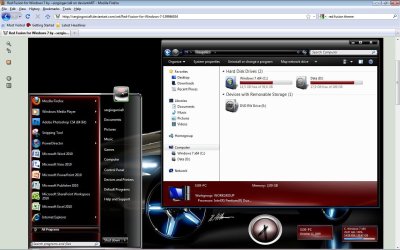
attached is the way the theme should look
 

Attachments

  • red fusion.jpg
    red fusion.jpg
    132.5 KB · Views: 149

My Computer

Computer Manufacturer/Model Number
hp Dv9000 craptop
OS
windows 7 build 7600 RTM
CPU
AMD Turion(tm) 64 X2 Mobile Technology TL-58, 1900
Motherboard
Quanda 30D1
Memory
4gb
Graphics Card(s)
NVIDIA GeForce 7150M / nForce 630M
Sound Card
Conexant High Definition SmartAudio HD2
Monitor(s) Displays
On Board
Screen Resolution
Resolution 1440 x 900 x 59 hertz
Hard Drives
1} Model FUJITSU MHV2120BH PL ATA Device 120 gb
2} Model WDC WD3200BEKT-00F3T0 ATA Device 320 gb
Keyboard
Standard 101/102-Key or Microsoft Natural PS/2 K
Mouse
Synaptics PS/2 Port TouchPad
Other Info
HDA CX20549 Soft Modem
Last edited:

My Computer

Computer Manufacturer/Model Number
Custom | Whitebox
OS
Windows 7 Ultimate, OS X 10.7, Ubuntu 11.04
CPU
Intel E6750 @ 3.80GHz
Motherboard
Gigabyte GA-EP45-UD3L (Revision 1.1)
Memory
2x2GB & 2x1GB (6GB) OCZ Reaper 1066MHz @ 1080MHz
Graphics Card(s)
EVGA nVidia GTX 260 896mb (216 Core) FTW Edition
Sound Card
Realtek ALC888
Monitor(s) Displays
21" VIZIO TV
Screen Resolution
1680x1050 @ 60Hz
Hard Drives
Western Digital WD6401AALS - 640GB
Hitachi HDP725016GLA380 - 160GB
PSU
Corsair 750W
Case
NZXT Nemesis Elite
Cooling
Thermaltake SpinQ
Keyboard
Logitech Wireless S520
Mouse
Logitech Wireless S520 - Microsoft Wireless Arc Mouse
Internet Speed
Download: 20mbps, Upload: 3mbps
Have you patched your theme files and whatnot?

http://soft3.wmzhe.com/download/deepxw/UniversalThemePatcher_20090409.zip

(run as admin with UAC turned off)

After you patch all three files, restart, reselect the theme the same way you did before (under personalization) and it should work.


yes I patched all 3 files UAC is always off on my rig, and i did run as admin before patching and it still did not work could it be my RC7100 isn't compatible with these themes they were tested on 64 bit on the RTM .16384 perhaps it is this
 

My Computer

Computer Manufacturer/Model Number
hp Dv9000 craptop
OS
windows 7 build 7600 RTM
CPU
AMD Turion(tm) 64 X2 Mobile Technology TL-58, 1900
Motherboard
Quanda 30D1
Memory
4gb
Graphics Card(s)
NVIDIA GeForce 7150M / nForce 630M
Sound Card
Conexant High Definition SmartAudio HD2
Monitor(s) Displays
On Board
Screen Resolution
Resolution 1440 x 900 x 59 hertz
Hard Drives
1} Model FUJITSU MHV2120BH PL ATA Device 120 gb
2} Model WDC WD3200BEKT-00F3T0 ATA Device 320 gb
Keyboard
Standard 101/102-Key or Microsoft Natural PS/2 K
Mouse
Synaptics PS/2 Port TouchPad
Other Info
HDA CX20549 Soft Modem
Have you patched your theme files and whatnot?

http://soft3.wmzhe.com/download/deepxw/UniversalThemePatcher_20090409.zip

(run as admin with UAC turned off)

After you patch all three files, restart, reselect the theme the same way you did before (under personalization) and it should work.


yes I patched all 3 files UAC is always off on my rig, and i did run as admin before patching and it still did not work could it be my RC7100 isn't compatible with these themes they were tested on 64 bit on the RTM .16384 perhaps it is this

Couldn't tell you, I'm on the retail (I suppose its retail even though I got it from the Launch Party thing).

-

Hi Mark, I see you.
 

My Computer

Computer Manufacturer/Model Number
Custom | Whitebox
OS
Windows 7 Ultimate, OS X 10.7, Ubuntu 11.04
CPU
Intel E6750 @ 3.80GHz
Motherboard
Gigabyte GA-EP45-UD3L (Revision 1.1)
Memory
2x2GB & 2x1GB (6GB) OCZ Reaper 1066MHz @ 1080MHz
Graphics Card(s)
EVGA nVidia GTX 260 896mb (216 Core) FTW Edition
Sound Card
Realtek ALC888
Monitor(s) Displays
21" VIZIO TV
Screen Resolution
1680x1050 @ 60Hz
Hard Drives
Western Digital WD6401AALS - 640GB
Hitachi HDP725016GLA380 - 160GB
PSU
Corsair 750W
Case
NZXT Nemesis Elite
Cooling
Thermaltake SpinQ
Keyboard
Logitech Wireless S520
Mouse
Logitech Wireless S520 - Microsoft Wireless Arc Mouse
Internet Speed
Download: 20mbps, Upload: 3mbps
i did some experimenting and installed power tools v2.3 and patched my themeui.dll is not patched in powertools but it is in the universal patcher, either way I installed the themes from powertools all of em work just fine so I believe the Red Fusion and other themes on the tutorial page are designed around the RTM 7600 oh well thanx for all unless you guys can think of something else
 

My Computer

Computer Manufacturer/Model Number
hp Dv9000 craptop
OS
windows 7 build 7600 RTM
CPU
AMD Turion(tm) 64 X2 Mobile Technology TL-58, 1900
Motherboard
Quanda 30D1
Memory
4gb
Graphics Card(s)
NVIDIA GeForce 7150M / nForce 630M
Sound Card
Conexant High Definition SmartAudio HD2
Monitor(s) Displays
On Board
Screen Resolution
Resolution 1440 x 900 x 59 hertz
Hard Drives
1} Model FUJITSU MHV2120BH PL ATA Device 120 gb
2} Model WDC WD3200BEKT-00F3T0 ATA Device 320 gb
Keyboard
Standard 101/102-Key or Microsoft Natural PS/2 K
Mouse
Synaptics PS/2 Port TouchPad
Other Info
HDA CX20549 Soft Modem
Back
Top