Thank you very much.
This is good to know you didn't move the files.

How do you know then the files got corrupted? What type of files are they?
I hope I understand your questions correctly: I copied the same archive (zip or rar) a few times to another folder and in the same folder on the same drive and some of the copies have a different check sum (the check sum also differs among the corrupted files, so corrupted files have different check sums, not the same wrong check sum) and WinRAR or other programs show an error message that a file or more are corrupted when I try to unzip some of the copies. I mostly or only copied archives, zip, rar.
Western Digital Data LifeGuard Diagnostics - DLGDIAG, CrystalDiskInfo and other programs do not show any errors regarding the S.M.A.R.T. information for that drive.
Yes, I understand, very sorry again. Yes, I will do it as soon as possible, sorry at the moment, since about 12 hours, a memory test is running on the other Notebook (to exclude the RAM to cause the problem) so I cannot access it now. Western Digital Data LifeGuard Diagnostics - DLGDIAG, CrystalDiskInfo and other programs do not show any errors regarding the S.M.A.R.T. information for that drive.
Very sorry about this: WinDlg - Data Lifeguard Diagnostic for Windows does not start / work anymore, do not know why:
http://i.imgur.com/bXZbl9Z.png
How could I get it to work again?
The Western Digital Data LifeGuard Diagnostics - DLGDIAG shows to test the cable. Is that test reliable?
To which test of WD DLG are you referring to? The main ones are Quick and Extended.
To both ones the quick and extended tests, they display to test the cable - if I remember it right - while they are testing.
Generally speaking, the most reliable test for the cable is changing it with a known-working one.
OK, I just will exchange that cable with another one of the same model, hoping the same fault won't occur in all of the cables.
For the drivers you can find in Device Manager, wherever there is a yellow exclamation mark, it means the drivers are not up to date.
Ah OK, that was meant, yes, they are up to date. But the OS, Win 7 isn't, the Win updater does not update Internet Explorer, an error message occurs each time it tries to update, do not know why.
If a file system is corrupted it would usually result in other problems, as well, the worst which would be the drive becoming in RAW format. Do you have any other issues with the drive?
No, I do not have any problems (I would have noticed, at least).
Hmmm, that would mean in my case a corrupted file works, can be played, opened properly, an archive can be unzipped without causing an error message of the unzipper program, but after transferring that file (the first time or a further time) the corruption shows its effect (without the same or with another check sum)?
This was only a theory, thinking out loud.
Yes, of course, sounds interesting, I would like to understand that theory, what does it mean?
The checksums themselves, if they mismatch, indicate that the transmission is not corruption-free, so I would suppose the checksum mismatches are only on the corrupted files?
I am not quite sure to understand correctly. The source file has a check sum, say 111111, the copied file, if copied / moved correctly has the same sum, so 111111, if transferred not correctly / if corrupted it has different check sum, say, 111333. When I transfer the same file a second time the check sum might be 112255.
How did you calculate the checksums?
I let different programs do it, they showed the same check sums for the different files. Why do you ask?
Or else you risk for instance a 3TB drive to be displayed as 800GB.
HDtune shows the WD, 4TB as 500 GB drive.
1. Open the Start Menu, type diskpart, press Enter
2. Type list disk, press Enter
When you find the drive it would say either GPT or it will be blank (no GPT). But if the drive is correctly shown in Disk Management (e.g. 4TB=3.6TB "real" size), then it is GPT.
Yes the drive always is shown correctly, I would say, this is shown:
http://i.imgur.com/VNT0NUC.png
My advice, change the cable, see what happens when you copy paste from teh system to the WD drive
Alright, I just started copying files from the internal drive to the WD 4TB drive.
Is there a special way I should prefer to copy the files for testing? E.g. drag & drop, synchronize, copy & paste? So is there a process which could cause the faulty copying the best?
Your first post was a bit fuzzy
Very sorry for the fuzzyness. What exactly was fuzzy, not understandable? I will try to clarify it.
how many drives do you have, and is the WD Elements the only one having this problem, only when you copy paste from it to it?
Very sorry, I couldn't notice that problem when I copy from the drive or to it, but only when I copy / move files on it, so the files I copied / moved kept staying on that drive. THe files never left the drive when I tested. May be transferring files from / to it works properly, I will test it.
I have about 7, 8 Western Digital 4TB drives and other drives bigger than 2.2 TB. That 4TB Elements drive is the only drive I know from having this problem. May be the problem occurs on all of my drives, but I would not have noticed it until now. I find the problem for the 4TB WD out more or less at random.
On Advanced format - includes actually a separate software for the older OS (WD Align Windows software utility):
Support Answers
Sorry, I cannot open the page, respectively there is only a blanc page shown without any content.
If the OP has no problem in copying and retrieving data from a less than 2TB drive (without any corruption) , but has this problem of corruption taking place only with this greater than 2 TB drive, then one can conclude that that HDD has a defective drive translation electronics inside.
OP? What does that mean? Yes, the only drive I noticed to have exactly this problem is this WD 4TB Elements drive. But I do not know if other drives have this problem either. I could not notice it until now, all of my other drives appear to work correctly, besides of the 640 GB 2,5 drive (used with the other Notebook), using that one there were caused some "check sum" problems also, but I do not know whether there is a connection to the WD 4TB drive and I do not know what the (may be another kind of) problem was caused by.
He can try it on other PCs too.The same corruption will take place. .
Unfortunately I do not have any other PC / Notebook than the second one. Using the same constellation (the second Notebook with same OS, same formating / not GPT) for testing would not be useful, I guess.
One has to note that this electronics fault can be intermittent. So wherever it is tried it has to be monitored for quite a period to catch it.
Yes, that makes it very displeasing.
The OP needs to RMA the drive if it is confirmed as above.
Sorry, what does RMA mean?
( The manufacturer's diagnostic/repair utility only checks the physical drive but not this additional electronics which converts the 4096 byte data stream into 512 byte data stream and presents it to the . Corruption is taking place here due to faulty electronics)
Alright, so as (faulty) converting does not effect the health / state of the surface, the physical parts of the / a drive that diagnostic test takes an notice of it. Is there a way / program (I don't think so otherwise you had already mentioned it) to test the state of of that electronics?
In his initial post he mentions having troubles of similar nature with two other drives,
The external Fujitsu Siemens 1TB drive, USB 2.0 just lost the connection to the Notebook, I do not know whether there might be a connection to the problem now.
Also, he has to see if the files get corrupt when copy pasting from the system to the external WD device
By copying and pasting you mean just copying / moving or especially to use the shortcuts?
The device could be for RMA, but otherwise every other action, as OP states, is done correctly and as expected, and only some files get corrupted. To me, it sounds like a problem with either the laptop/PC he/she is using, or the WD Elements's file system.
So, not using that GPT system. Is there anything I could test regarding the state of the Notebook, if the problem is caused by it?
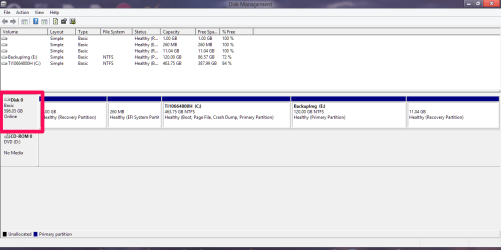
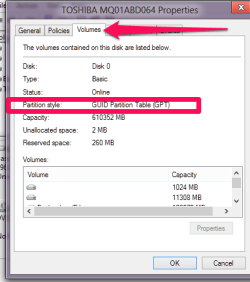
The info is shown clearly in Disk Management Volume tab.
Yes, very clearly indeed, very sorry for missing that, many thanks for the screenshots:
http://i.imgur.com/pcuqWgr.png
Your WD Elements seems to be initialized in MBR. Still, I speak a little German, so I understand that there has been a problem detected with the WD DLG, no specific reason given, I suppose when you tried to scan the drive through it?
Yes, initialized in MBR. That's great, you speak German. No, just when I start WD DLG the message appears, I cannot get to the options.
The SMART also indicates of real no problems, which leaves that the enclosure is perhaps the issue.
OK, so the CrystalDiskMark information is enough. OK, the enclosure perhaps.
Would you please look at my post #12 and answer the questions just so that I can make sure.
Yes, of course, sorry, done, if any fuzzyness again (sorry for that), just ask.
"
I did not test my other drives with some copying processes, but may be that happens with all of my drive."
The OP states may be. So I am not taking the OP's words seriously.
They can mix up different issues and club it to this issue.
Very sorry for this. The issue, the exact issue of the WD 4TB Elements drive I only noticed occurring with this drive. I never have noticed it occurring elsewhere, but I unfortunately I cannot grant that that issue does not occur somewhere else especially because this issue is not that easily to notice unfortunately.
So now the real test will be that the OP should try this > 2Tb drive on another known to be good PC and monitor whether the same corruption takes place.
Yes, if only I had another known to be good system. At the moment the copying to that drive is still running.
If it does, just return it and get a replacement. (If I were him/her ( I don't know
but immaterial) if it is within the return policy of the vendor I would straightaway return it with no reasons specified clause, take a new one and scratch my head if only the same problem repeats with the new one.
)
Yes, there is still warranty, it is some months old. But I would have to get a further 4TB drive to copy the data to from the drive to be returned (respectively I would need a second drive as well as I would not get a replacement for the returning immediately). Then shredder the data of the returning one. And when the problem occurs again with the new drive(s) I would scratch my head and after knock it against the wall through the night.
I dunno'. It seems to me I've read about problems in Windows with 4 TB drives that weren't partitioned exactly in two. IOW, a partition > 2 TB = sadness.
And two partitions less than 2 TB each one = happiness. So when there are two partitions that problem might be gone...or not.
Many thanks for helping.

 sometimes they were corrupted.




 To be as brief till the end of this post as possible:
