Copied files a few times on same external hard disk: copies corruptedd

Doki

New member
Local time
8:13 AM
Messages
12
On an external USB drive, WD Elements, 4TB (Notebook Medion akoya P8614) some files obviously became corrupted after copying them on the same drive (the files are not copied from another drive, but may be such files can become corrupted also). There was not any error message displaying the copying to be failed. I copied the same archive (zip or rar) a few times to another folder and in the same folder on the same drive and some of the copies have a different check sum (the check sum also differs among the corrupted files, so corrupted files have different check sums, not the same wrong check sum) and WinRAR or other programs show an error message that a file or more are corrupted when I try to unzip some of the copies. The file size stayed the same of all of the copies.

When I plugged in the USB plug of that drive the first times the external drive was not shown, after a few times and waiting finally it was shown. And some time ago with another Notebook (same manufacturer) I had some kind of the same problem: when unzipping / downloading archives to (or on, I do not remember anymore at the moment) a 2,5 external 640 GB drive (A
AHsJFJhC1JVdTiwNFHjIzQRYghQooATggIBTTTRlyNVL0Z4COQLoGuCnQgAduFxBEWgoDaMibGzFWSPmU4csj+wM1PKj1okIIUjp6WEESB+BGGKhQHUrj5U6CaosGTVmjgxZfDhtogIpxgAJAgBgmZTpC5kNAxkcmaIq1B1PgSotWCgQzyIagHx4afCnFZqFdF5IKWCKgGENQxAxKdGi1yBCpWrMCCDCAC0TAdrsuGRDyAcYFIJ0QSDAAIIEiQBEYpWEh5JXTySZAQBmxYADD8KQaOQCTi8cXFZ5cGRBDYRUZd6AuiFnIIhOW1QQucCBFxJMLM7QFTgiioNZheYuAgwIADs=
sometimes they were corrupted.

I checked the drives (the 640 GB one and the WD Elements, 4TB) with CrystalDiskMark and CrystalDiskInfo and checked the 640GB drive with HDtune (error scan, the long one, not the "Quick Scan", no errors found.

And I checked the WD Elements, 4TB drive with the extended test (lasting two days and about 12 hours) of Western Digital Data LifeGuard Diagnostics - DLGDIAG, so a program developed by / for WD, no errors found:


And with another older external hard disk, 1TB, some weeks ago I had problems also, the cable USB connection to the Notebook (the same with the P: drive) obviously got interrupted 2 times while copying, I don't know why. May be there is a connection to the cause for the problems above. I did not test my other drives with some copying processes, but may be that happens with all of my drive.

What might cause the corrupted files? And how could I correct it?
 
Last edited:

My Computer My Computer

At a glance

Windows 7 Home Premium 64-bit SP1Intel Core i3 390M @ 2.67GHz Arrandale 32nm T...4,00GB Dual-Channel DDR3 @ 532MHz (7-7-7-20)PnP-Monitor (Standard) (1366x768@60Hz) Intel ...
Computer type
Laptop
OS
Windows 7 Home Premium 64-bit SP1
CPU
Intel Core i3 390M @ 2.67GHz Arrandale 32nm Technology
Motherboard
MEDION P6630 (CPU 1)
Memory
4,00GB Dual-Channel DDR3 @ 532MHz (7-7-7-20)
Graphics Card(s)
PnP-Monitor (Standard) (1366x768@60Hz) Intel HD Graphics (Wi
Sound Card
NVIDIA Virtual Audio Device (Wave Extensible) (WDM)
Hard Drives
Western Digital, WD Elements, 3TB
Western Digital, WD Elements, 4TB
Western Digital, MyBook, 3TB
Western Digital, MyBook, 4TB
A couple of things come to mind, one I've read about on the 'net is older computers don't do well with 3TB and larger HDDs and the other is the Power Options need to be set to NOT shut anything down, Windows sometimes doesn't properly recognize when a USB port is or is not idle. I have mine set on the When Plugged In feature to turn nothing off, no Sleep, no Hibernation, etc. The defaults for When On Battery are fine as I don't usually do the heavy-duty copy/move of files then.
 

My Computer My Computer

At a glance

Windows 7 Ultimate 64-bit, Windows 8.1 64-bit...
Computer type
PC/Desktop
Computer Manufacturer/Model Number
Customs, Dell, Gateway, HP, Toshiba, Acer, ASUS
OS
Windows 7 Ultimate 64-bit, Windows 8.1 64-bit, Mac OS X 10.10, Linux Mint 17, Windows 10 Pro TP
Keyboard
Microsoft
Mouse
Microsoft

My Computer My Computer

At a glance

Windows 7 32 bitAMD 5200+ dual core2 GBNVidia GeForce 6150SE 128 MB
Computer Manufacturer/Model Number
HP Media Center
OS
Windows 7 32 bit
CPU
AMD 5200+ dual core
Memory
2 GB
Graphics Card(s)
NVidia GeForce 6150SE 128 MB
Monitor(s) Displays
CRT
Screen Resolution
1280x1024
Hard Drives
500 GB Sata internal :

SIIG USB 3.0 docking stations w/WD Caviar Black 6 Gb/s drives
Keyboard
PS/2
Mouse
PS/2 Wheel Mouse
Other Info
SIIG USB 3.0 PCIexpress card.
Thank you, Berton,

The Medion akoya P6630 is bought 2011, August and Medion Akoya P8614 (MD 98470) 2012, Jan. Actually I would think that should not be too old.

the Power Options need to be set to NOT shut anything down
I do not use the battery usually, the power supply only.

I have mine set on the When Plugged In feature to turn nothing off, no Sleep, no Hibernation, etc.
Where could I find it? May be there is a connection to that strange sounding setting: http://i.imgur.com/ws0zc5J.pnghttp://i.imgur.com/MEg563T.png

Is the 4 TB formatted as GPT?
Thank you for the link, never heard of it. I did not formated the drive, may be a (normal, I suppose NTFS) quick format (a full format lasts about 2 days, I assume), I guess, I kept the default (manufacturer) format.
I thought as long as the entire hard disk is recognized (like shown) it is alright. So the wrong format / formating effects the files to may be become corrupt without error message when transferring.

How could I find out the way the drive is formated, whether it is formated with GPT?

Many thanks again.
 
Last edited:

My Computer My Computer

At a glance

Windows 7 Home Premium 64-bit SP1Intel Core i3 390M @ 2.67GHz Arrandale 32nm T...4,00GB Dual-Channel DDR3 @ 532MHz (7-7-7-20)PnP-Monitor (Standard) (1366x768@60Hz) Intel ...
Computer type
Laptop
OS
Windows 7 Home Premium 64-bit SP1
CPU
Intel Core i3 390M @ 2.67GHz Arrandale 32nm Technology
Motherboard
MEDION P6630 (CPU 1)
Memory
4,00GB Dual-Channel DDR3 @ 532MHz (7-7-7-20)
Graphics Card(s)
PnP-Monitor (Standard) (1366x768@60Hz) Intel HD Graphics (Wi
Sound Card
NVIDIA Virtual Audio Device (Wave Extensible) (WDM)
Hard Drives
Western Digital, WD Elements, 3TB
Western Digital, WD Elements, 4TB
Western Digital, MyBook, 3TB
Western Digital, MyBook, 4TB
Hello Doki!

I'm sorry to hear for your problem! :/

Are you trying to move the exact same files, or may be same file types? What happens if you copy paste the same or similar file from the PC to the WD Elements, does it also corrupt?

In WD DLG there is the option for SMART data, clicking on it should export to the screen the RAW SMART values of your WD external, could please post a screenshot of that?

Other reasons for the files corrupting would be a faulty cable, drivers (USB etc.) installed improperly, corruption in the drive's file system, or the files themselves have corruptions that may not show up in the initial copy, but during the transfer.

If a drive is over 2.2 TB to be shown properly it would need to be Initialized in GPT, which is the step before the partitioning and formatting. If your drive has shown correctly, in its full 4TB, and was able to follow copy paste commands, it was initialized in GPT. If you would like, try and reformat the external WD drive and try the transfer again. Do the files corrupt again? Do this after backing up any data from it, as reformatting erases everything!

CK_WD
 

My Computer My Computer

At a glance

Windows 7 Home Premium x64
Computer type
PC/Desktop
OS
Windows 7 Home Premium x64
How could I find out the way the drive is formated, whether it is formated with GPT?
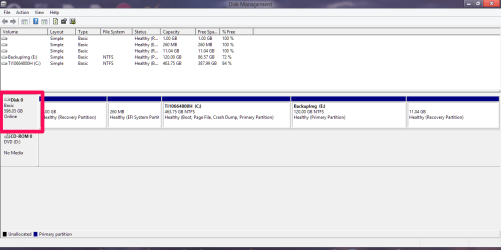
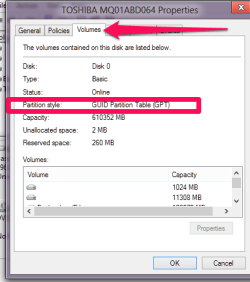
In Control Panel => Administrative Tools => Disk Management
right click on the disk for the extenal then click Properties
then Volumes. It will say Guid Partition Table GPT
 

My Computer My Computer

At a glance

Windows 7 32 bitAMD 5200+ dual core2 GBNVidia GeForce 6150SE 128 MB
Computer Manufacturer/Model Number
HP Media Center
OS
Windows 7 32 bit
CPU
AMD 5200+ dual core
Memory
2 GB
Graphics Card(s)
NVidia GeForce 6150SE 128 MB
Monitor(s) Displays
CRT
Screen Resolution
1280x1024
Hard Drives
500 GB Sata internal :

SIIG USB 3.0 docking stations w/WD Caviar Black 6 Gb/s drives
Keyboard
PS/2
Mouse
PS/2 Wheel Mouse
Other Info
SIIG USB 3.0 PCIexpress card.
Hello CK_WD,

Thank you very much.

Are you trying to move the exact same files
I did not move them (for testing), I always copied them, so the originals (when I tested) were kept. Yes, I copied a single file / the same / identical (by content and same name) / the exact same file copied for example 10 times to the same folder / different folders on the same drive. Some became corrupt, some didn't.

If only there were displayed error messages when transferring failed...

or may be same file types?
Yes, I also copied different types of archives (zip, rar), if I remember it right.

What happens if you copy paste the same or similar file from the PC to the WD Elements, does it also corrupt?
I didn't try it until now. It is not that easy to reproduce the problem all the time. I synchronized in a further try on the same drive different (types of) archives (about 100, 200, I guess) and 1 or 2 or so became corrupted.

In WD DLG there is the option for SMART data, clicking on it should export to the screen the RAW SMART values of your WD external, could please post a screenshot of that?
Yes, I will do it as soon as possible, sorry at the moment, since about 12 hours, a memory test is running on the other Notebook (to exclude the RAM to cause the problem) so I cannot access it now. Western Digital Data LifeGuard Diagnostics - DLGDIAG, CrystalDiskInfo and other programs do not show any errors regarding the S.M.A.R.T. information for that drive.

Other reasons for the files corrupting would be a faulty cable
The Western Digital Data LifeGuard Diagnostics - DLGDIAG shows to test the cable. Is that test reliable?

drivers (USB etc.) installed improperly
The drivers for the USB port / controller or something like that? How could I find out? Is there a program which can test it?

corruption in the drive's file system
Which program could check that? Chkdsk of Win? Western Digital Data LifeGuard Diagnostics - DLGDIAG obviously does not check it.

or the files themselves have corruptions that may not show up in the initial copy, but during the transfer.
Hmmm, that would mean in my case a corrupted file works, can be played, opened properly, an archive can be unzipped without causing an error message of the unzipper program, but after transferring that file (the first time or a further time) the corruption shows its effect (without the same or with another check sum)?

If a drive is over 2.2 TB to be shown properly it would need to be Initialized in GPT
Sorry, I am not quite sure to understand, so when a drive is bigger than 2.2 TB it might not be shown properly on Win 7. And if it is not shown properly (that would have been very good because I would have noticed it and could have corrected it, but without a message according to anything being connected to a failure of that drive I would not have noticed anything) I would have to initialize it in GPI (whatever exactly that means. I do not have any idea of all of that, sorry). Does that mean, if a drive bigger than 2.2 TB is shown properly (so the entire size of the drive is shown, may be 3,6 TB "real" size of 4TB) there should not occur any problem then?

If your drive has shown correctly, in its full 4TB, and was able to follow copy paste commands
Yes, it was shown fully, the full "real" size (about 3,6 TB or so) at least, depending of the program showing the drives. And yes, all commands / processes appeared / appear to work correctly without any doubt. The behavior of the drive appears / appeared to be the same like usual / like it is with any other drive.

...it was initialized in GPT.
How could I find out now how it was / is initialized?

If you would like, try and reformat the external WD drive and try the transfer again.
Hmmm, yes, well, well, that is a good idea...but may be...so copying / moving all of the files stored on that drive would last about 2 and a half days (running 7/24, without interruption) on the second Notebook (USB 2.0) doing nothing but this and without checking the files after transferring, but without checking the files after transfer (and checking them absolutely would be necessary). With checking (by check sum or content) the files, I assume, it would last about 1 or 1 and a half days longer. Then initialize the drive with GPT, I do not know how long it lasts, then format (quick or full) the drive. Full format lasts about 2 and a half days. Then copy / move back the files to the drive, about 4 days with checking the check sums / contents after. Presumed there do not occur any problems, hesitations. With USB 3.0 it might last half the time, I could imagine.

And I do not know whether all of my other drives bigger than 2.2 TB of size are effected also. Actually I would have to grant they are effected. I have about 7, 8 Western Digital 4TB drives and other drives bigger than 2.2 TB. Even if all of these processes only last 6 days - I would not think so - (running 7/24) for a single drive it would last about 50 days (running 7/24) for all of these drives. And I could not use these drives (properly). And even if the problem would not occur anymore while testing after these processes are done I could not be sure the problem is gone. May be it is caused by anything else.

Many thanks again.

Oops, a new post, sorry, I missed it:

In Control Panel => Administrative Tools => Disk Management
right click on the disk for the extenal then click Properties
then Volumes. It will say Guid Partition Table GPT
I will look at it immediately after the memory test has finished.
Many thanks.
 

My Computer My Computer

At a glance

Windows 7 Home Premium 64-bit SP1Intel Core i3 390M @ 2.67GHz Arrandale 32nm T...4,00GB Dual-Channel DDR3 @ 532MHz (7-7-7-20)PnP-Monitor (Standard) (1366x768@60Hz) Intel ...
Computer type
Laptop
OS
Windows 7 Home Premium 64-bit SP1
CPU
Intel Core i3 390M @ 2.67GHz Arrandale 32nm Technology
Motherboard
MEDION P6630 (CPU 1)
Memory
4,00GB Dual-Channel DDR3 @ 532MHz (7-7-7-20)
Graphics Card(s)
PnP-Monitor (Standard) (1366x768@60Hz) Intel HD Graphics (Wi
Sound Card
NVIDIA Virtual Audio Device (Wave Extensible) (WDM)
Hard Drives
Western Digital, WD Elements, 3TB
Western Digital, WD Elements, 4TB
Western Digital, MyBook, 3TB
Western Digital, MyBook, 4TB
Hello Doki!......
If a drive is over 2.2 TB to be shown properly it would need to be Initialized in GPT,.... CK_WD

Need not necessarily. As on date almost all the >2TB drives including Western Digital drives use Advanced Formatting where the 8 default 512bytes sectors are combined ( by the drive translation circuitry inside the enclosure) and present a 4096 byte sector size. Consequently upto 16TB (2TBx8) drives can be initialised as an MBR drive.

At the moment only Toshiba has started making a true 4096 byte sector size >2TB drives. These will necessarily be GPT formatted. When I last checked in April/May when I was in USA and recently about a month ago,these are generally not available in the market over the counter but one can place an order directly on Toshiba. There is a delayed shipping date.
 

My Computer My Computer

At a glance

Windows 7 Home Premium 32 bit
OS
Windows 7 Home Premium 32 bit
I did not move them (for testing), I always copied them, so the originals (when I tested) were kept.

This is good to know you didn't move the files. :) How do you know then the files got corrupted? What type of files are they?

Western Digital Data LifeGuard Diagnostics - DLGDIAG, CrystalDiskInfo and other programs do not show any errors regarding the S.M.A.R.T. information for that drive.

I understand they don't show errors in the results, but I would like to see the WD DLG SMART values. :)

The Western Digital Data LifeGuard Diagnostics - DLGDIAG shows to test the cable. Is that test reliable?

To which test of WD DLG are you referring to? The main ones are Quick and Extended. WD DLG has multiple error codes, some of which may apply to the physical connections. Generally speaking, the most reliable test for the cable is changing it with a known-working one.

The drivers for the USB port / controller or something like that? How could I find out? Is there a program which can test it?

For the drivers you can find in Device Manager, wherever there is a yellow exclamation mark, it means the drivers are not up to date.

Which program could check that? Chkdsk of Win?

If a file system is corrupted it would usually result in other problems, as well, the worst which would be the drive becoming in RAW format. Do you have any other issues with the drive?

Hmmm, that would mean in my case a corrupted file works, can be played, opened properly, an archive can be unzipped without causing an error message of the unzipper program, but after transferring that file (the first time or a further time) the corruption shows its effect (without the same or with another check sum)?

This was only a theory, thinking out loud. The checksums themselves, if they mismatch, indicate that the transmission is not corruption-free, so I would suppose the checksum mismatches are only on the corrupted files? How did you calculate the checksums?

Sorry, I am not quite sure to understand, so when a drive is bigger than 2.2 TB it might not be shown properly on Win 7. And if it is not shown properly (that would have been very good because I would have noticed it and could have corrected it, but without a message according to anything being connected to a failure of that drive I would not have noticed anything) I would have to initialize it in GPI (whatever exactly that means. I do not have any idea of all of that, sorry). Does that mean, if a drive bigger than 2.2 TB is shown properly (so the entire size of the drive is shown, may be 3,6 TB "real" size of 4TB) there should not occur any problem then?

Yes, almost. MBR (Master Boot Record) and GPT (GUID Partition Table) are two different ways of storing the partitioning information on a drive. Their methods are different. Since technology advanced and larger HDDs were created, these which were above 2.2TB, no matter the Windows you are using, need to be Initialized in GPT (generally), in order to be correctly and fully seen by the system. Or else you risk for instance a 3TB drive to be displayed as 800GB. All because MBR has limitations in the distribution of sectors on the drive. You could check how your drives have been initialized in diskpart.

1. Open the Start Menu, type diskpart, press Enter
2. Type list disk, press Enter

When you find the drive it would say either GPT or it will be blank (no GPT). But if the drive is correctly shown in Disk Management (e.g. 4TB=3.6TB "real" size), then it is GPT.

How could I find out now how it was / is initialized?

Every storage device is first Initialized before Partitioned and then formatted. It can't function otherwise.

With USB 3.0 it might last half the time, I could imagine.

Yes, it should.


My advice, change the cable, see what happens when you copy paste from teh system to the WD drive. Your first post was a bit fuzzy, how many drives do you have, and is the WD Elements the only one having this problem, only when you copy paste from it to it?

On Advanced format - includes actually a separate software for the older OS (WD Align Windows software utility):
Support Answers

CK_WD
 
Last edited:

My Computer My Computer

At a glance

Windows 7 Home Premium x64
Computer type
PC/Desktop
OS
Windows 7 Home Premium x64
As a corollary to what has been stated above in my post #8,

If the OP has no problem in copying and retrieving data from a less than 2TB drive (without any corruption) , but has this problem of corruption taking place only with this greater than 2 TB drive, then one can conclude that that HDD has a defective drive translation electronics inside. He can try it on other PCs too.The same corruption will take place. One has to note that this electronics fault can be intermittent. So wherever it is tried it has to be monitored for quite a period to catch it..

The OP needs to RMA the drive if it is confirmed as above.
( The manufacturer's diagnostic/repair utility only checks the physical drive but not this additional electronics which converts the 4096 byte data stream into 512 byte data stream and presents it to the . Corruption is taking place here due to faulty electronics)
 

My Computer My Computer

At a glance

Windows 7 Home Premium 32 bit
OS
Windows 7 Home Premium 32 bit
Thank you, jumanji.

Need not necessarily. As on date almost all the >2TB drives including Western Digital drives use Advanced Formatting where the 8 default 512bytes sectors are combined and present a 4096 byte sector size, by the drive translation circuitry inside the enclosure. Consequently upto 16TB (2TBx8) drives can be initialised as an MBR drive.
I am not quite sure, so this means, I should leave my drives like they are, all is good with the external drive(s)?

In Control Panel => Administrative Tools => Disk Management
right click on the disk for the extenal then click Properties
then Volumes. It will say Guid Partition Table GPT
Looks like all of the drives are formated with NTSF / the normal way, not initialized with GPI:

The drives are shown like this:
http://i.imgur.com/UHzG0Lx.png
or
http://i.imgur.com/rBdBxzH.png

Information about the drive:

http://i.imgur.com/t74XvCu.png
http://i.imgur.com/dT6PVZG.png
http://i.imgur.com/FFXQCwO.png

Disk Management:
http://i.imgur.com/I9vNSc8.png
http://i.imgur.com/xee8nfd.png

WinDlg - Data Lifeguard Diagnostic for Windows does not start / work anymore, do not know why:
http://i.imgur.com/bXZbl9Z.png

The information of CrystalDiskInfo:

Code:
----------------------------------------------------------------------------
CrystalDiskInfo 6.2.1 (C) 2008-2014 hiyohiyo
                                Crystal Dew World : http://crystalmark.info/
----------------------------------------------------------------------------

    OS : Windows 7 Home Premium SP1 [6.1 Build 7601] (x64)
  Date : 2015/07/20 15:53:13

-- Controller Map ----------------------------------------------------------
 + Intel(R) 5 Series/3400 Series Chipset Family 6 Port SATA AHCI Controller - 3B2F [ATA]
   + ATA Channel 0 (0)
     - ST1000LM024 HN-M101MBB ATA Device
   + ATA Channel 1 (1)
     - TSSTcorp CDDVDW SN-S083C ATA Device
   - ATA Channel 2 (2)

-- Disk List ---------------------------------------------------------------
 (1) ST1000LM024 HN-M101MBB : 1000,2 GB [0/0/0, pd1] - st
 (2) WDC WD40EZRX-00SPEB0 : 4000,7 GB [2/X/X, sa1] (V=1058, P=107C) - wd

----------------------------------------------------------------------------
 (1) ST1000LM024 HN-M101MBB
----------------------------------------------------------------------------
           Model : ST1000LM024 HN-M101MBB
        Firmware : 2AR10001
   Serial Number : S2U5J9CC608613
       Disk Size : 1000,2 GB (8,4/137,4/1000,2/1000,2)
     Buffer Size : 8192 KB
     Queue Depth : 32
    # of Sectors : 1953525168
   Rotation Rate : 5400 RPM
       Interface : Serial ATA
   Major Version : ATA8-ACS
   Minor Version : ATA8-ACS version 6
   Transfer Mode : SATA/300 | SATA/300
  Power On Hours : 12326 Std.
  Power On Count : 970 mal
     Temperature : 41 C (105 F)
   Health Status : Gut
        Features : S.M.A.R.T., APM, 48bit LBA, NCQ
       APM Level : 0080h [ON]
       AAM Level : ----

-- S.M.A.R.T. --------------------------------------------------------------
ID Cur Wor Thr RawValues(6) Attribute Name
01 100 100 _51 000000000021 Lesefehlerrate
02 252 252 __0 000000000000 Leistungsfähigkeit
03 _89 _89 _25 000000000D81 Beschleunigungszeit
04 100 100 __0 0000000003CF Start/Stop des Spindels
05 252 252 _10 000000000000 Neu zugewiesene Sektoren
07 252 252 _51 000000000000 Suchfehlerrate
08 252 252 _15 000000000000 Suchzeitleistung
09 100 100 __0 000000003026 Eingeschaltete Stunden
0A 252 252 _51 000000000000 Drehwiederholungen
0B 100 100 __0 0000000002C5 Rekalibrierungswiederholungen
0C 100 100 __0 0000000003CA Ein-/Ausschaltungen
BF 100 100 __0 000000000024 G-Sense Fehlerrate
C0 252 252 __0 000000000000 Ausschaltungsabbrüche
C2 _59 _49 __0 0033000E0029 Temperatur
C3 100 100 __0 000000000000 Hardware ECC wiederhergestellt
C4 252 252 __0 000000000000 Neuzuweisungsereignisse
C5 252 252 __0 000000000000 Aktuell schwebende Sektoren
C6 252 252 __0 000000000000 Unkorrigierbare Sektoren
C7 200 200 __0 000000000000 UltraDMA CRC Fehler
C8 __1 __1 __0 0000000164FE Schreibfehlerrate
DF 100 100 __0 0000000002C5 Laden/Entladen Wiederholungen
E1 _97 _97 __0 0000000086E7 Laden/Entladen Zyklus

-- IDENTIFY_DEVICE ---------------------------------------------------------
        0    1    2    3    4    5    6    7    8    9
000: 0040 3FFF C837 0010 0000 0000 003F 0000 0000 0000
010: 5332 5535 4A39 4343 3630 3836 3133 2020 2020 2020
020: 0000 4000 0004 3241 5231 3030 3031 5354 3130 3030
030: 4C4D 3032 3420 484E 2D4D 3130 314D 4242 2020 2020
040: 2020 2020 2020 2020 2020 2020 2020 8010 4000 2F00
050: 4000 0200 0200 0006 3FFF 0010 003F FC10 00FB 0110
060: FFFF 0FFF 0000 0007 0003 0078 0078 0078 0078 0000
070: 0000 0000 0000 0000 0000 001F 0F06 0004 004C 0040
080: 01FF 0028 746B 7D09 6123 7469 BC09 6123 203F 0068
090: 0068 0080 FFFE 0000 0000 0000 0000 0000 0000 0000
100: 6DB0 7470 0000 0000 0000 0000 6003 0000 5000 4CF2
110: 07D9 0E92 0000 0000 0000 0000 0000 0000 0000 401C
120: 401C 0000 0000 0000 0000 0000 0000 0000 0029 0000
130: 0000 0000 0000 0000 0000 0000 0000 0000 0000 0000
140: 0000 0000 0000 0000 0000 0000 0000 0000 0000 0000
150: 0000 0000 0000 0000 0000 0000 0000 0000 0000 0000
160: 0000 0000 0000 0000 0000 0000 0000 0000 0003 0000
170: 0000 0000 0000 0000 0000 0000 0000 0000 0000 0000
180: 0000 0000 0000 0000 0000 0000 0000 0000 0000 0000
190: 0000 0000 0000 0000 0000 0000 0000 0000 0000 0000
200: 0000 0000 0000 0000 0000 0000 003F 0000 0000 4000
210: 0000 0000 0000 0000 0000 0000 0000 1518 0000 0000
220: 0000 0000 103F 0000 0000 0000 0000 0000 0000 0000
230: 0000 0000 0000 0000 0001 0400 0000 0000 0000 0000
240: 0000 0000 0000 0000 0000 0000 0000 0000 0000 0000
250: 0000 0000 0000 0000 0000 39A5

-- SMART_READ_DATA ---------------------------------------------------------
     +0 +1 +2 +3 +4 +5 +6 +7 +8 +9 +A +B +C +D +E +F
000: 10 00 01 2F 00 64 64 21 00 00 00 00 00 00 02 26
010: 00 FC FC 00 00 00 00 00 00 00 03 23 00 59 59 81
020: 0D 00 00 00 00 00 04 32 00 64 64 CF 03 00 00 00
030: 00 00 05 33 00 FC FC 00 00 00 00 00 00 00 07 2E
040: 00 FC FC 00 00 00 00 00 00 00 08 24 00 FC FC 00
050: 00 00 00 00 00 00 09 32 00 64 64 26 30 00 00 00
060: 00 00 0A 32 00 FC FC 00 00 00 00 00 00 00 0B 32
070: 00 64 64 C5 02 00 00 00 00 00 0C 32 00 64 64 CA
080: 03 00 00 00 00 00 BF 22 00 64 64 24 00 00 00 00
090: 00 00 C0 22 00 FC FC 00 00 00 00 00 00 00 C2 02
0A0: 00 3B 31 29 00 0E 00 33 00 00 C3 3A 00 64 64 00
0B0: 00 00 00 00 00 00 C4 32 00 FC FC 00 00 00 00 00
0C0: 00 00 C5 32 00 FC FC 00 00 00 00 00 00 00 C6 30
0D0: 00 FC FC 00 00 00 00 00 00 00 C7 36 00 C8 C8 00
0E0: 00 00 00 00 00 00 C8 2A 00 01 01 FE 64 01 00 00
0F0: 00 00 DF 32 00 64 64 C5 02 00 00 00 00 00 E1 32
100: 00 61 61 E7 86 00 00 00 00 00 00 00 00 00 00 00
110: 00 00 00 00 00 00 00 00 00 00 00 00 00 00 00 00
120: 00 00 00 00 00 00 00 00 00 00 00 00 00 00 00 00
130: 00 00 00 00 00 00 00 00 00 00 00 00 00 00 00 00
140: 00 00 00 00 00 00 00 00 00 00 00 00 00 00 00 00
150: 00 00 00 00 00 00 00 00 00 00 00 00 00 00 00 00
160: 00 00 00 00 00 00 00 00 00 00 00 00 18 33 00 5B
170: 03 00 01 00 02 DA 00 00 00 00 00 00 00 00 00 00
180: 00 00 00 00 00 00 00 00 00 00 00 00 00 00 00 00
190: 00 00 00 00 00 00 00 00 00 00 00 00 00 00 00 00
1A0: 00 00 00 00 00 00 00 00 00 00 00 00 00 00 00 00
1B0: 00 00 00 00 00 00 00 00 00 00 00 00 00 00 00 00
1C0: 00 00 00 00 00 00 00 00 00 00 00 00 00 00 00 00
1D0: 00 00 00 00 00 00 00 00 00 00 00 00 00 00 00 00
1E0: 00 00 00 00 00 00 00 00 00 00 00 00 00 00 00 00
1F0: 00 00 00 00 00 00 00 00 00 00 00 00 00 00 00 B7

-- SMART_READ_THRESHOLD ----------------------------------------------------
     +0 +1 +2 +3 +4 +5 +6 +7 +8 +9 +A +B +C +D +E +F
000: 10 00 01 33 00 00 00 00 00 00 00 00 00 00 02 00
010: 00 00 00 00 00 00 00 00 00 00 03 19 00 00 00 00
020: 00 00 00 00 00 00 04 00 00 00 00 00 00 00 00 00
030: 00 00 05 0A 00 00 00 00 00 00 00 00 00 00 07 33
040: 00 00 00 00 00 00 00 00 00 00 08 0F 00 00 00 00
050: 00 00 00 00 00 00 09 00 00 00 00 00 00 00 00 00
060: 00 00 0A 33 00 00 00 00 00 00 00 00 00 00 0B 00
070: 00 00 00 00 00 00 00 00 00 00 0C 00 00 00 00 00
080: 00 00 00 00 00 00 BF 00 00 00 00 00 00 00 00 00
090: 00 00 C0 00 00 00 00 00 00 00 00 00 00 00 C2 00
0A0: 00 00 00 00 00 00 00 00 00 00 C3 00 00 00 00 00
0B0: 00 00 00 00 00 00 C4 00 00 00 00 00 00 00 00 00
0C0: 00 00 C5 00 00 00 00 00 00 00 00 00 00 00 C6 00
0D0: 00 00 00 00 00 00 00 00 00 00 C7 00 00 00 00 00
0E0: 00 00 00 00 00 00 C8 00 00 00 00 00 00 00 00 00
0F0: 00 00 DF 00 00 00 00 00 00 00 00 00 00 00 E1 00
100: 00 00 00 00 00 00 00 00 00 00 00 00 00 00 00 00
110: 00 00 00 00 00 00 00 00 00 00 00 00 00 00 00 00
120: 00 00 00 00 00 00 00 00 00 00 00 00 00 00 00 00
130: 00 00 00 00 00 00 00 00 00 00 00 00 00 00 00 00
140: 00 00 00 00 00 00 00 00 00 00 00 00 00 00 00 00
150: 00 00 00 00 00 00 00 00 00 00 00 00 00 00 00 00
160: 00 00 00 00 00 00 00 00 00 00 00 00 00 00 00 00
170: 00 00 00 00 00 00 00 00 00 00 00 00 00 00 00 00
180: 00 00 00 00 00 00 00 00 00 00 00 00 00 00 00 00
190: 00 00 00 00 00 00 00 00 00 00 00 00 00 00 00 00
1A0: 00 00 00 00 00 00 00 00 00 00 00 00 00 00 00 00
1B0: 00 00 00 00 00 00 00 00 00 00 00 00 00 00 00 00
1C0: 00 00 00 00 00 00 00 00 00 00 00 00 00 00 00 00
1D0: 00 00 00 00 00 00 00 00 00 00 00 00 00 00 00 00
1E0: 00 00 00 00 00 00 00 00 00 00 00 00 00 00 00 00
1F0: 00 00 00 00 00 00 00 00 00 00 00 00 00 00 00 3B

----------------------------------------------------------------------------
 (2) WDC WD40EZRX-00SPEB0
----------------------------------------------------------------------------
       Enclosure : WD Elements 107C USB Device (V=1058, P=107C, sa1) - wd
           Model : WDC WD40EZRX-00SPEB0
        Firmware : 80.00A80
   Serial Number : WD-WCC4E6UXUZ9U
       Disk Size : 4000,7 GB (8,4/137,4/4000,7/4000,7)
     Buffer Size : Unbekannt
     Queue Depth : 32
    # of Sectors : 7814037168
   Rotation Rate : 5400 RPM
       Interface : USB (Serial ATA)
   Major Version : ACS-2
   Minor Version : ----
   Transfer Mode : SATA/300 | SATA/600
  Power On Hours : 174 Std.
  Power On Count : 31 mal
     Temperature : 37 C (98 F)
   Health Status : Gut
        Features : S.M.A.R.T., 48bit LBA, NCQ
       APM Level : ----
       AAM Level : ----

-- S.M.A.R.T. --------------------------------------------------------------
ID Cur Wor Thr RawValues(6) Attribute Name
01 200 200 _51 000000000000 Lesefehlerrate
03 198 178 _21 000000001B92 Beschleunigungszeit
04 100 100 __0 00000000001F Start/Stop des Spindels
05 200 200 140 000000000000 Neu zugewiesene Sektoren
07 100 253 __0 000000000000 Suchfehlerrate
09 100 100 __0 0000000000AE Eingeschaltete Stunden
0A 100 253 __0 000000000000 Drehwiederholungen
0B 100 253 __0 000000000000 Rekalibrierungswiederholungen
0C 100 100 __0 00000000001F Ein-/Ausschaltungen
C0 200 200 __0 000000000017 Ausschaltungsabbrüche
C1 200 200 __0 0000000002D7 Laden/Entladen Zyklus
C2 115 101 __0 000000000025 Temperatur
C4 200 200 __0 000000000000 Neuzuweisungsereignisse
C5 200 200 __0 000000000000 Aktuell schwebende Sektoren
C6 100 253 __0 000000000000 Unkorrigierbare Sektoren
C7 200 200 __0 000000000000 UltraDMA CRC Fehler
C8 100 253 __0 000000000000 Schreibfehlerrate

-- IDENTIFY_DEVICE ---------------------------------------------------------
        0    1    2    3    4    5    6    7    8    9
000: 427A 3FFF C837 0010 0000 0000 003F 0000 0000 0000
010: 2020 2020 2057 442D 5743 4334 4536 5558 555A 3955
020: 0000 0000 0000 3830 2E30 3041 3830 5744 4320 5744
030: 3430 455A 5258 2D30 3053 5045 4230 2020 2020 2020
040: 2020 2020 2020 2020 2020 2020 2020 8010 4000 2F00
050: 4001 0000 0000 0007 3FFF 0010 003F FC10 00FB 0100
060: FFFF 0FFF 0000 0107 0003 0078 0078 0078 0078 0000
070: 0000 0000 0000 0000 0000 001F 970E 0004 004C 0000
080: 03FE 0000 706B 7C61 4123 7069 BC41 4123 007F 00FF
090: 00FF 0000 FFFE 0000 0000 0000 0000 0000 0000 0000
100: BEB0 D1C0 0001 0000 0000 0000 6003 0000 5001 4EE2
110: 0BB9 E33A 0000 0000 0000 0000 0000 0000 0000 401C
120: 401C 0000 0000 0000 0000 0000 0000 0000 0021 0400
130: 0001 0000 0000 0000 0000 0000 0000 0000 0000 0000
140: 0000 0000 0004 0000 0000 0000 0000 0000 0000 0000
150: 0000 0000 0000 0000 0000 0000 0000 0000 0000 0000
160: 0000 0000 0000 0000 0000 0000 0000 0000 0000 0000
170: 0000 0000 0000 0000 0000 0000 0000 0000 0000 0000
180: 0000 0000 0000 0000 0000 0000 0000 0000 0000 0000
190: 0000 0000 0000 0000 0000 0000 0000 0000 0000 0000
200: 0000 0000 0000 0000 0000 0000 7035 0000 0000 0000
210: 0000 0000 0000 0000 0000 0000 0000 1518 0000 0000
220: 0000 0000 103E 0000 0000 0000 0000 0000 0000 0000
230: 0000 0000 0000 0000 0001 1000 0000 0000 0000 0000
240: 0000 0000 0000 0000 0000 0000 0000 0000 0000 0000
250: 0000 0000 0000 0000 0000 59A5

-- SMART_READ_DATA ---------------------------------------------------------
     +0 +1 +2 +3 +4 +5 +6 +7 +8 +9 +A +B +C +D +E +F
000: 10 00 01 2F 00 C8 C8 00 00 00 00 00 00 00 03 27
010: 00 C6 B2 92 1B 00 00 00 00 00 04 32 00 64 64 1F
020: 00 00 00 00 00 00 05 33 00 C8 C8 00 00 00 00 00
030: 00 00 07 2E 00 64 FD 00 00 00 00 00 00 00 09 32
040: 00 64 64 AE 00 00 00 00 00 00 0A 32 00 64 FD 00
050: 00 00 00 00 00 00 0B 32 00 64 FD 00 00 00 00 00
060: 00 00 0C 32 00 64 64 1F 00 00 00 00 00 00 C0 32
070: 00 C8 C8 17 00 00 00 00 00 00 C1 32 00 C8 C8 D7
080: 02 00 00 00 00 00 C2 22 00 73 65 25 00 00 00 00
090: 00 00 C4 32 00 C8 C8 00 00 00 00 00 00 00 C5 32
0A0: 00 C8 C8 00 00 00 00 00 00 00 C6 30 00 64 FD 00
0B0: 00 00 00 00 00 00 C7 32 00 C8 C8 00 00 00 00 00
0C0: 00 00 C8 08 00 64 FD 00 00 00 00 00 00 00 00 00
0D0: 00 00 00 00 00 00 00 00 00 00 00 00 00 00 00 00
0E0: 00 00 00 00 00 00 00 00 00 00 00 00 00 00 00 00
0F0: 00 00 00 00 00 00 00 00 00 00 00 00 00 00 00 00
100: 00 00 00 00 00 00 00 00 00 00 00 00 00 00 00 00
110: 00 00 00 00 00 00 00 00 00 00 00 00 00 00 00 00
120: 00 00 00 00 00 00 00 00 00 00 00 00 00 00 00 00
130: 00 00 00 00 00 00 00 00 00 00 00 00 00 00 00 00
140: 00 00 00 00 00 00 00 00 00 00 00 00 00 00 00 00
150: 00 00 00 00 00 00 00 00 00 00 00 00 00 00 00 00
160: 00 00 00 00 00 00 00 00 00 00 80 00 C8 CD 01 7B
170: 03 00 01 00 02 FF 05 0F 02 00 00 00 00 00 00 00
180: 00 00 01 08 00 00 00 00 00 00 00 00 00 00 00 00
190: 00 00 00 00 00 00 00 00 00 00 00 00 00 00 00 00
1A0: 00 00 00 00 00 00 00 00 00 00 00 00 00 00 00 00
1B0: 00 00 00 00 00 00 00 00 00 00 00 00 00 00 00 00
1C0: 00 00 00 00 00 00 00 00 00 00 00 00 00 00 00 00
1D0: 00 00 00 00 00 00 00 00 00 00 00 00 00 00 00 00
1E0: 00 00 00 00 00 00 00 00 00 00 00 00 00 00 00 00
1F0: 00 00 00 00 00 00 00 00 00 00 00 00 00 00 00 AC

-- SMART_READ_THRESHOLD ----------------------------------------------------
     +0 +1 +2 +3 +4 +5 +6 +7 +8 +9 +A +B +C +D +E +F
000: 10 00 01 33 C8 C8 C8 C8 C8 C8 C8 C8 00 00 03 15
010: 00 00 00 00 00 00 00 00 00 00 04 00 00 00 00 00
020: 00 00 00 00 00 00 05 8C 00 00 00 00 00 00 00 00
030: 00 00 07 00 64 64 64 64 64 64 64 64 00 00 09 00
040: 00 00 00 00 00 00 00 00 00 00 0A 00 00 00 00 00
050: 00 00 00 00 00 00 0B 00 00 00 00 00 00 00 00 00
060: 00 00 0C 00 00 00 00 00 00 00 00 00 00 00 C0 00
070: 00 00 00 00 00 00 00 00 00 00 C1 00 00 00 00 00
080: 00 00 00 00 00 00 C2 00 00 00 00 00 00 00 00 00
090: 00 00 C4 00 00 00 00 00 00 00 00 00 00 00 C5 00
0A0: 00 00 00 00 00 00 00 00 00 00 C6 00 00 00 00 00
0B0: 00 00 00 00 00 00 C7 00 00 00 00 00 00 00 00 00
0C0: 00 00 C8 00 00 00 00 00 00 00 00 00 00 00 00 00
0D0: 00 00 00 00 00 00 00 00 00 00 00 00 00 00 00 00
0E0: 00 00 00 00 00 00 00 00 00 00 00 00 00 00 00 00
0F0: 00 00 00 00 00 00 00 00 00 00 00 00 00 00 00 00
100: 00 00 00 00 00 00 00 00 00 00 00 00 00 00 00 00
110: 00 00 00 00 00 00 00 00 00 00 00 00 00 00 00 00
120: 00 00 00 00 00 00 00 00 00 00 00 00 00 00 00 00
130: 00 00 00 00 00 00 00 00 00 00 00 00 00 00 00 00
140: 00 00 00 00 00 00 00 00 00 00 00 00 00 00 00 00
150: 00 00 00 00 00 00 00 00 00 00 00 00 00 00 00 00
160: 00 00 00 00 00 00 00 00 00 00 00 00 00 00 00 00
170: 00 00 00 00 00 00 00 00 00 00 00 00 00 00 00 00
180: 00 00 00 00 00 00 00 00 00 00 00 00 00 00 00 00
190: 00 00 00 00 00 00 00 00 00 00 00 00 00 00 00 00
1A0: 00 00 00 00 00 00 00 00 00 00 00 00 00 00 00 00
1B0: 00 00 00 00 00 00 00 00 00 00 00 00 00 00 00 00
1C0: 00 00 00 00 00 00 00 00 00 00 00 00 00 00 00 00
1D0: 00 00 00 00 00 00 00 00 00 00 00 00 00 00 00 00
1E0: 00 00 00 00 00 00 00 00 00 00 00 00 00 00 00 00
1F0: 00 00 00 00 00 00 00 00 00 00 00 00 00 00 00 5D
 
Last edited:

My Computer My Computer

At a glance

Windows 7 Home Premium 64-bit SP1Intel Core i3 390M @ 2.67GHz Arrandale 32nm T...4,00GB Dual-Channel DDR3 @ 532MHz (7-7-7-20)PnP-Monitor (Standard) (1366x768@60Hz) Intel ...
Computer type
Laptop
OS
Windows 7 Home Premium 64-bit SP1
CPU
Intel Core i3 390M @ 2.67GHz Arrandale 32nm Technology
Motherboard
MEDION P6630 (CPU 1)
Memory
4,00GB Dual-Channel DDR3 @ 532MHz (7-7-7-20)
Graphics Card(s)
PnP-Monitor (Standard) (1366x768@60Hz) Intel HD Graphics (Wi
Sound Card
NVIDIA Virtual Audio Device (Wave Extensible) (WDM)
Hard Drives
Western Digital, WD Elements, 3TB
Western Digital, WD Elements, 4TB
Western Digital, MyBook, 3TB
Western Digital, MyBook, 4TB
I would agree with Jumanji, but we are waiting to see what OP is going to say about the other problems he has been having. In his initial post he mentions having troubles of similar nature with two other drives, and again to the same system in at least one of the cases. Also, he has to see if the files get corrupt when copy pasting from the system to the external WD device, and also needs to give a bit of info on the cheksums calculations he has made. :)

Additionally, he could see what happens when he copy pastes from another system to that device, and then again from and to it (the same files).

The device could be for RMA, but otherwise every other action, as OP states, is done correctly and as expected, and only some files get corrupted. To me, it sounds like a problem with either the laptop/PC he/she is using, or the WD Elements's file system.

CK_WD
 

My Computer My Computer

At a glance

Windows 7 Home Premium x64
Computer type
PC/Desktop
OS
Windows 7 Home Premium x64
The info is shown clearly in Disk Management Volume tab. To get there first you need to right click inside the square for the physical Disk, as in Disk 0 or Disk 1 like so

snap1.png


Click Properties, then click the Volume Tab

snap2.png
 
Last edited:

My Computer My Computer

At a glance

Windows 7 32 bitAMD 5200+ dual core2 GBNVidia GeForce 6150SE 128 MB
Computer Manufacturer/Model Number
HP Media Center
OS
Windows 7 32 bit
CPU
AMD 5200+ dual core
Memory
2 GB
Graphics Card(s)
NVidia GeForce 6150SE 128 MB
Monitor(s) Displays
CRT
Screen Resolution
1280x1024
Hard Drives
500 GB Sata internal :

SIIG USB 3.0 docking stations w/WD Caviar Black 6 Gb/s drives
Keyboard
PS/2
Mouse
PS/2 Wheel Mouse
Other Info
SIIG USB 3.0 PCIexpress card.
NTFS is the file system, it's something different, GPT is the partition table types. Each drive needs to have both a partition table type and a file system.

Your WD Elements seems to be initialized in MBR. Still, I speak a little German, so I understand that there has been a problem detected with the WD DLG, no specific reason given, I suppose when you tried to scan the drive through it? The SMART also indicates of real no problems, which leaves that the enclosure is perhaps the issue.

Would you please look at my post #12 and answer the questions just so that I can make sure. :)

CK_WD
 

My Computer My Computer

At a glance

Windows 7 Home Premium x64
Computer type
PC/Desktop
OS
Windows 7 Home Premium x64
"I did not test my other drives with some copying processes, but may be that happens with all of my drive."

The OP states may be. So I am not taking the OP's words seriously.:) They can mix up different issues and club it to this issue.

So now the real test will be that the OP should try this > 2Tb drive on another known to be good PC and monitor whether the same corruption takes place.

If it does, just return it and get a replacement.

(If I were him/her ( I don't know :) but immaterial) if it is within the return policy of the vendor I would straightaway return it with no reasons specified clause, take a new one and scratch my head if only the same problem repeats with the new one.:))
 

My Computer My Computer

At a glance

Windows 7 Home Premium 32 bit
OS
Windows 7 Home Premium 32 bit
I dunno'. It seems to me I've read about problems in Windows with 4 TB drives that weren't partitioned exactly in two. IOW, a partition > 2 TB = sadness. But I don't have any to try. So it is all guess work on my part and going by what MS says(which is always dangerous.) :)
 

My Computer My Computer

At a glance

Windows 7 32 bitAMD 5200+ dual core2 GBNVidia GeForce 6150SE 128 MB
Computer Manufacturer/Model Number
HP Media Center
OS
Windows 7 32 bit
CPU
AMD 5200+ dual core
Memory
2 GB
Graphics Card(s)
NVidia GeForce 6150SE 128 MB
Monitor(s) Displays
CRT
Screen Resolution
1280x1024
Hard Drives
500 GB Sata internal :

SIIG USB 3.0 docking stations w/WD Caviar Black 6 Gb/s drives
Keyboard
PS/2
Mouse
PS/2 Wheel Mouse
Other Info
SIIG USB 3.0 PCIexpress card.
Thank you very much.

This is good to know you didn't move the files. :) How do you know then the files got corrupted? What type of files are they?
I hope I understand your questions correctly: I copied the same archive (zip or rar) a few times to another folder and in the same folder on the same drive and some of the copies have a different check sum (the check sum also differs among the corrupted files, so corrupted files have different check sums, not the same wrong check sum) and WinRAR or other programs show an error message that a file or more are corrupted when I try to unzip some of the copies. I mostly or only copied archives, zip, rar.

Western Digital Data LifeGuard Diagnostics - DLGDIAG, CrystalDiskInfo and other programs do not show any errors regarding the S.M.A.R.T. information for that drive.
Yes, I understand, very sorry again. Yes, I will do it as soon as possible, sorry at the moment, since about 12 hours, a memory test is running on the other Notebook (to exclude the RAM to cause the problem) so I cannot access it now. Western Digital Data LifeGuard Diagnostics - DLGDIAG, CrystalDiskInfo and other programs do not show any errors regarding the S.M.A.R.T. information for that drive.

Very sorry about this: WinDlg - Data Lifeguard Diagnostic for Windows does not start / work anymore, do not know why:
http://i.imgur.com/bXZbl9Z.png
How could I get it to work again?

The Western Digital Data LifeGuard Diagnostics - DLGDIAG shows to test the cable. Is that test reliable?
To which test of WD DLG are you referring to? The main ones are Quick and Extended.
To both ones the quick and extended tests, they display to test the cable - if I remember it right - while they are testing.

Generally speaking, the most reliable test for the cable is changing it with a known-working one.
OK, I just will exchange that cable with another one of the same model, hoping the same fault won't occur in all of the cables.

For the drivers you can find in Device Manager, wherever there is a yellow exclamation mark, it means the drivers are not up to date.
Ah OK, that was meant, yes, they are up to date. But the OS, Win 7 isn't, the Win updater does not update Internet Explorer, an error message occurs each time it tries to update, do not know why.

If a file system is corrupted it would usually result in other problems, as well, the worst which would be the drive becoming in RAW format. Do you have any other issues with the drive?
No, I do not have any problems (I would have noticed, at least).

Hmmm, that would mean in my case a corrupted file works, can be played, opened properly, an archive can be unzipped without causing an error message of the unzipper program, but after transferring that file (the first time or a further time) the corruption shows its effect (without the same or with another check sum)?
This was only a theory, thinking out loud.
Yes, of course, sounds interesting, I would like to understand that theory, what does it mean?
The checksums themselves, if they mismatch, indicate that the transmission is not corruption-free, so I would suppose the checksum mismatches are only on the corrupted files?
I am not quite sure to understand correctly. The source file has a check sum, say 111111, the copied file, if copied / moved correctly has the same sum, so 111111, if transferred not correctly / if corrupted it has different check sum, say, 111333. When I transfer the same file a second time the check sum might be 112255.

How did you calculate the checksums?
I let different programs do it, they showed the same check sums for the different files. Why do you ask?

Or else you risk for instance a 3TB drive to be displayed as 800GB.
HDtune shows the WD, 4TB as 500 GB drive.

1. Open the Start Menu, type diskpart, press Enter
2. Type list disk, press Enter

When you find the drive it would say either GPT or it will be blank (no GPT). But if the drive is correctly shown in Disk Management (e.g. 4TB=3.6TB "real" size), then it is GPT.
Yes the drive always is shown correctly, I would say, this is shown: http://i.imgur.com/VNT0NUC.png

My advice, change the cable, see what happens when you copy paste from teh system to the WD drive
Alright, I just started copying files from the internal drive to the WD 4TB drive.
Is there a special way I should prefer to copy the files for testing? E.g. drag & drop, synchronize, copy & paste? So is there a process which could cause the faulty copying the best?

Your first post was a bit fuzzy
Very sorry for the fuzzyness. What exactly was fuzzy, not understandable? I will try to clarify it.

how many drives do you have, and is the WD Elements the only one having this problem, only when you copy paste from it to it?
Very sorry, I couldn't notice that problem when I copy from the drive or to it, but only when I copy / move files on it, so the files I copied / moved kept staying on that drive. THe files never left the drive when I tested. May be transferring files from / to it works properly, I will test it.
I have about 7, 8 Western Digital 4TB drives and other drives bigger than 2.2 TB. That 4TB Elements drive is the only drive I know from having this problem. May be the problem occurs on all of my drives, but I would not have noticed it until now. I find the problem for the 4TB WD out more or less at random.

On Advanced format - includes actually a separate software for the older OS (WD Align Windows software utility):
Support Answers
Sorry, I cannot open the page, respectively there is only a blanc page shown without any content.

If the OP has no problem in copying and retrieving data from a less than 2TB drive (without any corruption) , but has this problem of corruption taking place only with this greater than 2 TB drive, then one can conclude that that HDD has a defective drive translation electronics inside.
OP? What does that mean? Yes, the only drive I noticed to have exactly this problem is this WD 4TB Elements drive. But I do not know if other drives have this problem either. I could not notice it until now, all of my other drives appear to work correctly, besides of the 640 GB 2,5 drive (used with the other Notebook), using that one there were caused some "check sum" problems also, but I do not know whether there is a connection to the WD 4TB drive and I do not know what the (may be another kind of) problem was caused by.

He can try it on other PCs too.The same corruption will take place. .
Unfortunately I do not have any other PC / Notebook than the second one. Using the same constellation (the second Notebook with same OS, same formating / not GPT) for testing would not be useful, I guess.

One has to note that this electronics fault can be intermittent. So wherever it is tried it has to be monitored for quite a period to catch it.
Yes, that makes it very displeasing.

The OP needs to RMA the drive if it is confirmed as above.
Sorry, what does RMA mean?

( The manufacturer's diagnostic/repair utility only checks the physical drive but not this additional electronics which converts the 4096 byte data stream into 512 byte data stream and presents it to the . Corruption is taking place here due to faulty electronics)
Alright, so as (faulty) converting does not effect the health / state of the surface, the physical parts of the / a drive that diagnostic test takes an notice of it. Is there a way / program (I don't think so otherwise you had already mentioned it) to test the state of of that electronics?

In his initial post he mentions having troubles of similar nature with two other drives,
The external Fujitsu Siemens 1TB drive, USB 2.0 just lost the connection to the Notebook, I do not know whether there might be a connection to the problem now.

Also, he has to see if the files get corrupt when copy pasting from the system to the external WD device
By copying and pasting you mean just copying / moving or especially to use the shortcuts?

The device could be for RMA, but otherwise every other action, as OP states, is done correctly and as expected, and only some files get corrupted. To me, it sounds like a problem with either the laptop/PC he/she is using, or the WD Elements's file system.
So, not using that GPT system. Is there anything I could test regarding the state of the Notebook, if the problem is caused by it?

The info is shown clearly in Disk Management Volume tab.
Yes, very clearly indeed, very sorry for missing that, many thanks for the screenshots: http://i.imgur.com/pcuqWgr.png

Your WD Elements seems to be initialized in MBR. Still, I speak a little German, so I understand that there has been a problem detected with the WD DLG, no specific reason given, I suppose when you tried to scan the drive through it?
Yes, initialized in MBR. That's great, you speak German. No, just when I start WD DLG the message appears, I cannot get to the options.

The SMART also indicates of real no problems, which leaves that the enclosure is perhaps the issue.
OK, so the CrystalDiskMark information is enough. OK, the enclosure perhaps.

Would you please look at my post #12 and answer the questions just so that I can make sure. :)
Yes, of course, sorry, done, if any fuzzyness again (sorry for that), just ask.

"I did not test my other drives with some copying processes, but may be that happens with all of my drive."

The OP states may be. So I am not taking the OP's words seriously.:) They can mix up different issues and club it to this issue.
Very sorry for this. The issue, the exact issue of the WD 4TB Elements drive I only noticed occurring with this drive. I never have noticed it occurring elsewhere, but I unfortunately I cannot grant that that issue does not occur somewhere else especially because this issue is not that easily to notice unfortunately.

So now the real test will be that the OP should try this > 2Tb drive on another known to be good PC and monitor whether the same corruption takes place.
Yes, if only I had another known to be good system. At the moment the copying to that drive is still running.

If it does, just return it and get a replacement. (If I were him/her ( I don't know :) but immaterial) if it is within the return policy of the vendor I would straightaway return it with no reasons specified clause, take a new one and scratch my head if only the same problem repeats with the new one.:))
Yes, there is still warranty, it is some months old. But I would have to get a further 4TB drive to copy the data to from the drive to be returned (respectively I would need a second drive as well as I would not get a replacement for the returning immediately). Then shredder the data of the returning one. And when the problem occurs again with the new drive(s) I would scratch my head and after knock it against the wall through the night.
I dunno'. It seems to me I've read about problems in Windows with 4 TB drives that weren't partitioned exactly in two. IOW, a partition > 2 TB = sadness.
And two partitions less than 2 TB each one = happiness. So when there are two partitions that problem might be gone...or not.

Many thanks for helping.

 

My Computer My Computer

At a glance

Windows 7 Home Premium 64-bit SP1Intel Core i3 390M @ 2.67GHz Arrandale 32nm T...4,00GB Dual-Channel DDR3 @ 532MHz (7-7-7-20)PnP-Monitor (Standard) (1366x768@60Hz) Intel ...
Computer type
Laptop
OS
Windows 7 Home Premium 64-bit SP1
CPU
Intel Core i3 390M @ 2.67GHz Arrandale 32nm Technology
Motherboard
MEDION P6630 (CPU 1)
Memory
4,00GB Dual-Channel DDR3 @ 532MHz (7-7-7-20)
Graphics Card(s)
PnP-Monitor (Standard) (1366x768@60Hz) Intel HD Graphics (Wi
Sound Card
NVIDIA Virtual Audio Device (Wave Extensible) (WDM)
Hard Drives
Western Digital, WD Elements, 3TB
Western Digital, WD Elements, 4TB
Western Digital, MyBook, 3TB
Western Digital, MyBook, 4TB
Yes, I understand, very sorry again. Yes, I will do it as soon as possible, sorry at the moment, since about 12 hours, a memory test is running on the other Notebook ........
Data Lifeguard Diagnostic for Windows does not start / work anymore, do not know why....

Just reinstall the WD DLG software and try it again. But about the SMART you need not worry, you have already posted us a link to it. Though I would suspect that the drive is healthy but if there's an issue it's with the enclosure.

To both ones the quick and extended tests, they display to test the cable - if I remember it right - while they are testing.

As I mentioned, the two main tests are the Quick and Extended, the first does a quick SMART self test and the second performs a full media scan, where there are possible errors for a physical connection issue. :)

the Win updater does not update Internet Explorer, an error message occurs each time it tries to update, do not know why.

I do not believe Windows Explorer has anything to do with the issue at hand, but you can try and update it manually, check for updates on the Microsoft website. :geek:

Yes, of course, sounds interesting, I would like to understand that theory, what does it mean?

It would mean that another theory I have is with the error being somewhere in the main system, and the action of transferring files via copy-paste or cut-move etc., corrupts them. Thus, I wanted you to check the drive on another PC (post #12) and so did Jumanji (post #15). ;)

I am not quite sure to understand correctly. The source file has a check sum, say 111111, the copied file, if copied / moved correctly has the same sum, so 111111, if transferred not correctly / if corrupted it has different check sum, say, 111333. When I transfer the same file a second time the check sum might be 112255.

We both explained the exact same thing.

HDtune shows the WD, 4TB as 500 GB drive.

That is incorrect, if you are refering to screenshots http://i.imgur.com/rBdBxzH.png, http://i.imgur.com/t74XvCu.png and the other two of the same software, they show you Free space of almost 500GB, and total space - ~4TB.

Is there a special way I should prefer to copy the files for testing?

No, not really, traditional copy-paste.

so the files I copied / moved kept staying on that drive

This is exactly what I wrote and meant.

Why do you ask?

My questions, and I would suppose the others', are to gather as much information about the case as possible, sometimes to you they may seem irrelevant or illogical, but I assure you, all the detail on the matter could be of help. ;)


I apologize, but your answers contradict one another a bit and are quite too long to keep track of. :D To be as brief till the end of this post as possible:

- Your drive is shown everywhere as full capacity ~4TB and free space ~500GB, please look again.
- Simply change the cable with a new, just copy-paste (only copying no moving) files from the PC to the external drive, check if they are corrupted then.
- Borrow another PC or visit a friend, try the same copy-paste procedure, on the drive itself copy-pasting files from one folder to another on the drive, and then from the PC to the drive.
- If you can save your data from the external WD 4TB drive somewhere else, and delete the Partition on it. Then reinitialize it in GPT and create the partition and format, make the test of copy-pasting again. But first save your data from this drive on another drive as these processes erase data!
- We believe it is most likely the enclosure that is faulty, not the drive itself which is inside, thus a RMA could be done, meaning Return Merchandise Authorization, where you use your warranty to return a product with an issue and get a recertified replacement. Check your warranty and its policy to WD:

WD Warranty check:
Support Answers

WD Warranty policy:
Support Answers

- OP means Original Poster.

Please follow these dashes, do the following, most important - dash #3, and then post back in a brief and clear answer. :)

CK_WD
 

My Computer My Computer

At a glance

Windows 7 Home Premium x64
Computer type
PC/Desktop
OS
Windows 7 Home Premium x64
Just reinstall the WD DLG software and try it again.
I use it portably. I tried a new copy but the same problem and using a new version (at another place) did not help either.

To both ones the quick and extended tests, they display to test the cable - if I remember it right - while they are testing.
As I mentioned, the two main tests are the Quick and Extended, the first does a quick SMART self test and the second performs a full media scan, where there are possible errors for a physical connection issue.
Sorry, I do not understand this.

the Win updater does not update Internet Explorer, an error message occurs each time it tries to update, do not know why.
I do not believe Windows Explorer has anything to do with the issue at hand, but you can try and update it manually, check for updates on the Microsoft website.
Yes, I would not believe it as well. But may be one or more of the missing updates might which are not installed as long as the update for IE is not installed.

Yes, of course, sounds interesting, I would like to understand that theory, what does it mean?
It would mean that another theory I have is with the error being somewhere in the main system, and the action of transferring files via copy-paste or cut-move etc., corrupts them. Thus, I wanted you to check the drive on another PC (post #12) and so did Jumanji (post #15).
Alright, I understand. Yes, that's absolutely true. If only I had such another PC.

HDtune shows the WD, 4TB as 500 GB drive.
That is incorrect, if you are refering to screenshots http://i.imgur.com/rBdBxzH.png, http://i.imgur.com/t74XvCu.png and the other two of the same software, they show you Free space of almost 500GB, and total space - ~4TB.
Yes, HDtune shows the drive incorrectly: http://i.imgur.com/l0WlVoB.png. And the other programs show it correctly.
May be HDtune would show the drive correctly when the drive would has been initialized with GPT. May be that incorrect display of HDtune points to a faulty behavior of the drive / OS which causes the problem.

Why do you ask?
My questions, and I would suppose the others', are to gather as much information about the case as possible, sometimes to you they may seem irrelevant or illogical, but I assure you, all the detail on the matter could be of help.
Yes, yes, of course, I never didn't have the least doubt about that. Sorry for sounding like that, I just was interested to learn, may be the more I know, learn now the better the information might be I could give. Very sorry again.

I apologize, but your answers contradict one another a bit and are quite too long to keep track of.
No, no, there is no reason to apologize, I have to apologize for my insufficient and too long answers, very sorry about that. Could you give an example for which of my answers are contradicting?

- Your drive is shown everywhere as full capacity ~4TB and free space ~500GB, please look again.
Yes, that is right, as far as I can see there is no program besides of HDtune showing that drive incorrectly.

- Simply change the cable with a new, just copy-paste (only copying no moving) files from the PC to the external drive, check if they are corrupted then.
Yes, I understand. The last night until now I copied 1845 (zip, rar...) files (about 240 GB) on the same drive and about 70 GB (edit: about 35 GB and 238 files more now without any corruption displayed), 550 files (rar, zip...) to the drive (from the internal drive) with different programs always using the old cable. There is not any file shown as corrupted (after verifying by check sum or content), so each file should have the same check sum, be alright. So when using another cable it might be very difficult to verify the problem.

During the copying of some files on the drive I moved, stretched, etc. the cable / plugs a little, no effect, no corruption shown of the copies.

- Borrow another PC or visit a friend, try the same copy-paste procedure, on the drive itself copy-pasting files from one folder to another on the drive, and then from the PC to the drive.
If I have understand it right, if the wrong initializing (the drive is not initialized in GPT) caused the problem it would be possible to just verify the existence of the problem using other machines. So the problem would occur on each machine then since the drive is not initialized with GPT. Is that right?

So whatever I can do, one thing appears to be for sure, it will last extremely long, be circumstantially. There is no other way.

- We believe it is most likely the enclosure that is faulty, not the drive itself which is inside, thus a RMA could be done, meaning Return Merchandise Authorization, where you use your warranty to return a product with an issue and get a recertified replacement. Check your warranty and its policy to WD:
What would I have to do to do a RMA? Go to the shop I bought it from or contact the manufacturer on its website?
This is shown on one of the support links on the WD page: http://i.imgur.com/9leqWWp.png

1. Open the Start Menu, type diskpart, press Enter
2. Type list disk, press Enter

When you find the drive it would say either GPT or it will be blank (no GPT). But if the drive is correctly shown in Disk Management (e.g. 4TB=3.6TB "real" size), then it is GPT.
Yes the drive always is shown correctly, I would say, this is shown: http://i.imgur.com/VNT0NUC.png
If I understand correctly, the drive when displayed correctly is initialized with GPT. But it is not initialized with GPT, so I am wondering why the drive is shown correctly, although not initialized with GPT, do you have any idea?

Which programs would you recommend to create / control check sums and programs for copying, moving and programs to synchronize (that automatically verifies the files after synchronizing)?

Please follow these dashes, do the following, most important - dash #3, and then post back in a brief and clear answer.
Yes, I will try to follow those dashes and will try to post then as clearly and briefly as I am able to. Sorry again for the inconveniences. Oops, I just noticed my last answers are again very long, hard to track, very sorry again.

Many thanks for your great help.
 
Last edited:

My Computer My Computer

At a glance

Windows 7 Home Premium 64-bit SP1Intel Core i3 390M @ 2.67GHz Arrandale 32nm T...4,00GB Dual-Channel DDR3 @ 532MHz (7-7-7-20)PnP-Monitor (Standard) (1366x768@60Hz) Intel ...
Computer type
Laptop
OS
Windows 7 Home Premium 64-bit SP1
CPU
Intel Core i3 390M @ 2.67GHz Arrandale 32nm Technology
Motherboard
MEDION P6630 (CPU 1)
Memory
4,00GB Dual-Channel DDR3 @ 532MHz (7-7-7-20)
Graphics Card(s)
PnP-Monitor (Standard) (1366x768@60Hz) Intel HD Graphics (Wi
Sound Card
NVIDIA Virtual Audio Device (Wave Extensible) (WDM)
Hard Drives
Western Digital, WD Elements, 3TB
Western Digital, WD Elements, 4TB
Western Digital, MyBook, 3TB
Western Digital, MyBook, 4TB
Just reinstall the WD DLG software and try it again.
I use it portably. I tried a new copy but the same problem and using a new version (at another place) did not help either.

What does using a new version at another place mean? The software is active and working, by reinstalling, especially on another system, it should have worked.

WD DLG:
Support Answers

If only I had such another PC

For the purpose of the testing I believe one can be found, you can borrow from a friend, go to their place, in a University, etc. etc. you just would need to make an agreement. It's up to you. ;)

Yes, HDtune shows the drive incorrectly:

This was a screenshot you hadn't provided before. This is inconclusive as this is one program/place the drive is shown incorrectly but it is a sign of a problem.

last night until now I copied 1845 (zip, rar...) files (about 240 GB) on the same drive and about 70 GB (edit: about 35 GB and 238 files more now without any corruption displayed), 550 files (rar, zip...) to the drive (from the internal drive) with different programs always using the old cable.

This would exclude a problem with the system you are using.

So the problem would occur on each machine then since the drive is not initialized with GPT. Is that right?

Yes, that is correct, as the problem should occur on every system if the partition table type is at fault. That is an if, thus testing is required.

What would I have to do to do a RMA? Go to the shop I bought it from or contact the manufacturer on its website?
This is shown on one of the support links on the WD page: http://i.imgur.com/9leqWWp.png

This is the Warranty status help page on your link.

Here you check your drive's warranty status by entering the Serial Number of the product:
Support Answers

Here is the Warranrt Policy of WD:
Support Answers

This is the Warranty services for End users:
Support Answers

so I am wondering why the drive is shown correctly, although not initialized with GPT, do you have any idea?

It took me some time, but I believe that the answer is in the initializing after all.

The Advanced Format Technology, that is embedded into the WD drive that is in your external device, allows for drives to be created with larger capacities and the drive exposes its native 4K sector size instead of emulating 512-byte sectors. This means extending the MBR limit to 17.6 TB, thus going around the rule of GPT initializing.

However, this creates other compatibility issues, such as programs that rely on 512-byte sector sizes may not work correctly, like partitioning programs, data base programs, so may be even some archiving programs. (sound familiar? :D )It could lead to partial data loss, or in your case - data corruption. That is why it didn't happen constantly but rather randomly!

Looks like this is an anomaly with the 4kn and I would advise as one final conclusion - back up your data from the drive onto another physical drive, and convert your external WD drive in GPT, the partition table a HDD above 2.2TB should have, and let me know if the problem occurs. :)

Cheers! :)

CK_WD
 

My Computer My Computer

At a glance

Windows 7 Home Premium x64
Computer type
PC/Desktop
OS
Windows 7 Home Premium x64
Back
Top