Solved Problem: Video hardware error No BSOD but BCCode 117 in reliability

trew01

New member
Local time
1:16 PM
Messages
12
As the topic states,
I can run the unreal engine benchmarks and keep them running for hours. no errors but as soon as i run a game like ARK survival evolved it will happen randomly where i get this error. Most games play just fine.

google chrome likes to crash my video drivers as well when hardware acceleration is on. only google chrome.

Any help is very much appreciated. Already started RMA process with MSI but id rather avoid it if its not the card. even called them and they stated if those benchmarks (heaven and field) ran over night with no errors i should be fine. which they did.

I will keep an eye actively for replies and respond asap.
any files you need please let me know i will upload what i can. im running the newest drivers on nvidia's website.

Specs:
Motherboard: Asus z97-A
Video card: MSI GTX 97 4gig Gaming 100me
Ram: 12 gigs ddr3 1600
CPU: I7 4790

error information:
Source
Windows

Summary
Video hardware error

Date
‎7/‎18/‎2015 5:23 PM

Status
Not reported

Description
A problem with your video hardware caused Windows to stop working correctly.

Problem signature
Problem Event Name: LiveKernelEvent
OS Version: 6.1.7601.2.1.0.256.48
Locale ID: 1033

Extra information about the problem
BCCode: 117
BCP1: FFFFFA8010C29210
BCP2: FFFFF8800357019C
BCP3: 0000000000000000
BCP4: 0000000000000000
OS Version: 6_1_7601
Service Pack: 1_0
Product: 256_1


EDIT: so i played ARK and other games for a few hours and ran a memory stress test for the video card OCCT i think its called let it pass 16 times. everything was fine. so im not sure whats going on i cant force reproduce the problem it happens when it wants. anyone have any ideas or advice id be grateful card is only a couple months old and i do not OC anything. never goes above 62 C under high load.

hope someone has some ideas thank you all again for any help in advance.
 

Attachments

Last edited:

My Computer My Computer

Computer type
PC/Desktop
Computer Manufacturer/Model Number
Custom
OS
Windows 7 PRO
CPU
I7 4790
Motherboard
Asus z97-A
Memory
12 gigs ddr3 1600
Graphics Card(s)
MSI gtx 970 4gig Gaming 100ME
Antivirus
Windows defender
Browser
Google Chrome
happened again today while playing Alien Isolation. just random crash like an hour into the game. i will paste the logs from the reliability side. please someone help if you have any ideas :(
 

Attachments

Last edited:

My Computer My Computer

Computer type
PC/Desktop
Computer Manufacturer/Model Number
Custom
OS
Windows 7 PRO
CPU
I7 4790
Motherboard
Asus z97-A
Memory
12 gigs ddr3 1600
Graphics Card(s)
MSI gtx 970 4gig Gaming 100ME
Antivirus
Windows defender
Browser
Google Chrome
Did you turn off HA ?

I run 353.30 and have never had a game crash.

You could install 353.38 if you haven`t yet.

I just leave HA off, nvidia will come out with an official driver soon.

It`s not the card.

https://forums.geforce.com/
 

My Computer My Computer

Computer type
PC/Desktop
Computer Manufacturer/Model Number
Skylake Special #666
OS
Windows 10 Pro x64
CPU
Intel Core i7 6700K
Motherboard
Asus Sabertooth Z170 Mark 1
Memory
GSkill TridentZ RGB 16GB 3600 16-16-16-36
Graphics Card(s)
EVGA GTX 980 Ti SC x2
Sound Card
Realtek High Definition
Monitor(s) Displays
AOC G2460PG
Screen Resolution
1920 x 1080 144Hz
Hard Drives
Samsung 860 Pro 256GB, Seagate Barracuda 4TB x2
PSU
EVGA 1000 P2, EVGA White Custom Braided Cables
Case
Corsair Vengeance C70 Gunmetal Black
Cooling
Corsair H100i v2, Corsair ML120 x2, Thermal Grizzly Kryonaut
Keyboard
Logitech G910 Orion Spectrum
Mouse
Logitech G700s
Internet Speed
Verizon Fios Quantum Gateway 75/75
Antivirus
Windows Defender, Malwarebytes Free 3.8.3
Browser
Chrome
Other Info
Corsair SP120 x4, LG Blu-ray Drive, Durabrand HT-395 100 Watt Dolby Digital Amp, Corsair H2100 Wireless 7.1 Headset
Did you turn off HA ?

I run 353.30 and have never had a game crash.

You could install 353.38 if you haven`t yet.

I just leave HA off, nvidia will come out with an official driver soon.

It`s not the card.

https://forums.geforce.com/

so your sure its not the card? here's what happened last night,
I played ARK when it launched into the server the driver stopped responding and recovered right off bat and closed the game. relaunched and played for 2 hours straight no issues.
can run furmark and other GPU intensive stress tests with no issues ran furmark for over 2 hours straight temps never got over 63 and no crashes.
weird right? maybe i need a fresh install of windows? reformat maybe?
it was a transferred image from a normal HDD to a SDD.
I will do the downgrade in drivers as soon as i get home and update you thanks for the reply. and any other replies i might get.


Edit: wow i'm stupid i diddn't read what you said correctly. the drivers you mentioned were hot fixes etc.. i should of said update not downgrade drivers my bad. ill test them out an dlet you know
 
Last edited:

My Computer My Computer

Computer type
PC/Desktop
Computer Manufacturer/Model Number
Custom
OS
Windows 7 PRO
CPU
I7 4790
Motherboard
Asus z97-A
Memory
12 gigs ddr3 1600
Graphics Card(s)
MSI gtx 970 4gig Gaming 100ME
Antivirus
Windows defender
Browser
Google Chrome
error happened again even with new driver when starting ark right before you enter a server it crashed said it recovered and will now exit.
:(

Description
A problem with your video hardware caused Windows to stop working correctly.

Problem signature
Problem Event Name: LiveKernelEvent
OS Version: 6.1.7601.2.1.0.256.48
Locale ID: 1033

Files that help describe the problem
WD-20150721-1816.dmp
sysdata.xml
WERInternalMetadata.xml

View a temporary copy of these files
Warning: If a virus or other security threat caused the problem, opening a copy of the files could harm your computer.

Extra information about the problem
BCCode: 117
BCP1: FFFFFA8011021010
BCP2: FFFFF880035AE19C
BCP3: 0000000000000000
BCP4: 0000000000000000
OS Version: 6_1_7601
Service Pack: 1_0
Product: 256_1
 

My Computer My Computer

Computer type
PC/Desktop
Computer Manufacturer/Model Number
Custom
OS
Windows 7 PRO
CPU
I7 4790
Motherboard
Asus z97-A
Memory
12 gigs ddr3 1600
Graphics Card(s)
MSI gtx 970 4gig Gaming 100ME
Antivirus
Windows defender
Browser
Google Chrome
A 0x117 is definitely to do with the GPU (VIDEO_TDR_ERROR), it could be down to drivers, heat, power, the PCI-slot, bad connections... This needs troublehsooting step by step, first off which driver do you have installed at the moment?
 

My Computer My Computer

Computer type
PC/Desktop
Computer Manufacturer/Model Number
Custom Build
OS
W7 Pro x64 SP1 | W10 Pro IP x64 | W8.1 Pro x64 VM | Linux Mint VM
CPU
i7-4790k @ 4GHz (4.4GHz Boost)
Motherboard
ASUS Sabertooth Z87 (BIOS Rev 2004)
Memory
16GB DDR3 Kingston HyperX Fury @ 1600MHz CL 9-9-9-27
Graphics Card(s)
EVGA GTX 980 Classified
Sound Card
Realtek Onboard
Monitor(s) Displays
Samsung S27D390
Screen Resolution
1920 x 1080
Hard Drives
240GB Intel 520 Series SSD |
Samsung 850 EVO 120GB SSD |
2TB WD Caviar Black |
2TB WD Caviar Green
PSU
Corsair HX850-80 Gold Modular
Case
Cooler Master Silencio 650
Cooling
Corsair H80i w/2 x Corsair SP120 | 2 x 120mm Noctua NF-S12B
Keyboard
Microsoft Sidewinder X4
Mouse
Gigabyte M6900 optical
Internet Speed
152mb
Antivirus
F-Secure
Browser
Firefox 38.0
Other Info
Backup Rig: Win 7 Pro 64-bit | AMD A10-5800k | ASUS F2A85-V Pro | 8GB Samsung DDR3 @1600MHz | 120GB Toshiba SDD | 2TB Seagate HDD | Cooler Master Silencio 550
a 0x117 is definitely to do with the gpu (video_tdr_error), it could be down to drivers, heat, power, the pci-slot, bad connections... This needs troublehsooting step by step, first off which driver do you have installed at the moment?

353.38. Been monitoring Temps this is a fairly new build 2 months old. Temps are always below 58 degrees. Cpu is also good in temps. Power supply is 750 watt and I don't have but a couple hdd hooked to it and video card. Well case fans too but that shouldn't be an issue. I'm hoping it's just the video card. Should I re seat it on the other slot?
 

My Computer My Computer

Computer type
PC/Desktop
Computer Manufacturer/Model Number
Custom
OS
Windows 7 PRO
CPU
I7 4790
Motherboard
Asus z97-A
Memory
12 gigs ddr3 1600
Graphics Card(s)
MSI gtx 970 4gig Gaming 100ME
Antivirus
Windows defender
Browser
Google Chrome
What I would do is uninstall the GPU via Device Manager then power down. Remove the card and all connections and reinstall it into the same slot making sure it's fully seated and all power connections are made properly. Follow http://www.sevenforums.com/tutorials/327414-nvidia-drivers-avoid-problems.html for the cleanest possible driver install.

Report back and we'll work from there.
 

My Computer My Computer

Computer type
PC/Desktop
Computer Manufacturer/Model Number
Custom Build
OS
W7 Pro x64 SP1 | W10 Pro IP x64 | W8.1 Pro x64 VM | Linux Mint VM
CPU
i7-4790k @ 4GHz (4.4GHz Boost)
Motherboard
ASUS Sabertooth Z87 (BIOS Rev 2004)
Memory
16GB DDR3 Kingston HyperX Fury @ 1600MHz CL 9-9-9-27
Graphics Card(s)
EVGA GTX 980 Classified
Sound Card
Realtek Onboard
Monitor(s) Displays
Samsung S27D390
Screen Resolution
1920 x 1080
Hard Drives
240GB Intel 520 Series SSD |
Samsung 850 EVO 120GB SSD |
2TB WD Caviar Black |
2TB WD Caviar Green
PSU
Corsair HX850-80 Gold Modular
Case
Cooler Master Silencio 650
Cooling
Corsair H80i w/2 x Corsair SP120 | 2 x 120mm Noctua NF-S12B
Keyboard
Microsoft Sidewinder X4
Mouse
Gigabyte M6900 optical
Internet Speed
152mb
Antivirus
F-Secure
Browser
Firefox 38.0
Other Info
Backup Rig: Win 7 Pro 64-bit | AMD A10-5800k | ASUS F2A85-V Pro | 8GB Samsung DDR3 @1600MHz | 120GB Toshiba SDD | 2TB Seagate HDD | Cooler Master Silencio 550
What I would do is uninstall the GPU via Device Manager then power down. Remove the card and all connections and reinstall it into the same slot making sure it's fully seated and all power connections are made properly. Follow http://www.sevenforums.com/tutorials/327414-nvidia-drivers-avoid-problems.html for the cleanest possible driver install.

Report back and we'll work from there.

ok it took a long time
I followed the steps took the card out and power connectors i even removed the motherboard to make sure it was seated right in the case.
when installing the msi gtx 970 gaming 100me card into the z97-a asus mb (should look it up to see what im talking about) it seems the slot next to each pci express is taller by a couple milometers?

the fans on the GPU might be blocking it from seating all the way down. BUT the rear part of the card seats and clicks in place. it might be that the front isnt seating correctly?

I have to lightly push the card forward a smidge to lign up the metal end to the case holes to screw it in place. or maybe thats just how it is with this card and my case?

Here is the case: Corsair Graphite Series 730T Black Steel / Plastic ATX Full Tower Gaming Case with Two 140mm Red LED Fans - Newegg.com

and here is the MB: ASUS Z97-A LGA 1150 Intel Z97 HDMI SATA 6Gb/s USB 3.0 ATX Intel Motherboard - Newegg.com

and here is the GPU: MSI GTX 970 GAMING 100ME GeForce GTX 970 4GB 256-Bit GDDR5 PCI Express 3.0 x16 HDCP Ready SLI Support ATX Video Card - Newegg.com


i will keep testing it now that its up and running again and let you know if i run into any errors, any other replies to what i mentioned are greatly appreciated.
 

My Computer My Computer

Computer type
PC/Desktop
Computer Manufacturer/Model Number
Custom
OS
Windows 7 PRO
CPU
I7 4790
Motherboard
Asus z97-A
Memory
12 gigs ddr3 1600
Graphics Card(s)
MSI gtx 970 4gig Gaming 100ME
Antivirus
Windows defender
Browser
Google Chrome
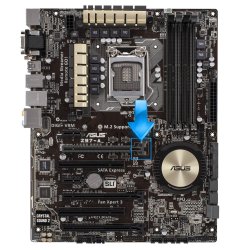
Some cards are a bit awkward to fit. Make sure the tab at the end of the slot (highlighted below) has clipped into place, as long as that's holding the card and the output plate is screwed into the I/O panel it should be fitted correctly. Let us know how it goes and we'll work from there.
ASUS_Z97-A_01.jpg
 

My Computer My Computer

Computer type
PC/Desktop
Computer Manufacturer/Model Number
Custom Build
OS
W7 Pro x64 SP1 | W10 Pro IP x64 | W8.1 Pro x64 VM | Linux Mint VM
CPU
i7-4790k @ 4GHz (4.4GHz Boost)
Motherboard
ASUS Sabertooth Z87 (BIOS Rev 2004)
Memory
16GB DDR3 Kingston HyperX Fury @ 1600MHz CL 9-9-9-27
Graphics Card(s)
EVGA GTX 980 Classified
Sound Card
Realtek Onboard
Monitor(s) Displays
Samsung S27D390
Screen Resolution
1920 x 1080
Hard Drives
240GB Intel 520 Series SSD |
Samsung 850 EVO 120GB SSD |
2TB WD Caviar Black |
2TB WD Caviar Green
PSU
Corsair HX850-80 Gold Modular
Case
Cooler Master Silencio 650
Cooling
Corsair H80i w/2 x Corsair SP120 | 2 x 120mm Noctua NF-S12B
Keyboard
Microsoft Sidewinder X4
Mouse
Gigabyte M6900 optical
Internet Speed
152mb
Antivirus
F-Secure
Browser
Firefox 38.0
Other Info
Backup Rig: Win 7 Pro 64-bit | AMD A10-5800k | ASUS F2A85-V Pro | 8GB Samsung DDR3 @1600MHz | 120GB Toshiba SDD | 2TB Seagate HDD | Cooler Master Silencio 550
Some cards are a bit awkward to fit. Make sure the tab at the end of the slot (highlighted below) has clipped into place, as long as that's holding the card and the output plate is screwed into the I/O panel it should be fitted correctly. Let us know how it goes and we'll work from there.

Yes the back clips in and is locked in place. Just like before. I did the nvidia install guide un checking the options shown before install. Been running random games start up shut down start up another game run for a few minutes shut down. Ran heaven benchmark for an hour. And went back to ark multiple times. Idk if its just me but I feel like it will do it again :/ but I'm crossing my fingers.

Running heaven Benchmark again now and leaving it run for a couple hours then testing a game later on.

Any recommended stress test besides furmark and hevenmark that will stress test the gpu to make it crash if it's unstable? I'll update again as I progress thanks so much for responding and assisting.
 

My Computer My Computer

Computer type
PC/Desktop
Computer Manufacturer/Model Number
Custom
OS
Windows 7 PRO
CPU
I7 4790
Motherboard
Asus z97-A
Memory
12 gigs ddr3 1600
Graphics Card(s)
MSI gtx 970 4gig Gaming 100ME
Antivirus
Windows defender
Browser
Google Chrome
You're still getting shutdowns during games after reseating the card?
 

My Computer My Computer

Computer type
PC/Desktop
Computer Manufacturer/Model Number
Custom Build
OS
W7 Pro x64 SP1 | W10 Pro IP x64 | W8.1 Pro x64 VM | Linux Mint VM
CPU
i7-4790k @ 4GHz (4.4GHz Boost)
Motherboard
ASUS Sabertooth Z87 (BIOS Rev 2004)
Memory
16GB DDR3 Kingston HyperX Fury @ 1600MHz CL 9-9-9-27
Graphics Card(s)
EVGA GTX 980 Classified
Sound Card
Realtek Onboard
Monitor(s) Displays
Samsung S27D390
Screen Resolution
1920 x 1080
Hard Drives
240GB Intel 520 Series SSD |
Samsung 850 EVO 120GB SSD |
2TB WD Caviar Black |
2TB WD Caviar Green
PSU
Corsair HX850-80 Gold Modular
Case
Cooler Master Silencio 650
Cooling
Corsair H80i w/2 x Corsair SP120 | 2 x 120mm Noctua NF-S12B
Keyboard
Microsoft Sidewinder X4
Mouse
Gigabyte M6900 optical
Internet Speed
152mb
Antivirus
F-Secure
Browser
Firefox 38.0
Other Info
Backup Rig: Win 7 Pro 64-bit | AMD A10-5800k | ASUS F2A85-V Pro | 8GB Samsung DDR3 @1600MHz | 120GB Toshiba SDD | 2TB Seagate HDD | Cooler Master Silencio 550
You're still getting shutdowns during games after reseating the card?

So far no. Again it's random usually once every other day according to reliability. I hope reseating fixed it. Would hate to rma the card and waste msi time on something that isn't broke .

I'll keep the post updated for a few more days. To let you know and close it if all is well as solved. As I said no shut down from games to desktop yet and benchmarks haven't failed but they never did in the past.

Any suggestions on a stress test for the gpu besides the ones I've tried?

You've been a big help relieving my concern so far. Just want to see for a few more days if I run into any more of the same error code.
 

My Computer My Computer

Computer type
PC/Desktop
Computer Manufacturer/Model Number
Custom
OS
Windows 7 PRO
CPU
I7 4790
Motherboard
Asus z97-A
Memory
12 gigs ddr3 1600
Graphics Card(s)
MSI gtx 970 4gig Gaming 100ME
Antivirus
Windows defender
Browser
Google Chrome
Just carry on using normally, if Furmark hasn't shown anything then nothing else will probably find something it's missed. Keep us posted.
 

My Computer My Computer

Computer type
PC/Desktop
Computer Manufacturer/Model Number
Custom Build
OS
W7 Pro x64 SP1 | W10 Pro IP x64 | W8.1 Pro x64 VM | Linux Mint VM
CPU
i7-4790k @ 4GHz (4.4GHz Boost)
Motherboard
ASUS Sabertooth Z87 (BIOS Rev 2004)
Memory
16GB DDR3 Kingston HyperX Fury @ 1600MHz CL 9-9-9-27
Graphics Card(s)
EVGA GTX 980 Classified
Sound Card
Realtek Onboard
Monitor(s) Displays
Samsung S27D390
Screen Resolution
1920 x 1080
Hard Drives
240GB Intel 520 Series SSD |
Samsung 850 EVO 120GB SSD |
2TB WD Caviar Black |
2TB WD Caviar Green
PSU
Corsair HX850-80 Gold Modular
Case
Cooler Master Silencio 650
Cooling
Corsair H80i w/2 x Corsair SP120 | 2 x 120mm Noctua NF-S12B
Keyboard
Microsoft Sidewinder X4
Mouse
Gigabyte M6900 optical
Internet Speed
152mb
Antivirus
F-Secure
Browser
Firefox 38.0
Other Info
Backup Rig: Win 7 Pro 64-bit | AMD A10-5800k | ASUS F2A85-V Pro | 8GB Samsung DDR3 @1600MHz | 120GB Toshiba SDD | 2TB Seagate HDD | Cooler Master Silencio 550
Just carry on using normally, if Furmark hasn't shown anything then nothing else will probably find something it's missed. Keep us posted.


so it seems the card might not of seated properly or maybe it was a driver install bug? it is working great now no crashes etc..

I cant explain it. its been about 13 years since ive done computer gaming and built my own pc. just glad there are people out there to help me understand what could be wrong if i cant figure it out.

when i followed the directions i think the only change in drivers were un selecting the other portions of the nvidia install.
example: the hd audio option and a few others. it only told me to do 2 of the 5 i think there were?

why would that be a problem if it was?
thanks for the help and i am marking this as solved as soon as i get a reply to this.
 

My Computer My Computer

Computer type
PC/Desktop
Computer Manufacturer/Model Number
Custom
OS
Windows 7 PRO
CPU
I7 4790
Motherboard
Asus z97-A
Memory
12 gigs ddr3 1600
Graphics Card(s)
MSI gtx 970 4gig Gaming 100ME
Antivirus
Windows defender
Browser
Google Chrome
Glad to hear all's working well mate.

Removing driver package components can minimise the possibility of driver conflicts, say you use Realtek audio drivers and install nVidia HD audio drivers it can become problematic. If you don't use 3D at all then there's no use introducing 3D Vision drivers into your system as they don't need to be there. By only installing the graphics driver and PhysX driver you're removing the chance of an unneeded driver causing issues and only installing what you really need.

The drivers may have been the problem or it's possible something just wasn't connected fully, either way it's just good to see you up and running again.
 

My Computer My Computer

Computer type
PC/Desktop
Computer Manufacturer/Model Number
Custom Build
OS
W7 Pro x64 SP1 | W10 Pro IP x64 | W8.1 Pro x64 VM | Linux Mint VM
CPU
i7-4790k @ 4GHz (4.4GHz Boost)
Motherboard
ASUS Sabertooth Z87 (BIOS Rev 2004)
Memory
16GB DDR3 Kingston HyperX Fury @ 1600MHz CL 9-9-9-27
Graphics Card(s)
EVGA GTX 980 Classified
Sound Card
Realtek Onboard
Monitor(s) Displays
Samsung S27D390
Screen Resolution
1920 x 1080
Hard Drives
240GB Intel 520 Series SSD |
Samsung 850 EVO 120GB SSD |
2TB WD Caviar Black |
2TB WD Caviar Green
PSU
Corsair HX850-80 Gold Modular
Case
Cooler Master Silencio 650
Cooling
Corsair H80i w/2 x Corsair SP120 | 2 x 120mm Noctua NF-S12B
Keyboard
Microsoft Sidewinder X4
Mouse
Gigabyte M6900 optical
Internet Speed
152mb
Antivirus
F-Secure
Browser
Firefox 38.0
Other Info
Backup Rig: Win 7 Pro 64-bit | AMD A10-5800k | ASUS F2A85-V Pro | 8GB Samsung DDR3 @1600MHz | 120GB Toshiba SDD | 2TB Seagate HDD | Cooler Master Silencio 550
Thanks again yeah glad it was resolved either way just like to learn and understand when something goes wrong why it happens so I can use that knowledge to fix other problems in the future.

Marking this as solved.
 

My Computer My Computer

Computer type
PC/Desktop
Computer Manufacturer/Model Number
Custom
OS
Windows 7 PRO
CPU
I7 4790
Motherboard
Asus z97-A
Memory
12 gigs ddr3 1600
Graphics Card(s)
MSI gtx 970 4gig Gaming 100ME
Antivirus
Windows defender
Browser
Google Chrome
i wanted to add an additional update to the post,

so i tested a theory and installed the nvidia audio and 3d drivers. sure enough bccode 117 crashes etc.. all because nvidia forces you to install their crap i wonder why they haven't fixed these conflicts with other audio drivers etc...
frustrates me but at least we now know the problem was driver conflicts on the audio side
 

My Computer My Computer

Computer type
PC/Desktop
Computer Manufacturer/Model Number
Custom
OS
Windows 7 PRO
CPU
I7 4790
Motherboard
Asus z97-A
Memory
12 gigs ddr3 1600
Graphics Card(s)
MSI gtx 970 4gig Gaming 100ME
Antivirus
Windows defender
Browser
Google Chrome
Good detective work, the culprit was nailed :thumbsup:
 

My Computer My Computer

Computer type
PC/Desktop
Computer Manufacturer/Model Number
Custom Build
OS
W7 Pro x64 SP1 | W10 Pro IP x64 | W8.1 Pro x64 VM | Linux Mint VM
CPU
i7-4790k @ 4GHz (4.4GHz Boost)
Motherboard
ASUS Sabertooth Z87 (BIOS Rev 2004)
Memory
16GB DDR3 Kingston HyperX Fury @ 1600MHz CL 9-9-9-27
Graphics Card(s)
EVGA GTX 980 Classified
Sound Card
Realtek Onboard
Monitor(s) Displays
Samsung S27D390
Screen Resolution
1920 x 1080
Hard Drives
240GB Intel 520 Series SSD |
Samsung 850 EVO 120GB SSD |
2TB WD Caviar Black |
2TB WD Caviar Green
PSU
Corsair HX850-80 Gold Modular
Case
Cooler Master Silencio 650
Cooling
Corsair H80i w/2 x Corsair SP120 | 2 x 120mm Noctua NF-S12B
Keyboard
Microsoft Sidewinder X4
Mouse
Gigabyte M6900 optical
Internet Speed
152mb
Antivirus
F-Secure
Browser
Firefox 38.0
Other Info
Backup Rig: Win 7 Pro 64-bit | AMD A10-5800k | ASUS F2A85-V Pro | 8GB Samsung DDR3 @1600MHz | 120GB Toshiba SDD | 2TB Seagate HDD | Cooler Master Silencio 550
Back
Top