Red lines appearing on desktop

starwolf1336

Star Wars G33k
Power User
Local time
1:04 PM
Messages
460
Location
Alabama
I did a search and couldn't find anything close to what i have, so sorry in advance if this is posted somewhere else.

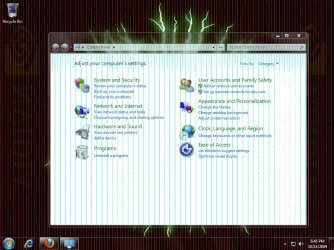
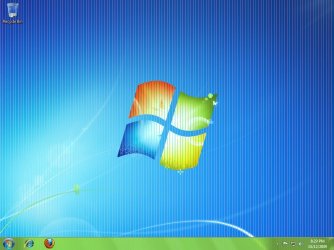
Basically sometimes when i bring a new window forward red lines will appear behind that window but not on the current window. I have the current (legacy) drivers for my video card. And its not my monitor because when i go to use the snipping tool or do a print screen, the lines will appear in the picture even if the lines weren't there when i took the shot.

I have tried changing my background image to different pictures as well as just solid colors.

My computer hardware specs are listed in the tab, but if you need more info please let me know.

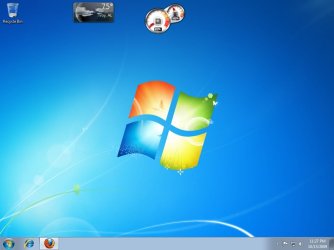
Below are some screen shots of what they look like.
 

Attachments
  • desktop.jpg
    desktop.jpg
    110.1 KB · Views: 262
  • Capture.JPG
    Capture.JPG
    172.7 KB · Views: 254

My Computer My Computer

Computer Manufacturer/Model Number
Myself
OS
Windows 7 Professional 64bit
CPU
AMD Athlon II X2 240 Regor 2.8GHz
Motherboard
GIGABYTE GA-MA785GMT-UD2H
Memory
4 gigs DDR3 Dual Channel
Graphics Card(s)
Radeon HD 5770 1gig video RAM
Sound Card
Realtek ALC889A
Monitor(s) Displays
Dell E770s 17in
Screen Resolution
1024x768
Hard Drives
1 x 250gb seagate
PSU
Rosewill RP600V2-S-SL 600W
Case
Antec Nine Hundred Black Steel ATX Mid Tower
Cooling
4 Fans
Keyboard
Micro Inovations
Mouse
Microsoft optical mouse
Internet Speed
22 mbps download 1 mbps upload
Those screenshots make me think leaking or blown capacitors on the video card. Have a look at it inside. Pull it out if you have to. Look for any discoloration on the capacitors near the base and top. Make sure the tops are flat and not rounded.

If there are blown caps, you can easily solder in new replacements.

Or it could be a driver issue.
 

My Computer My Computer

Computer Manufacturer/Model Number
self built
OS
7600.20510 x86
CPU
P4 550 3.4 GHz HT running at 3.5 GHz
Motherboard
MSI PM8M3-V (MS-7211 v1.x) Micro-ATX mainboard
Memory
OCZ 2 GB(2x1GB) DDR400mHz running @ 414 mHz
Graphics Card(s)
HIS Radeon HD 3850 IceQ 3 Turbo HDMI Dual DL-DVI AGP
Sound Card
MOTU Traveler firewire studio interface 192 kHz 24 bit
Monitor(s) Displays
22" widescreen Acer X223W LCD, 17" Compaq P75 CRT
Screen Resolution
1680x1050 and 1280x1024
Hard Drives
SATA I x2 WD, 400 GB and 120 GB, SATA 2 WD Caviar Black 1 TB
PSU
350W generic
Case
Cybertronpc, it glows blue
Cooling
stock cpu fan, Ice-Q 3 gpu and system, many case fans
Keyboard
Logitch Classical Keyboard 200
Mouse
Logitech Mediaplay cordless
Internet Speed
1792/448 kbits/sec
Other Info
SATA II PCI fake RAID adapter, 1 GB Readyboost, original ATI Remote Wonder (even works with WMC perfectly), Logitech Rumblepad 2 game controller x2
Those screenshots make me think leaking or blown capacitors on the video card.

Or it could be a driver issue.

+1

Do you have any graphical corruption during BIOS etc, or do the lines solely appear in Windows?

If it occurs outside of windows, then you're h/ware is failing. If it's just within Windows then it's most likely a driver issue.

Try uninstalling your current drivers and see if the problem occurs with the default Windows VGA driver.
 

My Computer My Computer

Computer type
PC/Desktop
Computer Manufacturer/Model Number
Systems by SmartEyeball
OS
8 Pro x64
CPU
i7 3770K 4.6GHz
Motherboard
ASUS P8Z77 WS
Memory
16GB G.Skill Trident X 2666mhz
Graphics Card(s)
x2 EVGA 780 Ti Superclocked SLI
Sound Card
SB X-FI Surround 5.1 PRO USB / ATH-AD900 Headphones
Monitor(s) Displays
x3 Dell U2410 / 58" Samsung
Screen Resolution
5760*1200/ 1920*1200
Hard Drives
2x Intel 520 240GB (RAID 0) * 2x WD Caviar Blacks 2TB (RAID 0) * 2TB WD Caviar Black * Sony Optirac DVD
PSU
Silverstone Strider Evolution 1200W
Case
Thermaltake Level 10 GT Snow Edition
Cooling
Noctua NH-D14
Keyboard
Topre Realforce // Ducky Shine MX Black // Filco Ninja TKL
Mouse
Thermaltake Theron (Highly Recommended) + Razer Imperator
Antivirus
MSE
Browser
IE, FF, WaterFox
Other Info
GT Extreme V2 Sim Racing Cockpit + 40" LCD and K/B Mouse stand ▼
Fanatec CSR Elite Wheel + Clubsport V1 Pedals + CSR shifter/7G-H ▼Saitek X52 Pro ▼ TrackIR 5 Pro
Buttkicker v2 Seat Rumbler with Dedicated 5.1 and Sub Woofer attached to frame ▼
=
Bloody Big Grin
My downstairs pc with NVidia 6200A-LE had blown caps. The problem was only evident when going to start a game. The screens would bug out and go crazy. Otherwise, everything else was perfect. I replaced the blown caps and the card plays games again well. So the lack of corruption outside of Windows doesn't mean a perfect working card. I wouldn't have known this if it didn't happen to me personally heh. :D

So I'm really leaning towards blown caps here too, especially because the card has probably been in use since like 2004 or 2005.
 

My Computer My Computer

Computer Manufacturer/Model Number
self built
OS
7600.20510 x86
CPU
P4 550 3.4 GHz HT running at 3.5 GHz
Motherboard
MSI PM8M3-V (MS-7211 v1.x) Micro-ATX mainboard
Memory
OCZ 2 GB(2x1GB) DDR400mHz running @ 414 mHz
Graphics Card(s)
HIS Radeon HD 3850 IceQ 3 Turbo HDMI Dual DL-DVI AGP
Sound Card
MOTU Traveler firewire studio interface 192 kHz 24 bit
Monitor(s) Displays
22" widescreen Acer X223W LCD, 17" Compaq P75 CRT
Screen Resolution
1680x1050 and 1280x1024
Hard Drives
SATA I x2 WD, 400 GB and 120 GB, SATA 2 WD Caviar Black 1 TB
PSU
350W generic
Case
Cybertronpc, it glows blue
Cooling
stock cpu fan, Ice-Q 3 gpu and system, many case fans
Keyboard
Logitch Classical Keyboard 200
Mouse
Logitech Mediaplay cordless
Internet Speed
1792/448 kbits/sec
Other Info
SATA II PCI fake RAID adapter, 1 GB Readyboost, original ATI Remote Wonder (even works with WMC perfectly), Logitech Rumblepad 2 game controller x2
Ok, i'll take a look at the card tonight when i get a chance. But no everything else is fine. There is nothing wrong during start up. I used to game with this but not anymore since my computer specs no longer meet the requirements. And i do have the latest drivers from amd.com

So i'll check all that tonight and get back with yall. Thanks for the input.

And just a side note, i was running xp before this. I installed the windows 7 RC on a virtual machine on top of xp and it did the same red lines but only in the windows 7 area.

But as of right now my machines OS is now windows 7 professional and not RC.
 

My Computer My Computer

Computer Manufacturer/Model Number
Myself
OS
Windows 7 Professional 64bit
CPU
AMD Athlon II X2 240 Regor 2.8GHz
Motherboard
GIGABYTE GA-MA785GMT-UD2H
Memory
4 gigs DDR3 Dual Channel
Graphics Card(s)
Radeon HD 5770 1gig video RAM
Sound Card
Realtek ALC889A
Monitor(s) Displays
Dell E770s 17in
Screen Resolution
1024x768
Hard Drives
1 x 250gb seagate
PSU
Rosewill RP600V2-S-SL 600W
Case
Antec Nine Hundred Black Steel ATX Mid Tower
Cooling
4 Fans
Keyboard
Micro Inovations
Mouse
Microsoft optical mouse
Internet Speed
22 mbps download 1 mbps upload
Ok, i got home, checked out the video card. Everything seems in order. Nothing looks deformed or out of place.

I let windows look to see if it could find any drivers for my video card, and it surprisingly did. Even though i got the lastest drivers from AMD like 2 days ago. But it didint fix the problem. :(
 

My Computer My Computer

Computer Manufacturer/Model Number
Myself
OS
Windows 7 Professional 64bit
CPU
AMD Athlon II X2 240 Regor 2.8GHz
Motherboard
GIGABYTE GA-MA785GMT-UD2H
Memory
4 gigs DDR3 Dual Channel
Graphics Card(s)
Radeon HD 5770 1gig video RAM
Sound Card
Realtek ALC889A
Monitor(s) Displays
Dell E770s 17in
Screen Resolution
1024x768
Hard Drives
1 x 250gb seagate
PSU
Rosewill RP600V2-S-SL 600W
Case
Antec Nine Hundred Black Steel ATX Mid Tower
Cooling
4 Fans
Keyboard
Micro Inovations
Mouse
Microsoft optical mouse
Internet Speed
22 mbps download 1 mbps upload
If it is not a software problem then it has to be a hardware problem. Do you know of anyone you could try a different card from? In my experience leaking caps are not that easily noticeable sometimes. It only takes a minor problem to create artifacting. and lets face it the card is getting pretty old and windows 7 is demanding more out of it. IMO. Fabe
 

My Computer My Computer

Computer Manufacturer/Model Number
Self Built
OS
Windows 7 ultimate 64 bit / XP Home sp3
CPU
intel Core 2 Duo E8400 3.0ghz
Motherboard
Asus P5ND bios 1401
Memory
8 gigs 1066 OCZ Fata1ty
Graphics Card(s)
EVGA GTX 580 Call of Duty Black Ops Edition
Sound Card
Creative Soundblaster Audigy 2zs
Monitor(s) Displays
Asus 24in LCD's 2MS X2
Screen Resolution
1920x1080p @60Hz
Hard Drives
WD Caviar 500 Black/ WD Caviar 200 Blue
PSU
OCZ 700W GameXtreme
Case
NZXT Apollo
Cooling
Corsair H50 CPU/120mm x3 /60mm x2 /Corsair Dominator Ram
Keyboard
Logitech Bluetooth Wireless MX5000
Mouse
Logitech Bluetooth Wireless MX1000
Internet Speed
Download 19.83 Upload 0.97
Other Info
Logitech Z2300 Speakers/ Bose Noise Cancelling Headphones/Avermedia PCI-e Hybrid TV Bravo/Epson NX415 all in one/ 4 Port Powered USB Hub/ LG 10x Bluray Burner /TSST Corp DVDRW External
No, most of my friends have laptops and arnt into customizing. So i guess i'll just let it be till it actually dies. Not like its crippling my performance or anything.

Only problem is that my motherboard has a AGP slot. I know there is a radeon HD 4800 AGP card out there, but i think it would be a waste when i'll be building a new system sometime early next year.

So i'll just let it stay. If it dies, i'll replace it with a cheap one card till my next build.

Thanks for the help guys :)
 

My Computer My Computer

Computer Manufacturer/Model Number
Myself
OS
Windows 7 Professional 64bit
CPU
AMD Athlon II X2 240 Regor 2.8GHz
Motherboard
GIGABYTE GA-MA785GMT-UD2H
Memory
4 gigs DDR3 Dual Channel
Graphics Card(s)
Radeon HD 5770 1gig video RAM
Sound Card
Realtek ALC889A
Monitor(s) Displays
Dell E770s 17in
Screen Resolution
1024x768
Hard Drives
1 x 250gb seagate
PSU
Rosewill RP600V2-S-SL 600W
Case
Antec Nine Hundred Black Steel ATX Mid Tower
Cooling
4 Fans
Keyboard
Micro Inovations
Mouse
Microsoft optical mouse
Internet Speed
22 mbps download 1 mbps upload
Your welcome. And good luck. Fabe
 

My Computer My Computer

Computer Manufacturer/Model Number
Self Built
OS
Windows 7 ultimate 64 bit / XP Home sp3
CPU
intel Core 2 Duo E8400 3.0ghz
Motherboard
Asus P5ND bios 1401
Memory
8 gigs 1066 OCZ Fata1ty
Graphics Card(s)
EVGA GTX 580 Call of Duty Black Ops Edition
Sound Card
Creative Soundblaster Audigy 2zs
Monitor(s) Displays
Asus 24in LCD's 2MS X2
Screen Resolution
1920x1080p @60Hz
Hard Drives
WD Caviar 500 Black/ WD Caviar 200 Blue
PSU
OCZ 700W GameXtreme
Case
NZXT Apollo
Cooling
Corsair H50 CPU/120mm x3 /60mm x2 /Corsair Dominator Ram
Keyboard
Logitech Bluetooth Wireless MX5000
Mouse
Logitech Bluetooth Wireless MX1000
Internet Speed
Download 19.83 Upload 0.97
Other Info
Logitech Z2300 Speakers/ Bose Noise Cancelling Headphones/Avermedia PCI-e Hybrid TV Bravo/Epson NX415 all in one/ 4 Port Powered USB Hub/ LG 10x Bluray Burner /TSST Corp DVDRW External
Leaving NO stone unturned ?

How about taking out the Video card, cleaning the edge contacts with a pencil eraser, then lightly cleaning them with rubbing alcohol & soft cloth. Let thouroughly dry. Re-install, reseat video card in AGP slot. Double check video cable between video card & monitor for loose or bad connection, or anything broken.

Maybe go into bios on boot up & check what that screen looks like for red lines.

Is bios setup, set to default to AGP slot ?
 

My Computer My Computer

Computer type
PC/Desktop
Computer Manufacturer/Model Number
Built them myself, Science Experiments !
OS
Win7 Enterprise, Win7 x86 (Ult 7600), Win7 x64 Ult 7600, TechNet RTM on AMD x64 (2.8Ghz)
CPU
AMD fx8350 4ghz, AMD-32 2400mhz, AMD-64 3200mhz, AMDx64 2.8G
Motherboard
SIS 755, ECS-K8M890M-M (Ult 7600), GigaByte & others
Memory
2gb, 4gb on the Ult 7600, 4gb on Technet RTM, 32gb on FX8350
Graphics Card(s)
Draw my own Graphics, several nVidia cards
Sound Card
on motherboard
Monitor(s) Displays
19" flat scr, 28" I-Inc widescr,22" Emprex Widescr, 23" Acer
Screen Resolution
1280 x 1024, 1440 x 900, 1920 x 1080
Hard Drives
6 pata Ide HD's & 2 Sata HD's
added 80gb external on Ult 7600 computer,
numerous extra 1tb, 2TB, 3Tb SATA HD's
A collection of ext HD Docks w/ HDs
PSU
430w, 550w, 600w, 700, 800, etc
Case
All Generic Full Towers
Cooling
Open Air & a few fans, some w/ colored LEDs
Keyboard
Compaq & Dell recycled from GoodWill
Mouse
Made in China Optical Wired Mouse
Internet Speed
Fast Cable InterNet
Antivirus
AVG Free on 24 different Desktops, NO Problems!
Browser
IE 8 is preferred, but use FireFox sometimes
Other Info
Linksys Routers, switches, & Hubs
Too Many USB Flash Drives to count, Biggest is 64GB !
Eight computers in my home network.
Sixteen computers at my business network.
Linked via TeamViewer !
Lots of old used spare computer parts everywhere!
I have taken the card out and cleaned it. Its pluged in good, so is the power cord.

And there are no red lines in the bios. It has to be a windows 7 thing. Maybe my video card just doesnt like aero.
 

My Computer My Computer

Computer Manufacturer/Model Number
Myself
OS
Windows 7 Professional 64bit
CPU
AMD Athlon II X2 240 Regor 2.8GHz
Motherboard
GIGABYTE GA-MA785GMT-UD2H
Memory
4 gigs DDR3 Dual Channel
Graphics Card(s)
Radeon HD 5770 1gig video RAM
Sound Card
Realtek ALC889A
Monitor(s) Displays
Dell E770s 17in
Screen Resolution
1024x768
Hard Drives
1 x 250gb seagate
PSU
Rosewill RP600V2-S-SL 600W
Case
Antec Nine Hundred Black Steel ATX Mid Tower
Cooling
4 Fans
Keyboard
Micro Inovations
Mouse
Microsoft optical mouse
Internet Speed
22 mbps download 1 mbps upload
Actually, I had the All-In-Wonder 9800 Pro AGP in my main rig in specs here before I upgraded. It handled Aero well. Ironically, that card failed on me too. But it wasn't caps that time.
 

My Computer My Computer

Computer Manufacturer/Model Number
self built
OS
7600.20510 x86
CPU
P4 550 3.4 GHz HT running at 3.5 GHz
Motherboard
MSI PM8M3-V (MS-7211 v1.x) Micro-ATX mainboard
Memory
OCZ 2 GB(2x1GB) DDR400mHz running @ 414 mHz
Graphics Card(s)
HIS Radeon HD 3850 IceQ 3 Turbo HDMI Dual DL-DVI AGP
Sound Card
MOTU Traveler firewire studio interface 192 kHz 24 bit
Monitor(s) Displays
22" widescreen Acer X223W LCD, 17" Compaq P75 CRT
Screen Resolution
1680x1050 and 1280x1024
Hard Drives
SATA I x2 WD, 400 GB and 120 GB, SATA 2 WD Caviar Black 1 TB
PSU
350W generic
Case
Cybertronpc, it glows blue
Cooling
stock cpu fan, Ice-Q 3 gpu and system, many case fans
Keyboard
Logitch Classical Keyboard 200
Mouse
Logitech Mediaplay cordless
Internet Speed
1792/448 kbits/sec
Other Info
SATA II PCI fake RAID adapter, 1 GB Readyboost, original ATI Remote Wonder (even works with WMC perfectly), Logitech Rumblepad 2 game controller x2
Well, the problem def is the aero effect. I turned it off, and i havnet seen the lines yet. I can also take screen shots w/o the lines showing up. Below is a shot w/o aero turned on.

Atleast i found what was sort of the problem

But it sucks to me w/o the aero effects :(
 

Attachments

  • nolines.jpg
    nolines.jpg
    40.9 KB · Views: 86

My Computer My Computer

Computer Manufacturer/Model Number
Myself
OS
Windows 7 Professional 64bit
CPU
AMD Athlon II X2 240 Regor 2.8GHz
Motherboard
GIGABYTE GA-MA785GMT-UD2H
Memory
4 gigs DDR3 Dual Channel
Graphics Card(s)
Radeon HD 5770 1gig video RAM
Sound Card
Realtek ALC889A
Monitor(s) Displays
Dell E770s 17in
Screen Resolution
1024x768
Hard Drives
1 x 250gb seagate
PSU
Rosewill RP600V2-S-SL 600W
Case
Antec Nine Hundred Black Steel ATX Mid Tower
Cooling
4 Fans
Keyboard
Micro Inovations
Mouse
Microsoft optical mouse
Internet Speed
22 mbps download 1 mbps upload
Ya. Aero is probably "pushing" the card to work, much like in my example of when I tried to start a game. Replacing that 9800 with something more modern in the HD series will benefit your pc immensely. I really like my 3850 a lot.

Your PSU is enough. All you need is a cheap converter to change 2 available molexes to either 4 or 6 pin. (4 only will work, leaving 2 unused on card and many HD AGP cards come with this converter. Mine from HIS did.)

If you don't have 2 available molex connectors from PSU, you can easily splice into two separate rails to provide power and attach to converter piece. Or if you only have 1 molex available to be used, you'd then only have to splice into one other rail.

If you would like to upgrade and need any kind of help with connections or what not, let us know.
 

My Computer My Computer

Computer Manufacturer/Model Number
self built
OS
7600.20510 x86
CPU
P4 550 3.4 GHz HT running at 3.5 GHz
Motherboard
MSI PM8M3-V (MS-7211 v1.x) Micro-ATX mainboard
Memory
OCZ 2 GB(2x1GB) DDR400mHz running @ 414 mHz
Graphics Card(s)
HIS Radeon HD 3850 IceQ 3 Turbo HDMI Dual DL-DVI AGP
Sound Card
MOTU Traveler firewire studio interface 192 kHz 24 bit
Monitor(s) Displays
22" widescreen Acer X223W LCD, 17" Compaq P75 CRT
Screen Resolution
1680x1050 and 1280x1024
Hard Drives
SATA I x2 WD, 400 GB and 120 GB, SATA 2 WD Caviar Black 1 TB
PSU
350W generic
Case
Cybertronpc, it glows blue
Cooling
stock cpu fan, Ice-Q 3 gpu and system, many case fans
Keyboard
Logitch Classical Keyboard 200
Mouse
Logitech Mediaplay cordless
Internet Speed
1792/448 kbits/sec
Other Info
SATA II PCI fake RAID adapter, 1 GB Readyboost, original ATI Remote Wonder (even works with WMC perfectly), Logitech Rumblepad 2 game controller x2
I dont plan on upgrading this machine. I'll just deal with it till my next build which will be soon. I dont game on it any more so i'm not expecting it to do much more then web browsing/ watching movies and email.

Thanks for all the answers and encouragement.

BTW, how do you rate people? :P i cant seem to find it.
 

My Computer My Computer

Computer Manufacturer/Model Number
Myself
OS
Windows 7 Professional 64bit
CPU
AMD Athlon II X2 240 Regor 2.8GHz
Motherboard
GIGABYTE GA-MA785GMT-UD2H
Memory
4 gigs DDR3 Dual Channel
Graphics Card(s)
Radeon HD 5770 1gig video RAM
Sound Card
Realtek ALC889A
Monitor(s) Displays
Dell E770s 17in
Screen Resolution
1024x768
Hard Drives
1 x 250gb seagate
PSU
Rosewill RP600V2-S-SL 600W
Case
Antec Nine Hundred Black Steel ATX Mid Tower
Cooling
4 Fans
Keyboard
Micro Inovations
Mouse
Microsoft optical mouse
Internet Speed
22 mbps download 1 mbps upload
Well, the problem def is the aero effect. I turned it off, and i havnet seen the lines yet. I can also take screen shots w/o the lines showing up. Below is a shot w/o aero turned on.

Atleast i found what was sort of the problem

But it sucks to me w/o the aero effects :(

Glad to see you have found the problem. You can use the red triangle in the uppper right corner and click it and report the fix you found and the admin will mark the post fixed. Fabe
 
Last edited:

My Computer My Computer

Computer Manufacturer/Model Number
Self Built
OS
Windows 7 ultimate 64 bit / XP Home sp3
CPU
intel Core 2 Duo E8400 3.0ghz
Motherboard
Asus P5ND bios 1401
Memory
8 gigs 1066 OCZ Fata1ty
Graphics Card(s)
EVGA GTX 580 Call of Duty Black Ops Edition
Sound Card
Creative Soundblaster Audigy 2zs
Monitor(s) Displays
Asus 24in LCD's 2MS X2
Screen Resolution
1920x1080p @60Hz
Hard Drives
WD Caviar 500 Black/ WD Caviar 200 Blue
PSU
OCZ 700W GameXtreme
Case
NZXT Apollo
Cooling
Corsair H50 CPU/120mm x3 /60mm x2 /Corsair Dominator Ram
Keyboard
Logitech Bluetooth Wireless MX5000
Mouse
Logitech Bluetooth Wireless MX1000
Internet Speed
Download 19.83 Upload 0.97
Other Info
Logitech Z2300 Speakers/ Bose Noise Cancelling Headphones/Avermedia PCI-e Hybrid TV Bravo/Epson NX415 all in one/ 4 Port Powered USB Hub/ LG 10x Bluray Burner /TSST Corp DVDRW External
I dont plan on upgrading this machine. I'll just deal with it till my next build which will be soon. I dont game on it any more so i'm not expecting it to do much more then web browsing/ watching movies and email.

Thanks for all the answers and encouragement.

BTW, how do you rate people? :P i cant seem to find it.


Rep Icon :geek:
 

Attachments

  • RepScalessigpic117326_1_gif.jpg
    RepScalessigpic117326_1_gif.jpg
    8.2 KB · Views: 469

My Computer My Computer

Computer type
PC/Desktop
Computer Manufacturer/Model Number
Built them myself, Science Experiments !
OS
Win7 Enterprise, Win7 x86 (Ult 7600), Win7 x64 Ult 7600, TechNet RTM on AMD x64 (2.8Ghz)
CPU
AMD fx8350 4ghz, AMD-32 2400mhz, AMD-64 3200mhz, AMDx64 2.8G
Motherboard
SIS 755, ECS-K8M890M-M (Ult 7600), GigaByte & others
Memory
2gb, 4gb on the Ult 7600, 4gb on Technet RTM, 32gb on FX8350
Graphics Card(s)
Draw my own Graphics, several nVidia cards
Sound Card
on motherboard
Monitor(s) Displays
19" flat scr, 28" I-Inc widescr,22" Emprex Widescr, 23" Acer
Screen Resolution
1280 x 1024, 1440 x 900, 1920 x 1080
Hard Drives
6 pata Ide HD's & 2 Sata HD's
added 80gb external on Ult 7600 computer,
numerous extra 1tb, 2TB, 3Tb SATA HD's
A collection of ext HD Docks w/ HDs
PSU
430w, 550w, 600w, 700, 800, etc
Case
All Generic Full Towers
Cooling
Open Air & a few fans, some w/ colored LEDs
Keyboard
Compaq & Dell recycled from GoodWill
Mouse
Made in China Optical Wired Mouse
Internet Speed
Fast Cable InterNet
Antivirus
AVG Free on 24 different Desktops, NO Problems!
Browser
IE 8 is preferred, but use FireFox sometimes
Other Info
Linksys Routers, switches, & Hubs
Too Many USB Flash Drives to count, Biggest is 64GB !
Eight computers in my home network.
Sixteen computers at my business network.
Linked via TeamViewer !
Lots of old used spare computer parts everywhere!
Thanks very much DocBrown and TheFabe for the forum info :)
 

My Computer My Computer

Computer Manufacturer/Model Number
Myself
OS
Windows 7 Professional 64bit
CPU
AMD Athlon II X2 240 Regor 2.8GHz
Motherboard
GIGABYTE GA-MA785GMT-UD2H
Memory
4 gigs DDR3 Dual Channel
Graphics Card(s)
Radeon HD 5770 1gig video RAM
Sound Card
Realtek ALC889A
Monitor(s) Displays
Dell E770s 17in
Screen Resolution
1024x768
Hard Drives
1 x 250gb seagate
PSU
Rosewill RP600V2-S-SL 600W
Case
Antec Nine Hundred Black Steel ATX Mid Tower
Cooling
4 Fans
Keyboard
Micro Inovations
Mouse
Microsoft optical mouse
Internet Speed
22 mbps download 1 mbps upload
Back
Top