Window crush and stuck on repair mood after installing boot camp drive

istylevision

New member
Local time
3:06 AM
Messages
12
Hello


I got very strange situation with my Imac

So i installed new windows, and then i installed the boot camp drivers
Right after that my Imac crush and send me to windows restore/repair page
So first i try to restore, the results was un successful, and the its sent me to windows repair, so when i try to repair its say done and after restart i getting back to the same repair screen
I try to start with safe mood, and again same repair page, nothing is working, the only option that i have in my head is to change the boot order,
so i am now on edit boot options

EDIT BOOT OPTIONS
edit windows boot options for: windows 7
path: \windows\system32\winload.exe
partition: 2
hard disk: 69a8
[ /NOEXECUTE=OPTIN

I try to change the "NOEXECUTE=OPTIN" to "DEBUGPORT=USB" and still nothing happened

Any one know what other option i can try ? i am getting crazy already :)
 

My Computer My Computer

At a glance

Ultimate x 643000
Computer type
PC/Desktop
Computer Manufacturer/Model Number
Imac
OS
Ultimate x 64
CPU
3000
Are you boot camping with osx or just windows on that whole hdd? Also what model imac?
 

My Computer My Computer

At a glance

10 Pro x64Ryzen 9 3900X64GB(4x16GB) DDR4EVGA 1080ti FTW3
Computer type
PC/Desktop
Computer Manufacturer/Model Number
Custom
OS
10 Pro x64
CPU
Ryzen 9 3900X
Motherboard
Asrock x370 Tachi
Memory
64GB(4x16GB) DDR4
Graphics Card(s)
EVGA 1080ti FTW3
Sound Card
ASUS Xonar Essence STX (V4 Bursons), ODAC rev B, NFB-11, O2
Monitor(s) Displays
3xASUS PB278Q/R, Optoma HD142X
Screen Resolution
3x1440p, 1080p
Hard Drives
512GB 850 EVO(OS, Programs)
4TB (Movies)
3TB (Downloads)
3TB (Programs)
1TB HDD (Games)
2x6TB R1 (videos)
PSU
AX760
Case
Fractal Define R5
Cooling
NH-D15S
Keyboard
Massdrop Ctrl with Box Navy's
Mouse
G903, Alioth XXL Mat
Internet Speed
280/40
Antivirus
MBAM, ESET
Browser
Canary 64 Bit
Other Info
I also own a Thinkpad P50 Xeon 4K, X220T, X1C5
Are you boot camping with osx or just windows on that whole hdd? Also what model imac?


Thanks for the reply

I am trying to boot camping with windows, and i have no option to boot the osx, cause for some reason it was deleted (in my older installation)

Not sure what is the model, but i bought the Mac early 2013, 1.4GHz dual‑core, 2.7GHz 21 Inch

Thanks for the support
 

My Computer My Computer

At a glance

Ultimate x 643000
Computer type
PC/Desktop
Computer Manufacturer/Model Number
Imac
OS
Ultimate x 64
CPU
3000
So is your goal to have OSX and windows? If you boot while holding the option key after it shows the grey screen when turning on do you see another disk besides windows there?
 

My Computer My Computer

At a glance

10 Pro x64Ryzen 9 3900X64GB(4x16GB) DDR4EVGA 1080ti FTW3
Computer type
PC/Desktop
Computer Manufacturer/Model Number
Custom
OS
10 Pro x64
CPU
Ryzen 9 3900X
Motherboard
Asrock x370 Tachi
Memory
64GB(4x16GB) DDR4
Graphics Card(s)
EVGA 1080ti FTW3
Sound Card
ASUS Xonar Essence STX (V4 Bursons), ODAC rev B, NFB-11, O2
Monitor(s) Displays
3xASUS PB278Q/R, Optoma HD142X
Screen Resolution
3x1440p, 1080p
Hard Drives
512GB 850 EVO(OS, Programs)
4TB (Movies)
3TB (Downloads)
3TB (Programs)
1TB HDD (Games)
2x6TB R1 (videos)
PSU
AX760
Case
Fractal Define R5
Cooling
NH-D15S
Keyboard
Massdrop Ctrl with Box Navy's
Mouse
G903, Alioth XXL Mat
Internet Speed
280/40
Antivirus
MBAM, ESET
Browser
Canary 64 Bit
Other Info
I also own a Thinkpad P50 Xeon 4K, X220T, X1C5
So is your goal to have OSX and windows? If you boot while holding the option key after it shows the grey screen when turning on do you see another disk besides windows there?

Hi

No my goal is just to reinstall my windows, everytime when i am trying to start its stuck in repair mood (and cant repair) The option key is not working cause for the the OSX is not active for some time,

I am kind of lost :(
 

My Computer My Computer

At a glance

Ultimate x 643000
Computer type
PC/Desktop
Computer Manufacturer/Model Number
Imac
OS
Ultimate x 64
CPU
3000
The option menu is built into the efi firmware and will still be there, look at this chart. https://support.apple.com/en-us/HT201255 to reinstall you will want to do a clean install again like this.

If you insert the windows disk and hold down 'alt' on startup, the windows install will kick in. As previously mentioned, if you want to install Windows 7, the latest Bootcamp drivers are required. These are a .exe found on the Snow Leopard disk (or torrent) and will make your touchpad, sound etc work well in Win 7. Ignore the thing about SL it will still work, but you do need to torrent the right bootcamp drivers or it will not work, what boot camp drivers did you use to make the problem?
 

My Computer My Computer

At a glance

10 Pro x64Ryzen 9 3900X64GB(4x16GB) DDR4EVGA 1080ti FTW3
Computer type
PC/Desktop
Computer Manufacturer/Model Number
Custom
OS
10 Pro x64
CPU
Ryzen 9 3900X
Motherboard
Asrock x370 Tachi
Memory
64GB(4x16GB) DDR4
Graphics Card(s)
EVGA 1080ti FTW3
Sound Card
ASUS Xonar Essence STX (V4 Bursons), ODAC rev B, NFB-11, O2
Monitor(s) Displays
3xASUS PB278Q/R, Optoma HD142X
Screen Resolution
3x1440p, 1080p
Hard Drives
512GB 850 EVO(OS, Programs)
4TB (Movies)
3TB (Downloads)
3TB (Programs)
1TB HDD (Games)
2x6TB R1 (videos)
PSU
AX760
Case
Fractal Define R5
Cooling
NH-D15S
Keyboard
Massdrop Ctrl with Box Navy's
Mouse
G903, Alioth XXL Mat
Internet Speed
280/40
Antivirus
MBAM, ESET
Browser
Canary 64 Bit
Other Info
I also own a Thinkpad P50 Xeon 4K, X220T, X1C5
The option menu is built into the efi firmware and will still be there, look at this chart. https://support.apple.com/en-us/HT201255 to reinstall you will want to do a clean install again like this.

If you insert the windows disk and hold down 'alt' on startup, the windows install will kick in. As previously mentioned, if you want to install Windows 7, the latest Bootcamp drivers are required. These are a .exe found on the Snow Leopard disk (or torrent) and will make your touchpad, sound etc work well in Win 7. Ignore the thing about SL it will still work, but you do need to torrent the right bootcamp drivers or it will not work, what boot camp drivers did you use to make the problem?

Hi

Thanks for the reply


Let me try to explain the problem again, first a year a ago i had the same problem, i manage to resolve it back then by reinstalling the windows, but i did it in the wrong way, so now when i try to reinstall all went ok but when i install the bootcamp drivers the mac crush and i just need to find a way how to load form USB cause, this version of Imac hes no CD :( i have no option to restore or repair or start in safe mood and non of Imac keys are working for me

Thanks
 

My Computer My Computer

At a glance

Ultimate x 643000
Computer type
PC/Desktop
Computer Manufacturer/Model Number
Imac
OS
Ultimate x 64
CPU
3000
Oh then use option at boot and you will get the startup manger and you pick the usb. It's listed on that chart how to do it. Are you using an apple keyboard or one with windows logo?
 

My Computer My Computer

At a glance

10 Pro x64Ryzen 9 3900X64GB(4x16GB) DDR4EVGA 1080ti FTW3
Computer type
PC/Desktop
Computer Manufacturer/Model Number
Custom
OS
10 Pro x64
CPU
Ryzen 9 3900X
Motherboard
Asrock x370 Tachi
Memory
64GB(4x16GB) DDR4
Graphics Card(s)
EVGA 1080ti FTW3
Sound Card
ASUS Xonar Essence STX (V4 Bursons), ODAC rev B, NFB-11, O2
Monitor(s) Displays
3xASUS PB278Q/R, Optoma HD142X
Screen Resolution
3x1440p, 1080p
Hard Drives
512GB 850 EVO(OS, Programs)
4TB (Movies)
3TB (Downloads)
3TB (Programs)
1TB HDD (Games)
2x6TB R1 (videos)
PSU
AX760
Case
Fractal Define R5
Cooling
NH-D15S
Keyboard
Massdrop Ctrl with Box Navy's
Mouse
G903, Alioth XXL Mat
Internet Speed
280/40
Antivirus
MBAM, ESET
Browser
Canary 64 Bit
Other Info
I also own a Thinkpad P50 Xeon 4K, X220T, X1C5
Oh then use option at boot and you will get the startup manger and you pick the usb. It's listed on that chart how to do it. Are you using an apple keyboard or one with windows logo?


This is exactly my problem, on the mac there is no menu like on windows all i have when i press on f10
is this

EDIT BOOT OPTIONS
edit windows boot options for: windows 7
path: \windows\system32\winload.exe
partition: 2
hard disk: 69a8
[ /NOEXECUTE=OPTIN

And i dont know how to set it to boot form USB

I try to change the "NOEXECUTE=OPTIN" to "DEBUGPORT=USB" and still nothing happened

Thanks
 

My Computer My Computer

At a glance

Ultimate x 643000
Computer type
PC/Desktop
Computer Manufacturer/Model Number
Imac
OS
Ultimate x 64
CPU
3000
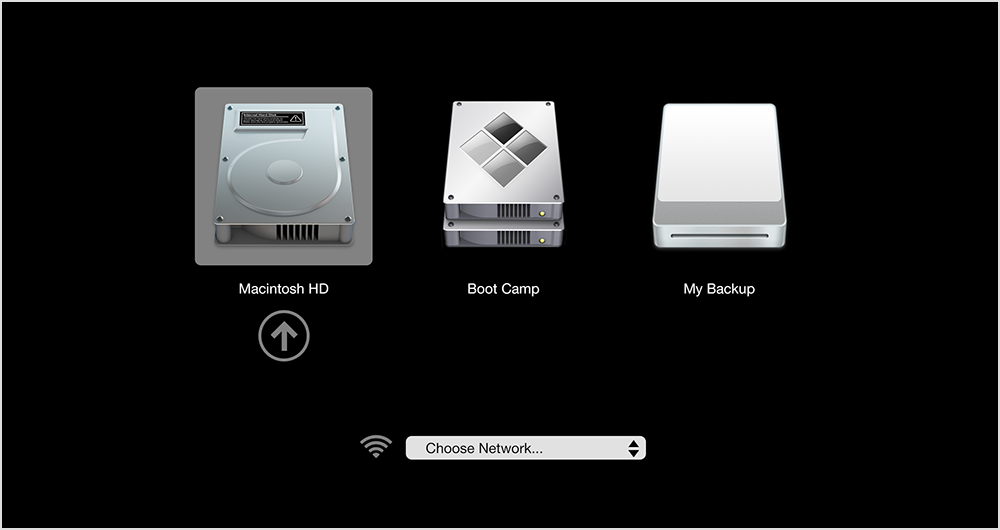
No before you get into windows you will get this, you turn off the mac then turn it on, right after it makes the chime noise hold the option key till a screen like this shows up.
yos_startup_disk.png
 

My Computer My Computer

At a glance

10 Pro x64Ryzen 9 3900X64GB(4x16GB) DDR4EVGA 1080ti FTW3
Computer type
PC/Desktop
Computer Manufacturer/Model Number
Custom
OS
10 Pro x64
CPU
Ryzen 9 3900X
Motherboard
Asrock x370 Tachi
Memory
64GB(4x16GB) DDR4
Graphics Card(s)
EVGA 1080ti FTW3
Sound Card
ASUS Xonar Essence STX (V4 Bursons), ODAC rev B, NFB-11, O2
Monitor(s) Displays
3xASUS PB278Q/R, Optoma HD142X
Screen Resolution
3x1440p, 1080p
Hard Drives
512GB 850 EVO(OS, Programs)
4TB (Movies)
3TB (Downloads)
3TB (Programs)
1TB HDD (Games)
2x6TB R1 (videos)
PSU
AX760
Case
Fractal Define R5
Cooling
NH-D15S
Keyboard
Massdrop Ctrl with Box Navy's
Mouse
G903, Alioth XXL Mat
Internet Speed
280/40
Antivirus
MBAM, ESET
Browser
Canary 64 Bit
Other Info
I also own a Thinkpad P50 Xeon 4K, X220T, X1C5
No before you get into windows you will get this, you turn off the mac then turn it on, right after it makes the chime noise hold the option key till a screen like this shows up.
yos_startup_disk.png


Non of the OSX commands are working cause the system is disable, i tried to press all the commands keywords non is working

Do you know how to set this kind of boot option ?

EDIT BOOT OPTIONS
edit windows boot options for: windows 7
path: \windows\system32\winload.exe
partition: 2
hard disk: 69a8
[ /NOEXECUTE=OPTIN
 

My Computer My Computer

At a glance

Ultimate x 643000
Computer type
PC/Desktop
Computer Manufacturer/Model Number
Imac
OS
Ultimate x 64
CPU
3000
No before you get into windows you will get this, you turn off the mac then turn it on, right after it makes the chime noise hold the option key till a screen like this shows up.
yos_startup_disk.png


Non of the OSX commands are working cause the system is disable, i tried to press all the commands keywords non is working

Do you know how to set this kind of boot option ?

EDIT BOOT OPTIONS
edit windows boot options for: windows 7
path: \windows\system32\winload.exe
partition: 2
hard disk: 69a8
[ /NOEXECUTE=OPTIN

I do not think you can get it to boot from usb that way also I i'm pretty sure you can not disable the startup stuff like apple diagnostic ect. Even if if it had no hdd in the mac it would show that screen. So I ask again are you using a mac keyboard atm or a windows one? Try holding alt instead of option and see if it works like this. https://youtu.be/Y5unDeUo8w0?t=123
 

My Computer My Computer

At a glance

10 Pro x64Ryzen 9 3900X64GB(4x16GB) DDR4EVGA 1080ti FTW3
Computer type
PC/Desktop
Computer Manufacturer/Model Number
Custom
OS
10 Pro x64
CPU
Ryzen 9 3900X
Motherboard
Asrock x370 Tachi
Memory
64GB(4x16GB) DDR4
Graphics Card(s)
EVGA 1080ti FTW3
Sound Card
ASUS Xonar Essence STX (V4 Bursons), ODAC rev B, NFB-11, O2
Monitor(s) Displays
3xASUS PB278Q/R, Optoma HD142X
Screen Resolution
3x1440p, 1080p
Hard Drives
512GB 850 EVO(OS, Programs)
4TB (Movies)
3TB (Downloads)
3TB (Programs)
1TB HDD (Games)
2x6TB R1 (videos)
PSU
AX760
Case
Fractal Define R5
Cooling
NH-D15S
Keyboard
Massdrop Ctrl with Box Navy's
Mouse
G903, Alioth XXL Mat
Internet Speed
280/40
Antivirus
MBAM, ESET
Browser
Canary 64 Bit
Other Info
I also own a Thinkpad P50 Xeon 4K, X220T, X1C5
No before you get into windows you will get this, you turn off the mac then turn it on, right after it makes the chime noise hold the option key till a screen like this shows up.
yos_startup_disk.png


Non of the OSX commands are working cause the system is disable, i tried to press all the commands keywords non is working

Do you know how to set this kind of boot option ?

EDIT BOOT OPTIONS
edit windows boot options for: windows 7
path: \windows\system32\winload.exe
partition: 2
hard disk: 69a8
[ /NOEXECUTE=OPTIN

I do not think you can get it to boot from usb that way also I i'm pretty sure you can not disable the startup stuff like apple diagnostic ect. Even if if it had no hdd in the mac it would show that screen. So I ask again are you using a mac keyboard atm or a windows one? Try holding alt instead of option and see if it works like this. https://youtu.be/Y5unDeUo8w0?t=123


Sorry missed your question before, no i am not using apple keyboard, but i try to press on the kwyboard i have on the windows logo, is that right no ?

Thanks
 

My Computer My Computer

At a glance

Ultimate x 643000
Computer type
PC/Desktop
Computer Manufacturer/Model Number
Imac
OS
Ultimate x 64
CPU
3000
OK I managed to start with OSX but look what coming up, no option for OSX :(


My Computer My Computer

At a glance

Ultimate x 643000
Computer type
PC/Desktop
Computer Manufacturer/Model Number
Imac
OS
Ultimate x 64
CPU
3000
Now do it again with your usb installer for windows in there and it will show up.
 

My Computer My Computer

At a glance

10 Pro x64Ryzen 9 3900X64GB(4x16GB) DDR4EVGA 1080ti FTW3
Computer type
PC/Desktop
Computer Manufacturer/Model Number
Custom
OS
10 Pro x64
CPU
Ryzen 9 3900X
Motherboard
Asrock x370 Tachi
Memory
64GB(4x16GB) DDR4
Graphics Card(s)
EVGA 1080ti FTW3
Sound Card
ASUS Xonar Essence STX (V4 Bursons), ODAC rev B, NFB-11, O2
Monitor(s) Displays
3xASUS PB278Q/R, Optoma HD142X
Screen Resolution
3x1440p, 1080p
Hard Drives
512GB 850 EVO(OS, Programs)
4TB (Movies)
3TB (Downloads)
3TB (Programs)
1TB HDD (Games)
2x6TB R1 (videos)
PSU
AX760
Case
Fractal Define R5
Cooling
NH-D15S
Keyboard
Massdrop Ctrl with Box Navy's
Mouse
G903, Alioth XXL Mat
Internet Speed
280/40
Antivirus
MBAM, ESET
Browser
Canary 64 Bit
Other Info
I also own a Thinkpad P50 Xeon 4K, X220T, X1C5
Now do it again with your usb installer for windows in there and it will show up.

Hello again


So i did it again with usb installer, and i pick the windows, but now is just black screen, looks like it cant install
maybe i need to have the windows on special format ? like image file ?

Thanks
 

My Computer My Computer

At a glance

Ultimate x 643000
Computer type
PC/Desktop
Computer Manufacturer/Model Number
Imac
OS
Ultimate x 64
CPU
3000

My Computer My Computer

At a glance

10 Pro x64Ryzen 9 3900X64GB(4x16GB) DDR4EVGA 1080ti FTW3
Computer type
PC/Desktop
Computer Manufacturer/Model Number
Custom
OS
10 Pro x64
CPU
Ryzen 9 3900X
Motherboard
Asrock x370 Tachi
Memory
64GB(4x16GB) DDR4
Graphics Card(s)
EVGA 1080ti FTW3
Sound Card
ASUS Xonar Essence STX (V4 Bursons), ODAC rev B, NFB-11, O2
Monitor(s) Displays
3xASUS PB278Q/R, Optoma HD142X
Screen Resolution
3x1440p, 1080p
Hard Drives
512GB 850 EVO(OS, Programs)
4TB (Movies)
3TB (Downloads)
3TB (Programs)
1TB HDD (Games)
2x6TB R1 (videos)
PSU
AX760
Case
Fractal Define R5
Cooling
NH-D15S
Keyboard
Massdrop Ctrl with Box Navy's
Mouse
G903, Alioth XXL Mat
Internet Speed
280/40
Antivirus
MBAM, ESET
Browser
Canary 64 Bit
Other Info
I also own a Thinkpad P50 Xeon 4K, X220T, X1C5

My Computer My Computer

At a glance

Ultimate x 643000
Computer type
PC/Desktop
Computer Manufacturer/Model Number
Imac
OS
Ultimate x 64
CPU
3000
Finally all is working again, Thank you very much for the support :)
 

My Computer My Computer

At a glance

Ultimate x 643000
Computer type
PC/Desktop
Computer Manufacturer/Model Number
Imac
OS
Ultimate x 64
CPU
3000
Glad you got it worked out and hey you learned a lot in the process, that's a win win all around. :) Don't forget to mark the thread as solved.
 

My Computer My Computer

At a glance

10 Pro x64Ryzen 9 3900X64GB(4x16GB) DDR4EVGA 1080ti FTW3
Computer type
PC/Desktop
Computer Manufacturer/Model Number
Custom
OS
10 Pro x64
CPU
Ryzen 9 3900X
Motherboard
Asrock x370 Tachi
Memory
64GB(4x16GB) DDR4
Graphics Card(s)
EVGA 1080ti FTW3
Sound Card
ASUS Xonar Essence STX (V4 Bursons), ODAC rev B, NFB-11, O2
Monitor(s) Displays
3xASUS PB278Q/R, Optoma HD142X
Screen Resolution
3x1440p, 1080p
Hard Drives
512GB 850 EVO(OS, Programs)
4TB (Movies)
3TB (Downloads)
3TB (Programs)
1TB HDD (Games)
2x6TB R1 (videos)
PSU
AX760
Case
Fractal Define R5
Cooling
NH-D15S
Keyboard
Massdrop Ctrl with Box Navy's
Mouse
G903, Alioth XXL Mat
Internet Speed
280/40
Antivirus
MBAM, ESET
Browser
Canary 64 Bit
Other Info
I also own a Thinkpad P50 Xeon 4K, X220T, X1C5
Back
Top