Windows Explorer - File info display

I'm sure this has been said a million times already, but i only have one issue with windows 7(at least for the moment, after one day of usage.. i'm sure i'll find more by the end of tomorrow and so on..), otherwise it would be perfect. The useless status bar. The one that doesn't show file sizes. It's a 'small' issue when compared with how many other new features 7 has, but IMO it's a DEALBREAKER. You don't take out the most useful tried and true basic functionality that EVERYONE uses to provide some extra caveats that no one really cares about.
 

My Computer My Computer

OS
Windows Seven
I'm sure this has been said a million times already, but i only have one issue with windows 7(at least for the moment, after one day of usage.. i'm sure i'll find more by the end of tomorrow and so on..), otherwise it would be perfect. The useless status bar. The one that doesn't show file sizes. It's a 'small' issue when compared with how many other new features 7 has, but IMO it's a DEALBREAKER. You don't take out the most useful tried and true basic functionality that EVERYONE uses to provide some extra caveats that no one really cares about.

What are you talking about?

Instead of statusbar we now have a infobar and it shows the filesizes among a load of other info.

Here take a look.

jesus.png

How much more info on a file do you need???

XP statusbar is pathetic compared to this.

You say you speak for EVERYONE, wanna bet you're not?

Some is lost some is found.
 

My Computer My Computer

OS
Win7 Build 7600 x86
CPU
Pentium II 300MHz
Motherboard
Asus
Memory
32mb EDO RAM
Graphics Card(s)
Diamond Viper
Sound Card
Soundblaster 16
Monitor(s) Displays
14" AOC CRT 16K color
Screen Resolution
800x600
Hard Drives
300mb Quantum fireball
PSU
110 Watts
Cooling
Passive
Keyboard
Trust Ergonomic
Mouse
Generic
Internet Speed
256K u 128K d
I'm sure this has been said a million times already, but i only have one issue with windows 7(at least for the moment, after one day of usage.. i'm sure i'll find more by the end of tomorrow and so on..), otherwise it would be perfect. The useless status bar. The one that doesn't show file sizes. It's a 'small' issue when compared with how many other new features 7 has, but IMO it's a DEALBREAKER. You don't take out the most useful tried and true basic functionality that EVERYONE uses to provide some extra caveats that no one really cares about.

What are you talking about?

Instead of statusbar we now have a infobar and it shows the filesizes among a load of other info.

Here take a look.

View attachment 31676

How much more info on a file do you need???

XP statusbar is pathetic compared to this.

You say you speak for EVERYONE, wanna bet you're not?

Some is lost some is found.

If you don't know what i'm talking about, then please don't quote me.. I think it would be better for you not to know, because when you do, it's gonna annoy the hell out of you(if you use explorer as your main shell and do a lot of copying and stuff). You see the part next to the computer in the status bar? On the left of the computer thing, it shows you the FILESIZE. Obviously if you click a folder, it doesn't show the size. Try click on a FILE. In one of your pics, you clicked on a folder(but it was on the tree folder), and it showed that it had 469KB worth of files in it(not counting subdirectories). This is where it will also show the file size. Now when you highlight or select more than one file, it will also show the TOTAL FILESIZE in the same bit in the status bar. Now this feature is totally gone from the status bar, and this doesn't even work with the new details pane(over 15 files) you have to click SHOW MORE DETAILS. See what i'm saying now? It's not some little thing, it's a major functionality issue.

Just say i'm holding down CTRL, and i'm selecting more and more files(over 15), now i have to click SHOW MORE DETAILS every single time i add another file just to see the new total filesize and if i go over whatever limit i have or not(very very annoying and time consuming, like if i'm trying to fill up my external HDD or trying to burn something). There's no excuse for not having it.

Understand what i mean or 'what i'm talking about' now? :p

In case you don't, and in case others listened to you and also misunderstand my post and think i'm just ranting for no reason, check out my reply to you in the other thread that's actually about this topic.

http://www.sevenforums.com/312210-post22.html

I don't know how you can say XP statusbar is pathetic compared to this. You don't even know what the status bar is. You're talking about the details pane, which XP doesn't even have. XP's status bar DESTROYS window 7's one. It also destroys window 7's details pane(that is, if you actually care about useful things like, i dunno, FILE SIZE and not all that useless extra garbage like tags, rating, dimensions etc etc)
 
Last edited:

My Computer My Computer

OS
Windows Seven
If you don't know what i'm talking about, then please don't quote me.. I think it would be better for you not to know, because when you do, it's gonna annoy the hell out of you(if you use explorer as your main shell and do a lot of copying and stuff). You see the part next to the computer in the status bar? On the left of the computer thing, it shows you the FILESIZE. Obviously if you click a folder, it doesn't show the size. Try click on a FILE. In one of your pics, you clicked on a folder(but it was on the tree folder), and it showed that it had 469KB worth of files in it(not counting subdirectories). This is where it will also show the file size. Now when you highlight or select more than one file, it will also show the TOTAL FILESIZE in the same bit in the status bar. Now this feature is totally gone from the status bar, and this doesn't even work with the new details pane(over 15 files) you have to click SHOW MORE DETAILS. See what i'm saying now? It's not some little thing, it's a major functionality issue.

.

.

I asked you several times to provide us with a screenshot of what you meant.
You failed to explain what you meant, and still haven't posted a screenshot.
Ever heard of pictures are worth a thousand words?

And now you admit yourself that Win7 does show it, but only for 15 files.

So your "major functionality issue" turns out to be the fact you have to click "show more details". !!??? One click is a major issue for you?

And you couldn't have said that in the first post??

You know how many clicks Win7 saves you with libraries, favorites, breadcrums, thumbnails compared to XP?

You wasted my time, and that of some others, and you weren't being very nice nor helpful in the process.

thank you very much.

Edit: Mistaken you for another user with the same gripe.
It seems two threads were merged.
So the part of wasting my time doesn't apply to you.
Sorry

 

My Computer My Computer

OS
Win7 Build 7600 x86
CPU
Pentium II 300MHz
Motherboard
Asus
Memory
32mb EDO RAM
Graphics Card(s)
Diamond Viper
Sound Card
Soundblaster 16
Monitor(s) Displays
14" AOC CRT 16K color
Screen Resolution
800x600
Hard Drives
300mb Quantum fireball
PSU
110 Watts
Cooling
Passive
Keyboard
Trust Ergonomic
Mouse
Generic
Internet Speed
256K u 128K d
   Warning
Keep this thread on topic and friendly. Please no more insulting each other. If you can't be nice, then don't post. Only warning.
 

My Computer My Computer

Computer type
PC/Desktop
Computer Manufacturer/Model Number
Airbot 2.0
OS
Windows 7 Ultimate x64 SP1
CPU
Core i7 920 (D0) @ 4Ghz, *26c idle *65c full load on air
Motherboard
Asus P6X58D Premium - Sata 6Gb/s - USB 3.0
Memory
12GB DDR3 Corsair Dominator -CMD12GX3M6A1600C8 at 1600MHz
Graphics Card(s)
Zotac Geforce GTX 770
Sound Card
ASUS Xonar D2X
Monitor(s) Displays
1 LG 24" Flatron W2453V-PF 1 Samsung 24" P2450H both 2ms RT
Screen Resolution
1920x1080@60hz
Hard Drives
1 Samsung 250GB 840 Evo SSD
1 OCZ Vertex2 180GB SSD
1 TB Samsung Spinpoint F1 7200RPM 32MB cache
2 500GB WD Caviar Blacks 7200RPM 32MB cache (WD5001AALS)

Pioneer DVD Burner DVR-S18M
PSU
Corsair HX1000W
Case
Cooler Master HAF 932
Cooling
Case Fans *3 230mm, *1 140mm/CPU - *Tuniq Tower 120 Extreme
Keyboard
Logitech Wireless MK700
Mouse
Logitech Wireless MK700
Internet Speed
DL 15 Mbps UL 0.98 Mbps
Antivirus
None
Browser
Firefox Nightly
Other Info
Processor-7.7 *RAM- 7.9 *Graphics-7.9 *Gaming Graphics- 7.9 *SSD- 7.8 W.E.I final score= 7.7
*Phone- LG Nexus 5
If you don't know what i'm talking about, then please don't quote me.. I think it would be better for you not to know, because when you do, it's gonna annoy the hell out of you(if you use explorer as your main shell and do a lot of copying and stuff). You see the part next to the computer in the status bar? On the left of the computer thing, it shows you the FILESIZE. Obviously if you click a folder, it doesn't show the size. Try click on a FILE. In one of your pics, you clicked on a folder(but it was on the tree folder), and it showed that it had 469KB worth of files in it(not counting subdirectories). This is where it will also show the file size. Now when you highlight or select more than one file, it will also show the TOTAL FILESIZE in the same bit in the status bar. Now this feature is totally gone from the status bar, and this doesn't even work with the new details pane(over 15 files) you have to click SHOW MORE DETAILS. See what i'm saying now? It's not some little thing, it's a major functionality issue.

.

.

I asked you several times to provide us with a screenshot of what you meant.
You failed to explain what you meant, and still haven't posted a screenshot.
Ever heard of pictures are worth a thousand words?

And now you admit yourself that Win7 does show it, but only for 15 files.

So your "major functionality issue" turns out to be the fact you have to click "show more details". !!??? One click is a major issue for you?

And you couldn't have said that in the first post??

You know how many clicks Win7 saves you with libraries, favorites, breadcrums, thumbnails compared to XP?

You wasted my time, and that of some others, and you weren't being very nice nor helpful in the process.

thank you very much.

Edit: Mistaken you for another user with the same gripe.
It seems two threads were merged.
So the part of wasting my time doesn't apply to you.
Sorry

I provided screenshots and made an in detail post in the other thread. Please read it. And you may think that clicking show more details isn't much, but trust me, for me it's a huge issue. You try to make it sound like it's just ONE CLICK, but it's one click EVERY SINGLE TIME you add a new file. And i use that EVERY SINGLE DAY. So it's going to end up to be THOUSANDS if not millions of clicks in my lifetime, and for no real reason that i can think of.

I remember reading another thread where someone said it had to do with some issues like 'a new way for windows to index files' and all that, but i don't care. This is a basic function that is important and should never be taken out. It's like cutting off your hand just so you can go and get a fake tan or something. Yes, you have better looking skin and are more 'attractive' on the outside, but you cannot do anything meaningful now. It's a complete step backwards imo.

It's not just clicking show details too, it's much more than that. Read my other post that i linked to.

@mod : Are you talking to me? I did not insult anybody??

Should I remain polite after this

You were offended by that? lol. I apologize then i guess? I did not mean that as an insult.
 

My Computer My Computer

OS
Windows Seven
I provided screenshots and made an in detail post in the other thread. Please read it. And you may think that clicking show more details isn't much, but trust me, for me it's a huge issue. It's not just clicking show details too, it's much more than that. Read my other post that i linked to.

I did read that post, and it doesn't bother me, I'm sorry it's a huge issue for you.

Maybe you can find an explorer replacement for that specific task.

Or stay with XP until MS changes it, if they ever do.

My biggest gripe with W7 is that they dumped the shared icon.
Now I have to click on every folder in a tree to see if it's shared or not.

But there are many reasons to enjoy Win7, so I'll live with it.

I really liked the radio in my previous car, but my new car has an inbuilt radio.
I do like the car however.

PS. Like I stated, my less friendly response was not meant for you.
I mistaken you for another poster.
 

My Computer My Computer

OS
Win7 Build 7600 x86
CPU
Pentium II 300MHz
Motherboard
Asus
Memory
32mb EDO RAM
Graphics Card(s)
Diamond Viper
Sound Card
Soundblaster 16
Monitor(s) Displays
14" AOC CRT 16K color
Screen Resolution
800x600
Hard Drives
300mb Quantum fireball
PSU
110 Watts
Cooling
Passive
Keyboard
Trust Ergonomic
Mouse
Generic
Internet Speed
256K u 128K d

My Computer My Computer

Computer type
PC/Desktop
Computer Manufacturer/Model Number
Alienware Aurora ALX R4
OS
Windows 10 Pro (x64)
CPU
Intel Core i7-3930K (3.2GHz - 4.5GHz)
Motherboard
Alienware Aurora-R4 x79
Memory
4x Samsung 4GB PC3-12800 DDR3 (16GB 1600MHz)
Graphics Card(s)
Nvidia Geforce GTX 690
Sound Card
SteelSeries Siberia Elite
Monitor(s) Displays
Dell UltraSharp U3011
Screen Resolution
2560x1600
Hard Drives
Samsung 850 Pro 256 GB, Seagate 1TB Desktop Hybrid HDD, 2x Western Digital 4TB Green HDD
PSU
875W Some Dell PSU <.<
Case
Alienware Aurora ALX
Cooling
Custom Liquid Cooling (EK CPU & GPU blocks) dual EK 480RAD
Keyboard
Logitech G710+ Mechanical
Mouse
Logitech G700s
Internet Speed
Verizon Fios (50 mbps average)
Other Info
Server: Intel NUC D54250WYK: i5-4250U, 16GB, 256 GB mSATA, Windows Server 2012 R2
For this who are in dire need of the status bar: Comparison of file managers - Wikipedia, the free encyclopedia
But I cannot fathom why you need to see [cumulative] file size all the time.

Look at my post in the other thread. It(details pane) doesn't even show me the file size for single files half the time. And this is between files of the same type. As for your original question, it's not about NEEDING to see it ALL THE TIME(because you don't have multiple files selected ALL THE TIME, but everytime you do, of course you want to see it..). It's just something that doesn't hurt, is useful for everyone and essential for many people, has no negatives whatsoever associated with it being standard or at least being an option, hence there's no excuse for it not being in there at all. Thanks for the link though, i'll most likely be using something else if they don't fix the status bar up.
 

My Computer My Computer

OS
Windows Seven
Look at my post in the other thread. It(details pane) doesn't even show me the file size for single files half the time. And this is between files of the same type. As for your original question, it's not about NEEDING to see it ALL THE TIME(because you don't have multiple files selected ALL THE TIME, but everytime you do, of course you want to see it..). It's just something that doesn't hurt, is useful for everyone and essential for many people, has no negatives whatsoever associated with it being standard or at least being an option, hence there's no excuse for it not being in there at all. Thanks for the link though, i'll most likely be using something else if they don't fix the status bar up.
Could you at least use the enter some more, breaking these long paragraphs into smaller chunks. Reading a mass of words is less then ideal.

It is the same in Windows Vista, it is the same in Windows 7. They have no intention to fix it or it is not a priority.
 

My Computer My Computer

Computer type
PC/Desktop
Computer Manufacturer/Model Number
Alienware Aurora ALX R4
OS
Windows 10 Pro (x64)
CPU
Intel Core i7-3930K (3.2GHz - 4.5GHz)
Motherboard
Alienware Aurora-R4 x79
Memory
4x Samsung 4GB PC3-12800 DDR3 (16GB 1600MHz)
Graphics Card(s)
Nvidia Geforce GTX 690
Sound Card
SteelSeries Siberia Elite
Monitor(s) Displays
Dell UltraSharp U3011
Screen Resolution
2560x1600
Hard Drives
Samsung 850 Pro 256 GB, Seagate 1TB Desktop Hybrid HDD, 2x Western Digital 4TB Green HDD
PSU
875W Some Dell PSU <.<
Case
Alienware Aurora ALX
Cooling
Custom Liquid Cooling (EK CPU & GPU blocks) dual EK 480RAD
Keyboard
Logitech G710+ Mechanical
Mouse
Logitech G700s
Internet Speed
Verizon Fios (50 mbps average)
Other Info
Server: Intel NUC D54250WYK: i5-4250U, 16GB, 256 GB mSATA, Windows Server 2012 R2
I'm sure this has been said a million times already, but i only have one issue with windows 7(at least for the moment, after one day of usage.. i'm sure i'll find more by the end of tomorrow and so on..), otherwise it would be perfect. The useless status bar. The one that doesn't show file sizes. It's a 'small' issue when compared with how many other new features 7 has, but IMO it's a DEALBREAKER. You don't take out the most useful tried and true basic functionality that EVERYONE uses to provide some extra caveats that no one really cares about.

Windows Explorer doesn't show the size of a file? This is news to me! Please see attached screenshot:
filesize.jpg
Oh, an one other thing, people, let's get back on topic: What don't you like about Windows 7?​
 

My Computer My Computer

Computer type
PC/Desktop
Computer Manufacturer/Model Number
Virtual Machine
OS
Windows 7 Professional 32-bit SP1
CPU
AMD A4/A6
Motherboard
Intel Corporation 440BX Desktop Reference Platform
Memory
3.00GB EDO
Graphics Card(s)
VMware SVGA 3D
Sound Card
High Definition Audio Device
Monitor(s) Displays
Generic Non-PnP Monitor on VMware SVGA 3D
Screen Resolution
1440x900
Hard Drives
1 x 60GB VMware Virtual SATA Hard Drive ATA Device
Antivirus
Kaspersky Total Security

My Computers My Computers

System One System Two

  • Computer type
    PC/Desktop
    Computer Manufacturer/Model Number
    ChillBlast - Custom to my design
    OS
    Windows 11 Pro x64 [Latest Release and Release Preview]
    CPU
    Ryzen 9 5950X, 3.8 - 5.2 MHz
    Motherboard
    Asus Prime X570-Pro
    Memory
    64GB [2 x 32GB] DDR4 3200MHz
    Graphics Card(s)
    4GB NVIDIA GEFORCE GTX 1650 Ti
    Sound Card
    On-board SPDIF to 5.1 System + HDMI [5.1 system]
    Monitor(s) Displays
    32" UHD 32 Bit HDR Monitor + 43" UHD 4K 32Bit HDR TV
    Screen Resolution
    2 x 3840 x 2160 @60Hz
    Hard Drives
    1TB M2 SSD OS, 500GB Fast Access SSD, 2 x 8TB Data + Various Externals from 1TB to 4TB, 10TB NAS
    PSU
    NZXT C750 80 PLUS Gold 750W Modular PSU
    Case
    Workstation Case [Matt Black]
    Cooling
    NZXT Kraken X63 280mm CPU Cooler +2x Quiet Case fans
    Keyboard
    Logitech Wireless MX Keys & K400 + others
    Mouse
    Logitech Wireless MX Master 3S
    Internet Speed
    920 MB Down 50 MB Up
    Antivirus
    BitDefender Total Security Pro
    Browser
    Chrome (always run latest Non-Beta)
    Other Info
    Also run ...
    Laptop - Quad 8GB - Windows 10 Pro x64
    Nexus 7 Android tablet x2
    Samsung 10.2" tablet
    Blackview TAB 8 4G Android Tablet c/w Keyboard
    Wacom Intuos Pro Medium Pen Pad
    Wacom Intuos Pro Small Pen Pad
    Wacom Expresskeys Remote
    Loopdeck+ Graphics Controller
    Shuttle Pro v2 Control
  • Computer type
    Laptop
    System Manufacturer/Model Number
    Dell XPS 17 10750H
    OS
    Windows 11 Pro x64 Latest RP
    CPU
    Intel I7 10750H 5.0GHz
    Motherboard
    Dell XPS
    Memory
    32GB [2x16GB] DDR4 2933 MHz
    Graphics Card(s)
    nVidia GTX1650Ti 4 GB GDDR6
    Sound Card
    Stock [Realtek] 4 Speaker
    Monitor(s) Displays
    17" IPS UHD+ Infinity Edge Touchscreen
    Screen Resolution
    3840 x 2400
    Hard Drives
    2TB M2 NVMe, 4TB External + various 500GB & 1TB External NVMe (also have access to spinner HDD from
    PSU
    Stock
    Case
    Stock XPS Aluminium & Carbon Fibre
    Cooling
    Stock - Active Fan Control
    Keyboard
    Backlit + Various Logitech
    Mouse
    Stock Track Pad + Logitech MX Trackball
    Internet Speed
    72 MB Down 18MB Up
    Browser
    Chrome
    Other Info
    Also run ...
    Laptop - Quad 8GB - Windows 10 Pro x64
    Nexus 7 Android tablet x2
    10.2" tablet
    Sony Z3 Android Smartphone
    Wacom Intuos Pro Medium Pen Pad
    Wacom Intuos Pro Small Pen Pad
    Wacom Expresskeys Remote
    Loopdeck+ Graphics Controller
    Shuttle Pro v2 Control Pad
    10TB NAS
I'm sure this has been said a million times already, but i only have one issue with windows 7(at least for the moment, after one day of usage.. i'm sure i'll find more by the end of tomorrow and so on..), otherwise it would be perfect. The useless status bar. The one that doesn't show file sizes. It's a 'small' issue when compared with how many other new features 7 has, but IMO it's a DEALBREAKER. You don't take out the most useful tried and true basic functionality that EVERYONE uses to provide some extra caveats that no one really cares about.

Windows Explorer doesn't show the size of a file? This is news to me! Please see attached screenshot:
Oh, an one other thing, people, let's get back on topic: What don't you like about Windows 7?​

It would help if a mod read all the posts in the thread(and the one i linked to aswell, i have screenshots too) and knew the difference between the status bar and the details pane.. :P
 

My Computer My Computer

OS
Windows Seven
I know this thread is old but ...

**** Moved to here since i read i should start a new thread once one starts getting off topic or too many responses, etc. ****


OK guys....

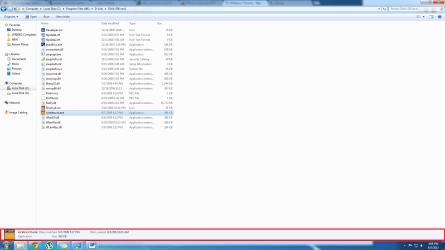
I've seen it done before and i would like to customize mine to do the same. In the screenshot i added, at the point i specified, i want to be able to view File name, Type, Size, Extension, and Date last altered or better yet display when the file put on to the computer and NOT when it was last edited by moving or something like how it shows by default. Or just moreinformation all together. And if possible, i would like to have this done to anything that i click in Windows Explorer. Drives, folders, files, etc.

You guy's gotta admit .... there's a lot of space for a BUNCH more info in that area.

If i'm not mistaken no 3rd party programs are needed. I read someone talking about it slowing down the computer or something, but my system can handle it, of that i am positive.

I am also using an SSD drive as my primary. I Don't want to do this if it will have a negative impact on the SSD.

Thanks in advance guys. :thumbsup:
 

Attachments

  • Untitled.png
    Untitled.png
    76 KB · Views: 6
Last edited:

My Computer My Computer

Computer type
PC/Desktop
Computer Manufacturer/Model Number
Dell Inspiron 530
OS
Windows 7 Professional Version 6.1 Build 7601 SP1
CPU
Q6600
Motherboard
IDK
Memory
4GB Total
Graphics Card(s)
GeForce 9500GT =(
Sound Card
Onboard
Monitor(s) Displays
Smaller than what i want
Screen Resolution
Not up to par
Hard Drives
Not an SSD
PSU
350 Watt or W/E this model comes with
Case
Dell Inspiron 530
Cooling
Factory
Keyboard
Logitech G510
Mouse
Logitech G500
Internet Speed
Eh, its okay.
Browser
Aviator.
Other Info
I want my old computer back.
Back
Top