As mentioned already, meridius21, I'm afraid you already have some of the Win 10 update garbage installed. As ignatzatsonic said, those top 4 in your list are Windows 10 update patches. FYI, 2990214 (meant to enable you "to upgrade your computer from Windows 7 Service Pack 1 (SP1) to a later version of Windows") was replaced by 3050265 (a June 2015 Windows Update Client update) and then 3065987, (a July 2015 Windows Update Client update).
There were actual improvements added to 3050265 that were not Windows 10 related, but I think most were for getting ready for installing later operating systems. BUT, they did add a positive thing related to Windows 10, a way to block later operating system related updates, "This update installs a new Group Policy object that enables you to block upgrades to the latest version of Windows through Windows Update." ref:
https://support.microsoft.com/en-us/kb/3050265. I expect you would want the latest update, 3065987 (July) for any fixes. The original 2990214 was overbearing (and a little broken I think), but maybe after a few months of fixes they have it working OK.
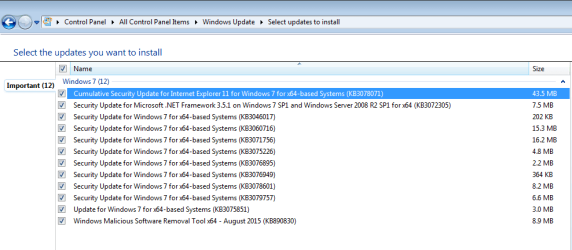
I don't have any of those Windows Update Client updates installed on my PC and it seems to be working fine. All the Security Patches actually needed for Windows 7 are found. I always install the Security Patches, but I wait some number of days for others to find bugs in Microsoft's updates as well as identifying sneaky Win 10 related things installed by some updates.
Of the next group of 5, I'm afraid 3022345 and 3068708 are Windows 10 update related (adding a tracking service so "you can add benefits from the latest version of Windows to systems that have not yet upgraded." FYI, 3022345 was later replaced by 3068708 since '345 had problems. And 3065987 mentioned above. My system doesn't have any of those installed, either.
As meridius21 said, removing updates can be problematic. Although, there are ways to clean-up your PC's patch database on your system which can help.
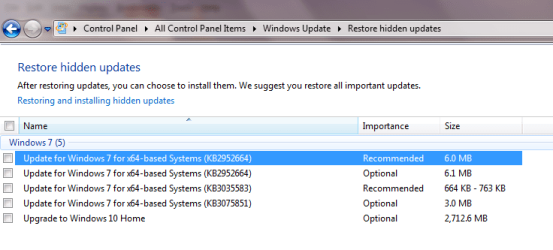
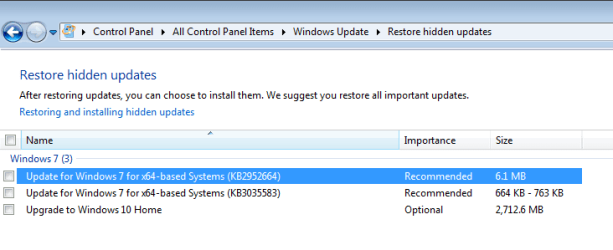
Adding to the confusion is what Mark Phelps is saying about MS trying to force Win 10 upon us with sneaky methods. But they don't always change the patch number to do it. They will re-issue patches with both fixes and other changes. For instance, 2952664 has been changed many times. meridius21, I think that might be why you see it again, even if you have it in the Hidden list.
Here is a hint to clean-up your patch status (including Hidden list) as reported by the Windows Update control panel. At least it worked for me. Before I tried it, I took a snapshot of my list of Hidden patches. Then, I unhid all of them and clicked Check for Updates. It cleaned up allot because some of those patches were no longer needed. All patches will end up in Important or Optional sections. Then, for the patches I didn't want, I hid them again.
For Windows 7 users I recommend you NOT included "Recommended" updates in your Windows Update settings. That is, when the "Recommended" box is checked, it will put those updates (all of the Windows 10 garbage) into the "Important" section (along with real Important and Critical updates). So, keep it unchecked and both the Recommended and actual Optional updates will go into the "Optional" section. Damn confusing that; more of the sneakiness I guess.
Since Mainstream Support ended for Windows 7 on 13 January 2015, we are in the Extended Support phase for the operating system. Extended Support ends 14 January 2020; it basically only includes Security Updates. If you guys haven't already done it, consider changing your update settings in your Windows Update control panel. For the support schedule and related information see
https://support.microsoft.com/en-us/lifecycle. Click the FAQs box to see useful information. Here is a searched link directly to a Windows 7 schedule:
https://support.microsoft.com/en-us/lifecycle/search?sort=PN&alpha=Windows 7.
Here is how my system is set.
BTW, I have it set that only users with administrator privs can do updates. If you want others to do the updates, check the "Allow all users to install updates on this computer" box.