Solved Firefox 40.0.2 Obscuring Addresses

marsmimar

New member
Guru
Gold Member
VIP
Local time
11:02 AM
Messages
6,973
Location
South Central Texas
After updating Firefox to 40.0.2 typed addresses in the awesome bar (aka: address bar) are partially obscured. All previous versions worked. What I've done: (1) Uninstalled/reinstalled Firefox; (2) Installed previous versions; (3) Removed all add-ons; (4) Cleaned cookies/temp files; (5) Rebooted computer. Nothing has helped. Any suggestions?
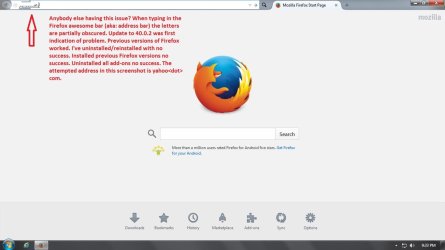
firefox.jpg
 

My Computer My Computer

At a glance

Win 7 Pro 64-bitIntel i5 2.4 Ghz8GB DDR3Intel HD 3000
Computer type
Laptop
Computer Manufacturer/Model Number
Sony Vaio VPCEB47GM Laptop
OS
Win 7 Pro 64-bit
CPU
Intel i5 2.4 Ghz
Memory
8GB DDR3
Graphics Card(s)
Intel HD 3000
Sound Card
IDT High Definition
Monitor(s) Displays
15.6 WGXA Anti-Glare LED
Screen Resolution
1280x800
Hard Drives
640Gb 7200rpm
Antivirus
MSE
Browser
Opera (primary) with IE9 backup
Hi:

Most Firefox problems originate in the user's profile, not in the program itself.

Firefox - Standard Diagnostic


Troubleshoot and diagnose Firefox problems


It might help at this point to create a new, vanilla profile with NO extensions or add-ons or tweaked settings/options:

Creating a new Firefox profile

Doing so does not burn bridges, as you can switch back to the old profile later, if you wish.

If the new profile resolves the issue, then you can import your bookmarks (saved from the "old" profile), and you can then customize the new profile by adding extensions, changing settings, etc.

Cheers,
 

My Computer My Computer

At a glance

OEM Windows 7 Ult (x64) SP1Intel Core-i7 3770 @ 3.4 GHz16 GB DDR3 SDRAM @ 1333 MHzNVidia GeForce GT620 1 GB
Computer type
PC/Desktop
Computer Manufacturer/Model Number
Dell Studio XPS 8500
OS
OEM Windows 7 Ult (x64) SP1
CPU
Intel Core-i7 3770 @ 3.4 GHz
Motherboard
"Dell" branded
Memory
16 GB DDR3 SDRAM @ 1333 MHz
Graphics Card(s)
NVidia GeForce GT620 1 GB
Sound Card
THX TruStudio PC
Monitor(s) Displays
Dell U2410 Full HD
Hard Drives
2.0 TB SATA2 @ 7200 RPM
PSU
350W
Keyboard
MS 4000 Ergon - Wired
Mouse
Logitech Anywhere MX
Internet Speed
Cable HSI w/Turbo (router)
Antivirus
KIS-MBAM Premium-MBAE Premium
Browser
Fx (current version); IE
Other Info
And a Win7/64 Pro laptop; And a Win10/64 Pro desktop.
Just updated from v40.0 to v40.0.2 and don't have the problem you describe. MoxieMomma may be right.
 

My Computer My Computer

At a glance

Windows 7 Home Premium 64 bit SP1i5-2320 @3.00 GHz6GBNVIDIA GeForce 7300 LE
Computer type
PC/Desktop
Computer Manufacturer/Model Number
ASUS
OS
Windows 7 Home Premium 64 bit SP1
CPU
i5-2320 @3.00 GHz
Memory
6GB
Graphics Card(s)
NVIDIA GeForce 7300 LE
Monitor(s) Displays
Acer S200HQL 19.5 LED
Screen Resolution
1280 x 800 (1900 x 900 max)
Hard Drives
Drive 1: 1 TB SATA internal: C drive
Drive 2: 250 GB SATA internal: User Data Backup
Drive 3: 500 GB SATA USB: Full System Backup 1, Father
Drive 4: 500 GB SATA USB: Full System Backup 2, Son
Drive 5: 40 GB IDE USB: Kindle, ASUS Tabl
Keyboard
ASUS KB34211
Mouse
Logitech m325 cordless
Internet Speed
27Mb down, 3 Mb up cable modem w/Netgear R6400 WiFi
Antivirus
NIS, Spybot S&D, CCleaner, Malwarebytes, MSERT, MRT
Browser
FF v44.0.2;IE11 v11.0.9600.18015,uv11.0.23;Chrome v44.0.2403
Other Info
FF has AdBlockPlus and Ghostery plugins,
Try using a better Theme
 

My Computer My Computer

At a glance

Win 10 Pro 64Intel Core i7 960 @3.20 GHz24.0 GB DDR3EVGA GTX 750Ti
Computer type
PC/Desktop
Computer Manufacturer/Model Number
Custom Build
OS
Win 10 Pro 64
CPU
Intel Core i7 960 @3.20 GHz
Motherboard
MSI MS7522
Memory
24.0 GB DDR3
Graphics Card(s)
EVGA GTX 750Ti
Monitor(s) Displays
LG E2341 23 Inch
Screen Resolution
1920x1080
Hard Drives
1TB Western Dgital 1002FAEX-00Y9A0
1TB Hitachi HDS721010CLA322
PSU
700 Watt
Case
Haf 912
Cooling
Fans
Keyboard
Logitech MK710
Mouse
Logitech M705
Internet Speed
Cable
Antivirus
AIS 2015 .10.0.2225
Browser
Firefox 49
Other Info
MalwareBytes Anti-Rootkit utility
UPDATE: Did a complete uninstall of Firefox and all user data and settings using the steps outlined in the Mozilla Support article here. Also used regedit to delete all traces of mozilla and firefox from the registry. Used Mozilla's archive to reinstall default 39.0.3 without any extensions or add-ons or tweaked settings/options. 39.0.3 worked perfectly. Upon updating to 40.0.2 (without any extensions, etc) address bar problem returned.

Uninstalled Firefox and all user data and settings for a second time, cleaned registry, installed 39.0.3 again. Worked perfectly without any modifications. Installed my extensions/add-ons/tweaks and it continued to work flawlessly. Updated to 40.0.2 and it went to s**t again.

Third time I uninstalled Firefox and all user data and settings again, cleaned registry. This time I downloaded/installed 40.0.2 directly from Mozilla's website. Address bar still doesn't work right.

For whatever the reason, 40.0.2 does not like this computer. And for my few remaining brain cells, it doesn't make sense that all previous versions of Firefox have worked perfectly. But 40.0.2 fails. Guess I'll just live with it until Firefox releases its next update and see what happens.

EDIT: @ Gary. Guess I was composing while you were adding your suggestion. Tried a few different themes for 40.0.2 but no joy. Address bar still obscures letters.
 

My Computer My Computer

At a glance

Win 7 Pro 64-bitIntel i5 2.4 Ghz8GB DDR3Intel HD 3000
Computer type
Laptop
Computer Manufacturer/Model Number
Sony Vaio VPCEB47GM Laptop
OS
Win 7 Pro 64-bit
CPU
Intel i5 2.4 Ghz
Memory
8GB DDR3
Graphics Card(s)
Intel HD 3000
Sound Card
IDT High Definition
Monitor(s) Displays
15.6 WGXA Anti-Glare LED
Screen Resolution
1280x800
Hard Drives
640Gb 7200rpm
Antivirus
MSE
Browser
Opera (primary) with IE9 backup
Not sure it'll help but just in case in about:config change browser.urlbar.formatting.enabled to false
 

My Computer My Computer

At a glance

Windows 7 Ultimate x64Q6600 3.1ghzKingston DDR2 6400 8GBGigabyte Radeon HD 6850 1GB 256-Bit
Computer type
PC/Desktop
Computer Manufacturer/Model Number
Home Made
OS
Windows 7 Ultimate x64
CPU
Q6600 3.1ghz
Motherboard
Gigabyte GA-P35-DS3L
Memory
Kingston DDR2 6400 8GB
Graphics Card(s)
Gigabyte Radeon HD 6850 1GB 256-Bit
Sound Card
On board
Monitor(s) Displays
Acer X243H
Screen Resolution
1920x1080
Hard Drives
Intel 330 120GB SSD
WD 2TB 7200
PSU
Thermaltake Toughpower 750W Semi Modular
Case
Modified Alienware
Keyboard
A4Tech
Mouse
Gigabyte ECO600
Antivirus
Comodo
Browser
Cyberfox
Your screenshot shows FF full screened. Does it happen when you have FF in a window?

Try the Windows native magnifier to see if that changes things. I'm thinking that it is a combo of your video driver and the way FF wants to display info in that field. The magnifier might change the way the info is processed.

You mentioned themes. I'm guessing that you tried FF themes. Have you tested with the classic OS theme? (just as a test)


The FF change log was of no help :-(
 

My Computer My Computer

At a glance

W7 Pro SP1 64biti78GBIntel HD Graphics
Computer type
Laptop
Computer Manufacturer/Model Number
Employer provided Dell Latitude
OS
W7 Pro SP1 64bit
CPU
i7
Memory
8GB
Graphics Card(s)
Intel HD Graphics
Hard Drives
crappy SSD
Antivirus
Employer mandated Symantec Endpoint Protection
Browser
Pale Moon 64bit, IE11 64bit & Chrome 64bit
Your screenshot shows FF full screened. Does it happen when you have FF in a window?

Try the Windows native magnifier to see if that changes things. I'm thinking that it is a combo of your video driver and the way FF wants to display info in that field. The magnifier might change the way the info is processed.

You mentioned themes. I'm guessing that you tried FF themes. Have you tested with the classic OS theme? (just as a test)


The FF change log was of no help :-(

^^ Agree with those suggestions. If it's not the program installation or the profile, it does sound as if it could be something on your system.^^

You might post over at forums.mozillazine.org -- a lot of serious "power users" and script kiddies hang out there. Perhaps someone will be able to explain or resolve the issue for you.

and/or

You might want to check at bugzilla -- if this has not already been reported, then you could file a bug report

Needless to say, you won't want to stay on an outdated version for too long, because of the security vulnerabilities.

Sorry it's still not working -- hope you get it resolved.
 

My Computer My Computer

At a glance

OEM Windows 7 Ult (x64) SP1Intel Core-i7 3770 @ 3.4 GHz16 GB DDR3 SDRAM @ 1333 MHzNVidia GeForce GT620 1 GB
Computer type
PC/Desktop
Computer Manufacturer/Model Number
Dell Studio XPS 8500
OS
OEM Windows 7 Ult (x64) SP1
CPU
Intel Core-i7 3770 @ 3.4 GHz
Motherboard
"Dell" branded
Memory
16 GB DDR3 SDRAM @ 1333 MHz
Graphics Card(s)
NVidia GeForce GT620 1 GB
Sound Card
THX TruStudio PC
Monitor(s) Displays
Dell U2410 Full HD
Hard Drives
2.0 TB SATA2 @ 7200 RPM
PSU
350W
Keyboard
MS 4000 Ergon - Wired
Mouse
Logitech Anywhere MX
Internet Speed
Cable HSI w/Turbo (router)
Antivirus
KIS-MBAM Premium-MBAE Premium
Browser
Fx (current version); IE
Other Info
And a Win7/64 Pro laptop; And a Win10/64 Pro desktop.
Would you be prepared to try a Firefox variant to see if you get the same issue? You could try Cyberfox as it uses it's own profile and doesn't interfere with any Firefox profile. In other words it doesn't share Firefox profile like some other Firefox variants.

If you want to test you need one of these options:

Cyberfox 64bit Intel optimized version

or if you want to use 32bit plugins (Java)

Cyberfox 32bit Intel optimized version

Either way you can choose to install or just use the portable version of either.

It would be interesting to know if it works without the url obfuscation issue.
 

My Computer My Computer

At a glance

Microsoft Windows 7 Home Premium 64-bit 7601 ...AMD C-60 APU with Radeon(tm) HD Graphics4.00 GBAMD Radeon HD 6290 Graphics
Computer type
Laptop
Computer Manufacturer/Model Number
ASUS
OS
Microsoft Windows 7 Home Premium 64-bit 7601 Multiprocessor Free Service Pack 1
CPU
AMD C-60 APU with Radeon(tm) HD Graphics
Motherboard
ASUSTeK COMPUTER INC. X501U
Memory
4.00 GB
Graphics Card(s)
AMD Radeon HD 6290 Graphics
Sound Card
(1) AMD High Definition Audio Device (2) Realtek High Defi
Screen Resolution
1366 x 768 x 32 bits (4294967296 colors) @ 60 Hz
Hard Drives
Hitachi HTS545050A7E380 SATA Disk Device
Antivirus
Comodo CIS & FW, SecureAplus App Whitelisting, Threatfire
Browser
Cyberfox 64bit, Opera 64bit, Airfox
Other Info
Spy-The-Spy, HitmanPro.Alert, Norton Connect Safe, MJRegWatcher, BitDefender TrafficLight, Voodoo Shield, Zemana AntiMalware
Thanks for all the suggestions, Everyone!

Not sure it'll help but just in case in about:config change browser.urlbar.formatting.enabled to false

Appreciate the suggestion, Simon but changing to "false" had no effect. :(

Your screenshot shows FF full screened. Does it happen when you have FF in a window?

Try the Windows native magnifier to see if that changes things. I'm thinking that it is a combo of your video driver and the way FF wants to display info in that field. The magnifier might change the way the info is processed.

You mentioned themes. I'm guessing that you tried FF themes. Have you tested with the classic OS theme? (just as a test)

The FF change log was of no help :-(

- Problem occurs full screen, separate window, private browsing, etc.
- Using Windows native magnifier had no effect other than enlarging the problem. :D
- Yes, tried FF themes, classic OS theme, other 3rd party themes, etc. Problem persists.

Your screenshot shows FF full screened. Does it happen when you have FF in a window?

Try the Windows native magnifier to see if that changes things. I'm thinking that it is a combo of your video driver and the way FF wants to display info in that field. The magnifier might change the way the info is processed.

You mentioned themes. I'm guessing that you tried FF themes. Have you tested with the classic OS theme? (just as a test)


The FF change log was of no help :-(

^^ Agree with those suggestions. If it's not the program installation or the profile, it does sound as if it could be something on your system.^^

You might post over at forums.mozillazine.org -- a lot of serious "power users" and script kiddies hang out there. Perhaps someone will be able to explain or resolve the issue for you.

and/or

You might want to check at bugzilla -- if this has not already been reported, then you could file a bug report

Needless to say, you won't want to stay on an outdated version for too long, because of the security vulnerabilities.

Sorry it's still not working -- hope you get it resolved.

Thanks MM. I couldn't find anything similar on the Mozilla forums or at Bugzilla so I filed a new bug report. I would have to agree that 40.0.2 doesn't like something about my computer. What irks me the most is I haven't changed anything on my machine. I even used a few system images to rule out all updates for the past three months (Windows Updates, security updates, Flash updates, etc.) No matter what I've tried 40.0.2 address bar won't show addresses/URLs until I click Enter. Then they show up just fine. :confused:

Would you be prepared to try a Firefox variant to see if you get the same issue? You could try Cyberfox as it uses it's own profile and doesn't interfere with any Firefox profile. In other words it doesn't share Firefox profile like some other Firefox variants.

If you want to test you need one of these options:

Cyberfox 64bit Intel optimized version

or if you want to use 32bit plugins (Java)

Cyberfox 32bit Intel optimized version

Either way you can choose to install or just use the portable version of either.

It would be interesting to know if it works without the url obfuscation issue.

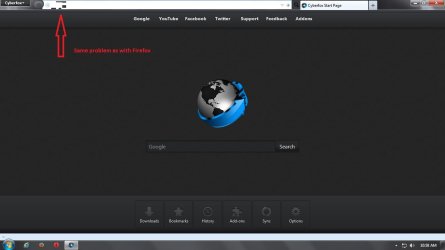
Took your advice Chris and installed Cyberfox. It's using Firefox's 40.0.2 coding. As they say, a picture is worth a thousand words. :mad:

cyberfox.jpg

Just for giggles and grins I tried Pale Moon and Waterfox. Both of them have versions earlier than FF 40.0.2 and they worked fine (just as earlier versions of FF worked fine.) So once again I have to conclude that something in the 40.0.2 coding isn't working on this computer (a Sony Vaio.) But 40.0.2 is working as it should on a Dell and a Lenovo.

I'm going to keep Firefox installed so I can continue to troubleshoot but I'll be using Opera as my primary browser. It works fine as does IE and Chrome.
 

My Computer My Computer

At a glance

Win 7 Pro 64-bitIntel i5 2.4 Ghz8GB DDR3Intel HD 3000
Computer type
Laptop
Computer Manufacturer/Model Number
Sony Vaio VPCEB47GM Laptop
OS
Win 7 Pro 64-bit
CPU
Intel i5 2.4 Ghz
Memory
8GB DDR3
Graphics Card(s)
Intel HD 3000
Sound Card
IDT High Definition
Monitor(s) Displays
15.6 WGXA Anti-Glare LED
Screen Resolution
1280x800
Hard Drives
640Gb 7200rpm
Antivirus
MSE
Browser
Opera (primary) with IE9 backup
Thanks for testing Cyberfox. It does then rule out any problems with a corrupt Firefox profile or problematic add-ons. I have 40.0.2 installed and it seems to work fine.

I guess you'll probably have to wait for the next version of Firefox to be released then see if it's fixed.
 

My Computer My Computer

At a glance

Microsoft Windows 7 Home Premium 64-bit 7601 ...AMD C-60 APU with Radeon(tm) HD Graphics4.00 GBAMD Radeon HD 6290 Graphics
Computer type
Laptop
Computer Manufacturer/Model Number
ASUS
OS
Microsoft Windows 7 Home Premium 64-bit 7601 Multiprocessor Free Service Pack 1
CPU
AMD C-60 APU with Radeon(tm) HD Graphics
Motherboard
ASUSTeK COMPUTER INC. X501U
Memory
4.00 GB
Graphics Card(s)
AMD Radeon HD 6290 Graphics
Sound Card
(1) AMD High Definition Audio Device (2) Realtek High Defi
Screen Resolution
1366 x 768 x 32 bits (4294967296 colors) @ 60 Hz
Hard Drives
Hitachi HTS545050A7E380 SATA Disk Device
Antivirus
Comodo CIS & FW, SecureAplus App Whitelisting, Threatfire
Browser
Cyberfox 64bit, Opera 64bit, Airfox
Other Info
Spy-The-Spy, HitmanPro.Alert, Norton Connect Safe, MJRegWatcher, BitDefender TrafficLight, Voodoo Shield, Zemana AntiMalware
Someone with a font rendering problem reported the issue here: https://8pecxstudios.com/Forums/viewtopic.php?f=5&t=1114

Seems to apply to the latest build and the developer is blaming it on the graphics driver.

The issue reported isn't identical to yours but maybe it's related. You could also try posting that Cyberfox screenshot in the same forum and see if the developer has any ideas. Usually there's a response within a day or so.
 

My Computer My Computer

At a glance

Microsoft Windows 7 Home Premium 64-bit 7601 ...AMD C-60 APU with Radeon(tm) HD Graphics4.00 GBAMD Radeon HD 6290 Graphics
Computer type
Laptop
Computer Manufacturer/Model Number
ASUS
OS
Microsoft Windows 7 Home Premium 64-bit 7601 Multiprocessor Free Service Pack 1
CPU
AMD C-60 APU with Radeon(tm) HD Graphics
Motherboard
ASUSTeK COMPUTER INC. X501U
Memory
4.00 GB
Graphics Card(s)
AMD Radeon HD 6290 Graphics
Sound Card
(1) AMD High Definition Audio Device (2) Realtek High Defi
Screen Resolution
1366 x 768 x 32 bits (4294967296 colors) @ 60 Hz
Hard Drives
Hitachi HTS545050A7E380 SATA Disk Device
Antivirus
Comodo CIS & FW, SecureAplus App Whitelisting, Threatfire
Browser
Cyberfox 64bit, Opera 64bit, Airfox
Other Info
Spy-The-Spy, HitmanPro.Alert, Norton Connect Safe, MJRegWatcher, BitDefender TrafficLight, Voodoo Shield, Zemana AntiMalware
Someone with a font rendering problem reported the issue here: https://8pecxstudios.com/Forums/viewtopic.php?f=5&t=1114

Seems to apply to the latest build and the developer is blaming it on the graphics driver.

The issue reported isn't identical to yours but maybe it's related. You could also try posting that Cyberfox screenshot in the same forum and see if the developer has any ideas. Usually there's a response within a day or so.

Thank you for the info, Chris. I submitted a bug report to 8pecxstudios as well as Mozilla's Bugzilla. As soon as I hear something I'll update this thread.
 

My Computer My Computer

At a glance

Win 7 Pro 64-bitIntel i5 2.4 Ghz8GB DDR3Intel HD 3000
Computer type
Laptop
Computer Manufacturer/Model Number
Sony Vaio VPCEB47GM Laptop
OS
Win 7 Pro 64-bit
CPU
Intel i5 2.4 Ghz
Memory
8GB DDR3
Graphics Card(s)
Intel HD 3000
Sound Card
IDT High Definition
Monitor(s) Displays
15.6 WGXA Anti-Glare LED
Screen Resolution
1280x800
Hard Drives
640Gb 7200rpm
Antivirus
MSE
Browser
Opera (primary) with IE9 backup
Hmmm, this sure is weird.
Please keep us updated on the status of your issue.

Thanks,
 

My Computer My Computer

At a glance

OEM Windows 7 Ult (x64) SP1Intel Core-i7 3770 @ 3.4 GHz16 GB DDR3 SDRAM @ 1333 MHzNVidia GeForce GT620 1 GB
Computer type
PC/Desktop
Computer Manufacturer/Model Number
Dell Studio XPS 8500
OS
OEM Windows 7 Ult (x64) SP1
CPU
Intel Core-i7 3770 @ 3.4 GHz
Motherboard
"Dell" branded
Memory
16 GB DDR3 SDRAM @ 1333 MHz
Graphics Card(s)
NVidia GeForce GT620 1 GB
Sound Card
THX TruStudio PC
Monitor(s) Displays
Dell U2410 Full HD
Hard Drives
2.0 TB SATA2 @ 7200 RPM
PSU
350W
Keyboard
MS 4000 Ergon - Wired
Mouse
Logitech Anywhere MX
Internet Speed
Cable HSI w/Turbo (router)
Antivirus
KIS-MBAM Premium-MBAE Premium
Browser
Fx (current version); IE
Other Info
And a Win7/64 Pro laptop; And a Win10/64 Pro desktop.
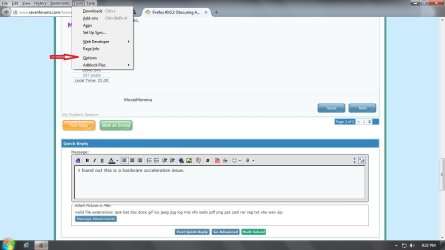
According to Cyberfox Admin "Toady", this is a hardware acceleration issue. In Firefox, Cyberfox, and presumably any other Firefox variant, do the following:

1. Go to the Menu bar and click Tools > Options
hw acceleration 1.jpg

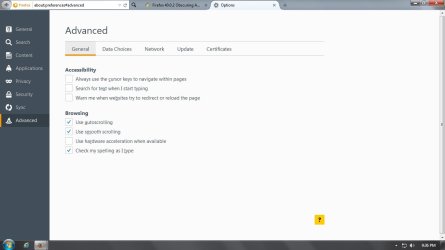
2. From Options click Advanced tab (left column) > Browsing > Uncheck "Use hardware acceleration when available"
hw acceleration 2.jpg

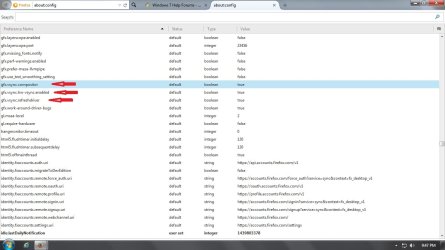
If this doesn't work, an alternate solution is:

1. In address bar type about:config > Enter > accept warning
2. Scroll down to gfx.vsynch
3. Reset gfx.vsync.compositor, gfx.vsync.hw-vsync.enabled, and gfx.vsync.refreshdriver to "false" by double clicking each item
alternate solution.jpg

I've requested additional info as to why the obfuscated URL only appears in the start page address bar and not in any other subsequent address bars. I also asked why does 40.0.2 only affect my Sony Vaio. And finally, I asked if this was a coding error of some kind since all previous versions of Firefox did not have a hardware acceleration issue. Hopefully I'll get an answer to these questions and I'll post back with more updated info. In the meantime I'll leave this thread open for a while.

Again, thanks to all for the suggestions. :thumbsup:
 

My Computer My Computer

At a glance

Win 7 Pro 64-bitIntel i5 2.4 Ghz8GB DDR3Intel HD 3000
Computer type
Laptop
Computer Manufacturer/Model Number
Sony Vaio VPCEB47GM Laptop
OS
Win 7 Pro 64-bit
CPU
Intel i5 2.4 Ghz
Memory
8GB DDR3
Graphics Card(s)
Intel HD 3000
Sound Card
IDT High Definition
Monitor(s) Displays
15.6 WGXA Anti-Glare LED
Screen Resolution
1280x800
Hard Drives
640Gb 7200rpm
Antivirus
MSE
Browser
Opera (primary) with IE9 backup
I know this may sound stupid but... have you tried upgrading your graphics driver?... I had issues with hardware acceleration too a while ago, upgrading my ATI drivers to use a set from 2012 solved it...
 

My Computer My Computer

At a glance

Microsoft Windows 7 Home Premium SP1 64-bit B...AMD Athlon 64 X2 5200+ Dual Core CPU @ 2.7 Gh...2x2 GB DDR2 PC-5300 (667 Mhz) Kingston ValueRAMXFX ATI Radeon HD 4350 GPU (512 MB + 512 MB HM)
Computer type
PC/Desktop
Computer Manufacturer/Model Number
Assembled Desktop PC
OS
Microsoft Windows 7 Home Premium SP1 64-bit Build 7600
CPU
AMD Athlon 64 X2 5200+ Dual Core CPU @ 2.7 Ghz (Brisbane)
Motherboard
PCChips A13G+ v3.0
Memory
2x2 GB DDR2 PC-5300 (667 Mhz) Kingston ValueRAM
Graphics Card(s)
XFX ATI Radeon HD 4350 GPU (512 MB + 512 MB HM)
Sound Card
Realtek High Definition Audio Driver ALC660 @ MCP61S
Monitor(s) Displays
HP S2031 20" LED HD Widescreen Display Monitor
Screen Resolution
1600 x 900 px
Hard Drives
Maxtor Diamond Max 10 (160 GB, 7200 RPM, SATA-II Hard Disk)
Western Digital Scorpion Blue (250 GB, 5400 RPM, SATA-II External Hard Disk - Personal Data)
Toshiba MQ01ABD050 (500 GB, 5400 RPM, SATA-II External Hard Disk - Software & ISOs)
PSU
Pixxo Transformer 850W 80+ Certification PSU
Case
Compaq 5BW353 Case
Cooling
Many solutions, see other info...
Keyboard
Green Leaf (Mitzu) Standard Keyboard
Mouse
Microsoft USB Lasser Pointing Device
Internet Speed
10 MB
Antivirus
Avast Antivirus Free
Browser
Firefox, Chrome, Internet Explorer
Other Info
Windows Experience Index Result: 3.8 of 7.9.

Cooling solutions:
- AVC @ 2000/5000 RPM Copper Heatpipes (For Athlon 64 X2 6000+ CPU used in an Athlon 64 X2 5200+)
- Rear Fan 80 mm @ 2700 RPM for heat extraction
- Manhatan Chipset Cooler @ 4700/7200 RPM (For nVidia Chipset in MoBo)
- Foxconn @ 2500 RPM (Old Pentium III heatsink fan) in XFX ATI Radeon HD 4350
I know this may sound stupid but... have you tried upgrading your graphics driver?... I had issues with hardware acceleration too a while ago, upgrading my ATI drivers to use a set from 2012 solved it...

Definitely not a stupid question. One of the first things I did was go to the Sony eSupport site and check for updated drivers and software. I have the latest and greatest of everything installed. This lappy is using the Intel HD 3000 graphics. I went to Intel and used their Driver Update Utility. The scan came back "no new drivers found".

The most puzzling thing to me is: With hardware acceleration enabled, a URL won't show correctly in the Firefox/Cyberfox start page. Even though it doesn't show correctly I can click Enter and go to whatever website I typed in. Then the address bar shows everything correctly and continues to work correctly until I close the browser window. If I close the browser window, then open a new window, the URL will again fail to show properly. If this is a driver issue, how would the driver know if I was on a new start page or not? Or is it "normal" for drivers to work on some pages and not others? :confused:
 

My Computer My Computer

At a glance

Win 7 Pro 64-bitIntel i5 2.4 Ghz8GB DDR3Intel HD 3000
Computer type
Laptop
Computer Manufacturer/Model Number
Sony Vaio VPCEB47GM Laptop
OS
Win 7 Pro 64-bit
CPU
Intel i5 2.4 Ghz
Memory
8GB DDR3
Graphics Card(s)
Intel HD 3000
Sound Card
IDT High Definition
Monitor(s) Displays
15.6 WGXA Anti-Glare LED
Screen Resolution
1280x800
Hard Drives
640Gb 7200rpm
Antivirus
MSE
Browser
Opera (primary) with IE9 backup
Dang!

"Who'da thunk" that hardware acceleration would be the explanation?
(As others have pointed out, it has been known to do weird things, but this rather "takes the cake".)

Most bizarre.

I assume you've had no response to your bug report at bugzilla?
 

My Computer My Computer

At a glance

OEM Windows 7 Ult (x64) SP1Intel Core-i7 3770 @ 3.4 GHz16 GB DDR3 SDRAM @ 1333 MHzNVidia GeForce GT620 1 GB
Computer type
PC/Desktop
Computer Manufacturer/Model Number
Dell Studio XPS 8500
OS
OEM Windows 7 Ult (x64) SP1
CPU
Intel Core-i7 3770 @ 3.4 GHz
Motherboard
"Dell" branded
Memory
16 GB DDR3 SDRAM @ 1333 MHz
Graphics Card(s)
NVidia GeForce GT620 1 GB
Sound Card
THX TruStudio PC
Monitor(s) Displays
Dell U2410 Full HD
Hard Drives
2.0 TB SATA2 @ 7200 RPM
PSU
350W
Keyboard
MS 4000 Ergon - Wired
Mouse
Logitech Anywhere MX
Internet Speed
Cable HSI w/Turbo (router)
Antivirus
KIS-MBAM Premium-MBAE Premium
Browser
Fx (current version); IE
Other Info
And a Win7/64 Pro laptop; And a Win10/64 Pro desktop.
~~~
I've requested additional info as to why the obfuscated URL only appears in the start page address bar and not in any other subsequent address bars.
~~~
It probably only does it when the Firefox box (for lack of a better term) is involved. [See the second screenshot.] That FF box should go away as soon as you type the first letter of yahoo.com.

In your first screenshot, the FF box barfs on its transition out of the way.

FF1.PNG


I'm going to guess that you already had the issue "fixed" by the time you took the screenshot below:

FF2.PNG


This URL probably was typed into a new tab - one that never had the FF box in the address bar.

FF3.PNG
(Or maybe you had that URL bookmarked :-)


As a test, you might "unfix" FF and try typing in a URL while on that about:preferences page.
 

My Computer My Computer

At a glance

W7 Pro SP1 64biti78GBIntel HD Graphics
Computer type
Laptop
Computer Manufacturer/Model Number
Employer provided Dell Latitude
OS
W7 Pro SP1 64bit
CPU
i7
Memory
8GB
Graphics Card(s)
Intel HD Graphics
Hard Drives
crappy SSD
Antivirus
Employer mandated Symantec Endpoint Protection
Browser
Pale Moon 64bit, IE11 64bit & Chrome 64bit
Dang!

"Who'da thunk" that hardware acceleration would be the explanation?
(As others have pointed out, it has been known to do weird things, but this rather "takes the cake".)

Most bizarre.

I assume you've had no response to your bug report at bugzilla?

Correct. No response yet from Bugzilla. If and when they respond I'll post back with whatever info they provide. :)
 

My Computer My Computer

At a glance

Win 7 Pro 64-bitIntel i5 2.4 Ghz8GB DDR3Intel HD 3000
Computer type
Laptop
Computer Manufacturer/Model Number
Sony Vaio VPCEB47GM Laptop
OS
Win 7 Pro 64-bit
CPU
Intel i5 2.4 Ghz
Memory
8GB DDR3
Graphics Card(s)
Intel HD 3000
Sound Card
IDT High Definition
Monitor(s) Displays
15.6 WGXA Anti-Glare LED
Screen Resolution
1280x800
Hard Drives
640Gb 7200rpm
Antivirus
MSE
Browser
Opera (primary) with IE9 backup
Back
Top