reverting from Windows 10 back to 7

patches

New member
Local time
8:50 AM
Messages
1
Due to problems with quick books I had to revert from 10 back to7
When I did I had numerous problems with permissions and now I found that windows 7 backup task image is now corrupt
Any help?
 

My Computer My Computer

Computer type
PC/Desktop
Computer Manufacturer/Model Number
dell
OS
7 pro 64 biy
Memory
16
Antivirus
norton
Browser
firefox
I upgraded to Windows 10 on July 30th from Win7.
Before I did I cloned my Win7 disk to another spare drive.
I periodically boot into that drive and after a few minutes it tries to Upgrade to Win10 and fails. I want it to stop doing that.
It probably fails because the upgrade files in the download folder are corrupt.
I have uninstalled KB3035583 and hidden it.
How do I stop Windows 7 from trying to upgrade to Windows 10?
I already called Windows Support and they were no help and they had no problems with me running Windows 7 and Windows 10 on the same machine as long as I didn't run them both at the same time (how could I?).
 

My Computer My Computer

Computer type
PC/Desktop
Computer Manufacturer/Model Number
Custom
OS
Windows 7 Pro 64-bit SP1/Windows 10 Dual Boot
CPU
AMD FX-8350
Motherboard
ASUS 970 Pro Gaming Aura
Memory
Corsair Vengeance 8GBx2 1866
Graphics Card(s)
Sapphire RX-580 Nitro + 4GB
Sound Card
On-board HD Audio
Monitor(s) Displays
Acer P236H
Screen Resolution
1920x1080
Hard Drives
WD 500GB Blue x 2
WD 500GB Green
Samsung 850 EVO 500 GB
PSU
Corsair RM750
Case
Antec 1100
Keyboard
Kensington Washable
Mouse
Logitech M510
Internet Speed
LTE 30Mbps down/10Mbps up
Antivirus
BitDefender Anti Virus Plus 2019 Paid version
Browser
Firefox, Chrome

My Computer My Computer

Computer type
PC/Desktop
Computer Manufacturer/Model Number
Custom assembled by me :}
OS
Win-7-Pro64bit 7-H-Prem-64bit
CPU
i7-5930K 2nd i9-9940x both water blocked VRM's too
Motherboard
ASUS SABERTOOTH X99 2nd ASUS x299 Apex
Memory
Trident-z 3200C14 2nd Trident-z 3600C16
Graphics Card(s)
EVGA 1080ti ftw3 2nd Titan Xp both water blocked
Sound Card
Built-in Realtek
Monitor(s) Displays
1-AOC G2460PG 24"G-Sync 144Hz/ 2nd 1-ASUS VG248QE 24" 144Hz
Screen Resolution
1920 x 1080 144Hz
Hard Drives
2-Samsung M.2 Evo & Evo Plus
2-Samsung 850 EVO 500GB SSD's/ 3-2.5 W.D. Black 1tb-&3-1tb/3-3.5 WD Black 1tb hdd's
PSU
EVGA SuperNOVA 1000-P2 2nd 1200-P2
Case
2-Corsair Obsidian Series 450D Black ATX Mid Tower
Cooling
Custom water loops
Keyboard
Logitech G710+/ 2nd Logitech G910
Mouse
2-RedDragon M901 Perdition 16400 dpi Gaming mouse = wired
Internet Speed
Comcast Ping 19ms 89.31mbps download speed 6.12mbps upload
Antivirus
Malwarebytes Pro/ Superantispyware Pro
Browser
FireFox & Pale moon
Other Info
2nd ASUS X299 Apex/Intel i9-9940x with Custom water loop/7H-Prem-x64/Corsair 450D case/Ram Trident-z 3600C16 4x8gb / Samsung970Evo plus 500gb SSD/Dual ssd EZ swap evo/PSU EVGA SuperNova 1200w-P2 80+Platinum/GPU Titan Xp /8-ML-140 on push-pull on 2-280GTX rads
Thanks Thrash but none of that helped me.

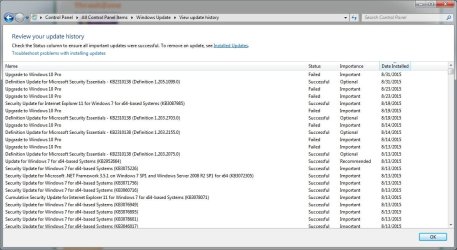
Here's what WU shows me.
 

Attachments

  • Installed Updates.jpg
    Installed Updates.jpg
    109.8 KB · Views: 2

My Computer My Computer

Computer type
PC/Desktop
Computer Manufacturer/Model Number
Custom
OS
Windows 7 Pro 64-bit SP1/Windows 10 Dual Boot
CPU
AMD FX-8350
Motherboard
ASUS 970 Pro Gaming Aura
Memory
Corsair Vengeance 8GBx2 1866
Graphics Card(s)
Sapphire RX-580 Nitro + 4GB
Sound Card
On-board HD Audio
Monitor(s) Displays
Acer P236H
Screen Resolution
1920x1080
Hard Drives
WD 500GB Blue x 2
WD 500GB Green
Samsung 850 EVO 500 GB
PSU
Corsair RM750
Case
Antec 1100
Keyboard
Kensington Washable
Mouse
Logitech M510
Internet Speed
LTE 30Mbps down/10Mbps up
Antivirus
BitDefender Anti Virus Plus 2019 Paid version
Browser
Firefox, Chrome

My Computer My Computer

Computer type
PC/Desktop
Computer Manufacturer/Model Number
Custom assembled by me :}
OS
Win-7-Pro64bit 7-H-Prem-64bit
CPU
i7-5930K 2nd i9-9940x both water blocked VRM's too
Motherboard
ASUS SABERTOOTH X99 2nd ASUS x299 Apex
Memory
Trident-z 3200C14 2nd Trident-z 3600C16
Graphics Card(s)
EVGA 1080ti ftw3 2nd Titan Xp both water blocked
Sound Card
Built-in Realtek
Monitor(s) Displays
1-AOC G2460PG 24"G-Sync 144Hz/ 2nd 1-ASUS VG248QE 24" 144Hz
Screen Resolution
1920 x 1080 144Hz
Hard Drives
2-Samsung M.2 Evo & Evo Plus
2-Samsung 850 EVO 500GB SSD's/ 3-2.5 W.D. Black 1tb-&3-1tb/3-3.5 WD Black 1tb hdd's
PSU
EVGA SuperNOVA 1000-P2 2nd 1200-P2
Case
2-Corsair Obsidian Series 450D Black ATX Mid Tower
Cooling
Custom water loops
Keyboard
Logitech G710+/ 2nd Logitech G910
Mouse
2-RedDragon M901 Perdition 16400 dpi Gaming mouse = wired
Internet Speed
Comcast Ping 19ms 89.31mbps download speed 6.12mbps upload
Antivirus
Malwarebytes Pro/ Superantispyware Pro
Browser
FireFox & Pale moon
Other Info
2nd ASUS X299 Apex/Intel i9-9940x with Custom water loop/7H-Prem-x64/Corsair 450D case/Ram Trident-z 3600C16 4x8gb / Samsung970Evo plus 500gb SSD/Dual ssd EZ swap evo/PSU EVGA SuperNova 1200w-P2 80+Platinum/GPU Titan Xp /8-ML-140 on push-pull on 2-280GTX rads
OK. I changed the WU settings. Let's see what that does.
I'll check back with an update.
 

My Computer My Computer

Computer type
PC/Desktop
Computer Manufacturer/Model Number
Custom
OS
Windows 7 Pro 64-bit SP1/Windows 10 Dual Boot
CPU
AMD FX-8350
Motherboard
ASUS 970 Pro Gaming Aura
Memory
Corsair Vengeance 8GBx2 1866
Graphics Card(s)
Sapphire RX-580 Nitro + 4GB
Sound Card
On-board HD Audio
Monitor(s) Displays
Acer P236H
Screen Resolution
1920x1080
Hard Drives
WD 500GB Blue x 2
WD 500GB Green
Samsung 850 EVO 500 GB
PSU
Corsair RM750
Case
Antec 1100
Keyboard
Kensington Washable
Mouse
Logitech M510
Internet Speed
LTE 30Mbps down/10Mbps up
Antivirus
BitDefender Anti Virus Plus 2019 Paid version
Browser
Firefox, Chrome
Hi,
Good not just review the other thread again and use the links on page 1 and 2 for other goodies to try :)
 

My Computer My Computer

Computer type
PC/Desktop
Computer Manufacturer/Model Number
Custom assembled by me :}
OS
Win-7-Pro64bit 7-H-Prem-64bit
CPU
i7-5930K 2nd i9-9940x both water blocked VRM's too
Motherboard
ASUS SABERTOOTH X99 2nd ASUS x299 Apex
Memory
Trident-z 3200C14 2nd Trident-z 3600C16
Graphics Card(s)
EVGA 1080ti ftw3 2nd Titan Xp both water blocked
Sound Card
Built-in Realtek
Monitor(s) Displays
1-AOC G2460PG 24"G-Sync 144Hz/ 2nd 1-ASUS VG248QE 24" 144Hz
Screen Resolution
1920 x 1080 144Hz
Hard Drives
2-Samsung M.2 Evo & Evo Plus
2-Samsung 850 EVO 500GB SSD's/ 3-2.5 W.D. Black 1tb-&3-1tb/3-3.5 WD Black 1tb hdd's
PSU
EVGA SuperNOVA 1000-P2 2nd 1200-P2
Case
2-Corsair Obsidian Series 450D Black ATX Mid Tower
Cooling
Custom water loops
Keyboard
Logitech G710+/ 2nd Logitech G910
Mouse
2-RedDragon M901 Perdition 16400 dpi Gaming mouse = wired
Internet Speed
Comcast Ping 19ms 89.31mbps download speed 6.12mbps upload
Antivirus
Malwarebytes Pro/ Superantispyware Pro
Browser
FireFox & Pale moon
Other Info
2nd ASUS X299 Apex/Intel i9-9940x with Custom water loop/7H-Prem-x64/Corsair 450D case/Ram Trident-z 3600C16 4x8gb / Samsung970Evo plus 500gb SSD/Dual ssd EZ swap evo/PSU EVGA SuperNova 1200w-P2 80+Platinum/GPU Titan Xp /8-ML-140 on push-pull on 2-280GTX rads
Hi,
Okay so you changed your update settings,
That alone would make it to where you can actually see the update and be able to right click it and Hide.
That would at least stop it from loading and looks like failing each time.
http://www.sevenforums.com/windows-...get-rid-windows-10-upgrade-2.html#post3138633

We might be talking semantics here but what I am referring to is an "upgrade" not an "update". Does it make a difference? I am not seeing the Windows 10 Upgrade listed in any "update" list...hidden or otherwise.
 

My Computer My Computer

Computer type
PC/Desktop
Computer Manufacturer/Model Number
Custom
OS
Windows 7 Pro 64-bit SP1/Windows 10 Dual Boot
CPU
AMD FX-8350
Motherboard
ASUS 970 Pro Gaming Aura
Memory
Corsair Vengeance 8GBx2 1866
Graphics Card(s)
Sapphire RX-580 Nitro + 4GB
Sound Card
On-board HD Audio
Monitor(s) Displays
Acer P236H
Screen Resolution
1920x1080
Hard Drives
WD 500GB Blue x 2
WD 500GB Green
Samsung 850 EVO 500 GB
PSU
Corsair RM750
Case
Antec 1100
Keyboard
Kensington Washable
Mouse
Logitech M510
Internet Speed
LTE 30Mbps down/10Mbps up
Antivirus
BitDefender Anti Virus Plus 2019 Paid version
Browser
Firefox, Chrome

My Computer My Computer

Computer type
PC/Desktop
Computer Manufacturer/Model Number
Custom assembled by me :}
OS
Win-7-Pro64bit 7-H-Prem-64bit
CPU
i7-5930K 2nd i9-9940x both water blocked VRM's too
Motherboard
ASUS SABERTOOTH X99 2nd ASUS x299 Apex
Memory
Trident-z 3200C14 2nd Trident-z 3600C16
Graphics Card(s)
EVGA 1080ti ftw3 2nd Titan Xp both water blocked
Sound Card
Built-in Realtek
Monitor(s) Displays
1-AOC G2460PG 24"G-Sync 144Hz/ 2nd 1-ASUS VG248QE 24" 144Hz
Screen Resolution
1920 x 1080 144Hz
Hard Drives
2-Samsung M.2 Evo & Evo Plus
2-Samsung 850 EVO 500GB SSD's/ 3-2.5 W.D. Black 1tb-&3-1tb/3-3.5 WD Black 1tb hdd's
PSU
EVGA SuperNOVA 1000-P2 2nd 1200-P2
Case
2-Corsair Obsidian Series 450D Black ATX Mid Tower
Cooling
Custom water loops
Keyboard
Logitech G710+/ 2nd Logitech G910
Mouse
2-RedDragon M901 Perdition 16400 dpi Gaming mouse = wired
Internet Speed
Comcast Ping 19ms 89.31mbps download speed 6.12mbps upload
Antivirus
Malwarebytes Pro/ Superantispyware Pro
Browser
FireFox & Pale moon
Other Info
2nd ASUS X299 Apex/Intel i9-9940x with Custom water loop/7H-Prem-x64/Corsair 450D case/Ram Trident-z 3600C16 4x8gb / Samsung970Evo plus 500gb SSD/Dual ssd EZ swap evo/PSU EVGA SuperNova 1200w-P2 80+Platinum/GPU Titan Xp /8-ML-140 on push-pull on 2-280GTX rads
Can't upgrade to ie10 or 11 from ie8. Updates fail to finish the installation. I'm usingwin7 home premium.
I need to upgrade to d/l drivers for my Lenovo g560.

This all started when I upgraded to win10 then went back to win7 via the degrade option. No wifi since. Installed a net gear dongle to get wifi back.

Thanks
 
Last edited:

My Computer My Computer

Computer type
Laptop
Computer Manufacturer/Model Number
Lenovo
OS
Windows premium 32bit
Memory
4 gig
Hard Drives
250 gig
Browser
Ie8

I can't cancel the Reservation because I removed the "Get Windows 10" icon and hid KB3035583.

The last item is interesting because sometimes I've seen the "install updates/shutdown message" after a failed Win10 upgrade attempt and sometimes not - today for instance.

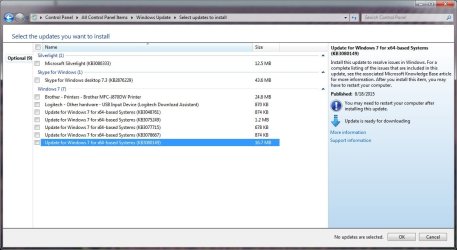
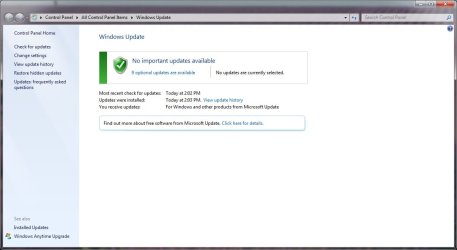
I'm including my current List of Optional Updates.
 

Attachments

  • Optional Updates Aug 31 2015.jpg
    Optional Updates Aug 31 2015.jpg
    78.5 KB · Views: 1
  • Optional Updates  Summary Aug 31 2015.jpg
    Optional Updates Summary Aug 31 2015.jpg
    47.3 KB · Views: 0

My Computer My Computer

Computer type
PC/Desktop
Computer Manufacturer/Model Number
Custom
OS
Windows 7 Pro 64-bit SP1/Windows 10 Dual Boot
CPU
AMD FX-8350
Motherboard
ASUS 970 Pro Gaming Aura
Memory
Corsair Vengeance 8GBx2 1866
Graphics Card(s)
Sapphire RX-580 Nitro + 4GB
Sound Card
On-board HD Audio
Monitor(s) Displays
Acer P236H
Screen Resolution
1920x1080
Hard Drives
WD 500GB Blue x 2
WD 500GB Green
Samsung 850 EVO 500 GB
PSU
Corsair RM750
Case
Antec 1100
Keyboard
Kensington Washable
Mouse
Logitech M510
Internet Speed
LTE 30Mbps down/10Mbps up
Antivirus
BitDefender Anti Virus Plus 2019 Paid version
Browser
Firefox, Chrome
It would now seem that changing the WU options has made a difference.
It has not tried to upgrade to Windows 10 for 3 days.
I'll continue to keep an eye on it.
Thanks.
 

My Computer My Computer

Computer type
PC/Desktop
Computer Manufacturer/Model Number
Custom
OS
Windows 7 Pro 64-bit SP1/Windows 10 Dual Boot
CPU
AMD FX-8350
Motherboard
ASUS 970 Pro Gaming Aura
Memory
Corsair Vengeance 8GBx2 1866
Graphics Card(s)
Sapphire RX-580 Nitro + 4GB
Sound Card
On-board HD Audio
Monitor(s) Displays
Acer P236H
Screen Resolution
1920x1080
Hard Drives
WD 500GB Blue x 2
WD 500GB Green
Samsung 850 EVO 500 GB
PSU
Corsair RM750
Case
Antec 1100
Keyboard
Kensington Washable
Mouse
Logitech M510
Internet Speed
LTE 30Mbps down/10Mbps up
Antivirus
BitDefender Anti Virus Plus 2019 Paid version
Browser
Firefox, Chrome
Back
Top