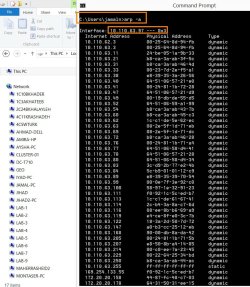
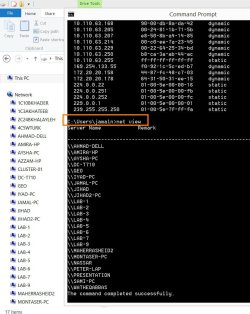
The “cmd” command to show the all the connected machines on network

If your dns server is setup correctly. You should be able to use

nslookup FQDN

FQDN= fully qualified domain name.

Find your fqdn with
echo %COMPUTERNAME%.%USERDNSDOMAIN%


example from work:
C:\Documents and Settings\CParman>echo %COMPUTERNAME%.%USERDNSDOMAIN%
CPARMAN-8DFCMF1.CORP

update:
%USERDNSDOMAIN% only works on a domain :mad:

So you can get it with the ipconfig /all output.

Code:
C:\Documents and Settings\CParman>ipconfig /all

Windows IP Configuration

        Host Name . . . . . . . . . . . . : cparman-8dfcmf1
        Primary Dns Suffix  . . . . . . . : CORP

Very much appreciated Kari and Parman.


Once, I saw an IT personnel using a command to show all the connected machines with a particular machine (the command is joined with identifying its IP address). I couldn’t remember the command he used.


All the best
Jamal
 

My Computer My Computer

At a glance

Windows 7 Ultimate x64
OS
Windows 7 Ultimate x64
I personally don't know any built in windows commands that can do that. But like I said before there are plenty of third party programs that can. He might of been using one of them.
 

My Computer My Computer

At a glance

Windows 7 Ultimate x64
OS
Windows 7 Ultimate x64
If your not fused what device you use to find out all ips, computer names etc etc, if you have an android or iPhone device, Download an app called fing. Its free , connect your device to the network and open the fing app, it will scan the network and show all devices, ip address, mac address.
 

My Computer My Computer

At a glance

Windows 7 Home Premium 64 BitCore I7 1155 3.4GHZ8GB DDR 1600
Computer Manufacturer/Model Number
Cooler Master
OS
Windows 7 Home Premium 64 Bit
CPU
Core I7 1155 3.4GHZ
Memory
8GB DDR 1600
Hard Drives
64 GB SSD - OS
1TB - DATA
PSU
340 Watt Corsair
Case
Cooler Master
Cooling
Cooler Master
If your not fused what device you use to find out all ips, computer names etc etc, if you have an android or iPhone device, Download an app called fing. Its free , connect your device to the network and open the fing app, it will scan the network and show all devices, ip address, mac address.


Many thanks guys for the help. This is very useful

Best

Jamal
 

My Computer My Computer

At a glance

Windows 7 Ultimate x64
OS
Windows 7 Ultimate x64
If your not fused what device you use to find out all ips, computer names etc etc, if you have an android or iPhone device, Download an app called fing. Its free , connect your device to the network and open the fing app, it will scan the network and show all devices, ip address, mac address.


Many thanks guys for the help. This is very useful

Best

Jamal


Glad we can help.

Heres what FING looks like in action:
2367726050.jpg
 

My Computer My Computer

At a glance

Windows 7 Home Premium 64 BitCore I7 1155 3.4GHZ8GB DDR 1600
Computer Manufacturer/Model Number
Cooler Master
OS
Windows 7 Home Premium 64 Bit
CPU
Core I7 1155 3.4GHZ
Memory
8GB DDR 1600
Hard Drives
64 GB SSD - OS
1TB - DATA
PSU
340 Watt Corsair
Case
Cooler Master
Cooling
Cooler Master
Hi!

Since this is the first thread that appears when you Google for similar issues, I thought that I'd give you an answer how to get all IP addresses in your local network. It's arp -a. You can look through arp commands by just typing in arp. Word of advice - don't mess around with it too much.
 

My Computer My Computer

At a glance

Win 10, 64bit
Computer type
Laptop
Computer Manufacturer/Model Number
Asus
OS
Win 10, 64bit
Hard Drives
SSD 340GB & SSD 120GB
Antivirus
Kaspersky
Browser
Firefox & Chrome
Hi!

Since this is the first thread that appears when you Google for similar issues, I thought that I'd give you an answer how to get all IP addresses in your local network. It's arp -a. You can look through arp commands by just typing in arp. Word of advice - don't mess around with it too much.
See post #9.
 

My Computer My Computer

At a glance

W7 Pro SP1 64biti78GBIntel HD Graphics
Computer type
Laptop
Computer Manufacturer/Model Number
Employer provided Dell Latitude
OS
W7 Pro SP1 64bit
CPU
i7
Memory
8GB
Graphics Card(s)
Intel HD Graphics
Hard Drives
crappy SSD
Antivirus
Employer mandated Symantec Endpoint Protection
Browser
Pale Moon 64bit, IE11 64bit & Chrome 64bit
Maybe I should join the hair splitting competition in this already "dead" thread:

The Address Resolution Protocol (ARP) listing which is shown with arp -a command is quite irrelevant regarding the thread title and OP's original question over two and a half years ago. The OP wanted to know a command to see the MACHINES (names), not a list of IP ADDRESSES without anyway to connect said IP addresses to a certain computer. In OP's case the command was and is NET VIEW.
 

My Computer My Computer

At a glance

Windows 10 Pro x64 EN-GB1.6 GHz Intel Core i7-720QM Processor6 GBATI Mobility Radeon HD 5850 Graphics
Computer type
Laptop
Computer Manufacturer/Model Number
HP ENVY 17-1150eg
OS
Windows 10 Pro x64 EN-GB
CPU
1.6 GHz Intel Core i7-720QM Processor
Memory
6 GB
Graphics Card(s)
ATI Mobility Radeon HD 5850 Graphics
Sound Card
Beats sound system with integrated subwoofer
Monitor(s) Displays
17" laptop display, 22" LED and 32" Full HD TV through HDMI
Screen Resolution
1600*900 (1), 1920*1080 (2&3)
Hard Drives
Internal: 2 x 500 GB SATA Hard Disk Drive 7200 rpm
External: 2TB for backups, 3TB USB3 network drive for media
Cooling
As Envy runs a bit warm, I have it on a Cooler Master pad
Keyboard
Logitech diNovo Media Desktop Laser (bluetooth)
Mouse
Logitech Performance Mouse MX
Internet Speed
50/10 Mbps VDSL
Antivirus
Windows Defender 4.3.9431.0
Browser
Maxthon 3.5.2., IE11
Maybe I should join the hair splitting competition in this already "dead" thread:

The Address Resolution Protocol (ARP) listing which is shown with arp -a command is quite irrelevant regarding the thread title and OP's original question over two and a half years ago. The OP wanted to know a command to see the MACHINES (names), not a list of IP ADDRESSES without anyway to connect said IP addresses to a certain computer. In OP's case the command was and is NET VIEW.

Hi Kari,

Arp-a and net view are just great.

Is there a way to show the machine names AND their IP address in the same page?
 

Attachments

  • Clip_531.jpg
    Clip_531.jpg
    155.8 KB · Views: 4
  • Clip_532.jpg
    Clip_532.jpg
    98.5 KB · Views: 4

My Computer My Computer

At a glance

Windows 7 Ultimate x64
OS
Windows 7 Ultimate x64

My Computer My Computer

At a glance

Windows 7 Ultimate x64 SP1AMD Phenom 2 1090T2x8GB Kingston HyperX Fury Black 1600Mhz Unga...MSI GTX 970 Gaming 4G
Computer type
PC/Desktop
Computer Manufacturer/Model Number
Custom Build
OS
Windows 7 Ultimate x64 SP1
CPU
AMD Phenom 2 1090T
Motherboard
Gigabyte GA-890FXA-UD5
Memory
2x8GB Kingston HyperX Fury Black 1600Mhz Unganged
Graphics Card(s)
MSI GTX 970 Gaming 4G
Sound Card
Realtek On-Board HD 7.1 Audio / Logitech G35
Monitor(s) Displays
3xAcer GD245HQ
Screen Resolution
1920x1080
Hard Drives
Samsung 850 Pro 512GB SSD - OS /
WD Caviar Black SATA 3 - 1 TBx2 - Dynamic RAID 0 /
WD Caviar Green SATA 2 - 640GBx2 - Dynamic RAID 0 /
WD Caviar Green SATA 2 - 640GB - Internal Backup /
Seagate Barracude SATA 3 - 3TB - External Backup/ Sync
PSU
HighPower 1000W
Case
Cooler Master HAF 932
Cooling
Noctua NH-D14
Keyboard
Logitech G19
Mouse
Logitech G500
Internet Speed
100/4 Mbit Cable (100GB quota)
Antivirus
ZoneAlarm Extreme Security / MBAM Pro / MBAE Free / SAS Free
Browser
IE 11 - Firefox - Chrome
Other Info
Logitech F710/ G27/ G940/ Z5500 // TrackIR 5 // Nvidia 3D Surround Vision
Thanks. I'm not sure if this will work for me.
 

My Computer My Computer

At a glance

Windows 7 Ultimate x64
OS
Windows 7 Ultimate x64
thought this might help

Go To RUN
Write CMD
Ping the server if you know or your gateway. Even if there is requested timed out.
type "arp -a "
It will usually list down all the IP's and Computers with their Mac Addresses

Thanks
 

My Computer My Computer

At a glance

Windows 7 Ultimate x64
Computer type
PC/Desktop
OS
Windows 7 Ultimate x64
Try this
Go To RUN
Write CMD
Ping the server if you know or your gateway. Even if there is requested timed out.
type "arp -a "
It will usually list down all the IP's and Computers with their Mac Addresses
Thanks
 

My Computer My Computer

At a glance

Windows 7 Ultimate x64
Computer type
PC/Desktop
OS
Windows 7 Ultimate x64
Thanks Kari, UsernameIssues & Kovu for filling out possible gaps, this would have been another dead end for me.
 

My Computer My Computer

At a glance

W10
Computer type
PC/Desktop
OS
W10
Back
Top