Hello,
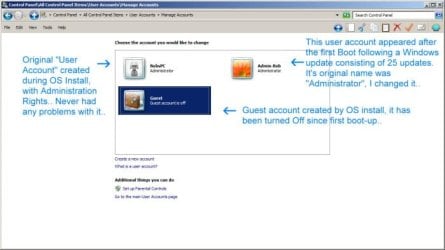
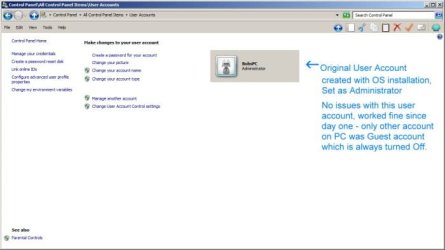
My computer is only 3 months old, it's new OS is Windows 7 Premium 64 Bit. I am the only user of the computer meaning no one but myself ever uses it or will ever use it. So I do not need or use a password set, I just don't need one. There were 2 username accounts, one being 'My-PC' (with Administrator rights) and the other was 'Guest' (Standard rights).
When I turned my computer on it went directly to opening Windows without having to pick a user, which is the way I liked it.
Last night when I shut down there were 25 Windows updates, which updated without a problem.
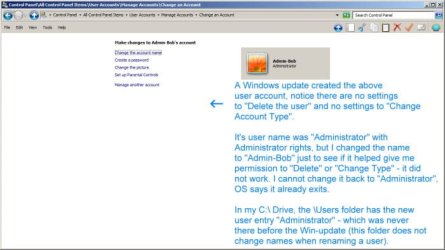
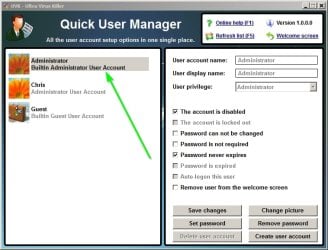
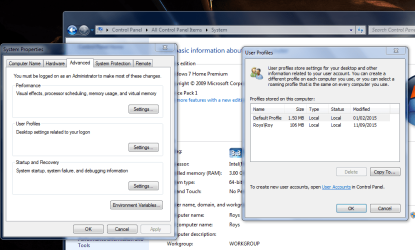
1) But now the upgrades created a 3rd username and called it Administrator (with Administrator rights).
2) Also removing Administrator rights from original 'My-PC' username.
3) And now I have to choose between the usernames 'Administrator' and 'My-PC' every time I reboot or turn the computer on.
4) I also tried to give the user 'My-PC' administrator rights in my Control Panel > User accounts, but it wouldn't allow the change.
The same exact thing happened to my Wife's computer. I'm sure if I just delete the new Administrator username with Administrator rights (or remove it's Admin rights) I will be able to add Admin rights back onto my original username. But does anyone know if this is going to happen with every update?
Also, could someone help me understand a few things
1) Do I really need 3 usernames, 'one with Admin rights', 'one with Standard rights for normal use', and 'a Guest user account' (is this a Microsoft requirement)?
2) Why couldn't I create a second Admin account (is only one allowed per OS)?
3) Is there a way to skip the boot-up usernames choices so it boots directly into my main account?
I would appreciate any help/answers to my issues,
Bob
My computer is only 3 months old, it's new OS is Windows 7 Premium 64 Bit. I am the only user of the computer meaning no one but myself ever uses it or will ever use it. So I do not need or use a password set, I just don't need one. There were 2 username accounts, one being 'My-PC' (with Administrator rights) and the other was 'Guest' (Standard rights).
When I turned my computer on it went directly to opening Windows without having to pick a user, which is the way I liked it.
Last night when I shut down there were 25 Windows updates, which updated without a problem.
1) But now the upgrades created a 3rd username and called it Administrator (with Administrator rights).
2) Also removing Administrator rights from original 'My-PC' username.
3) And now I have to choose between the usernames 'Administrator' and 'My-PC' every time I reboot or turn the computer on.
4) I also tried to give the user 'My-PC' administrator rights in my Control Panel > User accounts, but it wouldn't allow the change.
The same exact thing happened to my Wife's computer. I'm sure if I just delete the new Administrator username with Administrator rights (or remove it's Admin rights) I will be able to add Admin rights back onto my original username. But does anyone know if this is going to happen with every update?
Also, could someone help me understand a few things
1) Do I really need 3 usernames, 'one with Admin rights', 'one with Standard rights for normal use', and 'a Guest user account' (is this a Microsoft requirement)?
2) Why couldn't I create a second Admin account (is only one allowed per OS)?
3) Is there a way to skip the boot-up usernames choices so it boots directly into my main account?
I would appreciate any help/answers to my issues,
Bob
My Computer
At a glance
Windows 7 Premium 64 BitIntel Core i7 4790K 4.0GHz Quad Core 8MBKingston 16GB (2X8GB) DDR3-1600Gigabyte Radeon HD 260X 2GB PCI-Express
- Computer type
- PC/Desktop
- Computer Manufacturer/Model Number
- Intel Generic
- OS
- Windows 7 Premium 64 Bit
- CPU
- Intel Core i7 4790K 4.0GHz Quad Core 8MB
- Motherboard
- ASUS Intel H97-Pro Gaming ATX
- Memory
- Kingston 16GB (2X8GB) DDR3-1600
- Graphics Card(s)
- Gigabyte Radeon HD 260X 2GB PCI-Express
- Hard Drives
- Samsung 850 EVO Series 250GB SSD (Drive C:\)
1TB Western Digital Black 7200RPM SATA-3 6 Gbs 64MB Cache (Drive D:\ & E:\)
- Antivirus
- Trend Micro Maximum Antivirus, Malwarebytes, CCleaner
- Browser
- FireFox



 ,
,