Anyone have a visual network discovery tool do display it all?

soho1

New member
Power User
Local time
1:39 AM
Messages
458
Location
Earth, Mostly Chicago and London
Hi everyone!

It's me again, your least common denominator guy in networking. If you can explain it to me, you can explain it to anyone. I LOVE SevenForums because this is such an awesome community with supporting stars who have written many great tutorials.

I come to you today asking for a recommendation for a visual tool to use on my home network (or is it networks?) to discover devices and find connectivity paths. I'm a windows 7 pro user (that's 7 pro, not that i'm not a pro user, but hey.) So, I have used the usual Network and Sharing Center, but find it only shows me a bit at a time. This is a problem.

A problem? Well yes, I have a few oddities going on and want to sort things out. First some general connection info: I have two ISPs as I am currently in transition from one to the other and satisfied with neither just yet. I have both ethernet and wi-fi. Eventually, I hope to have a dual connection off my router to assure connectivity, uptime, bandwidth (or should I say capacity?) etc.

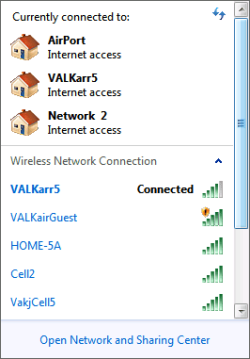
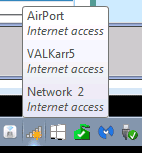
Now, some of my current issues are sorting out why I cannot print sometimes but can other times (my printer is on a bridge), but to remind you, I am starting out here just looking for a good visual investigative tool. I'll log the specific problems in another thread. But to demonstrate some of the complexity, if the dual network described above is not enough, I have a couple images to show you about things I need to investigate and get working properly. // Images attached

So, any suggestions for an awesome discovery tool that is visually oriented? Thanks in advance!


UPDATE: Tools I have researched so far...
- For completeness, mentioning that Microsoft's Network & Sharing Center can see SOME devices, not all and report one visually, but one subnet at a time, where it understands them.
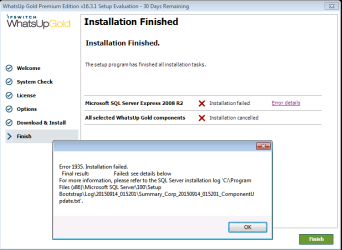
- Found WhatsUpGold from IPSWITCH but it seems to require a more powerful server as a minimum configuration (or so it reports), so ... no progress on this one.
- Tried AngryIPScanner, but again, you have to know the subnet in advance, but you can choose a range of subnets, though it is noisy about what is NOT there. Perhaps there's a way to reconfigure that so that only meaningful results are returned. Not sure.
- Tried Trogon MAC Scanner which nicely lists the MAC Addrs found on a subnet, and while you have to manually choose one subnet at a time to search, it makes nice suggestions about subnets. It was nice enough to provide device names which helped me find a router I was uncertain of the address of. Line item data, not graphical, but it;s only saying what is out on a subnet, not what you can connect to. W
- Trying to install and run SpiceWorks, but it has been nearly an hour long progress bar to my first application run. They are "picking, sorting, and chopping the peppers" but no results yet.
 

Attachments
  • Tray_icon.png
    Tray_icon.png
    2.8 KB · Views: 31
  • Networks.png
    Networks.png
    6.2 KB · Views: 23
Last edited:

My Computer My Computer

Computer type
Laptop
Computer Manufacturer/Model Number
Dell Insprion 7559 next to a Toshiba Portege
OS
Win 7 Pro 64-bit
CPU
Intel Core i5
Motherboard
Intel
Memory
16 GB Dell, 6 GB Toshiba
Graphics Card(s)
Intel crap on both but Dell also has nVidia GeForce GTX960M
Sound Card
RealTek
Monitor(s) Displays
internal and external ACER KA270H 27"
Screen Resolution
1920x1080
Hard Drives
SSD 256 GB plus numerous WD Red or Purple on USB3 docks. Used to buy a lot of Seagate but tossed them the second time I got unrecoverable disc corruption in the midst of use.
Keyboard
Garage Mouse SW and some cheap Amazon China made USB device
Mouse
Garage Mouse and some cheap Amazon China made USB device
Internet Speed
50 Mbps (allegedly, depends on server)
Antivirus
Defender, Malwarebytes Premium and Kaspersky
Browser
IE 11, and Chrome something
How is your network physically connected? Can you perhaps draw something and take a screenshot/scan and attach here? If you have 2 DHCP servers in the same network it will cause problems.

Include modems, routers, PC, switch and printers etc.
 

My Computer My Computer

Computer type
PC/Desktop
Computer Manufacturer/Model Number
Custom Build
OS
Windows 7 Ultimate x64 SP1
CPU
AMD Phenom 2 1090T
Motherboard
Gigabyte GA-890FXA-UD5
Memory
2x8GB Kingston HyperX Fury Black 1600Mhz Unganged
Graphics Card(s)
MSI GTX 970 Gaming 4G
Sound Card
Realtek On-Board HD 7.1 Audio / Logitech G35
Monitor(s) Displays
3xAcer GD245HQ
Screen Resolution
1920x1080
Hard Drives
Samsung 850 Pro 512GB SSD - OS /
WD Caviar Black SATA 3 - 1 TBx2 - Dynamic RAID 0 /
WD Caviar Green SATA 2 - 640GBx2 - Dynamic RAID 0 /
WD Caviar Green SATA 2 - 640GB - Internal Backup /
Seagate Barracude SATA 3 - 3TB - External Backup/ Sync
PSU
HighPower 1000W
Case
Cooler Master HAF 932
Cooling
Noctua NH-D14
Keyboard
Logitech G19
Mouse
Logitech G500
Internet Speed
100/4 Mbit Cable (100GB quota)
Antivirus
ZoneAlarm Extreme Security / MBAM Pro / MBAE Free / SAS Free
Browser
IE 11 - Firefox - Chrome
Other Info
Logitech F710/ G27/ G940/ Z5500 // TrackIR 5 // Nvidia 3D Surround Vision
That would be part of why I want a nice visual tool.
 

My Computer My Computer

Computer type
Laptop
Computer Manufacturer/Model Number
Dell Insprion 7559 next to a Toshiba Portege
OS
Win 7 Pro 64-bit
CPU
Intel Core i5
Motherboard
Intel
Memory
16 GB Dell, 6 GB Toshiba
Graphics Card(s)
Intel crap on both but Dell also has nVidia GeForce GTX960M
Sound Card
RealTek
Monitor(s) Displays
internal and external ACER KA270H 27"
Screen Resolution
1920x1080
Hard Drives
SSD 256 GB plus numerous WD Red or Purple on USB3 docks. Used to buy a lot of Seagate but tossed them the second time I got unrecoverable disc corruption in the midst of use.
Keyboard
Garage Mouse SW and some cheap Amazon China made USB device
Mouse
Garage Mouse and some cheap Amazon China made USB device
Internet Speed
50 Mbps (allegedly, depends on server)
Antivirus
Defender, Malwarebytes Premium and Kaspersky
Browser
IE 11, and Chrome something
Look here: 10 great free downloads for your network | Computerworld

The first one listed, Network Magic, sounds like it may be what you want.

Rats, looks like that one is no longer available.

Edit: Try Spiceworks. I'm installing it now to check it out. A bit complicated as it installs a Apache web server and sql database but it's free so may do the job. I'll know soon.

Nope, way to complicated and asks for too much information for me to use, sorry. I'm uninstalling it now.
 

My Computer My Computer

Computer type
PC/Desktop
Computer Manufacturer/Model Number
Lenovo IdeaCenter 450
OS
Windows 10 Pro X64
CPU
Intel Quad Core i7-4770 @ 3.4Ghz
Memory
16.0GB PC3-12800 DDR3 SDRAM 1600 MHz
Graphics Card(s)
Intel Integrated HD Graphics
Sound Card
Realtek HD Audio
Monitor(s) Displays
HP 22" LCD
Screen Resolution
1680 x 1050
Hard Drives
250GB Samsung EVO SATA-3 SSD
2TB Seagate ST2000DM001 SATA-2
1.5TB Seagate ST3150041AS SATA
Keyboard
Dell USB
Mouse
Lenovo USB
Internet Speed
Cable via Road Runner 3MB Upload, 30MB Download
Antivirus
Windows Defender, MBAM Pro, MBAE
Browser
Seamonkey
Other Info
UEFI/GPT
PLDS DVD-RW DH16AERSH
That would be part of why I want a nice visual tool.

I understand that :)

But it may be hard for any software to display information about another subnet, routers shouldn't be able to relay the necessary packets for discovery. On large networks services like DNS and WINS are used for identifying resources.

You should still be able to find your network on your own, perhaps with some help?

I will wait for Ztruker to to assess Spiceworks.
Oh well
 

My Computer My Computer

Computer type
PC/Desktop
Computer Manufacturer/Model Number
Custom Build
OS
Windows 7 Ultimate x64 SP1
CPU
AMD Phenom 2 1090T
Motherboard
Gigabyte GA-890FXA-UD5
Memory
2x8GB Kingston HyperX Fury Black 1600Mhz Unganged
Graphics Card(s)
MSI GTX 970 Gaming 4G
Sound Card
Realtek On-Board HD 7.1 Audio / Logitech G35
Monitor(s) Displays
3xAcer GD245HQ
Screen Resolution
1920x1080
Hard Drives
Samsung 850 Pro 512GB SSD - OS /
WD Caviar Black SATA 3 - 1 TBx2 - Dynamic RAID 0 /
WD Caviar Green SATA 2 - 640GBx2 - Dynamic RAID 0 /
WD Caviar Green SATA 2 - 640GB - Internal Backup /
Seagate Barracude SATA 3 - 3TB - External Backup/ Sync
PSU
HighPower 1000W
Case
Cooler Master HAF 932
Cooling
Noctua NH-D14
Keyboard
Logitech G19
Mouse
Logitech G500
Internet Speed
100/4 Mbit Cable (100GB quota)
Antivirus
ZoneAlarm Extreme Security / MBAM Pro / MBAE Free / SAS Free
Browser
IE 11 - Firefox - Chrome
Other Info
Logitech F710/ G27/ G940/ Z5500 // TrackIR 5 // Nvidia 3D Surround Vision
Installing Spiceworks, yes, it's a bit complicated and wants very personal information for the community. It seems to be a big market lead generation organization. Watch their intro video and all the tell tale signs are there.

The product did not work as installed. I got errors launching it that said the default configuration was wrong. Nice! Drive people to the community where your data is collected for lead generation. Nice touch, guys! Evil, but clever.

Anyway, twiddling the choices, I eventually found choices that would work and configured the firewall to let it through and have been waiting about 30 min for it to finish doing something or other with a progress bar.

I should know more soon.

Try Spiceworks....
Nope, way to complicated and asks for too much information for me to use, sorry. I'm uninstalling it now.

You were right. I should have listened.
 
Last edited:

My Computer My Computer

Computer type
Laptop
Computer Manufacturer/Model Number
Dell Insprion 7559 next to a Toshiba Portege
OS
Win 7 Pro 64-bit
CPU
Intel Core i5
Motherboard
Intel
Memory
16 GB Dell, 6 GB Toshiba
Graphics Card(s)
Intel crap on both but Dell also has nVidia GeForce GTX960M
Sound Card
RealTek
Monitor(s) Displays
internal and external ACER KA270H 27"
Screen Resolution
1920x1080
Hard Drives
SSD 256 GB plus numerous WD Red or Purple on USB3 docks. Used to buy a lot of Seagate but tossed them the second time I got unrecoverable disc corruption in the midst of use.
Keyboard
Garage Mouse SW and some cheap Amazon China made USB device
Mouse
Garage Mouse and some cheap Amazon China made USB device
Internet Speed
50 Mbps (allegedly, depends on server)
Antivirus
Defender, Malwarebytes Premium and Kaspersky
Browser
IE 11, and Chrome something
How is your network physically connected?

So, yeah, when I have things sorted out I will put together a diagram, or better yet, one of these tools will help. I started with a cable modem and router, an RT-N66U which I had for ages but I have been seeing errors recently - wasn't sure if it's ASUS related or COMCAST related. However, they still appear after Comcast changed out the modem and router, suggesting my dreaded ISP may be the issue.

Furthermore my location is a cell phone dead zone so I use an ASUS TM-AC9100 as a CellSpot to get calls. TM says put it in front of the router, but I'd rather keep it behind the router for security purposes.

Now, with Comcast having DOUBLED my internet costs in the last 8 months :cry:, I started looking at other ISPs and now have a second network. Originally I was thinking to use the RT-N66U which allows running off both networks. This would be great because while Comcast speeds are good, the infrastructure fails in bad weather (as soon as it rains.) So now I am just looking to transition off.
With all the recent changes, I wanted to make sure I was catching everything so that I could get the network configurations similar before I attempt to discuss the outrageous price hikes with Comcast. Been there before. I hear they make it nearly impossible to disconnect service, but I dream of unplugging everything and getting out my wire cutters. :devil: I may start sleeping with them under my pillow.
 
Last edited:

My Computer My Computer

Computer type
Laptop
Computer Manufacturer/Model Number
Dell Insprion 7559 next to a Toshiba Portege
OS
Win 7 Pro 64-bit
CPU
Intel Core i5
Motherboard
Intel
Memory
16 GB Dell, 6 GB Toshiba
Graphics Card(s)
Intel crap on both but Dell also has nVidia GeForce GTX960M
Sound Card
RealTek
Monitor(s) Displays
internal and external ACER KA270H 27"
Screen Resolution
1920x1080
Hard Drives
SSD 256 GB plus numerous WD Red or Purple on USB3 docks. Used to buy a lot of Seagate but tossed them the second time I got unrecoverable disc corruption in the midst of use.
Keyboard
Garage Mouse SW and some cheap Amazon China made USB device
Mouse
Garage Mouse and some cheap Amazon China made USB device
Internet Speed
50 Mbps (allegedly, depends on server)
Antivirus
Defender, Malwarebytes Premium and Kaspersky
Browser
IE 11, and Chrome something
... it may be hard for any software to display information about another subnet, ...
You should still be able to find your network on your own, perhaps with some help?

As it turns out, so far I am most impressed with the Trogon MAC Scanner. It found various subnets and lists them in a pull-down list as a menu for things you might want to scan.

Perhaps it was just that when it reported what obscure subnet it found the CellSpot router on, I was surprised at what it was configured as. I browsed over to the device; logged in; changed the subnet to something more reasonable. Not sure if endorphins or oxytocin was firing up but I was happy with the result.
 

My Computer My Computer

Computer type
Laptop
Computer Manufacturer/Model Number
Dell Insprion 7559 next to a Toshiba Portege
OS
Win 7 Pro 64-bit
CPU
Intel Core i5
Motherboard
Intel
Memory
16 GB Dell, 6 GB Toshiba
Graphics Card(s)
Intel crap on both but Dell also has nVidia GeForce GTX960M
Sound Card
RealTek
Monitor(s) Displays
internal and external ACER KA270H 27"
Screen Resolution
1920x1080
Hard Drives
SSD 256 GB plus numerous WD Red or Purple on USB3 docks. Used to buy a lot of Seagate but tossed them the second time I got unrecoverable disc corruption in the midst of use.
Keyboard
Garage Mouse SW and some cheap Amazon China made USB device
Mouse
Garage Mouse and some cheap Amazon China made USB device
Internet Speed
50 Mbps (allegedly, depends on server)
Antivirus
Defender, Malwarebytes Premium and Kaspersky
Browser
IE 11, and Chrome something
Tried WhatsUpGold but didn't make it through the install.

I may look again later at this.
 

Attachments

  • WhatsUpGold.png
    WhatsUpGold.png
    14 KB · Views: 0

My Computer My Computer

Computer type
Laptop
Computer Manufacturer/Model Number
Dell Insprion 7559 next to a Toshiba Portege
OS
Win 7 Pro 64-bit
CPU
Intel Core i5
Motherboard
Intel
Memory
16 GB Dell, 6 GB Toshiba
Graphics Card(s)
Intel crap on both but Dell also has nVidia GeForce GTX960M
Sound Card
RealTek
Monitor(s) Displays
internal and external ACER KA270H 27"
Screen Resolution
1920x1080
Hard Drives
SSD 256 GB plus numerous WD Red or Purple on USB3 docks. Used to buy a lot of Seagate but tossed them the second time I got unrecoverable disc corruption in the midst of use.
Keyboard
Garage Mouse SW and some cheap Amazon China made USB device
Mouse
Garage Mouse and some cheap Amazon China made USB device
Internet Speed
50 Mbps (allegedly, depends on server)
Antivirus
Defender, Malwarebytes Premium and Kaspersky
Browser
IE 11, and Chrome something
Back
Top