Hi everyone!
It's me again, your least common denominator guy in networking. If you can explain it to me, you can explain it to anyone. I LOVE SevenForums because this is such an awesome community with supporting stars who have written many great tutorials.
I come to you today asking for a recommendation for a visual tool to use on my home network (or is it networks?) to discover devices and find connectivity paths. I'm a windows 7 pro user (that's 7 pro, not that i'm not a pro user, but hey.) So, I have used the usual Network and Sharing Center, but find it only shows me a bit at a time. This is a problem.
A problem? Well yes, I have a few oddities going on and want to sort things out. First some general connection info: I have two ISPs as I am currently in transition from one to the other and satisfied with neither just yet. I have both ethernet and wi-fi. Eventually, I hope to have a dual connection off my router to assure connectivity, uptime, bandwidth (or should I say capacity?) etc.
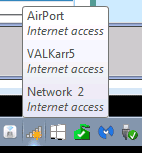
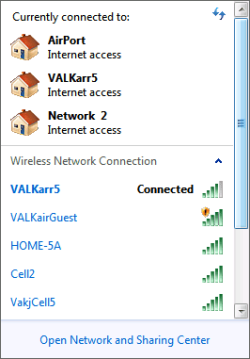
Now, some of my current issues are sorting out why I cannot print sometimes but can other times (my printer is on a bridge), but to remind you, I am starting out here just looking for a good visual investigative tool. I'll log the specific problems in another thread. But to demonstrate some of the complexity, if the dual network described above is not enough, I have a couple images to show you about things I need to investigate and get working properly. // Images attached
So, any suggestions for an awesome discovery tool that is visually oriented? Thanks in advance!
UPDATE: Tools I have researched so far...
- For completeness, mentioning that Microsoft's Network & Sharing Center can see SOME devices, not all and report one visually, but one subnet at a time, where it understands them.
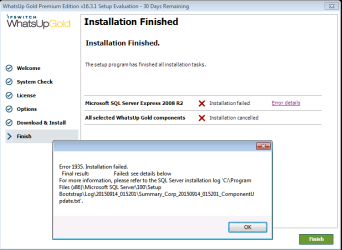
- Found WhatsUpGold from IPSWITCH but it seems to require a more powerful server as a minimum configuration (or so it reports), so ... no progress on this one.
- Tried AngryIPScanner, but again, you have to know the subnet in advance, but you can choose a range of subnets, though it is noisy about what is NOT there. Perhaps there's a way to reconfigure that so that only meaningful results are returned. Not sure.
- Tried Trogon MAC Scanner which nicely lists the MAC Addrs found on a subnet, and while you have to manually choose one subnet at a time to search, it makes nice suggestions about subnets. It was nice enough to provide device names which helped me find a router I was uncertain of the address of. Line item data, not graphical, but it;s only saying what is out on a subnet, not what you can connect to. W
- Trying to install and run SpiceWorks, but it has been nearly an hour long progress bar to my first application run. They are "picking, sorting, and chopping the peppers" but no results yet.
It's me again, your least common denominator guy in networking. If you can explain it to me, you can explain it to anyone. I LOVE SevenForums because this is such an awesome community with supporting stars who have written many great tutorials.
I come to you today asking for a recommendation for a visual tool to use on my home network (or is it networks?) to discover devices and find connectivity paths. I'm a windows 7 pro user (that's 7 pro, not that i'm not a pro user, but hey.) So, I have used the usual Network and Sharing Center, but find it only shows me a bit at a time. This is a problem.
A problem? Well yes, I have a few oddities going on and want to sort things out. First some general connection info: I have two ISPs as I am currently in transition from one to the other and satisfied with neither just yet. I have both ethernet and wi-fi. Eventually, I hope to have a dual connection off my router to assure connectivity, uptime, bandwidth (or should I say capacity?) etc.
Now, some of my current issues are sorting out why I cannot print sometimes but can other times (my printer is on a bridge), but to remind you, I am starting out here just looking for a good visual investigative tool. I'll log the specific problems in another thread. But to demonstrate some of the complexity, if the dual network described above is not enough, I have a couple images to show you about things I need to investigate and get working properly. // Images attached
So, any suggestions for an awesome discovery tool that is visually oriented? Thanks in advance!
UPDATE: Tools I have researched so far...
- For completeness, mentioning that Microsoft's Network & Sharing Center can see SOME devices, not all and report one visually, but one subnet at a time, where it understands them.
- Found WhatsUpGold from IPSWITCH but it seems to require a more powerful server as a minimum configuration (or so it reports), so ... no progress on this one.
- Tried AngryIPScanner, but again, you have to know the subnet in advance, but you can choose a range of subnets, though it is noisy about what is NOT there. Perhaps there's a way to reconfigure that so that only meaningful results are returned. Not sure.
- Tried Trogon MAC Scanner which nicely lists the MAC Addrs found on a subnet, and while you have to manually choose one subnet at a time to search, it makes nice suggestions about subnets. It was nice enough to provide device names which helped me find a router I was uncertain of the address of. Line item data, not graphical, but it;s only saying what is out on a subnet, not what you can connect to. W
- Trying to install and run SpiceWorks, but it has been nearly an hour long progress bar to my first application run. They are "picking, sorting, and chopping the peppers" but no results yet.
Attachments
Last edited:
My Computer
- Computer type
- Laptop
- Computer Manufacturer/Model Number
- Dell Insprion 7559 next to a Toshiba Portege
- OS
- Win 7 Pro 64-bit
- CPU
- Intel Core i5
- Motherboard
- Intel
- Memory
- 16 GB Dell, 6 GB Toshiba
- Graphics Card(s)
- Intel crap on both but Dell also has nVidia GeForce GTX960M
- Sound Card
- RealTek
- Monitor(s) Displays
- internal and external ACER KA270H 27"
- Screen Resolution
- 1920x1080
- Hard Drives
- SSD 256 GB plus numerous WD Red or Purple on USB3 docks. Used to buy a lot of Seagate but tossed them the second time I got unrecoverable disc corruption in the midst of use.
- Keyboard
- Garage Mouse SW and some cheap Amazon China made USB device
- Mouse
- Garage Mouse and some cheap Amazon China made USB device
- Internet Speed
- 50 Mbps (allegedly, depends on server)
- Antivirus
- Defender, Malwarebytes Premium and Kaspersky
- Browser
- IE 11, and Chrome something


 , I started looking at other ISPs and now have a second network. Originally I was thinking to use the RT-N66U which allows running off both networks. This would be great because while Comcast speeds are good, the infrastructure fails in bad weather (as soon as it rains.) So now I am just looking to transition off.