I should 'master imaging'? In my windows experience fixes often create new problems, so, even aside from the hassle factor, opening that can of worms does not seem promising enough.
I've just started experimenting with W7's Control Panel > Backup and Repair backup. But it's [as usual] badly documented: it creates a backup, yes, but if W7 crashes, and one reinstalls it, will it open? And is it more reliable than "System Restore"? If i sound paranoid that's cuz i am- dear Mr. Gates beat that into me long ago.
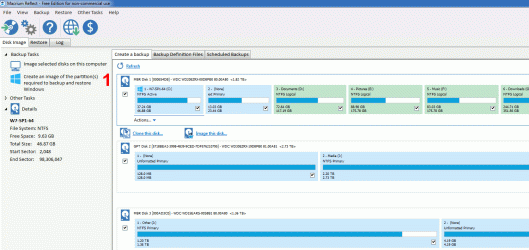
It seems like most of the members here prefer to use a 3rd Party program, like Acronis or Macrium, rather than the built-in W7 backup tool.
If you like to spend an entire day (or more) reinstalling Windows, Windows updates, drivers, all of your software and recreating your customised settings, that is your choice.
It's your system and you can manage/use it anyway you like.

If my HDD/SSD fails, within 15 minutes of installing a new HDD/SSD, my system is up and running like nothing had ever happened.
I'm proceeding timidly- if i can just reliably back up a few critical text files and Firefox [its damned add-ons don't d/l separately so FF reinstall means tedious separate add-on reinstalls], i'll be very happy. Then i'll look into backing up whole OS images, with Macrium or Deep Freeze.
An image is simply a file that can be used to rebuild your HDD's exact (or an "intelligent") storage contents/layout.
An exact (forensic) image duplicates the layout including the empty sections.
An "intelligent" image only duplicates sections that contain data that is being used.
When you restore an image, it recreates the HDD storage contents/layout, so that it matches the "description" in the image file.
You can also browse the image file as if it were just another HDD/partition and copy files out of it (Macrium allows this so I assume software like Acronis can also do this).
The whole point of creating an image is so that you can restore your PC's setup (Windows, Windows updates, drivers, all of your software and your customised settings) in a few minutes.
As for Firefox, you can copy your Firefox Profile to a safe location and then simply copy it back once you have reinstalled Firefox (and backed up the default FF Profile).
Of course if Mozilla has decided to make some new "bonehead" changes, some of the add-ons might not work in a newer version of FF.
As for the reliability issue, businesses with multiple PCs usually use images to "install" Windows as opposed to using a Windows install DVD.
Larger businesses store a "corporate default" image on their servers and when new machines are connected the image is pushed out to them and "installed".
Actually there are other apps [than Office, and games] that don't exist in Linux. I use CursorFx, Irfanview!!, CinemaDrape, Lava Lamp, WindowFX, Atmosphere Lite & Aire Freshener, Noiseware, Vitrite, WinRoll, Cool Reader [i hear runs poorly in Ubuntu], and Crypt Edit Lite! [an oddity of Linux is that the dozen or two indie word processors available in Windows aren't present in Linux, which has only the few standard office suite ones (like Libre).
Obviously, if the programs you like don't exist in Linux, then you have to use Windows (or a Windows VM).
The only program (in your list) that I use is IrfanView.
It's one of the first programs I install in a new Windows installation.
I don't need it in LM as the default utilities are good enough (and better than the Windows ones).
For example, you can hover the mouse pointer over a music file icon (in Icon view) and the file will play without having to start a media player.
Linux has the rep for wow customizability/eye candy but actually Windows has at least as much, that's usually easier to use to boot.
It is not as easy to customise Linux as some people claim (unless you know how to code).
I would argue that W7 is a lot easier to customise than Linux.
The W8 series and W10 (especially) are much harder to customise than W7 or Linux.
"If one eliminates Start and taskbar how can one start apps?!" Who said anything about wanting to eliminate Start? My beef is only with non-removeable/non-hideable desktop elements: Start appears only when Win key pressed, so it's not a problem.
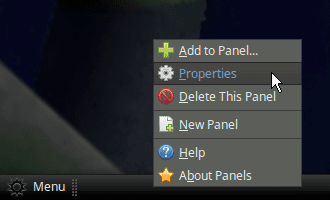
You asked how to remove the Panel.
Your reply indicates that I don't know what you are trying to say.
Out of the box, Linux Mint MATE is basically identical to W7 (one Panel/Taskbar with a Start menu button at one end and a clock and some icons at the other end).
You can turn off the default desktop icons just like in W7.
I assume you can get docks for Linux, but I don't like them (Mac dock, Ubuntu Unity, etc.) so I've never looked for any.
If you can find a dock you like, you could just eliminate the Panel/Taskbar.
You're kinder towards Microsoft than I- yes, it's amazing that "given the complexity of the hardware and software, it's as stable as it is." But Amiga and BeOS did far better than Windows, with far less money. So sorry, i'll keep my voodoo doll of Bill Gates.
On EightForums and TenForums I've been accused of being a "MS Hater".
IMO, MS has made many "boneheaded" decisions and engaged in dubious behaviour.
Those issues aside (IMO) Windows is still the easiest system to use (I use it for ~95% of my PC activities).
About Sandboxie. It's like VMware only for individual files, and it's only one of a half dozen [check alternativeto.net for competitors like Cameyo].
I know what Sandboxie is supposed to do, but I've never tried it.



 If it's not plug n' play, fire and forget, i'm gone. Computers attract guys with high pain thresholds- it's the modern equivalent of rebuilding car engines- if you don't love it, you hate it. "System Restore" is unreliable but is far simpler than Macrium and most apps in its field. I'm looking at Deep Freeze... seems superior [=simpler].