
Solved Wifi: How to cover this building?

ish4d0w

New member
Member
VIP
Local time
9:37 AM
Messages
179
Hi

We're thinking about upgrading the wifi network in our school, because frankly, it is useless now.
It only covers half the building and it is very slow and cannot handle this many devices.

To be honest, that's not a surprise since there are using basic 10 year old SOHO routers that can barely handle 100mbit wired, let alone 50 devices connected...

What should they buy? There are two things required:
It needs to be able to handle a LOT of Wifi devices at a time.
This is not home level. Let say like 100 to 200, at least. But that's the number of the wifi devices only.
If you add wired computers (there are about 80 of them), it seems we need something (not just samething, but a whole new network actually) that can handle routing over 300 devices at the same time (insane!).


(It doesn't have to be a single device, we could split it up if it would take up the load, but that's how it is now, having SIX routers creating a nightmare of interference and routing problems... But maybe two would be fine.)


It needs to be powerful
We need to cover the whole school (the building is small actually, but with a lot of walls of course. But we have a large atrium garden at the middle of the school so maybe we could make use of it. Maybe we could get an outdoor AP for example, I guess)


So... could you give me a hint what should we buy? And most importantly, where should we place them?
Here's the diagram.
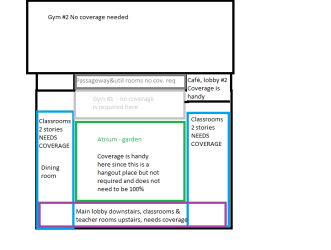
school wifi building plan.png
Basically we need coverage at the colored areas.

I could also give you google maps coordinates if that helps. Or just the sizes, let me know.
 

My Computer My Computer

At a glance

Microsoft® Windows 7 Professional 64-bitIntel(R) Pentium(R) Dual CPU T2310 @ 1.46GHz4,00 GB(1) Mobile Intel(R) 965 Express Chipset Famil...
Computer type
Laptop
Computer Manufacturer/Model Number
HP Compaq 6720s
OS
Microsoft® Windows 7 Professional 64-bit
CPU
Intel(R) Pentium(R) Dual CPU T2310 @ 1.46GHz
Motherboard
Hewlett-Packard 30D8
Memory
4,00 GB
Graphics Card(s)
(1) Mobile Intel(R) 965 Express Chipset Family (2) Mobile
Sound Card
(1) Bluetooth Hands-free Audio (2) Bluetooth Stereo Audio
Screen Resolution
1280 x 800 x 32 bits (4294967296 colors) @ 59 Hz
Hard Drives
(1) Hitachi HTS542516K9SA00 ATA Device (2) Multi Flash Reader USB Device
Guess it mainly comes down to budget, more cash better system
We use a lot of Ubiquiti Unifi APs that seem to work well, multiple units will mesh together to form a zero handoff network and they are very cheap >£100 per unit and we work in a couple schools that have these systems installed a serve many hundreds of students and staff, but if you have a large budget then there are much better enterprise class products like Ruckus for example but these retail for several hundred pounds per unit.

So really depends on how many units you need and how much money you have

If structure between floors is concrete then you will probably need separate APs for each floor, the question is how many you need for each floor and I don't think any one can answer that over the internet but again if walls between rooms are stone/concrete then multiple units is the answer.

When building a system you can always start with a few and add to them in time if satisfactory coverage is not achieved initially
What country are you in ?
 

My Computer My Computer

At a glance

Win7 Ultimate X64Intel i5 3570K8GB DDR3 1600Onboard
Computer type
PC/Desktop
Computer Manufacturer/Model Number
Pauly Special
OS
Win7 Ultimate X64
CPU
Intel i5 3570K
Motherboard
Gigabyte Z77X-DS3H
Memory
8GB DDR3 1600
Graphics Card(s)
Onboard
Sound Card
Onboard
Screen Resolution
1280x1024
Hard Drives
Samsung 840 Evo SSD (OS)
1TB Spinner (Data)
PSU
800W Arctic
Case
Cooler Master
Cooling
3x120mm Fans
Keyboard
MS Wireless
Mouse
MS Wireless
Internet Speed
20M
I would say you need (I don't have experience with that large of a wireless network):
- X number of Wireless APs scattered around, same SSID and pass-phrase so clients will auto-connect to the best signal (some devices may need 3rd party software/apps) - possibly what Pauly told
- APs and wired PCs should connect to a nearby perimeter Gigabit switch with Cat6 cables (not sure if you would have the budget for re-cabling)
- These perimeter Gigabit switches connect to the main switch cabinet/rack with fiber optic (or perhaps Cat6 - depending on distance) cables.
- Single DHCP server hands off IPs (a 23 bit subnet should be enough but for simplicity 16 bit - 255.255.0.0)
- Only router needed is between LAN and ISP

Wonder if this would cause any managerial issues as all devices would be in one subnet :D
 

My Computer My Computer

At a glance

Windows 7 Ultimate x64 SP1AMD Phenom 2 1090T2x8GB Kingston HyperX Fury Black 1600Mhz Unga...MSI GTX 970 Gaming 4G
Computer type
PC/Desktop
Computer Manufacturer/Model Number
Custom Build
OS
Windows 7 Ultimate x64 SP1
CPU
AMD Phenom 2 1090T
Motherboard
Gigabyte GA-890FXA-UD5
Memory
2x8GB Kingston HyperX Fury Black 1600Mhz Unganged
Graphics Card(s)
MSI GTX 970 Gaming 4G
Sound Card
Realtek On-Board HD 7.1 Audio / Logitech G35
Monitor(s) Displays
3xAcer GD245HQ
Screen Resolution
1920x1080
Hard Drives
Samsung 850 Pro 512GB SSD - OS /
WD Caviar Black SATA 3 - 1 TBx2 - Dynamic RAID 0 /
WD Caviar Green SATA 2 - 640GBx2 - Dynamic RAID 0 /
WD Caviar Green SATA 2 - 640GB - Internal Backup /
Seagate Barracude SATA 3 - 3TB - External Backup/ Sync
PSU
HighPower 1000W
Case
Cooler Master HAF 932
Cooling
Noctua NH-D14
Keyboard
Logitech G19
Mouse
Logitech G500
Internet Speed
100/4 Mbit Cable (100GB quota)
Antivirus
ZoneAlarm Extreme Security / MBAM Pro / MBAE Free / SAS Free
Browser
IE 11 - Firefox - Chrome
Other Info
Logitech F710/ G27/ G940/ Z5500 // TrackIR 5 // Nvidia 3D Surround Vision
You also need to decide if you want isolation between the computers that are connected via Wi-Fi. Most commercial grade Wireless Access Points (WAP) offer that feature.

Should there be one network for students and another network for staff? Many commercial grade WAPs can handle multiple SSIDs at the same time.

Setting replication comes in handy too.
e.g. if you change the SSID and password on one WAP you can tell that WAP to replicate the changes to all other WAPs on the network.


If most of your traffic on this Wi-Fi network is Internet traffic, then the slowness might be the ISP service level.
 

My Computer My Computer

At a glance

W7 Pro SP1 64biti78GBIntel HD Graphics
Computer type
Laptop
Computer Manufacturer/Model Number
Employer provided Dell Latitude
OS
W7 Pro SP1 64bit
CPU
i7
Memory
8GB
Graphics Card(s)
Intel HD Graphics
Hard Drives
crappy SSD
Antivirus
Employer mandated Symantec Endpoint Protection
Browser
Pale Moon 64bit, IE11 64bit & Chrome 64bit
Guess it mainly comes down to budget, more cash better system
We use a lot of Ubiquiti Unifi APs that seem to work well, multiple units will mesh together to form a zero handoff network and they are very cheap >£100 per unit and we work in a couple schools that have these systems installed a serve many hundreds of students and staff, but if you have a large budget then there are much better enterprise class products like Ruckus for example but these retail for several hundred pounds per unit.

So really depends on how many units you need and how much money you have

If structure between floors is concrete then you will probably need separate APs for each floor, the question is how many you need for each floor and I don't think any one can answer that over the internet but again if walls between rooms are stone/concrete then multiple units is the answer.

When building a system you can always start with a few and add to them in time if satisfactory coverage is not achieved initially
What country are you in ?

Thank you very much. That Ubiquity AP seems good! I'll check it out.
It is concrete, but since the building is not huge (about twice the size of a typical tower of flats) I hope we can achieve it with a few APs per floor.
I'm in Hungary, Europe.

I would say you need (I don't have experience with that large of a wireless network):
- X number of Wireless APs scattered around, same SSID and pass-phrase so clients will auto-connect to the best signal (some devices may need 3rd party software/apps) - possibly what Pauly told

- APs and wired PCs should connect to a nearby perimeter Gigabit switch with Cat6 cables (not sure if you would have the budget for re-cabling)

- These perimeter Gigabit switches connect to the main switch cabinet/rack with fiber optic (or perhaps Cat6 - depending on distance) cables.
- Single DHCP server hands off IPs (a 23 bit subnet should be enough but for simplicity 16 bit - 255.255.0.0)
- Only router needed is between LAN and ISP

Wonder if this would cause any managerial issues as all devices would be in one subnet :D


Thanks a lot! :D
I'll ask them if we have the budget to re-cable. But I guess it's not a matter of choice (they have 15 year old cables, possibly CAT5 (NOT CAT5E, not even gigabit capable!). So it's a must I guess.


You also need to decide if you want isolation between the computers that are connected via Wi-Fi. Most commercial grade Wireless Access Points (WAP) offer that feature.

Should there be one network for students and another network for staff? Many commercial grade WAPs can handle multiple SSIDs at the same time.

Setting replication comes in handy too.
e.g. if you change the SSID and password on one WAP you can tell that WAP to replicate the changes to all other WAPs on the network.


If most of your traffic on this Wi-Fi network is Internet traffic, then the slowness might be the ISP service level.

Thanks! Isolation is an interesting feature, but currently we don't need it. But should the need arise, we'll actually target to buy devices that support multiple SSIDs. It might be handy later.


The last paragraph is really worrying. I would say 99% of Wifi traffic is internet traffic. ISP service is a dual line (two modems) connection, 60mbits each. That would do for a home connection but not for a school.


Faster speeds are now available (120mbps, 240, even 500), and actually the government has an ongoing project to bring very high speed (leader level, even on European scales -- seems cool, and quite an achievement to compared what we have today... But we'll make it happen)


So again, thanks everyone, I'll talk to the staff, see what we can do. Your answers were really helpful to me, I learned a lot! Have a nice week ahead! :)
 

My Computer My Computer

At a glance

Microsoft® Windows 7 Professional 64-bitIntel(R) Pentium(R) Dual CPU T2310 @ 1.46GHz4,00 GB(1) Mobile Intel(R) 965 Express Chipset Famil...
Computer type
Laptop
Computer Manufacturer/Model Number
HP Compaq 6720s
OS
Microsoft® Windows 7 Professional 64-bit
CPU
Intel(R) Pentium(R) Dual CPU T2310 @ 1.46GHz
Motherboard
Hewlett-Packard 30D8
Memory
4,00 GB
Graphics Card(s)
(1) Mobile Intel(R) 965 Express Chipset Family (2) Mobile
Sound Card
(1) Bluetooth Hands-free Audio (2) Bluetooth Stereo Audio
Screen Resolution
1280 x 800 x 32 bits (4294967296 colors) @ 59 Hz
Hard Drives
(1) Hitachi HTS542516K9SA00 ATA Device (2) Multi Flash Reader USB Device
Wireless Isolation - how to understand it, and implement it!
Isolation is meant to keep each computer from seeing things on other computers. This might not be desired in some cases, but it is intended to protect some users from their own carelessness. When person connects to a network for the first time, Windows should ask them what type of network it is. Let's say that the user selected Home as the network type. Sadly, there is an option to tell Windows to treat all future networks as Home. When they connect at school, that computer is sharing more stuff than it should in a school setting.
 

My Computer My Computer

At a glance

W7 Pro SP1 64biti78GBIntel HD Graphics
Computer type
Laptop
Computer Manufacturer/Model Number
Employer provided Dell Latitude
OS
W7 Pro SP1 64bit
CPU
i7
Memory
8GB
Graphics Card(s)
Intel HD Graphics
Hard Drives
crappy SSD
Antivirus
Employer mandated Symantec Endpoint Protection
Browser
Pale Moon 64bit, IE11 64bit & Chrome 64bit
Back
Top