
re: laptop is giving problems after it heats up

reble

New member
Member
VIP
Local time
7:10 AM
Messages
326
Location
Kennewick, Wa
re: laptop is giving problems after it heats up

I have a HP Presario C700 laptop. Os Win7 home 32bit. When I 1st turn the laptop on cold everything is fine. After a while the front left side of the laptop gets warm. It isn't hot enough to burn my hand. I can rest my hand there for a long time but it does get a bit uncomfortable after a while when I am playing a game.
After a while when the laptop is warmed up. Prog's that need a a lot of cpu usage and memory start slowing down and stop working. Then the prog needs to be closed and reopened. Often FireFox will stop working right in the middle of doing something. Thank the makers of FireFox for putting in a sub routine in that lets FireFox go right back to were ever I was (even if I am in the middle typing a post and I don't lose what I already typed) after restarting the prog. Also I understand that some laptops just do that, getting warm in one spot, because of the design and layout. Is it something I just have live with until I can get a better laptop? or is it something that needs fixing and can be fixed.

OOO a ps. Sometimes, not very often, like with the current proj I am working on with a pare of SDR (Software Defined Radio) RTL USB radio dongles. I am often running 4 or 5 different prog's at the same time to decode the digital signals picked up by the receivers. Windows sometimes, not often, will get so over worked that it locks up the laptop and the only thing left to do is reboot the laptop.


Steve
 

My Computer My Computer

At a glance

windows 7 home 32 bit, I just changed back fr...amc a6-6310, radon r4 graphics 1800mhz with 4...6.8gbnot sure off hand
Computer type
Laptop
Computer Manufacturer/Model Number
Dell Inspiron 3541
OS
windows 7 home 32 bit, I just changed back from 64 to 32bit
CPU
amc a6-6310, radon r4 graphics 1800mhz with 4 cores
Memory
6.8gb
Graphics Card(s)
not sure off hand
Sound Card
not shure off hand
Monitor(s) Displays
built in lcd
Screen Resolution
1366 x 768
Hard Drives
1 500gb sata internal HDD and 1 250 gb's sata HDD in a USB external USB case.
Keyboard
Wifi with attached wifi mouse
Internet Speed
don't know
Antivirus
Zone Alarm
Browser
Firefox
Other Info
The gateway laptop model MD2614U died because a voltage regulator on the motherboard went poof. The Gateway laptop has been scraped.
You can try using a laptop cooler.

And to make sure of thermal throttling:
- Change to High Performance power plan - so CPU stay at max frequency
- Download and run HWInfo in sensor-only mode.
- Make sure minimum column for CPU frequency is 100% (multiplier at max), reset the readings (lower right) and keep it running in the background
- Do your thing until it gets slow, then check the frequency (multiplier) minimum to see if CPU has throttled.

Also try to vacuum the fan openings as compressed air may cause more issues with laptops since blown away dust don't have anywhere to escape.
 

My Computer My Computer

At a glance

Windows 7 Ultimate x64 SP1AMD Phenom 2 1090T2x8GB Kingston HyperX Fury Black 1600Mhz Unga...MSI GTX 970 Gaming 4G
Computer type
PC/Desktop
Computer Manufacturer/Model Number
Custom Build
OS
Windows 7 Ultimate x64 SP1
CPU
AMD Phenom 2 1090T
Motherboard
Gigabyte GA-890FXA-UD5
Memory
2x8GB Kingston HyperX Fury Black 1600Mhz Unganged
Graphics Card(s)
MSI GTX 970 Gaming 4G
Sound Card
Realtek On-Board HD 7.1 Audio / Logitech G35
Monitor(s) Displays
3xAcer GD245HQ
Screen Resolution
1920x1080
Hard Drives
Samsung 850 Pro 512GB SSD - OS /
WD Caviar Black SATA 3 - 1 TBx2 - Dynamic RAID 0 /
WD Caviar Green SATA 2 - 640GBx2 - Dynamic RAID 0 /
WD Caviar Green SATA 2 - 640GB - Internal Backup /
Seagate Barracude SATA 3 - 3TB - External Backup/ Sync
PSU
HighPower 1000W
Case
Cooler Master HAF 932
Cooling
Noctua NH-D14
Keyboard
Logitech G19
Mouse
Logitech G500
Internet Speed
100/4 Mbit Cable (100GB quota)
Antivirus
ZoneAlarm Extreme Security / MBAM Pro / MBAE Free / SAS Free
Browser
IE 11 - Firefox - Chrome
Other Info
Logitech F710/ G27/ G940/ Z5500 // TrackIR 5 // Nvidia 3D Surround Vision
re: laptop is giving problems after it heats up

Gokay I added a ps. Did you see it?

You can try using a laptop cooler.

And to make sure of thermal throttling:
- Change to High Performance power plan - so CPU stay at max frequency
- Download and run HWInfo in sensor-only mode.
- Make sure minimum column for CPU frequency is 100% (multiplier at max), reset the readings (lower right) and keep it running in the background
- Do your thing until it gets slow, then check the frequency (multiplier) minimum to see if CPU has throttled.

Also try to vacuum the fan openings as compressed air may cause more issues with laptops since blown away dust don't have anywhere to escape.
 

My Computer My Computer

At a glance

windows 7 home 32 bit, I just changed back fr...amc a6-6310, radon r4 graphics 1800mhz with 4...6.8gbnot sure off hand
Computer type
Laptop
Computer Manufacturer/Model Number
Dell Inspiron 3541
OS
windows 7 home 32 bit, I just changed back from 64 to 32bit
CPU
amc a6-6310, radon r4 graphics 1800mhz with 4 cores
Memory
6.8gb
Graphics Card(s)
not sure off hand
Sound Card
not shure off hand
Monitor(s) Displays
built in lcd
Screen Resolution
1366 x 768
Hard Drives
1 500gb sata internal HDD and 1 250 gb's sata HDD in a USB external USB case.
Keyboard
Wifi with attached wifi mouse
Internet Speed
don't know
Antivirus
Zone Alarm
Browser
Firefox
Other Info
The gateway laptop model MD2614U died because a voltage regulator on the motherboard went poof. The Gateway laptop has been scraped.
Good thing you re-posted, I didn't see the Note.

You can try the same approach to determine if it is a case of thermal throttling. Sometimes it is possible to stop throttling by decreasing max processor state to less than 100%. Say, your 3 GHz CPU will work at 2.7 GHz but at least it won't slow down all together.

By the way Prime95 is also another good method to induce some heat to the CPU for testing purposes.
 

My Computer My Computer

At a glance

Windows 7 Ultimate x64 SP1AMD Phenom 2 1090T2x8GB Kingston HyperX Fury Black 1600Mhz Unga...MSI GTX 970 Gaming 4G
Computer type
PC/Desktop
Computer Manufacturer/Model Number
Custom Build
OS
Windows 7 Ultimate x64 SP1
CPU
AMD Phenom 2 1090T
Motherboard
Gigabyte GA-890FXA-UD5
Memory
2x8GB Kingston HyperX Fury Black 1600Mhz Unganged
Graphics Card(s)
MSI GTX 970 Gaming 4G
Sound Card
Realtek On-Board HD 7.1 Audio / Logitech G35
Monitor(s) Displays
3xAcer GD245HQ
Screen Resolution
1920x1080
Hard Drives
Samsung 850 Pro 512GB SSD - OS /
WD Caviar Black SATA 3 - 1 TBx2 - Dynamic RAID 0 /
WD Caviar Green SATA 2 - 640GBx2 - Dynamic RAID 0 /
WD Caviar Green SATA 2 - 640GB - Internal Backup /
Seagate Barracude SATA 3 - 3TB - External Backup/ Sync
PSU
HighPower 1000W
Case
Cooler Master HAF 932
Cooling
Noctua NH-D14
Keyboard
Logitech G19
Mouse
Logitech G500
Internet Speed
100/4 Mbit Cable (100GB quota)
Antivirus
ZoneAlarm Extreme Security / MBAM Pro / MBAE Free / SAS Free
Browser
IE 11 - Firefox - Chrome
Other Info
Logitech F710/ G27/ G940/ Z5500 // TrackIR 5 // Nvidia 3D Surround Vision
re: laptop is giving problems after it heats up

I think I understand what thermal throttling is after typing in "what is thermal throttling" into Google search and reading a few posts in other forums about it. Also what is Prime95? I am also not sure what you mean by "Change to High Performance power plan - so CPU stay at max frequency" and "Make sure minimum column for CPU frequency is 100% (multiplier at max)".

Good thing you re-posted, I didn't see the Note.

You can try the same approach to determine if it is a case of thermal throttling. Sometimes it is possible to stop throttling by decreasing max processor state to less than 100%. Say, your 3 GHz CPU will work at 2.7 GHz but at least it won't slow down all together.

By the way Prime95 is also another good method to induce some heat to the CPU for testing purposes.
 

My Computer My Computer

At a glance

windows 7 home 32 bit, I just changed back fr...amc a6-6310, radon r4 graphics 1800mhz with 4...6.8gbnot sure off hand
Computer type
Laptop
Computer Manufacturer/Model Number
Dell Inspiron 3541
OS
windows 7 home 32 bit, I just changed back from 64 to 32bit
CPU
amc a6-6310, radon r4 graphics 1800mhz with 4 cores
Memory
6.8gb
Graphics Card(s)
not sure off hand
Sound Card
not shure off hand
Monitor(s) Displays
built in lcd
Screen Resolution
1366 x 768
Hard Drives
1 500gb sata internal HDD and 1 250 gb's sata HDD in a USB external USB case.
Keyboard
Wifi with attached wifi mouse
Internet Speed
don't know
Antivirus
Zone Alarm
Browser
Firefox
Other Info
The gateway laptop model MD2614U died because a voltage regulator on the motherboard went poof. The Gateway laptop has been scraped.
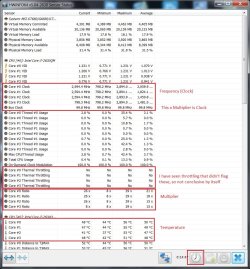
GokAy here is the readouts from HWInfo in (sensor mode only) with the laptop on for a few hours and warmed up.
 

Attachments

  • hdinfo.jpg
    hdinfo.jpg
    147.4 KB · Views: 2

My Computer My Computer

At a glance

windows 7 home 32 bit, I just changed back fr...amc a6-6310, radon r4 graphics 1800mhz with 4...6.8gbnot sure off hand
Computer type
Laptop
Computer Manufacturer/Model Number
Dell Inspiron 3541
OS
windows 7 home 32 bit, I just changed back from 64 to 32bit
CPU
amc a6-6310, radon r4 graphics 1800mhz with 4 cores
Memory
6.8gb
Graphics Card(s)
not sure off hand
Sound Card
not shure off hand
Monitor(s) Displays
built in lcd
Screen Resolution
1366 x 768
Hard Drives
1 500gb sata internal HDD and 1 250 gb's sata HDD in a USB external USB case.
Keyboard
Wifi with attached wifi mouse
Internet Speed
don't know
Antivirus
Zone Alarm
Browser
Firefox
Other Info
The gateway laptop model MD2614U died because a voltage regulator on the motherboard went poof. The Gateway laptop has been scraped.
Prime95 is actually a Mersenne Prime (mathematics) search software. But used for CPU benchmarking and torture tests as well. From its website:
CPU Stress / Torture Testing

Prime95 has been a popular choice for stress / torture testing a CPU since it's introduction, especially with overclockers and system builders. Since the software makes heavy use of the processor's integer and floating point instructions, it feeds the processor a consistent and verifiable workload to test the stability of the CPU and the L1/L2/L3 processor cache. Additionally, it uses all of the cores of a multi-CPU / multi-core system to ensure a high-load stress test environment.
From the most recent "stress.txt" file included in the download:
Today's computers are not perfect. Even brand new systems from major manufacturers can have hidden flaws. If any of several key components such as CPU, memory, cooling, etc. are not up to spec, it can lead to incorrect calculations and/or unexplained system crashes.
Overclocking is the practice of increasing the speed of the CPU and/or memory to make a machine faster at little cost. Typically, overclocking involves pushing a machine past its limits and then backing off just a little bit.
For these reasons, both non-overclockers and overclockers need programs that test the stability of their computers. This is done by running programs that put a heavy load on the computer. Though not originally designed for this purpose, this program is one of a few programs that are excellent at stress testing a computer.

The Prime95 Wikipedia page has an excellent overview on using Prime95 to test your system and ensure it is working properly. The tips presented there should be helpful regarding how long to run the torture test and provide a solid guideline on how long to run the Prime95 stress test.

Performing a stress test is simple:
  1. Download the software and unzip the files to your desired location.
  2. Run the Prime95 executable and select "Just Stress Testing" when asked.
  3. The default options are sufficient to do a well balanced stress test on the system.
Normally, a CPU uses a feature called "Dynamic Frequency Scaling" to adjust its frequency to save power, produce less heat and prolong lifetime. Say, a 3 GHz CPU will run at 600MHz when idle and increase frequency in steps (called multiplier) when needed.

Windows 7 can manage the min/max of how much a CPU can go with Power Plans - http://www.sevenforums.com/tutorials/778-power-plan-settings-change.html

Why High Performance? My reasoning is that, by setting CPU to 100% min and resetting the sensor readings, any throttling will show itself (even if Thermal Throttling row doesn't show it).

But do try with your normal power plan first: start HWInfo (sensors-only) and then Prime95, keep an eye on temperatures and CPU entries. Stop from the Menu of Prime95 when you do, and check notification area also to make sure it has stopped running.

hwinfo.jpg
 

My Computer My Computer

At a glance

Windows 7 Ultimate x64 SP1AMD Phenom 2 1090T2x8GB Kingston HyperX Fury Black 1600Mhz Unga...MSI GTX 970 Gaming 4G
Computer type
PC/Desktop
Computer Manufacturer/Model Number
Custom Build
OS
Windows 7 Ultimate x64 SP1
CPU
AMD Phenom 2 1090T
Motherboard
Gigabyte GA-890FXA-UD5
Memory
2x8GB Kingston HyperX Fury Black 1600Mhz Unganged
Graphics Card(s)
MSI GTX 970 Gaming 4G
Sound Card
Realtek On-Board HD 7.1 Audio / Logitech G35
Monitor(s) Displays
3xAcer GD245HQ
Screen Resolution
1920x1080
Hard Drives
Samsung 850 Pro 512GB SSD - OS /
WD Caviar Black SATA 3 - 1 TBx2 - Dynamic RAID 0 /
WD Caviar Green SATA 2 - 640GBx2 - Dynamic RAID 0 /
WD Caviar Green SATA 2 - 640GB - Internal Backup /
Seagate Barracude SATA 3 - 3TB - External Backup/ Sync
PSU
HighPower 1000W
Case
Cooler Master HAF 932
Cooling
Noctua NH-D14
Keyboard
Logitech G19
Mouse
Logitech G500
Internet Speed
100/4 Mbit Cable (100GB quota)
Antivirus
ZoneAlarm Extreme Security / MBAM Pro / MBAE Free / SAS Free
Browser
IE 11 - Firefox - Chrome
Other Info
Logitech F710/ G27/ G940/ Z5500 // TrackIR 5 // Nvidia 3D Surround Vision
Did you notice the problems happen while recording those stats? Run Prime95 while having HWINfo open.

By the way your Specs say: CPU dual core 2.1 gb each
But HWInfo only show a max of 1.73GHz, maybe it was not even run at 100%.
 

My Computer My Computer

At a glance

Windows 7 Ultimate x64 SP1AMD Phenom 2 1090T2x8GB Kingston HyperX Fury Black 1600Mhz Unga...MSI GTX 970 Gaming 4G
Computer type
PC/Desktop
Computer Manufacturer/Model Number
Custom Build
OS
Windows 7 Ultimate x64 SP1
CPU
AMD Phenom 2 1090T
Motherboard
Gigabyte GA-890FXA-UD5
Memory
2x8GB Kingston HyperX Fury Black 1600Mhz Unganged
Graphics Card(s)
MSI GTX 970 Gaming 4G
Sound Card
Realtek On-Board HD 7.1 Audio / Logitech G35
Monitor(s) Displays
3xAcer GD245HQ
Screen Resolution
1920x1080
Hard Drives
Samsung 850 Pro 512GB SSD - OS /
WD Caviar Black SATA 3 - 1 TBx2 - Dynamic RAID 0 /
WD Caviar Green SATA 2 - 640GBx2 - Dynamic RAID 0 /
WD Caviar Green SATA 2 - 640GB - Internal Backup /
Seagate Barracude SATA 3 - 3TB - External Backup/ Sync
PSU
HighPower 1000W
Case
Cooler Master HAF 932
Cooling
Noctua NH-D14
Keyboard
Logitech G19
Mouse
Logitech G500
Internet Speed
100/4 Mbit Cable (100GB quota)
Antivirus
ZoneAlarm Extreme Security / MBAM Pro / MBAE Free / SAS Free
Browser
IE 11 - Firefox - Chrome
Other Info
Logitech F710/ G27/ G940/ Z5500 // TrackIR 5 // Nvidia 3D Surround Vision
re: laptop is giving problems after it heats up

No there weren't any problems while recording the stats. I just changed the Power Plan to High Performance and the laptop is running a bit cooler now. I can past in the High Performance settings in if you need to see them. Also I have picked out 2 things on Ebay that I am going to get when I get my SSDI check on Oct 1st. A USB LED Light 2 Fan 9"-17" Laptop Notebook cooling pad adjustable cooler and a mini vacuum USB cooler air extracting cooling fan for pc laptop. Between the 2 they should keep the laptop at a safe temperature. What do you thinkhttp://www.ebay.com/itm/331590650061?_trksid=p2060353.m1438.l2649&ssPageName=STRK:MEBIDX:IT

Did you notice the problems happen while recording those stats? Run Prime95 while having HWINfo open.

By the way your Specs say: CPU dual core 2.1 gb each
But HWInfo only show a max of 1.73GHz, maybe it was not even run at 100%.
 

My Computer My Computer

At a glance

windows 7 home 32 bit, I just changed back fr...amc a6-6310, radon r4 graphics 1800mhz with 4...6.8gbnot sure off hand
Computer type
Laptop
Computer Manufacturer/Model Number
Dell Inspiron 3541
OS
windows 7 home 32 bit, I just changed back from 64 to 32bit
CPU
amc a6-6310, radon r4 graphics 1800mhz with 4 cores
Memory
6.8gb
Graphics Card(s)
not sure off hand
Sound Card
not shure off hand
Monitor(s) Displays
built in lcd
Screen Resolution
1366 x 768
Hard Drives
1 500gb sata internal HDD and 1 250 gb's sata HDD in a USB external USB case.
Keyboard
Wifi with attached wifi mouse
Internet Speed
don't know
Antivirus
Zone Alarm
Browser
Firefox
Other Info
The gateway laptop model MD2614U died because a voltage regulator on the motherboard went poof. The Gateway laptop has been scraped.
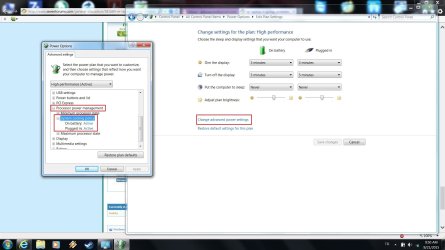
If it is running cooler, I wonder if cooling policy was changed in your previous plan. Mind checking the previous plan's settings?
power options details.jpg

Cooling pad will help for sure, I don't have experience with a vacuum fan.
 

My Computer My Computer

At a glance

Windows 7 Ultimate x64 SP1AMD Phenom 2 1090T2x8GB Kingston HyperX Fury Black 1600Mhz Unga...MSI GTX 970 Gaming 4G
Computer type
PC/Desktop
Computer Manufacturer/Model Number
Custom Build
OS
Windows 7 Ultimate x64 SP1
CPU
AMD Phenom 2 1090T
Motherboard
Gigabyte GA-890FXA-UD5
Memory
2x8GB Kingston HyperX Fury Black 1600Mhz Unganged
Graphics Card(s)
MSI GTX 970 Gaming 4G
Sound Card
Realtek On-Board HD 7.1 Audio / Logitech G35
Monitor(s) Displays
3xAcer GD245HQ
Screen Resolution
1920x1080
Hard Drives
Samsung 850 Pro 512GB SSD - OS /
WD Caviar Black SATA 3 - 1 TBx2 - Dynamic RAID 0 /
WD Caviar Green SATA 2 - 640GBx2 - Dynamic RAID 0 /
WD Caviar Green SATA 2 - 640GB - Internal Backup /
Seagate Barracude SATA 3 - 3TB - External Backup/ Sync
PSU
HighPower 1000W
Case
Cooler Master HAF 932
Cooling
Noctua NH-D14
Keyboard
Logitech G19
Mouse
Logitech G500
Internet Speed
100/4 Mbit Cable (100GB quota)
Antivirus
ZoneAlarm Extreme Security / MBAM Pro / MBAE Free / SAS Free
Browser
IE 11 - Firefox - Chrome
Other Info
Logitech F710/ G27/ G940/ Z5500 // TrackIR 5 // Nvidia 3D Surround Vision
re: laptop is giving problems after it heats up

System cooling policy
On battery: Passive
Plugged in: Active

I rarely ever take the laptop anywhere. 90% of the time the laptop stays plugged in and sitting on the desk. I had an older Toshiba Satellite M60 laptop OS XP Pro that I used to use for my ham radio digital sound card prog's that sat so long plugged in that the battery leaked a black tarry substance all over the bottom of the laptop, on the table and under the cover were the memory sticks and the wifi board are. I salvaged what I could and tosted the rest in the garbage. This is kind of like when I used to fix cb radios for a living back when cb's were the craze. I get ppl coming in with there rigs saying there radio transmissions were going out garbled and bothering the nighbors tv's and radios. I open the radio up and find that the transmit bios voltage was cranked way up and the final transistors blazing hot because they were over the top of the linear slope and flat topping which causes splattering all over the band. The cb operators are only allowed to transmit a max of 5 watts. By cranking up the bios voltage they can get it up to about 8 watts of power out. But there is a price to pay for doing that. Changing the power plain reminded me of the cb bit. Same general thing with cranking up the juice on the cpu.

If it is running cooler, I wonder if cooling policy was changed in your previous plan. Mind checking the previous plan's settings?
View attachment 371982

Cooling pad will help for sure, I don't have experience with a vacuum fan.
 

My Computer My Computer

At a glance

windows 7 home 32 bit, I just changed back fr...amc a6-6310, radon r4 graphics 1800mhz with 4...6.8gbnot sure off hand
Computer type
Laptop
Computer Manufacturer/Model Number
Dell Inspiron 3541
OS
windows 7 home 32 bit, I just changed back from 64 to 32bit
CPU
amc a6-6310, radon r4 graphics 1800mhz with 4 cores
Memory
6.8gb
Graphics Card(s)
not sure off hand
Sound Card
not shure off hand
Monitor(s) Displays
built in lcd
Screen Resolution
1366 x 768
Hard Drives
1 500gb sata internal HDD and 1 250 gb's sata HDD in a USB external USB case.
Keyboard
Wifi with attached wifi mouse
Internet Speed
don't know
Antivirus
Zone Alarm
Browser
Firefox
Other Info
The gateway laptop model MD2614U died because a voltage regulator on the motherboard went poof. The Gateway laptop has been scraped.
Did you try stress testing the CPU yet?

Having CPU at 100% isn't like what you describe though (my desktop is 100% for 5.5 years now), what you describe looks more like overclocking. Especially when gaming a constant 100% is much better than a ever fluctuating CPU.
 

My Computer My Computer

At a glance

Windows 7 Ultimate x64 SP1AMD Phenom 2 1090T2x8GB Kingston HyperX Fury Black 1600Mhz Unga...MSI GTX 970 Gaming 4G
Computer type
PC/Desktop
Computer Manufacturer/Model Number
Custom Build
OS
Windows 7 Ultimate x64 SP1
CPU
AMD Phenom 2 1090T
Motherboard
Gigabyte GA-890FXA-UD5
Memory
2x8GB Kingston HyperX Fury Black 1600Mhz Unganged
Graphics Card(s)
MSI GTX 970 Gaming 4G
Sound Card
Realtek On-Board HD 7.1 Audio / Logitech G35
Monitor(s) Displays
3xAcer GD245HQ
Screen Resolution
1920x1080
Hard Drives
Samsung 850 Pro 512GB SSD - OS /
WD Caviar Black SATA 3 - 1 TBx2 - Dynamic RAID 0 /
WD Caviar Green SATA 2 - 640GBx2 - Dynamic RAID 0 /
WD Caviar Green SATA 2 - 640GB - Internal Backup /
Seagate Barracude SATA 3 - 3TB - External Backup/ Sync
PSU
HighPower 1000W
Case
Cooler Master HAF 932
Cooling
Noctua NH-D14
Keyboard
Logitech G19
Mouse
Logitech G500
Internet Speed
100/4 Mbit Cable (100GB quota)
Antivirus
ZoneAlarm Extreme Security / MBAM Pro / MBAE Free / SAS Free
Browser
IE 11 - Firefox - Chrome
Other Info
Logitech F710/ G27/ G940/ Z5500 // TrackIR 5 // Nvidia 3D Surround Vision
re: laptop is giving problems after it heats up

It is possible that the cooling policy was changed. I got the laptop from a pawn shop. With my experiences with fixing 2 way radios and tv's I follow the practice of "if it isn't broke don't fix it or change factory settings". That practice has served me well.

Did you try stress testing the CPU yet?

Having CPU at 100% isn't like what you describe though (my desktop is 100% for 5.5 years now), what you describe looks more like overclocking. Especially when gaming a constant 100% is much better than a ever fluctuating CPU.
 

My Computer My Computer

At a glance

windows 7 home 32 bit, I just changed back fr...amc a6-6310, radon r4 graphics 1800mhz with 4...6.8gbnot sure off hand
Computer type
Laptop
Computer Manufacturer/Model Number
Dell Inspiron 3541
OS
windows 7 home 32 bit, I just changed back from 64 to 32bit
CPU
amc a6-6310, radon r4 graphics 1800mhz with 4 cores
Memory
6.8gb
Graphics Card(s)
not sure off hand
Sound Card
not shure off hand
Monitor(s) Displays
built in lcd
Screen Resolution
1366 x 768
Hard Drives
1 500gb sata internal HDD and 1 250 gb's sata HDD in a USB external USB case.
Keyboard
Wifi with attached wifi mouse
Internet Speed
don't know
Antivirus
Zone Alarm
Browser
Firefox
Other Info
The gateway laptop model MD2614U died because a voltage regulator on the motherboard went poof. The Gateway laptop has been scraped.
re: laptop is giving problems after it heats up

2 problems solved today. I got a wireless keyboard and mouse online and it arrived today in the snail mail. The way this laptop is layed out, the audio in and out jacks are right under palm of my left hand when playing games. I had to put a small stick under the headphone jack so I don't mess up the headphone jack. Also that mini USB fan that attaches to the laptop air exhaust port came in todays snail mail. The laptop case in the lower right hand corner is running about 25° cooler. That little fan is pulling a lot of the hot air out of the laptop case. :D :party:

Steve

No there weren't any problems while recording the stats. I just changed the Power Plan to High Performance and the laptop is running a bit cooler now. I can past in the High Performance settings in if you need to see them. Also I have picked out 2 things on Ebay that I am going to get when I get my SSDI check on Oct 1st. A USB LED Light 2 Fan 9"-17" Laptop Notebook cooling pad adjustable cooler and a mini vacuum USB cooler air extracting cooling fan for pc laptop. Between the 2 they should keep the laptop at a safe temperature. What do you think

Did you notice the problems happen while recording those stats? Run Prime95 while having HWINfo open.

By the way your Specs say: CPU dual core 2.1 gb each
But HWInfo only show a max of 1.73GHz, maybe it was not even run at 100%.
 

My Computer My Computer

At a glance

windows 7 home 32 bit, I just changed back fr...amc a6-6310, radon r4 graphics 1800mhz with 4...6.8gbnot sure off hand
Computer type
Laptop
Computer Manufacturer/Model Number
Dell Inspiron 3541
OS
windows 7 home 32 bit, I just changed back from 64 to 32bit
CPU
amc a6-6310, radon r4 graphics 1800mhz with 4 cores
Memory
6.8gb
Graphics Card(s)
not sure off hand
Sound Card
not shure off hand
Monitor(s) Displays
built in lcd
Screen Resolution
1366 x 768
Hard Drives
1 500gb sata internal HDD and 1 250 gb's sata HDD in a USB external USB case.
Keyboard
Wifi with attached wifi mouse
Internet Speed
don't know
Antivirus
Zone Alarm
Browser
Firefox
Other Info
The gateway laptop model MD2614U died because a voltage regulator on the motherboard went poof. The Gateway laptop has been scraped.
Back
Top