
Hello. My 8 year old 500GB Seagate hard drive failed a few days ago and I switched over to my recent backup from a cloned drive (about a week old backup). The last time I backed up my drive, the only error was something like Adobe font pack failed to copy. No other errors appeared. I have the original backup without any changes. I’m currently cloning the disk using Hiren’s Boot CD and CloneDrive to make a new copy if things get too hosed while i’m trying to fix the issue.
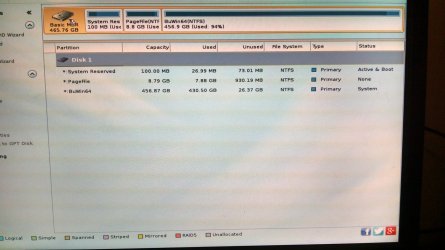
This is not a dual boot machine. Just A basic Windows 7 install. 3 x Partitions: 100 mb System Reserved (Active), Pagefile, and Win7. Custom build
Tested the current hard drive i’m troubleshooting from and passed.
Ran chkdsk from Hiren’s Boot CD. Corrected a few things.
I get an error message under “Windows Boot Manager” screen = Windows failed to start.
File: \Windows\System32\winload.exe
Status: 0xc000000e
Info: The selected entry could not be loaded because the application is missing or corrupt.
Alternately after some troubleshooting Info might show “The boot selection failed because a required device is inaccessible”.
I hit enter to continue and the next screens gives me one option to choose an operating system “Windows 7” and returns to the previous screen mentioned above.
Booting to the windows installation DVD:
After selecting repair computer it’s “Searching for Windows Installations...” and after about 10 seconds it shows:
OperatingSystem ---------- Partition Size ---------- Location
Windows 7 -------------------- 0 MB ------------------------(Unknown) Local Disk
System Recovery Options.
Choose a recovery tool.
Operating system: Windows 7 on (unknown) Local Disk.
I’ve booted using the Windows 7 installation DVD and tried Startup Repair (repair 3 times) multiple times after major troubleshooting steps when Startup Repair can attempt to repair the problem. Usually it just gives the error message below:
I use “wmic logicaldisk get name” to list the drives. The only drives that show are D: for the cd and X: for the recovery environment.
DiskPart will recognize the drive and partitions. System Reserved partition is active with other partitions inactive.
It usually shows “Startup Repair cannot repair this computer automatically”.
Problem Details:
Problem Signature:
Problem Event Name: Startup Repair Offline
Problem Signature 01: 0.0.0.0
Problem Signature 02: 0.0.0.0
Problem Signature 03: unknown
Problem Signature 04: 0
Problem Signature 05: unknown
Problem Signature 06: 1
Problem Signature 07: unknown
OS Version: 6.1.7601.2.3.0.256.1
Locale ID: 1033
Startup Repair diagnosis and repair log:
--------------------------------------
Number of repair attempts:1
Session details
-------------------------------------
System Disk = \Device\Harddisk0
Windows Directory = <<<<<<<<<<Missing?
AutoChk Run = 0
Number of root causes = 1
Test Performed (shortened to show ones that passed)
Completed successfully: Error code = 0 x 0
Name:
Check for Updates
System disk test
Disk failure diagnosis
Disk metadata test
Target OS test
Root cause found:
---------------------------------------
Boot configuration is corrupt
Repair action: Partition table repair
Result: Failed. Error code = 0x490
Time taken 453 ms
Next i tried:
BootRec with switches:
/FixMbr = Completes Successfully
/FixBoot = Completes Successfully
/ScanOs = Zero OS found
/Rebuild BCD
Also tried delete and /Rebuild:
Same error message after reboot
I referenced the following link for the next section:
https://support.symantec.com/en_US/article.TECH160475.html
When I type in BCDEDIT:
Windows Boot Manager
-------------------------------
identifier ---------------------------------------- {bootmgr}
device -------------------------------------------- partition=\Device\HarddiskVolume1
path ------------------------------------------------ \bootmgr
description -------------------------------------- Windows Boot Manager
locale ---------------------------------------------- en-US
inherit --------------------------------------------- {globalsettings}
default --------------------------------------------- {default}
resumeobject -----------------------------------{23512ef6-c62b-11e0-a274-99f9dbd9b8b1}
displayorder -------------------------------------{default}
toolsdisplayorder -----------------------------{memdiag}
timeout30
Windows Boot Loader
----------------------------
identifier ------------------------------------------ {default}
device ---------------------------------------------- unknown
path -------------------------------------------------- \Windows\system32\winload.exe
description ---------------------------------------- Windows 7
locale ------------------------------------------------en-US
inherit ------------------------------------------------{bootloadersettings}
osdevice --------------------------------------------unknown
systemroot -----------------------------------------\Windows
resumeobject -------------------------------------{23512ef6-c62b-11e0-a274-99f9dbd9b8b1}
nx -------------------------------------------------------OptIn
Device and Osdevice show up as unknown. Tried to fix this by:
bcdedit /set {DEFAULT} device partition=c:
(press enter)
bcdedit /set {DEFAULT} osdevice partition=c:
(press enter)
bcdedit /set {BOOTMGR} device partition=c:
(press enter)
All three reported:
An error has occurred setting the element data.
The request is not supported.
When i try F8 for safe mode i get:
Windows 7/Vista/server (Pointer)
Windows 7/Vista/server
Windows 7/Vista/server (Debug - Default mode)
Windows 7/Vista/server (Debug - Legacy mode)
Windows 7/Vista/server (No SLIC - Pointer)
Windows 7/Vista/server (No SLIC)
Windows NT/2000/XP
Loader Help
<Use the Uparrow and Downarrow to highlight an entry. Press ENTER or 'b' to boot.>
<Press 'c' for a command-line
Not familiar with the above options.
I moved the hard drive to another computer and can see my files. I know I can reinstall windows and start over, but it would be great to get this up and running, at least for a little while longer.
Anything else to try? I’ve read dozens of posts trying to figure this out, but this one has me stumped.
Thanks!
This is not a dual boot machine. Just A basic Windows 7 install. 3 x Partitions: 100 mb System Reserved (Active), Pagefile, and Win7. Custom build
Tested the current hard drive i’m troubleshooting from and passed.
Ran chkdsk from Hiren’s Boot CD. Corrected a few things.
I get an error message under “Windows Boot Manager” screen = Windows failed to start.
File: \Windows\System32\winload.exe
Status: 0xc000000e
Info: The selected entry could not be loaded because the application is missing or corrupt.
Alternately after some troubleshooting Info might show “The boot selection failed because a required device is inaccessible”.
I hit enter to continue and the next screens gives me one option to choose an operating system “Windows 7” and returns to the previous screen mentioned above.
Booting to the windows installation DVD:
After selecting repair computer it’s “Searching for Windows Installations...” and after about 10 seconds it shows:
OperatingSystem ---------- Partition Size ---------- Location
Windows 7 -------------------- 0 MB ------------------------(Unknown) Local Disk
System Recovery Options.
Choose a recovery tool.
Operating system: Windows 7 on (unknown) Local Disk.
I’ve booted using the Windows 7 installation DVD and tried Startup Repair (repair 3 times) multiple times after major troubleshooting steps when Startup Repair can attempt to repair the problem. Usually it just gives the error message below:
I use “wmic logicaldisk get name” to list the drives. The only drives that show are D: for the cd and X: for the recovery environment.
DiskPart will recognize the drive and partitions. System Reserved partition is active with other partitions inactive.
It usually shows “Startup Repair cannot repair this computer automatically”.
Problem Details:
Problem Signature:
Problem Event Name: Startup Repair Offline
Problem Signature 01: 0.0.0.0
Problem Signature 02: 0.0.0.0
Problem Signature 03: unknown
Problem Signature 04: 0
Problem Signature 05: unknown
Problem Signature 06: 1
Problem Signature 07: unknown
OS Version: 6.1.7601.2.3.0.256.1
Locale ID: 1033
Startup Repair diagnosis and repair log:
--------------------------------------
Number of repair attempts:1
Session details
-------------------------------------
System Disk = \Device\Harddisk0
Windows Directory = <<<<<<<<<<Missing?
AutoChk Run = 0
Number of root causes = 1
Test Performed (shortened to show ones that passed)
Completed successfully: Error code = 0 x 0
Name:
Check for Updates
System disk test
Disk failure diagnosis
Disk metadata test
Target OS test
Root cause found:
---------------------------------------
Boot configuration is corrupt
Repair action: Partition table repair
Result: Failed. Error code = 0x490
Time taken 453 ms
Next i tried:
BootRec with switches:
/FixMbr = Completes Successfully
/FixBoot = Completes Successfully
/ScanOs = Zero OS found
/Rebuild BCD
Also tried delete and /Rebuild:
- bcdedit /export C:\BCD_Backup
- c:
- cd boot
- attrib bcd -s -h -r
- ren c:\boot\bcd bcd.old
- bootrec /RebuildBcd
Same error message after reboot
I referenced the following link for the next section:
https://support.symantec.com/en_US/article.TECH160475.html
When I type in BCDEDIT:
Windows Boot Manager
-------------------------------
identifier ---------------------------------------- {bootmgr}
device -------------------------------------------- partition=\Device\HarddiskVolume1
path ------------------------------------------------ \bootmgr
description -------------------------------------- Windows Boot Manager
locale ---------------------------------------------- en-US
inherit --------------------------------------------- {globalsettings}
default --------------------------------------------- {default}
resumeobject -----------------------------------{23512ef6-c62b-11e0-a274-99f9dbd9b8b1}
displayorder -------------------------------------{default}
toolsdisplayorder -----------------------------{memdiag}
timeout30
Windows Boot Loader
----------------------------
identifier ------------------------------------------ {default}
device ---------------------------------------------- unknown
path -------------------------------------------------- \Windows\system32\winload.exe
description ---------------------------------------- Windows 7
locale ------------------------------------------------en-US
inherit ------------------------------------------------{bootloadersettings}
osdevice --------------------------------------------unknown
systemroot -----------------------------------------\Windows
resumeobject -------------------------------------{23512ef6-c62b-11e0-a274-99f9dbd9b8b1}
nx -------------------------------------------------------OptIn
Device and Osdevice show up as unknown. Tried to fix this by:
bcdedit /set {DEFAULT} device partition=c:
(press enter)
bcdedit /set {DEFAULT} osdevice partition=c:
(press enter)
bcdedit /set {BOOTMGR} device partition=c:
(press enter)
All three reported:
An error has occurred setting the element data.
The request is not supported.
When i try F8 for safe mode i get:
Windows 7/Vista/server (Pointer)
Windows 7/Vista/server
Windows 7/Vista/server (Debug - Default mode)
Windows 7/Vista/server (Debug - Legacy mode)
Windows 7/Vista/server (No SLIC - Pointer)
Windows 7/Vista/server (No SLIC)
Windows NT/2000/XP
Loader Help
<Use the Uparrow and Downarrow to highlight an entry. Press ENTER or 'b' to boot.>
<Press 'c' for a command-line
Not familiar with the above options.
I moved the hard drive to another computer and can see my files. I know I can reinstall windows and start over, but it would be great to get this up and running, at least for a little while longer.
Anything else to try? I’ve read dozens of posts trying to figure this out, but this one has me stumped.
Thanks!
My Computer
At a glance
Windows 7 Ultimate x64Intel Core 2 Duo E66004 GB CorsairNVidia GeForce 8600 GTS 256mb
- Computer type
- PC/Desktop
- Computer Manufacturer/Model Number
- Custom
- OS
- Windows 7 Ultimate x64
- CPU
- Intel Core 2 Duo E6600
- Motherboard
- Intel D975XBX2
- Memory
- 4 GB Corsair
- Graphics Card(s)
- NVidia GeForce 8600 GTS 256mb
- Hard Drives
- Seagate 500GB ST3500320AS x 3
- Antivirus
- Avast Free
- Browser
- Firefox and Chrome


 Startup repair should have done this for you. I wonder now, did you run startup repair 3 times when you first set system active?

