Solved 8 tb external usb 3.0 drive not recognized

livingem

New member
Local time
10:55 PM
Messages
26
Location
Long Island, NY
Hello

I have a Seagate 8 TB 3.0 external hdd .

I originally attached it to my NAS and formatted it while attached to the NAS.

The backup was too slow so I disconnected the drive from my NAS and connected it to a USB 3.0 port in my Windows 7 Pro PC

The disk does not show up in disk management on my PC.

Windows 7 installed the driver on my PC after I attached the drive.

Thank you for your help.

Sheila
 

My Computer My Computer

At a glance

7 pro 64 bitintel i516 gigs
Computer Manufacturer/Model Number
built to order
OS
7 pro 64 bit
CPU
intel i5
Motherboard
asus
Memory
16 gigs
Monitor(s) Displays
2
Hard Drives
3
Keyboard
usb
Mouse
usb
Does it show up in a command prompt with?

diskpart (wait for it load)
list disk (it will show you the disks on the system in a list with there sizes)
exit
 

My Computer My Computer

At a glance

10 Pro x64Ryzen 9 3900X64GB(4x16GB) DDR4EVGA 1080ti FTW3
Computer type
PC/Desktop
Computer Manufacturer/Model Number
Custom
OS
10 Pro x64
CPU
Ryzen 9 3900X
Motherboard
Asrock x370 Tachi
Memory
64GB(4x16GB) DDR4
Graphics Card(s)
EVGA 1080ti FTW3
Sound Card
ASUS Xonar Essence STX (V4 Bursons), ODAC rev B, NFB-11, O2
Monitor(s) Displays
3xASUS PB278Q/R, Optoma HD142X
Screen Resolution
3x1440p, 1080p
Hard Drives
512GB 850 EVO(OS, Programs)
4TB (Movies)
3TB (Downloads)
3TB (Programs)
1TB HDD (Games)
2x6TB R1 (videos)
PSU
AX760
Case
Fractal Define R5
Cooling
NH-D15S
Keyboard
Massdrop Ctrl with Box Navy's
Mouse
G903, Alioth XXL Mat
Internet Speed
280/40
Antivirus
MBAM, ESET
Browser
Canary 64 Bit
Other Info
I also own a Thinkpad P50 Xeon 4K, X220T, X1C5
Hello

No. it does not show up in diskpart.

I can see the disk, however, when it is connected to my NAS.

Thank you.
 

My Computer My Computer

At a glance

7 pro 64 bitintel i516 gigs
Computer Manufacturer/Model Number
built to order
OS
7 pro 64 bit
CPU
intel i5
Motherboard
asus
Memory
16 gigs
Monitor(s) Displays
2
Hard Drives
3
Keyboard
usb
Mouse
usb

My Computer My Computer

At a glance

Windows 7 Home Premium 32 bit
OS
Windows 7 Home Premium 32 bit
Hello

I am sorry that I did not communicate clearly.

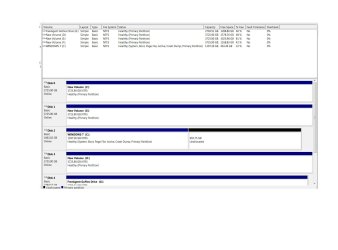
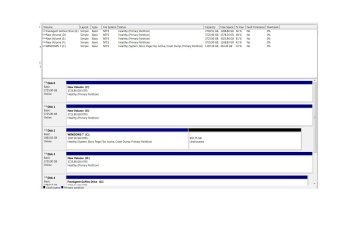
The 8 TB drive never appears in Windows Disk Management - neither when it is attached to my PC by USB 3.0, nor when it is attached to the NAS BY USB 2.0.

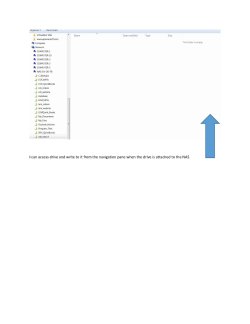
The drive appears in the Navigation Pane along with the other files in the NAS. I can access the drive, write to it from the Navigation Pane.

I have uploaded five screen shots:

1. WDM - 8 TB IN USB 3.
2. WD, 8 TB IN NAS
3. 8 TB RECOGNIZED HERE (Navigation pane view)
4.8 TB ACCESSED - Drive opened from Navigation Pane (no data)
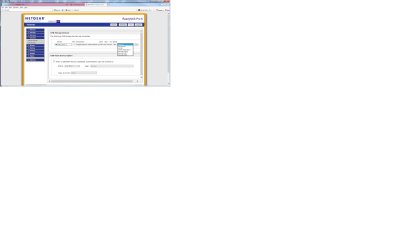
5. NAS - view of the Netgear ReadyNAS Pro 6 [X-RAID2] software showing the recognized drive and the dropdown menu with the formatting options.

Thank you very much.

Sheila
 

Attachments

  • WDM - 8 TB IN USB 3.jpg - Copy.jpg
    WDM - 8 TB IN USB 3.jpg - Copy.jpg
    123.9 KB · Views: 6
  • WDM - 8 TB IN NAS (3).jpg
    WDM - 8 TB IN NAS (3).jpg
    123.9 KB · Views: 4
  • 8 TB RECOGNIZED HERE.jpg.jpg
    8 TB RECOGNIZED HERE.jpg.jpg
    36.3 KB · Views: 2
  • 8 TB DR ACCESSED.jpg
    8 TB DR ACCESSED.jpg
    54.5 KB · Views: 3
  • NAS.jpg
    NAS.jpg
    171.6 KB · Views: 4

My Computer My Computer

At a glance

7 pro 64 bitintel i516 gigs
Computer Manufacturer/Model Number
built to order
OS
7 pro 64 bit
CPU
intel i5
Motherboard
asus
Memory
16 gigs
Monitor(s) Displays
2
Hard Drives
3
Keyboard
usb
Mouse
usb
I don't know anything about Netgear ReadyNAS Pro 6. When I checked Amazon.com Amazon.com: Netgear ReadyNAS Pro 6, 12TB Unified Storage System (12TB: 6 x 2TB) (RNDP6620): Electronics
there are seven variants of it and you have not specified which one you have. Check and specify which one you have.

What I see is that none of them can handle an 8TB drive in a single slot. Those can handle only 1TB,2TB and 3TB drives per slot X No.of slots.

That being the case how did you put an 8TB drive in one slot?
 

My Computer My Computer

At a glance

Windows 7 Home Premium 32 bit
OS
Windows 7 Home Premium 32 bit
If you do not care about the data on it and just need it to be usable then have that format it as ext3 then it will be a partition windows cant see but can wipe for itself in diskpart with the clean command (make sure you wipe the right disk if you do this).
 

My Computer My Computer

At a glance

10 Pro x64Ryzen 9 3900X64GB(4x16GB) DDR4EVGA 1080ti FTW3
Computer type
PC/Desktop
Computer Manufacturer/Model Number
Custom
OS
10 Pro x64
CPU
Ryzen 9 3900X
Motherboard
Asrock x370 Tachi
Memory
64GB(4x16GB) DDR4
Graphics Card(s)
EVGA 1080ti FTW3
Sound Card
ASUS Xonar Essence STX (V4 Bursons), ODAC rev B, NFB-11, O2
Monitor(s) Displays
3xASUS PB278Q/R, Optoma HD142X
Screen Resolution
3x1440p, 1080p
Hard Drives
512GB 850 EVO(OS, Programs)
4TB (Movies)
3TB (Downloads)
3TB (Programs)
1TB HDD (Games)
2x6TB R1 (videos)
PSU
AX760
Case
Fractal Define R5
Cooling
NH-D15S
Keyboard
Massdrop Ctrl with Box Navy's
Mouse
G903, Alioth XXL Mat
Internet Speed
280/40
Antivirus
MBAM, ESET
Browser
Canary 64 Bit
Other Info
I also own a Thinkpad P50 Xeon 4K, X220T, X1C5
Hello

The 8 TB drive appeared in Window Disk Management before I attached it to the NAS. I formatted it there with Windows "Quick Format" and then I attached it to the NAS. I was initially unable to write to the NAS so I formatted the drive again with either the last or the next to last option on the formatting list (according to the instructions of a Netgear tech).

After that, I could no longer view the drive in Windows when attached to my PC. I thought the problem was the formatting because the tech told me that the option we used was a Linux format. After I wrote to the forum the first time, I formatted the drive with FAT32 because I know that Is a Windows format, but that didn't help.

I know there is a more recent formatting type than FAT32 for Windows, but I cannot recall its name or how to access it.

Thank you.
 

My Computer My Computer

At a glance

7 pro 64 bitintel i516 gigs
Computer Manufacturer/Model Number
built to order
OS
7 pro 64 bit
CPU
intel i5
Motherboard
asus
Memory
16 gigs
Monitor(s) Displays
2
Hard Drives
3
Keyboard
usb
Mouse
usb
Hello

The 8 TB drive appeared in Window Disk Management before I attached it to the NAS. I formatted it there with Windows "Quick Format" and then I attached it to the NAS. I was initially unable to write to the NAS so I formatted the drive again with either the last or the next to last option on the formatting list (according to the instructions of a Netgear tech).

After that, I could no longer view the drive in Windows when attached to my PC. I thought the problem was the formatting because the tech told me that the option we used was a Linux format. After I wrote to the forum the first time, I formatted the drive with FAT32 because I know that Is a Windows format, but that didn't help.

I know there is a more recent formatting type than FAT32 for Windows, but I cannot recall its name or how to access it.

Thank you.

Ntfs is the new windows format used. You should try the ext3 format then see if you can see it in diskpart in Windows, it will only show the disk size for now. Can you post a pic of your diskpart if it sees something like it please.
 

My Computer My Computer

At a glance

10 Pro x64Ryzen 9 3900X64GB(4x16GB) DDR4EVGA 1080ti FTW3
Computer type
PC/Desktop
Computer Manufacturer/Model Number
Custom
OS
10 Pro x64
CPU
Ryzen 9 3900X
Motherboard
Asrock x370 Tachi
Memory
64GB(4x16GB) DDR4
Graphics Card(s)
EVGA 1080ti FTW3
Sound Card
ASUS Xonar Essence STX (V4 Bursons), ODAC rev B, NFB-11, O2
Monitor(s) Displays
3xASUS PB278Q/R, Optoma HD142X
Screen Resolution
3x1440p, 1080p
Hard Drives
512GB 850 EVO(OS, Programs)
4TB (Movies)
3TB (Downloads)
3TB (Programs)
1TB HDD (Games)
2x6TB R1 (videos)
PSU
AX760
Case
Fractal Define R5
Cooling
NH-D15S
Keyboard
Massdrop Ctrl with Box Navy's
Mouse
G903, Alioth XXL Mat
Internet Speed
280/40
Antivirus
MBAM, ESET
Browser
Canary 64 Bit
Other Info
I also own a Thinkpad P50 Xeon 4K, X220T, X1C5
When you want to format your 8TB external drive in Windows, remember that you have to initialise it as GPT.
 

My Computer My Computer

At a glance

Windows 7 Home Premium 32 bit
OS
Windows 7 Home Premium 32 bit
I FORMATTED IN EXT 3 AND THE DRIVE IS NOW READ/WRITE ACCESSIBLE IN WDM

Thank you very much for your help
 

My Computer My Computer

At a glance

7 pro 64 bitintel i516 gigs
Computer Manufacturer/Model Number
built to order
OS
7 pro 64 bit
CPU
intel i5
Motherboard
asus
Memory
16 gigs
Monitor(s) Displays
2
Hard Drives
3
Keyboard
usb
Mouse
usb
I FORMATTED IN EXT 3 AND THE DRIVE IS NOW READ/WRITE ACCESSIBLE IN WDM

Thank you very much for your help

Good to hear now make sure you initialize it as gpt like Jumanji said.
 

My Computer My Computer

At a glance

10 Pro x64Ryzen 9 3900X64GB(4x16GB) DDR4EVGA 1080ti FTW3
Computer type
PC/Desktop
Computer Manufacturer/Model Number
Custom
OS
10 Pro x64
CPU
Ryzen 9 3900X
Motherboard
Asrock x370 Tachi
Memory
64GB(4x16GB) DDR4
Graphics Card(s)
EVGA 1080ti FTW3
Sound Card
ASUS Xonar Essence STX (V4 Bursons), ODAC rev B, NFB-11, O2
Monitor(s) Displays
3xASUS PB278Q/R, Optoma HD142X
Screen Resolution
3x1440p, 1080p
Hard Drives
512GB 850 EVO(OS, Programs)
4TB (Movies)
3TB (Downloads)
3TB (Programs)
1TB HDD (Games)
2x6TB R1 (videos)
PSU
AX760
Case
Fractal Define R5
Cooling
NH-D15S
Keyboard
Massdrop Ctrl with Box Navy's
Mouse
G903, Alioth XXL Mat
Internet Speed
280/40
Antivirus
MBAM, ESET
Browser
Canary 64 Bit
Other Info
I also own a Thinkpad P50 Xeon 4K, X220T, X1C5
I formatted the drive and am writing to it successfully. I don't know what you mean by "initialize" the drive, or what GPT means in this context. Thank you.
 

Attachments

  • Format.jpg
    Format.jpg
    117.6 KB · Views: 3

My Computer My Computer

At a glance

7 pro 64 bitintel i516 gigs
Computer Manufacturer/Model Number
built to order
OS
7 pro 64 bit
CPU
intel i5
Motherboard
asus
Memory
16 gigs
Monitor(s) Displays
2
Hard Drives
3
Keyboard
usb
Mouse
usb
I formatted the drive and am writing to it successfully. I don't know what you mean by "initialize" the drive, or what GPT means in this context. Thank you.

Means guid partition scheme and it is what larger drives (2TB and up) must use instead of mbr for it to be one whole partition and not split up. If windows is formating a 7TB partition then it must have initialized as gpt. When you formatted it as ext3 on the nas it would have made it gpt first. What?s the Difference Between GPT and MBR When Partitioning a Drive?
 

My Computer My Computer

At a glance

10 Pro x64Ryzen 9 3900X64GB(4x16GB) DDR4EVGA 1080ti FTW3
Computer type
PC/Desktop
Computer Manufacturer/Model Number
Custom
OS
10 Pro x64
CPU
Ryzen 9 3900X
Motherboard
Asrock x370 Tachi
Memory
64GB(4x16GB) DDR4
Graphics Card(s)
EVGA 1080ti FTW3
Sound Card
ASUS Xonar Essence STX (V4 Bursons), ODAC rev B, NFB-11, O2
Monitor(s) Displays
3xASUS PB278Q/R, Optoma HD142X
Screen Resolution
3x1440p, 1080p
Hard Drives
512GB 850 EVO(OS, Programs)
4TB (Movies)
3TB (Downloads)
3TB (Programs)
1TB HDD (Games)
2x6TB R1 (videos)
PSU
AX760
Case
Fractal Define R5
Cooling
NH-D15S
Keyboard
Massdrop Ctrl with Box Navy's
Mouse
G903, Alioth XXL Mat
Internet Speed
280/40
Antivirus
MBAM, ESET
Browser
Canary 64 Bit
Other Info
I also own a Thinkpad P50 Xeon 4K, X220T, X1C5
Back
Top