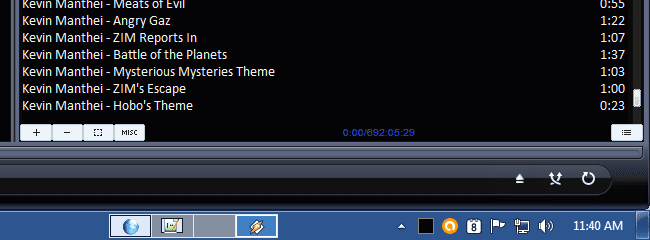
Is the UI for Windows 7 onwards ugly on the eyes or just me?

Windidugo

New member
Local time
2:04 AM
Messages
49
I actually like Windows 7/8/10 as an OS, but sometimes I don't like the look of the user interface. At least Vista still had the old-style taskbar. I guess the matte style in Windows 8 is slightly better than Windows 7 (the aero glass colors and the oversized bottom bar don't really go together; it looks better in Windows 8/10). Windows 10 UI doesn't look like the Windows I'm used to seeing at all. Besides, my computer sucks with Windows 10. It's a very low-end mini desktop from the refurbished bin going at over $300 or something. Also, the 2GB RAM size is unacceptable.

Even though I say that the UI turned ugly since Windows 7, I give Windows 8 credit for changing the glass interface.
 

My Computer My Computer

At a glance

Windows 7 Home Premium 64-bitAMD E-3502GB DDR3Radeon HD 6310
Computer type
PC/Desktop
Computer Manufacturer/Model Number
eMachines
OS
Windows 7 Home Premium 64-bit
CPU
AMD E-350
Memory
2GB DDR3
Graphics Card(s)
Radeon HD 6310
Beauty is in the eye of the beholder.

Pick any OS ever produced and there will be people that hated the UI. And there will be people that loved it. It is impossible to design a UI that everybody will like.
Many people love the UI of Windows 7, others do not.
I happen to like the UI of Windows 7.
 

My Computer My Computer

At a glance

Windows 7 Pro 64 bitXeon W35208 GBNvidia Geforce 210
Computer type
PC/Desktop
Computer Manufacturer/Model Number
HP
OS
Windows 7 Pro 64 bit
CPU
Xeon W3520
Memory
8 GB
Graphics Card(s)
Nvidia Geforce 210
I feel Win 7 was the last attractive MSpy OS and it is the last one to have so many options for how to personalize it without using third party programs.

Btw, the transparency of Aeroglass can be turned off. I also feel it is ugly and it does use up a lot of resources. The height of the task bar can also be adjusted. I have the transparency of AeroGlass turned off and the width of the taskbar (I moved mine to the right side of the screen instead of the bottom) adjusted to allow up to three small icons across side by side (task bar height, or width, depending on where it is, can be adjust down to approximately 2.5 icons). The task bar can also be locked in place (my personal preference) or allow it to hide itself until the mouse pointer is within a few pixels of the edge where it is located. Another advantage of of Win 7 is the Quick Launch Menu can be brought back with an easy hack (there is a tutorial here on Seven Forums on how to do it).
 

My Computer My Computer

At a glance

Win 7 Ultimate 64 bitIntel i7-3930KKingston HyperX Genesis 32GB Kit (8x4GB Modul...MSI R7850 Twin Frozr 2GD5/OC Radeon HD 7850 2...
Computer type
PC/Desktop
Computer Manufacturer/Model Number
Custom Build
OS
Win 7 Ultimate 64 bit
CPU
Intel i7-3930K
Motherboard
ASUS P9X79 WS
Memory
Kingston HyperX Genesis 32GB Kit (8x4GB Modules) 1600MHz DDR
Graphics Card(s)
MSI R7850 Twin Frozr 2GD5/OC Radeon HD 7850 2GB 256-bit GDDR
Sound Card
Asus Xonar Essence STX
Monitor(s) Displays
3x Asus VG248QE 24", Vizio 32" TV
Screen Resolution
1920 x 1080, ?
Hard Drives
Samsung 128GB 840 Pro SSD (1),
Samsung 4TB 850 EVO SSDs (4)
Samsung 4TB 850 EVO SSDs (16) external backup drives used in 2.5" hot swap bays in the computer.
PSU
Corsair HX750w
Case
Antec Two Hundred v2 (modified)
Cooling
Cooler Master GeminII S524 120mm (fan replaced with a 140mm)
Keyboard
Logitech G510s
Mouse
Logitech M525 (two in use)
Internet Speed
=< 32Mbps down, 8Mbps up
Antivirus
AVAST!, MBAM, SAS, Spybot S&D (all but MBAM free) Glary Util
Browser
IE11
Other Info
LSI 9211-8i HBA card (8 SATA III ports), 2.5" & 3.5" Hot Swap Bays, HooToo HT-CR001 PCI-E to USB 3.0 Internal Hub + 6 Slot Card Reader, and LG Model CH12LS28 BD-ROM Optical Drive. Also, ScanSnap S1500 ADF duplexing scanner, Canon 9000F flat bed scanner, Corsair SP2500 2.1 speakers, Samsung CLP 415nw laser color printer, Cyberpower PP2200SW UPS
Hi
Yep aero glass is hit and miss but a hit in my eyes :)

In 7 all one needs to do is change the desktop theme to anything other than a aero theme and select something else,
Classic theme would solve most that don't get into aero stuff on low power/ low memory systems it would be best any way.
http://www.sevenforums.com/tutorials/280-theme-change-save.html
 

My Computer My Computer

At a glance

Win-7-Pro64bit 7-H-Prem-64biti7-5930K 2nd i9-9940x both water blocked VRM'...Trident-z 3200C14 2nd Trident-z 3600C16EVGA 1080ti ftw3 2nd Titan Xp both water blocked
Computer type
PC/Desktop
Computer Manufacturer/Model Number
Custom assembled by me :}
OS
Win-7-Pro64bit 7-H-Prem-64bit
CPU
i7-5930K 2nd i9-9940x both water blocked VRM's too
Motherboard
ASUS SABERTOOTH X99 2nd ASUS x299 Apex
Memory
Trident-z 3200C14 2nd Trident-z 3600C16
Graphics Card(s)
EVGA 1080ti ftw3 2nd Titan Xp both water blocked
Sound Card
Built-in Realtek
Monitor(s) Displays
1-AOC G2460PG 24"G-Sync 144Hz/ 2nd 1-ASUS VG248QE 24" 144Hz
Screen Resolution
1920 x 1080 144Hz
Hard Drives
2-Samsung M.2 Evo & Evo Plus
2-Samsung 850 EVO 500GB SSD's/ 3-2.5 W.D. Black 1tb-&3-1tb/3-3.5 WD Black 1tb hdd's
PSU
EVGA SuperNOVA 1000-P2 2nd 1200-P2
Case
2-Corsair Obsidian Series 450D Black ATX Mid Tower
Cooling
Custom water loops
Keyboard
Logitech G710+/ 2nd Logitech G910
Mouse
2-RedDragon M901 Perdition 16400 dpi Gaming mouse = wired
Internet Speed
Comcast Ping 19ms 89.31mbps download speed 6.12mbps upload
Antivirus
Malwarebytes Pro/ Superantispyware Pro
Browser
FireFox & Pale moon
Other Info
2nd ASUS X299 Apex/Intel i9-9940x with Custom water loop/7H-Prem-x64/Corsair 450D case/Ram Trident-z 3600C16 4x8gb / Samsung970Evo plus 500gb SSD/Dual ssd EZ swap evo/PSU EVGA SuperNova 1200w-P2 80+Platinum/GPU Titan Xp /8-ML-140 on push-pull on 2-280GTX rads
Windidugo, you can change the oversize task bar really easily. Just right click it, select properties, and check "use small icons."

If you want to go back to the old-style taskbar buttons, you can change the options in the dropdown there too, and as Lady Fitzgerald mentioned, you can add the quick launch bar back easily too.

You can do a lot to make 7 look like older versions, and that's one of its best features versus the newer versions. I am of the opinion that the UI of Windows reached its zenith aesthetically in Windows 2000 (basically the same as it had been since 95). Fortunately, XP could be de-Luna'd and made to look Classic really easily, and so can Vista and 7 if (as has already been mentioned) if you use the Classic Theme.

I use Win 7 x64 with Classic Shell (start menu and Windows Explorer) and a self-modified version of Saarineames' Classic AE theme (mostly to change the background from white to light grey). Classic AE allows you to have the Classic appearance while still having all of the Aero features.

The only Aero feature I really care for is the use of dwm.exe for desktop composition. I had tons of tearing in videos and when scrolling in Google maps and many other things in the browser, but I can't set vsync on in regular Classic for non-native directX programs. It's on automatically in "Aero" (composited) themes, even those like Classic AE that don't have any transparency.

I have the Aero peek taskbar previews turned off (sort of; the hacks for this never worked, but I set the delay to be several days, so it is effectively disabled) and the XP style "coolswitch" re-enabled for alt-tab. I would be okay with the alt-tab previews if it didn't change the order from the coolswitch version.

Every new Windows version has required more and more work to make it look the way I demand, but as long as I can get it there, I am happy. I've never used 8, but I did try 10 after it had been out for about a month, and at that point, I was not able to make even close to how I require... and since I don't want any of Windows 10's "features" (well, DX12 would be nice), I went back.

I really wish the UI and kernel parts of the OS were developed separately. I do like some of 7's changes over XP (the preview pane, for one), but I could be happy with the de-Luna'd XP interface forever if the nuts and bolts were updated.
 

My Computer My Computer

At a glance

Windows 8.1 x64 Pro and Linux Mint Cinnamon 1...Intel i5-2500k @4.5ghzCorsair Vengeance 2133 mhz 4x4gb (16GB total)PNY GTX 760 @125% TDP and Arctic Twin Turbo I...
Computer type
PC/Desktop
Computer Manufacturer/Model Number
self built
OS
Windows 8.1 x64 Pro and Linux Mint Cinnamon 18.3 (dual boot)
CPU
Intel i5-2500k @4.5ghz
Motherboard
Asus P8P67 Deluxe 3.0
Memory
Corsair Vengeance 2133 mhz 4x4gb (16GB total)
Graphics Card(s)
PNY GTX 760 @125% TDP and Arctic Twin Turbo II cool
Hard Drives
Samsung Pro 840 SSD 128GB
Toshiba DT01ACA300 3gb (Hitachi design)
PSU
XFX XTR-550 fully modular (Seasonic OEM, Gold efficiency)
Case
Corsair 760T
Cooling
CPU- Deepcool Gamer Storm w/Corsair SP120 HP fan
Keyboard
Corsair K70
Mouse
Corsair M95
Antivirus
Defender
Browser
Waterfox
Other Info
Intake fans (x2) Aerocool Deep Silence 140
Exhaust fan Aerocool Deep Silence 140
I have the Windows 7 UI totally tweaked to my preferences, and to me, it's the best UI there is. I've tried just about everything over the years (many years, like since 1978). Apple's vaunted design excellence I find to be cartoonish and counterproductive. I've tried all the Linux UI's, and some of them are OK. But Win7 is the best as far as I am concerned. Win 8+ I don't care for so much, but Win10 can be made at least usable, if not attractive.

Yes, beauty surely is in the eye of the beholder ;-)
 

My Computer My Computer

At a glance

Windows 7 Home Premium 64bitIntel Pentium Dual Core E2180 @2GHz4 GBNVIDIA GeForce 8500 GT
Computer Manufacturer/Model Number
Compaq Presario SR5518F (desktop)
OS
Windows 7 Home Premium 64bit
CPU
Intel Pentium Dual Core E2180 @2GHz
Motherboard
MSI "Boston"
Memory
4 GB
Graphics Card(s)
NVIDIA GeForce 8500 GT
Sound Card
Integrated - Realtek High Definition Audio
Monitor(s) Displays
Acer
Hard Drives
Hitachi HDP725025GLA380 ATA Device
Optiarc DVD RW AD-7201S5 ATA Device
Internet Speed
5 Mbps
I don't like the looks of any UI from Windows 8 or Windows 10 but I will get over it. Windows 7 has the ability to make the changes that I care to change in it's UI.
I still use a solid black Desktop with a few icons. I spend so little time on the Desktop I don't know why a pretty picture would be of any use.
I do like the ability to change fonts so they are easy to read. More adjustability in that area would be helpful without a 3rd party program.
 

My Computer My Computer

At a glance

Windows 10 Pro. 64/ version 1709 Windows 7 Pr...Intel i7-6800K @ 4.3Corsair Platinum 16 gig @2400EVGA GTX 1070 OC
Computer type
PC/Desktop
Computer Manufacturer/Model Number
Home made Desktop
OS
Windows 10 Pro. 64/ version 1709 Windows 7 Pro/64
CPU
Intel i7-6800K @ 4.3
Motherboard
ASUS X-99 Deluxe II
Memory
Corsair Platinum 16 gig @2400
Graphics Card(s)
EVGA GTX 1070 OC
Monitor(s) Displays
Asus 27" LED LCD/VE278Q
Screen Resolution
1920-1080 or 1280-720 HDMI
Hard Drives
INTEL SSD 730-240 Gb Sata 3.0/
PSU
EVGA Platium 1200W
Case
Phanteks Luxe Tempered Glass 8 fans/ one radiator
Cooling
XSPC/ Water Cooled CPU
Keyboard
Das 4 Professional
Mouse
Logitech M705/MX Anywhere 2-S
Internet Speed
100 mbits
Antivirus
Microsoft Security Essentials/ Malwarebytes Premium 3.0/ SAS
Browser
I.E. 11 default/Firefox/ ISP Time Warner Cable/Spectrum
Other Info
LG BluRay Burner/
Sound system-KLipsch-THX/
Icy Dock ssd Hot Swap bays.
Coming from 19 years on a Mac I find Windows 7's UI suits me. I prefer the elegant (a recent post mentioned cartoonish) appearance of the Mac's UI but Windows 7 gives me most of the functionality of the Mac and is easy to move around in. Two functionalities I miss: the Mac's easier file handling (especially its greater use of drag-and-drop); and its extra desktops (as many as you want) which can slide sideways into or out of view, a huge help for reducing clutter, better than Window's minimise. But I am happy. It works. It seems that the days of ten years ago or so, when (at least from the Mac viewpoint) Windows was buggy, are long gone.
 

My Computer My Computer

At a glance

Windows 7 Home Premium 64bitIntel Pentium Edition G3220 3.0 GHz8 GB DDR3 1600 MHz DIMMNot Known
Computer type
PC/Desktop
Computer Manufacturer/Model Number
Gigabyte ATX case with 500 W power supply GZ-M1
OS
Windows 7 Home Premium 64bit
CPU
Intel Pentium Edition G3220 3.0 GHz
Motherboard
Gigabyte Socket 1150 MicroATX Mot Ultra Durable, GA-H81M-S2H
Memory
8 GB DDR3 1600 MHz DIMM
Graphics Card(s)
Not Known
Sound Card
Not known
Monitor(s) Displays
Samsung LS24D590 23.6"
Screen Resolution
1920 x 1080
Hard Drives
256 GB Solid State Drive (C: on which Windows 7 is installed)-
1 TB internal conventional HD (X:)-
Two WD "Elements" " 2TB USB drives as backups
PSU
500 W
Case
Gigabyte ATX case
Cooling
Several fans!
Keyboard
Accuratus 301 USB Compact, white.
Mouse
Microsoft Basic Optical Mouse v2.0, two-button, tethered
Internet Speed
10 to 12 Mb per second
Antivirus
Kaspersky Internet Security 2016, Malwarebytes (paid)
Browser
Firefox (ocassionally Safari)
Other Info
The 256 GB SSD (C:) also has Adobe Photoshop CS6 and InDesign CS6, MS Office, Adobe Lightroom, and other small programs.
Try VirtuaWin + KvasdoPager

Two functionalities I miss: the Mac's easier file handling (especially its greater use of drag-and-drop); ...
After using Windows for every other subject, TAFE made us use Macs for the last couple of subjects in the Web Design diploma (without any training).
It was an awful experience.

Easier file handling?
Greater use of Drag & Drop?
Can you elaborate?

... and its extra desktops (as many as you want) which can slide sideways into or out of view, a huge help for reducing clutter, better than Window's minimise.
There are various virtual desktop programs available for Windows.
ATI and NVidia graphics drivers can also be set up to create virtual desktops.

I use "VirtuaWin + KvasdoPager" to create virtual desktops in W7.
The picture below shows my 4 virtual desktops setup.
VirtuaWin & KvasdoPager.png
 

My Computer My Computer

At a glance

W7 Ultimate SP1, LM19.2 MATE, W10 Home 1703, ...AMD Phenom II x6 1100T, 3.3 GHz12GB DDR3 1333 G-Skill (4GB x 2), G-Skill (2G...NVIDIA GeForce GTX 660
Computer type
PC/Desktop
Computer Manufacturer/Model Number
n/a
OS
W7 Ultimate SP1, LM19.2 MATE, W10 Home 1703, W10 Pro 1703 VM, #All 64 bit
CPU
AMD Phenom II x6 1100T, 3.3 GHz
Motherboard
ASUS M4A88T-M/USB3 (AM3)
Memory
12GB DDR3 1333 G-Skill (4GB x 2), G-Skill (2GB x 2)
Graphics Card(s)
NVIDIA GeForce GTX 660
Sound Card
Realtek?
Monitor(s) Displays
Samsung S23B350
Screen Resolution
1920x1080
Hard Drives
WD Green 2TB (SATA), WD Green 3TB (SATA), WD Blue 4TB (SATA), WD Blue 6TB (SATA)
PSU
Cooler Master
Case
Antec GX300 Tower
Cooling
3x Antec TRICOOL 120mm Fans
Mouse
Wired Optical
Internet Speed
DSL
Antivirus
Avast
Browser
Pale Moon (64 bit)
Other Info
2018-12-27 Upgraded HDDs
2015-12-10 Upgraded case, graphics card, storage
2015-08-15 Upgraded motherboard & RAM
2015-07-15 Upgraded LM17.1 to LM17.2
Two functionalities I miss: the Mac's easier file handling (especially its greater use of drag-and-drop); ...
After using Windows for every other subject, TAFE made us use Macs for the last couple of subjects in the Web Design diploma (without any training).
It was an awful experience.

Easier file handling?
Greater use of Drag & Drop?
Can you elaborate?

... and its extra desktops (as many as you want) which can slide sideways into or out of view, a huge help for reducing clutter, better than Window's minimise.
There are various virtual desktop programs available for Windows.
ATI and NVidia graphics drivers can also be set up to create virtual desktops.

I use "VirtuaWin + KvasdoPager" to create virtual desktops in W7.
The picture below shows my 4 virtual desktops setup.

I also found Windows "an awful experience" at first.

Drag and drop: If the destination window for a file about to be saved is open on the desktop, with the save D. box active, click on that destination window and its file path is entered automatically into the save D. box, evn if that destination window is deeply burried in a file hiearchy. With Windows, I have normally to save the file to the desktop then drag it onto the destination window (if it is open) and if not open, save to the desktop and hunt for the window, or do File Save As and pick my way down to that window.

Also, if you have an image file on the desktop or buried deep in a file hierarchy, just drag it to Photoshop's icon on the equivalent of the Taskbar and Photoshop will open and display the file in one go. In Windows I have to open Photoshop first, open a blank window in it and then drag the image on to it, and if the size of the Photoshop window is too small or too big, I have to use the Crop tool to enlarge it or make it smaller, (unless I have not discovered a one-step way in Windows). I'm a bit hazy now, but there were other examples.

These features saved me time on the Mac, but as I said, Windows has mainly the same functionality as the Mac.

That's good news about virtual windows. Your image seems just to list several (what I interpret as the) names of windows. Do Windows desktops slide completely away (complete with a set of windows, files, programs etc. all still open) and become completely replaced with a new desktop, complete with other files, windows, programs etc. all previously opened and ready for immediate use etc., and then back to the earlier desktop with its windows, files, programs etc. still open for immediate use? And can a file or folder etc. living on one virtual window be dragged and dropped to anothe virtual window without revealing those windows? If so, that's great news. I will investigate.

EDIT: I have just noticed Desktops v2.0 from MIcrosoft’s Windows Sysinternals site. Any view on that?
 

My Computer My Computer

At a glance

Windows 7 Home Premium 64bitIntel Pentium Edition G3220 3.0 GHz8 GB DDR3 1600 MHz DIMMNot Known
Computer type
PC/Desktop
Computer Manufacturer/Model Number
Gigabyte ATX case with 500 W power supply GZ-M1
OS
Windows 7 Home Premium 64bit
CPU
Intel Pentium Edition G3220 3.0 GHz
Motherboard
Gigabyte Socket 1150 MicroATX Mot Ultra Durable, GA-H81M-S2H
Memory
8 GB DDR3 1600 MHz DIMM
Graphics Card(s)
Not Known
Sound Card
Not known
Monitor(s) Displays
Samsung LS24D590 23.6"
Screen Resolution
1920 x 1080
Hard Drives
256 GB Solid State Drive (C: on which Windows 7 is installed)-
1 TB internal conventional HD (X:)-
Two WD "Elements" " 2TB USB drives as backups
PSU
500 W
Case
Gigabyte ATX case
Cooling
Several fans!
Keyboard
Accuratus 301 USB Compact, white.
Mouse
Microsoft Basic Optical Mouse v2.0, two-button, tethered
Internet Speed
10 to 12 Mb per second
Antivirus
Kaspersky Internet Security 2016, Malwarebytes (paid)
Browser
Firefox (ocassionally Safari)
Other Info
The 256 GB SSD (C:) also has Adobe Photoshop CS6 and InDesign CS6, MS Office, Adobe Lightroom, and other small programs.
I'm one of those who really liked the aero effects of 7. I have the power to run it with no ill effects and (blush) just like the "bling". Having said that, my new machine came with 8.1 installed and the UI was just horrendous in my eyes. Luckily I only had to endure that assault on my eyeballs for about a week. I upgraded to 10 last night and while theres no aero (sigh), I do find the newer UI easier on my poor old eyes. I do not understand why the aero effects I love so much can't at least be an option for those of us with the power and desire to run them.
 

My Computer My Computer

At a glance

Windows 10x64 Build 1709Intel i7 7700HQ Kaby Lake16 GB DDR4 @2400Nvidia Geforce GTX 1060
Computer type
Laptop
Computer Manufacturer/Model Number
MSI GE72VR Apache Pro-416
OS
Windows 10x64 Build 1709
CPU
Intel i7 7700HQ Kaby Lake
Motherboard
Micro-Star Intl. MS-179B (U3C1)
Memory
16 GB DDR4 @2400
Graphics Card(s)
Nvidia Geforce GTX 1060
Screen Resolution
1920x1080 120Hz
Hard Drives
256 GB Nvme M.2 SSD

1TB HDD@7200
Cooling
Cooler Blast 4
Keyboard
Steel Series
Antivirus
Bit Defender Free
Browser
Edge
I upgraded to 10 last night and while theres no aero (sigh), I do find the newer UI easier on my poor old eyes.
I tried 10 for a few hours, and I went back to 7 because 10 was far too harsh on my eyes, with no option to change it.

With every version of Windows since 98, I think, I have set the backgrounds of all windows to light gray (prior to that, I used CRTs, and they didn't hurt with white the way LCDs do). Every version of Windows has given me the choice to do away with the white quickly and easily... except 10 (not including 8 here; I never tried it). Vast expanses of white pixels, and no way to change it (other than the even more hideous high-contrast themes). White backgrounds, white menus, white toolbars... and my retinas sizzling like bacon in a frying pan.

I tried my unsigned theme enabling patcher on 10, and while it said it performed the task, my themes still would not fully enable. Not surprisingly, I guess, since they're intended for 7... so I began to search for Win 10 themes that were not so bright. I found some promising "screenshots" on DeviantArt, only to find that they were mockups, because what they were trying to do was impossible with 10 as released.

I went back to 7 after that. 10 looked unfinished, like a product released before it was ready for prime time, and I remembered the example of Vista... much hated at release, but it eventually was developed into a usable and stable OS. Maybe 10 will yet become what I want... but for now, 7 is still the best choice for me, given that I never wanted most of the Win 10 "features" anyway (only DX12... Cortana and the ability to run phone apps are of no interest to me).
I do not understand why the aero effects I love so much can't at least be an option for those of us with the power and desire to run them.
Because 8 and 10 are not about delivering the best desktop experience you can have the way 7 is. They're about trying to have one UI for phones/tablets and desktop PCs, and trying to get people invested in the MS "ecosystem" with 10 on the desktop, so when you buy your next phone, you will be more likely to select a Windows phone. Windows 8 and 10 have to be saddled with a phone-friendly interface because of Microsoft's cockamamie idea that there should be one Windows to rule them all. It doesn't matter that your desktop can handle Aero-- the question is, can most phones? If it's not going to work on a phone, it's not going to be on your Windows 10 PC.
 

My Computer My Computer

At a glance

Windows 8.1 x64 Pro and Linux Mint Cinnamon 1...Intel i5-2500k @4.5ghzCorsair Vengeance 2133 mhz 4x4gb (16GB total)PNY GTX 760 @125% TDP and Arctic Twin Turbo I...
Computer type
PC/Desktop
Computer Manufacturer/Model Number
self built
OS
Windows 8.1 x64 Pro and Linux Mint Cinnamon 18.3 (dual boot)
CPU
Intel i5-2500k @4.5ghz
Motherboard
Asus P8P67 Deluxe 3.0
Memory
Corsair Vengeance 2133 mhz 4x4gb (16GB total)
Graphics Card(s)
PNY GTX 760 @125% TDP and Arctic Twin Turbo II cool
Hard Drives
Samsung Pro 840 SSD 128GB
Toshiba DT01ACA300 3gb (Hitachi design)
PSU
XFX XTR-550 fully modular (Seasonic OEM, Gold efficiency)
Case
Corsair 760T
Cooling
CPU- Deepcool Gamer Storm w/Corsair SP120 HP fan
Keyboard
Corsair K70
Mouse
Corsair M95
Antivirus
Defender
Browser
Waterfox
Other Info
Intake fans (x2) Aerocool Deep Silence 140
Exhaust fan Aerocool Deep Silence 140
Drag and drop: If the destination window for a file about to be saved is open on the desktop, with the save D. box active, click on that destination window and its file path is entered automatically into the save D. box, evn if that destination window is deeply burried in a file hiearchy. With Windows, I have normally to save the file to the desktop then drag it onto the destination window (if it is open) and if not open, save to the desktop and hunt for the window, or do File Save As and pick my way down to that window.
I can see how that could be convenient, but it might also be annoying if you switch away from the save dialog to rummage around in the file system to look for something (as I often do) without wanting the window I am clicking on to become the save destination.

If the intended destination is open in Windows explorer, you can simply click the breadcrumb bar (to the right of any of the entries) and it will change to a path, already highlighted for your convenience. Copy that, then go back to the save dialog and click the breadcrumb bar there (which then turns into a path) and paste.

Also, if you have an image file on the desktop or buried deep in a file hierarchy, just drag it to Photoshop's icon on the equivalent of the Taskbar and Photoshop will open and display the file in one go.
I've never used Photoshop, but the functionality you seek is a part of Windows, although it is not implemented exactly the same. I've never used a Mac (other than the old black and white ones with the 9 inch black and white screen, and that was 25 years ago), so the comparison might not be exact.

To drag and drop a file into a program in the taskbar, simply drag it, point at the taskbar button for a second, and the program will pop up, and you can drop the file right into the window. If there are several instances of the program you want open, pointing at the taskbar icon will bring up a list or a series of previews of the instances (depending on settings); just point at the one you want for a second (still holding the button to drag) and it will pop up, and you can then drop the still-dragged file in. I like that better than I would like just dropping it into the icon on the taskbar directly-- because I could be attempting to drop the file into a window containing something I don't want to replace (if the program can only have one file open at a time, of course). By bringing up the window first, I can see where I am dropping it.

This works with the quick launch bar too; just aim (while dragging) at the program icon and make sure the tooltip says "open with {program}" rather than "Copy to Quick Launch." In that case, it always opens a new instance of the program, if the program is not able to handle multiple files at once, so overwriting an existing one is not an issue. I would imagine it works that way as well with pinned programs-- I don't use that feature, and I have it disabled at present, so I can't easily test it.

Additionally, if you are using a file type that is only used with one program, you can just double click the file to open it in the associated program. If this is not the case, you can right click the file and select "Open With..." and there will be a list of the programs you have used to open that file type. Any image file would show Photoshop as one of the options, so that would save you the difficulty you describe.

In Windows I have to open Photoshop first, open a blank window in it and then drag the image on to it, and if the size of the Photoshop window is too small or too big, I have to use the Crop tool to enlarge it or make it smaller, (unless I have not discovered a one-step way in Windows). I'm a bit hazy now, but there were other examples.
If you drag the file into a part of the Photoshop Window that is not the default new file, perhaps it would open the file as new rather than pasting it over the default file (which is what seems to be happening). The "Open with" context menu item would avoid that difficulty. You could also create a shortcut to Photoshop, and drag the file to that... this would open a new instance of Photoshop with that file.

 

My Computer My Computer

At a glance

Windows 8.1 x64 Pro and Linux Mint Cinnamon 1...Intel i5-2500k @4.5ghzCorsair Vengeance 2133 mhz 4x4gb (16GB total)PNY GTX 760 @125% TDP and Arctic Twin Turbo I...
Computer type
PC/Desktop
Computer Manufacturer/Model Number
self built
OS
Windows 8.1 x64 Pro and Linux Mint Cinnamon 18.3 (dual boot)
CPU
Intel i5-2500k @4.5ghz
Motherboard
Asus P8P67 Deluxe 3.0
Memory
Corsair Vengeance 2133 mhz 4x4gb (16GB total)
Graphics Card(s)
PNY GTX 760 @125% TDP and Arctic Twin Turbo II cool
Hard Drives
Samsung Pro 840 SSD 128GB
Toshiba DT01ACA300 3gb (Hitachi design)
PSU
XFX XTR-550 fully modular (Seasonic OEM, Gold efficiency)
Case
Corsair 760T
Cooling
CPU- Deepcool Gamer Storm w/Corsair SP120 HP fan
Keyboard
Corsair K70
Mouse
Corsair M95
Antivirus
Defender
Browser
Waterfox
Other Info
Intake fans (x2) Aerocool Deep Silence 140
Exhaust fan Aerocool Deep Silence 140
Not reading the entire thread, but Windows 7 is beautiful and you can make the taskbar smaller if you want to.
 

My Computer My Computer

At a glance

Windows 10 Pro x64Intel Core i7 6700KGSkill TridentZ RGB 16GB 3600 16-16-16-36EVGA GTX 980 Ti SC x2
Computer type
PC/Desktop
Computer Manufacturer/Model Number
Skylake Special #666
OS
Windows 10 Pro x64
CPU
Intel Core i7 6700K
Motherboard
Asus Sabertooth Z170 Mark 1
Memory
GSkill TridentZ RGB 16GB 3600 16-16-16-36
Graphics Card(s)
EVGA GTX 980 Ti SC x2
Sound Card
Realtek High Definition
Monitor(s) Displays
AOC G2460PG
Screen Resolution
1920 x 1080 144Hz
Hard Drives
Samsung 860 Pro 256GB, Seagate Barracuda 4TB x2
PSU
EVGA 1000 P2, EVGA White Custom Braided Cables
Case
Corsair Vengeance C70 Gunmetal Black
Cooling
Corsair H100i v2, Corsair ML120 x2, Thermal Grizzly Kryonaut
Keyboard
Logitech G910 Orion Spectrum
Mouse
Logitech G700s
Internet Speed
Verizon Fios Quantum Gateway 75/75
Antivirus
Windows Defender, Malwarebytes Free 3.8.3
Browser
Chrome
Other Info
Corsair SP120 x4, LG Blu-ray Drive, Durabrand HT-395 100 Watt Dolby Digital Amp, Corsair H2100 Wireless 7.1 Headset
I rarely use the the UI to interact with windows 7. Of course the program uses a window. Beyond that I've always found the Start Menu to be extremely cumbersome from the first time I used a Windows based computer on Win98. As far as opening programs, interacting with task bar and system tray I've found much easier ways to do what I want. Being a creature of habit I've carried the methods I used on Win98 to each new system as the years went by.

Don't get me wrong, I love Windows 7 because it allows you to find different ways to use it the way you want. In looking at the OS's beyond Win 7 it seems that the ability to change away from the Windows UI and use alternative methods is becoming more difficult or near impossible. I definitely didn't like Window8.x and while I haven't tried 10 I really doubt I will as I'm really content with what I have, but I won't say never.
 

My Computer My Computer

At a glance

1. Windows 7 Home Premium sp1 - 64bit 2. Wind...1. AMD Phenom II x2 511 3.4GHz 2. Intel i7-47...1. 5 GB - DDR3 2. 8GB DDR3-1600MHzIntegrated 1. ATI Radeon 4200 2. Intel HD Gra...
Computer type
PC/Desktop
Computer Manufacturer/Model Number
1. HP p6733w Desktop 2. HP Envy 700-515xt Desktop
OS
1. Windows 7 Home Premium sp1 - 64bit 2. Windows 7 Pro sp1 - 64bit
CPU
1. AMD Phenom II x2 511 3.4GHz 2. Intel i7-4790 Quad 4.0GHz
Motherboard
1. N-Alvorix-RS880-uATX 2. Kaili2
Memory
1. 5 GB - DDR3 2. 8GB DDR3-1600MHz
Graphics Card(s)
Integrated 1. ATI Radeon 4200 2. Intel HD Graphics 4600
Sound Card
1. Realtek High Definition Audio 2. Realtek (Neutered Beats)
Monitor(s) Displays
1. Acer V193L 2. HP 2311 Series Wide LCD
Screen Resolution
1. 1280 x 1024 2. 1920 x 1080
Hard Drives
1. 750 GB - 7200 RPM SATA 2. 1TB 7200 RPM SATA
PSU
1. 250w 2. 300w
Cooling
Stock
Keyboard
Logitech USB keyboard
Mouse
Logitech USB optical mouse
Internet Speed
1.0 - 2.0 mbps
Antivirus
Eset Smart Security v9.0.349.0
Browser
Pale Moon
Drag & Drop and VirtuaWin

I also found Windows "an awful experience" at first.

Drag and drop: If the destination window for a file about to be saved is open on the desktop, with the save D. box active, click on that destination window and its file path is entered automatically into the save D. box, evn if that destination window is deeply burried in a file hiearchy. With Windows, I have normally to save the file to the desktop then drag it onto the destination window (if it is open) and if not open, save to the desktop and hunt for the window, or do File Save As and pick my way down to that window.
That sounds handy (I wish someone had mentioned that on my TAFE course). :)

I found the "disembodied" menu bar particularly annoying.

Also, if you have an image file on the desktop or buried deep in a file hierarchy, just drag it to Photoshop's icon on the equivalent of the Taskbar and Photoshop will open and display the file in one go. In Windows I have to open Photoshop first, open a blank window in it and then drag the image on to it, and if the size of the Photoshop window is too small or too big, I have to use the Crop tool to enlarge it or make it smaller, (unless I have not discovered a one-step way in Windows). I'm a bit hazy now, but there were other examples.
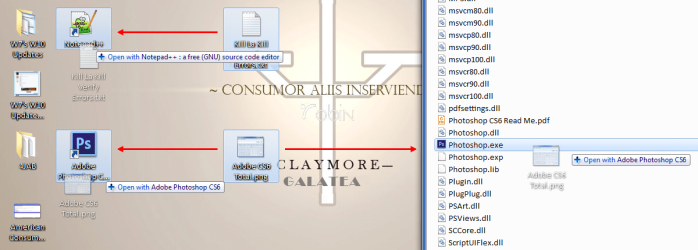
You can drag files to the:

  • Appropriate shortcut (or program icon) and they will open with that program
  • Program's window button, wait for it to popup and then drop the file into the window (as mentioned by Ascaris)
Drop on Desktop Shortcut (Trimmed).png
You can't drag files onto the "Pinned Taskbar buttons/icons" to open them (they get added to the "Jump List").

You can also combine the keyboard and mouse:

  • "Ctrl + Left mouse button" will copy the file where you release the button
  • "Shift + Left mouse button" will move the file where you release the button
  • "Alt + Left mouse button" will create a shortcut for the file where you release the button
If you "Drag & Drop" using the "Right mouse button", you will get a popup options menu when you release the button.

That's good news about virtual windows. Your image seems just to list several (what I interpret as the) names of windows. Do Windows desktops slide completely away (complete with a set of windows, files, programs etc. all still open) and become completely replaced with a new desktop, complete with other files, windows, programs etc. all previously opened and ready for immediate use etc., and then back to the earlier desktop with its windows, files, programs etc. still open for immediate use? And can a file or folder etc. living on one virtual window be dragged and dropped to anothe virtual window without revealing those windows? If so, that's great news. I will investigate.

EDIT: I have just noticed Desktops v2.0 from MIcrosoft’s Windows Sysinternals site. Any view on that?
"VirtuaWin + KvasdoPager" works basically the same way as the Linux Virtual Desktops.

"KvasdoPager" is a toolbar.
You click on the desktop you want to switch to (you can set keyboard shortcuts if you want).
The current window disappears and is replaced with the chosen one.
Each virtual desktop remembers the windows that are open on it.

Windows Explorer, MS Office programs and almost every other program will only appear on the virtual desktop that you opened them on.
Some programs (e.g. "Macrium Reflect") and system tools (e.g. "Create a System Repair Disc") will appear on every virtual desktop. :(

You can "Drag & Drop" the icons shown in the "KvasdoPager" toolbar to other virtual desktops and they will be transferred to the chosen virtual desktop.
VirtuaWin 02.gif
Note:
I normally hide the VirtuaWin Notification icon.
I've never tried the Sysinternals virtual desktop program, so I can't comment on it.
The other Sysinternals programs I've tried are excellent (e.g. Process Explorer) so I'd expect their virtual desktop program to be good too. :)
 
Last edited:

My Computer My Computer

At a glance

W7 Ultimate SP1, LM19.2 MATE, W10 Home 1703, ...AMD Phenom II x6 1100T, 3.3 GHz12GB DDR3 1333 G-Skill (4GB x 2), G-Skill (2G...NVIDIA GeForce GTX 660
Computer type
PC/Desktop
Computer Manufacturer/Model Number
n/a
OS
W7 Ultimate SP1, LM19.2 MATE, W10 Home 1703, W10 Pro 1703 VM, #All 64 bit
CPU
AMD Phenom II x6 1100T, 3.3 GHz
Motherboard
ASUS M4A88T-M/USB3 (AM3)
Memory
12GB DDR3 1333 G-Skill (4GB x 2), G-Skill (2GB x 2)
Graphics Card(s)
NVIDIA GeForce GTX 660
Sound Card
Realtek?
Monitor(s) Displays
Samsung S23B350
Screen Resolution
1920x1080
Hard Drives
WD Green 2TB (SATA), WD Green 3TB (SATA), WD Blue 4TB (SATA), WD Blue 6TB (SATA)
PSU
Cooler Master
Case
Antec GX300 Tower
Cooling
3x Antec TRICOOL 120mm Fans
Mouse
Wired Optical
Internet Speed
DSL
Antivirus
Avast
Browser
Pale Moon (64 bit)
Other Info
2018-12-27 Upgraded HDDs
2015-12-10 Upgraded case, graphics card, storage
2015-08-15 Upgraded motherboard & RAM
2015-07-15 Upgraded LM17.1 to LM17.2
Thanks folks. I'm working through the various suggestions.
 

My Computer My Computer

At a glance

Windows 7 Home Premium 64bitIntel Pentium Edition G3220 3.0 GHz8 GB DDR3 1600 MHz DIMMNot Known
Computer type
PC/Desktop
Computer Manufacturer/Model Number
Gigabyte ATX case with 500 W power supply GZ-M1
OS
Windows 7 Home Premium 64bit
CPU
Intel Pentium Edition G3220 3.0 GHz
Motherboard
Gigabyte Socket 1150 MicroATX Mot Ultra Durable, GA-H81M-S2H
Memory
8 GB DDR3 1600 MHz DIMM
Graphics Card(s)
Not Known
Sound Card
Not known
Monitor(s) Displays
Samsung LS24D590 23.6"
Screen Resolution
1920 x 1080
Hard Drives
256 GB Solid State Drive (C: on which Windows 7 is installed)-
1 TB internal conventional HD (X:)-
Two WD "Elements" " 2TB USB drives as backups
PSU
500 W
Case
Gigabyte ATX case
Cooling
Several fans!
Keyboard
Accuratus 301 USB Compact, white.
Mouse
Microsoft Basic Optical Mouse v2.0, two-button, tethered
Internet Speed
10 to 12 Mb per second
Antivirus
Kaspersky Internet Security 2016, Malwarebytes (paid)
Browser
Firefox (ocassionally Safari)
Other Info
The 256 GB SSD (C:) also has Adobe Photoshop CS6 and InDesign CS6, MS Office, Adobe Lightroom, and other small programs.
Back
Top