Solitaire: Windows does not recognize that the game is over!

frightwriter

New member
Local time
5:21 AM
Messages
2
In Windows 7 home premium 64 bit, when you reach what you KNOW is the end of the game, the game does not recognize that there are no more plays left! And when you click on "hint", it will highlight the deck, even though there are definitely no more plays available! It sucks because it never recognizes that the game is over! If I need to, I can take screen shots of what I mean, but I don't think you can post them here in the forum. But I will be glad to send them to someone. Has anyone else had this problem?
 

My Computer My Computer

OS
win 7 home premium
Never heard of that happening. Perhaps you can turn it off then on again from "Turn Windows Features On or Off".
 

My Computer My Computer

Computer Manufacturer/Model Number
Dell XPS
OS
Windows 7 Pro 64bit
CPU
Intel Core 2 Quad Q6600
Motherboard
Dell Inc 0PP150 (Socket 775)
Memory
4GB
Graphics Card(s)
1024MB GeForce GTS 250 (PNY)
Monitor(s) Displays
Dell 22in
Screen Resolution
1680x1050
Hard Drives
313GB Seagate ST332062 0AS SCSI Disk Device (SCSI)
733GB Western Digital WDC WD75 00AACS-00D6B SCSI Disk Device (SCSI)
Keyboard
Logitech G11
Mouse
Logitech G5
Internet Speed
3Mb/s
Other Info
And Acer Aspire One
Na, it doesn't matter what you do, it won't fix itself. I think its a flaw in the program. But thanks for the reply!
 

My Computer My Computer

OS
win 7 home premium
Usually when this happens you'll find that more moves are in fact available by pulling cards back down from the 4 finished piles onto your working stack which may enable you to get one or more cards from top left out. But I agree sometimes I can't even manage to do that.
 

My Computer My Computer

OS
Windows Vista Home 32 bit
Never heard of this problem before... have you tried using the file's bracket (at the top) and clicked on new game at the end? if not, you might need to contact Windows and tell them about the problem.
 

My Computer My Computer

Computer Manufacturer/Model Number
Hewlett-Packard
OS
Windows 7 Professional 32-bit (6.1, Build 7600)
Memory
4096MB RAM
Graphics Card(s)
Radeon ATI HD4870
Monitor(s) Displays
NVIDIA GeForce GT220
Screen Resolution
1680 x 1050
I too have had this problem. And I agree completely with Frightwriter. In addition, I have been keeping track of the dealt hands and Windows 7 issues the same hands over and over again. Most of the repeaters are losing hands. Think about it. If the computer can instantly issue a winning hand if you ask it too then it can also conjure up a losing hand just as easily. Anytime I get close to going to 54% I start getting a lot of losing hands and they are always the same ones I have lost several times before.
 

My Computer My Computer

Computer type
PC/Desktop
OS
Windows 7 Ultimate x64
It is a confirmed bug, at least by me. I play Solitaire all the time and I just hate it when there are no more plays left, but tapping the hint key keeps sending you through the deck with no playable cards at all. Yep, Windows 7 64 bit. We cannot call Microsoft about this, for one thing they don't care. Solitaire is a very old game that has come with Windows for ages. I doubt if the original programmer is still around and they sure will not pay any developer to "fix it" when they are now pushing Windows 10, for "free", and have already eliminated Solitaire from Windows along with any kind of DVD player. Sad, the end of a somewhat generous Windows manufacturer. Now it is all about turning PCs into cellphones where Microsoft is the OS owner and handler, not the owner anymore. And yeah, you will have to pay for it too.
 

My Computer My Computer

Computer type
PC/Desktop
Computer Manufacturer/Model Number
Built from Maximum PC magazine article
OS
Windows 10 Pro via free update.
CPU
Intel Core i7 3820
Motherboard
Gigabyte X79-UP4
Memory
16,384 MB DDR3-SDRAM
Graphics Card(s)
NVIDIA GeForce GTX 770
Hard Drives
1) - C:/ 500 Gb Samsung SSD 840
2) - 1 Tb SATA drives
1) - 4 Tb SATA Drive
1) - t Tb USB External BU Drive
Antivirus
Avast Free Antivirus 2014.9.0.2006
Browser
Firefox
...tapping the hint key keeps sending you through the deck with no playable cards at all.
I don't play games, but in my testing of what you described...
...I requested a hint and the deck is highlighted
...I clicked on the on the deck
...I requested a hint and the deck is highlighted
...I clicked on the on the deck
This was repeated until I finally got:

s.png
 

My Computer My Computer

Computer type
Laptop
Computer Manufacturer/Model Number
Employer provided Dell Latitude
OS
W7 Pro SP1 64bit
CPU
i7
Memory
8GB
Graphics Card(s)
Intel HD Graphics
Hard Drives
crappy SSD
Antivirus
Employer mandated Symantec Endpoint Protection
Browser
Pale Moon 64bit, IE11 64bit & Chrome 64bit
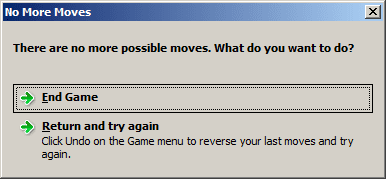
It is not every game where you see the hint bug,. You play until you win or see the "No More Moves" window, then end game, play again, or play new game. Mine looks a little different than yours, but it looks like you are not using Aero desktop. Every 1 out of 5 or 10 games I will get the endless hint. Like this:

You play Solitaire and find that you have gone through the deck twice and nothing has changed, there are no cards to play. Just to be sure I didn't miss anything (I might be watching TV at the same time.), I will tap the H button. The deck glows to tap or enter. Next card comes up, no moves to play. Tap H again, deck glows, no moves. Rinse and repeat, several times, give up and close game.

Sometimes I will miss a move, but when it becomes apparent, anything, even moving a card up to the stack deck top right, I would have to run all the way through the play deck again before hints should show me there are no more moves. And it does not happen. It is ridiculous and funny, you tap h, deck glows, advance card, tap h, deck glows, until you reach the end, then the empty deck glows, reset the deck, tap h, deck glows, next card, tap h, deck glows, until you reach the end of the deck again. After going through the deck twice, with no moves at all, the game should end and it does not. The hint button keeps you cycling through the play deck, forever.

Not every game. Out of 10 games for sure I will see this at least once, usually 2 or more times. Windows 7 Ultimate, 64 bit.

This is a silly issue, not a serious one. But we come to expect perfection from our PCs and when it does not happen such as in this case, it is unsettling. And it is not like Microsoft would ever "fix it". They have already taken it out of Windows 8 and 10 and charge you for it, forever, if you wanted to play Windows Solitaire.

EDIT: If this is a real bug, I should be able to Google for it and am not having good luck, cannot find anything on Google about this. But I have been frustrated by it for months! Go figure. :(

EDIT 2: Tell you what, next time this happens, I will try to grab a FRAPS video of it and put it on youtube. Then you guys can see if there is a play on the board that I just do not see. I doubt it since the hint keeps cycling the play deck and nothing else.

 
Last edited:

My Computer My Computer

Computer type
PC/Desktop
Computer Manufacturer/Model Number
Built from Maximum PC magazine article
OS
Windows 10 Pro via free update.
CPU
Intel Core i7 3820
Motherboard
Gigabyte X79-UP4
Memory
16,384 MB DDR3-SDRAM
Graphics Card(s)
NVIDIA GeForce GTX 770
Hard Drives
1) - C:/ 500 Gb Samsung SSD 840
2) - 1 Tb SATA drives
1) - 4 Tb SATA Drive
1) - t Tb USB External BU Drive
Antivirus
Avast Free Antivirus 2014.9.0.2006
Browser
Firefox
You could play solitaire in a free XP virtual machine :-)
 

My Computer My Computer

Computer type
Laptop
Computer Manufacturer/Model Number
Employer provided Dell Latitude
OS
W7 Pro SP1 64bit
CPU
i7
Memory
8GB
Graphics Card(s)
Intel HD Graphics
Hard Drives
crappy SSD
Antivirus
Employer mandated Symantec Endpoint Protection
Browser
Pale Moon 64bit, IE11 64bit & Chrome 64bit
Yeah, could you imagine? You would need a monster computer and a lot of time to wait for virtual XP to come up for a solitaire game. :confused:

I just played at least 10 games in a row and could not get the bug to return. This is frustrating because I have seen this so many times. I wanted to bring it up, capture it in a video file, and show you and now cannot do it.

Speculation: I do have issues with Windows at times. Example is write email in Windows Live Mail and click the Send button. Nothing happens, message does not close, message does not send. Alt+S does send the messages. Rebooting fixes this issue for a while. Running system file checker reveals "Windows has found problems and fixed some of theme", meaning there are things that were not fixed. Peeking at the log is to cryptic to be of help.

Maybe this is one of those bugs, not sure, but when it comes back, I am going to capture it and post it for you guys to see. Once the challenge has been put out there, prove it, then I have to try and prove it. If I can. :rolleyes:
 

My Computer My Computer

Computer type
PC/Desktop
Computer Manufacturer/Model Number
Built from Maximum PC magazine article
OS
Windows 10 Pro via free update.
CPU
Intel Core i7 3820
Motherboard
Gigabyte X79-UP4
Memory
16,384 MB DDR3-SDRAM
Graphics Card(s)
NVIDIA GeForce GTX 770
Hard Drives
1) - C:/ 500 Gb Samsung SSD 840
2) - 1 Tb SATA drives
1) - 4 Tb SATA Drive
1) - t Tb USB External BU Drive
Antivirus
Avast Free Antivirus 2014.9.0.2006
Browser
Firefox
I was able to repeat the issue. After pressing H and Enter enough times to see that it things were not going to change, I restarted that same game and let the computer play it thru to the end via hints. The computer was unable to win - the hints stopped - I never got the "...no more possible moves..." screen.
 

My Computer My Computer

Computer type
Laptop
Computer Manufacturer/Model Number
Employer provided Dell Latitude
OS
W7 Pro SP1 64bit
CPU
i7
Memory
8GB
Graphics Card(s)
Intel HD Graphics
Hard Drives
crappy SSD
Antivirus
Employer mandated Symantec Endpoint Protection
Browser
Pale Moon 64bit, IE11 64bit & Chrome 64bit
You got the hint bug to show up? Oh thank goodness! I played 10 games in a row, sure I would spot the bug and could screencap it for you, and the bug never showed up.

That's right, you do not get the "No More Moves" screen and there are no moves left to play. Hints do not actually stop though. I can tap the h key and the deal deck will always glow, telling me to use the deck. But every card turn of the play deck never reveals any moves you can play. Every press of the h key makes the play deck glow. All the way to the end of the deck, restart the deck, all the way to end of deck again, repeat infinity. Hint always shows the play deck has next move, but there are no moves in the play deck at all. Not in 3 card deal Solitaire.

Well, I really do not feel like making the video, this is an issue you can prove if you just play Solitaire over and over, you will see it. I did find this bug in Google, that is how I got to this page. But subsequent searches could not find anything further. Bug proven, no apparent solution or fix.

BTW, there are numerous links on youtube to get the game pack back in Windows 8 and 10. Some people have created game installers that do work quite well to restore the games.

Thanks for taking the time, UsernameIssues. You have a very high rating on this forum and the fact that you took the time to confirm this bug shows just how you go that rating. Nice work! This is an old thread and I did not expect any answers on it. Nice to at least confirm it. Now I just have to live with it. :rolleyes:
 

My Computer My Computer

Computer type
PC/Desktop
Computer Manufacturer/Model Number
Built from Maximum PC magazine article
OS
Windows 10 Pro via free update.
CPU
Intel Core i7 3820
Motherboard
Gigabyte X79-UP4
Memory
16,384 MB DDR3-SDRAM
Graphics Card(s)
NVIDIA GeForce GTX 770
Hard Drives
1) - C:/ 500 Gb Samsung SSD 840
2) - 1 Tb SATA drives
1) - 4 Tb SATA Drive
1) - t Tb USB External BU Drive
Antivirus
Avast Free Antivirus 2014.9.0.2006
Browser
Firefox
Thanks for the kind words. I was planning on a video or two after testing a few more things.

I used an AutoIt3 script to send the "H" and "ENTER" keys:
Code:
HotKeySet("{ESC}", "_end_this")

WinMove("Solitaire", "", 0, 0)

While 1
    WinActivate("Solitaire")
    WinWaitActive("Solitaire")
    Send("h")
    Sleep(100)
    Send("{ENTER}")
    Sleep(100)
    If WinExists("No More Moves") Then
        WinActivate("No More Moves")
        WinWaitActive("No More Moves")
        Send("{ENTER}")
        WinWaitClose("No More Moves")

        WinWait("Game Lost")
        WinActivate("Game Lost")
        WinWaitActive("Game Lost")
        Send("{ENTER}")
        WinWaitClose("Game Lost")
    EndIf

    If WinExists("Game Won") Then
        WinActivate("Game Won")
        WinWaitActive("Game Won")
        Send("{ENTER}")
        WinWaitClose("Game Won")
    EndIf
WEnd

Func _end_this()
    Exit
EndFunc
As you noted, sometimes it took a few games for the issue to show up. The videos only show the problem, not the games that were played until the issue appeared. The script can be used to find a problematic game. Once found, the script can be ended by pressing the ESC key. Then select Game > New Game > Restart this game and start the script again (as shown in the videos). If someone finds this thread and wants to play with the script, here is some info on using AutoIt3.


Draw 1


Draw 3
 

My Computer My Computer

Computer type
Laptop
Computer Manufacturer/Model Number
Employer provided Dell Latitude
OS
W7 Pro SP1 64bit
CPU
i7
Memory
8GB
Graphics Card(s)
Intel HD Graphics
Hard Drives
crappy SSD
Antivirus
Employer mandated Symantec Endpoint Protection
Browser
Pale Moon 64bit, IE11 64bit & Chrome 64bit
url

Wow, you nailed it! You see, this is why I come here for answers and I often do my part by helping those that I can. There is a certain "caliber" of individual that comes to sevenforums to help and assist. Who else would take the time to script Solitaire and then capture it for all to see? What did you use, Windows Scripting Host? I had to drop the ball at batch files, the scripts were to far advanced for me to use. You did a great job, though, UsernameIssues. You *never* see answers like this at Yahoo Answers or fixya.com. Hah hah, LOL! :party:

I did save the script and this post, I cannot help but to save particularly interesting posts and files, and this, this was a commendable effort. I had planned to save only the error itself by tapping h, Enter repeatedly, and record with FRAPS to show no more plays and no end game present. Your video was quite clear, the same 3 cards, 9, 4, 8 kept repeating with no end game or win. *Very* good.

Now there is no question about it. The hint bug in Microsoft Solitaire is clearly documented and illustrated. I had to take a break from Law & Order; Special Victims Unit to read this, yeah, it was actually better than the 17th season's drama episodes, although the 4 of them are very good. Nothing we can do about it and Microsoft is retiring much of the "free entertainment" in Windows in favor for a pay as you play approach. Will not hurt me as I will install anything I like, but it sure will hurt everyone else. Thank you, UsernameIssues. You did an awesome job of illustrating the problem so that at least those that come later will know it is a true, documented bug. Back to SVU, good night! ;)

EDIT: Here is a url to a page where the fellow seems to have the Solitaire hint system figured out. He is also "bugged" about this bug and commented on it. Worth a read as it is a very informative post. Thanks again name issue. :geek:

Solitaire - It Just Bugs Me!
 

My Computer My Computer

Computer type
PC/Desktop
Computer Manufacturer/Model Number
Built from Maximum PC magazine article
OS
Windows 10 Pro via free update.
CPU
Intel Core i7 3820
Motherboard
Gigabyte X79-UP4
Memory
16,384 MB DDR3-SDRAM
Graphics Card(s)
NVIDIA GeForce GTX 770
Hard Drives
1) - C:/ 500 Gb Samsung SSD 840
2) - 1 Tb SATA drives
1) - 4 Tb SATA Drive
1) - t Tb USB External BU Drive
Antivirus
Avast Free Antivirus 2014.9.0.2006
Browser
Firefox
The scripting language is AutoIt3. There is a link to a post in the paragraph above the first video that details how to download/use scripts like this. If you get bored sometime - you can write a script that will play Solitaire for you. AutoIt3 (and most other scripting tools) can "see" pixel patterns - so it can "see" the cards.

Many years ago, I had to take a computer class at work. I had been working with computers for years, but there was this new thing called a mouse. We spent the first part of the class playing Solitaire. We learned how to start the game, set the options, position the window and get comfortable with drag & drop.... lots and lots of drag & drop.
 

My Computer My Computer

Computer type
Laptop
Computer Manufacturer/Model Number
Employer provided Dell Latitude
OS
W7 Pro SP1 64bit
CPU
i7
Memory
8GB
Graphics Card(s)
Intel HD Graphics
Hard Drives
crappy SSD
Antivirus
Employer mandated Symantec Endpoint Protection
Browser
Pale Moon 64bit, IE11 64bit & Chrome 64bit
That is a good heads up. Thank you buddy, UsernameIssues. I don't know when and where I will need this new scripting tool, but it is a comfort to know that if I do, I know where to get it. I would say this has been excellent and determined work to prove or disprove the Solitaire hint bug, and for all intents and purposes, this case is closed. Thank you kindly for your help.
 

My Computer My Computer

Computer type
PC/Desktop
Computer Manufacturer/Model Number
Built from Maximum PC magazine article
OS
Windows 10 Pro via free update.
CPU
Intel Core i7 3820
Motherboard
Gigabyte X79-UP4
Memory
16,384 MB DDR3-SDRAM
Graphics Card(s)
NVIDIA GeForce GTX 770
Hard Drives
1) - C:/ 500 Gb Samsung SSD 840
2) - 1 Tb SATA drives
1) - 4 Tb SATA Drive
1) - t Tb USB External BU Drive
Antivirus
Avast Free Antivirus 2014.9.0.2006
Browser
Firefox
Empty Stack Fault

There is a fault in Spider Solitaire (1 suit). It does not allow you to deal a new row if there are empty stacks. but it is possible to have fewer than 10 cards left exposed, making it impossible to put 1 in all the stacks. Then the game hangs and you can't continue. I had 5 tricks won and 3 rows to deal. So there were only 9 cards exposed (there were 3 outstanding tricks with a total of 39 cards; there are 10 rows so there were 3x10 + 9 cards left to make tricks from). I have often had 7 tricks, 1 row left to deal and only 3 cards exposed.

The rule seems unnecessary. Why can't you deal a single card on a blank stack? Then you can at least complete the game.
 

My Computer My Computer

Computer type
PC/Desktop
OS
7
I realise this is an old thread, but I think it should be pointed out that neither of the examples above provided by UsernameIssues actually demonstrates a bug. Both the Draw 1 and Draw 3 games have further possible moves.

Draw 1

  1. Take 3 hearts back off the 1st top pile and place it on 4 clubs
  2. Take 2 clubs and place it on 3 hearts
  3. Now a new card is exposed (was beneath 2 clubs)
Draw 3

  1. Take 5 clubs + 4 hearts (together) and place them on 6 hearts
  2. Take 6 diamonds (now exposed) and place on top pile (on top of 5 diamonds)

When Solitaire does not signal that the game has no more possible moves, I have always found another move. It just takes some persistence.
 

My Computer My Computer

Computer type
PC/Desktop
OS
Win 10 Pro x64
A very old thread but wanted to point out what user "protogen" back in 2019 said does not prove the bug does not exist.

I have managed to install these Win 7 games on my Win10 laptop a couple of years ago and can confirm, by experience, that the bug really does exist but it is not Win 7 related.

There is also one other type of bug that I have found and that is in the Spider Solitaire: when the game says there are no more moves you can keep on trying and rearranging cards and finally find a way to win the game. This has happened only a couple of times though.
 

My Computers My Computers

System One System Two

  • Computer type
    Laptop
    Computer Manufacturer/Model Number
    Dell
    OS
    Win 7 Pro 64bit, Win 10 Pro 64bit
  • Computer type
    PC/Desktop
Back
Top