Only safe mode opens on reboot or startup

Good thoughts Anak! Taking some of that advice. Me & $M MSE are not good buddies but at least its better than e.g. AVG. I just do not like auto installs on the sneak & never saw much active protection with MSE but absent something better it helps.

FYI, the "reboot>F*" was intended to simply mean reboot then tap F8 but I had inadvertently hit the caps key with my big fumbling fingers (horrible for typing!) and wound up with a F* instead of a F8. Better edit it, I'd say. Eh!

You input is sincerely recognized and appreciated. James:D
 

My Computer My Computer

Computer type
PC/Desktop
Computer Manufacturer/Model Number
gateway
OS
win7 Home Premium x64
Antivirus
avast
Browser
Firefox
Alright guys, went the clean startup route first, w/o Avast, and a surprise (to me) was lurking therein.

The unchecked Load Startup box presented no problem.

But the services tab did present an odd situation. I think the Hide all $M services box worked fine but the "disable all" button for other running services presented an oddity (right<>wrong?). It did not Hold! Hmmm.

After restart on try one (1), two (2) services boxes still had check marks. Ohh!, I thought, and then did the process again. After the same process, and restart, about 2/3 - 3/4 of the non-$M services were still checked. Double Hmmm!

So in sum, somethings wrong in Denmark (as they say).

What do you guys think?

Now addressing the DNS possibility but the other two (2) PC's on the same server are fine, soooo???


Talk later, James:confused::huh:
 

My Computer My Computer

Computer type
PC/Desktop
Computer Manufacturer/Model Number
gateway
OS
win7 Home Premium x64
Antivirus
avast
Browser
Firefox
I repeat my adopted signature: "The only true wisdom is in knowing you know nothing. Socrates.

Bottom line is that I acquired cold feet (yup! I am a scardey cat), when in the process of doing these dns routines I was/am nervous about. To wit:

Am I also changing the dns for the room 1 PC 3? What about PC 2 also? Gaaaasp!

If so, what then?

Myself, with PC2, am relaying heavily on that working computer.

Another person, with PC 3, is relying on that working computer.

The possibility exits (in my mind) that there is a possibility I could disrupt both other PC's connections just because PC1 is semi-toast connections-wise.

Am open for input, especially in this forum, but always stay on the side of caution when warranted in my mind.

No offense at all intended, James:thumbsup:

 
Last edited:

My Computer My Computer

Computer type
PC/Desktop
Computer Manufacturer/Model Number
gateway
OS
win7 Home Premium x64
Antivirus
avast
Browser
Firefox
As to post #22:
When you disable certain services, you're only disabling them for that session; If you restart Windows the services you thought should be still disabled will in fact restart themselves for the new session.


And, Post #23:
"Am I also changing the dns for the room 1 PC 3? What about PC 2 also? Gaaaasp!"
No.

I am open for correction, but the only way you can set-up all three machines to use the same DNS is if you set it through your router. If you set one machine differently from the other two only it will use the different DNS.

Have you tested PC3 and 2 after changing the DNS numbers for PC1; And have you tested PC1 with the new numbers?


Something else you can try, this describes how to do a hard re-set:

  • Shut all three PC's and the router off.

  • After you shut off the router pull the power adapter plug.

  • Then go to each PC and pull their power cords out. Then push their power buttons as if you want to start them, hold for about 5 seconds. You might see the back-light for the power button light up, hold until it goes out.

  • Walk away for at least 15 minutes and do anything else.

  • Come back and plug everything back in and restart the three PC's and router.

  • Test PC1 for connectivity first, then PC2 and 3.

  • Any improvement?


Some questions:
Where did you get the info for creating this safe-mode short-cut, have a link?


Have you thought of running a restore point to before you applied this short-cut?
 

My Computer My Computer

Computer type
PC/Desktop
Computer Manufacturer/Model Number
Gateway DX4831-01e (Mid-Tower Desktop)
OS
Originally Win 7 Hm Prem x64 Ver 6.1.7600 Build 7601-SP1 | Upgraded to Windows 10 December 14, 2019
CPU
Intel i3 530 2.93GHz, 2933MHz 2 Cores 4 Logical Processors
Motherboard
Gateway H57M01 133 megahertz
Memory
6GB of 1,333MHz DDR3 SDRAM
Graphics Card(s)
32MB Intel Graphics Media Accelerator HD IGChip
Sound Card
Realtek High Definition Audio
Monitor(s) Displays
Gateway HX2000 20inch TFT active matrix TN
Screen Resolution
1600 x 900 x 59 hertz
Hard Drives
WDC WD10EADS-00M2B0 [HDD] (1000.20 GB) -- drive 0,
HL-DT-ST DVDRAM GH41N [CD-ROM dr]
Four card readers, and Four USB 2.0
PSU
300watts.
Case
Mid-Tower Desktop
Cooling
Stock from Gateway
Keyboard
Natural Ergonomic Keyboard 4000, see Other Info
Mouse
Orig. Gateway wore out now using Insignia USB wired optical
Internet Speed
Vz FIOS 10ms png 57.64Mbps down 65.53Mbps up Speedtest.org
Antivirus
Zamana Anti-logger with Anti-malware, MSE, Windows Firewall,
Browser
IE11.0.9600.19399-Upd ver11.0.135, Firefox 68.0.1 x64
Other Info
System Specs by Belarc.

BIOS: American Megatrends Inc. P01-A0 11/17/2009

Replaced the MS 'Natural' Standard PS/2 Enhanced 101-102 Keyboard with a new Natural Ergonomic Keyboard 4000 on August 1st 2014.

Canon Pixma MG3222 Printer.

Updated to IE11 on 12102015 | Fios Quantum Router g1100

Additional AV: SpywareBlaster, manual Mbam, SAS
Hello out there. Been busy collecting the ipfig /all cmd info for you guys and which I copied & printed out on my Oo office program. Di this for the PC1 and the PC2 to be able to compare since PC2 connects Normal Mode and PC1 does not.

The information under the title "DNS SERVERS" is identical: DNS Servers.........2001:558:feed::1
2001:558:feed::2
75.75.75.75
75.75.76.76
There are some differences e.g. PC1 "Ethernet adapter Local Area Connection 2:"
PC2 "Ethernet adapter Local Area Connection 3:"

I have the full documents of all the ipfig information for both pc's but did not know if it was a good idea or not to post everything here on this public forum.

Tell me what you want to know & I can post it. If the best choice is still to try the google dns, we can go for that.

Hope this info helps you guys out with hard pertinent information for decisions rather than quality educated guesses.

Thanks again, James

Edit: the information for safe mode: http://www.sevenforums.com/tutorials/69585-safe-mode.htmlhttp://www.sevenforums.com/tutorials/61430-sleep-shortcut-create.html

had two prior sys-restore points. used one> did not work, so came to this forum as I am now.

Will try your guys possible fixes if you still think its best after getting this dns info.
 
Last edited:

My Computer My Computer

Computer type
PC/Desktop
Computer Manufacturer/Model Number
gateway
OS
win7 Home Premium x64
Antivirus
avast
Browser
Firefox
If we would request the ipconfig /all report just blur out what you believe to be sensitive.

Those 75's and 76's are okay they're comcast's servers, same with the dns servers info. Those Ethernet adapter differences are normal, it's how the adapter can tell the machines apart. Try running the google dns's.

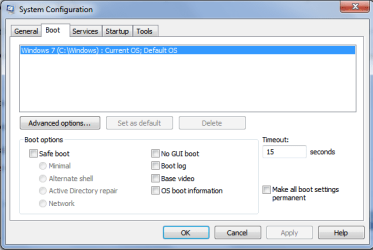
What I would like to see is your general and boot tabs in msconfig, use this to help post the screenshots.
Here's mine; The reason there is blue in the selective startup section is I have some of the services and startup items stopped:

scgen.PNG

scboot.PNG
 

My Computer My Computer

Computer type
PC/Desktop
Computer Manufacturer/Model Number
Gateway DX4831-01e (Mid-Tower Desktop)
OS
Originally Win 7 Hm Prem x64 Ver 6.1.7600 Build 7601-SP1 | Upgraded to Windows 10 December 14, 2019
CPU
Intel i3 530 2.93GHz, 2933MHz 2 Cores 4 Logical Processors
Motherboard
Gateway H57M01 133 megahertz
Memory
6GB of 1,333MHz DDR3 SDRAM
Graphics Card(s)
32MB Intel Graphics Media Accelerator HD IGChip
Sound Card
Realtek High Definition Audio
Monitor(s) Displays
Gateway HX2000 20inch TFT active matrix TN
Screen Resolution
1600 x 900 x 59 hertz
Hard Drives
WDC WD10EADS-00M2B0 [HDD] (1000.20 GB) -- drive 0,
HL-DT-ST DVDRAM GH41N [CD-ROM dr]
Four card readers, and Four USB 2.0
PSU
300watts.
Case
Mid-Tower Desktop
Cooling
Stock from Gateway
Keyboard
Natural Ergonomic Keyboard 4000, see Other Info
Mouse
Orig. Gateway wore out now using Insignia USB wired optical
Internet Speed
Vz FIOS 10ms png 57.64Mbps down 65.53Mbps up Speedtest.org
Antivirus
Zamana Anti-logger with Anti-malware, MSE, Windows Firewall,
Browser
IE11.0.9600.19399-Upd ver11.0.135, Firefox 68.0.1 x64
Other Info
System Specs by Belarc.

BIOS: American Megatrends Inc. P01-A0 11/17/2009

Replaced the MS 'Natural' Standard PS/2 Enhanced 101-102 Keyboard with a new Natural Ergonomic Keyboard 4000 on August 1st 2014.

Canon Pixma MG3222 Printer.

Updated to IE11 on 12102015 | Fios Quantum Router g1100

Additional AV: SpywareBlaster, manual Mbam, SAS
Hey, on the ipconfig report: Trouble is I do not really know what is or is not sensitive. Is a private look-see by you ok to determine what is sensitive? Its ok with me, just thinking I do not want "god and everybody" to see all this stuff.

Ok I will run the Google dns and see

My general and boot msconfig's are exactly the same as yours. Also am perfecting my screenshot abilities.

gonna redo the IP config docs info, cos was back and forth and fixing which likely means I goofed. I know me, UC!

Hey, rvcjew , we are all friends here. Say Hi once in a while:shock:

As always, really do appreciate your help guys. mean that!! Jim:)
 

My Computer My Computer

Computer type
PC/Desktop
Computer Manufacturer/Model Number
gateway
OS
win7 Home Premium x64
Antivirus
avast
Browser
Firefox
Hey, on the ipconfig report: Trouble is I do not really know what is or is not sensitive. Is a private look-see by you ok to determine what is sensitive? Its ok with me, just thinking I do not want "god and everybody" to see all this stuff.

Ok I will run the Google dns and see

My general and boot msconfig's are exactly the same as yours. Also am perfecting my screenshot abilities.

gonna redo the IP config docs info, cos was back and forth and fixing which likely means I goofed. I know me, UC!

Hey, rvcjew , we are all friends here. Say Hi once in a while:shock:

As always, really do appreciate your help guys. mean that!! Jim:)

Hey James, sorry been busy lately. The only thing you should need to blur would be your public IP address but if your address starts with 192.168. then your okay to show it as your behind a router. To check, Google "what's my ip" and Google well tell you your public IP. If it matches the number in the report for ipconfig /all then blur it. Hope this helps.
 

My Computer My Computer

Computer type
PC/Desktop
Computer Manufacturer/Model Number
Custom
OS
10 Pro x64
CPU
Ryzen 9 3900X
Motherboard
Asrock x370 Tachi
Memory
64GB(4x16GB) DDR4
Graphics Card(s)
EVGA 1080ti FTW3
Sound Card
ASUS Xonar Essence STX (V4 Bursons), ODAC rev B, NFB-11, O2
Monitor(s) Displays
3xASUS PB278Q/R, Optoma HD142X
Screen Resolution
3x1440p, 1080p
Hard Drives
512GB 850 EVO(OS, Programs)
4TB (Movies)
3TB (Downloads)
3TB (Programs)
1TB HDD (Games)
2x6TB R1 (videos)
PSU
AX760
Case
Fractal Define R5
Cooling
NH-D15S
Keyboard
Massdrop Ctrl with Box Navy's
Mouse
G903, Alioth XXL Mat
Internet Speed
280/40
Antivirus
MBAM, ESET
Browser
Canary 64 Bit
Other Info
I also own a Thinkpad P50 Xeon 4K, X220T, X1C5
Let us know how the google dns made out.

I'm going to be busy all day today, hanging a new storm door on old construction, other errands and chores probably won't be able to reply until dark sometime.

The more this drags on, the more I'm thinking to do a repair install on pc1, but you'll need an installation disk, do you have one?
 

My Computer My Computer

Computer type
PC/Desktop
Computer Manufacturer/Model Number
Gateway DX4831-01e (Mid-Tower Desktop)
OS
Originally Win 7 Hm Prem x64 Ver 6.1.7600 Build 7601-SP1 | Upgraded to Windows 10 December 14, 2019
CPU
Intel i3 530 2.93GHz, 2933MHz 2 Cores 4 Logical Processors
Motherboard
Gateway H57M01 133 megahertz
Memory
6GB of 1,333MHz DDR3 SDRAM
Graphics Card(s)
32MB Intel Graphics Media Accelerator HD IGChip
Sound Card
Realtek High Definition Audio
Monitor(s) Displays
Gateway HX2000 20inch TFT active matrix TN
Screen Resolution
1600 x 900 x 59 hertz
Hard Drives
WDC WD10EADS-00M2B0 [HDD] (1000.20 GB) -- drive 0,
HL-DT-ST DVDRAM GH41N [CD-ROM dr]
Four card readers, and Four USB 2.0
PSU
300watts.
Case
Mid-Tower Desktop
Cooling
Stock from Gateway
Keyboard
Natural Ergonomic Keyboard 4000, see Other Info
Mouse
Orig. Gateway wore out now using Insignia USB wired optical
Internet Speed
Vz FIOS 10ms png 57.64Mbps down 65.53Mbps up Speedtest.org
Antivirus
Zamana Anti-logger with Anti-malware, MSE, Windows Firewall,
Browser
IE11.0.9600.19399-Upd ver11.0.135, Firefox 68.0.1 x64
Other Info
System Specs by Belarc.

BIOS: American Megatrends Inc. P01-A0 11/17/2009

Replaced the MS 'Natural' Standard PS/2 Enhanced 101-102 Keyboard with a new Natural Ergonomic Keyboard 4000 on August 1st 2014.

Canon Pixma MG3222 Printer.

Updated to IE11 on 12102015 | Fios Quantum Router g1100

Additional AV: SpywareBlaster, manual Mbam, SAS
No problem guy. You both have a life as do I. I am grateful that you both take time to help others like myself.

One big thing about this problem continues to nag me. What I can tell that this is all about is a supposed harmless addition to the right click options in windows 7 described in option one here: Safe Mode - Add to Desktop Context Menu in Windows , involving a simple "Remove_Safe_Mode_from_Desktop_Context_Menu.bat" described procedure. Very odd, to me. You?? Would think that a problem with that procedure should be looked at. Of course I could easily have done something wrong in that procedure but how that could cause all of this problem is amazing indeed. My bet is Shawn might like to know about the potential situation, perhaps.

On the repair install front. I had considered that for a different problem before but Shawn advised quite honestly that such repair attempts with such a disc were not at all what they were cracked up to be and a completeWin7 install was the best effective route to go. I have the original Gateway factory set of discs but as we all well know that is a enduring task overall. So I was trying to avoid that less than favorable option if at all possible.:cry:

Will be trying that Google DNS and let you guys know. Just redid the DNS and IP address info for PC1 & PC2 to upload here but first gotta change the .odt to .txt it appears, to be able to upload, according to your provided link in post 26 above.

Please remember I am dealing with two PC's back and forth in our communications, which is also time consuming on my part, but gotta what ya gotta do, and all that.

Will talk later when your free and up to it. Thanks bunches again, James;)
 
Last edited:

My Computer My Computer

Computer type
PC/Desktop
Computer Manufacturer/Model Number
gateway
OS
win7 Home Premium x64
Antivirus
avast
Browser
Firefox
Hey James, I have only looked through the posts so apologies in advance if they are already covered.
Most of the AV programs don't let you disable them through msconfig and simply check themselves back. So, best is to just uninstall them during troubleshooting. Sometimes they really need a re-install.

You can disable or delete any context menu entries with CCleaner - Tools - Startup - Context Menu
 

My Computer My Computer

Computer type
PC/Desktop
Computer Manufacturer/Model Number
Custom Build
OS
Windows 7 Ultimate x64 SP1
CPU
AMD Phenom 2 1090T
Motherboard
Gigabyte GA-890FXA-UD5
Memory
2x8GB Kingston HyperX Fury Black 1600Mhz Unganged
Graphics Card(s)
MSI GTX 970 Gaming 4G
Sound Card
Realtek On-Board HD 7.1 Audio / Logitech G35
Monitor(s) Displays
3xAcer GD245HQ
Screen Resolution
1920x1080
Hard Drives
Samsung 850 Pro 512GB SSD - OS /
WD Caviar Black SATA 3 - 1 TBx2 - Dynamic RAID 0 /
WD Caviar Green SATA 2 - 640GBx2 - Dynamic RAID 0 /
WD Caviar Green SATA 2 - 640GB - Internal Backup /
Seagate Barracude SATA 3 - 3TB - External Backup/ Sync
PSU
HighPower 1000W
Case
Cooler Master HAF 932
Cooling
Noctua NH-D14
Keyboard
Logitech G19
Mouse
Logitech G500
Internet Speed
100/4 Mbit Cable (100GB quota)
Antivirus
ZoneAlarm Extreme Security / MBAM Pro / MBAE Free / SAS Free
Browser
IE 11 - Firefox - Chrome
Other Info
Logitech F710/ G27/ G940/ Z5500 // TrackIR 5 // Nvidia 3D Surround Vision
@GokAy
Well hello there! Yup, Avast just rechecked itself with option to control that behavior that I could see readily, so I uninstalled.
Am sure as H going to check out the CCleaner tip though. Very interesting indeed, Thanks Jim
 

My Computer My Computer

Computer type
PC/Desktop
Computer Manufacturer/Model Number
gateway
OS
win7 Home Premium x64
Antivirus
avast
Browser
Firefox
Guys, had some more "little" problems I solved myself, and while so doing with the help of an HTG article I discovered an unwanted continued presence of a Comodo driver in PC 1. Been studying that situation, so as to not send you guys into a needless whirlwind that perhaps I can fix myself. Hang tough, there is always hope!:grouphug: James
Edit: The HTG article is: (How to Find Your Computer?s Private & Public IP Addresses)
http://www.howtogeek.com/117371/how-to-find-your-computers-private-public-ip-addresses/:
 
Last edited:

My Computer My Computer

Computer type
PC/Desktop
Computer Manufacturer/Model Number
gateway
OS
win7 Home Premium x64
Antivirus
avast
Browser
Firefox
Back on PC1 again. Yea!! It was just the Comodo driver. Unchecked the box and was set to go. if you guys had not got me going the right search direction this would not have been possible. And see:remove comodo internet security firewall driver Solved - Windows 7 Help Forums See the check box I unchecked with Comodo Internet security firewall driver in the attachment. Can't tell If that is a good pic, seems too big but will be back to make it better once I figure out how. Any ideas? OOhh ohhh oh Hapy days are here again. Worth the wait indeed!! :D:cool::party:
 

Attachments

  • COMODO DRIVER 200.jpg
    COMODO DRIVER 200.jpg
    449.6 KB · Views: 5
Last edited:

My Computer My Computer

Computer type
PC/Desktop
Computer Manufacturer/Model Number
gateway
OS
win7 Home Premium x64
Antivirus
avast
Browser
Firefox
Back on PC1 again. Yea!! It was just the Comodo driver. Unchecked the box and was set to go. if you guys had not got me going the right search direction this would not have been possible. And see:remove comodo internet security firewall driver Solved - Windows 7 Help Forums See the check box I unchecked with Comodo Internet security firewall driver in the attachment. Can't tell If that is a good pic, seems too big but will be back to make it better once I figure out how. Any ideas? OOhh ohhh oh Hapy days are here again. Worth the wait indeed!! :D:cool::party:

Oh yeah, when I had comodo firewall it would always mess with stuff I did not want and seem to revert my custom settings.
 

My Computer My Computer

Computer type
PC/Desktop
Computer Manufacturer/Model Number
Custom
OS
10 Pro x64
CPU
Ryzen 9 3900X
Motherboard
Asrock x370 Tachi
Memory
64GB(4x16GB) DDR4
Graphics Card(s)
EVGA 1080ti FTW3
Sound Card
ASUS Xonar Essence STX (V4 Bursons), ODAC rev B, NFB-11, O2
Monitor(s) Displays
3xASUS PB278Q/R, Optoma HD142X
Screen Resolution
3x1440p, 1080p
Hard Drives
512GB 850 EVO(OS, Programs)
4TB (Movies)
3TB (Downloads)
3TB (Programs)
1TB HDD (Games)
2x6TB R1 (videos)
PSU
AX760
Case
Fractal Define R5
Cooling
NH-D15S
Keyboard
Massdrop Ctrl with Box Navy's
Mouse
G903, Alioth XXL Mat
Internet Speed
280/40
Antivirus
MBAM, ESET
Browser
Canary 64 Bit
Other Info
I also own a Thinkpad P50 Xeon 4K, X220T, X1C5
Yup, the forums and posts were FULL of bitches gripes complaints about Comodo this or that. Evan with a firewall that was really great to me, its time to say goodbye to U Comodo w/o a friendly wave.:axe:
Hey, thanks also for the HWinfo tip. That is really something. Not know all what it means yet but will in time. Is there something available that tells me how (and how long it takes) the Reflect works. Been meaning to do that but you know > always something else going on, so now is the time I guess. BTW you initially (Post #15) got me headed the right direction on this prob. Thanks for that! I do good research but need a good pointer :ar: to get me going the right direction sometimes > like this time! Not sure all what the UBCD does involves but will study. All good info it appears. Thank so very much!
Well, gotta get to the comodo leftovers cleanup.:cry: but found tool just for that purpose. That's good.:D
Hope those Cal fires are dying for the winter! Enjoy Bud!:thumbsup:
 

My Computer My Computer

Computer type
PC/Desktop
Computer Manufacturer/Model Number
gateway
OS
win7 Home Premium x64
Antivirus
avast
Browser
Firefox
Yup, the forums and posts were FULL of bitches gripes complaints about Comodo this or that. Evan with a firewall that was really great to me, its time to say goodbye to U Comodo w/o a friendly wave.:axe:
Hey, thanks also for the HWinfo tip. That is really something. Not know all what it means yet but will in time. Is there something available that tells me how (and how long it takes) the Reflect works. Been meaning to do that but you know > always something else going on, so now is the time I guess. BTW you initially (Post #15) got me headed the right direction on this prob. Thanks for that! I do good research but need a good pointer :ar: to get me going the right direction sometimes > like this time! Not sure all what the UBCD does involves but will study. All good info it appears. Thank so very much!
Well, gotta get to the comodo leftovers cleanup.:cry: but found tool just for that purpose. That's good.:D
Hope those Cal fires are dying for the winter! Enjoy Bud!:thumbsup:

Depends were the backup image is going and the speed, and size of the source. How much of your hdd is used space?
 

My Computer My Computer

Computer type
PC/Desktop
Computer Manufacturer/Model Number
Custom
OS
10 Pro x64
CPU
Ryzen 9 3900X
Motherboard
Asrock x370 Tachi
Memory
64GB(4x16GB) DDR4
Graphics Card(s)
EVGA 1080ti FTW3
Sound Card
ASUS Xonar Essence STX (V4 Bursons), ODAC rev B, NFB-11, O2
Monitor(s) Displays
3xASUS PB278Q/R, Optoma HD142X
Screen Resolution
3x1440p, 1080p
Hard Drives
512GB 850 EVO(OS, Programs)
4TB (Movies)
3TB (Downloads)
3TB (Programs)
1TB HDD (Games)
2x6TB R1 (videos)
PSU
AX760
Case
Fractal Define R5
Cooling
NH-D15S
Keyboard
Massdrop Ctrl with Box Navy's
Mouse
G903, Alioth XXL Mat
Internet Speed
280/40
Antivirus
MBAM, ESET
Browser
Canary 64 Bit
Other Info
I also own a Thinkpad P50 Xeon 4K, X220T, X1C5
Just for future viewers and others who want to know. On my PC2 with Comodo's Chromodo, Geekbuddy and Cromodo firewall all installed just like PC1 had been, ran Win7 system restore then an Iobit uninstall which does its own system restore 1st before each uninstall and ran its own registry clean up with LOTS of (about 6,800 > whew!) registry items total, and removing the same firewall driver check-mark Comodo likes to leave intact, then with a reboot my Fx window opened right up with not a hint of a problem. Yup, there was my Google Search pre-set home page in all its glory gently waiting for my search input!!

So this is how to do this problem solver evidenced in this thread. I have not even done my own registry clean with my arsenal, so all seems fine in Denmark (as they say)!! Happy searching all, James:)
 

My Computer My Computer

Computer type
PC/Desktop
Computer Manufacturer/Model Number
gateway
OS
win7 Home Premium x64
Antivirus
avast
Browser
Firefox
James, IObit is what we usually ask for to remove as they potentially cause issues, you can search the forums about it.
 

My Computer My Computer

Computer type
PC/Desktop
Computer Manufacturer/Model Number
Custom Build
OS
Windows 7 Ultimate x64 SP1
CPU
AMD Phenom 2 1090T
Motherboard
Gigabyte GA-890FXA-UD5
Memory
2x8GB Kingston HyperX Fury Black 1600Mhz Unganged
Graphics Card(s)
MSI GTX 970 Gaming 4G
Sound Card
Realtek On-Board HD 7.1 Audio / Logitech G35
Monitor(s) Displays
3xAcer GD245HQ
Screen Resolution
1920x1080
Hard Drives
Samsung 850 Pro 512GB SSD - OS /
WD Caviar Black SATA 3 - 1 TBx2 - Dynamic RAID 0 /
WD Caviar Green SATA 2 - 640GBx2 - Dynamic RAID 0 /
WD Caviar Green SATA 2 - 640GB - Internal Backup /
Seagate Barracude SATA 3 - 3TB - External Backup/ Sync
PSU
HighPower 1000W
Case
Cooler Master HAF 932
Cooling
Noctua NH-D14
Keyboard
Logitech G19
Mouse
Logitech G500
Internet Speed
100/4 Mbit Cable (100GB quota)
Antivirus
ZoneAlarm Extreme Security / MBAM Pro / MBAE Free / SAS Free
Browser
IE 11 - Firefox - Chrome
Other Info
Logitech F710/ G27/ G940/ Z5500 // TrackIR 5 // Nvidia 3D Surround Vision
Ok will lookee. I use three, cos non seem to always work fully all the time, at random. Revo, Iobit, Geek. Thanks
 
Last edited:

My Computer My Computer

Computer type
PC/Desktop
Computer Manufacturer/Model Number
gateway
OS
win7 Home Premium x64
Antivirus
avast
Browser
Firefox
Back
Top