How to remove Windows 10 upgrade updates in Windows 7 and 8

...I guess I'm hoping that eventually, MS will pull back, after sufficient outcry. Or lawsuits.

This is a mass tort lawsuit just waiting to happen. Even though I would get little to no cash from such a suit (mass tort lawsuits are moneymakers for the lawyers only; they're a disgrace to our legal system), I would be all over one of those like stink on skunk.
 

My Computer My Computer

At a glance

Win 7 Ultimate 64 bitIntel i7-3930KKingston HyperX Genesis 32GB Kit (8x4GB Modul...MSI R7850 Twin Frozr 2GD5/OC Radeon HD 7850 2...
Computer type
PC/Desktop
Computer Manufacturer/Model Number
Custom Build
OS
Win 7 Ultimate 64 bit
CPU
Intel i7-3930K
Motherboard
ASUS P9X79 WS
Memory
Kingston HyperX Genesis 32GB Kit (8x4GB Modules) 1600MHz DDR
Graphics Card(s)
MSI R7850 Twin Frozr 2GD5/OC Radeon HD 7850 2GB 256-bit GDDR
Sound Card
Asus Xonar Essence STX
Monitor(s) Displays
3x Asus VG248QE 24", Vizio 32" TV
Screen Resolution
1920 x 1080, ?
Hard Drives
Samsung 128GB 840 Pro SSD (1),
Samsung 4TB 850 EVO SSDs (4)
Samsung 4TB 850 EVO SSDs (16) external backup drives used in 2.5" hot swap bays in the computer.
PSU
Corsair HX750w
Case
Antec Two Hundred v2 (modified)
Cooling
Cooler Master GeminII S524 120mm (fan replaced with a 140mm)
Keyboard
Logitech G510s
Mouse
Logitech M525 (two in use)
Internet Speed
=< 32Mbps down, 8Mbps up
Antivirus
AVAST!, MBAM, SAS, Spybot S&D (all but MBAM free) Glary Util
Browser
IE11
Other Info
LSI 9211-8i HBA card (8 SATA III ports), 2.5" & 3.5" Hot Swap Bays, HooToo HT-CR001 PCI-E to USB 3.0 Internal Hub + 6 Slot Card Reader, and LG Model CH12LS28 BD-ROM Optical Drive. Also, ScanSnap S1500 ADF duplexing scanner, Canon 9000F flat bed scanner, Corsair SP2500 2.1 speakers, Samsung CLP 415nw laser color printer, Cyberpower PP2200SW UPS
zelcoin's Bad updates Windows 7/8.1 list (as of 17/10/2015):

KB971033
KB2922324
KB2952664
KB2976978
KB2977759
KB2990214
KB3012973
KB3015249
KB3021917
KB3022345
KB3035583
KB3044374
KB3068708
KB3075249
KB3080149
KB3083324
KB3083325
 

My Computer My Computer

At a glance

Win7
Computer type
PC/Desktop
OS
Win7
zelcoin's Bad updates Windows 7/8.1 list (as of 17/10/2015):

KB971033
KB2922324
KB2952664
KB2976978
KB2977759
KB2990214
KB3012973
KB3015249
KB3021917
KB3022345
KB3035583
KB3044374
KB3068708
KB3075249
KB3080149
KB3083324
KB3083325
I'm not trying to start anything. I genuinely would like to know what version of the Windows Update (WU) client are you using? And do you see high memory usage during the WU scans and installs?
 

My Computer My Computer

At a glance

W7 Pro SP1 64biti78GBIntel HD Graphics
Computer type
Laptop
Computer Manufacturer/Model Number
Employer provided Dell Latitude
OS
W7 Pro SP1 64bit
CPU
i7
Memory
8GB
Graphics Card(s)
Intel HD Graphics
Hard Drives
crappy SSD
Antivirus
Employer mandated Symantec Endpoint Protection
Browser
Pale Moon 64bit, IE11 64bit & Chrome 64bit
I'm not trying to start anything. I genuinely would like to know what version of the Windows Update (WU) client are you using? And do you see high memory usage during the WU scans and installs?

Yes i do see high memory usage for scanning, installs are normal. But i manually check for updates when updates occur (usually once a month) so i don't mind my bad client.
 

My Computer My Computer

At a glance

Win7
Computer type
PC/Desktop
OS
Win7
zelcoin's Bad updates Windows 7/8.1 list (as of 17/10/2015):

KB971033
KB2922324
KB2952664
KB2976978
KB2977759
KB2990214
KB3012973
KB3015249
KB3021917
KB3022345
KB3035583
KB3044374
KB3068708
KB3075249
KB3080149
KB3083324
KB3083325
I'm not trying to start anything. I genuinely would like to know what version of the Windows Update (WU) client are you using? And do you see high memory usage during the WU scans and installs?

RE: KB971033. I am informed that it should be installed. Checks your windows is legit every 90 days I think.

RE: Windows Update Client.

I had high memory usage (netsvcs.exe) for more than six months and fixed it many times by resetting WU components and running MicrosoftFixit50202.msi three times in a row but needed to prevent WU updating to the latest WU client each time and also needed to manually delete certain folders and files.

I fixed it and eaxh time the problem eventually returned.

Currently I have force installed KB3075851 after removing all other WU Client versions and running advanced disk cleanup. Memory usage has remained stable even when running WU checks.


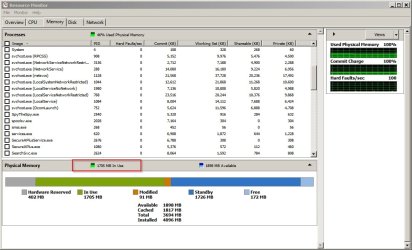
Current Memory Usage
Resource Monitor.jpg

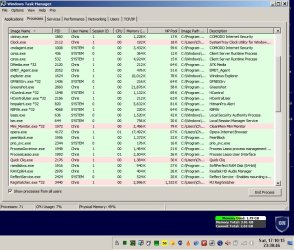
Currently 71 processes running including quite a few security apps and a browser.
Processes.jpg

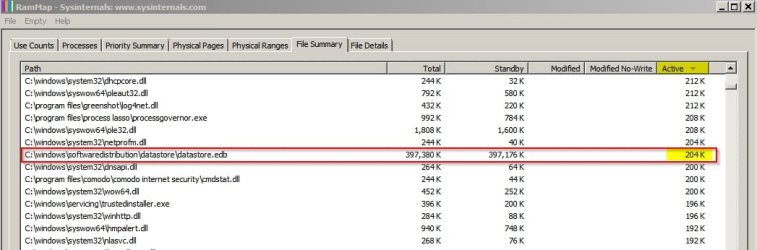
For those people experiencing high RAM usage when windows checks for updates I'd say it is worth checking how much RAM datastore.edb is using and how many handles it has open.
 

My Computer My Computer

At a glance

Microsoft Windows 7 Home Premium 64-bit 7601 ...AMD C-60 APU with Radeon(tm) HD Graphics4.00 GBAMD Radeon HD 6290 Graphics
Computer type
Laptop
Computer Manufacturer/Model Number
ASUS
OS
Microsoft Windows 7 Home Premium 64-bit 7601 Multiprocessor Free Service Pack 1
CPU
AMD C-60 APU with Radeon(tm) HD Graphics
Motherboard
ASUSTeK COMPUTER INC. X501U
Memory
4.00 GB
Graphics Card(s)
AMD Radeon HD 6290 Graphics
Sound Card
(1) AMD High Definition Audio Device (2) Realtek High Defi
Screen Resolution
1366 x 768 x 32 bits (4294967296 colors) @ 60 Hz
Hard Drives
Hitachi HTS545050A7E380 SATA Disk Device
Antivirus
Comodo CIS & FW, SecureAplus App Whitelisting, Threatfire
Browser
Cyberfox 64bit, Opera 64bit, Airfox
Other Info
Spy-The-Spy, HitmanPro.Alert, Norton Connect Safe, MJRegWatcher, BitDefender TrafficLight, Voodoo Shield, Zemana AntiMalware
Currently I have force installed KB3075851 after removing all other WU Client versions and running advanced disk cleanup. Memory usage has remained stable even when running WU checks.

Id avoid this one. At this point Im installing them one at a time to know for sure which ones are bad and 3075851 caused Windows 10 downloading and "getting setup files" for me.
 

My Computer My Computer

At a glance

64 bit windows 7AMD A8 6410 AMD K168gb DDR3 PC3-12800 (2x 4gb not in dual channel)AMD Radeon R5 Graphics 6410
Computer type
PC/Desktop
Computer Manufacturer/Model Number
Toshiba C55D-B5212
OS
64 bit windows 7
CPU
AMD A8 6410 AMD K16
Motherboard
TOSHIBA Model ZBWAE (P0)
Memory
8gb DDR3 PC3-12800 (2x 4gb not in dual channel)
Graphics Card(s)
AMD Radeon R5 Graphics 6410
Hard Drives
Crucial CT250BX1
Antivirus
Bitdefender Free
Browser
Chrome
Id avoid this one. At this point Im installing them one at a time to know for sure which ones are bad and 3075851 caused Windows 10 downloading and "getting setup files" for me.

Not for me. Did you have windows updates set to download and install automatically and also did you mistakenly check that "Give me recommended updates the same way as I receive important updates" checkbox?
 

My Computer My Computer

At a glance

Microsoft Windows 7 Home Premium 64-bit 7601 ...AMD C-60 APU with Radeon(tm) HD Graphics4.00 GBAMD Radeon HD 6290 Graphics
Computer type
Laptop
Computer Manufacturer/Model Number
ASUS
OS
Microsoft Windows 7 Home Premium 64-bit 7601 Multiprocessor Free Service Pack 1
CPU
AMD C-60 APU with Radeon(tm) HD Graphics
Motherboard
ASUSTeK COMPUTER INC. X501U
Memory
4.00 GB
Graphics Card(s)
AMD Radeon HD 6290 Graphics
Sound Card
(1) AMD High Definition Audio Device (2) Realtek High Defi
Screen Resolution
1366 x 768 x 32 bits (4294967296 colors) @ 60 Hz
Hard Drives
Hitachi HTS545050A7E380 SATA Disk Device
Antivirus
Comodo CIS & FW, SecureAplus App Whitelisting, Threatfire
Browser
Cyberfox 64bit, Opera 64bit, Airfox
Other Info
Spy-The-Spy, HitmanPro.Alert, Norton Connect Safe, MJRegWatcher, BitDefender TrafficLight, Voodoo Shield, Zemana AntiMalware
RE: KB971033. I am informed that it should be installed. Checks your windows is legit every 90 days I think.
You don't need it.

However, if you try to download updates directly from MS you may be asked to install & run "GenuineCheck.exe". :geek:

Currently I have force installed KB3075851 after removing all other WU Client versions and running advanced disk cleanup. Memory usage has remained stable even when running WU checks.
KB3075851 fixed my excessive RAM and CPU usage problems. :party:
 

My Computer My Computer

At a glance

W7 Ultimate SP1, LM19.2 MATE, W10 Home 1703, ...AMD Phenom II x6 1100T, 3.3 GHz12GB DDR3 1333 G-Skill (4GB x 2), G-Skill (2G...NVIDIA GeForce GTX 660
Computer type
PC/Desktop
Computer Manufacturer/Model Number
n/a
OS
W7 Ultimate SP1, LM19.2 MATE, W10 Home 1703, W10 Pro 1703 VM, #All 64 bit
CPU
AMD Phenom II x6 1100T, 3.3 GHz
Motherboard
ASUS M4A88T-M/USB3 (AM3)
Memory
12GB DDR3 1333 G-Skill (4GB x 2), G-Skill (2GB x 2)
Graphics Card(s)
NVIDIA GeForce GTX 660
Sound Card
Realtek?
Monitor(s) Displays
Samsung S23B350
Screen Resolution
1920x1080
Hard Drives
WD Green 2TB (SATA), WD Green 3TB (SATA), WD Blue 4TB (SATA), WD Blue 6TB (SATA)
PSU
Cooler Master
Case
Antec GX300 Tower
Cooling
3x Antec TRICOOL 120mm Fans
Mouse
Wired Optical
Internet Speed
DSL
Antivirus
Avast
Browser
Pale Moon (64 bit)
Other Info
2018-12-27 Upgraded HDDs
2015-12-10 Upgraded case, graphics card, storage
2015-08-15 Upgraded motherboard & RAM
2015-07-15 Upgraded LM17.1 to LM17.2
I'm not trying to start anything. I genuinely would like to know what version of the Windows Update (WU) client are you using? And do you see high memory usage during the WU scans and installs?
Yes i do see high memory usage for scanning, installs are normal. But i manually check for updates when updates occur (usually once a month) so i don't mind my bad client.
Thanks, I am hoping to find someone that does not see this issue and then find out which WU client they use. But it might not be as simple as using one WU client update vs. other WU client updates.

Callender,
As you saw in this post, I have a VM patched with SP1 and not much else. That same frozen VM has been brought all the way up to completely patched many times in the past few years. The last few attempts to fully update it have been met with high RAM and high CPU usage. I have not seen that in the past and I don't know exactly when it started.

The high usage does not cause me any problems (other than heating up the room). I don't have this high resource usage on any real computers... but I do (mildly) wonder what the cause might be.

To be clear, I'm not talking about RAM starting out at 1.7GB (which this laptop is using right now) and climbing to 2GB or even 3GB during a WU scan/install. I'm talking about WU using all available RAM and pushing well into the swap file - no matter how much RAM is assigned/installed. That is what I see in the VM and that is what I've seen in a few threads.
 

My Computer My Computer

At a glance

W7 Pro SP1 64biti78GBIntel HD Graphics
Computer type
Laptop
Computer Manufacturer/Model Number
Employer provided Dell Latitude
OS
W7 Pro SP1 64bit
CPU
i7
Memory
8GB
Graphics Card(s)
Intel HD Graphics
Hard Drives
crappy SSD
Antivirus
Employer mandated Symantec Endpoint Protection
Browser
Pale Moon 64bit, IE11 64bit & Chrome 64bit
KB3075851 fixed my excessive RAM and CPU usage problems. :party:
I'm pretty sure that I tried that one.

By try, I mean install that first and then let the VM scan for all other updates. I still had it max out the RAM.

Oh well, maybe I should stick to solving problems that my users are facing...
...which is none at the moment :-)
 

My Computer My Computer

At a glance

W7 Pro SP1 64biti78GBIntel HD Graphics
Computer type
Laptop
Computer Manufacturer/Model Number
Employer provided Dell Latitude
OS
W7 Pro SP1 64bit
CPU
i7
Memory
8GB
Graphics Card(s)
Intel HD Graphics
Hard Drives
crappy SSD
Antivirus
Employer mandated Symantec Endpoint Protection
Browser
Pale Moon 64bit, IE11 64bit & Chrome 64bit
RE: KB971033. I am informed that it should be installed. Checks your windows is legit every 90 days I think.
You don't need it.

However, if you try to download updates directly from MS you may be asked to install & run "GenuineCheck.exe". :geek:

Currently I have force installed KB3075851 after removing all other WU Client versions and running advanced disk cleanup. Memory usage has remained stable even when running WU checks.
KB3075851 fixed my excessive RAM and CPU usage problems. :party:

My RAM and CPU has improved significantly when doing scans for updates. That's why I've stopped ignoring the WU client updates. I just use the GP workaround to block the 10 upgrade. But, I've seen no ill-effects from installing those on my system, only an improvement while scanning.
 

My Computer My Computer

At a glance

Win 7 Ultimate, Win 8.1 Pro, Linux Mint 19 Ci...Intel i5 4690KCorsair Vengeance LP 32GB DDR3MSI GTX 1060 GAMING X 6GB
Computer type
PC/Desktop
Computer Manufacturer/Model Number
Custom Build
OS
Win 7 Ultimate, Win 8.1 Pro, Linux Mint 19 Cinnamon (All 64-Bit)
CPU
Intel i5 4690K
Motherboard
Gigabyte Z97X-UD3H
Memory
Corsair Vengeance LP 32GB DDR3
Graphics Card(s)
MSI GTX 1060 GAMING X 6GB
Sound Card
Onboard
Hard Drives
Samsung 850 EVO 250GB SSD (x2)
Samsung 860 EVO 1TB SSD (x2)
Crucial MX300 525GB SSD
WD Blue 2TB 5400rpm Intellipark Disabled (x2)
PSU
Corsair HX750i
Case
Phanteks Enthoo Pro
Cooling
CM Hyper 212 EVO on CPU, Noctua Redux NF-P14S 1500rpm (x6)
Keyboard
Corsair K70 RGB LUX
Mouse
Corsair Sabre RGB
Antivirus
Avast Free, MalwareBytes, SAS & CryptoPrevent
Browser
Chrome
Other Info
StarTech PEXESAT322I 2 Port PCI-E SATA Card
ASUS PCE-AC56 Dual-band AC1300 Wireless Card
Akasa FC.Six Manual Fan Controller
And a Partridge in a Pear Tree!
I have a VM patched with SP1 and not much else. That same frozen VM has been brought all the way up to completely patched many times in the past few years. The last few attempts to fully update it have been met with high RAM and high CPU usage. I have not seen that in the past and I don't know exactly when it started.

The high usage does not cause me any problems (other than heating up the room). I don't have this high resource usage on any real computers... but I do (mildly) wonder what the cause might be.

To be clear, I'm not talking about RAM starting out at 1.7GB (which this laptop is using right now) and climbing to 2GB or even 3GB during a WU scan/install. I'm talking about WU using all available RAM and pushing well into the swap file - no matter how much RAM is assigned/installed. That is what I see in the VM and that is what I've seen in a few threads.

Maybe check this post:

http://www.sevenforums.com/windows-...0005-please-read-post3163065.html#post3163065

If you can run RAMmap in your VM does it show high memory usage by datastore.edb ?
 

My Computer My Computer

At a glance

Microsoft Windows 7 Home Premium 64-bit 7601 ...AMD C-60 APU with Radeon(tm) HD Graphics4.00 GBAMD Radeon HD 6290 Graphics
Computer type
Laptop
Computer Manufacturer/Model Number
ASUS
OS
Microsoft Windows 7 Home Premium 64-bit 7601 Multiprocessor Free Service Pack 1
CPU
AMD C-60 APU with Radeon(tm) HD Graphics
Motherboard
ASUSTeK COMPUTER INC. X501U
Memory
4.00 GB
Graphics Card(s)
AMD Radeon HD 6290 Graphics
Sound Card
(1) AMD High Definition Audio Device (2) Realtek High Defi
Screen Resolution
1366 x 768 x 32 bits (4294967296 colors) @ 60 Hz
Hard Drives
Hitachi HTS545050A7E380 SATA Disk Device
Antivirus
Comodo CIS & FW, SecureAplus App Whitelisting, Threatfire
Browser
Cyberfox 64bit, Opera 64bit, Airfox
Other Info
Spy-The-Spy, HitmanPro.Alert, Norton Connect Safe, MJRegWatcher, BitDefender TrafficLight, Voodoo Shield, Zemana AntiMalware
My RAM and CPU has improved significantly when doing scans for updates. That's why I've stopped ignoring the WU client updates. I just use the GP workaround to block the 10 upgrade. But, I've seen no ill-effects from installing those on my system, only an improvement while scanning.

Whats the GP workaround?
 

My Computer My Computer

At a glance

64 bit windows 7AMD A8 6410 AMD K168gb DDR3 PC3-12800 (2x 4gb not in dual channel)AMD Radeon R5 Graphics 6410
Computer type
PC/Desktop
Computer Manufacturer/Model Number
Toshiba C55D-B5212
OS
64 bit windows 7
CPU
AMD A8 6410 AMD K16
Motherboard
TOSHIBA Model ZBWAE (P0)
Memory
8gb DDR3 PC3-12800 (2x 4gb not in dual channel)
Graphics Card(s)
AMD Radeon R5 Graphics 6410
Hard Drives
Crucial CT250BX1
Antivirus
Bitdefender Free
Browser
Chrome

My Computer My Computer

At a glance

Win 7 Ultimate, Win 8.1 Pro, Linux Mint 19 Ci...Intel i5 4690KCorsair Vengeance LP 32GB DDR3MSI GTX 1060 GAMING X 6GB
Computer type
PC/Desktop
Computer Manufacturer/Model Number
Custom Build
OS
Win 7 Ultimate, Win 8.1 Pro, Linux Mint 19 Cinnamon (All 64-Bit)
CPU
Intel i5 4690K
Motherboard
Gigabyte Z97X-UD3H
Memory
Corsair Vengeance LP 32GB DDR3
Graphics Card(s)
MSI GTX 1060 GAMING X 6GB
Sound Card
Onboard
Hard Drives
Samsung 850 EVO 250GB SSD (x2)
Samsung 860 EVO 1TB SSD (x2)
Crucial MX300 525GB SSD
WD Blue 2TB 5400rpm Intellipark Disabled (x2)
PSU
Corsair HX750i
Case
Phanteks Enthoo Pro
Cooling
CM Hyper 212 EVO on CPU, Noctua Redux NF-P14S 1500rpm (x6)
Keyboard
Corsair K70 RGB LUX
Mouse
Corsair Sabre RGB
Antivirus
Avast Free, MalwareBytes, SAS & CryptoPrevent
Browser
Chrome
Other Info
StarTech PEXESAT322I 2 Port PCI-E SATA Card
ASUS PCE-AC56 Dual-band AC1300 Wireless Card
Akasa FC.Six Manual Fan Controller
And a Partridge in a Pear Tree!
I gave RAMMap a try. Sadly, I could not get the RAM to go over 2.2GB out of 4GB. (I changed the RAM assigned - as I have done in the past - to let the scan go faster.) I did not wait for the installation of the updates. The database file did have about the same amount of RAM assigned to it that your screenshot showed - but the vast majority of it was not locked.

scan.png

standby.png
 

My Computer My Computer

At a glance

W7 Pro SP1 64biti78GBIntel HD Graphics
Computer type
Laptop
Computer Manufacturer/Model Number
Employer provided Dell Latitude
OS
W7 Pro SP1 64bit
CPU
i7
Memory
8GB
Graphics Card(s)
Intel HD Graphics
Hard Drives
crappy SSD
Antivirus
Employer mandated Symantec Endpoint Protection
Browser
Pale Moon 64bit, IE11 64bit & Chrome 64bit
Once again, my current list and my WUA version is 7.6.7601.18979


Updates not to Install

KB2876229 SKYPE, If you want Skype then install it.
KB2923545 RDP
KB2970228
KB3035583
KB2990214
KB3021917
KB3068708 Telemetry
KB2592687
KB2660075
KB2506928
KB2952664 x2
KB3050265
KB2726535
KB2994023
KB3022345 Replaced by KB3068708 Telemetry

KB3022345 Caused false sfc result
KB2545698 (IE9)
KB3065987
KB3077715
KB3078667
KB3080149 Telemetry
KB3075249 Telemetry
KB2999226
KB3083710
KB3097966
 

My Computer My Computer

At a glance

Windows 10 Pro x64Intel Core i7 6700KGSkill TridentZ RGB 16GB 3600 16-16-16-36EVGA GTX 980 Ti SC x2
Computer type
PC/Desktop
Computer Manufacturer/Model Number
Skylake Special #666
OS
Windows 10 Pro x64
CPU
Intel Core i7 6700K
Motherboard
Asus Sabertooth Z170 Mark 1
Memory
GSkill TridentZ RGB 16GB 3600 16-16-16-36
Graphics Card(s)
EVGA GTX 980 Ti SC x2
Sound Card
Realtek High Definition
Monitor(s) Displays
AOC G2460PG
Screen Resolution
1920 x 1080 144Hz
Hard Drives
Samsung 860 Pro 256GB, Seagate Barracuda 4TB x2
PSU
EVGA 1000 P2, EVGA White Custom Braided Cables
Case
Corsair Vengeance C70 Gunmetal Black
Cooling
Corsair H100i v2, Corsair ML120 x2, Thermal Grizzly Kryonaut
Keyboard
Logitech G910 Orion Spectrum
Mouse
Logitech G700s
Internet Speed
Verizon Fios Quantum Gateway 75/75
Antivirus
Windows Defender, Malwarebytes Free 3.8.3
Browser
Chrome
Other Info
Corsair SP120 x4, LG Blu-ray Drive, Durabrand HT-395 100 Watt Dolby Digital Amp, Corsair H2100 Wireless 7.1 Headset
I gave RAMMap a try. Sadly, I could not get the RAM to go over 2.2GB out of 4GB. (I changed the RAM assigned - as I have done in the past - to let the scan go faster.) I did not wait for the installation of the updates. The database file did have about the same amount of RAM assigned to it that your screenshot showed - but the vast majority of it was not locked.

Well your screenshot shows the same problem with datastore.edb that I have seen on my own machine. No way should it show that many open handles.

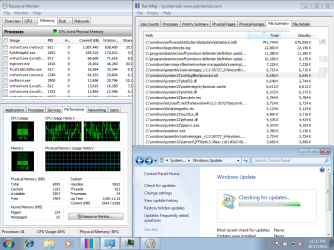
Normal behaviour is like this:

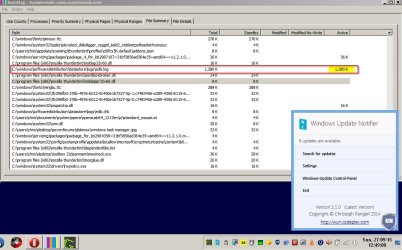
With a windows update check in progress have a look at usage shown in the "Active" tab.

RamMap WU Check running.jpg

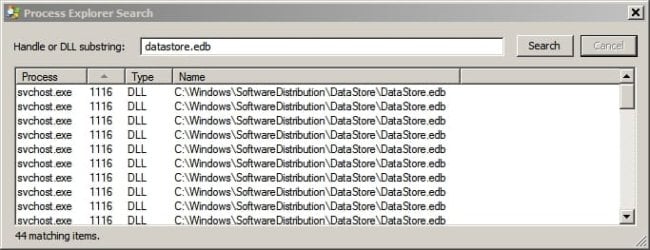
Also this is normal for the number of handles. I used Process Explorer but as you found out RAMmap can display some details on handles too.

Process Explorer Search.jpg

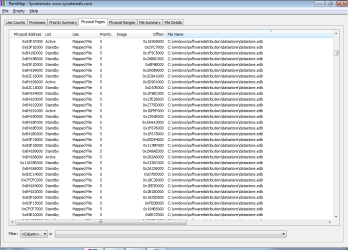
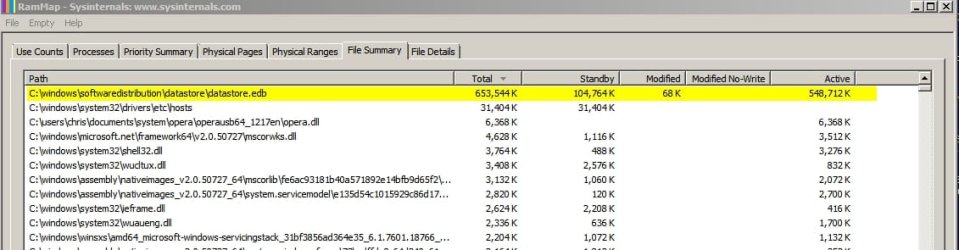
Note: Memory usage by datastore.edb during WU checks seems to have crept up since I last checked. Here's how it appeared after the fix:

Datastore edb 2.jpg

EDIT: Just for comparison. Screenshot of "Active" tab before the problem was fixed:

Datastore edb before.jpg
 
Last edited:

My Computer My Computer

At a glance

Microsoft Windows 7 Home Premium 64-bit 7601 ...AMD C-60 APU with Radeon(tm) HD Graphics4.00 GBAMD Radeon HD 6290 Graphics
Computer type
Laptop
Computer Manufacturer/Model Number
ASUS
OS
Microsoft Windows 7 Home Premium 64-bit 7601 Multiprocessor Free Service Pack 1
CPU
AMD C-60 APU with Radeon(tm) HD Graphics
Motherboard
ASUSTeK COMPUTER INC. X501U
Memory
4.00 GB
Graphics Card(s)
AMD Radeon HD 6290 Graphics
Sound Card
(1) AMD High Definition Audio Device (2) Realtek High Defi
Screen Resolution
1366 x 768 x 32 bits (4294967296 colors) @ 60 Hz
Hard Drives
Hitachi HTS545050A7E380 SATA Disk Device
Antivirus
Comodo CIS & FW, SecureAplus App Whitelisting, Threatfire
Browser
Cyberfox 64bit, Opera 64bit, Airfox
Other Info
Spy-The-Spy, HitmanPro.Alert, Norton Connect Safe, MJRegWatcher, BitDefender TrafficLight, Voodoo Shield, Zemana AntiMalware
Updates not to Install
...
KB3097966
What is the problem with that update?
It seems to be related to security certificates.
 

My Computer My Computer

At a glance

W7 Ultimate SP1, LM19.2 MATE, W10 Home 1703, ...AMD Phenom II x6 1100T, 3.3 GHz12GB DDR3 1333 G-Skill (4GB x 2), G-Skill (2G...NVIDIA GeForce GTX 660
Computer type
PC/Desktop
Computer Manufacturer/Model Number
n/a
OS
W7 Ultimate SP1, LM19.2 MATE, W10 Home 1703, W10 Pro 1703 VM, #All 64 bit
CPU
AMD Phenom II x6 1100T, 3.3 GHz
Motherboard
ASUS M4A88T-M/USB3 (AM3)
Memory
12GB DDR3 1333 G-Skill (4GB x 2), G-Skill (2GB x 2)
Graphics Card(s)
NVIDIA GeForce GTX 660
Sound Card
Realtek?
Monitor(s) Displays
Samsung S23B350
Screen Resolution
1920x1080
Hard Drives
WD Green 2TB (SATA), WD Green 3TB (SATA), WD Blue 4TB (SATA), WD Blue 6TB (SATA)
PSU
Cooler Master
Case
Antec GX300 Tower
Cooling
3x Antec TRICOOL 120mm Fans
Mouse
Wired Optical
Internet Speed
DSL
Antivirus
Avast
Browser
Pale Moon (64 bit)
Other Info
2018-12-27 Upgraded HDDs
2015-12-10 Upgraded case, graphics card, storage
2015-08-15 Upgraded motherboard & RAM
2015-07-15 Upgraded LM17.1 to LM17.2
Could be ?
Little too close to Halloween for a spoofing update :p
Known issues in this security update

  • Microsoft is aware of legitimate kernel drivers for D-Link products (including network adapters) that were signed by the affected D-Link certificates. These drivers include the Windows 7 drivers on the installation CD for the DUB-E100 USB network adapter. After you install this security update, these kernel drivers will no longer load, and the hardware will stop functioning. Updated drivers that aren't affected by this issue are available on Windows Update.
The third-party products that this article discusses are manufactured by companies that are independent of Microsoft. Microsoft makes no warranty, implied or otherwise, about the performance or reliability of these products.
 

My Computer My Computer

At a glance

Win-7-Pro64bit 7-H-Prem-64biti7-5930K 2nd i9-9940x both water blocked VRM'...Trident-z 3200C14 2nd Trident-z 3600C16EVGA 1080ti ftw3 2nd Titan Xp both water blocked
Computer type
PC/Desktop
Computer Manufacturer/Model Number
Custom assembled by me :}
OS
Win-7-Pro64bit 7-H-Prem-64bit
CPU
i7-5930K 2nd i9-9940x both water blocked VRM's too
Motherboard
ASUS SABERTOOTH X99 2nd ASUS x299 Apex
Memory
Trident-z 3200C14 2nd Trident-z 3600C16
Graphics Card(s)
EVGA 1080ti ftw3 2nd Titan Xp both water blocked
Sound Card
Built-in Realtek
Monitor(s) Displays
1-AOC G2460PG 24"G-Sync 144Hz/ 2nd 1-ASUS VG248QE 24" 144Hz
Screen Resolution
1920 x 1080 144Hz
Hard Drives
2-Samsung M.2 Evo & Evo Plus
2-Samsung 850 EVO 500GB SSD's/ 3-2.5 W.D. Black 1tb-&3-1tb/3-3.5 WD Black 1tb hdd's
PSU
EVGA SuperNOVA 1000-P2 2nd 1200-P2
Case
2-Corsair Obsidian Series 450D Black ATX Mid Tower
Cooling
Custom water loops
Keyboard
Logitech G710+/ 2nd Logitech G910
Mouse
2-RedDragon M901 Perdition 16400 dpi Gaming mouse = wired
Internet Speed
Comcast Ping 19ms 89.31mbps download speed 6.12mbps upload
Antivirus
Malwarebytes Pro/ Superantispyware Pro
Browser
FireFox & Pale moon
Other Info
2nd ASUS X299 Apex/Intel i9-9940x with Custom water loop/7H-Prem-x64/Corsair 450D case/Ram Trident-z 3600C16 4x8gb / Samsung970Evo plus 500gb SSD/Dual ssd EZ swap evo/PSU EVGA SuperNova 1200w-P2 80+Platinum/GPU Titan Xp /8-ML-140 on push-pull on 2-280GTX rads
Callender,
I do see a high number of handles; about 790M. Deleting the softwaredistribution folder and starting with a fresh datastore database does cause fewer active handles (~186M). The overall RAM usage is the same; but, since most of that RAM was not locked by active handles, it is of little concern.

Rather than find the last good WU client, deleting the softwaredistribution folder seems easiest for fresh builds. For existing builds, such a deletion would unhide hidden updates. Perhaps the a more surgical approach might work.
 

My Computer My Computer

At a glance

W7 Pro SP1 64biti78GBIntel HD Graphics
Computer type
Laptop
Computer Manufacturer/Model Number
Employer provided Dell Latitude
OS
W7 Pro SP1 64bit
CPU
i7
Memory
8GB
Graphics Card(s)
Intel HD Graphics
Hard Drives
crappy SSD
Antivirus
Employer mandated Symantec Endpoint Protection
Browser
Pale Moon 64bit, IE11 64bit & Chrome 64bit
Back
Top