Task Manager indicating processes running as 32-bit. Is this normal?

buckscaper

New member
Local time
4:39 AM
Messages
19
Hi,

I have a 2 month old HP Pavilion with Windows 7 Home Premium 64-bit.

The past few weeks, the machine has started acting up - freezing, not sleeping, not waking when it has been sleeping, etc.

Coincident with these issues, I've recently noticed in Task Manager that a lot of processes are now running with a *32 after their name. I do not believe this was the case when I first started using the machine. But now, the overwhelming majority of processes have that *32 after them.

For example:
chrome.exe *32 (there are 8 instances of this process)
Dropbox.exe *32
SkyDrive.exe *32
AvastUI.exe *32
rundll32.exe *32
hpsysdrv.exe *32
HPTouchSmartSyncCalReminderApp.exe *32
hpwusched2.exe *32

I think this is especially suspicious because it's an HP computer running Windows (a Microsoft product). I'd think that at the very least, Skydrive (also a Microsoft product) and HP installed processes would know that this is a 64-bit machine and run as such.

Does anyone know what's going on and why these apps are running like this? Can it be fixed?

This was a rockin' fast and awesome machine when I got it 2 months ago and after just those 2 months, it's definitely not running the way it was.

Some additional details:
HP Pavilion p7-1226s
6GB
Windows 7 Home Premium 64-bit
Updates on auto - all have been installed.
Avast antivirus
Threatfire

On another note...a couple of days ago when the machine was especially bad (IE freezing every time I opened it) and the whole machine not sleeping at all, I did a system restore to prior to the last series of Windows updates and that seemed to fix things. But then over night the machine re-installed all of its updates and put me back to where I started.

Thanks,
Buck
 

My Computer My Computer

Computer Manufacturer/Model Number
HP Pavilion
OS
Win7 Home Premium SP1 32bit
CPU
core 2 quad
Hard Drives
WD Black 1Tb
There is nothing wrong...with running 32-bit processes on a 64-bit machine.
 

My Computer My Computer

Computer type
PC/Desktop
Computer Manufacturer/Model Number
Alienware Aurora ALX R4
OS
Windows 10 Pro (x64)
CPU
Intel Core i7-3930K (3.2GHz - 4.5GHz)
Motherboard
Alienware Aurora-R4 x79
Memory
4x Samsung 4GB PC3-12800 DDR3 (16GB 1600MHz)
Graphics Card(s)
Nvidia Geforce GTX 690
Sound Card
SteelSeries Siberia Elite
Monitor(s) Displays
Dell UltraSharp U3011
Screen Resolution
2560x1600
Hard Drives
Samsung 850 Pro 256 GB, Seagate 1TB Desktop Hybrid HDD, 2x Western Digital 4TB Green HDD
PSU
875W Some Dell PSU <.<
Case
Alienware Aurora ALX
Cooling
Custom Liquid Cooling (EK CPU & GPU blocks) dual EK 480RAD
Keyboard
Logitech G710+ Mechanical
Mouse
Logitech G700s
Internet Speed
Verizon Fios (50 mbps average)
Other Info
Server: Intel NUC D54250WYK: i5-4250U, 16GB, 256 GB mSATA, Windows Server 2012 R2
This is quite normal. Win 7 x64 will run 32 bit programs. Your specific case of Chrome having 8 processes is also quite normal. Chrome will have a process for each open tab and for each loaded extension or running plugin. This is part of the way Chrome protects each process from faults in another.
 

My Computer My Computer

Computer type
Laptop
Computer Manufacturer/Model Number
Hewlett-Packard/G62-107SA Notebook
OS
Microsoft Windows 7 Home Premium 64-bit Service Pack 1
CPU
Intel(R) Core(TM) i3 CPU M 330 @ 2.13GHz
Motherboard
Hewlett-Packard 1425
Memory
8 GB DDR3
Graphics Card(s)
Intel(R) HD Graphics
Sound Card
Realtek High Definition Audio
Monitor(s) Displays
Builtin
Screen Resolution
1366 x 768 x 32 bits (4294967296 colors) @ 60 Hz
Hard Drives
250 GB SATA Hard Disk Drive 7200 rpm
2TB Seagate GoFlex USB 2 Drive
1TB Iomega Prestige USB 2 Drive
1.5TB Iomega Prestige USB 2 Drive (Samsung)
2TB WD MyBook Live NAS.
Mouse
Logitech Anywhere MX
Internet Speed
152 Mbs download 10 Mbs upload
Antivirus
Norton 360
Browser
Chrome
Thank you both for your responses. I understand that Win 64 can run 32 bit programs. What I'm questioning is two-fold: 1) I don't remember seeing so many processes running with the *32 designation a month ago, and; 2) I'm wondering if the machine is running the processes as 32-bit in error - shouldn't Chrome be running as 64 bit? Skydrive? I guess I expect that these up-to-date products would have 64-bit versions (which is what would have been loaded on my machine) and as such, shouldn't they be running as 64-bit?

Basically, I think something happened that is causing my machine to run things as 32-bit when they should be running as 64-bit.

Thanks again.
 

My Computer My Computer

Computer Manufacturer/Model Number
HP Pavilion
OS
Win7 Home Premium SP1 32bit
CPU
core 2 quad
Hard Drives
WD Black 1Tb
No these are not in error. Chrome is a 32bit program as are the others mentioned. You can tell which are 32bit programs from where they are installed. By default 64bit programs are installed under C:\Program Files and 32 bit programs under C:\Program Files (x86).
 

My Computer My Computer

Computer type
Laptop
Computer Manufacturer/Model Number
Hewlett-Packard/G62-107SA Notebook
OS
Microsoft Windows 7 Home Premium 64-bit Service Pack 1
CPU
Intel(R) Core(TM) i3 CPU M 330 @ 2.13GHz
Motherboard
Hewlett-Packard 1425
Memory
8 GB DDR3
Graphics Card(s)
Intel(R) HD Graphics
Sound Card
Realtek High Definition Audio
Monitor(s) Displays
Builtin
Screen Resolution
1366 x 768 x 32 bits (4294967296 colors) @ 60 Hz
Hard Drives
250 GB SATA Hard Disk Drive 7200 rpm
2TB Seagate GoFlex USB 2 Drive
1TB Iomega Prestige USB 2 Drive
1.5TB Iomega Prestige USB 2 Drive (Samsung)
2TB WD MyBook Live NAS.
Mouse
Logitech Anywhere MX
Internet Speed
152 Mbs download 10 Mbs upload
Antivirus
Norton 360
Browser
Chrome
Added to the fact Windows cannot run a 64-bit application as 32-bit under any condition. The binary data between a 32-bit and a 64-bit application are not comparable.
 

My Computer My Computer

Computer type
PC/Desktop
Computer Manufacturer/Model Number
Alienware Aurora ALX R4
OS
Windows 10 Pro (x64)
CPU
Intel Core i7-3930K (3.2GHz - 4.5GHz)
Motherboard
Alienware Aurora-R4 x79
Memory
4x Samsung 4GB PC3-12800 DDR3 (16GB 1600MHz)
Graphics Card(s)
Nvidia Geforce GTX 690
Sound Card
SteelSeries Siberia Elite
Monitor(s) Displays
Dell UltraSharp U3011
Screen Resolution
2560x1600
Hard Drives
Samsung 850 Pro 256 GB, Seagate 1TB Desktop Hybrid HDD, 2x Western Digital 4TB Green HDD
PSU
875W Some Dell PSU <.<
Case
Alienware Aurora ALX
Cooling
Custom Liquid Cooling (EK CPU & GPU blocks) dual EK 480RAD
Keyboard
Logitech G710+ Mechanical
Mouse
Logitech G700s
Internet Speed
Verizon Fios (50 mbps average)
Other Info
Server: Intel NUC D54250WYK: i5-4250U, 16GB, 256 GB mSATA, Windows Server 2012 R2
As others have said, this is totally normal. What I do see you saying is that the computer has become slow following some updates. I would suggest restoring back to before the updates again, and then putting the update setting so that it won't update automatically (I have mine set to prompt me before downloading and installing the updates, as I usually wait 4 to 5 days before installing the updates as they can round some bugs out of them). I would try running the computer without installing the set of updates to see if it will still get slow. If it does, it means the updates are not the issue.
 

My Computer My Computer

Computer type
PC/Desktop
Computer Manufacturer/Model Number
Custom built Desktop(Myself) Specs below - Also Asus G53SW-A1 laptop
OS
Windows 10 Pro / OpenSUSE
CPU
Intel Core i7 4790K
Motherboard
Asus Z97-A
Memory
32GB DDR3
Graphics Card(s)
EVGA GTX 1070
Sound Card
OnBoard
Monitor(s) Displays
3 X 1080P 24" displays
Screen Resolution
1280x1050 & 1920x1080
Hard Drives
SSD: Crucial M500 128GB
HD 1: WD Caviar Black 1TB
HD 2: WD Caviar Black 2TB
HD 3: WD Caviar Blue 500GB
PSU
Corsair CX650M
Case
Corsair Obisidian 450D
Cooling
Noctua NH-D14
Keyboard
Corsair K70 Vengeance (blue switches)
Mouse
Logitech M500
Internet Speed
65/10
Antivirus
Kaskersky Internet Securty
Browser
Opera
Thanks everyone for your responses. Should I then assume that an MS product like Skydrive, for instance, is NOT a 64-bit application? And the HP system software that HP installed on the 64-bit machine that THEY built and installed a 64-bit operating system on, is also NOT 64-bit software? (If that's the case, my mind is officially blown.)

So when I see a system requirement on a single piece of software (i.e. just one downloadable file, not different versions of same software) that shows the following (which is from Malewarebytes Antimalware):
Operating Systems: Windows 2000, XP, Vista, and Windows 7 with 32-bit (x86) and 64-bit (x64) architectures.

Should I assume that it will automatically install and run as 64-bit on my 64-bit machine? I ask because when I started to install this, it wanted to put itself into the x86 folder (I cancelled install pending answers here).

Re the update situation, I did roll back some updates using system restore and the machine is again sleeping and waking properly. However, the problems with IE have not been fixed. It's still freezing right and left.

I looked in Control Panel-Programs to see if I could select IE and do a "repair" but that's not an option since IE does not appear in that list. It only appears in the "Turn Windows Features On or Off" dialog and even there, repair is not an option - only remove. Is there a way to REPAIR Internet Explorer?

Also, with all the hard reboots I've had to do recently due to all the freezing, I was hoping there was a way to scan Windows itself and repair any files that may have become corrupted or damaged. But I just don't see any way to do that. Any ideas?

Thanks again.
 

My Computer My Computer

Computer Manufacturer/Model Number
HP Pavilion
OS
Win7 Home Premium SP1 32bit
CPU
core 2 quad
Hard Drives
WD Black 1Tb
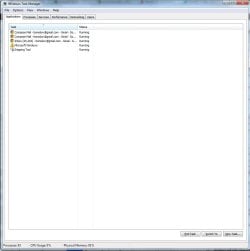
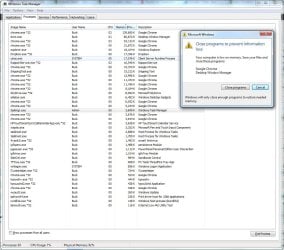
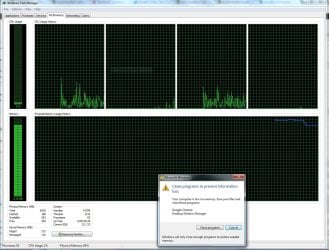
So, while the questions and issues outstanding from post #8 above are still active (and I'd still really appreciate answers on them), the machine is acting up AGAIN. This time I have screen caps from Task Manager to show what I'm seeing.

I have 6GB of RAM, I'm the only logged in user (standard) and the only thing I have open is Chrome with 11 total tabs. I have an Out of Memory error and the machine has slowed to a crawl.

In addition to what you see in the screen caps, there are 3 full pages of "Services" showing as "running" in Task Manager but since it would be difficult to capture I'm just making note of it here. If you need to see it, I'll have to grab it in 4 separate views.

Thanks very much in advance for any help you can offer.
 

Attachments

  • Task Manager Applications Tab Capture.JPG
    Task Manager Applications Tab Capture.JPG
    55.6 KB · Views: 29
  • Task Manager Processes Tab Capture.JPG
    Task Manager Processes Tab Capture.JPG
    146.5 KB · Views: 76
  • Task Manager Performance Tab Memory Pegged Capture.JPG
    Task Manager Performance Tab Memory Pegged Capture.JPG
    264 KB · Views: 28

My Computer My Computer

Computer Manufacturer/Model Number
HP Pavilion
OS
Win7 Home Premium SP1 32bit
CPU
core 2 quad
Hard Drives
WD Black 1Tb
Some where you have a memory leak, finding which application is leaking memory well that is going to be a hard one. Use this tool when you reach this error again and save the results for us.
 

My Computer My Computer

Computer type
PC/Desktop
Computer Manufacturer/Model Number
Alienware Aurora ALX R4
OS
Windows 10 Pro (x64)
CPU
Intel Core i7-3930K (3.2GHz - 4.5GHz)
Motherboard
Alienware Aurora-R4 x79
Memory
4x Samsung 4GB PC3-12800 DDR3 (16GB 1600MHz)
Graphics Card(s)
Nvidia Geforce GTX 690
Sound Card
SteelSeries Siberia Elite
Monitor(s) Displays
Dell UltraSharp U3011
Screen Resolution
2560x1600
Hard Drives
Samsung 850 Pro 256 GB, Seagate 1TB Desktop Hybrid HDD, 2x Western Digital 4TB Green HDD
PSU
875W Some Dell PSU <.<
Case
Alienware Aurora ALX
Cooling
Custom Liquid Cooling (EK CPU & GPU blocks) dual EK 480RAD
Keyboard
Logitech G710+ Mechanical
Mouse
Logitech G700s
Internet Speed
Verizon Fios (50 mbps average)
Other Info
Server: Intel NUC D54250WYK: i5-4250U, 16GB, 256 GB mSATA, Windows Server 2012 R2
Back to the original question... *32

Hi Buck,

Did you ever resolve this? I'm having the identical problem and it's also newish and my machine was also fast as fast and is now junk.

Do you run.... Kaspersky?

My problems coincide exactly when I took off Norton (expired) and added Kaspersky. I did these things within a day of one another. Did I get a virus? Who knows. Is Kaspersky screwing me up? More likely, since it hasn't picked up any viruses in its scans.

So... yeah, I'm going to switch back to Norton and probably restore my computer right back to a factory install.

Also, Kaspersky keeps being turned off... by a virus? I don't know Kaspersky, you tell me: is there a virus turning you off? Yes? Well, would you recommend we have an anti-virus program to detect and remove that virus? Yes? Ok, can you recommend one? Ah, Kaspersky. You are recommending Kaspersky. What's that? Oh, you, yourself are an anti-virus program? Well, how convenient. May I suggest something, then? DO YOUR $!^&%#@% job!

That feels a wee bit better. Not much, but a wee bit. Really, even less than that. But something. Epsilon. 10 seconds pass. Yeah, about what I was saying, you know, about feeling better... well... you get the idea.

Hi,

I have a 2 month old HP Pavilion with Windows 7 Home Premium 64-bit.

The past few weeks, the machine has started acting up - freezing, not sleeping, not waking when it has been sleeping, etc.

Coincident with these issues, I've recently noticed in Task Manager that a lot of processes are now running with a *32 after their name. I do not believe this was the case when I first started using the machine. But now, the overwhelming majority of processes have that *32 after them.

For example:
chrome.exe *32 (there are 8 instances of this process)
Dropbox.exe *32
SkyDrive.exe *32
AvastUI.exe *32
rundll32.exe *32
hpsysdrv.exe *32
HPTouchSmartSyncCalReminderApp.exe *32
hpwusched2.exe *32

I think this is especially suspicious because it's an HP computer running Windows (a Microsoft product). I'd think that at the very least, Skydrive (also a Microsoft product) and HP installed processes would know that this is a 64-bit machine and run as such.

Does anyone know what's going on and why these apps are running like this? Can it be fixed?

This was a rockin' fast and awesome machine when I got it 2 months ago and after just those 2 months, it's definitely not running the way it was.

Some additional details:
HP Pavilion p7-1226s
6GB
Windows 7 Home Premium 64-bit
Updates on auto - all have been installed.
Avast antivirus
Threatfire

On another note...a couple of days ago when the machine was especially bad (IE freezing every time I opened it) and the whole machine not sleeping at all, I did a system restore to prior to the last series of Windows updates and that seemed to fix things. But then over night the machine re-installed all of its updates and put me back to where I started.

Thanks,
Buck
 

My Computer My Computer

Computer type
Laptop
Computer Manufacturer/Model Number
Lenovo
OS
Windows 7 Home Premium (64) SP1
CPU
Core i7-3520M at 2.90MHz
Memory
8GB
Graphics Card(s)
GEFORCE
Antivirus
Kaspersky - And I think this is the source of my woe
Browser
Chrome and IE
32 bit and 64 bit processes are very different in design and implementation. A 32 bit process will always be a 32 bit process whether run under a 32 or 64 bit OS. A 32 bit process run under a 64 bit OS will always be a 32 bit process. Some applications will have dual 32 and 64 bit installers but this simply selects which version to install. Once installed a process remains what it is with no power known to man that can change it.
 

My Computer My Computer

Computer type
PC/Desktop
Computer Manufacturer/Model Number
HP
OS
Windows 7 Pro 64 bit
CPU
Xeon W3520
Memory
8 GB
Graphics Card(s)
Nvidia Geforce 210
A Solution

I am having this same problem. Did anyone solve this. MY laptop is actually a few years old, but typically runs great. I woke it up to use it this morning (haven't used it in a couple of weeks), and all my programs were gone. I restarted and then it continued to startup then freeze after only a few minutes. This happened a few times, so then I ran Malwarebytes in safemode and removed a number of items.... most importantly Yantoo.... Every time I restart this Yantoo crap keeps coming back. I notice on the processes running that they are all *32 (never before). Also of note, when I Google what the processes are it comes up that they are Vista programs? I don't have vista I have windows 7 64 bit. Additionally, at times I get a never ending C++ runtime error popups. Everyone here is saying that running 32 on a 64 bit machine is fine, but that's not really the question. I feel like this is clearly a virus that is spoofing (probably wrong word) these programs to run that wouldn't normally run otherwise. Also interesting is that most of the programs have multiple instances running (5-10). Does anyone know what this is and how I can remove it? Thank you.
 

My Computer My Computer

Computer type
PC/Desktop
Computer Manufacturer/Model Number
Dell (Alienware M11xr3)
OS
Windows 7 64 bit
CPU
Intel Core i7-2637M @ 1.70 GHz
Memory
16 GB
Sorry for my vent.

The original creator of this thread buckscaper has/had an authentic problem and put a ton of effort into assisting the experts into giving him help. It seems the only help he got was mere speculation. In addition it started with the 32bit vs. 64bit concern which ended up being the dead horse that was beaten over and over with so many differing explanation on the same thing. Buck clearly understood that and was asking for additional help beyond the 32 vs 64 thing. Some of comments seem arrogant and just waste peoples time. Like asking him to do some more research that he hasn't yet done which he does and still he received no help. Or the typical, "go download this and try it" which from my experience is an exercise in futility and patience. After this you see several more people that have the same or similar issues asking for more help and still they get nothing? When this issue seems so prevalent why doesn't anyone have a clue how to fix it?
Maybe I have no clue how these forums work or created by or something else I'm ignorant about. So my apologies in advance, I have no desire to criticize anyone on here! I thank all for their efforts! I guess here is my ultimate question- who are the experts answering the questions on here? Do they have specific credentials or are they self proclaimed experts that enjoy helping people? It just seems so rare that I see anything that gets resolved. Like the typical engineer type, never do I see anyone I DONT KNOW! I do see a lot of responses with instruction/suggestions that should have been I DONT KNOW or better yet non-existent. Is there anyone with the necessary credentials that can and know how to correct this over ignored problem?
Again please don't take my rant as criticism, its not meant like that. Its just frustration because these forums always end up wasting my time
Peace
PS- I doubt anyone will respond to this but if anyone has a valid answer this problem, I'm all ears/eyes>>>>>>>>
 

My Computer My Computer

Computer type
PC/Desktop
Computer Manufacturer/Model Number
hp
OS
7-64
The original creator of this thread buckscaper has/had an authentic problem and put a ton of effort into assisting the experts into giving him help. It seems the only help he got was mere speculation.
I failed to find the speculation in the replies. Please be more specific.

The OP states that the computer is "freezing, not sleeping, not waking when it has been sleeping, etc." Then discusses 32bit apps running on 64bit OS and asks, "Does anyone know what's going on and why these apps are running like this? Can it be fixed?" Followed by "IE freezing every time I opened it".

Posts #2 and 3 are attempting to get the OP off of the red herring of 32bit apps running on a 64bit OS. The bit level of the apps has nothing to do with the problems that the OP was experiencing. If the OP had accepted the truth of posts #2 and 3, then the thread could move on to look for a solution to the multiple problems listed in the original post.

Post #4 shows that the OP thinks that a change has occurred on his computer which caused 64bit apps to be run as 32bit apps. This is a new bit of info and it is the cause for posts #5 and 6 saying that this is not possible. You might have seen posts #5 and 6 as beating a dead horse, but the OP brought it up again in a totally new way.

Post #7 states agreement with some or all of the previous replies - then offers a good theory and proposed solution.

Post #8 makes it clear that the OP is not going to accept the info presented in the previous replies. The OP brings up the 32bit vs 64bit yet again. The OP sheds some new light on why the OP thinks that apps like MalwareBytes Antimalware tool should be a 64bit app.

I disagree with your assessment that "In addition it started with the 32bit vs. 64bit concern which ended up being the dead horse that was beaten over and over with so many differing explanation on the same thing. Buck clearly understood that and was asking for additional help beyond the 32 vs 64 thing." While I agree that the OP asked for other help (SFC & repair IE); it was the OP that continued to bring up the 32bit/64bit issue. Each time with a bit more insight as to why the OP thought this was the cause of the slowdown.

Post #9 starts off by saying that the questions from post #8 are still an issue. Most of post #8 was about the 32bit/64bit issue. I think that this alone shows that the OP never understood the nature of 32bit apps running on a 64bit OS. The screenshots do not show all processes, but they do indeed point to a memory leak issue. Posts #10 is pointing to the correct tool to help us help the OP with a memory leak issue.


Post #11 makes it clear thru the post's title "Back to the original question... *32" that kdub100 was also stuck on the theory that 32bit apps on a 64bit OS causes problems. The Kaspersky issue should have been in a separate thread and therefore was not addressed in post #12.

Post #13 admits that 32bit on 64bit is not the issue and goes on to detail why his computer is slow. That post should not have been made to this thread.


As a sidebar, many posts never get read by anyone that is capable of helping. There are far more people seeking help than there are those offering help.


When this issue seems so prevalent why doesn't anyone have a clue how to fix it? ~~~~~ Is there anyone with the necessary credentials that can and know how to correct this over ignored problem?
What is the issue/problem? IE freezing? Computer not sleeping? Computer slow? Computer out of memory?
 
Last edited:

My Computer My Computer

Computer type
Laptop
Computer Manufacturer/Model Number
Employer provided Dell Latitude
OS
W7 Pro SP1 64bit
CPU
i7
Memory
8GB
Graphics Card(s)
Intel HD Graphics
Hard Drives
crappy SSD
Antivirus
Employer mandated Symantec Endpoint Protection
Browser
Pale Moon 64bit, IE11 64bit & Chrome 64bit
The original creator of this thread buckscaper has/had an authentic problem and put a ton of effort into assisting the experts into giving him help. It seems the only help he got was mere speculation.
I failed to find the speculation in the replies. Please be more specific.

The OP states that the computer is "freezing, not sleeping, not waking when it has been sleeping, etc." Then discusses 32bit apps running on 64bit OS and asks, "Does anyone know what's going on and why these apps are running like this? Can it be fixed?" Followed by "IE freezing every time I opened it".

Posts #2 and 3 are attempting to get the OP off of the red herring of 32bit apps running on a 64bit OS. The bit level of the apps has nothing to do with the problems that the OP was experiencing. If the OP had accepted the truth of posts #2 and 3, then the thread could move on to look for a solution to the multiple problems listed in the original post.

Post #4 shows that the OP thinks that a change has occurred on his computer which caused 64bit apps to be run as 32bit apps. This is a new bit of info and it is the cause for posts #5 and 6 saying that this is not possible. You might have seen posts #5 and 6 as beating a dead horse, but the OP brought it up again in a totally new way.

Post #7 states agreement with some or all of the previous replies - then offers a good theory and proposed solution.

Post #8 makes it clear that the OP is not going to accept the info presented in the previous replies. The OP brings up the 32bit vs 64bit yet again. The OP sheds some new light on why the OP thinks that apps like MalwareBytes Antimalware tool should be a 64bit app.

I disagree with your assessment that "In addition it started with the 32bit vs. 64bit concern which ended up being the dead horse that was beaten over and over with so many differing explanation on the same thing. Buck clearly understood that and was asking for additional help beyond the 32 vs 64 thing." While I agree that the OP asked for other help (SFC & repair IE); it was the OP that continued to bring up the 32bit/64bit issue. Each time with a bit more insight as to why the OP thought this was the cause of the slowdown.

Post #9 starts off by saying that the questions from post #8 are still an issue. Most of post #8 was about the 32bit/64bit issue. I think that this alone shows that the OP never understood the nature of 32bit apps running on a 64bit OS. The screenshots do not show all processes, but they do indeed point to a memory leak issue. Posts #10 is pointing to the correct tool to help us help the OP with a memory leak issue.


Post #11 makes it clear thru the post's title "Back to the original question... *32" that kdub100 was also stuck on the theory that 32bit apps on a 64bit OS causes problems. The Kaspersky issue should have been in a separate thread and therefore was not addressed in post #12.

Post #13 admits that 32bit on 64bit is not the issue and goes on to detail why his computer is slow. That post should not have been made to this thread.


As a sidebar, many posts never get read by anyone that is capable of helping. There are far more people seeking help than there are those offering help.


When this issue seems so prevalent why doesn't anyone have a clue how to fix it? ~~~~~ Is there anyone with the necessary credentials that can and know how to correct this over ignored problem?
What is the issue/problem? IE freezing? Computer not sleeping? Computer slow? Computer out of memory?

:thumbsup:
 

My Computer My Computer

Computer type
PC/Desktop
Computer Manufacturer/Model Number
Home made Desktop
OS
Windows 10 Pro. 64/ version 1709 Windows 7 Pro/64
CPU
Intel i7-6800K @ 4.3
Motherboard
ASUS X-99 Deluxe II
Memory
Corsair Platinum 16 gig @2400
Graphics Card(s)
EVGA GTX 1070 OC
Monitor(s) Displays
Asus 27" LED LCD/VE278Q
Screen Resolution
1920-1080 or 1280-720 HDMI
Hard Drives
INTEL SSD 730-240 Gb Sata 3.0/
PSU
EVGA Platium 1200W
Case
Phanteks Luxe Tempered Glass 8 fans/ one radiator
Cooling
XSPC/ Water Cooled CPU
Keyboard
Das 4 Professional
Mouse
Logitech M705/MX Anywhere 2-S
Internet Speed
100 mbits
Antivirus
Microsoft Security Essentials/ Malwarebytes Premium 3.0/ SAS
Browser
I.E. 11 default/Firefox/ ISP Time Warner Cable/Spectrum
Other Info
LG BluRay Burner/
Sound system-KLipsch-THX/
Icy Dock ssd Hot Swap bays.
Back
Top