Solved How to create Primary and logical partitions in my new harddisk

ovy

New member
Local time
5:41 PM
Messages
15
Location
Dhaka, Bangladesh
I have bought a new 500GB internal hdd. Now I want to install windows 7 on it. I want to create 4 partitions like below:

C: Windows .......... Primary 64.4GB
D: .......... Primary 99.9GB
E: .......... Logical 99.9GB
F: .......... Logical 201GB
(System Reserved 100MB)

I have a windows 7 installation cd and also a third party bootable partition software (easus p.m).
Problems I'm facing are...
1. How to create those 2 primary and 2 logical drives?
2. Can I simply install win 7 on a single 64GB partition and leave the rest unallocated, then create rest of the partitions later?

It's my first time so I'm kind of confused. Any detail guidance would be in my great assistance. Pls pardon any mistakes.
 
Last edited:

My Computer My Computer

At a glance

Windows 7 Home Premium 32bitPentium(R) Dual-Core CPU E5500 2.79GHz1 GB
Computer type
PC/Desktop
Computer Manufacturer/Model Number
Samsung
OS
Windows 7 Home Premium 32bit
CPU
Pentium(R) Dual-Core CPU E5500 2.79GHz
Memory
1 GB
Monitor(s) Displays
Samsung SyncMaster E1920
Internet Speed
512kbps
Browser
Firefox
If you install Windows to unallocated space it will create System Reserved and partitions, both partitions will be primary. The System Reserved will have the boot manager and be the [B]Active[/B] partition. The [C] partition is where Windows will be installed, and be the [B]Boot[/B] partition as seen in Disk Management. If you pre-define a partition to install Windows on, it will be the [B]Active[/B] partition having the Boot Manager, and the Windows OS. That's my experience, with Legacy BIOS, and MBR disks. I don't know what you are going to use [D] for, and why you want it as Primary. I prefer Logical partitions for all except the partition that has the boot code, that partition MUST be primary. You can use Minitool Partition Wizard (free) for better adjusting and fine-tuning the new HD partitions. [url=http://www.partitionwizard.com/free-partition-manager.html]Best Free Partition Manager for Windows | MiniTool Partition Free[/url] Make sure you have your current HD, OS, and DATA backed up completely on a different device, before making any changes. Use a program such as Macrium Reflect free for the creating a Backup Image of the OS partition.
 

My Computer My Computer

At a glance

Multi-Boot W7_Pro_x64 W8.1_Pro_x64 W10_Pro_x6...AMD Athlon II x4 6206GB GSkill DDR2 800AMD 4670 GPU + AMD 4200 IGP
Computer type
PC/Desktop
Computer Manufacturer/Model Number
home built
OS
Multi-Boot W7_Pro_x64 W8.1_Pro_x64 W10_Pro_x64 +Linux_VMs +Chromium_VM
CPU
AMD Athlon II x4 620
Motherboard
Gigabyte GA-MA785G-UD3H
Memory
6GB GSkill DDR2 800
Graphics Card(s)
AMD 4670 GPU + AMD 4200 IGP
Sound Card
on board Realtek ALC889A
Monitor(s) Displays
RCA 40" LCD TV, Insignia 32" LCD TV, HP 15" LCD monitor
Screen Resolution
1680 x 1050
Hard Drives
OCZ Vertex 3 120GB,
Samsung F3 1TB (3),
Several others - WD, Seagate, Hitachi, ...
PSU
Corsair 500 W
Case
Rosewill mid tower
Cooling
CM 90mm rifle
Keyboard
Gyration wireless, Logitech wireless, Dell USB wired
Mouse
Gyration wireless, Logitech wireless, V7 USB wired
Internet Speed
Spectrum - 100Mbps D / 10Mbps U
Antivirus
Avast, MBAM3, EMET, WinPatrol
Browser
Pale Moon, Firefox, IE
Other Info
2 multi-boot PC's
Mainly HTPC/Office/Gen purpose (no gaming).
Trendnet USB KVM.
LG DVD burner/Blue Ray Player.
Tray system for removable SATA backup drives.

Not currently OCd, under-volted.
I use Hybrid sleep, rarely re-boot or shutdown.

Hauppauge HD-PVR, Avermedia PCIe TV Tuner, Hauppauge PCI TV Tuner.
The easiest way is to install Windows first - it will create the 100MB System Reserved and Primary Partition itself. Afterwards, re-partition as required.
 

My Computer My Computer

At a glance

Windows 10 Pro x64 ; Xubuntu x64Intel i7 860 @ 2.80 GHz O/C'ed to 4.0GHz16GB Corsair Vengance DDR3 @ 661 MHz Dual Cha...EVGA NVidia GTX 560 1024MB
Computer type
PC/Desktop
Computer Manufacturer/Model Number
Golden Mk. I.4
OS
Windows 10 Pro x64 ; Xubuntu x64
CPU
Intel i7 860 @ 2.80 GHz O/C'ed to 4.0GHz
Motherboard
Gigabyte P55A-UD3R Rev.1. Award BIOS F13
Memory
16GB Corsair Vengance DDR3 @ 661 MHz Dual Channel (9-9-9-24)
Graphics Card(s)
EVGA NVidia GTX 560 1024MB
Sound Card
Realtek Integrated
Monitor(s) Displays
Dual Samsung SyncMaster 2494HS
Screen Resolution
1920*1080 and 1920*1080
Hard Drives
1*Samsung 840 EVO 120GB SSD;
1*OCZ Vertex 2 60GB SSD;
2*Samsung F3 SpinPoint 1TB in RAID0;
1*Samsung F1 SpinPoint 1TB;
2*Western Digital 1TB External USB 3.0
1*Western Digital 500GB External USB 3.0
1*Seagate 500GB External USB 2.0
PSU
Thermaltake ToughPower QFan 750W
Case
Thermaltake Element S VK60001W2Z
Cooling
Corsair H60 Water Cooling, 2*230mm and 2*80mm case fans
Keyboard
Logitech G110
Mouse
Logitech MX518
use a third party software

there are many software in the internet can do this. search partition freeware. I suppose it will do by choosing any of them,
 

My Computer My Computer

At a glance

Windows 10 32bit
Computer type
PC/Desktop
OS
Windows 10 32bit
If you install Windows to unallocated space it will create System Reserved and partitions, both partitions will be primary. The System Reserved will have the boot manager and be the [B]Active[/B] partition. The [C] partition is where Windows will be installed, and be the [B]Boot[/B] partition as seen in Disk Management. If you pre-define a partition to install Windows on, it will be the [B]Active[/B] partition having the Boot Manager, and the Windows OS. That's my experience, with Legacy BIOS, and MBR disks. I don't know what you are going to use [D] for, and why you want it as Primary. I prefer Logical partitions for all except the partition that has the boot code, that partition MUST be primary. You can use Minitool Partition Wizard (free) for better adjusting and fine-tuning the new HD partitions. [URL="http://www.partitionwizard.com/free-partition-manager.html"]Best Free Partition Manager for Windows | MiniTool Partition Free[/URL] Make sure you have your current HD, OS, and DATA backed up completely on a different device, before making any changes. Use a program such as Macrium Reflect free for the creating a Backup Image of the OS partition.[/QUOTE] Thanks DavidE. Actully I don't know why D: as primary drive, I just want to create everything just like my old hdd. Is there any benefit making two primary drive?
 

My Computer My Computer

At a glance

Windows 7 Home Premium 32bitPentium(R) Dual-Core CPU E5500 2.79GHz1 GB
Computer type
PC/Desktop
Computer Manufacturer/Model Number
Samsung
OS
Windows 7 Home Premium 32bit
CPU
Pentium(R) Dual-Core CPU E5500 2.79GHz
Memory
1 GB
Monitor(s) Displays
Samsung SyncMaster E1920
Internet Speed
512kbps
Browser
Firefox
The easiest way is to install Windows first - it will create the 100MB System Reserved and Primary Partition itself. Afterwards, re-partition as required.

Thanks Golden. Yeah that sounds easy. Using windows 7 installation DVD I will create a 64GB C: partition to install windows 7 on and leave the rest of the space unallocated. Then after completing the OS installation I will create other three partitions another day. Am I right?
 

My Computer My Computer

At a glance

Windows 7 Home Premium 32bitPentium(R) Dual-Core CPU E5500 2.79GHz1 GB
Computer type
PC/Desktop
Computer Manufacturer/Model Number
Samsung
OS
Windows 7 Home Premium 32bit
CPU
Pentium(R) Dual-Core CPU E5500 2.79GHz
Memory
1 GB
Monitor(s) Displays
Samsung SyncMaster E1920
Internet Speed
512kbps
Browser
Firefox
there are many software in the internet can do this. search partition freeware. I suppose it will do by choosing any of them,
In details... I will boot from a partition software and create 4 partitions on my fresh hdd (C,D,E,F, two primary and two logical). Then I will reboot my pc with windows 7 installation cd and install OS on partition C, and the 100mb system reserved partition will be created automatically. Am I correct? And thanks LordSnow for your reply.
 

My Computer My Computer

At a glance

Windows 7 Home Premium 32bitPentium(R) Dual-Core CPU E5500 2.79GHz1 GB
Computer type
PC/Desktop
Computer Manufacturer/Model Number
Samsung
OS
Windows 7 Home Premium 32bit
CPU
Pentium(R) Dual-Core CPU E5500 2.79GHz
Memory
1 GB
Monitor(s) Displays
Samsung SyncMaster E1920
Internet Speed
512kbps
Browser
Firefox
The easiest way is to install Windows first - it will create the 100MB System Reserved and Primary Partition itself. Afterwards, re-partition as required.

Thanks Golden. Yeah that sounds easy. Using windows 7 installation DVD I will create a 64GB C: partition to install windows 7 on and leave the rest of the space unallocated. Then after completing the OS installation I will create other three partitions another day. Am I right?
Yep, or you can let Windows use the entire space for the Primary partition (with the exception of the 100MB System Reserved), then resize and change it later too.
 

My Computer My Computer

At a glance

Windows 10 Pro x64 ; Xubuntu x64Intel i7 860 @ 2.80 GHz O/C'ed to 4.0GHz16GB Corsair Vengance DDR3 @ 661 MHz Dual Cha...EVGA NVidia GTX 560 1024MB
Computer type
PC/Desktop
Computer Manufacturer/Model Number
Golden Mk. I.4
OS
Windows 10 Pro x64 ; Xubuntu x64
CPU
Intel i7 860 @ 2.80 GHz O/C'ed to 4.0GHz
Motherboard
Gigabyte P55A-UD3R Rev.1. Award BIOS F13
Memory
16GB Corsair Vengance DDR3 @ 661 MHz Dual Channel (9-9-9-24)
Graphics Card(s)
EVGA NVidia GTX 560 1024MB
Sound Card
Realtek Integrated
Monitor(s) Displays
Dual Samsung SyncMaster 2494HS
Screen Resolution
1920*1080 and 1920*1080
Hard Drives
1*Samsung 840 EVO 120GB SSD;
1*OCZ Vertex 2 60GB SSD;
2*Samsung F3 SpinPoint 1TB in RAID0;
1*Samsung F1 SpinPoint 1TB;
2*Western Digital 1TB External USB 3.0
1*Western Digital 500GB External USB 3.0
1*Seagate 500GB External USB 2.0
PSU
Thermaltake ToughPower QFan 750W
Case
Thermaltake Element S VK60001W2Z
Cooling
Corsair H60 Water Cooling, 2*230mm and 2*80mm case fans
Keyboard
Logitech G110
Mouse
Logitech MX518
If you install Windows to unallocated space it will create System Reserved and partitions, both partitions will be primary. The System Reserved will have the boot manager and be the [B]Active[/B] partition. The [C] partition is where Windows will be installed, and be the [B]Boot[/B] partition as seen in Disk Management. If you pre-define a partition to install Windows on, it will be the [B]Active[/B] partition having the Boot Manager, and the Windows OS. That's my experience, with Legacy BIOS, and MBR disks. I don't know what you are going to use [D] for, and why you want it as Primary. I prefer Logical partitions for all except the partition that has the boot code, that partition MUST be primary. You can use Minitool Partition Wizard (free) for better adjusting and fine-tuning the new HD partitions. [URL="http://www.partitionwizard.com/free-partition-manager.html"]Best Free Partition Manager for Windows | MiniTool Partition Free[/URL] Make sure you have your current HD, OS, and DATA backed up completely on a different device, before making any changes. Use a program such as Macrium Reflect free for the creating a Backup Image of the OS partition.[/QUOTE] Thanks DavidE. Actully I don't know why D: as primary drive, I just want to create everything just like my old hdd. Is there any benefit making two primary drive?[/QUOTE] I don't know of any benefit to having partitions as primary rather than logical, other than the partition that has the Boot Code (boot-loader/boot manager) must be a Primary Active partition. My GUESS is your SYSTEM RESERVED partition is a Primary partition and is the Active / System partition. If that's true, that means your Boot Code (boot-loader/boot manager) is on the SYSTEM RESERVED partition. Just be aware, you can only have 3 Primary partitions, and any number of Logical partitions. OR You can have 4 Primary partitions, and no more partitions. If you ever do something and get prompted to [COLOR=Red][B]convert to DYNAMIC, DON'T DO IT[/B][/COLOR]. You never explained what the [D] partition is used for. It would be best if you post a proper screen print of Disk Management, resizing to show all info as explained here:. [URL]http://www.sevenforums.com/tutorials/274797-disk-management-post-screen-capture-image.html[/URL]
 

My Computer My Computer

At a glance

Multi-Boot W7_Pro_x64 W8.1_Pro_x64 W10_Pro_x6...AMD Athlon II x4 6206GB GSkill DDR2 800AMD 4670 GPU + AMD 4200 IGP
Computer type
PC/Desktop
Computer Manufacturer/Model Number
home built
OS
Multi-Boot W7_Pro_x64 W8.1_Pro_x64 W10_Pro_x64 +Linux_VMs +Chromium_VM
CPU
AMD Athlon II x4 620
Motherboard
Gigabyte GA-MA785G-UD3H
Memory
6GB GSkill DDR2 800
Graphics Card(s)
AMD 4670 GPU + AMD 4200 IGP
Sound Card
on board Realtek ALC889A
Monitor(s) Displays
RCA 40" LCD TV, Insignia 32" LCD TV, HP 15" LCD monitor
Screen Resolution
1680 x 1050
Hard Drives
OCZ Vertex 3 120GB,
Samsung F3 1TB (3),
Several others - WD, Seagate, Hitachi, ...
PSU
Corsair 500 W
Case
Rosewill mid tower
Cooling
CM 90mm rifle
Keyboard
Gyration wireless, Logitech wireless, Dell USB wired
Mouse
Gyration wireless, Logitech wireless, V7 USB wired
Internet Speed
Spectrum - 100Mbps D / 10Mbps U
Antivirus
Avast, MBAM3, EMET, WinPatrol
Browser
Pale Moon, Firefox, IE
Other Info
2 multi-boot PC's
Mainly HTPC/Office/Gen purpose (no gaming).
Trendnet USB KVM.
LG DVD burner/Blue Ray Player.
Tray system for removable SATA backup drives.

Not currently OCd, under-volted.
I use Hybrid sleep, rarely re-boot or shutdown.

Hauppauge HD-PVR, Avermedia PCIe TV Tuner, Hauppauge PCI TV Tuner.
The easiest way is to install Windows first - it will create the 100MB System Reserved and Primary Partition itself. Afterwards, re-partition as required.

Thanks Golden. Yeah that sounds easy. Using windows 7 installation DVD I will create a 64GB C: partition to install windows 7 on and leave the rest of the space unallocated. Then after completing the OS installation I will create other three partitions another day. Am I right?
Yep, or you can let Windows use the entire space for the Primary partition (with the exception of the 100MB System Reserved), then resize and change it later too.
And I am starting to feel a little more confident now. Thanks again for your help, Golden :)
 

My Computer My Computer

At a glance

Windows 7 Home Premium 32bitPentium(R) Dual-Core CPU E5500 2.79GHz1 GB
Computer type
PC/Desktop
Computer Manufacturer/Model Number
Samsung
OS
Windows 7 Home Premium 32bit
CPU
Pentium(R) Dual-Core CPU E5500 2.79GHz
Memory
1 GB
Monitor(s) Displays
Samsung SyncMaster E1920
Internet Speed
512kbps
Browser
Firefox
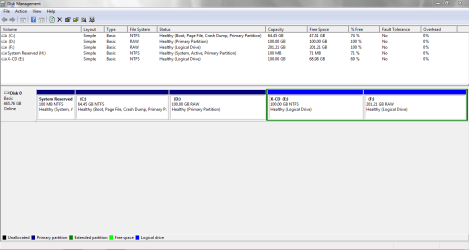
If you install Windows to unallocated space it will create System Reserved and partitions, both partitions will be primary. The System Reserved will have the boot manager and be the [B]Active[/B] partition. The [C] partition is where Windows will be installed, and be the [B]Boot[/B] partition as seen in Disk Management. If you pre-define a partition to install Windows on, it will be the [B]Active[/B] partition having the Boot Manager, and the Windows OS. That's my experience, with Legacy BIOS, and MBR disks. I don't know what you are going to use [D] for, and why you want it as Primary. I prefer Logical partitions for all except the partition that has the boot code, that partition MUST be primary. You can use Minitool Partition Wizard (free) for better adjusting and fine-tuning the new HD partitions. [URL="http://www.partitionwizard.com/free-partition-manager.html"]Best Free Partition Manager for Windows | MiniTool Partition Free[/URL] Make sure you have your current HD, OS, and DATA backed up completely on a different device, before making any changes. Use a program such as Macrium Reflect free for the creating a Backup Image of the OS partition.[/QUOTE] Thanks DavidE. Actully I don't know why D: as primary drive, I just want to create everything just like my old hdd. Is there any benefit making two primary drive?[/QUOTE] I don't know of any benefit to having partitions as primary rather than logical, other than the partition that has the Boot Code (boot-loader/boot manager) must be a Primary Active partition. My GUESS is your SYSTEM RESERVED partition is a Primary partition and is the Active / System partition. If that's true, that means your Boot Code (boot-loader/boot manager) is on the SYSTEM RESERVED partition. Just be aware, you can only have 3 Primary partitions, and any number of Logical partitions. OR You can have 4 Primary partitions, and no more partitions. If you ever do something and get prompted to [COLOR=Red][B]convert to DYNAMIC, DON'T DO IT[/B][/COLOR]. You never explained what the [D] partition is used for. It would be best if you post a proper screen print of Disk Management, resizing to show all info as explained here:. [URL]http://www.sevenforums.com/tutorials/274797-disk-management-post-screen-capture-image.html[/URL][/QUOTE] Hi DavidE, many thanks for those info. I'm a beginner, so they really helps me. I'm grateful to you. OS and all other programs I install on C, and D,E,F is for audio video and files. And I install my games on D: so that C: drive remains free. Someone created those 4 drives when I bought my pc, that's why it feels comfortable to make my new hdd similar. I can create my desired 4 partitions with windows 7 installation cd (at the time of installation), [B][COLOR=Red]but I don't know how and when[/COLOR][/B] to make C,D primary and E,F logical (Using new partion button or Extend partion button). I've attached a captured photo of my old hdd below. I'd be happy to arrange my new hdd just like it. (D and F drives are faulty, that's why I've bought a new hdd)
 

Attachments

  • Disk Drives.PNG
    Disk Drives.PNG
    22.1 KB · Views: 5

My Computer My Computer

At a glance

Windows 7 Home Premium 32bitPentium(R) Dual-Core CPU E5500 2.79GHz1 GB
Computer type
PC/Desktop
Computer Manufacturer/Model Number
Samsung
OS
Windows 7 Home Premium 32bit
CPU
Pentium(R) Dual-Core CPU E5500 2.79GHz
Memory
1 GB
Monitor(s) Displays
Samsung SyncMaster E1920
Internet Speed
512kbps
Browser
Firefox
The D and F partitions are RAW, imho that's why they are "faulty".
Do you have data on these partitions you need to keep ?
If you do, we'll need to ask for help from recovery experts.
I can ask for others to help with this, I'm not a data recovery expert.
Let me know if you want me to post for other's to help better than i can.

Don't do anything to your current HD / partitions without better advice than i can give you.
 

My Computer My Computer

At a glance

Multi-Boot W7_Pro_x64 W8.1_Pro_x64 W10_Pro_x6...AMD Athlon II x4 6206GB GSkill DDR2 800AMD 4670 GPU + AMD 4200 IGP
Computer type
PC/Desktop
Computer Manufacturer/Model Number
home built
OS
Multi-Boot W7_Pro_x64 W8.1_Pro_x64 W10_Pro_x64 +Linux_VMs +Chromium_VM
CPU
AMD Athlon II x4 620
Motherboard
Gigabyte GA-MA785G-UD3H
Memory
6GB GSkill DDR2 800
Graphics Card(s)
AMD 4670 GPU + AMD 4200 IGP
Sound Card
on board Realtek ALC889A
Monitor(s) Displays
RCA 40" LCD TV, Insignia 32" LCD TV, HP 15" LCD monitor
Screen Resolution
1680 x 1050
Hard Drives
OCZ Vertex 3 120GB,
Samsung F3 1TB (3),
Several others - WD, Seagate, Hitachi, ...
PSU
Corsair 500 W
Case
Rosewill mid tower
Cooling
CM 90mm rifle
Keyboard
Gyration wireless, Logitech wireless, Dell USB wired
Mouse
Gyration wireless, Logitech wireless, V7 USB wired
Internet Speed
Spectrum - 100Mbps D / 10Mbps U
Antivirus
Avast, MBAM3, EMET, WinPatrol
Browser
Pale Moon, Firefox, IE
Other Info
2 multi-boot PC's
Mainly HTPC/Office/Gen purpose (no gaming).
Trendnet USB KVM.
LG DVD burner/Blue Ray Player.
Tray system for removable SATA backup drives.

Not currently OCd, under-volted.
I use Hybrid sleep, rarely re-boot or shutdown.

Hauppauge HD-PVR, Avermedia PCIe TV Tuner, Hauppauge PCI TV Tuner.
The D and F partitions are RAW, imho that's why they are "faulty".
Do you have data on these partitions you need to keep ?
If you do, we'll need to ask for help from recovery experts.
I can ask for others to help with this, I'm not a data recovery expert.
Let me know if you want me to post for other's to help better than i can.

Don't do anything to your current HD / partitions without better advice than i can give you.
I have backups of all my important data so I will just throw this hdd, there are thousands of bad sectors in it. Only C: drive is still working. So I've bought a new hdd few days ago and it's still in its pack. I will fresh install my OS on this new HDD. That's why I need to learn how to efficiently partition and format a new hdd to install OS. That's why I'm collecting your advice :)
 

My Computer My Computer

At a glance

Windows 7 Home Premium 32bitPentium(R) Dual-Core CPU E5500 2.79GHz1 GB
Computer type
PC/Desktop
Computer Manufacturer/Model Number
Samsung
OS
Windows 7 Home Premium 32bit
CPU
Pentium(R) Dual-Core CPU E5500 2.79GHz
Memory
1 GB
Monitor(s) Displays
Samsung SyncMaster E1920
Internet Speed
512kbps
Browser
Firefox
Oh, the bad sectors issue sounds like a hardware problem.
As long as you have everything backed up and are ok with doing a clean install, that's great, best approach imho.

I have multi-boot PC's so my opinion/experience is "personally biased" and may not be best for you or anyone else.
But, i do believe the fewest possible primary partitions is the best setup, be it a single or multiple OS PC.

If you want. i'll post screen print(s) of my disk management.

My TEST PC is a triple boot with all OS's on the same SSD, a single boot manager/active primary partition.
My PRIMARY PC is a multi-boot, with each OS on a different storage device, each device with it's own boot manager, and a primary/active partition.

I don't suggest or recommend following my setup, it's what i have on my old PC's that has evolved over the years.
Somehow, it works for me.
 

My Computer My Computer

At a glance

Multi-Boot W7_Pro_x64 W8.1_Pro_x64 W10_Pro_x6...AMD Athlon II x4 6206GB GSkill DDR2 800AMD 4670 GPU + AMD 4200 IGP
Computer type
PC/Desktop
Computer Manufacturer/Model Number
home built
OS
Multi-Boot W7_Pro_x64 W8.1_Pro_x64 W10_Pro_x64 +Linux_VMs +Chromium_VM
CPU
AMD Athlon II x4 620
Motherboard
Gigabyte GA-MA785G-UD3H
Memory
6GB GSkill DDR2 800
Graphics Card(s)
AMD 4670 GPU + AMD 4200 IGP
Sound Card
on board Realtek ALC889A
Monitor(s) Displays
RCA 40" LCD TV, Insignia 32" LCD TV, HP 15" LCD monitor
Screen Resolution
1680 x 1050
Hard Drives
OCZ Vertex 3 120GB,
Samsung F3 1TB (3),
Several others - WD, Seagate, Hitachi, ...
PSU
Corsair 500 W
Case
Rosewill mid tower
Cooling
CM 90mm rifle
Keyboard
Gyration wireless, Logitech wireless, Dell USB wired
Mouse
Gyration wireless, Logitech wireless, V7 USB wired
Internet Speed
Spectrum - 100Mbps D / 10Mbps U
Antivirus
Avast, MBAM3, EMET, WinPatrol
Browser
Pale Moon, Firefox, IE
Other Info
2 multi-boot PC's
Mainly HTPC/Office/Gen purpose (no gaming).
Trendnet USB KVM.
LG DVD burner/Blue Ray Player.
Tray system for removable SATA backup drives.

Not currently OCd, under-volted.
I use Hybrid sleep, rarely re-boot or shutdown.

Hauppauge HD-PVR, Avermedia PCIe TV Tuner, Hauppauge PCI TV Tuner.
I think, I understand the basics of partitioning (at last!). And now I can advice others :D

Thank you DavidE for your time, this should be the motto of our internet, sharing and caring.

Good Night
 

My Computer My Computer

At a glance

Windows 7 Home Premium 32bitPentium(R) Dual-Core CPU E5500 2.79GHz1 GB
Computer type
PC/Desktop
Computer Manufacturer/Model Number
Samsung
OS
Windows 7 Home Premium 32bit
CPU
Pentium(R) Dual-Core CPU E5500 2.79GHz
Memory
1 GB
Monitor(s) Displays
Samsung SyncMaster E1920
Internet Speed
512kbps
Browser
Firefox
there are many software in the internet can do this. search partition freeware. I suppose it will do by choosing any of them,
In details... I will boot from a partition software and create 4 partitions on my fresh hdd (C,D,E,F, two primary and two logical). Then I will reboot my pc with windows 7 installation cd and install OS on partition C, and the 100mb system reserved partition will be created automatically. Am I correct? And thanks LordSnow for your reply.

no. in this way, windows will not create a system reserved partition. you need to select an unallocated space to install windows 10
 

My Computer My Computer

At a glance

Windows 10 32bit
Computer type
PC/Desktop
OS
Windows 10 32bit
there are many software in the internet can do this. search partition freeware. I suppose it will do by choosing any of them,
In details... I will boot from a partition software and create 4 partitions on my fresh hdd (C,D,E,F, two primary and two logical). Then I will reboot my pc with windows 7 installation cd and install OS on partition C, and the 100mb system reserved partition will be created automatically. Am I correct? And thanks LordSnow for your reply.

no. in this way, windows will not create a system reserved partition. you need to select an unallocated space to install windows 10
Oh I didn't know that! Anyway I will use the simple way. Using windows installation cd I will create only one partition of 65GB and install OS on it, and leave the rest space unallocated. Then Windows will create its 100mb system reserved partition right? After completing everything I will boot from the hdd and use windows disk manager to create other partitions later. Though another question, do I need to format first to install windows 7 at the beginning?
 

My Computer My Computer

At a glance

Windows 7 Home Premium 32bitPentium(R) Dual-Core CPU E5500 2.79GHz1 GB
Computer type
PC/Desktop
Computer Manufacturer/Model Number
Samsung
OS
Windows 7 Home Premium 32bit
CPU
Pentium(R) Dual-Core CPU E5500 2.79GHz
Memory
1 GB
Monitor(s) Displays
Samsung SyncMaster E1920
Internet Speed
512kbps
Browser
Firefox
In details... I will boot from a partition software and create 4 partitions on my fresh hdd (C,D,E,F, two primary and two logical). Then I will reboot my pc with windows 7 installation cd and install OS on partition C, and the 100mb system reserved partition will be created automatically. Am I correct? And thanks LordSnow for your reply.

no. in this way, windows will not create a system reserved partition. you need to select an unallocated space to install windows 10
Oh I didn't know that! Anyway I will use the simple way. Using windows installation cd I will create only one partition of 65GB and install OS on it, and leave the rest space unallocated. Then Windows will create its 100mb system reserved partition right? After completing everything I will boot from the hdd and use windows disk manager to create other partitions later. Though another question, do I need to format first to install windows 7 at the beginning?

No, If you install Windows into the 65GB partition you created, Windows will NOT create a System Reserved partition.
It will install the Boot Manager and Windows into the 65 GB partition, and give it the drive letter C.

If you want a System Reserved partition for the Boot Manager you MUST install Windows into unallocated space.

imho you are better off installing Windows into the 65GB partition, and not have a System Reserved partition.
That would save you one Primary partition, and it is easier to do this way.

Either way works, the choice is yours.

You do not need to format first, Windows will take care of that during the installation.
 

My Computer My Computer

At a glance

Multi-Boot W7_Pro_x64 W8.1_Pro_x64 W10_Pro_x6...AMD Athlon II x4 6206GB GSkill DDR2 800AMD 4670 GPU + AMD 4200 IGP
Computer type
PC/Desktop
Computer Manufacturer/Model Number
home built
OS
Multi-Boot W7_Pro_x64 W8.1_Pro_x64 W10_Pro_x64 +Linux_VMs +Chromium_VM
CPU
AMD Athlon II x4 620
Motherboard
Gigabyte GA-MA785G-UD3H
Memory
6GB GSkill DDR2 800
Graphics Card(s)
AMD 4670 GPU + AMD 4200 IGP
Sound Card
on board Realtek ALC889A
Monitor(s) Displays
RCA 40" LCD TV, Insignia 32" LCD TV, HP 15" LCD monitor
Screen Resolution
1680 x 1050
Hard Drives
OCZ Vertex 3 120GB,
Samsung F3 1TB (3),
Several others - WD, Seagate, Hitachi, ...
PSU
Corsair 500 W
Case
Rosewill mid tower
Cooling
CM 90mm rifle
Keyboard
Gyration wireless, Logitech wireless, Dell USB wired
Mouse
Gyration wireless, Logitech wireless, V7 USB wired
Internet Speed
Spectrum - 100Mbps D / 10Mbps U
Antivirus
Avast, MBAM3, EMET, WinPatrol
Browser
Pale Moon, Firefox, IE
Other Info
2 multi-boot PC's
Mainly HTPC/Office/Gen purpose (no gaming).
Trendnet USB KVM.
LG DVD burner/Blue Ray Player.
Tray system for removable SATA backup drives.

Not currently OCd, under-volted.
I use Hybrid sleep, rarely re-boot or shutdown.

Hauppauge HD-PVR, Avermedia PCIe TV Tuner, Hauppauge PCI TV Tuner.
64 GB for windows is too small. I wouldn`t go any less then 150 GB.

Remember, you should be installing all your programs (games not included, but that is a matter of choice) on C for disk image purposes.
 

My Computer My Computer

At a glance

Windows 10 Pro x64Intel Core i7 6700KGSkill TridentZ RGB 16GB 3600 16-16-16-36EVGA GTX 980 Ti SC x2
Computer type
PC/Desktop
Computer Manufacturer/Model Number
Skylake Special #666
OS
Windows 10 Pro x64
CPU
Intel Core i7 6700K
Motherboard
Asus Sabertooth Z170 Mark 1
Memory
GSkill TridentZ RGB 16GB 3600 16-16-16-36
Graphics Card(s)
EVGA GTX 980 Ti SC x2
Sound Card
Realtek High Definition
Monitor(s) Displays
AOC G2460PG
Screen Resolution
1920 x 1080 144Hz
Hard Drives
Samsung 860 Pro 256GB, Seagate Barracuda 4TB x2
PSU
EVGA 1000 P2, EVGA White Custom Braided Cables
Case
Corsair Vengeance C70 Gunmetal Black
Cooling
Corsair H100i v2, Corsair ML120 x2, Thermal Grizzly Kryonaut
Keyboard
Logitech G910 Orion Spectrum
Mouse
Logitech G700s
Internet Speed
Verizon Fios Quantum Gateway 75/75
Antivirus
Windows Defender, Malwarebytes Free 3.8.3
Browser
Chrome
Other Info
Corsair SP120 x4, LG Blu-ray Drive, Durabrand HT-395 100 Watt Dolby Digital Amp, Corsair H2100 Wireless 7.1 Headset
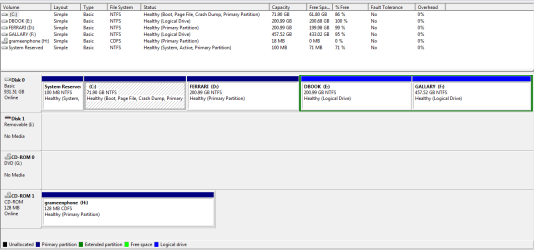
Yes DavidE you were right about boot manager, I've already completed the partition and installation using the installation cd (creating one partition) before seeing your reply. Why Windows Create this System Resereved Anyway!

If my OS were installed on un-partitioned space, was it possible to create other partitions later reducing the first partitions size? Was it easier?

Below is my newly created hdd (it's my first). Is evirything OK?
 

Attachments

  • Disk Partitions New.PNG
    Disk Partitions New.PNG
    18.6 KB · Views: 2

My Computer My Computer

At a glance

Windows 7 Home Premium 32bitPentium(R) Dual-Core CPU E5500 2.79GHz1 GB
Computer type
PC/Desktop
Computer Manufacturer/Model Number
Samsung
OS
Windows 7 Home Premium 32bit
CPU
Pentium(R) Dual-Core CPU E5500 2.79GHz
Memory
1 GB
Monitor(s) Displays
Samsung SyncMaster E1920
Internet Speed
512kbps
Browser
Firefox
Back
Top