Solved How to remove all yahoo from windows 7

ineuw

New member
Member
VIP
Local time
6:41 PM
Messages
152
The OS is Windows 7 and yahoo embedded itself in my browsers (four, because I am testing text rendering for Wikisource/Wikipedia) and I don't know how to get rid of it. There is no yahoo related program in Windows uninstall and I know all the installed software. Information on the web is outdated and useless. I looked with Revo uninstall, CCleaner uninstall, Malwarebytes, and with "everything" file search tool, deleted all files and folders that had the word "yahoo" in them. Can someone please advise what to do?
 

My Computer My Computer

Computer type
PC/Desktop
Computer Manufacturer/Model Number
Custom built
OS
Microsoft Windows 10 Pro 64-bit
CPU
8th generation Intel(R) Pentium G5600 3.9GHz
Motherboard
ASRock B360 Pro 4 8th Generation
Memory
16 GB DDR4 Kingston HyperX
Graphics Card(s)
On board Intel UHD Graphics 1GB shared
Sound Card
On board Realtek HD ALC892
Monitor(s) Displays
LG 22 in LCD
Screen Resolution
1536 x 864 x 32 bits (4294967296 colors) @ 59 Hz
Hard Drives
(1) SanDisk SDSSDHII120G ATA Device
(2) ST1000DM003-1SB10C ATA Device
(3) ST500DM002-1BD142 ATA Device
PSU
Antec 650 Watt PSU
Case
Antec mid size tower
Cooling
120mm fan
Keyboard
Generic 105 keys
Mouse
Generic JeTech
Internet Speed
50 megabits
Antivirus
Avast and daily Malwarebytes scan
Browser
Cyberfox 52.9.1
What exactly do you mean ?

Has Yahoo changed your home page ?

Has Yahoo added a toolbar ?

Have you looked in Add Remove programs for any Yahoo related garbage ?

What did you download to create this ? It didn`t happen on it`s own :)
 

My Computer My Computer

Computer type
PC/Desktop
Computer Manufacturer/Model Number
Skylake Special #666
OS
Windows 10 Pro x64
CPU
Intel Core i7 6700K
Motherboard
Asus Sabertooth Z170 Mark 1
Memory
GSkill TridentZ RGB 16GB 3600 16-16-16-36
Graphics Card(s)
EVGA GTX 980 Ti SC x2
Sound Card
Realtek High Definition
Monitor(s) Displays
AOC G2460PG
Screen Resolution
1920 x 1080 144Hz
Hard Drives
Samsung 860 Pro 256GB, Seagate Barracuda 4TB x2
PSU
EVGA 1000 P2, EVGA White Custom Braided Cables
Case
Corsair Vengeance C70 Gunmetal Black
Cooling
Corsair H100i v2, Corsair ML120 x2, Thermal Grizzly Kryonaut
Keyboard
Logitech G910 Orion Spectrum
Mouse
Logitech G700s
Internet Speed
Verizon Fios Quantum Gateway 75/75
Antivirus
Windows Defender, Malwarebytes Free 3.8.3
Browser
Chrome
Other Info
Corsair SP120 x4, LG Blu-ray Drive, Durabrand HT-395 100 Watt Dolby Digital Amp, Corsair H2100 Wireless 7.1 Headset
What exactly do you mean ?

Has Yahoo changed your home page ?

Has Yahoo added a toolbar ?

Have you looked in Add Remove programs for any Yahoo related garbage ?

What did you download to create this ? It didn`t happen on it`s own :)


Of course it didn't happen on its own, downloaded Wise registry cleaner and even though all offers were refused/deselected, it installed a Yahoo package of some sort. As I wrote before, "Add and remove" programs doesn't have anything related to Yahoo and neither did the other program uninstall software.

Yahoo changed my home page, added their toolbar and removed the form history add-on from Firefox.

I will keep this post updated, as I am trying to find out more.
 

My Computer My Computer

Computer type
PC/Desktop
Computer Manufacturer/Model Number
Custom built
OS
Microsoft Windows 10 Pro 64-bit
CPU
8th generation Intel(R) Pentium G5600 3.9GHz
Motherboard
ASRock B360 Pro 4 8th Generation
Memory
16 GB DDR4 Kingston HyperX
Graphics Card(s)
On board Intel UHD Graphics 1GB shared
Sound Card
On board Realtek HD ALC892
Monitor(s) Displays
LG 22 in LCD
Screen Resolution
1536 x 864 x 32 bits (4294967296 colors) @ 59 Hz
Hard Drives
(1) SanDisk SDSSDHII120G ATA Device
(2) ST1000DM003-1SB10C ATA Device
(3) ST500DM002-1BD142 ATA Device
PSU
Antec 650 Watt PSU
Case
Antec mid size tower
Cooling
120mm fan
Keyboard
Generic 105 keys
Mouse
Generic JeTech
Internet Speed
50 megabits
Antivirus
Avast and daily Malwarebytes scan
Browser
Cyberfox 52.9.1
Did you uninstall the registry cleaner? They are not needed with Windows 7 and just lead to problems.
 

My Computer My Computer

Computer type
PC/Desktop
Computer Manufacturer/Model Number
custom build
OS
Windows 7 Professional 64bit
CPU
Intel i7-5960X
Motherboard
EVGA X99 Classified
Memory
64GB Corsair Dominator 2400MHz
Graphics Card(s)
3 EVGA GTX980's
Sound Card
on board
Monitor(s) Displays
3 Dell E2715H 27"
Screen Resolution
1920x1080 (5760x1080)
Hard Drives
Samsung 950 Pro 1TB M.2 SSD,
Western Digital Black 2TB HDD's x5
Western Digital Black 1TB HDD's x3
PSU
Corsair AX1200i
Case
Corsair 750D
Cooling
Corsair H110i GT
Keyboard
Corsair K70
Mouse
Corsair M45
Internet Speed
250 down/10 up
Antivirus
Microsoft Security Essentials
Browser
IE 11, Google Chrome

My Computer My Computer

Computer Manufacturer/Model Number
Put together
OS
Win7 Pro-64 Bit
CPU
i7-2600-3.4GHz
Motherboard
ASRock Z68M
Memory
8 GIG DDR3
Graphics Card(s)
onboard
Sound Card
onboard
Hard Drives
Seagate 1TB 7200RPM
PSU
680 W
Case
black
Cooling
stock fans
Keyboard
Microsoft
Mouse
Microsoft optical
remove yahoo

Hi,
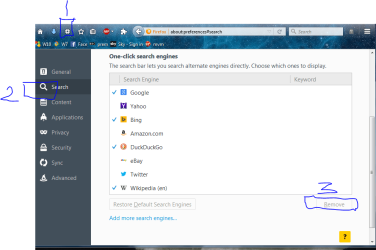
follow 1 2 3 in screenshot, to remove in Firefox,
then go to plugins/toolbars remove any yahoo.

Roy
 

Attachments

  • deltb.PNG
    deltb.PNG
    52.5 KB · Views: 0

My Computer My Computer

Computer type
PC/Desktop
Computer Manufacturer/Model Number
medionl/Aspire 6930G/acer x55a
OS
W7 home premium 32bit/W7HP 64bit/w10 tp insider ring
CPU
E5300 dual core
Motherboard
medion MS7366
Memory
3gb
Graphics Card(s)
Nvidia Geforce 7100 Nforce 630i
Monitor(s) Displays
avixc
Internet Speed
n (isp resticted to 72)
Antivirus
mse/pands
Browser
palemoon
Other Info
Belkin Fd7050 n USB using Railink RT2870 drivers, more upto date
CCleaner is all you need, and never does any damage.
 

My Computer My Computer

Computer type
PC/Desktop
Computer Manufacturer/Model Number
Skylake Special #666
OS
Windows 10 Pro x64
CPU
Intel Core i7 6700K
Motherboard
Asus Sabertooth Z170 Mark 1
Memory
GSkill TridentZ RGB 16GB 3600 16-16-16-36
Graphics Card(s)
EVGA GTX 980 Ti SC x2
Sound Card
Realtek High Definition
Monitor(s) Displays
AOC G2460PG
Screen Resolution
1920 x 1080 144Hz
Hard Drives
Samsung 860 Pro 256GB, Seagate Barracuda 4TB x2
PSU
EVGA 1000 P2, EVGA White Custom Braided Cables
Case
Corsair Vengeance C70 Gunmetal Black
Cooling
Corsair H100i v2, Corsair ML120 x2, Thermal Grizzly Kryonaut
Keyboard
Logitech G910 Orion Spectrum
Mouse
Logitech G700s
Internet Speed
Verizon Fios Quantum Gateway 75/75
Antivirus
Windows Defender, Malwarebytes Free 3.8.3
Browser
Chrome
Other Info
Corsair SP120 x4, LG Blu-ray Drive, Durabrand HT-395 100 Watt Dolby Digital Amp, Corsair H2100 Wireless 7.1 Headset
Unless you remove the Yahoo search engine WITHIN Firefox, which i believe ccleaner does not, then everytime you open the browser Yahoo will update and youll be back where you started.

Roy
 

My Computer My Computer

Computer type
PC/Desktop
Computer Manufacturer/Model Number
medionl/Aspire 6930G/acer x55a
OS
W7 home premium 32bit/W7HP 64bit/w10 tp insider ring
CPU
E5300 dual core
Motherboard
medion MS7366
Memory
3gb
Graphics Card(s)
Nvidia Geforce 7100 Nforce 630i
Monitor(s) Displays
avixc
Internet Speed
n (isp resticted to 72)
Antivirus
mse/pands
Browser
palemoon
Other Info
Belkin Fd7050 n USB using Railink RT2870 drivers, more upto date
How to remove all yahoo from windows 7 (solved)

I owe it to the community to share the information on this latest yahoo toolbar & browser package, in case someone else downloads and overlooks the installation options, as I have.

The stealth installation seems to affect only the default browser (Firefox 42.0 in my case,) but I found nothing related to yahoo in IE11, Comodo Dragon, or Opera.

I stopped syncing Firefox because every change would sync with my other "untainted" devices.

In Firefox, it removed the add-on named "Form History Control" which I use extensively, and replaced DuckDuckGo, my home page and search engine.

It must have checked if there was an entry in my saved passwords, or whether my IP and MAC address existed in their database, (which it did, because I have a yahoo mail account) and logged me into yahoo automatically.

In Firefox "about:config", the values containing the word "yahoo" could not be replaced permanently. On restart of the browser, the entries were again redefined by yahoo. So, I just cleared the values, and left them blank and they remained so.

Using "Everything", a fast Windows file search app, I found three files and a separate folder with the "yahoo" name in them which I deleted. Unfortunately, didn't record the name and the location of the folder and files. To know this, I would have to reinstall everything again, but I suspect that they were in the Program Files.

Ran Malwarebytes which found two potential PUP's which I deleted.

There was no mention of "yahoo" anywhere in the registry and now, everything is back to normal.

@BrightBlessings, @torchwood there was no addon or a Windows Program installation for any Yahoo product. I am very familiar with, and well versed in the "ins" and "outs" of Firefox. Have been beta testing the software for years.

@HAVOC, In general, I tend to agree if one is not familiar with the registry, but this is not the case because Im selective in what is removed.
 
Last edited:

My Computer My Computer

Computer type
PC/Desktop
Computer Manufacturer/Model Number
Custom built
OS
Microsoft Windows 10 Pro 64-bit
CPU
8th generation Intel(R) Pentium G5600 3.9GHz
Motherboard
ASRock B360 Pro 4 8th Generation
Memory
16 GB DDR4 Kingston HyperX
Graphics Card(s)
On board Intel UHD Graphics 1GB shared
Sound Card
On board Realtek HD ALC892
Monitor(s) Displays
LG 22 in LCD
Screen Resolution
1536 x 864 x 32 bits (4294967296 colors) @ 59 Hz
Hard Drives
(1) SanDisk SDSSDHII120G ATA Device
(2) ST1000DM003-1SB10C ATA Device
(3) ST500DM002-1BD142 ATA Device
PSU
Antec 650 Watt PSU
Case
Antec mid size tower
Cooling
120mm fan
Keyboard
Generic 105 keys
Mouse
Generic JeTech
Internet Speed
50 megabits
Antivirus
Avast and daily Malwarebytes scan
Browser
Cyberfox 52.9.1
2017 Yahoo Hijack Remove

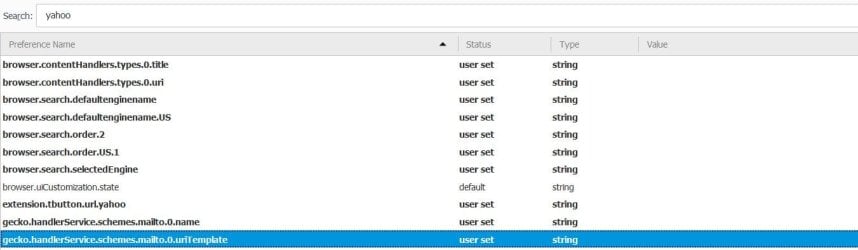
I read, in one of the replies, to search Firefox (50) about:config for yahoo and delete the values BUT leave them blank so I did. I also checked my search engines which were not modified.
Here's what I ended up with; should it reappear I will add additional info:

c
 

Attachments

  • yahoodell.jpg
    yahoodell.jpg
    43.3 KB · Views: 2

My Computer My Computer

Computer Manufacturer/Model Number
Toshiba U505-2002
OS
Windows 7 Ultimate x32
CPU
Pentium Dual Core CPU T4400 2.20 GHz
Motherboard
References to a motherboard on this PC do not exist.
Memory
4GB (LOL! 2.98 really)
Graphics Card(s)
Mobile Intel(R) 4 Series Express Chipset Family
Sound Card
High Definition Audio Device
Monitor(s) Displays
Generic PnP Display: Great Wall Flat Panel
Hard Drives
1x100GB, 70GB available, external 500GB, various USB 'sticks'
PSU
Jeez, Lousie! can I paste my device manager listings?
Case
Yes, black.
Cooling
Yes.
Back
Top