Windows wont start and cant even repair startup

supercain

New member
Local time
12:29 AM
Messages
37
Hi,

I have a laptop with Windows 7. I was using it yesterday night but I needed some sleep so I just closed the cover and went to bed. I had never done it before but I have seen people do it many times so I thought it was okay. However during sleep I woke up because it was too noisy. As I lift the cover the screen was showing ONLY the image I have as the wallpaper but nothing else so I had to shut it down by pressing the power button and went back to sleep.

The very next day I turned it on but now it wont start. It gets stuck at the windows logo and I cant get past it no matter how long I wait so I turned off the power again and restarted it. I chose Repair start up but after loading like 1000 files it gets stuck on a screen that says "preparing" or something like for 2 hours. Then it finally changed to a blue screen (its not the BSOD) but now its stuck there and nothing happens. I can only move the cursor. I had previously tried in safe mode too but it gets stuck as well. What can I do?

Thank you.
 

My Computer My Computer

At a glance

Windows 7 Ultimate x64Intel Core i7-2600k CPU @ 3.40GHz 3.40GHz8GBnVidia Ge Force GTx 560 Ti
Computer type
PC/Desktop
Computer Manufacturer/Model Number
Dell
OS
Windows 7 Ultimate x64
CPU
Intel Core i7-2600k CPU @ 3.40GHz 3.40GHz
Memory
8GB
Graphics Card(s)
nVidia Ge Force GTx 560 Ti
Antivirus
Windows Defender
Browser
Firefox
Any help please? I tried almost every trick on the book and nothing...
 

My Computer My Computer

At a glance

Windows 7 Ultimate x64Intel Core i7-2600k CPU @ 3.40GHz 3.40GHz8GBnVidia Ge Force GTx 560 Ti
Computer type
PC/Desktop
Computer Manufacturer/Model Number
Dell
OS
Windows 7 Ultimate x64
CPU
Intel Core i7-2600k CPU @ 3.40GHz 3.40GHz
Memory
8GB
Graphics Card(s)
nVidia Ge Force GTx 560 Ti
Antivirus
Windows Defender
Browser
Firefox

My Computer My Computer

At a glance

W7 Ultimate SP1, LM19.2 MATE, W10 Home 1703, ...AMD Phenom II x6 1100T, 3.3 GHz12GB DDR3 1333 G-Skill (4GB x 2), G-Skill (2G...NVIDIA GeForce GTX 660
Computer type
PC/Desktop
Computer Manufacturer/Model Number
n/a
OS
W7 Ultimate SP1, LM19.2 MATE, W10 Home 1703, W10 Pro 1703 VM, #All 64 bit
CPU
AMD Phenom II x6 1100T, 3.3 GHz
Motherboard
ASUS M4A88T-M/USB3 (AM3)
Memory
12GB DDR3 1333 G-Skill (4GB x 2), G-Skill (2GB x 2)
Graphics Card(s)
NVIDIA GeForce GTX 660
Sound Card
Realtek?
Monitor(s) Displays
Samsung S23B350
Screen Resolution
1920x1080
Hard Drives
WD Green 2TB (SATA), WD Green 3TB (SATA), WD Blue 4TB (SATA), WD Blue 6TB (SATA)
PSU
Cooler Master
Case
Antec GX300 Tower
Cooling
3x Antec TRICOOL 120mm Fans
Mouse
Wired Optical
Internet Speed
DSL
Antivirus
Avast
Browser
Pale Moon (64 bit)
Other Info
2018-12-27 Upgraded HDDs
2015-12-10 Upgraded case, graphics card, storage
2015-08-15 Upgraded motherboard & RAM
2015-07-15 Upgraded LM17.1 to LM17.2
Is it necessary to have the disk for that? Because for some reason my computer is giving me an error when reading the disk.
 

My Computer My Computer

At a glance

Windows 7 Ultimate x64Intel Core i7-2600k CPU @ 3.40GHz 3.40GHz8GBnVidia Ge Force GTx 560 Ti
Computer type
PC/Desktop
Computer Manufacturer/Model Number
Dell
OS
Windows 7 Ultimate x64
CPU
Intel Core i7-2600k CPU @ 3.40GHz 3.40GHz
Memory
8GB
Graphics Card(s)
nVidia Ge Force GTx 560 Ti
Antivirus
Windows Defender
Browser
Firefox
Last edited:

My Computer My Computer

At a glance

W7 Ultimate SP1, LM19.2 MATE, W10 Home 1703, ...AMD Phenom II x6 1100T, 3.3 GHz12GB DDR3 1333 G-Skill (4GB x 2), G-Skill (2G...NVIDIA GeForce GTX 660
Computer type
PC/Desktop
Computer Manufacturer/Model Number
n/a
OS
W7 Ultimate SP1, LM19.2 MATE, W10 Home 1703, W10 Pro 1703 VM, #All 64 bit
CPU
AMD Phenom II x6 1100T, 3.3 GHz
Motherboard
ASUS M4A88T-M/USB3 (AM3)
Memory
12GB DDR3 1333 G-Skill (4GB x 2), G-Skill (2GB x 2)
Graphics Card(s)
NVIDIA GeForce GTX 660
Sound Card
Realtek?
Monitor(s) Displays
Samsung S23B350
Screen Resolution
1920x1080
Hard Drives
WD Green 2TB (SATA), WD Green 3TB (SATA), WD Blue 4TB (SATA), WD Blue 6TB (SATA)
PSU
Cooler Master
Case
Antec GX300 Tower
Cooling
3x Antec TRICOOL 120mm Fans
Mouse
Wired Optical
Internet Speed
DSL
Antivirus
Avast
Browser
Pale Moon (64 bit)
Other Info
2018-12-27 Upgraded HDDs
2015-12-10 Upgraded case, graphics card, storage
2015-08-15 Upgraded motherboard & RAM
2015-07-15 Upgraded LM17.1 to LM17.2
Thanks for the answer. Seems like my hard drive is ****ed. This is according to the system diagnostics tool. But then why can I see the windows logo?
 

My Computer My Computer

At a glance

Windows 7 Ultimate x64Intel Core i7-2600k CPU @ 3.40GHz 3.40GHz8GBnVidia Ge Force GTx 560 Ti
Computer type
PC/Desktop
Computer Manufacturer/Model Number
Dell
OS
Windows 7 Ultimate x64
CPU
Intel Core i7-2600k CPU @ 3.40GHz 3.40GHz
Memory
8GB
Graphics Card(s)
nVidia Ge Force GTx 560 Ti
Antivirus
Windows Defender
Browser
Firefox
Check Disk

Thanks for the answer. Seems like my hard drive is ****ed. This is according to the system diagnostics tool. But then why can I see the windows logo?
The files that are loaded, up to and including the Windows Logo, must not have any damaged data (i.e. no bad sectors are present).

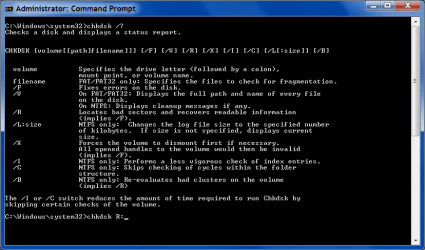
Have you tried running CHKDSK <drive>: /R (using the Command Prompt from the Advanced Boot Options)?
I can't guarantee that it won't make things worse though. :(
Check Disk 3.png
 
Last edited:

My Computer My Computer

At a glance

W7 Ultimate SP1, LM19.2 MATE, W10 Home 1703, ...AMD Phenom II x6 1100T, 3.3 GHz12GB DDR3 1333 G-Skill (4GB x 2), G-Skill (2G...NVIDIA GeForce GTX 660
Computer type
PC/Desktop
Computer Manufacturer/Model Number
n/a
OS
W7 Ultimate SP1, LM19.2 MATE, W10 Home 1703, W10 Pro 1703 VM, #All 64 bit
CPU
AMD Phenom II x6 1100T, 3.3 GHz
Motherboard
ASUS M4A88T-M/USB3 (AM3)
Memory
12GB DDR3 1333 G-Skill (4GB x 2), G-Skill (2GB x 2)
Graphics Card(s)
NVIDIA GeForce GTX 660
Sound Card
Realtek?
Monitor(s) Displays
Samsung S23B350
Screen Resolution
1920x1080
Hard Drives
WD Green 2TB (SATA), WD Green 3TB (SATA), WD Blue 4TB (SATA), WD Blue 6TB (SATA)
PSU
Cooler Master
Case
Antec GX300 Tower
Cooling
3x Antec TRICOOL 120mm Fans
Mouse
Wired Optical
Internet Speed
DSL
Antivirus
Avast
Browser
Pale Moon (64 bit)
Other Info
2018-12-27 Upgraded HDDs
2015-12-10 Upgraded case, graphics card, storage
2015-08-15 Upgraded motherboard & RAM
2015-07-15 Upgraded LM17.1 to LM17.2
I cant even get to that screen or safemode. It gets stuck when trying to load classpnp.sys and then it restarts.
 

My Computer My Computer

At a glance

Windows 7 Ultimate x64Intel Core i7-2600k CPU @ 3.40GHz 3.40GHz8GBnVidia Ge Force GTx 560 Ti
Computer type
PC/Desktop
Computer Manufacturer/Model Number
Dell
OS
Windows 7 Ultimate x64
CPU
Intel Core i7-2600k CPU @ 3.40GHz 3.40GHz
Memory
8GB
Graphics Card(s)
nVidia Ge Force GTx 560 Ti
Antivirus
Windows Defender
Browser
Firefox

My Computer My Computer

At a glance

W7 Ultimate SP1, LM19.2 MATE, W10 Home 1703, ...AMD Phenom II x6 1100T, 3.3 GHz12GB DDR3 1333 G-Skill (4GB x 2), G-Skill (2G...NVIDIA GeForce GTX 660
Computer type
PC/Desktop
Computer Manufacturer/Model Number
n/a
OS
W7 Ultimate SP1, LM19.2 MATE, W10 Home 1703, W10 Pro 1703 VM, #All 64 bit
CPU
AMD Phenom II x6 1100T, 3.3 GHz
Motherboard
ASUS M4A88T-M/USB3 (AM3)
Memory
12GB DDR3 1333 G-Skill (4GB x 2), G-Skill (2GB x 2)
Graphics Card(s)
NVIDIA GeForce GTX 660
Sound Card
Realtek?
Monitor(s) Displays
Samsung S23B350
Screen Resolution
1920x1080
Hard Drives
WD Green 2TB (SATA), WD Green 3TB (SATA), WD Blue 4TB (SATA), WD Blue 6TB (SATA)
PSU
Cooler Master
Case
Antec GX300 Tower
Cooling
3x Antec TRICOOL 120mm Fans
Mouse
Wired Optical
Internet Speed
DSL
Antivirus
Avast
Browser
Pale Moon (64 bit)
Other Info
2018-12-27 Upgraded HDDs
2015-12-10 Upgraded case, graphics card, storage
2015-08-15 Upgraded motherboard & RAM
2015-07-15 Upgraded LM17.1 to LM17.2
Back
Top