PC games lag and Graphic's card not seen by PC

Please post your exact model i can only find versions with I7 processors, which only come with 1 type of graphics.

Roy
 

My Computer My Computer

At a glance

W7 home premium 32bit/W7HP 64bit/w10 tp insid...E5300 dual core3gbNvidia Geforce 7100 Nforce 630i
Computer type
PC/Desktop
Computer Manufacturer/Model Number
medionl/Aspire 6930G/acer x55a
OS
W7 home premium 32bit/W7HP 64bit/w10 tp insider ring
CPU
E5300 dual core
Motherboard
medion MS7366
Memory
3gb
Graphics Card(s)
Nvidia Geforce 7100 Nforce 630i
Monitor(s) Displays
avixc
Internet Speed
n (isp resticted to 72)
Antivirus
mse/pands
Browser
palemoon
Other Info
Belkin Fd7050 n USB using Railink RT2870 drivers, more upto date
Please post your exact model i can only find versions with I7 processors, which only come with 1 type of graphics.

Roy

CPU
Intel Core i5 2320
Cores 4
Threads 4
Name Intel Core i5 2320
Code Name Sandy Bridge
Package Socket 1155 LGA
Technology 32nm
Specification Intel Core i5-2320 CPU @ 3.00GHz
Family 6
Extended Family 6
Model A
Extended Model 2A
Stepping 7
Revision D2
Instructions MMX, SSE, SSE2, SSE3, SSSE3, SSE4.1, SSE4.2, Intel 64, NX, VMX, AVX
Virtualization Supported, Enabled
Hyperthreading Supported, Disabled
Fan Speed 1229 RPM
Bus Speed 99,8 MHz
Stock Core Speed 3000 MHz
Stock Bus Speed 100 MHz
Average Temperature 29 °C
Caches
L1 Data Cache Size 4 x 32 KBytes
L1 Instructions Cache Size 4 x 32 KBytes
L2 Unified Cache Size 4 x 256 KBytes
L3 Unified Cache Size 6144 KBytes


If this is not what you asked for then please be a bit more specific.

Thanks.
 

My Computer My Computer

At a glance

Windows 10 Home 64-bitIntel Core i7 6700 - Skylake16,0GB4095MB NVIDIA GeForce GTX 970 (ASUStek Comput...
Computer type
PC/Desktop
Computer Manufacturer/Model Number
Custom
OS
Windows 10 Home 64-bit
CPU
Intel Core i7 6700 - Skylake
Motherboard
ASUSTeK COMPUTER INC. Z170-P
Memory
16,0GB
Graphics Card(s)
4095MB NVIDIA GeForce GTX 970 (ASUStek Computer Inc)
Monitor(s) Displays
S24B350 - Samsung (1 monitor)
Screen Resolution
1920x1080@60Hz
Hard Drives
931GB Seagate ST1000DM003-1SB10C (SATA)
111GB KINGSTON SV300S37A120G (SATA-2 (SSD))
1862GB Western Digital WD My Passport 0820 USB Device (USB (SATA)
Keyboard
Steelseries Apex M800
Mouse
Steelseries Rival 700
Antivirus
BullGuard Internet Security
Browser
Google Chrome // Microsoft Edge
Mines an ACER >>>6930<<< whats yours.

Roy
 

My Computer My Computer

At a glance

W7 home premium 32bit/W7HP 64bit/w10 tp insid...E5300 dual core3gbNvidia Geforce 7100 Nforce 630i
Computer type
PC/Desktop
Computer Manufacturer/Model Number
medionl/Aspire 6930G/acer x55a
OS
W7 home premium 32bit/W7HP 64bit/w10 tp insider ring
CPU
E5300 dual core
Motherboard
medion MS7366
Memory
3gb
Graphics Card(s)
Nvidia Geforce 7100 Nforce 630i
Monitor(s) Displays
avixc
Internet Speed
n (isp resticted to 72)
Antivirus
mse/pands
Browser
palemoon
Other Info
Belkin Fd7050 n USB using Railink RT2870 drivers, more upto date

My Computer My Computer

At a glance

Windows 10 Home 64-bitIntel Core i7 6700 - Skylake16,0GB4095MB NVIDIA GeForce GTX 970 (ASUStek Comput...
Computer type
PC/Desktop
Computer Manufacturer/Model Number
Custom
OS
Windows 10 Home 64-bit
CPU
Intel Core i7 6700 - Skylake
Motherboard
ASUSTeK COMPUTER INC. Z170-P
Memory
16,0GB
Graphics Card(s)
4095MB NVIDIA GeForce GTX 970 (ASUStek Computer Inc)
Monitor(s) Displays
S24B350 - Samsung (1 monitor)
Screen Resolution
1920x1080@60Hz
Hard Drives
931GB Seagate ST1000DM003-1SB10C (SATA)
111GB KINGSTON SV300S37A120G (SATA-2 (SSD))
1862GB Western Digital WD My Passport 0820 USB Device (USB (SATA)
Keyboard
Steelseries Apex M800
Mouse
Steelseries Rival 700
Antivirus
BullGuard Internet Security
Browser
Google Chrome // Microsoft Edge

My Computer My Computer

At a glance

W7 home premium 32bit/W7HP 64bit/w10 tp insid...E5300 dual core3gbNvidia Geforce 7100 Nforce 630i
Computer type
PC/Desktop
Computer Manufacturer/Model Number
medionl/Aspire 6930G/acer x55a
OS
W7 home premium 32bit/W7HP 64bit/w10 tp insider ring
CPU
E5300 dual core
Motherboard
medion MS7366
Memory
3gb
Graphics Card(s)
Nvidia Geforce 7100 Nforce 630i
Monitor(s) Displays
avixc
Internet Speed
n (isp resticted to 72)
Antivirus
mse/pands
Browser
palemoon
Other Info
Belkin Fd7050 n USB using Railink RT2870 drivers, more upto date
Have a look at this topic,
http://www.sevenforums.com/graphic-...control-center-ccc-will-not-open-install.html

After reviewing I noticed that you have Norton recovery set up, can you get a back-up from that?
you also stated in your first post that your system is gradually getting slower and slower over the last couple of weeks, It just might be that the card has just died.

Roy

Just re-read my own comment and i never stated my pc was getting slower at all.

It didn't work because there is no "90ba9c70f846762e" tokens under windows>assembly.
However there are multiple tokens that says AMD, just non of them have the following combination of "90ba9c70f846762e"
 

My Computer My Computer

At a glance

Windows 10 Home 64-bitIntel Core i7 6700 - Skylake16,0GB4095MB NVIDIA GeForce GTX 970 (ASUStek Comput...
Computer type
PC/Desktop
Computer Manufacturer/Model Number
Custom
OS
Windows 10 Home 64-bit
CPU
Intel Core i7 6700 - Skylake
Motherboard
ASUSTeK COMPUTER INC. Z170-P
Memory
16,0GB
Graphics Card(s)
4095MB NVIDIA GeForce GTX 970 (ASUStek Computer Inc)
Monitor(s) Displays
S24B350 - Samsung (1 monitor)
Screen Resolution
1920x1080@60Hz
Hard Drives
931GB Seagate ST1000DM003-1SB10C (SATA)
111GB KINGSTON SV300S37A120G (SATA-2 (SSD))
1862GB Western Digital WD My Passport 0820 USB Device (USB (SATA)
Keyboard
Steelseries Apex M800
Mouse
Steelseries Rival 700
Antivirus
BullGuard Internet Security
Browser
Google Chrome // Microsoft Edge
Hello mate now if I have it right you have installed a GPU? now perhaps I am not looking at the specs right but I cannot make out a GPU so can you run this please
Using HW Info
PART A:
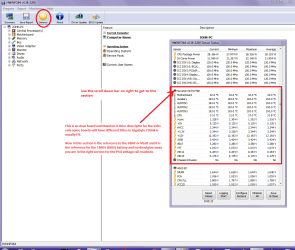
You can test the volts on the PSU with HWiNFO, HWiNFO32/64 - Download < download the right bit version and close the right hand window select Sensors and scroll down to the power section where you will see what the volts are doing see my pic. In my pic the section (Nuvoton) with VBATT is a dead give away you are in the section for the rail voltages. There are other section titles and one that pops up often is ITE
Now the voltage on the different rails have to be within 5% =+/- of what is required or the machine will not work properly if at all.
ATX Minimum Specs:

3.3v Rail (Min: 3.14v Max: 3.47v)

5v Rail (Min: 4.75v Max: 5.25v)

12v Rail (Min: 11.4v Max: 12.6v)
See this for the rail voltage info
Power Supply 101: A Reference Of Specifications - Power Supplies (Section 2.)
The original right hand window shows the machine running and is handy for that but for looking at the components in some detail close it and use the main left hand side panel
FOR OTHER COMPONENTS
PART B:
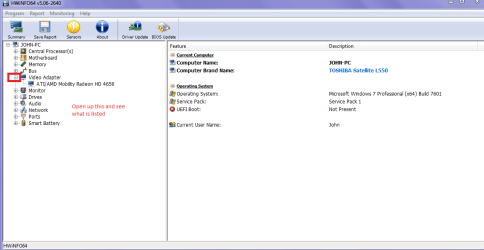
Open each small square with + in it on the section the components are in and then click on the individual component/s (it will highlight in blue) - in the right hand side will appear all sorts of details including brands speeds and other essential info that particular device. See pic for example.

So run Part A: first to get a look at that PSU and then PART B: to find the GPU model

To send pics see this How to Use the Snipping Tool in Vista - it says Vista but works ok in 7 I want to see pics like mine

 

Attachments

  • HW INFO DESKTOP PSU.PNG
    HW INFO DESKTOP PSU.PNG
    52.6 KB · Views: 1
  • HW GRAPHICS.PNG
    HW GRAPHICS.PNG
    24 KB · Views: 1

My Computer My Computer

At a glance

Desk1 7 Home Prem / Desk2 10 Pro / Main lap A...Desk1 i5 3750K / Laptop i7 GTX 860M / Desk2 i...Desk1 8GB (1866) / Desk2 16GB (1333) / Laptop...Desk 1& 2NVidia GTX 650 & Laptops on board Intel
Computer type
PC/Desktop
Computer Manufacturer/Model Number
Own build (new) Desk1 / Asus ROG Win 7 / Desk2 1st build
OS
Desk1 7 Home Prem / Desk2 10 Pro / Main lap Asus ROG 10 Pro 2 laptop Toshiba 7 Pro Asus P2520 7 & 10
CPU
Desk1 i5 3750K / Laptop i7 GTX 860M / Desk2 i5 2500
Motherboard
Desk1 Asus P877-V / Desk2 Gigabyte H67 UD3H / Laptop ?
Memory
Desk1 8GB (1866) / Desk2 16GB (1333) / Laptop 8Gb DDR3
Graphics Card(s)
Desk 1& 2NVidia GTX 650 & Laptops on board Intel
Sound Card
Desk 1 & 2 -XONAR DG Realtek High Def audio Laptop
Monitor(s) Displays
Desk 1 Benq HD 2450 / Desk2 Philips 24" / Laptop 17.5"
Screen Resolution
1920x1080 D1 & D2 & Laptop 1
Hard Drives
Desk1 Samsung 120GB 830 SSD
Asus ROG 256GB 850 Pro SSD
Desk2 Samsung 840 256 SSD
Toshiba 120GB EVO
PSU
Desk 1 Corsair HX 1050/ Laptop ? / Desk 2 Corsair HX 650
Case
Desk 1 Cooler HAF XM ? Toshiba laptop / Desk2 Coolermaster
Cooling
Fans on all Desk1 -2 Desk2 - all Coolermasters 5 Laptop ?
Keyboard
Desk 1 MS Sidewinder X6 Desk 2 MS Sidewinder X 4
Mouse
Desk 1&2 - Gigabyte MS 900 gamer - laptop - Logitec wireless
Internet Speed
ADSL2+
Other Info
One other Desktop (tester) and spare Toshba laptop both with SSD's
Running Kaspersky 2016 ISS on all machines config'd identically
Logitec audio stereo systems on each machine (x3)
Canon MG5250MFC
Router/modem TP-Link running WPA2SK
Hello mate now if I have it right you have installed a GPU? now perhaps I am not looking at the specs right but I cannot make out a GPU so can you run this please
Using HW Info
PART A:
You can test the volts on the PSU with HWiNFO, HWiNFO32/64 - Download < download the right bit version and close the right hand window select Sensors and scroll down to the power section where you will see what the volts are doing see my pic. In my pic the section (Nuvoton) with VBATT is a dead give away you are in the section for the rail voltages. There are other section titles and one that pops up often is ITE
Now the voltage on the different rails have to be within 5% =+/- of what is required or the machine will not work properly if at all.
ATX Minimum Specs:

3.3v Rail (Min: 3.14v Max: 3.47v)

5v Rail (Min: 4.75v Max: 5.25v)

12v Rail (Min: 11.4v Max: 12.6v)
See this for the rail voltage info
Power Supply 101: A Reference Of Specifications - Power Supplies (Section 2.)
The original right hand window shows the machine running and is handy for that but for looking at the components in some detail close it and use the main left hand side panel
FOR OTHER COMPONENTS
PART B:
Open each small square with + in it on the section the components are in and then click on the individual component/s (it will highlight in blue) - in the right hand side will appear all sorts of details including brands speeds and other essential info that particular device. See pic for example.

So run Part A: first to get a look at that PSU and then PART B: to find the GPU model

To send pics see this How to Use the Snipping Tool in Vista - it says Vista but works ok in 7 I want to see pics like mine

I am sorry but you are expecting too much from me,
the information you seek is beyond my skills and even with your explanation i still can't do it,
the screenshots you sent me are only confusing me since they of course do not show the exact same thing i see.
 

My Computer My Computer

At a glance

Windows 10 Home 64-bitIntel Core i7 6700 - Skylake16,0GB4095MB NVIDIA GeForce GTX 970 (ASUStek Comput...
Computer type
PC/Desktop
Computer Manufacturer/Model Number
Custom
OS
Windows 10 Home 64-bit
CPU
Intel Core i7 6700 - Skylake
Motherboard
ASUSTeK COMPUTER INC. Z170-P
Memory
16,0GB
Graphics Card(s)
4095MB NVIDIA GeForce GTX 970 (ASUStek Computer Inc)
Monitor(s) Displays
S24B350 - Samsung (1 monitor)
Screen Resolution
1920x1080@60Hz
Hard Drives
931GB Seagate ST1000DM003-1SB10C (SATA)
111GB KINGSTON SV300S37A120G (SATA-2 (SSD))
1862GB Western Digital WD My Passport 0820 USB Device (USB (SATA)
Keyboard
Steelseries Apex M800
Mouse
Steelseries Rival 700
Antivirus
BullGuard Internet Security
Browser
Google Chrome // Microsoft Edge
Hello mate now if I have it right you have installed a GPU? now perhaps I am not looking at the specs right but I cannot make out a GPU so can you run this please
Using HW Info
PART A:
You can test the volts on the PSU with HWiNFO, HWiNFO32/64 - Download < download the right bit version and close the right hand window select Sensors and scroll down to the power section where you will see what the volts are doing see my pic. In my pic the section (Nuvoton) with VBATT is a dead give away you are in the section for the rail voltages. There are other section titles and one that pops up often is ITE
Now the voltage on the different rails have to be within 5% =+/- of what is required or the machine will not work properly if at all.
ATX Minimum Specs:

3.3v Rail (Min: 3.14v Max: 3.47v)

5v Rail (Min: 4.75v Max: 5.25v)

12v Rail (Min: 11.4v Max: 12.6v)
See this for the rail voltage info
Power Supply 101: A Reference Of Specifications - Power Supplies (Section 2.)
The original right hand window shows the machine running and is handy for that but for looking at the components in some detail close it and use the main left hand side panel
FOR OTHER COMPONENTS
PART B:
Open each small square with + in it on the section the components are in and then click on the individual component/s (it will highlight in blue) - in the right hand side will appear all sorts of details including brands speeds and other essential info that particular device. See pic for example.

So run Part A: first to get a look at that PSU and then PART B: to find the GPU model

To send pics see this How to Use the Snipping Tool in Vista - it says Vista but works ok in 7 I want to see pics like mine

I am sorry but you are expecting too much from me,
the information you seek is beyond my skills and even with your explanation i still can't do it,
the screenshots you sent me are only confusing me since they of course do not show the exact same thing i see.
I guess there might be a more simple way:

  1. Press the Windows key.
  2. Type in dxdiag.exe
  3. Press enter.
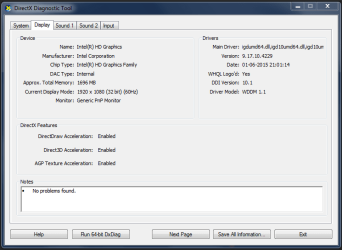
  4. On the first screen that you see there will be information about your computer like RAM and processor model, please click the button "Next Page".
  5. Take a screenshot of that page and post it back here.
  6. Use this tutorial on how to get the screenshot - How to Use the Snipping Tool in Vista


Kind regards


/Boris :)
 

My Computer My Computer

At a glance

Windows 7 Home Premiumi5-3570k16 GB DDR3 G Skill SniperGIGABYTE GeForce GTX 970 GV-N970WF3OC-4GD
Computer type
PC/Desktop
Computer Manufacturer/Model Number
Custom build
OS
Windows 7 Home Premium
CPU
i5-3570k
Motherboard
ASUS Sabertooth z77
Memory
16 GB DDR3 G Skill Sniper
Graphics Card(s)
GIGABYTE GeForce GTX 970 GV-N970WF3OC-4GD
Monitor(s) Displays
ASUS ROG PG278Q
Screen Resolution
2560x1440@60Hz/120Hz/144Hz
Hard Drives
56GB KINGSTON SVP200S37A60G
512GB Crucial MX100
1863GB Seagate ST2000DM001-1CH164
2795GB Seagate ST3000DM001-9YN166
PSU
Corsair GS800
Case
Storm Trooper Stryker White
Keyboard
Logitech G910 Orion Spark
Mouse
Logitech G502
Antivirus
MSE
Browser
Firefox/Chrome
Other Info
Logitech G633
Logitech Mouse Matt
I would bet this,

I didn't change anything that day but updated the Display Adapters using Driver Booster 3 shortly before shutting down the pc.

Caused this,

PS: Under device manager it now only sees my Intel HD graphics and have completely ignored/forgotten about my AMD Radeon. (can't even run AMD Catalyst anymore for some reason unknown to me.)

Thanks in advance.

And possibly other problems.
 

My Computer My Computer

At a glance

Win 10 Pro x64Intel I5-2500K @3.3GHz16GB G.Skill Ripjaws X (4x4GB)EVGA GeForce 750 Ti SC 2GB
Computer type
PC/Desktop
Computer Manufacturer/Model Number
Self Built
OS
Win 10 Pro x64
CPU
Intel I5-2500K @3.3GHz
Motherboard
Asrock P67 Extreme4
Memory
16GB G.Skill Ripjaws X (4x4GB)
Graphics Card(s)
EVGA GeForce 750 Ti SC 2GB
Sound Card
ASUS Xonar DG 5.1 Channels 24-bit 96KHz PCI Interface Sound
Monitor(s) Displays
auria eq2367
Screen Resolution
1920 x 1080
Hard Drives
250GB Samsung 850 EVO SSD
1TB WD Blue
1TB Hitachi
PSU
SeaSonic X 650W 80 Plus Gold
Case
Corsair Obsidian 750D
Cooling
Corsair H60, Three 140mm case fans
Keyboard
Logitech Wireless Keyboard K520
Mouse
Logitech Wireless Mouse M310
Internet Speed
Wave Broadband ~ 100 dn 5 up
Antivirus
Windows Defender, Malwarebytes Premium
Browser
Edge, IE11, Chrome
Other Info
Laptop specs: HP g7-1365dx /
CPU: AMD A6-3420M APU with Radeon(tm) HD Graphics /
RAM: Crucial 8Gb (2x4Gb) /
SSD: Crucial M4-CT128M4SSD2 ATA Device/ FW 000F /
GFX: AMD Radeon HD 6520G /
OS: Windows 10 Pro x64
I do have another program called speccy from piriform that might provide more information.
But here is the requested info.
 

Attachments

  • DirectX Diag.png
    DirectX Diag.png
    14.5 KB · Views: 1

My Computer My Computer

At a glance

Windows 10 Home 64-bitIntel Core i7 6700 - Skylake16,0GB4095MB NVIDIA GeForce GTX 970 (ASUStek Comput...
Computer type
PC/Desktop
Computer Manufacturer/Model Number
Custom
OS
Windows 10 Home 64-bit
CPU
Intel Core i7 6700 - Skylake
Motherboard
ASUSTeK COMPUTER INC. Z170-P
Memory
16,0GB
Graphics Card(s)
4095MB NVIDIA GeForce GTX 970 (ASUStek Computer Inc)
Monitor(s) Displays
S24B350 - Samsung (1 monitor)
Screen Resolution
1920x1080@60Hz
Hard Drives
931GB Seagate ST1000DM003-1SB10C (SATA)
111GB KINGSTON SV300S37A120G (SATA-2 (SSD))
1862GB Western Digital WD My Passport 0820 USB Device (USB (SATA)
Keyboard
Steelseries Apex M800
Mouse
Steelseries Rival 700
Antivirus
BullGuard Internet Security
Browser
Google Chrome // Microsoft Edge
I would bet this,

I didn't change anything that day but updated the Display Adapters using Driver Booster 3 shortly before shutting down the pc.

Caused this,

PS: Under device manager it now only sees my Intel HD graphics and have completely ignored/forgotten about my AMD Radeon. (can't even run AMD Catalyst anymore for some reason unknown to me.)

Thanks in advance.

And possibly other problems.

Yeah i was told that a few days ago, but i been using Driver Booster for about a year now,
and i never used the beta versions.
 

My Computer My Computer

At a glance

Windows 10 Home 64-bitIntel Core i7 6700 - Skylake16,0GB4095MB NVIDIA GeForce GTX 970 (ASUStek Comput...
Computer type
PC/Desktop
Computer Manufacturer/Model Number
Custom
OS
Windows 10 Home 64-bit
CPU
Intel Core i7 6700 - Skylake
Motherboard
ASUSTeK COMPUTER INC. Z170-P
Memory
16,0GB
Graphics Card(s)
4095MB NVIDIA GeForce GTX 970 (ASUStek Computer Inc)
Monitor(s) Displays
S24B350 - Samsung (1 monitor)
Screen Resolution
1920x1080@60Hz
Hard Drives
931GB Seagate ST1000DM003-1SB10C (SATA)
111GB KINGSTON SV300S37A120G (SATA-2 (SSD))
1862GB Western Digital WD My Passport 0820 USB Device (USB (SATA)
Keyboard
Steelseries Apex M800
Mouse
Steelseries Rival 700
Antivirus
BullGuard Internet Security
Browser
Google Chrome // Microsoft Edge
Last edited:

My Computer My Computer

At a glance

Windows 7 Home Premiumi5-3570k16 GB DDR3 G Skill SniperGIGABYTE GeForce GTX 970 GV-N970WF3OC-4GD
Computer type
PC/Desktop
Computer Manufacturer/Model Number
Custom build
OS
Windows 7 Home Premium
CPU
i5-3570k
Motherboard
ASUS Sabertooth z77
Memory
16 GB DDR3 G Skill Sniper
Graphics Card(s)
GIGABYTE GeForce GTX 970 GV-N970WF3OC-4GD
Monitor(s) Displays
ASUS ROG PG278Q
Screen Resolution
2560x1440@60Hz/120Hz/144Hz
Hard Drives
56GB KINGSTON SVP200S37A60G
512GB Crucial MX100
1863GB Seagate ST2000DM001-1CH164
2795GB Seagate ST3000DM001-9YN166
PSU
Corsair GS800
Case
Storm Trooper Stryker White
Keyboard
Logitech G910 Orion Spark
Mouse
Logitech G502
Antivirus
MSE
Browser
Firefox/Chrome
Other Info
Logitech G633
Logitech Mouse Matt
I do have another program called speccy from piriform that might provide more information.
But here is the requested info.
Um is this a laptop or are you using a desktop?
Have you tried going to the respective graphics card websites using their auto-detect utility?

AMD:
AMD Driver Autodetect

NVIDIA:
NVIDIA Driver Downloads - Automatically Detect NVIDIA Products

That's the main problem, my pc can't see anything other then the Intel display driver,
and because of that the auto detect can't do anything.

the AMD catalyst won't work properly, it seems to install just fine but it never boot's up, not even in safe mode that means the pc has no means of detecting that there is any AMD card at all, since there is nothing to prove it.

Think about it like a cycle pc can't see AMD display driver > auto detect won't work because the pc can't see the AMD display driver > AMD Catalyst won't boot up so there is nothing proving to the pc there is anything AMD related.

Or at least that's how i see it.
 

My Computer My Computer

At a glance

Windows 10 Home 64-bitIntel Core i7 6700 - Skylake16,0GB4095MB NVIDIA GeForce GTX 970 (ASUStek Comput...
Computer type
PC/Desktop
Computer Manufacturer/Model Number
Custom
OS
Windows 10 Home 64-bit
CPU
Intel Core i7 6700 - Skylake
Motherboard
ASUSTeK COMPUTER INC. Z170-P
Memory
16,0GB
Graphics Card(s)
4095MB NVIDIA GeForce GTX 970 (ASUStek Computer Inc)
Monitor(s) Displays
S24B350 - Samsung (1 monitor)
Screen Resolution
1920x1080@60Hz
Hard Drives
931GB Seagate ST1000DM003-1SB10C (SATA)
111GB KINGSTON SV300S37A120G (SATA-2 (SSD))
1862GB Western Digital WD My Passport 0820 USB Device (USB (SATA)
Keyboard
Steelseries Apex M800
Mouse
Steelseries Rival 700
Antivirus
BullGuard Internet Security
Browser
Google Chrome // Microsoft Edge
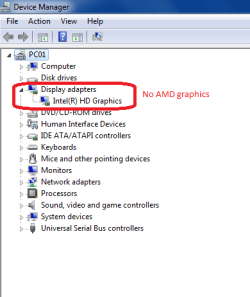
You can see here that the device manager does not see anything AMD related.

You can see more screenshot's i have uploaded here > Acer trouble - Album on Imgur
 

Attachments

  • No AMD graphics.png
    No AMD graphics.png
    10.9 KB · Views: 16

My Computer My Computer

At a glance

Windows 10 Home 64-bitIntel Core i7 6700 - Skylake16,0GB4095MB NVIDIA GeForce GTX 970 (ASUStek Comput...
Computer type
PC/Desktop
Computer Manufacturer/Model Number
Custom
OS
Windows 10 Home 64-bit
CPU
Intel Core i7 6700 - Skylake
Motherboard
ASUSTeK COMPUTER INC. Z170-P
Memory
16,0GB
Graphics Card(s)
4095MB NVIDIA GeForce GTX 970 (ASUStek Computer Inc)
Monitor(s) Displays
S24B350 - Samsung (1 monitor)
Screen Resolution
1920x1080@60Hz
Hard Drives
931GB Seagate ST1000DM003-1SB10C (SATA)
111GB KINGSTON SV300S37A120G (SATA-2 (SSD))
1862GB Western Digital WD My Passport 0820 USB Device (USB (SATA)
Keyboard
Steelseries Apex M800
Mouse
Steelseries Rival 700
Antivirus
BullGuard Internet Security
Browser
Google Chrome // Microsoft Edge
I do have another program called speccy from piriform that might provide more information.
But here is the requested info.
Um is this a laptop or are you using a desktop?
Have you tried going to the respective graphics card websites using their auto-detect utility?

AMD:
AMD Driver Autodetect

NVIDIA:
NVIDIA Driver Downloads - Automatically Detect NVIDIA Products

That's the main problem, my pc can't see anything other then the Intel display driver,
and because of that the auto detect can't do anything.

the AMD catalyst won't work properly, it seems to install just fine but it never boot's up, not even in safe mode that means the pc has no means of detecting that there is any AMD card at all, since there is nothing to prove it.

Think about it like a cycle pc can't see AMD display driver > auto detect won't work because the pc can't see the AMD display driver > AMD Catalyst won't boot up so there is nothing proving to the pc there is anything AMD related.

Or at least that's how i see it.
What is the model number, do you have it?

As of this Autumn/Winter AMD has ditched the Catalyst software and released a new version called Crimson, you should maybe try and install it rather than trying the Catalyst, and AMD has also said it has ditched cards older than the HD7000/8000 + R9 series!
 

My Computer My Computer

At a glance

Windows 7 Home Premiumi5-3570k16 GB DDR3 G Skill SniperGIGABYTE GeForce GTX 970 GV-N970WF3OC-4GD
Computer type
PC/Desktop
Computer Manufacturer/Model Number
Custom build
OS
Windows 7 Home Premium
CPU
i5-3570k
Motherboard
ASUS Sabertooth z77
Memory
16 GB DDR3 G Skill Sniper
Graphics Card(s)
GIGABYTE GeForce GTX 970 GV-N970WF3OC-4GD
Monitor(s) Displays
ASUS ROG PG278Q
Screen Resolution
2560x1440@60Hz/120Hz/144Hz
Hard Drives
56GB KINGSTON SVP200S37A60G
512GB Crucial MX100
1863GB Seagate ST2000DM001-1CH164
2795GB Seagate ST3000DM001-9YN166
PSU
Corsair GS800
Case
Storm Trooper Stryker White
Keyboard
Logitech G910 Orion Spark
Mouse
Logitech G502
Antivirus
MSE
Browser
Firefox/Chrome
Other Info
Logitech G633
Logitech Mouse Matt
Um is this a laptop or are you using a desktop?
Have you tried going to the respective graphics card websites using their auto-detect utility?

AMD:
AMD Driver Autodetect

NVIDIA:
NVIDIA Driver Downloads - Automatically Detect NVIDIA Products

That's the main problem, my pc can't see anything other then the Intel display driver,
and because of that the auto detect can't do anything.

the AMD catalyst won't work properly, it seems to install just fine but it never boot's up, not even in safe mode that means the pc has no means of detecting that there is any AMD card at all, since there is nothing to prove it.

Think about it like a cycle pc can't see AMD display driver > auto detect won't work because the pc can't see the AMD display driver > AMD Catalyst won't boot up so there is nothing proving to the pc there is anything AMD related.

Or at least that's how i see it.
What is the model number, do you have it?

As of this Autumn/Winter AMD has ditched the Catalyst software and released a new version called Crimson, you should maybe try and install it rather than trying the Catalyst, and AMD has also said it has ditched cards older than the HD7000/8000 + R9 series!

it says "amd radeon - hd 7770 up to 4095mb"

Well since Catalyst is still downloadable i will assume that it's still supported or needed to some point.
Besides i just tried installing Crimson and it didn't work, the folder seems to be there "like it's installed" but no desktop icon or anything supporting the fact that it is there besides the folder, just like Catalyst.
 

My Computer My Computer

At a glance

Windows 10 Home 64-bitIntel Core i7 6700 - Skylake16,0GB4095MB NVIDIA GeForce GTX 970 (ASUStek Comput...
Computer type
PC/Desktop
Computer Manufacturer/Model Number
Custom
OS
Windows 10 Home 64-bit
CPU
Intel Core i7 6700 - Skylake
Motherboard
ASUSTeK COMPUTER INC. Z170-P
Memory
16,0GB
Graphics Card(s)
4095MB NVIDIA GeForce GTX 970 (ASUStek Computer Inc)
Monitor(s) Displays
S24B350 - Samsung (1 monitor)
Screen Resolution
1920x1080@60Hz
Hard Drives
931GB Seagate ST1000DM003-1SB10C (SATA)
111GB KINGSTON SV300S37A120G (SATA-2 (SSD))
1862GB Western Digital WD My Passport 0820 USB Device (USB (SATA)
Keyboard
Steelseries Apex M800
Mouse
Steelseries Rival 700
Antivirus
BullGuard Internet Security
Browser
Google Chrome // Microsoft Edge
When installing anything AMD related it seems to analyze then install, however the installation part will jump from 2-5% to 100% in what could be 2-3 seconds and then confirm that the installation is successful.
 

My Computer My Computer

At a glance

Windows 10 Home 64-bitIntel Core i7 6700 - Skylake16,0GB4095MB NVIDIA GeForce GTX 970 (ASUStek Comput...
Computer type
PC/Desktop
Computer Manufacturer/Model Number
Custom
OS
Windows 10 Home 64-bit
CPU
Intel Core i7 6700 - Skylake
Motherboard
ASUSTeK COMPUTER INC. Z170-P
Memory
16,0GB
Graphics Card(s)
4095MB NVIDIA GeForce GTX 970 (ASUStek Computer Inc)
Monitor(s) Displays
S24B350 - Samsung (1 monitor)
Screen Resolution
1920x1080@60Hz
Hard Drives
931GB Seagate ST1000DM003-1SB10C (SATA)
111GB KINGSTON SV300S37A120G (SATA-2 (SSD))
1862GB Western Digital WD My Passport 0820 USB Device (USB (SATA)
Keyboard
Steelseries Apex M800
Mouse
Steelseries Rival 700
Antivirus
BullGuard Internet Security
Browser
Google Chrome // Microsoft Edge
When installing anything AMD related it seems to analyze then install, however the installation part will jump from 2-5% to 100% in what could be 2-3 seconds and then confirm that the installation is successful.
And where is the monitor cable plugged in?
 

My Computer My Computer

At a glance

Windows 7 Home Premiumi5-3570k16 GB DDR3 G Skill SniperGIGABYTE GeForce GTX 970 GV-N970WF3OC-4GD
Computer type
PC/Desktop
Computer Manufacturer/Model Number
Custom build
OS
Windows 7 Home Premium
CPU
i5-3570k
Motherboard
ASUS Sabertooth z77
Memory
16 GB DDR3 G Skill Sniper
Graphics Card(s)
GIGABYTE GeForce GTX 970 GV-N970WF3OC-4GD
Monitor(s) Displays
ASUS ROG PG278Q
Screen Resolution
2560x1440@60Hz/120Hz/144Hz
Hard Drives
56GB KINGSTON SVP200S37A60G
512GB Crucial MX100
1863GB Seagate ST2000DM001-1CH164
2795GB Seagate ST3000DM001-9YN166
PSU
Corsair GS800
Case
Storm Trooper Stryker White
Keyboard
Logitech G910 Orion Spark
Mouse
Logitech G502
Antivirus
MSE
Browser
Firefox/Chrome
Other Info
Logitech G633
Logitech Mouse Matt
When installing anything AMD related it seems to analyze then install, however the installation part will jump from 2-5% to 100% in what could be 2-3 seconds and then confirm that the installation is successful.
And where is the monitor cable plugged in?

Into the Intel HDMI port, since the AMD card port does not work, my Samsung monitor will act like it's searching for a picture when plugged into the AMD card port then go on standby mode when it fails to connect or get a picture.
 
Last edited:

My Computer My Computer

At a glance

Windows 10 Home 64-bitIntel Core i7 6700 - Skylake16,0GB4095MB NVIDIA GeForce GTX 970 (ASUStek Comput...
Computer type
PC/Desktop
Computer Manufacturer/Model Number
Custom
OS
Windows 10 Home 64-bit
CPU
Intel Core i7 6700 - Skylake
Motherboard
ASUSTeK COMPUTER INC. Z170-P
Memory
16,0GB
Graphics Card(s)
4095MB NVIDIA GeForce GTX 970 (ASUStek Computer Inc)
Monitor(s) Displays
S24B350 - Samsung (1 monitor)
Screen Resolution
1920x1080@60Hz
Hard Drives
931GB Seagate ST1000DM003-1SB10C (SATA)
111GB KINGSTON SV300S37A120G (SATA-2 (SSD))
1862GB Western Digital WD My Passport 0820 USB Device (USB (SATA)
Keyboard
Steelseries Apex M800
Mouse
Steelseries Rival 700
Antivirus
BullGuard Internet Security
Browser
Google Chrome // Microsoft Edge
Back
Top