PC games lag and Graphic's card not seen by PC

When installing anything AMD related it seems to analyze then install, however the installation part will jump from 2-5% to 100% in what could be 2-3 seconds and then confirm that the installation is successful.
And where is the monitor cable plugged in?

Into the Intel HDMI port, since the AMD card port does not work, my Samsung monitor will act like it's searching for a picture, then go on standby mode.
Well then I would try to switch PCI slot.
 

My Computer My Computer

At a glance

Windows 7 Home Premiumi5-3570k16 GB DDR3 G Skill SniperGIGABYTE GeForce GTX 970 GV-N970WF3OC-4GD
Computer type
PC/Desktop
Computer Manufacturer/Model Number
Custom build
OS
Windows 7 Home Premium
CPU
i5-3570k
Motherboard
ASUS Sabertooth z77
Memory
16 GB DDR3 G Skill Sniper
Graphics Card(s)
GIGABYTE GeForce GTX 970 GV-N970WF3OC-4GD
Monitor(s) Displays
ASUS ROG PG278Q
Screen Resolution
2560x1440@60Hz/120Hz/144Hz
Hard Drives
56GB KINGSTON SVP200S37A60G
512GB Crucial MX100
1863GB Seagate ST2000DM001-1CH164
2795GB Seagate ST3000DM001-9YN166
PSU
Corsair GS800
Case
Storm Trooper Stryker White
Keyboard
Logitech G910 Orion Spark
Mouse
Logitech G502
Antivirus
MSE
Browser
Firefox/Chrome
Other Info
Logitech G633
Logitech Mouse Matt
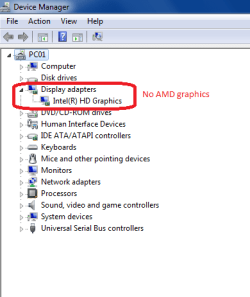
To clarify, my pc is not getting slower but since it's running the Intel graphics alone instead of AMD graphics (like it's supposed to)
it runs slightly slower, almost unnoticeable.

However the difference is day and night when trying to run games on the pc as the Intel graphics card is obviously completely unable to run most games and will lag/stutter really hard with the effects and lightning all over the place.
 

My Computer My Computer

At a glance

Windows 10 Home 64-bitIntel Core i7 6700 - Skylake16,0GB4095MB NVIDIA GeForce GTX 970 (ASUStek Comput...
Computer type
PC/Desktop
Computer Manufacturer/Model Number
Custom
OS
Windows 10 Home 64-bit
CPU
Intel Core i7 6700 - Skylake
Motherboard
ASUSTeK COMPUTER INC. Z170-P
Memory
16,0GB
Graphics Card(s)
4095MB NVIDIA GeForce GTX 970 (ASUStek Computer Inc)
Monitor(s) Displays
S24B350 - Samsung (1 monitor)
Screen Resolution
1920x1080@60Hz
Hard Drives
931GB Seagate ST1000DM003-1SB10C (SATA)
111GB KINGSTON SV300S37A120G (SATA-2 (SSD))
1862GB Western Digital WD My Passport 0820 USB Device (USB (SATA)
Keyboard
Steelseries Apex M800
Mouse
Steelseries Rival 700
Antivirus
BullGuard Internet Security
Browser
Google Chrome // Microsoft Edge
Think about it like a cycle, pc can't see AMD display driver > auto detect won't work because the pc can't see the AMD display driver > AMD Catalyst won't boot up so there is nothing proving to the pc there is anything AMD related.

Or at least that's how i see it.

For people who are a bit lazy here is a screenshot.
But i still recommend visiting my imgur for all my screenshots so far.
Acer trouble - Album on Imgur
 

Attachments

  • No AMD graphics.png
    No AMD graphics.png
    10.9 KB · Views: 24

My Computer My Computer

At a glance

Windows 10 Home 64-bitIntel Core i7 6700 - Skylake16,0GB4095MB NVIDIA GeForce GTX 970 (ASUStek Comput...
Computer type
PC/Desktop
Computer Manufacturer/Model Number
Custom
OS
Windows 10 Home 64-bit
CPU
Intel Core i7 6700 - Skylake
Motherboard
ASUSTeK COMPUTER INC. Z170-P
Memory
16,0GB
Graphics Card(s)
4095MB NVIDIA GeForce GTX 970 (ASUStek Computer Inc)
Monitor(s) Displays
S24B350 - Samsung (1 monitor)
Screen Resolution
1920x1080@60Hz
Hard Drives
931GB Seagate ST1000DM003-1SB10C (SATA)
111GB KINGSTON SV300S37A120G (SATA-2 (SSD))
1862GB Western Digital WD My Passport 0820 USB Device (USB (SATA)
Keyboard
Steelseries Apex M800
Mouse
Steelseries Rival 700
Antivirus
BullGuard Internet Security
Browser
Google Chrome // Microsoft Edge

My Computer My Computer

At a glance

Windows 10 Home 64-bitIntel Core i7 6700 - Skylake16,0GB4095MB NVIDIA GeForce GTX 970 (ASUStek Comput...
Computer type
PC/Desktop
Computer Manufacturer/Model Number
Custom
OS
Windows 10 Home 64-bit
CPU
Intel Core i7 6700 - Skylake
Motherboard
ASUSTeK COMPUTER INC. Z170-P
Memory
16,0GB
Graphics Card(s)
4095MB NVIDIA GeForce GTX 970 (ASUStek Computer Inc)
Monitor(s) Displays
S24B350 - Samsung (1 monitor)
Screen Resolution
1920x1080@60Hz
Hard Drives
931GB Seagate ST1000DM003-1SB10C (SATA)
111GB KINGSTON SV300S37A120G (SATA-2 (SSD))
1862GB Western Digital WD My Passport 0820 USB Device (USB (SATA)
Keyboard
Steelseries Apex M800
Mouse
Steelseries Rival 700
Antivirus
BullGuard Internet Security
Browser
Google Chrome // Microsoft Edge
Into the Intel HDMI port, since the AMD card port does not work, my Samsung monitor will act like it's searching for a picture, then go on standby mode.
Well then I would try to switch PCI slot.

In the Bios right ?
i have read something similar somewhere recently,
but can't remember where.

And don't know how to do it :confused:
Unfortunately it is not in the BIOS, you need to open up the case and switch PCI lane.

Here is a video on how to do it, it's not exactly the same model but it's pretty much the same for most desktop computers.
 

My Computer My Computer

At a glance

Windows 7 Home Premiumi5-3570k16 GB DDR3 G Skill SniperGIGABYTE GeForce GTX 970 GV-N970WF3OC-4GD
Computer type
PC/Desktop
Computer Manufacturer/Model Number
Custom build
OS
Windows 7 Home Premium
CPU
i5-3570k
Motherboard
ASUS Sabertooth z77
Memory
16 GB DDR3 G Skill Sniper
Graphics Card(s)
GIGABYTE GeForce GTX 970 GV-N970WF3OC-4GD
Monitor(s) Displays
ASUS ROG PG278Q
Screen Resolution
2560x1440@60Hz/120Hz/144Hz
Hard Drives
56GB KINGSTON SVP200S37A60G
512GB Crucial MX100
1863GB Seagate ST2000DM001-1CH164
2795GB Seagate ST3000DM001-9YN166
PSU
Corsair GS800
Case
Storm Trooper Stryker White
Keyboard
Logitech G910 Orion Spark
Mouse
Logitech G502
Antivirus
MSE
Browser
Firefox/Chrome
Other Info
Logitech G633
Logitech Mouse Matt
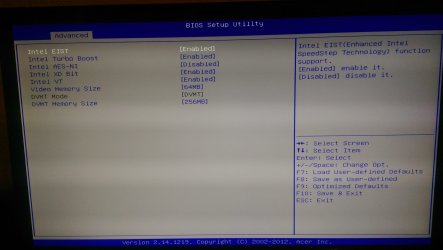
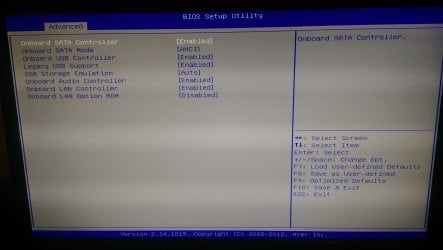
Mhhh... so, no card is showing up... you best bet is to see if, by any reason, your BIOs disabed your External GPU (AMD), go into your BIOS and check your GPU settings, it should be having either "Use External GPU" or "Use Both External and Intrgraded GPU" or something like that... the thing is, that you must have your EVGA enabled in the BIOS, otherwise, it won't be seen by the OS.

If that doesn't help, try opening your desktop and resetting the AMD card in the provided slot... if you still got no AMD card, I suspect it's dead somehow...
 

My Computer My Computer

At a glance

Microsoft Windows 7 Home Premium SP1 64-bit B...AMD Athlon 64 X2 5200+ Dual Core CPU @ 2.7 Gh...2x2 GB DDR2 PC-5300 (667 Mhz) Kingston ValueRAMXFX ATI Radeon HD 4350 GPU (512 MB + 512 MB HM)
Computer type
PC/Desktop
Computer Manufacturer/Model Number
Assembled Desktop PC
OS
Microsoft Windows 7 Home Premium SP1 64-bit Build 7600
CPU
AMD Athlon 64 X2 5200+ Dual Core CPU @ 2.7 Ghz (Brisbane)
Motherboard
PCChips A13G+ v3.0
Memory
2x2 GB DDR2 PC-5300 (667 Mhz) Kingston ValueRAM
Graphics Card(s)
XFX ATI Radeon HD 4350 GPU (512 MB + 512 MB HM)
Sound Card
Realtek High Definition Audio Driver ALC660 @ MCP61S
Monitor(s) Displays
HP S2031 20" LED HD Widescreen Display Monitor
Screen Resolution
1600 x 900 px
Hard Drives
Maxtor Diamond Max 10 (160 GB, 7200 RPM, SATA-II Hard Disk)
Western Digital Scorpion Blue (250 GB, 5400 RPM, SATA-II External Hard Disk - Personal Data)
Toshiba MQ01ABD050 (500 GB, 5400 RPM, SATA-II External Hard Disk - Software & ISOs)
PSU
Pixxo Transformer 850W 80+ Certification PSU
Case
Compaq 5BW353 Case
Cooling
Many solutions, see other info...
Keyboard
Green Leaf (Mitzu) Standard Keyboard
Mouse
Microsoft USB Lasser Pointing Device
Internet Speed
10 MB
Antivirus
Avast Antivirus Free
Browser
Firefox, Chrome, Internet Explorer
Other Info
Windows Experience Index Result: 3.8 of 7.9.

Cooling solutions:
- AVC @ 2000/5000 RPM Copper Heatpipes (For Athlon 64 X2 6000+ CPU used in an Athlon 64 X2 5200+)
- Rear Fan 80 mm @ 2700 RPM for heat extraction
- Manhatan Chipset Cooler @ 4700/7200 RPM (For nVidia Chipset in MoBo)
- Foxconn @ 2500 RPM (Old Pentium III heatsink fan) in XFX ATI Radeon HD 4350
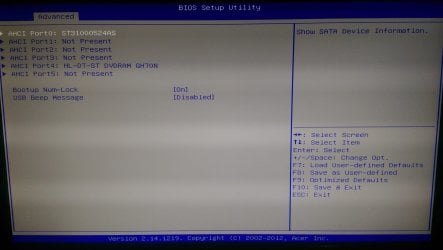
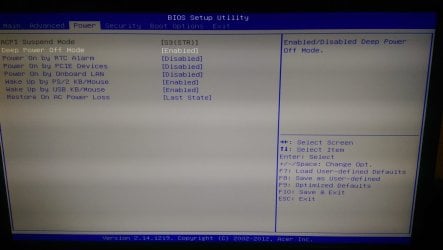
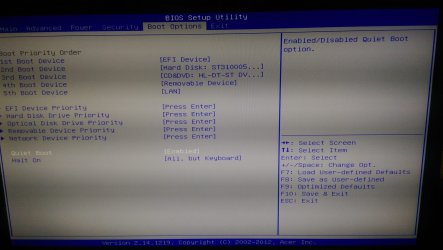
I am not sure where to enable EVGA on my Bios, since there is nothing mentioning EVGA on my end.
 

Attachments

  • Bios Advanced 02.jpg
    Bios Advanced 02.jpg
    276.4 KB · Views: 0
  • Bios Advanced 03.jpg
    Bios Advanced 03.jpg
    270.5 KB · Views: 0
  • Bios Advanced 01.jpg
    Bios Advanced 01.jpg
    235.5 KB · Views: 0
  • Bios Power.jpg
    Bios Power.jpg
    225.3 KB · Views: 0
  • Bios Boot Options.jpg
    Bios Boot Options.jpg
    350.8 KB · Views: 0

My Computer My Computer

At a glance

Windows 10 Home 64-bitIntel Core i7 6700 - Skylake16,0GB4095MB NVIDIA GeForce GTX 970 (ASUStek Comput...
Computer type
PC/Desktop
Computer Manufacturer/Model Number
Custom
OS
Windows 10 Home 64-bit
CPU
Intel Core i7 6700 - Skylake
Motherboard
ASUSTeK COMPUTER INC. Z170-P
Memory
16,0GB
Graphics Card(s)
4095MB NVIDIA GeForce GTX 970 (ASUStek Computer Inc)
Monitor(s) Displays
S24B350 - Samsung (1 monitor)
Screen Resolution
1920x1080@60Hz
Hard Drives
931GB Seagate ST1000DM003-1SB10C (SATA)
111GB KINGSTON SV300S37A120G (SATA-2 (SSD))
1862GB Western Digital WD My Passport 0820 USB Device (USB (SATA)
Keyboard
Steelseries Apex M800
Mouse
Steelseries Rival 700
Antivirus
BullGuard Internet Security
Browser
Google Chrome // Microsoft Edge
Well then I would try to switch PCI slot.

In the Bios right ?
i have read something similar somewhere recently,
but can't remember where.

And don't know how to do it :confused:
Unfortunately it is not in the BIOS, you need to open up the case and switch PCI lane.

Here is a video on how to do it, it's not exactly the same model but it's pretty much the same for most desktop computers.

Watched it from start to finish.

My AMD card only takes one plug from the side, however the cables on the other side seems to go unreachable places on the pc, so i have no way of tracking down where the cables go or where they might be connected.

Should i take a picture of the inside of my pc ?
 

My Computer My Computer

At a glance

Windows 10 Home 64-bitIntel Core i7 6700 - Skylake16,0GB4095MB NVIDIA GeForce GTX 970 (ASUStek Comput...
Computer type
PC/Desktop
Computer Manufacturer/Model Number
Custom
OS
Windows 10 Home 64-bit
CPU
Intel Core i7 6700 - Skylake
Motherboard
ASUSTeK COMPUTER INC. Z170-P
Memory
16,0GB
Graphics Card(s)
4095MB NVIDIA GeForce GTX 970 (ASUStek Computer Inc)
Monitor(s) Displays
S24B350 - Samsung (1 monitor)
Screen Resolution
1920x1080@60Hz
Hard Drives
931GB Seagate ST1000DM003-1SB10C (SATA)
111GB KINGSTON SV300S37A120G (SATA-2 (SSD))
1862GB Western Digital WD My Passport 0820 USB Device (USB (SATA)
Keyboard
Steelseries Apex M800
Mouse
Steelseries Rival 700
Antivirus
BullGuard Internet Security
Browser
Google Chrome // Microsoft Edge
You may need to reseat your card to make it detected, but first uninstall all amd stuff related to your gpu then reboot then run this driver cleanup tool by picking amd display drivers and have it do clean/reboot. Then install the amd driver suite again and reboot one final time. I would also uninstall driver booster like Mellon suggested. If after a reseat it does not show up it is probably dead. Is your pc on a surge protector?

Display Driver Uninstaller Download version 15.7.1.0
 

My Computer My Computer

At a glance

10 Pro x64Ryzen 9 3900X64GB(4x16GB) DDR4EVGA 1080ti FTW3
Computer type
PC/Desktop
Computer Manufacturer/Model Number
Custom
OS
10 Pro x64
CPU
Ryzen 9 3900X
Motherboard
Asrock x370 Tachi
Memory
64GB(4x16GB) DDR4
Graphics Card(s)
EVGA 1080ti FTW3
Sound Card
ASUS Xonar Essence STX (V4 Bursons), ODAC rev B, NFB-11, O2
Monitor(s) Displays
3xASUS PB278Q/R, Optoma HD142X
Screen Resolution
3x1440p, 1080p
Hard Drives
512GB 850 EVO(OS, Programs)
4TB (Movies)
3TB (Downloads)
3TB (Programs)
1TB HDD (Games)
2x6TB R1 (videos)
PSU
AX760
Case
Fractal Define R5
Cooling
NH-D15S
Keyboard
Massdrop Ctrl with Box Navy's
Mouse
G903, Alioth XXL Mat
Internet Speed
280/40
Antivirus
MBAM, ESET
Browser
Canary 64 Bit
Other Info
I also own a Thinkpad P50 Xeon 4K, X220T, X1C5
In the Bios right ?
i have read something similar somewhere recently,
but can't remember where.

And don't know how to do it :confused:
Unfortunately it is not in the BIOS, you need to open up the case and switch PCI lane.

Here is a video on how to do it, it's not exactly the same model but it's pretty much the same for most desktop computers.

Watched it from start to finish.

My AMD card only takes one plug from the side, however the cables on the other side seems to go unreachable places on the pc, so i have no way of tracking down where the cables go or where they might be connected.

Should i take a picture of the inside of my pc ?
Well presumably it is the power cables you are seeing those are the only ones that are plugged into the graphics card inside the case and it seems Acer has done some cable management.
But yes please a picture might come in handy.

Or if this is becoming too technical for you then you can bring it to the shop where you bought the computer and get help there, but that means that you need to have the receipt and warranty under control.
 

My Computer My Computer

At a glance

Windows 7 Home Premiumi5-3570k16 GB DDR3 G Skill SniperGIGABYTE GeForce GTX 970 GV-N970WF3OC-4GD
Computer type
PC/Desktop
Computer Manufacturer/Model Number
Custom build
OS
Windows 7 Home Premium
CPU
i5-3570k
Motherboard
ASUS Sabertooth z77
Memory
16 GB DDR3 G Skill Sniper
Graphics Card(s)
GIGABYTE GeForce GTX 970 GV-N970WF3OC-4GD
Monitor(s) Displays
ASUS ROG PG278Q
Screen Resolution
2560x1440@60Hz/120Hz/144Hz
Hard Drives
56GB KINGSTON SVP200S37A60G
512GB Crucial MX100
1863GB Seagate ST2000DM001-1CH164
2795GB Seagate ST3000DM001-9YN166
PSU
Corsair GS800
Case
Storm Trooper Stryker White
Keyboard
Logitech G910 Orion Spark
Mouse
Logitech G502
Antivirus
MSE
Browser
Firefox/Chrome
Other Info
Logitech G633
Logitech Mouse Matt
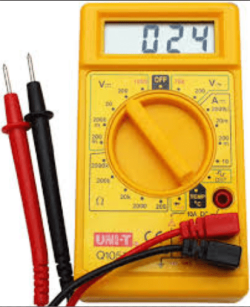
Two cents again I think I referred to earlier when testing the PSU the usual coloured cables for the gPU are black 0v and yellow 12v easy to test to see if they are at the right voltage with one of those cheap digital multimeters, and the are plugged the right way round.
 

Attachments

  • DIGITAL METER.PNG
    DIGITAL METER.PNG
    91.3 KB · Views: 41

My Computer My Computer

At a glance

Desk1 7 Home Prem / Desk2 10 Pro / Main lap A...Desk1 i5 3750K / Laptop i7 GTX 860M / Desk2 i...Desk1 8GB (1866) / Desk2 16GB (1333) / Laptop...Desk 1& 2NVidia GTX 650 & Laptops on board Intel
Computer type
PC/Desktop
Computer Manufacturer/Model Number
Own build (new) Desk1 / Asus ROG Win 7 / Desk2 1st build
OS
Desk1 7 Home Prem / Desk2 10 Pro / Main lap Asus ROG 10 Pro 2 laptop Toshiba 7 Pro Asus P2520 7 & 10
CPU
Desk1 i5 3750K / Laptop i7 GTX 860M / Desk2 i5 2500
Motherboard
Desk1 Asus P877-V / Desk2 Gigabyte H67 UD3H / Laptop ?
Memory
Desk1 8GB (1866) / Desk2 16GB (1333) / Laptop 8Gb DDR3
Graphics Card(s)
Desk 1& 2NVidia GTX 650 & Laptops on board Intel
Sound Card
Desk 1 & 2 -XONAR DG Realtek High Def audio Laptop
Monitor(s) Displays
Desk 1 Benq HD 2450 / Desk2 Philips 24" / Laptop 17.5"
Screen Resolution
1920x1080 D1 & D2 & Laptop 1
Hard Drives
Desk1 Samsung 120GB 830 SSD
Asus ROG 256GB 850 Pro SSD
Desk2 Samsung 840 256 SSD
Toshiba 120GB EVO
PSU
Desk 1 Corsair HX 1050/ Laptop ? / Desk 2 Corsair HX 650
Case
Desk 1 Cooler HAF XM ? Toshiba laptop / Desk2 Coolermaster
Cooling
Fans on all Desk1 -2 Desk2 - all Coolermasters 5 Laptop ?
Keyboard
Desk 1 MS Sidewinder X6 Desk 2 MS Sidewinder X 4
Mouse
Desk 1&2 - Gigabyte MS 900 gamer - laptop - Logitec wireless
Internet Speed
ADSL2+
Other Info
One other Desktop (tester) and spare Toshba laptop both with SSD's
Running Kaspersky 2016 ISS on all machines config'd identically
Logitec audio stereo systems on each machine (x3)
Canon MG5250MFC
Router/modem TP-Link running WPA2SK
Two cents again I think I referred to earlier when testing the PSU the usual coloured cables for the gPU are black 0v and yellow 12v easy to test to see if they are at the right voltage with one of those cheap digital multimeters, and the are plugged the right way round.
Yes you did but it seems he doesn't seem to be techy, savvy matey?
 

My Computer My Computer

At a glance

Windows 7 Home Premiumi5-3570k16 GB DDR3 G Skill SniperGIGABYTE GeForce GTX 970 GV-N970WF3OC-4GD
Computer type
PC/Desktop
Computer Manufacturer/Model Number
Custom build
OS
Windows 7 Home Premium
CPU
i5-3570k
Motherboard
ASUS Sabertooth z77
Memory
16 GB DDR3 G Skill Sniper
Graphics Card(s)
GIGABYTE GeForce GTX 970 GV-N970WF3OC-4GD
Monitor(s) Displays
ASUS ROG PG278Q
Screen Resolution
2560x1440@60Hz/120Hz/144Hz
Hard Drives
56GB KINGSTON SVP200S37A60G
512GB Crucial MX100
1863GB Seagate ST2000DM001-1CH164
2795GB Seagate ST3000DM001-9YN166
PSU
Corsair GS800
Case
Storm Trooper Stryker White
Keyboard
Logitech G910 Orion Spark
Mouse
Logitech G502
Antivirus
MSE
Browser
Firefox/Chrome
Other Info
Logitech G633
Logitech Mouse Matt
You may need to reseat your card to make it detected, but first uninstall all amd stuff related to your gpu then reboot then run this driver cleanup tool by picking amd display drivers and have it do clean/reboot. Then install the amd driver suite again and reboot one final time. I would also uninstall driver booster like Mellon suggested. If after a reseat it does not show up it is probably dead. Is your pc on a surge protector?

Display Driver Uninstaller Download version 15.7.1.0

I did everything you mentioned but it's still the same, will re-plug my AMD graphics card now.
 

My Computer My Computer

At a glance

Windows 10 Home 64-bitIntel Core i7 6700 - Skylake16,0GB4095MB NVIDIA GeForce GTX 970 (ASUStek Comput...
Computer type
PC/Desktop
Computer Manufacturer/Model Number
Custom
OS
Windows 10 Home 64-bit
CPU
Intel Core i7 6700 - Skylake
Motherboard
ASUSTeK COMPUTER INC. Z170-P
Memory
16,0GB
Graphics Card(s)
4095MB NVIDIA GeForce GTX 970 (ASUStek Computer Inc)
Monitor(s) Displays
S24B350 - Samsung (1 monitor)
Screen Resolution
1920x1080@60Hz
Hard Drives
931GB Seagate ST1000DM003-1SB10C (SATA)
111GB KINGSTON SV300S37A120G (SATA-2 (SSD))
1862GB Western Digital WD My Passport 0820 USB Device (USB (SATA)
Keyboard
Steelseries Apex M800
Mouse
Steelseries Rival 700
Antivirus
BullGuard Internet Security
Browser
Google Chrome // Microsoft Edge
Two cents again I think I referred to earlier when testing the PSU the usual coloured cables for the gPU are black 0v and yellow 12v easy to test to see if they are at the right voltage with one of those cheap digital multimeters, and the are plugged the right way round.

That's a good idea ill get my hands on one soon then.
 

My Computer My Computer

At a glance

Windows 10 Home 64-bitIntel Core i7 6700 - Skylake16,0GB4095MB NVIDIA GeForce GTX 970 (ASUStek Comput...
Computer type
PC/Desktop
Computer Manufacturer/Model Number
Custom
OS
Windows 10 Home 64-bit
CPU
Intel Core i7 6700 - Skylake
Motherboard
ASUSTeK COMPUTER INC. Z170-P
Memory
16,0GB
Graphics Card(s)
4095MB NVIDIA GeForce GTX 970 (ASUStek Computer Inc)
Monitor(s) Displays
S24B350 - Samsung (1 monitor)
Screen Resolution
1920x1080@60Hz
Hard Drives
931GB Seagate ST1000DM003-1SB10C (SATA)
111GB KINGSTON SV300S37A120G (SATA-2 (SSD))
1862GB Western Digital WD My Passport 0820 USB Device (USB (SATA)
Keyboard
Steelseries Apex M800
Mouse
Steelseries Rival 700
Antivirus
BullGuard Internet Security
Browser
Google Chrome // Microsoft Edge
Unfortunately it is not in the BIOS, you need to open up the case and switch PCI lane.

Here is a video on how to do it, it's not exactly the same model but it's pretty much the same for most desktop computers.

Watched it from start to finish.

My AMD card only takes one plug from the side, however the cables on the other side seems to go unreachable places on the pc, so i have no way of tracking down where the cables go or where they might be connected.

Should i take a picture of the inside of my pc ?
Well presumably it is the power cables you are seeing those are the only ones that are plugged into the graphics card inside the case and it seems Acer has done some cable management.
But yes please a picture might come in handy.

Or if this is becoming too technical for you then you can bring it to the shop where you bought the computer and get help there, but that means that you need to have the receipt and warranty under control.

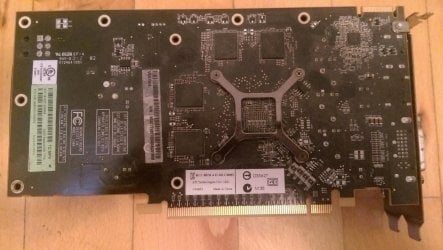
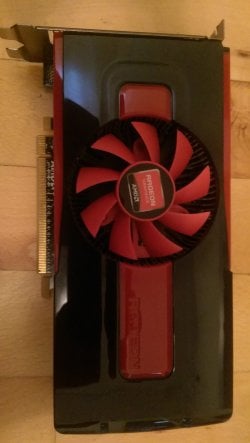
I turned the pc on while having the upper metal plate off, and the AMD graphics card's fan is running fine, as well as the other fans inside the pc, i spotted nothing unusual.

PS: I do remove the dust very carefully once in a while.

It's an old desktop from 2012 from an official electronics's store, i don't think they will.
 

Attachments

  • outside view.jpg
    outside view.jpg
    268.6 KB · Views: 6
  • AMD graphics card (back).jpg
    AMD graphics card (back).jpg
    397.4 KB · Views: 5
  • AMD graphics card (front).jpg
    AMD graphics card (front).jpg
    252 KB · Views: 4
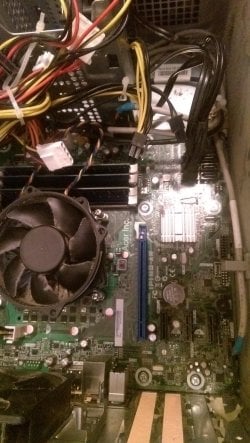
  • inside view (without AMD graphics card).jpg
    inside view (without AMD graphics card).jpg
    502.8 KB · Views: 2
  • inside view (with AMD graphics card).jpg
    inside view (with AMD graphics card).jpg
    386.2 KB · Views: 2

My Computer My Computer

At a glance

Windows 10 Home 64-bitIntel Core i7 6700 - Skylake16,0GB4095MB NVIDIA GeForce GTX 970 (ASUStek Comput...
Computer type
PC/Desktop
Computer Manufacturer/Model Number
Custom
OS
Windows 10 Home 64-bit
CPU
Intel Core i7 6700 - Skylake
Motherboard
ASUSTeK COMPUTER INC. Z170-P
Memory
16,0GB
Graphics Card(s)
4095MB NVIDIA GeForce GTX 970 (ASUStek Computer Inc)
Monitor(s) Displays
S24B350 - Samsung (1 monitor)
Screen Resolution
1920x1080@60Hz
Hard Drives
931GB Seagate ST1000DM003-1SB10C (SATA)
111GB KINGSTON SV300S37A120G (SATA-2 (SSD))
1862GB Western Digital WD My Passport 0820 USB Device (USB (SATA)
Keyboard
Steelseries Apex M800
Mouse
Steelseries Rival 700
Antivirus
BullGuard Internet Security
Browser
Google Chrome // Microsoft Edge
Watched it from start to finish.

My AMD card only takes one plug from the side, however the cables on the other side seems to go unreachable places on the pc, so i have no way of tracking down where the cables go or where they might be connected.

Should i take a picture of the inside of my pc ?
Well presumably it is the power cables you are seeing those are the only ones that are plugged into the graphics card inside the case and it seems Acer has done some cable management.
But yes please a picture might come in handy.

Or if this is becoming too technical for you then you can bring it to the shop where you bought the computer and get help there, but that means that you need to have the receipt and warranty under control.

I turned the pc on while having the upper metal plate off, and the AMD graphics card's fan is running fine, as well as the other fans inside the pc, i spotted nothing unusual.

PS: I do remove the dust very carefully once in a while.

It's an old desktop from 2012 from an official electronics's store, i don't think they will.
Uhm, alright well sorry for not replying sooner I'm just baffled as what the issue might be.

Not that this has anything to do with this specific error but could you perform this:
http://www.sevenforums.com/tutorials/1538-sfc-scannow-command-system-file-checker.html

Just to make sure that we aren't looking at this issue in the wrong way.
 

My Computer My Computer

At a glance

Windows 7 Home Premiumi5-3570k16 GB DDR3 G Skill SniperGIGABYTE GeForce GTX 970 GV-N970WF3OC-4GD
Computer type
PC/Desktop
Computer Manufacturer/Model Number
Custom build
OS
Windows 7 Home Premium
CPU
i5-3570k
Motherboard
ASUS Sabertooth z77
Memory
16 GB DDR3 G Skill Sniper
Graphics Card(s)
GIGABYTE GeForce GTX 970 GV-N970WF3OC-4GD
Monitor(s) Displays
ASUS ROG PG278Q
Screen Resolution
2560x1440@60Hz/120Hz/144Hz
Hard Drives
56GB KINGSTON SVP200S37A60G
512GB Crucial MX100
1863GB Seagate ST2000DM001-1CH164
2795GB Seagate ST3000DM001-9YN166
PSU
Corsair GS800
Case
Storm Trooper Stryker White
Keyboard
Logitech G910 Orion Spark
Mouse
Logitech G502
Antivirus
MSE
Browser
Firefox/Chrome
Other Info
Logitech G633
Logitech Mouse Matt
Yep well I would even throw in http://www.sevenforums.com/tutorials/433-disk-check.html < if necessary include the /f and /r in the command line as per Option2

But see my pics for testing the volts - the important thing is you keep yourself grounded by touching the case a few times and NOT touching the PSU
 

Attachments

  • CABLES.PNG
    CABLES.PNG
    120 KB · Views: 2
  • CABLE 2.PNG
    CABLE 2.PNG
    94.4 KB · Views: 32

My Computer My Computer

At a glance

Desk1 7 Home Prem / Desk2 10 Pro / Main lap A...Desk1 i5 3750K / Laptop i7 GTX 860M / Desk2 i...Desk1 8GB (1866) / Desk2 16GB (1333) / Laptop...Desk 1& 2NVidia GTX 650 & Laptops on board Intel
Computer type
PC/Desktop
Computer Manufacturer/Model Number
Own build (new) Desk1 / Asus ROG Win 7 / Desk2 1st build
OS
Desk1 7 Home Prem / Desk2 10 Pro / Main lap Asus ROG 10 Pro 2 laptop Toshiba 7 Pro Asus P2520 7 & 10
CPU
Desk1 i5 3750K / Laptop i7 GTX 860M / Desk2 i5 2500
Motherboard
Desk1 Asus P877-V / Desk2 Gigabyte H67 UD3H / Laptop ?
Memory
Desk1 8GB (1866) / Desk2 16GB (1333) / Laptop 8Gb DDR3
Graphics Card(s)
Desk 1& 2NVidia GTX 650 & Laptops on board Intel
Sound Card
Desk 1 & 2 -XONAR DG Realtek High Def audio Laptop
Monitor(s) Displays
Desk 1 Benq HD 2450 / Desk2 Philips 24" / Laptop 17.5"
Screen Resolution
1920x1080 D1 & D2 & Laptop 1
Hard Drives
Desk1 Samsung 120GB 830 SSD
Asus ROG 256GB 850 Pro SSD
Desk2 Samsung 840 256 SSD
Toshiba 120GB EVO
PSU
Desk 1 Corsair HX 1050/ Laptop ? / Desk 2 Corsair HX 650
Case
Desk 1 Cooler HAF XM ? Toshiba laptop / Desk2 Coolermaster
Cooling
Fans on all Desk1 -2 Desk2 - all Coolermasters 5 Laptop ?
Keyboard
Desk 1 MS Sidewinder X6 Desk 2 MS Sidewinder X 4
Mouse
Desk 1&2 - Gigabyte MS 900 gamer - laptop - Logitec wireless
Internet Speed
ADSL2+
Other Info
One other Desktop (tester) and spare Toshba laptop both with SSD's
Running Kaspersky 2016 ISS on all machines config'd identically
Logitec audio stereo systems on each machine (x3)
Canon MG5250MFC
Router/modem TP-Link running WPA2SK
Yep well I would even throw in http://www.sevenforums.com/tutorials/433-disk-check.html < if necessary include the /f and /r in the command line as per Option2
How will a ckdsk fix a graphics card issue?

The video card works, but doesn't appear in the Device Manager. Logically, it seems to be a driver issue. This is why you shouldn't use Driver Booster as mentioned.

Try run sfc/scannow as recommended.
 

My Computer My Computer

At a glance

Windows 10 Pro x64 ; Xubuntu x64Intel i7 860 @ 2.80 GHz O/C'ed to 4.0GHz16GB Corsair Vengance DDR3 @ 661 MHz Dual Cha...EVGA NVidia GTX 560 1024MB
Computer type
PC/Desktop
Computer Manufacturer/Model Number
Golden Mk. I.4
OS
Windows 10 Pro x64 ; Xubuntu x64
CPU
Intel i7 860 @ 2.80 GHz O/C'ed to 4.0GHz
Motherboard
Gigabyte P55A-UD3R Rev.1. Award BIOS F13
Memory
16GB Corsair Vengance DDR3 @ 661 MHz Dual Channel (9-9-9-24)
Graphics Card(s)
EVGA NVidia GTX 560 1024MB
Sound Card
Realtek Integrated
Monitor(s) Displays
Dual Samsung SyncMaster 2494HS
Screen Resolution
1920*1080 and 1920*1080
Hard Drives
1*Samsung 840 EVO 120GB SSD;
1*OCZ Vertex 2 60GB SSD;
2*Samsung F3 SpinPoint 1TB in RAID0;
1*Samsung F1 SpinPoint 1TB;
2*Western Digital 1TB External USB 3.0
1*Western Digital 500GB External USB 3.0
1*Seagate 500GB External USB 2.0
PSU
Thermaltake ToughPower QFan 750W
Case
Thermaltake Element S VK60001W2Z
Cooling
Corsair H60 Water Cooling, 2*230mm and 2*80mm case fans
Keyboard
Logitech G110
Mouse
Logitech MX518
Yep well I would even throw in http://www.sevenforums.com/tutorials/433-disk-check.html < if necessary include the /f and /r in the command line as per Option2
How will a ckdsk fix a graphics card issue?

The video card works, but doesn't appear in the Device Manager. Logically, it seems to be a driver issue. This is why you shouldn't use Driver Booster as mentioned.

Try run sfc/scannow as recommended.
I just don't understand why you shouldn't use Driver Booster as I've never seen any app that does the same job without asking to upgrade to a pro paid version or similar.
 

My Computer My Computer

At a glance

Windows 7 Home Premiumi5-3570k16 GB DDR3 G Skill SniperGIGABYTE GeForce GTX 970 GV-N970WF3OC-4GD
Computer type
PC/Desktop
Computer Manufacturer/Model Number
Custom build
OS
Windows 7 Home Premium
CPU
i5-3570k
Motherboard
ASUS Sabertooth z77
Memory
16 GB DDR3 G Skill Sniper
Graphics Card(s)
GIGABYTE GeForce GTX 970 GV-N970WF3OC-4GD
Monitor(s) Displays
ASUS ROG PG278Q
Screen Resolution
2560x1440@60Hz/120Hz/144Hz
Hard Drives
56GB KINGSTON SVP200S37A60G
512GB Crucial MX100
1863GB Seagate ST2000DM001-1CH164
2795GB Seagate ST3000DM001-9YN166
PSU
Corsair GS800
Case
Storm Trooper Stryker White
Keyboard
Logitech G910 Orion Spark
Mouse
Logitech G502
Antivirus
MSE
Browser
Firefox/Chrome
Other Info
Logitech G633
Logitech Mouse Matt
Through the years I have tried Driver Programs and all they did was cause problems and took forever to hunt them
down and remove all the foot prints.

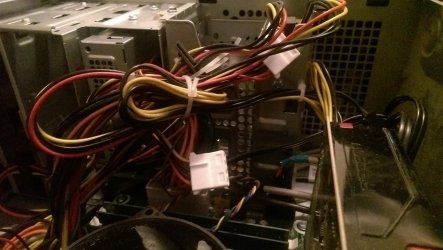
With that birds nest of wires and harness how would one even know if the video card was even plugged in properly and the
proper harness plugged into the proper places?
Their is enough crud in that computer to start a potato patch.

So my suggestions are simple starting with some basics.

1. Clean the filth out of the computer.
2. Clean up that birds nest of wiring and then verify everything is plugged in properly. It's called cable management.
3. Verify that the proper drivers are installed from the manufacture of the video card.
4. Do as Golden suggested; run sfc /scannow and see if Windows 7 System is having any problems.
-----------
When those things are done we need to know the results. Then we can give more guidance.
Their may or may not be more problems.
If the power supply fan and innards have the crud I think it has, its probable well done toast.
DO NOT take the power supply apart to clean.
 

My Computer My Computer

At a glance

Windows 10 Pro. 64/ version 1709 Windows 7 Pr...Intel i7-6800K @ 4.3Corsair Platinum 16 gig @2400EVGA GTX 1070 OC
Computer type
PC/Desktop
Computer Manufacturer/Model Number
Home made Desktop
OS
Windows 10 Pro. 64/ version 1709 Windows 7 Pro/64
CPU
Intel i7-6800K @ 4.3
Motherboard
ASUS X-99 Deluxe II
Memory
Corsair Platinum 16 gig @2400
Graphics Card(s)
EVGA GTX 1070 OC
Monitor(s) Displays
Asus 27" LED LCD/VE278Q
Screen Resolution
1920-1080 or 1280-720 HDMI
Hard Drives
INTEL SSD 730-240 Gb Sata 3.0/
PSU
EVGA Platium 1200W
Case
Phanteks Luxe Tempered Glass 8 fans/ one radiator
Cooling
XSPC/ Water Cooled CPU
Keyboard
Das 4 Professional
Mouse
Logitech M705/MX Anywhere 2-S
Internet Speed
100 mbits
Antivirus
Microsoft Security Essentials/ Malwarebytes Premium 3.0/ SAS
Browser
I.E. 11 default/Firefox/ ISP Time Warner Cable/Spectrum
Other Info
LG BluRay Burner/
Sound system-KLipsch-THX/
Icy Dock ssd Hot Swap bays.
Back
Top