
Solved PCI-E x16 3.0 GPU in PCI-E x16 1.1 - Should I upgrade?

Devadip

New member
Member
Local time
11:16 PM
Messages
82
Hi!

I bought a Sapphire dual-X r9 280X GPU and I noticed (in GPU-Z) that my PCI-E slot is actually a "1.1" version.

I have a very basic LGA 1155 H67 mobo. It has no other PCI-E slot and it doesn't have UEFI BIOS.

The R9 280x supports PCI-E x16 3.0 so is it a big drawback that I'm running a PCI-E 3.0 GPU on a PCI-E 1.1? If so, what should I do?

Thanks for your time.
 

Attachments
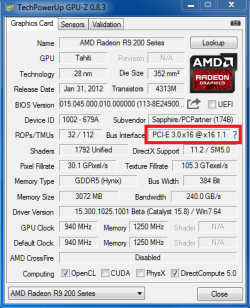
  • GPU-Z.png
    GPU-Z.png
    19.3 KB · Views: 10

My Computer My Computer

At a glance

Windows 7 Home Premium 64bit.Intel Core i7-2600 CPU @ 3.40GHz - Sandy Bridge16GB DDR3Sapphire Dual-x Radeon R9 280, 3GB.
Computer type
PC/Desktop
Computer Manufacturer/Model Number
Gateway FX6860
OS
Windows 7 Home Premium 64bit.
CPU
Intel Core i7-2600 CPU @ 3.40GHz - Sandy Bridge
Motherboard
FX6860 ef30p
Memory
16GB DDR3
Graphics Card(s)
Sapphire Dual-x Radeon R9 280, 3GB.
Hard Drives
120GB SSD and 2TB HDD
PSU
FSP750-80APG 750W
Internet Speed
25 Mbps Up & Down
Antivirus
Microsoft Security Essentials, Malwarebytes Premium
Browser
Google Chrome
My bad, I did a render test in GPU-Z and it says that my mobo has a PCI-E x16 2.0. I guess it's fine even if it's not a 3.0. Sorry for the useless post :/
 

Attachments

  • GPU-Z.png
    GPU-Z.png
    19.8 KB · Views: 10

My Computer My Computer

At a glance

Windows 7 Home Premium 64bit.Intel Core i7-2600 CPU @ 3.40GHz - Sandy Bridge16GB DDR3Sapphire Dual-x Radeon R9 280, 3GB.
Computer type
PC/Desktop
Computer Manufacturer/Model Number
Gateway FX6860
OS
Windows 7 Home Premium 64bit.
CPU
Intel Core i7-2600 CPU @ 3.40GHz - Sandy Bridge
Motherboard
FX6860 ef30p
Memory
16GB DDR3
Graphics Card(s)
Sapphire Dual-x Radeon R9 280, 3GB.
Hard Drives
120GB SSD and 2TB HDD
PSU
FSP750-80APG 750W
Internet Speed
25 Mbps Up & Down
Antivirus
Microsoft Security Essentials, Malwarebytes Premium
Browser
Google Chrome
My bad, I did a render test in GPU-Z and it says that my mobo has a PCI-E x16 2.0. I guess it's fine even if it's not a 3.0. Sorry for the useless post :/


You are running PCI-3.0 not 2.0

If you were running a AMD motherboard then you would be running in PCI-E 2.0

You are running the correct speed and AMD Gpu's are all PCI-E 3.0 Compatible

Unfortunately AMD had made one or two board with PCI-E 3.0 and they are hard to find anyway good luck on what ever you're trying to get done :geek:
 

My Computer My Computer

At a glance

Windows 10 Home Premium 64bit sp1Intel I7-6700K @ 4.6 Ghz 1.344 volts everyday OC32GB G-Skill TridentZ 3200mhz 16-18-18-38 DDR4Sli Gigabyte Windforce GTX 980 G1
Computer type
PC/Desktop
Computer Manufacturer/Model Number
CoreI7-6700K MrFingerIII Special Builds
OS
Windows 10 Home Premium 64bit sp1
CPU
Intel I7-6700K @ 4.6 Ghz 1.344 volts everyday OC
Motherboard
Asrock Fatality K6 Z170 Socket 1151
Memory
32GB G-Skill TridentZ 3200mhz 16-18-18-38 DDR4
Graphics Card(s)
Sli Gigabyte Windforce GTX 980 G1
Sound Card
AC97 Creative Rage Tactic 3D Headphones Bluetooth
Monitor(s) Displays
27" Asus ROG Swift PG278Q G-Sync 48" Vizio Smart HD TV
Screen Resolution
2560x1440p 27"- 48" Currently Gaming at 2560x1440p Res 2K
Hard Drives
250GB Samsung Evo840SSD Seagate baracuda 500 GB WD Mybook 500Gb 1TB Seagate Barracuda
PSU
HX1050w Corsair Silver 80plus certified crosfire/sli
Case
Enthod Pro Full Tower
Cooling
Corsair H110i GT 280 mm High Performance WaterBlock
Keyboard
Logitech wireless keyboard
Mouse
Logitech wireless mouse
Internet Speed
Cox Cable 100+ mb
Antivirus
WebRoot Spysweeper with Antivirus
Browser
IE-10, Chrome, Opera
Other Info
My Other Rig is a AMD FX8320E @4.6Ghz 16GB Ballistic Sport Ram
Mobo Asrock Fatality 990FX 120GB OCZ SSD 1TB Seagate Barracuda Corsair H75 Cooling PSU Corsair CX750
GPU GTX Gigabyte 970G1
Back
Top