Solved PC takes around 10 minutes or less to fully boot

Yeah looks good after those two things shutdown then on again (don't reboot).

All right! I'll do that tomorrow, gonna go to sleep now, it's 2AM in my country, defragmentation seems like it's going to take ages to finish. Thanks for the help! I'll update you on how i'll go.
 

My Computer My Computer

At a glance

Windows 7 Ultimate x64Intel Core i5 44608.00GB Single-Channel DDR3 @ 665MHz (9-9-9-24)3071MB NVIDIA GeForce GTX 580 (EVGA)
Computer type
PC/Desktop
Computer Manufacturer/Model Number
Custom build
OS
Windows 7 Ultimate x64
CPU
Intel Core i5 4460
Motherboard
ASUSTeK COMPUTER INC. B85M-K (SOCKET 1150)
Memory
8.00GB Single-Channel DDR3 @ 665MHz (9-9-9-24)
Graphics Card(s)
3071MB NVIDIA GeForce GTX 580 (EVGA)
Sound Card
Realtek High Definition Audio
Monitor(s) Displays
VA2431 Series (1920x1080@60Hz)
Screen Resolution
(1920x1080@60Hz
Hard Drives
465GB SAMSUNG HD503HI SCSI Disk Device (SATA)
PSU
TacensMARS GAMING MP700 700W
Case
Tracer X-Ray
Keyboard
Genesis RX55
Mouse
CM Storm Alcor
Antivirus
Microsoft Essentials
Browser
Google Chrome
if it's taking ages that means its a good thing your doing it.
 

My Computer My Computer

At a glance

10 Pro x64Ryzen 9 3900X64GB(4x16GB) DDR4EVGA 1080ti FTW3
Computer type
PC/Desktop
Computer Manufacturer/Model Number
Custom
OS
10 Pro x64
CPU
Ryzen 9 3900X
Motherboard
Asrock x370 Tachi
Memory
64GB(4x16GB) DDR4
Graphics Card(s)
EVGA 1080ti FTW3
Sound Card
ASUS Xonar Essence STX (V4 Bursons), ODAC rev B, NFB-11, O2
Monitor(s) Displays
3xASUS PB278Q/R, Optoma HD142X
Screen Resolution
3x1440p, 1080p
Hard Drives
512GB 850 EVO(OS, Programs)
4TB (Movies)
3TB (Downloads)
3TB (Programs)
1TB HDD (Games)
2x6TB R1 (videos)
PSU
AX760
Case
Fractal Define R5
Cooling
NH-D15S
Keyboard
Massdrop Ctrl with Box Navy's
Mouse
G903, Alioth XXL Mat
Internet Speed
280/40
Antivirus
MBAM, ESET
Browser
Canary 64 Bit
Other Info
I also own a Thinkpad P50 Xeon 4K, X220T, X1C5
Does your machine start faster in Safe Mode?
Can you use a Restore Point to restore your PC back the way it was a couple of months ago?

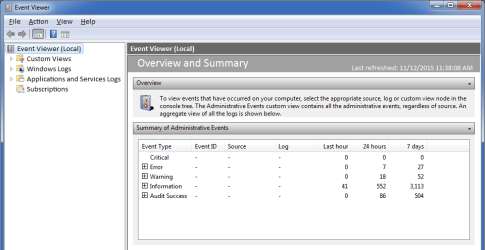
Check out what the Event Viewer records show (especially the "Critical" and "Error" sections).
Event Viewer.png
If you reboot your machine, you can then see if there are any new Event Viewer messages (which will probably be related to your reboot).

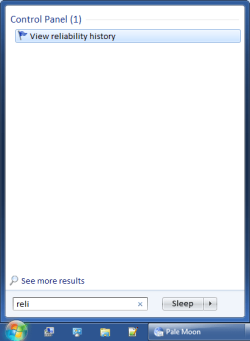
You could also check out your Reliability History.
Open the Start Menu and type in reliable into the search box.
Start Menu Search.png
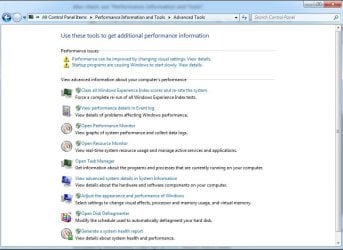
Also check out "Performance Information and Tools".
314639d1398047063-hibernation-very-slow-shut-down-performance-information-tools-optimized-.gif
 
Last edited:

My Computer My Computer

At a glance

W7 Ultimate SP1, LM19.2 MATE, W10 Home 1703, ...AMD Phenom II x6 1100T, 3.3 GHz12GB DDR3 1333 G-Skill (4GB x 2), G-Skill (2G...NVIDIA GeForce GTX 660
Computer type
PC/Desktop
Computer Manufacturer/Model Number
n/a
OS
W7 Ultimate SP1, LM19.2 MATE, W10 Home 1703, W10 Pro 1703 VM, #All 64 bit
CPU
AMD Phenom II x6 1100T, 3.3 GHz
Motherboard
ASUS M4A88T-M/USB3 (AM3)
Memory
12GB DDR3 1333 G-Skill (4GB x 2), G-Skill (2GB x 2)
Graphics Card(s)
NVIDIA GeForce GTX 660
Sound Card
Realtek?
Monitor(s) Displays
Samsung S23B350
Screen Resolution
1920x1080
Hard Drives
WD Green 2TB (SATA), WD Green 3TB (SATA), WD Blue 4TB (SATA), WD Blue 6TB (SATA)
PSU
Cooler Master
Case
Antec GX300 Tower
Cooling
3x Antec TRICOOL 120mm Fans
Mouse
Wired Optical
Internet Speed
DSL
Antivirus
Avast
Browser
Pale Moon (64 bit)
Other Info
2018-12-27 Upgraded HDDs
2015-12-10 Upgraded case, graphics card, storage
2015-08-15 Upgraded motherboard & RAM
2015-07-15 Upgraded LM17.1 to LM17.2
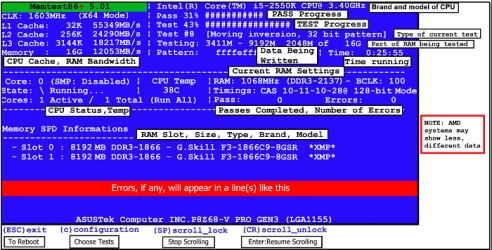
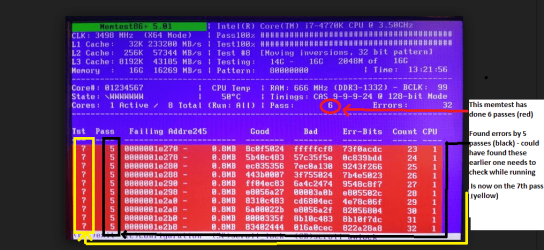
For my two cents worth have you done a memtest? http://www.sevenforums.com/tutorials/105647-ram-test-memtest86.html

You could also look in the Task Manager (Processes) to see what maybe eating up the RAM too. I did notice too the RAM is a 667Hz

Plus as everyone knows I like to see the state of the PSU so do this.
Using HW Info
PART A:
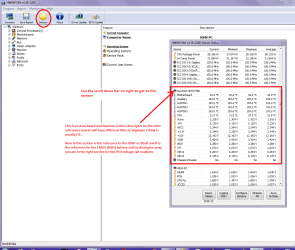
You can test the volts on the PSU with HW Info HWiNFO, HWiNFO32/64 - Download < download the right bit version and close the right hand window select Sensors and scroll down to the power section where you will see what the volts are doing see my pic. In my pic the section (Nuvoton) with VBATT is a dead give away you are in the section for the rail voltages. There are other section titles and one that pops up often is ITE
Now the voltage on the different rails have to be within 5% =+/- of what is required or the machine will not work properly if at all.
See this for the rail voltage info
Power Supply 101: A Reference Of Specifications - Power Supplies (Section 2.)
The original right hand window shows the machine running and is handy for that but for looking at the components in some detail close it and use the main left hand side panel
FOR OTHER COMPONENTS
PART B:
Open each small square with + in it on the section the components are in and then click on the individual component/s (it will highlight in blue) - in the right hand side will appear all sorts of details including brands speeds and other essential info that particular device. See pic for example.
Use PART A:
 

Attachments

  • MEMTEST START UP SCREEN.PNG
    MEMTEST START UP SCREEN.PNG
    57.2 KB · Views: 40
  • MEMTEST ERRORS.PNG
    MEMTEST ERRORS.PNG
    183 KB · Views: 2
  • HW INFO DESKTOP PSU.PNG
    HW INFO DESKTOP PSU.PNG
    52.6 KB · Views: 2

My Computer My Computer

At a glance

Desk1 7 Home Prem / Desk2 10 Pro / Main lap A...Desk1 i5 3750K / Laptop i7 GTX 860M / Desk2 i...Desk1 8GB (1866) / Desk2 16GB (1333) / Laptop...Desk 1& 2NVidia GTX 650 & Laptops on board Intel
Computer type
PC/Desktop
Computer Manufacturer/Model Number
Own build (new) Desk1 / Asus ROG Win 7 / Desk2 1st build
OS
Desk1 7 Home Prem / Desk2 10 Pro / Main lap Asus ROG 10 Pro 2 laptop Toshiba 7 Pro Asus P2520 7 & 10
CPU
Desk1 i5 3750K / Laptop i7 GTX 860M / Desk2 i5 2500
Motherboard
Desk1 Asus P877-V / Desk2 Gigabyte H67 UD3H / Laptop ?
Memory
Desk1 8GB (1866) / Desk2 16GB (1333) / Laptop 8Gb DDR3
Graphics Card(s)
Desk 1& 2NVidia GTX 650 & Laptops on board Intel
Sound Card
Desk 1 & 2 -XONAR DG Realtek High Def audio Laptop
Monitor(s) Displays
Desk 1 Benq HD 2450 / Desk2 Philips 24" / Laptop 17.5"
Screen Resolution
1920x1080 D1 & D2 & Laptop 1
Hard Drives
Desk1 Samsung 120GB 830 SSD
Asus ROG 256GB 850 Pro SSD
Desk2 Samsung 840 256 SSD
Toshiba 120GB EVO
PSU
Desk 1 Corsair HX 1050/ Laptop ? / Desk 2 Corsair HX 650
Case
Desk 1 Cooler HAF XM ? Toshiba laptop / Desk2 Coolermaster
Cooling
Fans on all Desk1 -2 Desk2 - all Coolermasters 5 Laptop ?
Keyboard
Desk 1 MS Sidewinder X6 Desk 2 MS Sidewinder X 4
Mouse
Desk 1&2 - Gigabyte MS 900 gamer - laptop - Logitec wireless
Internet Speed
ADSL2+
Other Info
One other Desktop (tester) and spare Toshba laptop both with SSD's
Running Kaspersky 2016 ISS on all machines config'd identically
Logitec audio stereo systems on each machine (x3)
Canon MG5250MFC
Router/modem TP-Link running WPA2SK
Does your machine start faster in Safe Mode?
Can you use a Restore Point to restore your PC back the way it was a couple of months ago?

Check out what the Event Viewer records show (especially the "Critical" and "Error" sections).If you reboot your machine, you can then see if there are any new Event Viewer messages (which will probably be related to your reboot).

You could also check out your Reliability History.
Open the Start Menu and type in reliable into the search box.Also check out "Performance Information and Tools".
314639d1398047063-hibernation-very-slow-shut-down-performance-information-tools-optimized-.gif


Hi,
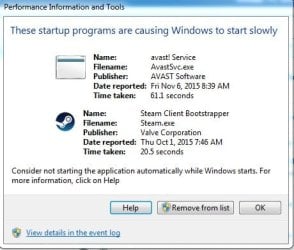
I'm really not sure at what to look at in the Event Manager, and in Reliability History, there's just many many errors each day. And there is something in the the performance information and tools. I'm adding pictures.
 

Attachments

  • ADV TOOLS.jpg
    ADV TOOLS.jpg
    75.3 KB · Views: 2
  • ADV OPTIONS 2.jpg
    ADV OPTIONS 2.jpg
    29.2 KB · Views: 31

My Computer My Computer

At a glance

Windows 7 Ultimate x64Intel Core i5 44608.00GB Single-Channel DDR3 @ 665MHz (9-9-9-24)3071MB NVIDIA GeForce GTX 580 (EVGA)
Computer type
PC/Desktop
Computer Manufacturer/Model Number
Custom build
OS
Windows 7 Ultimate x64
CPU
Intel Core i5 4460
Motherboard
ASUSTeK COMPUTER INC. B85M-K (SOCKET 1150)
Memory
8.00GB Single-Channel DDR3 @ 665MHz (9-9-9-24)
Graphics Card(s)
3071MB NVIDIA GeForce GTX 580 (EVGA)
Sound Card
Realtek High Definition Audio
Monitor(s) Displays
VA2431 Series (1920x1080@60Hz)
Screen Resolution
(1920x1080@60Hz
Hard Drives
465GB SAMSUNG HD503HI SCSI Disk Device (SATA)
PSU
TacensMARS GAMING MP700 700W
Case
Tracer X-Ray
Keyboard
Genesis RX55
Mouse
CM Storm Alcor
Antivirus
Microsoft Essentials
Browser
Google Chrome

My Computer My Computer

At a glance

Win-7-Pro64bit 7-H-Prem-64biti7-5930K 2nd i9-9940x both water blocked VRM'...Trident-z 3200C14 2nd Trident-z 3600C16EVGA 1080ti ftw3 2nd Titan Xp both water blocked
Computer type
PC/Desktop
Computer Manufacturer/Model Number
Custom assembled by me :}
OS
Win-7-Pro64bit 7-H-Prem-64bit
CPU
i7-5930K 2nd i9-9940x both water blocked VRM's too
Motherboard
ASUS SABERTOOTH X99 2nd ASUS x299 Apex
Memory
Trident-z 3200C14 2nd Trident-z 3600C16
Graphics Card(s)
EVGA 1080ti ftw3 2nd Titan Xp both water blocked
Sound Card
Built-in Realtek
Monitor(s) Displays
1-AOC G2460PG 24"G-Sync 144Hz/ 2nd 1-ASUS VG248QE 24" 144Hz
Screen Resolution
1920 x 1080 144Hz
Hard Drives
2-Samsung M.2 Evo & Evo Plus
2-Samsung 850 EVO 500GB SSD's/ 3-2.5 W.D. Black 1tb-&3-1tb/3-3.5 WD Black 1tb hdd's
PSU
EVGA SuperNOVA 1000-P2 2nd 1200-P2
Case
2-Corsair Obsidian Series 450D Black ATX Mid Tower
Cooling
Custom water loops
Keyboard
Logitech G710+/ 2nd Logitech G910
Mouse
2-RedDragon M901 Perdition 16400 dpi Gaming mouse = wired
Internet Speed
Comcast Ping 19ms 89.31mbps download speed 6.12mbps upload
Antivirus
Malwarebytes Pro/ Superantispyware Pro
Browser
FireFox & Pale moon
Other Info
2nd ASUS X299 Apex/Intel i9-9940x with Custom water loop/7H-Prem-x64/Corsair 450D case/Ram Trident-z 3600C16 4x8gb / Samsung970Evo plus 500gb SSD/Dual ssd EZ swap evo/PSU EVGA SuperNova 1200w-P2 80+Platinum/GPU Titan Xp /8-ML-140 on push-pull on 2-280GTX rads

My Computer My Computer

At a glance

10 Pro x64Ryzen 9 3900X64GB(4x16GB) DDR4EVGA 1080ti FTW3
Computer type
PC/Desktop
Computer Manufacturer/Model Number
Custom
OS
10 Pro x64
CPU
Ryzen 9 3900X
Motherboard
Asrock x370 Tachi
Memory
64GB(4x16GB) DDR4
Graphics Card(s)
EVGA 1080ti FTW3
Sound Card
ASUS Xonar Essence STX (V4 Bursons), ODAC rev B, NFB-11, O2
Monitor(s) Displays
3xASUS PB278Q/R, Optoma HD142X
Screen Resolution
3x1440p, 1080p
Hard Drives
512GB 850 EVO(OS, Programs)
4TB (Movies)
3TB (Downloads)
3TB (Programs)
1TB HDD (Games)
2x6TB R1 (videos)
PSU
AX760
Case
Fractal Define R5
Cooling
NH-D15S
Keyboard
Massdrop Ctrl with Box Navy's
Mouse
G903, Alioth XXL Mat
Internet Speed
280/40
Antivirus
MBAM, ESET
Browser
Canary 64 Bit
Other Info
I also own a Thinkpad P50 Xeon 4K, X220T, X1C5

My Computer My Computer

At a glance

Windows 7 Home Premiumi5-3570k16 GB DDR3 G Skill SniperGIGABYTE GeForce GTX 970 GV-N970WF3OC-4GD
Computer type
PC/Desktop
Computer Manufacturer/Model Number
Custom build
OS
Windows 7 Home Premium
CPU
i5-3570k
Motherboard
ASUS Sabertooth z77
Memory
16 GB DDR3 G Skill Sniper
Graphics Card(s)
GIGABYTE GeForce GTX 970 GV-N970WF3OC-4GD
Monitor(s) Displays
ASUS ROG PG278Q
Screen Resolution
2560x1440@60Hz/120Hz/144Hz
Hard Drives
56GB KINGSTON SVP200S37A60G
512GB Crucial MX100
1863GB Seagate ST2000DM001-1CH164
2795GB Seagate ST3000DM001-9YN166
PSU
Corsair GS800
Case
Storm Trooper Stryker White
Keyboard
Logitech G910 Orion Spark
Mouse
Logitech G502
Antivirus
MSE
Browser
Firefox/Chrome
Other Info
Logitech G633
Logitech Mouse Matt
Avast :/
Well you could uninstall Avast and try Panda it is better anyway ;)
https://www.avast.com/uninstall-utility

Go into Steam settings and uncheck start with windows.

Agreed I have seen both those things make a boot up easily 5 minutes.

I did both of these. And it did actually help! It's not so bad as it was before. Not perfect, but a lot better. My main problem is BSOD now.. I guess I'll post about it in an appropriate section. Because I got BSOD like 3 times today. Gonna mark this thread as solved. Thanks everyone!
 

My Computer My Computer

At a glance

Windows 7 Ultimate x64Intel Core i5 44608.00GB Single-Channel DDR3 @ 665MHz (9-9-9-24)3071MB NVIDIA GeForce GTX 580 (EVGA)
Computer type
PC/Desktop
Computer Manufacturer/Model Number
Custom build
OS
Windows 7 Ultimate x64
CPU
Intel Core i5 4460
Motherboard
ASUSTeK COMPUTER INC. B85M-K (SOCKET 1150)
Memory
8.00GB Single-Channel DDR3 @ 665MHz (9-9-9-24)
Graphics Card(s)
3071MB NVIDIA GeForce GTX 580 (EVGA)
Sound Card
Realtek High Definition Audio
Monitor(s) Displays
VA2431 Series (1920x1080@60Hz)
Screen Resolution
(1920x1080@60Hz
Hard Drives
465GB SAMSUNG HD503HI SCSI Disk Device (SATA)
PSU
TacensMARS GAMING MP700 700W
Case
Tracer X-Ray
Keyboard
Genesis RX55
Mouse
CM Storm Alcor
Antivirus
Microsoft Essentials
Browser
Google Chrome
Hi,
If you have Origin for games also go into it's settings and uncheck start with windows as well as any other utility...
Be sure to restore the msconfig startup to normal.
 

My Computer My Computer

At a glance

Win-7-Pro64bit 7-H-Prem-64biti7-5930K 2nd i9-9940x both water blocked VRM'...Trident-z 3200C14 2nd Trident-z 3600C16EVGA 1080ti ftw3 2nd Titan Xp both water blocked
Computer type
PC/Desktop
Computer Manufacturer/Model Number
Custom assembled by me :}
OS
Win-7-Pro64bit 7-H-Prem-64bit
CPU
i7-5930K 2nd i9-9940x both water blocked VRM's too
Motherboard
ASUS SABERTOOTH X99 2nd ASUS x299 Apex
Memory
Trident-z 3200C14 2nd Trident-z 3600C16
Graphics Card(s)
EVGA 1080ti ftw3 2nd Titan Xp both water blocked
Sound Card
Built-in Realtek
Monitor(s) Displays
1-AOC G2460PG 24"G-Sync 144Hz/ 2nd 1-ASUS VG248QE 24" 144Hz
Screen Resolution
1920 x 1080 144Hz
Hard Drives
2-Samsung M.2 Evo & Evo Plus
2-Samsung 850 EVO 500GB SSD's/ 3-2.5 W.D. Black 1tb-&3-1tb/3-3.5 WD Black 1tb hdd's
PSU
EVGA SuperNOVA 1000-P2 2nd 1200-P2
Case
2-Corsair Obsidian Series 450D Black ATX Mid Tower
Cooling
Custom water loops
Keyboard
Logitech G710+/ 2nd Logitech G910
Mouse
2-RedDragon M901 Perdition 16400 dpi Gaming mouse = wired
Internet Speed
Comcast Ping 19ms 89.31mbps download speed 6.12mbps upload
Antivirus
Malwarebytes Pro/ Superantispyware Pro
Browser
FireFox & Pale moon
Other Info
2nd ASUS X299 Apex/Intel i9-9940x with Custom water loop/7H-Prem-x64/Corsair 450D case/Ram Trident-z 3600C16 4x8gb / Samsung970Evo plus 500gb SSD/Dual ssd EZ swap evo/PSU EVGA SuperNova 1200w-P2 80+Platinum/GPU Titan Xp /8-ML-140 on push-pull on 2-280GTX rads
Back
Top